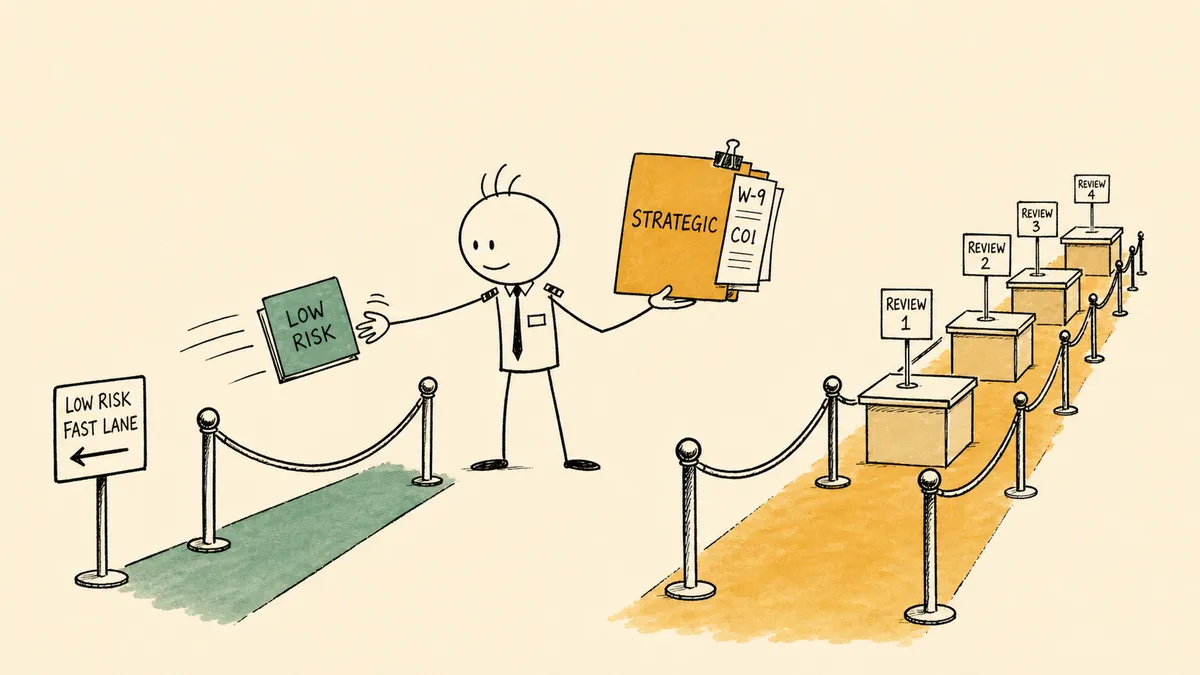
These ten supplier onboarding best practices make the biggest difference for procurement and AP teams:
- Tier suppliers by risk before you collect anything.
- Collect everything through one intake form the supplier fills in.
- Ask only for the documents each tier needs.
- Verify the tax ID and screen sanctions before approval.
- Check the ERP for duplicates before creating the supplier record.
- Treat every bank detail change as a new verification.
- Give every step an owner and a time limit.
- Record the audit trail while the process runs.
- Tell the supplier how to work with you.
- Hand renewal dates to whoever manages the supplier.
Each one is explained below, along with how to measure whether your onboarding is improving. They apply equally to vendor onboarding. For the steps themselves in order, with a document checklist, see the supplier onboarding process.
1. Tier suppliers by risk before you collect anything
Decide at intake how much review a supplier needs, then let that decision set the documents, the checks, and the approvers. A one-time supplier with low spend and no access to your data needs a tax form, bank details, and the basic checks. A supplier that will hold customer data or carry large annual spend needs the full treatment: security review, contract negotiation, a data processing agreement, and ongoing monitoring.

A common recommendation runs the other way: standardize one rigorous intake and send every supplier through it. We think that advice does real damage. When the office furniture supplier has to clear the same review as a software vendor with access to production data, the person waiting on the furniture starts looking for a way around procurement, and finds one. They pay the supplier as a one-time payee or put it on a corporate card, and every check on this page gets skipped. Tiering lets the many simple suppliers move quickly and gives reviewers time for the few that carry real risk. The process guide has a sample three-tier table with documents, checks, and approvers for each tier.
2. Collect everything through one intake form
Use one form for every new supplier request, and have the supplier fill in its own details and upload its own documents. Email attachments scatter across threads, and nobody can say what is still missing. A form gives you named fields, a single place to see what is outstanding, and documents attached to the right request from the start.
Put the questions every downstream team needs on that form. Legal needs the entity type to pick the right agreement. Finance needs the tax classification. IT needs to know whether the supplier will touch your systems or data. When those answers arrive on day one, nobody has to start a separate thread to ask. Companies that onboard suppliers at volume can put the form inside a supplier portal.
3. Ask only for the documents each tier needs
Every document you require is something your team has to chase now and check again at every renewal. Asking for more than the risk warrants slows the supplier down without making you safer. A supplier that will never see customer data does not need a SOC 2 report on file.
The baseline for a US supplier is short:
- A W-9, or a W-8 series form for non-US suppliers
- Banking details for payment, collected through the form and not a free-text email
- A certificate of insurance with the coverage and additional-insured wording your contracts require
Add anything beyond that only when the tier calls for it. A simple test: a document earns its place when you can name the risk it covers for this particular supplier.
4. Verify the tax ID and screen sanctions before approval
Check what the supplier sent before anyone approves it. Confirm the name and tax ID on the W-9 match; payers that file information returns can do this through the IRS TIN Matching service. Screen the supplier and its owners against the OFAC Sanctions List Search and any other lists your business requires. Sanctions lists change, so screen active suppliers again on a schedule, not only at onboarding.
Run these checks in the same place every time, with the results attached to the request. When screening lives in one analyst’s browser history, nobody can show an auditor that it happened.
5. Check the ERP for duplicates before creating the supplier record
Most duplicate vendor records start the same way. A purchase order is waiting, so someone creates the supplier record to unblock it and plans to finish the checks later. The checks never get finished, and months later AP finds two records for the same company paying against both.
Fix the order of operations. Search the existing vendor list at intake, before any record is written. Match on tax ID and legal name, because the same supplier shows up as Acme Inc., Acme LLC, and Acme Industries. Create the ERP record only after the documents, checks, and approvals are complete. The NetSuite vendor validation guide shows this check end to end, and the Acumatica version runs the duplicate and tax ID check before a bill is created.

6. Treat every bank detail change as a new verification
Fake requests to change a supplier’s bank account are one of the most common ways companies lose money to fraud. The FBI groups them under business email compromise, which accounted for about $3 billion in reported losses in its 2025 Internet Crime Report.
Most companies already have a policy that says to verify bank changes. A policy depends on whoever opens the email remembering it during a busy week. Make it a step the process will not skip instead. When a bank detail changes on an existing supplier, the change waits. Someone calls a contact already on file, never the number in the change request, and a named approver signs off before the ERP record updates.

7. Give every step an owner and a time limit
The most common reason an onboarding request stalls is that nobody can see where it is. Finance is waiting on legal, legal thinks procurement is still collecting a document, and three days pass before anyone notices.
Write down who owns each step, who covers when that person is out, and how long the step should take. A simple ownership chart for the seven steps is enough. Name one person who answers for each request from start to finish. Make every request’s current step visible to everyone involved, so a request that has sat too long gets noticed without someone asking.
8. Record the audit trail while the process runs
Auditors ask who approved a supplier, at what payment terms, on which date, and with what evidence on file. A thumbs-up in a chat thread does not answer that, and an answer reconstructed from memory months later is weak.
Capture each approval with the approver’s name, the time, and the documents they saw, as part of the step itself. When approvals happen inside the process, the audit trail builds itself as a side effect, and nobody has to assemble it the week before the audit.
9. Tell the supplier how to work with you
Onboarding has two sides. Once the supplier is approved, send it what it needs to do business with you:
- How purchase orders will arrive, and what a valid PO looks like
- Where to send invoices and what they must include
- The payment terms and payment method
- Who to contact with questions
Suppliers that know your invoicing rules send fewer invoices that bounce, and AP spends less time on exceptions.
10. Hand renewal dates to whoever manages the supplier
Onboarding ends when a supplier can transact. What follows is supplier management: insurance renewals, contract renewal dates, periodic sanctions checks, and performance reviews. Before closing the onboarding request, put the insurance expiry date and the contract renewal date on a calendar someone watches, and name the person who owns the supplier from here. When this handoff is left implicit, insurance lapses while the supplier keeps invoicing. The supplier relationship management page covers that later stage.
How to measure supplier onboarding
Pick a few measures, split them by tier, and review them monthly. Without the split, your fast low-risk path and your slow strategic path average into a number that describes neither.
| Measure | What it tells you |
|---|---|
| Cycle time, request to ready to transact | Overall speed, by tier |
| Idle time per step | Where requests wait, and which step to fix first |
| First-pass completeness | How often suppliers submit everything on the first try, which shows whether your form asks clearly |
| Duplicates caught at intake | Whether the duplicate check runs before the record exists |
| Suppliers paid outside the process | How often people go around procurement, such as one-time payees and card spend with new suppliers |
The last measure is the one to watch most closely. A rising count of suppliers paid outside the process means the formal path is too slow for the business.
Mistakes to avoid
- Sending every supplier through the full review, whatever its risk.
- Collecting documents by email and storing them in personal inboxes.
- Creating the ERP record before checks and approvals finish.
- Verification that only one person knows how to run.
- Approvals given in chat with no record of who, when, or what they saw.
- Closing onboarding without scheduling the insurance and contract renewal dates.
Where software fits
Most of these practices live between systems. The intake form is in one tool, the vendor list is in the ERP, the contract is in DocuSign, approvals happen in Slack or email, and renewal dates sit somewhere else. No single one of those tools can enforce “do not create the record until the checks pass” across all of them. That job belongs to an orchestration layer, which sits above the systems you already run, carries each request and its documents from step to step, and brings a person in where a decision needs judgment. FlowRunner is built for that layer.
In FlowRunner, the supplier fills in a form at its own link and uploads its documents there. A flow checks the ERP vendor list for duplicates while the form is still open and sends the request down the path for its tier. Approvals use human-in-the-loop, an execution pattern where AI agents pause autonomously, assemble the relevant context and the decision choices available, route to a human via their preferred channel, and resume the moment the human responds. The approver sees the documents and check results in Slack, email, WhatsApp, or by phone, and can ask the flow questions before deciding. The ERP record gets written only after the approvals are recorded, and each decision lands in the audit trail with the approver and the time.
Where to start
If several of these practices are missing, start with numbers 2 and 5: one intake form, and no ERP record until the checks and approvals are done. That change makes the audit trail easier, because structured steps leave timestamps behind. It also makes the renewal handoff easier, since the documents are already attached to the supplier. And it narrows the gap between the formal path and the workaround, which is what keeps people inside the process. For deciding which steps to automate first, see how to tell what is worth automating. If you want the definition and the case for why onboarding matters, see what vendor onboarding is. If you would rather have the flow built for you, our implementation team can build it in your FlowRunner workspace.
If you adopt only one practice from this list, make it the first. Matching the review to the risk is what keeps people inside the process, and every other practice depends on that.
Frequently asked questions
What are the best practices for supplier onboarding?
Tier suppliers by risk, collect everything through one intake form, and ask only for the documents each tier needs. Verify the tax ID, sanctions status, and bank account before approval, check the ERP for duplicates before creating the record, and treat every bank detail change as a new verification. Give each step an owner and a time limit, keep the audit trail as you go, tell the supplier how to get paid, and hand renewal dates to supplier management.
How can I speed up vendor onboarding?
Send low-risk vendors down a short path instead of the full review, and collect everything through one form so nothing is chased by email. Give every review step an owner and a time limit, and have the request move to the next reviewer automatically. Most delay is waiting between steps, so measure idle time per step and fix the longest one first.
How do you prevent duplicate vendor records?
Check the existing vendor list in the ERP at intake, before any record is created. Match on tax ID and legal name rather than display name, because the same supplier often appears as Acme Inc., Acme LLC, and Acme Industries. Do not create a record early to unblock a purchase order.