Capsule CRM Google Sheets Integration: Rows That Become Pipeline
Connect Capsule CRM and Google Sheets so every new lead row becomes a Capsule person and opportunity automatically, with an AI agent that pauses for a human before it merges a match or deletes a record with open pipeline attached.
How do you connect Capsule CRM to Google Sheets?
Use FlowRunner’s Google Sheets On New Row trigger to fire a flow each time a lead lands in your tracking sheet, then call Capsule CRM’s Search Parties, Create Person, and Create Opportunity actions to turn that row into a person and a pipeline deal automatically. FlowRunner is a visual AI-agent orchestration platform where automations run autonomously and pause for human judgment on the steps that carry real consequence. The same connection can run as an AI agent: it reads the row, checks Capsule for an existing match, and calls a human when the match is ambiguous or when a request would touch a record it should not delete without sign-off.
The problem this connection solves
Sales and ops teams collect leads the way most small teams do: a purchased list, a form export, a partner referral sheet, all of it landing as rows in Google Sheets before anyone touches Capsule. Someone, usually the office manager or the newest rep, has to open Capsule, search for the person by hand, decide if they already exist, create the record if not, then open an opportunity at the right pipeline stage. That sequence takes a few minutes per row on a quiet day. On a busy day, the sheet just grows, and Capsule falls behind the reality of who is actually in the pipeline.
The manual step is also where duplicates come from. There is no dedupe check before someone clicks “new person,” so the same buyer ends up in Capsule twice with slightly different spellings, and nobody notices until a report doesn’t add up. Meanwhile the sheet itself has no idea whether a row was ever acted on; it just sits there until someone remembers. Keeping Capsule current becomes a part-time job nobody was hired for, and the team never gets the time back to do the work that actually needs a person’s judgment.
How it works: the connection
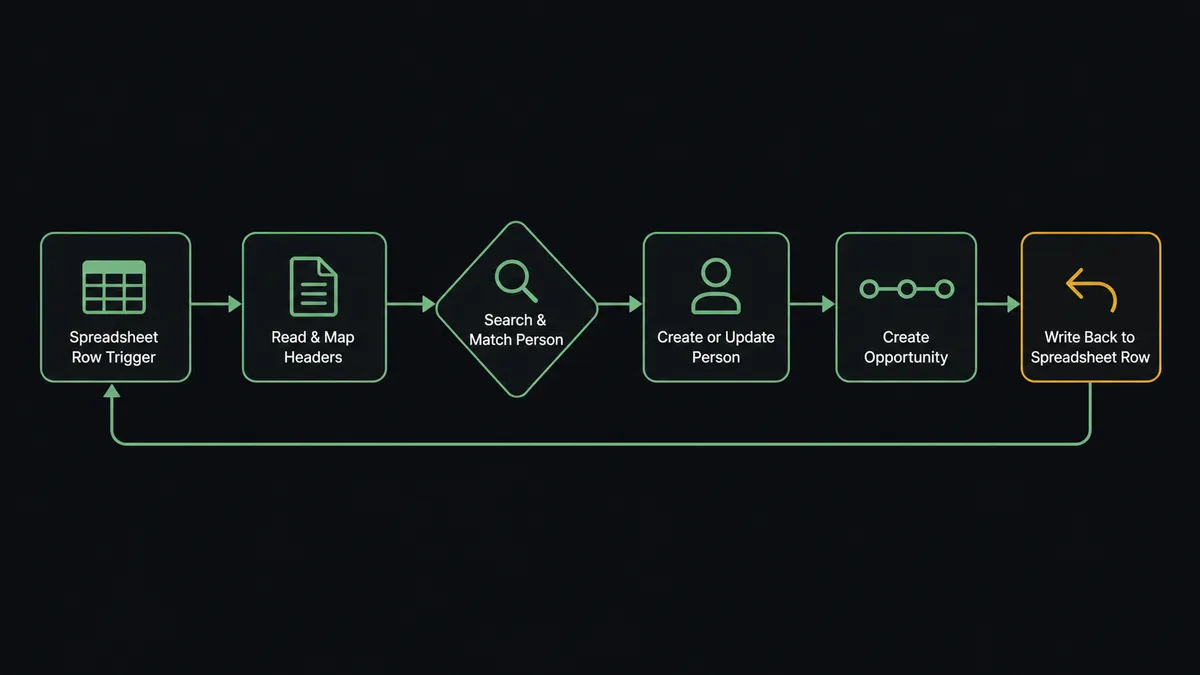
Google Sheets’ On New Row trigger fires the moment a row is added to the watched sheet. The agent reads the row values against the mapped header columns using Load Header Row, then works the row through Capsule the way a careful admin would.
The first stop is dedupe. The agent calls Search Parties with the email or name from the row. If a match exists, it calls Update Party to refresh the record with anything new in the row. If no match exists, it calls Create Person, mapping the row’s fields to the custom fields your team already reports on, resolved at runtime with List Custom Fields.
With the party resolved, the agent calls Create Opportunity to open the follow-up deal. It calls List Pipelines and List Milestones first, so the opportunity lands on the pipeline and stage your team actually uses instead of a generic default. Create Task schedules the first follow-up, assigned from List Users.
The last step writes back to the sheet. The agent calls Update Row to record the new Capsule opportunity link and a processed status in the source row, so the sheet becomes a live record of what happened to every lead, not just a list of names someone has to chase down.
Can an AI agent run it? (and why a human stays in the loop)
A plain sync tool runs the same three steps on every row: search, create, done. The agent does not treat every row the same, because not every row means the same thing.
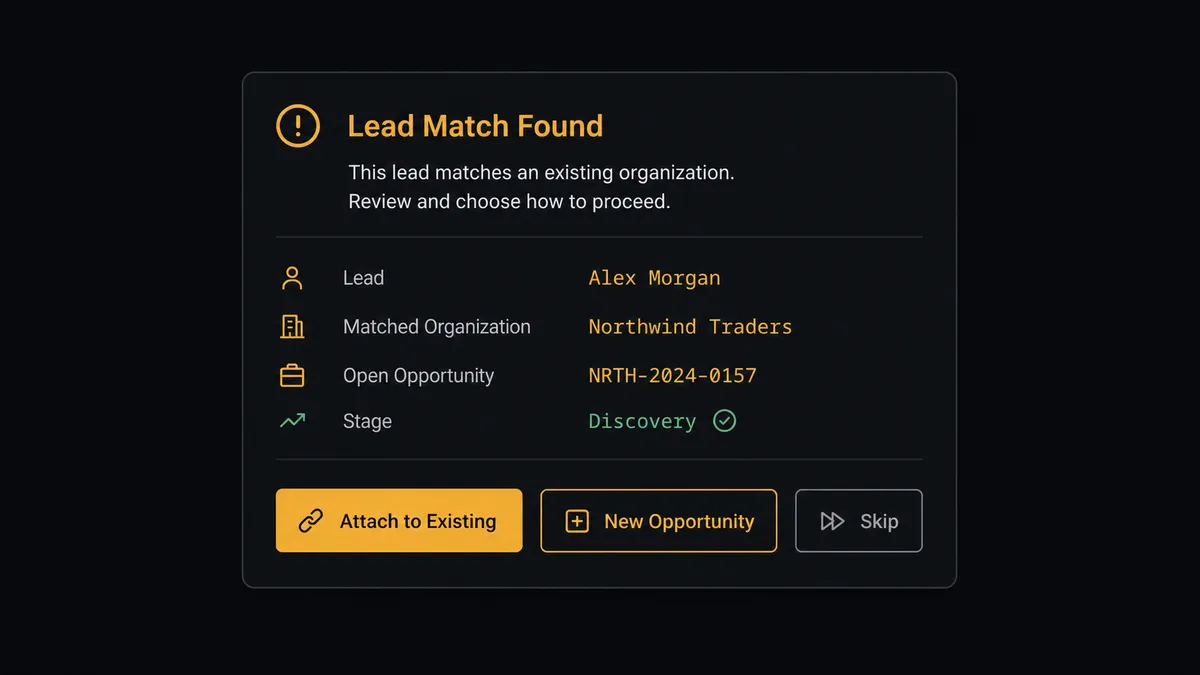
Consider a row for “Meridian Health” landing in the sheet with a contact name and email. Search Parties finds a match, an organization already in Capsule with an open opportunity sitting at “Proposal.” The agent does not blindly create a second opportunity under the same company. It stops and packages the context: the existing party, the open opportunity’s stage, and the new row’s details. It posts to the account owner in Slack: “New row for Meridian Health matches an existing party with an open opportunity at Proposal. Attach this lead to the existing deal, open a second opportunity for a separate engagement, or skip the row?” The owner decides, and the agent resumes with that decision as the next action to take.
That escalation was not a fixed rule triggered by any match at all. A brand-new contact at a brand-new company, or a returning contact with no open deal, gets processed straight through with no delay. The agent only stopped because this specific row collided with pipeline that was already live, the kind of ambiguity a script cannot resolve on its own. Capsule’s more permanent operations get the same discipline: Delete Party is irreversible, so when an erasure request touches a person with an open opportunity or an active case, the agent assembles that context first and waits for a person to approve, rather than deleting on receipt.
Prospects call this a “digital andon cord.” This is not a sync tool that fires the same three calls no matter what it finds; the agent knows when to stop and ask.
FlowRunner vs Zapier
If your team found this page, you have probably already looked at Zapier or connected these two systems that way. Zapier deserves credit here: it has a mature Google Sheets trigger, a fast setup for a basic two-step “new row creates a contact” zap, and broad adoption, so plenty of Capsule users already have a Zap running today.
The differences that matter once the flow needs to handle judgment calls, not just data transfer:
| Feature | Zapier | FlowRunner |
|---|---|---|
| Human-in-loop on ambiguous matches | Not available natively; requires a separate approval app wired in by hand | Native: the agent invokes a human-oversight flow as a callable tool at the step that needs a decision |
| Agent reasoning on row data | Fixed action sequence; every row runs the identical path | Agent reads the row, checks Capsule for existing pipeline, and decides whether to proceed or escalate |
| Unlimited users on every tier | Per-seat pricing on most plans | Unlimited users on every tier; the whole sales team collaborates from day one |
| BYOK for AI models | No native AI agent layer | Bring your own key for OpenAI, Anthropic, or any supported provider |
| Pricing model | Per-task execution pricing; costs scale with volume in unpredictable ways | Workflow-based tiers with clear execution limits; $45/mo Growth, $299/mo Professional |
| Self-hosted option | No | Yes; Community Edition at no cost, Enterprise with full compliance suite |
Before and after
| Category | Before | After |
|---|---|---|
| Lead entry time per row | A few minutes of manual search, create, and opportunity setup per row | Under a minute; agent handles the dedupe check, party creation, and opportunity setup |
| Duplicate parties in Capsule | No systematic check before someone clicks “new person” | Search Parties runs before every create; a match with open pipeline is surfaced, not silently duplicated |
| Row status visibility | A row sits in the sheet with no signal it was ever acted on | Update Row writes the opportunity link and status back into the source row |
| Pipeline currency | Capsule reflects whichever leads someone remembered to enter | Every valid row becomes a person and an opportunity the same day it lands |
| Erasure requests | Handled ad hoc, with no record of what was checked before deletion | Delete Party runs only after a person reviews the open deals and cases attached to the record |
What you can build
Inbound lead intake with dedupe and opportunity creation. A purchased list or form export lands in a tracking sheet. On New Row fires, the agent calls Search Parties by email, Create Person or Update Party, then Create Opportunity on the right pipeline and milestone. The row updates with the opportunity link the same moment the deal is created.
Evening pipeline digest to a reporting sheet. On a schedule, the agent calls List Opportunities and writes the day’s movement to a reporting tab with Add Rows, then posts a summary to the sales channel. Leadership checks one tab instead of opening Capsule.
Client onboarding tracker. When a deal closes, the agent calls Create Case against the party and Create Task for the onboarding sequence, then logs the case and its owner to a shared onboarding sheet with Add Row. As Update Case marks steps complete, the sheet row updates too, so client work stops living in whoever ran the last onboarding.
Right-to-erasure audit log. When an erasure request is approved and Delete Party runs, the agent calls Add Row to log the request, the reviewer, and the timestamp to a compliance sheet. Deletion in Capsule is permanent; the sheet keeps the paper trail Capsule no longer can.
Common questions
Is it free to connect Capsule CRM and Google Sheets on FlowRunner? FlowRunner has a free plan with 100 executions a month, every integration included, and no credit card required, and new accounts get 14 days of Professional on top. Beyond the free plan, Growth is $45 per month and includes the Capsule CRM and Google Sheets connectors, AI agents, and unlimited users and workflows.
Can I self-host FlowRunner to keep lead data on my own infrastructure? Yes. FlowRunner offers a self-hosted Community Edition at no cost for a single instance, and an Enterprise tier with multi-instance clustering and full compliance features. The Capsule CRM and Google Sheets connectors work the same way in both deployment models.
Does the agent need my own OpenAI key to run? FlowRunner uses a bring-your-own-key model for AI providers. You connect your preferred provider key directly in the platform. The agent uses your key and your model of choice; FlowRunner is the orchestration layer that coordinates the tools and the human oversight steps.
What happens when the agent finds a possible duplicate in Capsule? The agent does not guess. It holds the row, packages what Search Parties found, and routes the decision to the account owner over Slack with the options: attach to the existing party, create a new one, or skip the row. Nothing is created in Capsule until a person decides.
Does FlowRunner have a native Google Sheets trigger, or does it poll? FlowRunner’s Google Sheets connector includes native triggers: On New Row fires when a row is added to a watched sheet, and On New or Updated Row fires on any change. No polling interval to configure; the trigger fires on the event.
Can the same flow write Capsule pipeline data back into a Sheets report? Yes. The agent can call List Opportunities in Capsule on a schedule and write the results to a reporting sheet with Add Rows, so pipeline movement shows up in a tab leadership already checks without anyone exporting anything by hand.
Getting started
FlowRunner has a free plan with 100 executions a month, every integration included, and no credit card required, and new accounts get 14 days of Professional on top. Any real email address works; disposable domains are not accepted.
Connect both integrations from the FlowRunner integration library: Capsule CRM and Google Sheets. Both connectors are available on every tier, including the trial.
Start your free trial at flowrunner.ai or book a 30-minute walkthrough at calendly.com/flowrunner/intro. The walkthrough covers the Capsule CRM and Google Sheets connection and shows how the human-in-loop step works in a live flow.
Frequently asked questions
Is it free to connect Capsule CRM and Google Sheets on FlowRunner?
FlowRunner has a free plan with 100 executions a month, every integration included, and no credit card required, and new accounts get 14 days of Professional on top. Beyond the free plan, Growth is $45 per month and includes the Capsule CRM and Google Sheets connectors, AI agents, and unlimited users and workflows.
Can I self-host FlowRunner to keep lead data on my own infrastructure?
Yes. FlowRunner offers a self-hosted Community Edition at no cost for a single instance, and an Enterprise tier with multi-instance clustering and full compliance features. The Capsule CRM and Google Sheets connectors work the same way in both deployment models.
Does the agent need my own OpenAI key to run?
FlowRunner uses a bring-your-own-key model for AI providers. You connect your preferred provider key directly in the platform. The agent uses your key and your model of choice; FlowRunner is the orchestration layer that coordinates the tools and the human oversight steps.
What happens when the agent finds a possible duplicate in Capsule?
The agent does not guess. It holds the row, packages what Search Parties found, and routes the decision to the account owner over Slack with the options: attach to the existing party, create a new one, or skip the row. Nothing is created in Capsule until a person decides.
Does FlowRunner have a native Google Sheets trigger, or does it poll?
FlowRunner's Google Sheets connector includes native triggers: On New Row fires when a row is added to a watched sheet, and On New or Updated Row fires on any change. No polling interval to configure; the trigger fires on the event.
Can the same flow write Capsule pipeline data back into a Sheets report?
Yes. The agent can call List Opportunities in Capsule on a schedule and write the results to a reporting sheet with Add Rows, so pipeline movement shows up in a tab leadership already checks without anyone exporting anything by hand.