Copper + Google Sheets: Every Lead Becomes a Tracked Deal
Connect Copper and Google Sheets so a new spreadsheet row becomes a qualified Copper lead automatically, with an AI agent that pauses for a sales manager before converting strategic accounts.
How do you connect Copper to Google Sheets?
FlowRunner connects Copper to Google Sheets by watching a sheet with the On New Row trigger and calling Copper’s Create Lead action the moment a qualifying row lands, then writing the resulting Copper status back to that same row with Update Row. FlowRunner is a visual AI-agent orchestration platform where automations run autonomously and pause for human judgment on the steps that carry real consequence. The same connection can run as an AI agent that reads each row, decides whether the lead qualifies for conversion, and pauses for a sales manager before committing a strategic account to the pipeline.
The problem it solves
Leads arrive in a spreadsheet long before they arrive in the CRM. A trade show list, a marketing export, a partner referral sheet: someone drops a batch of rows into Google Sheets, and then an SDR or sales ops person works down the list by hand, checking Copper for a duplicate, creating the person and company, and eventually running the conversion once the lead looks qualified. Between the row landing and the lead getting worked, the data just sits there, and nothing about a spreadsheet row tells the team it needs attention.
The gap shows up downstream. Qualified leads stay leads for days because nobody ran Convert Lead. A rep double-enters a contact that already exists because nobody checked first. The sheet and the CRM drift apart, so a manager reviewing the pipeline is looking at a partial picture, and reporting means reopening the spreadsheet to see what actually happened. The fix isn’t a bigger spreadsheet. It’s making the row itself the trigger, and giving the process a place to pause when a lead is worth a second look.
How it works: the connection
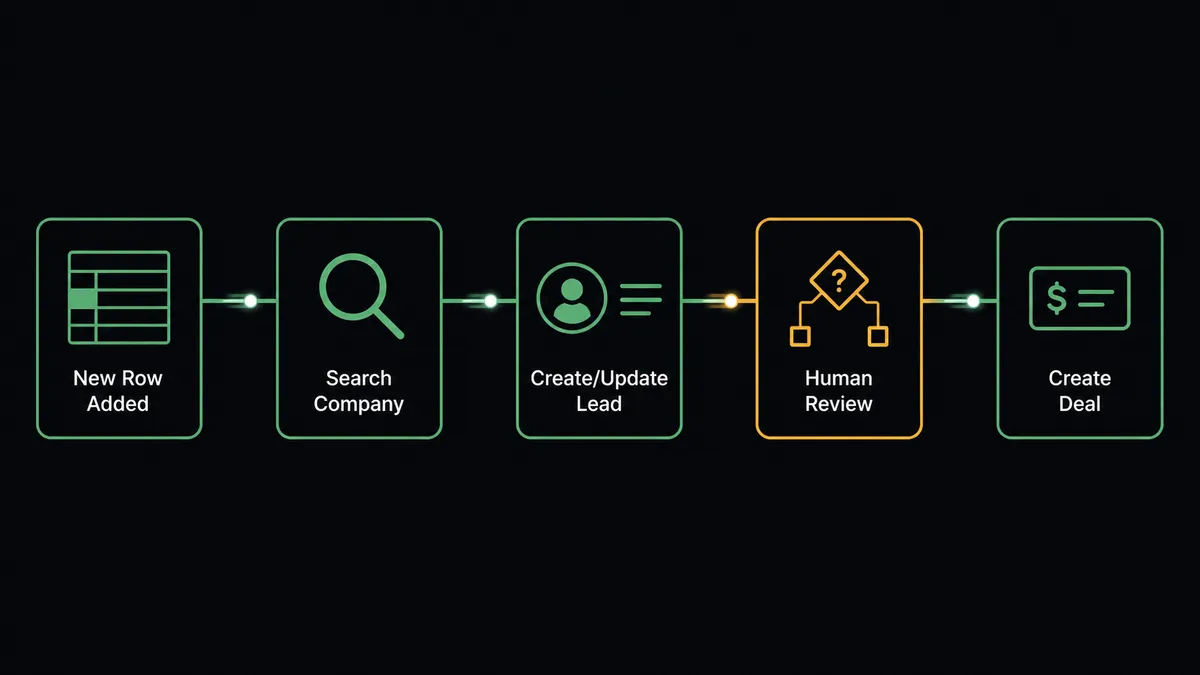
The flow starts on the Google Sheets side, because Copper does not emit its own trigger events. When a row lands in the tracking sheet, On New Row fires and the agent calls Load Header Row so it can address the row’s columns by name instead of a fixed layout. It reads the name, email, company, and deal value out of the row, then calls Search People in Copper to confirm the contact does not already exist. If it’s new, the agent calls Create Lead with the mapped fields, so the lead exists in Copper within seconds of the row appearing.
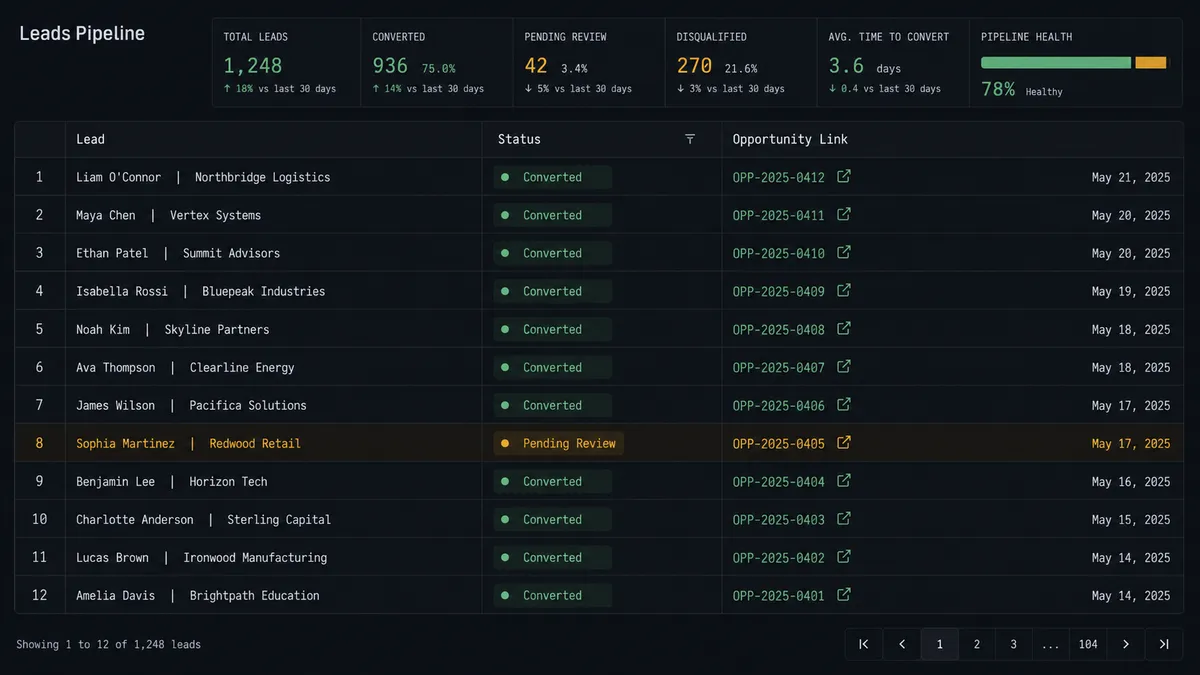
From there the agent evaluates whether the lead qualifies for conversion. For routine leads, it calls Convert Lead directly, producing a linked person, company, and opportunity in one move, and posts the new deal to the sales Slack channel with the name, value, and pipeline stage. Either way, the last step writes the outcome back to the source of truth: Update Row sets the lead’s Copper status and opportunity link on the same row that started the flow, so anyone scanning the sheet can see exactly what happened to each entry without opening Copper.
Can an AI agent run it? (and why a human stays in the loop)
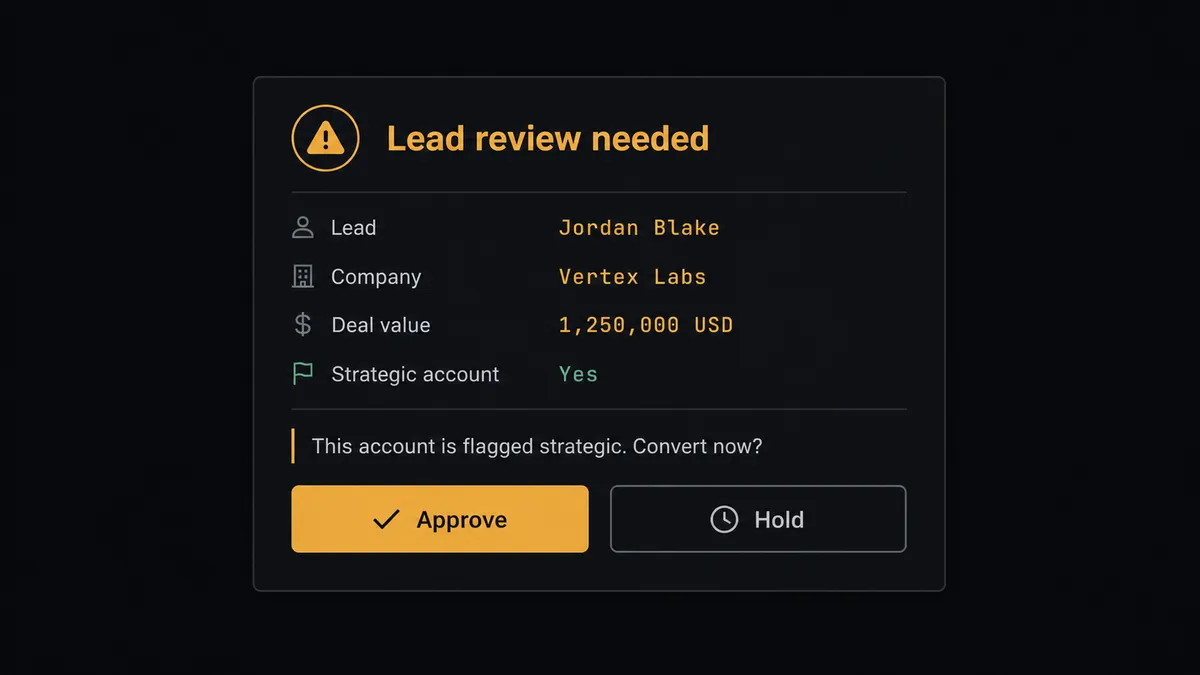
This is not a sync tool that copies every row the same way. The agent reads what’s in the row and reasons about it before acting, choosing Search People, Create Lead, and Convert Lead as tools rather than following a fixed script. The step that carries weight is Convert Lead: it produces a person, company, and opportunity and commits the deal to the pipeline in one irreversible move, so the agent treats a lead matching a flagged strategic account as a human-in-the-loop step rather than something to run on its own judgment.
When that happens, the flow pauses. The agent packages the lead’s details, the company it matched against, and the exact records the conversion would create, and sends it to a sales manager over Slack: here is the lead, here is what converting it creates, approve or hold. The manager approves, and the agent runs Convert Lead and notifies the team. The manager holds, and the lead stays a lead until someone follows up by hand. Routine leads from the same sheet convert without anyone touching them. This is a digital andon cord: the agent keeps working on everything ordinary and pulls the cord on the accounts that deserve a second set of eyes.
FlowRunner vs Zapier
Zapier is the tool most Copper and Google Sheets users already know, and it earns that position honestly: the trigger-and-action model is simple to set up, and both Copper and Google Sheets have mature Zapier integrations that a non-technical team can wire up in an afternoon. Where the two platforms diverge is what happens once the flow needs judgment instead of a fixed rule.
| FlowRunner | Zapier | |
|---|---|---|
| Human-in-the-loop | Native step; the agent decides when a lead needs review, not a fixed if/then rule | No native equivalent; approval requires a separate app or a manual step outside the Zap |
| Deciding which lead to escalate | AI agent reads the row and the account match, then chooses | Requires a hardcoded filter (e.g. company name equals X) |
| Users included | Unlimited on every tier | Priced per user on Team and Company plans |
| AI provider | Bring your own key, any supported model | Built-in AI steps run on Zapier’s own models |
| Pricing model | Transparent workflow-based tiers with a fixed execution ceiling | Per-task pricing that scales with every step in every run |
Before and after
| Metric | Before | After |
|---|---|---|
| Row to lead | A rep transcribes the row into Copper between other tasks | The agent creates the lead the moment the row lands |
| Duplicate risk | Reps re-enter contacts that already exist because nobody checked first | Search People runs before every Create Lead |
| Conversion timing | Qualified leads sit as leads because nobody ran the conversion step | Convert Lead runs as soon as a lead qualifies, or after a manager approves it |
| Pipeline visibility | The sheet and Copper drift apart between manual updates | Update Row writes the Copper status back to the sheet on every pass |
| Strategic accounts | Every lead converts the same way, with no extra review | Flagged accounts pause for a sales manager before conversion |
What you can build
Trade show list to worked pipeline. Drop a show’s badge-scan export into a sheet, and the agent turns every row into a searched, deduplicated, converted Copper lead before the team is back in the office.
Marketing form log with manager gate. Route form submissions through a logging sheet first, then let the agent create and convert leads automatically, pausing only when a submission matches a named enterprise account on the flagged list.
Weekly pipeline snapshot. On a schedule, export the sheet’s current lead status column with Export Sheet and email it to sales leadership as a standing report, no one opening Copper or the sheet to compile it.
Referral partner intake. Read rows from a shared referral-partner sheet, create the lead and company in Copper, and post the new opportunity to Slack so the account owner picks it up the same day it’s referred.
Common questions
Is it free to connect Copper and Google Sheets on FlowRunner? Yes. FlowRunner has a free plan with 100 executions a month, every integration included, and no credit card required, and new accounts get 14 days of Professional on top.
Can I self-host the Copper to Google Sheets connection? Self-hosting is available on FlowRunner’s Enterprise tier for teams that need the workflow to run on their own infrastructure; every cloud tier runs the same connection hosted by FlowRunner.
Does the agent need my own OpenAI key? Yes. FlowRunner uses a bring-your-own-key model for AI providers, so the agent runs on the key and model you choose rather than a bundled one.
What happens when the agent isn’t sure a lead should convert? The agent does not guess. It pauses the flow, sends a sales manager the lead details and the records the conversion would create, and waits for an approve or hold decision before running Convert Lead.
Does this only work one direction, from Google Sheets to Copper? No. The same pattern runs in reverse: a Copper opportunity update can trigger a downstream flow that calls Add Row or Update Row in Google Sheets to keep a pipeline tracker or report current.
Do I need to build the header mapping by hand? No. The agent calls Load Header Row to read a sheet’s column map before it processes any row, so the flow addresses columns by name instead of a fixed layout.
Getting started
Start on the free plan: 100 executions a month, every integration included, no credit card required, plus 14 days of Professional for new accounts. Connect Copper and Google Sheets, point the trigger at your lead sheet, and add the human-in-loop step for the accounts that deserve a second look before they convert. Visit flowrunner.ai to start, or book time at calendly.com/flowrunner/intro to walk through the setup with the team.
Frequently asked questions
Is it free to connect Copper and Google Sheets on FlowRunner?
Yes. FlowRunner has a free plan with 100 executions a month, every integration included, and no credit card required, and new accounts get 14 days of Professional on top.
Can I self-host the Copper to Google Sheets connection?
Self-hosting is available on FlowRunner's Enterprise tier for teams that need the workflow to run on their own infrastructure; every cloud tier runs the same connection hosted by FlowRunner.
Does the agent need my own OpenAI key?
Yes. FlowRunner uses a bring-your-own-key model for AI providers, so the agent runs on the key and model you choose rather than a bundled one.
What happens when the agent isn't sure a lead should convert?
The agent does not guess. It pauses the flow, sends a sales manager the lead details and the records the conversion would create, and waits for an approve or hold decision before running Convert Lead.
Does this only work one direction, from Google Sheets to Copper?
No. The same pattern runs in reverse: a Copper opportunity update can trigger a downstream flow that calls Add Row or Update Row in Google Sheets to keep a pipeline tracker or report current.
Do I need to build the header mapping by hand?
No. The agent calls Load Header Row to read a sheet's column map before it processes any row, so the flow addresses columns by name instead of a fixed layout.