How to Connect Zoho CRM to Google Sheets: Sync Closed Deals
Connect Zoho CRM and Google Sheets so closed deals log to a revenue tracker automatically, with an AI agent that pauses for a sales manager on strategic-account conversions.
How do you connect Zoho CRM to Google Sheets?
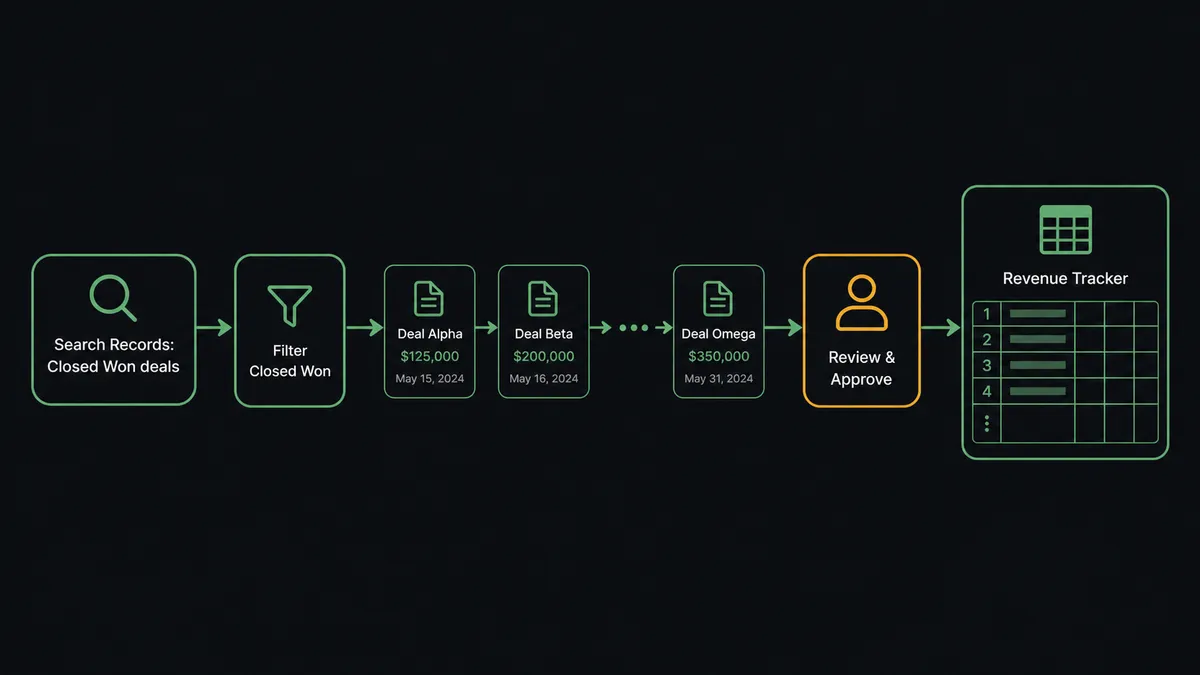
Connect Zoho CRM to Google Sheets by having FlowRunner run Zoho CRM’s Search Records action to pull closed deals, then call Google Sheets’ Add Row action to append each one to a tracking sheet, mapping deal name, account, amount, close date, and owner into the sheet’s header columns. FlowRunner is a visual AI-agent orchestration platform where automations run autonomously and pause for human judgment on the steps that carry real consequence. The same connection can run as an AI agent that reads each deal, decides how to log it, and pauses for a sales manager before it converts a lead on a strategic account. You can also run it in reverse: a new row in an intake sheet (On New Row) can create or update the matching Zoho CRM lead with Create or Update Record.
The problem it solves
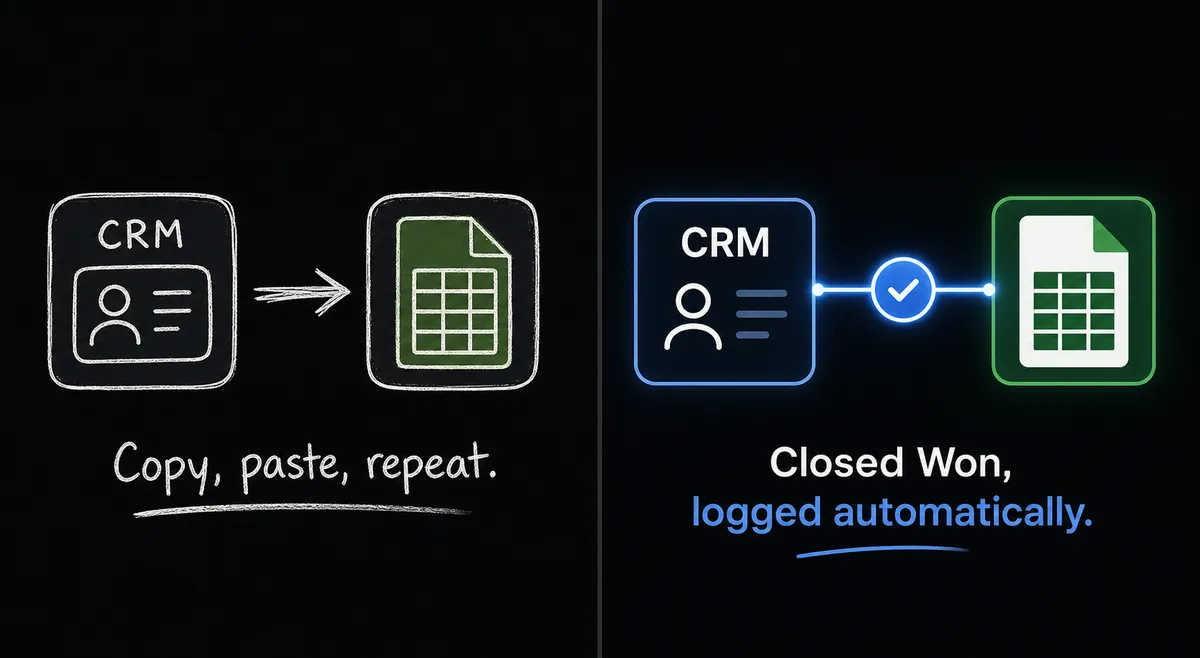
A sales ops manager or revenue analyst pulls closed deals out of Zoho CRM by hand at the end of every month, copying deal name, account, amount, and close date into a shared revenue tracker so finance and leadership have a number to look at. Some months a deal gets missed because it closed late and nobody remembered to add it. Some months the same deal gets logged twice because two people touched the spreadsheet. The tracker is only as current as the last person who remembered to update it, and by the time leadership reviews it, the numbers are already stale.
The same manual gap shows up on the intake side. Leads coming in from a form land in a spreadsheet, and someone has to notice the new row, open Zoho CRM, and key the lead in by hand, record by record. Duplicates creep in because nobody checks whether the same prospect already has a record before creating a new one. Qualified leads sit unconverted because converting is a manual step that competes with everything else on someone’s plate. None of this is complicated work, it’s just work that falls through the cracks when it depends on a person remembering to do it, and it eats the time that should go toward actually working the pipeline.
How it works: the connection
On a monthly schedule, the flow runs Search Records on Zoho CRM, filtered to deals in Closed Won status that closed since the last run. For each deal returned, FlowRunner calls Add Row on Google Sheets, writing the deal name, account, amount, close date, and owner into the mapped columns of the revenue tracker. The sheet stays current without anyone opening Zoho CRM or copying a single cell by hand.
The connection runs the other direction too. Google Sheets’ On New Row trigger fires when a new lead lands in an intake sheet, typically from a web form. FlowRunner reads the row against the sheet’s mapped header columns, then calls Create or Update Record on the Leads module in Zoho CRM. Because Create or Update Record matches on identity before it writes, the same prospect submitting the form twice updates one lead instead of creating two. From there, Convert Lead turns a qualified lead into a contact, account, and deal in a single step, and a Slack message through Send Message to Channel tells the sales team the moment it happens.
Can an AI agent run it? (and why a human stays in the loop)
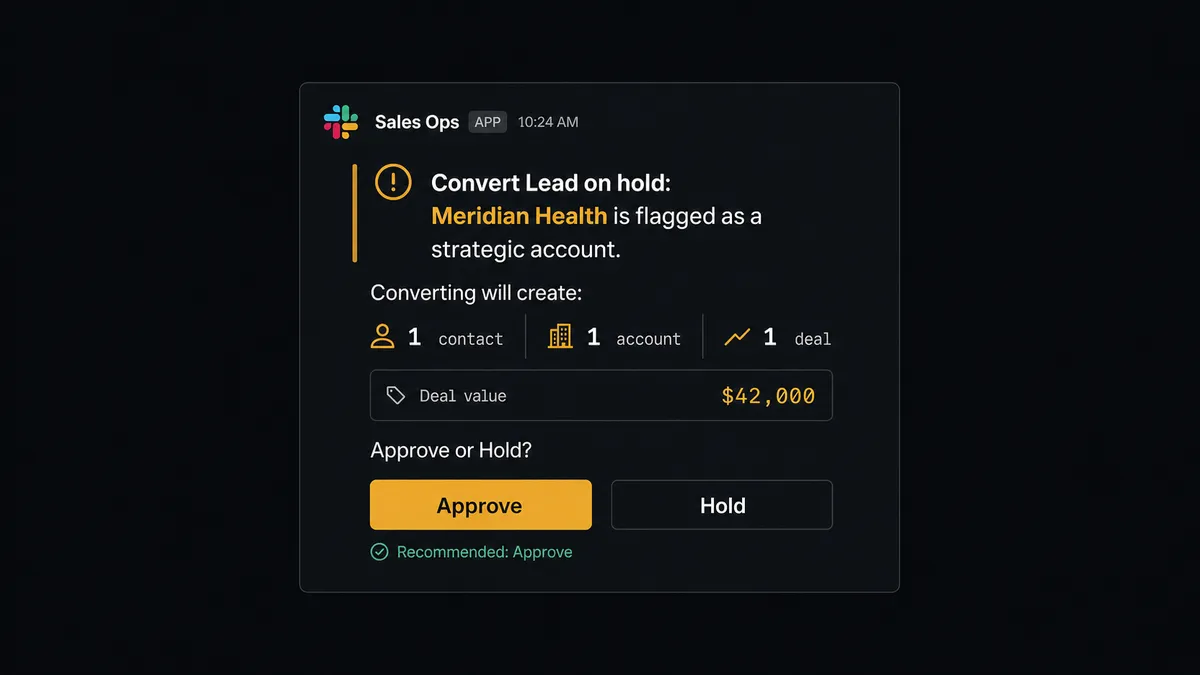
Yes, and this is where it stops being a plain sync tool. The agent doesn’t just move data between Zoho CRM and Google Sheets on a fixed schedule; it reads each deal, reasons about the account it belongs to, and picks the right tool from Search Records, Create or Update Record, Convert Lead, and Add Row based on what it finds. Convert Lead is the decisive action in this flow: it creates a contact, an account, and a deal, and commits the opportunity to the pipeline. That’s not a step you want running unsupervised on your most important accounts.
So the agent checks whether the lead it’s about to convert sits on an account you’ve flagged as strategic. If it doesn’t, the agent runs Convert Lead and moves on. If it does, the agent invokes a human-in-loop flow as a callable tool: it pauses, packages the lead details and the exact contact, account, and deal records the conversion is about to create, and sends that context to a sales manager through Slack. The manager sees what the agent found and why it’s asking before anything is committed. Approve, and the agent converts and notifies the team. Hold, and the lead waits untouched. Routine conversions run without anyone’s attention; the ones that shape a named account get a person.
This is the same pattern on the Google Sheets side. When a row in the intake sheet is missing a required field, the agent doesn’t push it into the CRM anyway. It flags the row, holds it, and messages the data owner: “Row is missing a required value in the mapped column. Correct the row and I will reprocess it, or tell me to skip it.” This is not a sync tool that fails silently or crashes on bad data. The agent knows when to stop and ask, and that decision is based on what it sees in the record, not a hardcoded threshold.
FlowRunner vs Zapier
Zapier is the tool most non-technical operations teams already reach for to connect Zoho CRM and Google Sheets, and it earns that reputation honestly: setup is fast, the trigger and action library is broad, and a sales ops manager can build a basic “new row creates a lead” zap in minutes without any help from IT.
Where the two diverge is what happens after the basic connection is built. Zapier moves data on a rule; it doesn’t reason about the data first, and it has no native way to pause a zap mid-run and hand a decision to a person with context attached. FlowRunner’s agent evaluates each deal or row and decides whether to act on it or escalate it, with human-in-loop built into the platform as a callable tool rather than a separate app you have to wire up around the edges.
| Zapier | FlowRunner | |
|---|---|---|
| Human-in-the-loop | Not native; requires a separate approval app bolted on | Native, callable by the agent as a tool with full context |
| AI reasoning on each record | Runs on the trigger’s fixed rule | Agent reads the deal or row and decides which action to take |
| Users included | Priced per user on paid plans | Unlimited users on every tier |
| AI provider | Uses Zapier’s built-in AI credits | BYOK, bring your own key for the model you choose |
| Self-hosting | Not available | Free Community Edition, custom Enterprise |
| Pricing model | Per-task pricing across the account | Transparent workflow-based execution tiers |
Before and after
| What changed | Before | After |
|---|---|---|
| Revenue tracker updates | Someone exports closed deals and pastes them into the sheet each month | Closed deals append to the tracker on a monthly sweep, no export or paste |
| Lead capture | A rep keys inbound leads into Zoho CRM by hand, record by record | The agent creates or updates the record the moment a lead appears |
| Duplicate leads | The same lead enters twice because no lookup runs before create | Create or Update Record matches and merges instead of duplicating |
| Strategic account conversions | Any qualifying lead converts the moment someone gets to it | The agent holds Convert Lead on flagged accounts until a manager confirms |
| Bad intake rows | A malformed row sits until someone happens to notice it | The agent flags it and routes it to the owner before it reaches the CRM |
What you can build
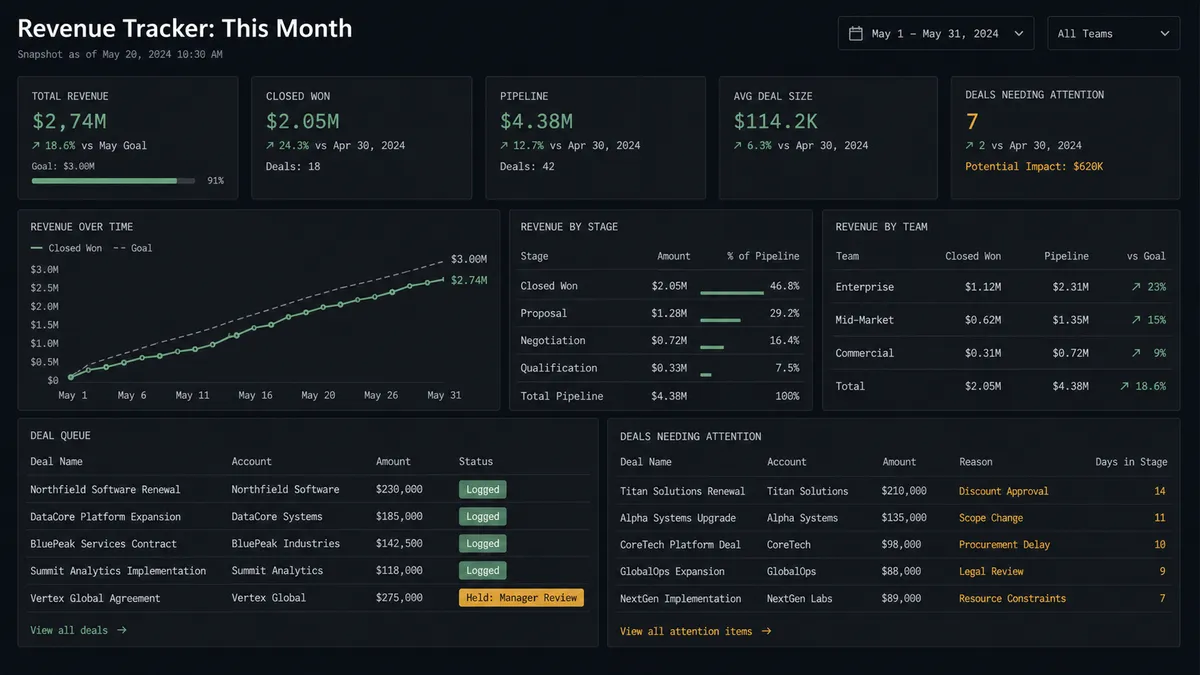
Closed-Won Revenue Tracker. Search Records pulls deals closed since the last run, and Add Row appends each one to a shared revenue tracker with deal name, account, amount, and close date, running monthly without anyone opening Zoho CRM.
Lead Capture from an Intake Sheet. On New Row fires when a form lead lands in a sheet, and the agent runs Create or Update Record on the Leads module so the same prospect never becomes two records, then tags the source and posts to Slack.
Deal Pipeline Snapshot for Leadership. Search Records pulls open deals into a working sheet, then Export Sheet turns it into an Excel file whose URL feeds a weekly email to leadership, no manual download required.
Strategic Account Conversion Gate. The agent finds a qualifying lead, checks whether its account is flagged, and holds Convert Lead for a sales manager’s approval before the contact, account, and deal are created, logging the outcome back to the tracker with Update Row.
Row Validation Before the CRM Sees It. A lead-intake row missing a required field never reaches Zoho CRM. The agent flags it, notifies the owner over Slack, and reprocesses only once the row is corrected or explicitly skipped.
Common questions
Is it free to connect Zoho CRM and Google Sheets on FlowRunner? FlowRunner has a free plan with 100 executions a month, every integration included, and no credit card required, and new accounts get 14 days of Professional on top. Growth is $45/mo after the credit and includes both the Zoho CRM and Google Sheets integrations plus AI agents and human-in-loop.
Can I self-host the Zoho CRM to Google Sheets flow? Yes. FlowRunner’s Community Edition is free to self-host for a single instance, and the Enterprise self-hosted tier adds multi-instance clustering and full compliance features for teams that need audit trails and RBAC on their own infrastructure.
Does the agent need my own OpenAI key? FlowRunner uses a bring-your-own-key model for AI providers, so you connect the API key for the model you want the agent to use. This keeps model costs and choice under your control instead of bundled into a markup.
What happens when the agent isn’t sure whether to convert a lead? The agent pauses before running Convert Lead, packages the lead and the contact, account, and deal it’s about to create, and routes the decision to a sales manager through Slack or email. Work resumes only after the manager approves or holds it.
Do I need to know how to code to set this up? No. FlowRunner is a visual, no-code builder. You pick the trigger, map the fields between Zoho CRM and Google Sheets, and add the human-in-loop step from a library of pre-built actions.
Can the flow react to updated rows, not just new ones? Yes. Google Sheets offers an On New or Updated Row trigger alongside On New Row, so a flow can react to edits on existing rows as well as brand-new ones.
Getting started
FlowRunner has a free plan with 100 executions a month, every integration included, and no credit card required, and new accounts get 14 days of Professional on top. Build the revenue sync flow, add the strategic-account approval gate, and turn it on. Start at flowrunner.ai or book a walkthrough at calendly.com/flowrunner/intro.
Frequently asked questions
Is it free to connect Zoho CRM and Google Sheets on FlowRunner?
FlowRunner has a free plan with 100 executions a month, every integration included, and no credit card required, and new accounts get 14 days of Professional on top. Growth is $45/mo after the credit and includes both the Zoho CRM and Google Sheets integrations plus AI agents and human-in-loop.
Can I self-host the Zoho CRM to Google Sheets flow?
Yes. FlowRunner's Community Edition is free to self-host for a single instance, and the Enterprise self-hosted tier adds multi-instance clustering and full compliance features for teams that need audit trails and RBAC on their own infrastructure.
Does the agent need my own OpenAI key?
FlowRunner uses a bring-your-own-key model for AI providers, so you connect the API key for the model you want the agent to use. This keeps model costs and choice under your control instead of bundled into a markup.
What happens when the agent isn't sure whether to convert a lead?
The agent pauses before running Convert Lead, packages the lead and the contact, account, and deal it's about to create, and routes the decision to a sales manager through Slack or email. Work resumes only after the manager approves or holds it.
Do I need to know how to code to set this up?
No. FlowRunner is a visual, no-code builder. You pick the trigger, map the fields between Zoho CRM and Google Sheets, and add the human-in-loop step from a library of pre-built actions.
Can the flow react to updated rows, not just new ones?
Yes. Google Sheets offers an On New or Updated Row trigger alongside On New Row, so a flow can react to edits on existing rows as well as brand-new ones.