Connect GoHighLevel to Google Sheets: Clean Rows Become Leads
Connect GoHighLevel and Google Sheets so every tracked row becomes a qualified contact and opportunity automatically, with an AI agent that pauses for a person when a row is missing what it needs.

How do you connect GoHighLevel to Google Sheets?
Google Sheets’ On New Row trigger fires when a lead lands in a shared tracking sheet, and that event drives GoHighLevel’s Upsert Contact and Create Opportunity actions to turn the row into a tracked contact and deal. FlowRunner is a visual AI-agent orchestration platform where automations run autonomously and pause for human judgment on the steps that carry real consequence. The same connection can run as a script that always does the same thing, or as an AI agent that reads each row, decides whether it is ready to act on, and pauses for a person when a row is missing what it needs.
Once connected, a spreadsheet stops being a place where leads wait to be noticed and starts being the input to a pipeline that runs itself.
The problem it solves
Marketing agencies and sales ops teams running GoHighLevel often collect leads somewhere else first: a trade show list, a landing page export, a partner referral sheet, a downloaded CSV from an ad platform. That data lands in Google Sheets because it is the fastest place to dump it, and it stays there until someone with CRM access copies each row into GoHighLevel by hand. The ops lead reviews the sheet once a day if they are lucky, opens each contact, checks whether it already exists, creates the opportunity, and starts the follow-up. Rows sit for hours or days. A duplicate contact gets created because nobody checked first. A row with a blank phone number gets copied in anyway, and the welcome text never sends.
The manual version does not scale past a handful of rows a day, and it fails quietly. Nobody gets an alert when a row falls through the cracks; it just sits at the bottom of the sheet, uncontacted, until someone happens to scroll down. The team wants the sheet to keep doing its job as an easy intake point, without needing a person to babysit every row that lands in it.
How it works: the connection
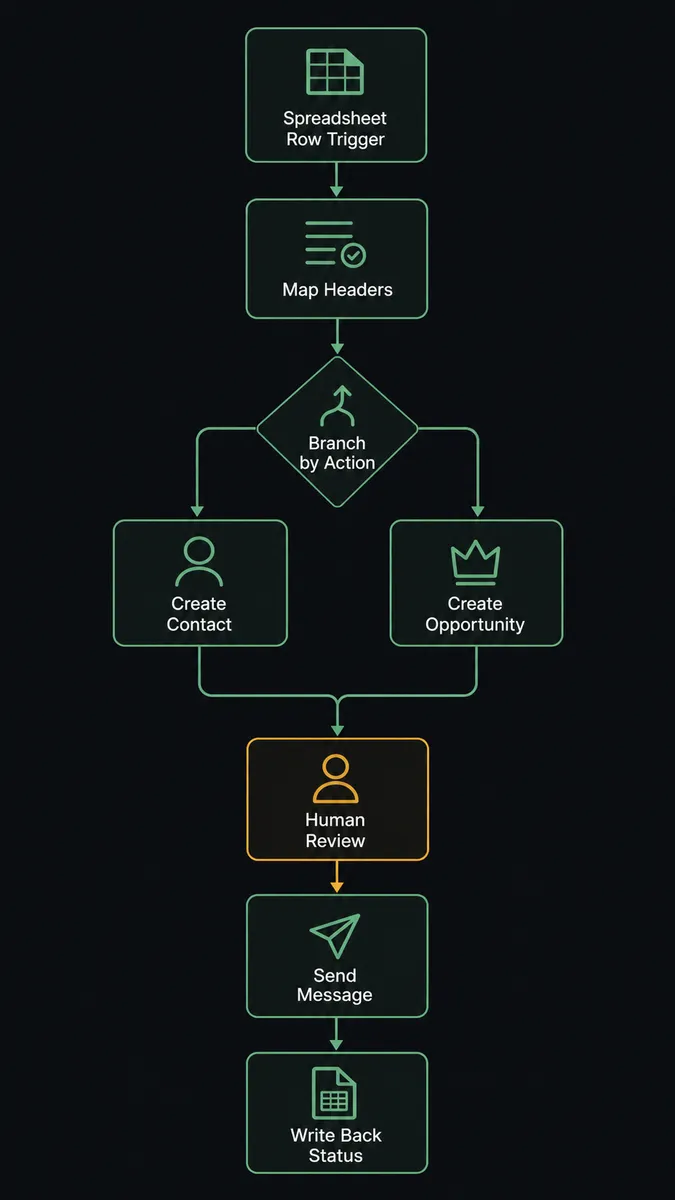
The flow starts when a row is added to the tracking sheet and Google Sheets fires On New Row. FlowRunner first calls Load Header Row so the flow can address columns by name instead of by position, then reads the new row’s values against that header. From there, Find Row and Search Contacts are available if the flow needs to check whether a matching contact already exists before deciding how to proceed.
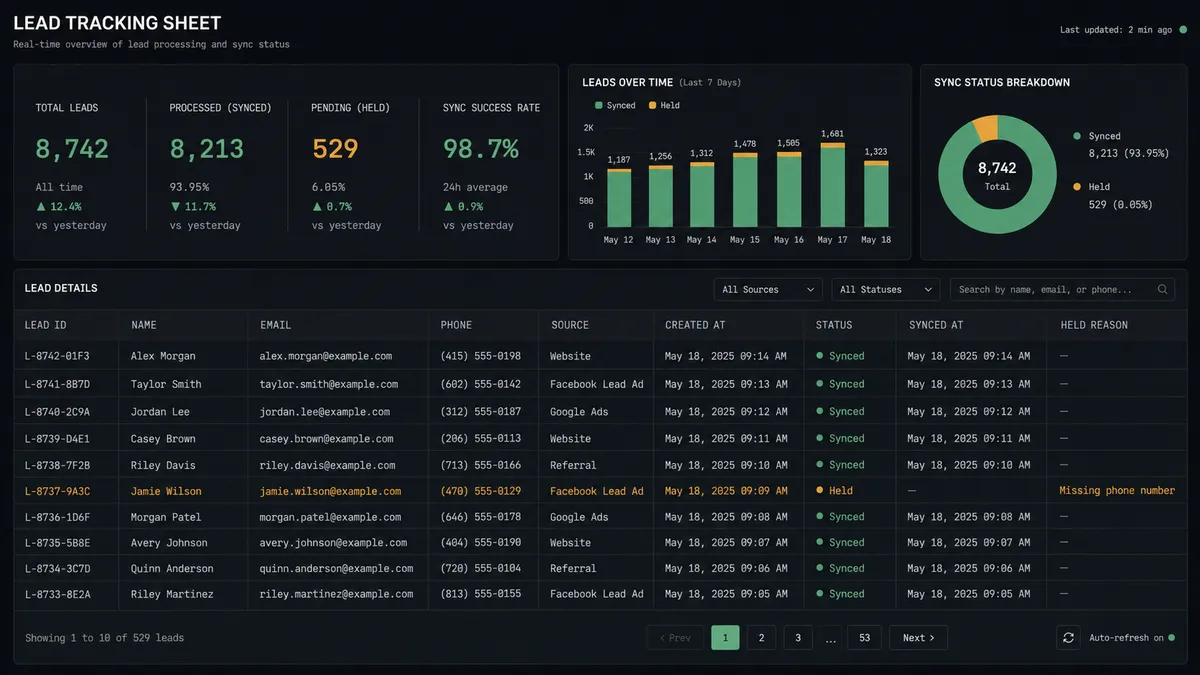
For a row that has what it needs, the agent calls Upsert Contact in GoHighLevel, which creates the contact if it is new or updates it if a match already exists, so the same lead never gets duplicated no matter how many times its row changes. It adds the relevant segment with Add Tags To Contact, then opens a deal in the correct pipeline with Create Opportunity. The agent sends the welcome message over the contact’s preferred channel with Send Message, whether that is SMS, email, or WhatsApp, and logs a Create Note entry so anyone who opens the contact later sees exactly what triggered the outreach. Finally, Update Row writes the outcome back into the sheet, so the tracker itself shows which rows are synced.
Can an AI agent run it? (and why a human stays in the loop)
Yes, and this is where FlowRunner stops being a sync tool. A basic integration would copy every row into GoHighLevel exactly as written, blank fields and all. The agent reads each row, reasons about whether it is complete enough to act on, and picks its tools accordingly: Upsert Contact and Create Opportunity for a row that is ready, or a human-in-loop tool for one that is not.
The decision is not a hardcoded rule like “if phone number is blank, stop.” The agent evaluates the row against what the downstream workflow actually needs: a name, a working contact channel, and a pipeline destination that maps to something real in the account. A row missing a phone number but carrying a valid email might still be usable if the flow sends the welcome message by email. A row with a pipeline value that does not match any known pipeline is a different kind of problem entirely, and the agent treats it that way.
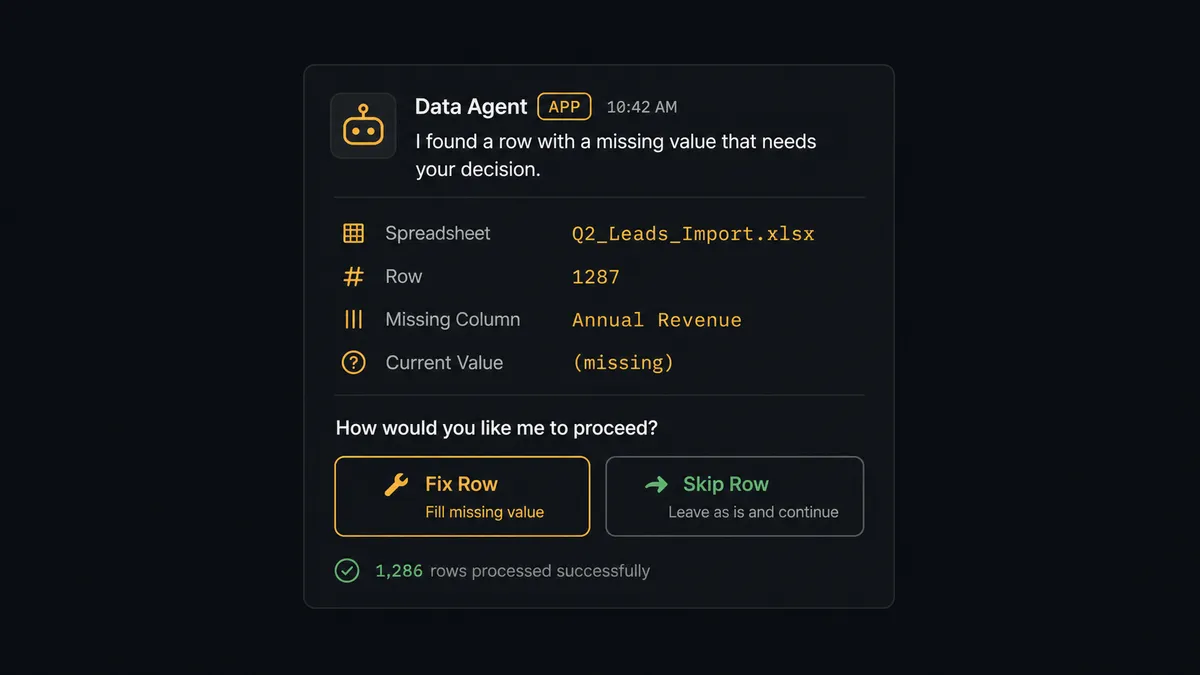
When a row fails that check, the agent does not push it into GoHighLevel and hope someone notices later. It marks the row in the sheet and routes it to the list owner over Slack: “Row 47 in ‘Trade Show Leads’ is missing a required value in the Phone column. Correct the row and I will reprocess it, or tell me to skip it.” The owner fixes the cell or tells the agent to move on, and only that decision determines what happens next. This is not a sync tool. The agent knows when to stop and ask, and the whole exchange, what the agent found, who responded, and when, is captured in the audit trail.
FlowRunner vs Zapier
Zapier is a genuinely easy way to connect Google Sheets to GoHighLevel for a straightforward “new row creates a contact” zap, and plenty of agencies run exactly that today with no complaints. Where it runs out of road is the moment a row needs judgment instead of a straight copy: a missing field, a possible duplicate, a pipeline that does not exist yet. Zapier’s filters and paths can catch some of that, but there is no agent reading the row and deciding what to do; there is only a chain of conditions someone has to anticipate and build in advance.
| FlowRunner | Zapier | |
|---|---|---|
| Human-in-the-loop | Native. An agent invokes a human-approval flow as a callable tool, mid-run | Not built in. Requires manual review steps or a separate app |
| Row validation before write | Agent reasons about row completeness before acting | Rule-based filters only, set up in advance |
| Users per plan | Unlimited on every tier | Priced per user on team plans |
| AI provider | Bring your own key, any supported model | Limited to Zapier’s built-in AI credits and models |
| Self-hosting | Free Community Edition, or self-hosted Enterprise | Cloud only |
| Pricing model | Transparent workflow-based execution tiers | Per-task pricing that scales with every step in a zap |
Before and after
| Category | Before | After |
|---|---|---|
| Lead intake | Someone copies each row from the tracker into GoHighLevel by hand | A new row creates or updates the contact and opens the opportunity automatically |
| Time to first touch | Depends on when a person notices the row | Welcome message sends the same run the row is confirmed complete |
| Duplicate contacts | Created when nobody checks first | Upsert Contact matches existing records before writing |
| Incomplete rows | Copied in anyway, or ignored at the bottom of the sheet | Held, flagged in the sheet, and routed to the owner to fix or skip |
| Pipeline visibility | Nobody knows what happened to a row after it was entered | Update Row shows synced, held, or skipped for every row |
What you can build
Trade show list to pipeline. Drop an exported CSV into a tracking sheet, and every row becomes a tagged contact and an open opportunity in the right GoHighLevel pipeline within the same run, with incomplete rows held for a quick fix instead of silently skipped.
Won-deal reporting sheet. Reverse the direction: GoHighLevel’s On New Opportunity trigger fires when a deal is marked won, and the agent calls Add Row to log the deal, contact, and amount into a reporting sheet that leadership checks without opening the CRM.
Invoice-ready deal export. When an opportunity reaches the billing stage, the agent creates the invoice with Create Invoice and logs the line to a finance tracking sheet with Add Row, while invoices above a set amount still wait for the owner to approve with Send Invoice before anything reaches the customer.
Scheduled pipeline snapshot. On a schedule, the agent calls Export Sheet to produce a current Excel export of the lead tracker and attaches it to a summary email, so the team gets a daily read without exporting anything by hand.
Common questions
Is it free to connect GoHighLevel and Google Sheets on FlowRunner? FlowRunner has a free plan with 100 executions a month, every integration included, and no credit card required, and new accounts get 14 days of Professional on top. You can build and run the GoHighLevel and Google Sheets connection during that period at no cost.
Do I need to know how to code to set this up? No. GoHighLevel and Google Sheets are both connected through FlowRunner’s visual builder. You pick the trigger, map the row columns to contact fields, and choose the actions; no scripting or API keys to hand-configure.
Does the AI agent need my own OpenAI key? FlowRunner uses a bring-your-own-key model for AI providers, so you connect the AI account you already use. You are not locked into a single model vendor.
What happens when the agent isn’t sure a row is ready? The agent does not push a row it cannot validate into GoHighLevel. It holds the row, marks it in the sheet, and routes the specific gap to the list owner over their preferred channel so a person can fix or skip it before it reprocesses.
Can I self-host instead of using FlowRunner’s cloud? Yes. FlowRunner offers a free self-hosted Community Edition for a single instance, and a self-hosted Enterprise tier with clustering and the full compliance suite for larger deployments.
Can this run the other direction, from GoHighLevel into Google Sheets? Yes. The same agent pattern applies in reverse: a new GoHighLevel opportunity or won deal can trigger an Add Row or Update Row call that keeps a reporting sheet current without anyone exporting data by hand.
Getting started
Connect GoHighLevel and Google Sheets in FlowRunner and turn your lead tracker into a pipeline that runs itself, with a person only in the loop when a row actually needs one. FlowRunner has a free plan with 100 executions a month, every integration included, and no credit card required, and new accounts get 14 days of Professional on top. Start at flowrunner.ai or book a walkthrough at calendly.com/flowrunner/intro.
Frequently asked questions
Is it free to connect GoHighLevel and Google Sheets on FlowRunner?
FlowRunner has a free plan with 100 executions a month, every integration included, and no credit card required, and new accounts get 14 days of Professional on top. You can build and run the GoHighLevel and Google Sheets connection during that period at no cost.
Do I need to know how to code to set this up?
No. GoHighLevel and Google Sheets are both connected through FlowRunner's visual builder. You pick the trigger, map the row columns to contact fields, and choose the actions; no scripting or API keys to hand-configure.
Does the AI agent need my own OpenAI key?
FlowRunner uses a bring-your-own-key model for AI providers, so you connect the AI account you already use. You are not locked into a single model vendor.
What happens when the agent isn't sure a row is ready?
The agent does not push a row it cannot validate into GoHighLevel. It holds the row, marks it in the sheet, and routes the specific gap to the list owner over their preferred channel so a person can fix or skip it before it reprocesses.
Can I self-host instead of using FlowRunner's cloud?
Yes. FlowRunner offers a free self-hosted Community Edition for a single instance, and a self-hosted Enterprise tier with clustering and the full compliance suite for larger deployments.
Can this run the other direction, from GoHighLevel into Google Sheets?
Yes. The same agent pattern applies in reverse: a new GoHighLevel opportunity or won deal can trigger an Add Row or Update Row call that keeps a reporting sheet current without anyone exporting data by hand.