Turn Google Sheets Rows Into HubSpot Contacts and Deals
Connect HubSpot and Google Sheets so a new row creates a matching contact and deal automatically, with an AI agent that pauses for a person when two records could be the same prospect.
How do you connect HubSpot to Google Sheets?
Connect HubSpot to Google Sheets by triggering on On New Row in a tracking sheet and having the flow call Get Contact by Email, then Create Contact and Create Deal in HubSpot, so every new row becomes a CRM record without anyone retyping it. FlowRunner is a visual AI-agent orchestration platform where automations run autonomously and pause for human judgment on the steps that carry real consequence. The same connection can run as a plain sync, or as an AI agent that reads each row, decides whether it matches an existing contact, and pauses for a person only when two records might be the same prospect.
The problem it solves
An ops lead or sales rep collects leads in a spreadsheet. A form export, a trade show list, a partner referral sheet, whatever the source, the rows sit there until someone opens HubSpot and manually creates a contact, a company, and a deal for each one. On a slow week that’s tedious. On a busy week, rows fall through the cracks: a prospect from Tuesday never gets a deal opened, a duplicate contact gets created because nobody checked if the email already existed, and the sales manager finds out three weeks later when the prospect emails asking why nobody followed up.
The spreadsheet itself isn’t the problem. It’s a reasonable place to collect leads from multiple sources. The problem is that nothing connects it to HubSpot, so every row requires a person to notice it, judge whether it’s a duplicate, and manually create three or four linked records in the right order. That’s not a job for a person; it’s a job that needs a system watching the sheet and a person available for the cases that actually require judgment.
How it works: the connection
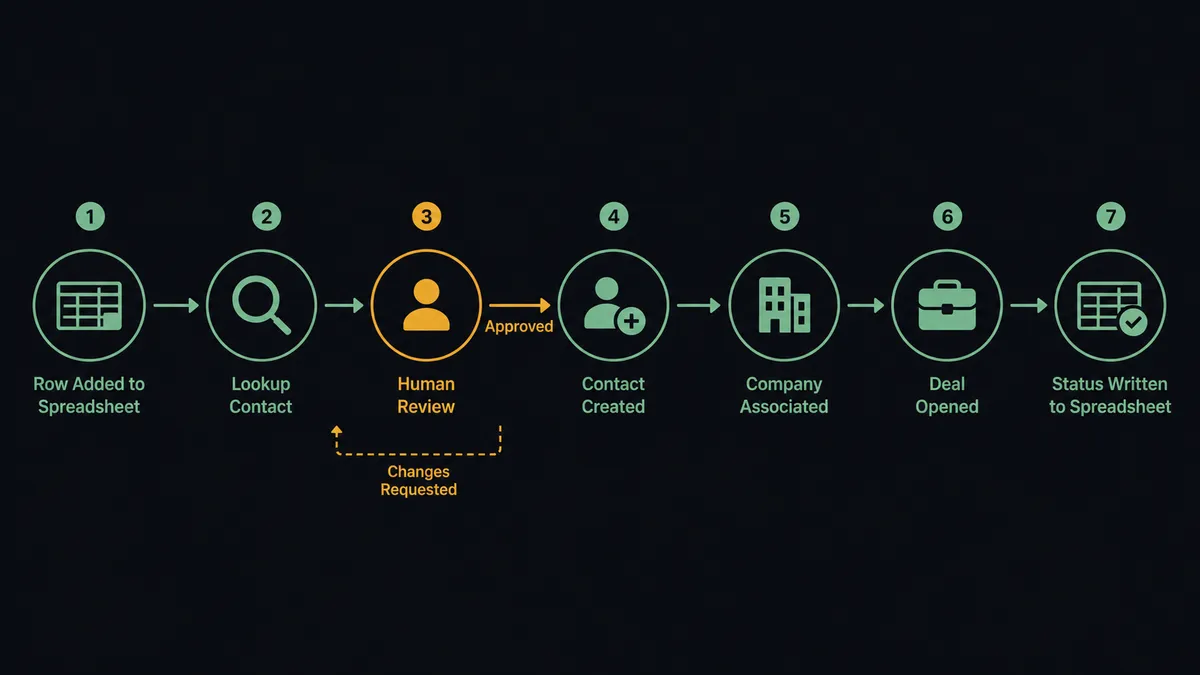
The flow starts with a trigger on the sheet: On New Row fires the moment a row is added to the tracking tab, or On New or Updated Row if edits to existing rows should also kick off processing. FlowRunner loads the header row with Load Header Row so downstream steps can reference Email, Company, or Deal Value by column name instead of by position, which keeps the flow working even if someone reorders columns later.
Once a row lands, the flow calls Get Contact by Email against HubSpot to check whether the prospect already exists. If no match is found, it calls Create Contact, then Associate Objects to link the contact to the right company record, then Create Deal to open the opportunity in the inbound pipeline with the lifecycle stage set to Lead. The flow finishes by calling Update Row in Google Sheets to write the new HubSpot contact ID and deal stage back into the row, so the sheet stays an accurate mirror of what’s in the CRM rather than a stale export.
Can an AI agent run it? (and why a human stays in the loop)
Yes, and this is where it stops being a sync tool. A plain trigger-to-action wire will call Create Contact every time a row arrives, whether or not that prospect already exists under a slightly different email or a shared company domain. An AI agent reads the row, calls Get Contact by Email and Get Contacts at Company as tools, and reasons about what it finds before deciding what to do next.
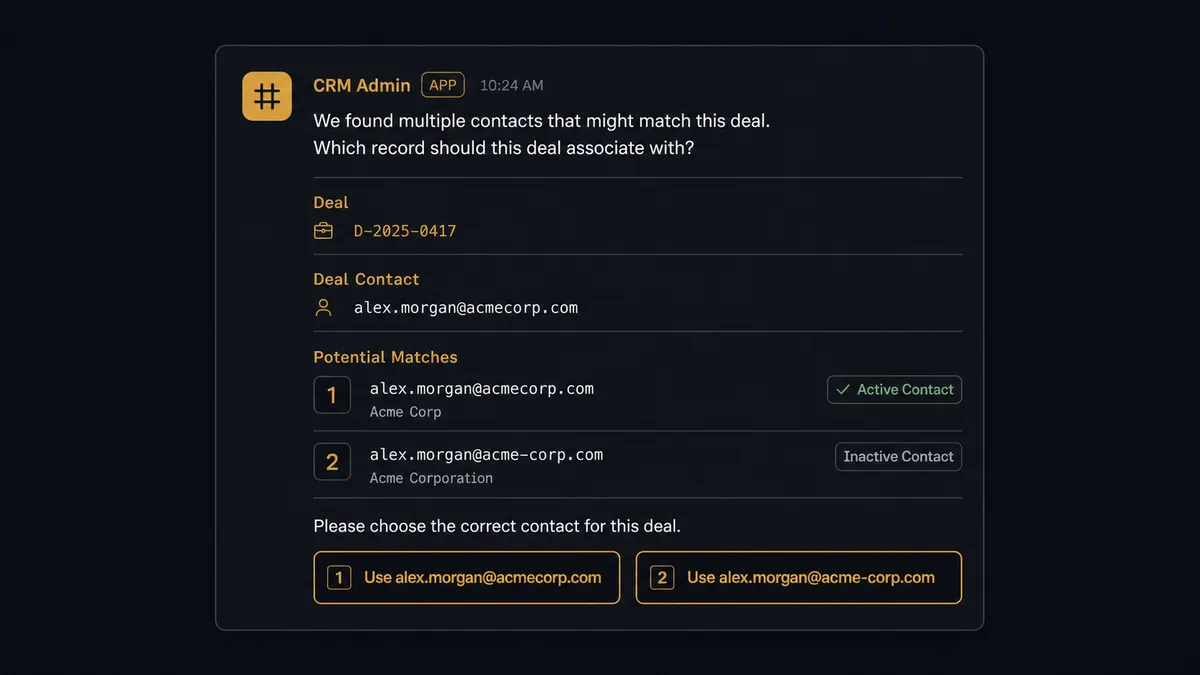
Here’s the decision moment. The agent finds a row for a prospect at “acme-corp.com” and, checking associations, finds two existing contacts at the same company domain with similar names, one created six months ago as “acme.co” and one as “acme-corp.com.” Nothing in the row data settles which one is right. Instead of guessing, the agent invokes a human-in-loop flow as a callable tool. It posts to the CRM admin’s Slack channel: “I found two contacts that could match this row: a lead from March under ‘acme.co’ and one from May under ‘acme-corp.com’. Which should this deal associate with, or is this a new contact?” The admin picks one with a click. The agent associates the deal accordingly, writes the decision and the admin’s identity into the audit trail, and resumes the rest of the flow.
This is not a sync tool. The agent knows when to stop and ask. Every other row, the vast majority, that has a clean unambiguous email match or a clear non-match, processes automatically with no one touching it.
FlowRunner vs Zapier
Zapier does this connection well for the simple case. Its HubSpot and Google Sheets triggers are mature, the setup takes minutes, and for a team that just wants “new row creates a contact” with no branching logic, it’s a reasonable choice.
Where it runs out of road is the duplicate case and the audit trail. A Zap either creates the contact regardless of whether one already exists, or it needs a separate Filter and Lookup step chain that still can’t reason about ambiguous matches, it can only apply a hard rule.
| Capability | FlowRunner | Zapier |
|---|---|---|
| Human-in-the-loop on ambiguous matches | Native: the agent invokes a Slack approval as a callable tool and logs the decision | Not available; duplicates either get created or require manual rule-based filters |
| Users included | Unlimited on every tier | Priced per user on team plans |
| AI provider | BYOK: connect your own key from your preferred provider | Requires Zapier’s own AI credits or a separate integration |
| Self-hosting | Available on Enterprise, with full audit retention | Not available |
| Pricing model | Transparent workflow-based execution tiers | Per-task pricing that scales with every row processed |
Before and after
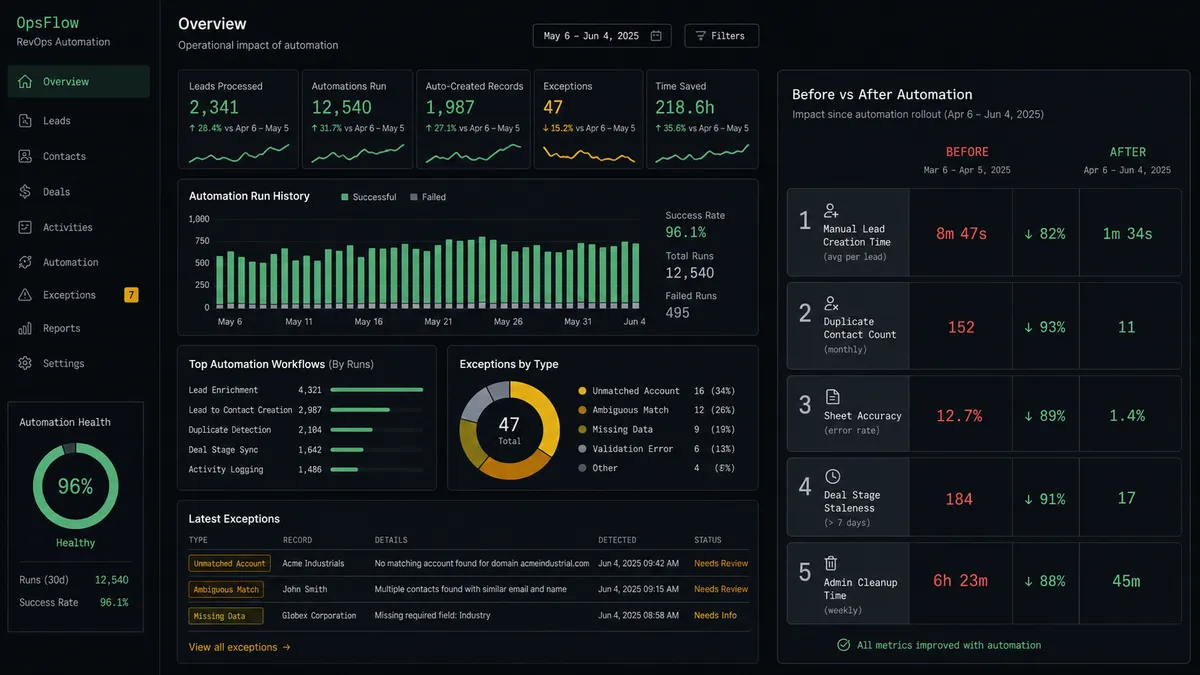
| Metric | Before | After |
|---|---|---|
| Time to create a lead in HubSpot | A rep manually creates the contact, company, and deal from the spreadsheet row | Contact created, associated, and deal opened from the row automatically |
| Duplicate contacts | No systematic check before creating a new record | Get Contact by Email runs before every create, and ambiguous matches route to a human |
| Sheet accuracy | The sheet is a static export that goes stale the moment HubSpot changes | Update Row writes the HubSpot contact ID and deal stage back after every run |
| Stalled deal visibility | Deal stages update only when a rep remembers to touch HubSpot | Deal stage sync runs from downstream activity without manual entry |
| CRM admin time on cleanup | Admin discovers duplicate or orphaned records weeks later during a data audit | Admin resolves flagged duplicates in Slack at the moment they’re created |
What you can build
Leads tracker to CRM pipeline. A new row in a shared leads sheet triggers Get Contact by Email, then Create Contact, Associate Objects, and Create Deal, with the sheet updated to show the deal stage as it moves.
Trade show list import. Import from CSV loads a batch of trade show contacts into a sheet, and the agent processes each row through the same lookup-and-create logic, flagging any rows missing a required email for a person to fill in.
Deal stage export for the sales meeting. On a weekly schedule, Get All Deals pulls current pipeline data from HubSpot, Add Rows writes it into a report sheet, and Export Sheet generates a PDF that’s emailed to the team before the Monday pipeline review.
Row validation before it reaches HubSpot. Rows that fail validation, a missing company name or an unrecognized lifecycle stage, are held and routed to the sheet owner via Slack instead of creating a malformed HubSpot record.
Common questions
Is it free to connect HubSpot and Google Sheets on FlowRunner? Yes. FlowRunner has a free plan with 100 executions a month, every integration included, and no credit card required, and new accounts get 14 days of Professional on top.
Can I self-host this HubSpot and Google Sheets flow? Yes, on the Enterprise tier. Self-hosting gives you a single-instance or multi-instance deployment with the same HubSpot and Google Sheets connectors, plus full audit retention and compliance reporting.
Does the agent need my own OpenAI key? FlowRunner uses a BYOK (Bring Your Own Keys) model, so you connect your own key from your preferred AI provider and the agent runs against it directly.
What happens when the agent isn’t sure which HubSpot contact to use? The agent stops before creating a duplicate. It sends a Slack message to a CRM admin describing the conflicting records it found, and it waits for a decision before associating the deal to either contact.
Does this work without an AI agent, as a plain sync? Yes. You can wire On New Row in Google Sheets directly to Create Contact and Create Deal in HubSpot as a standard trigger-to-action flow with no agent reasoning involved, then add the agent layer later when you want it handling exceptions.
How is this different from Zapier’s HubSpot and Google Sheets integration? Zapier can move the row into HubSpot on a trigger, but a duplicate contact either gets created twice or the zap fails silently; FlowRunner’s agent evaluates the match itself and routes only the ambiguous cases to a person, with the decision logged in an audit trail.
Getting started
Start on the free plan: 100 executions a month, every integration included, no credit card required, plus 14 days of Professional for new accounts. Connect your HubSpot integration and your Google Sheets integration, pick On New Row as your trigger, and turn on the flow.
Ready to build it? Start free at flowrunner.ai or book time to walk through your specific sheet at calendly.com/flowrunner/intro.
Frequently asked questions
Is it free to connect HubSpot and Google Sheets on FlowRunner?
Yes. FlowRunner has a free plan with 100 executions a month, every integration included, and no credit card required, and new accounts get 14 days of Professional on top.
Can I self-host this HubSpot and Google Sheets flow?
Yes, on the Enterprise tier. Self-hosting gives you a single-instance or multi-instance deployment with the same HubSpot and Google Sheets connectors, plus full audit retention and compliance reporting.
Does the agent need my own OpenAI key?
FlowRunner uses a BYOK (Bring Your Own Keys) model, so you connect your own key from your preferred AI provider and the agent runs against it directly.
What happens when the agent isn't sure which HubSpot contact to use?
The agent stops before creating a duplicate. It sends a Slack message to a CRM admin describing the conflicting records it found, and it waits for a decision before associating the deal to either contact.
Does this work without an AI agent, as a plain sync?
Yes. You can wire On New Row in Google Sheets directly to Create Contact and Create Deal in HubSpot as a standard trigger-to-action flow with no agent reasoning involved, then add the agent layer later when you want it handling exceptions.
How is this different from Zapier's HubSpot and Google Sheets integration?
Zapier can move the row into HubSpot on a trigger, but a duplicate contact either gets created twice or the zap fails silently; FlowRunner's agent evaluates the match itself and routes only the ambiguous cases to a person, with the decision logged in an audit trail.