Front HubSpot Integration: Leads Synced, Duplicates Held for Review
Connect Front and HubSpot so every new inbound conversation becomes a deduplicated HubSpot contact and deal, with an AI agent that pauses for a human on duplicate matches and outbound replies.
How do you connect Front to HubSpot?
Connect Front to HubSpot by triggering on Front’s On New Inbound Message event and having the flow call Get Contact by Email in HubSpot, then Create Contact, Associate Objects, and Create Deal when no record exists. FlowRunner is a visual AI-agent orchestration platform where automations run autonomously and pause for human judgment on the steps that carry real consequence. The same connection can run as a standard sync, or as an AI agent that reasons about each inbound conversation, creates or matches the right HubSpot record, and pauses for a human when it finds a duplicate contact or when a reply needs a person’s sign-off before it reaches the customer.
The problem it solves
Right now, when a new customer message lands in Front, someone on the support or sales team reads it, decides who owns it, and then switches over to HubSpot to check whether the sender already has a contact record. If they don’t, the rep creates one by hand: name, email, company, lifecycle stage, and if it looks like a real opportunity, a deal. Multiply that by every inbound conversation and the CRM becomes a record of whoever remembered to update it that day, not a record of what actually happened.
The failure mode is duplicates and gaps, not one dramatic mistake. A prospect emails from a personal address instead of their work one and gets a second contact record. A support conversation that was actually a sales inquiry never gets a deal opened because the support rep didn’t think to create one. An ops lead auditing the pipeline finds three contacts for the same company with different names on file. None of it is anyone’s fault; it’s what happens when CRM hygiene depends on a human remembering an extra step in the middle of answering a customer.
How it works: the connection
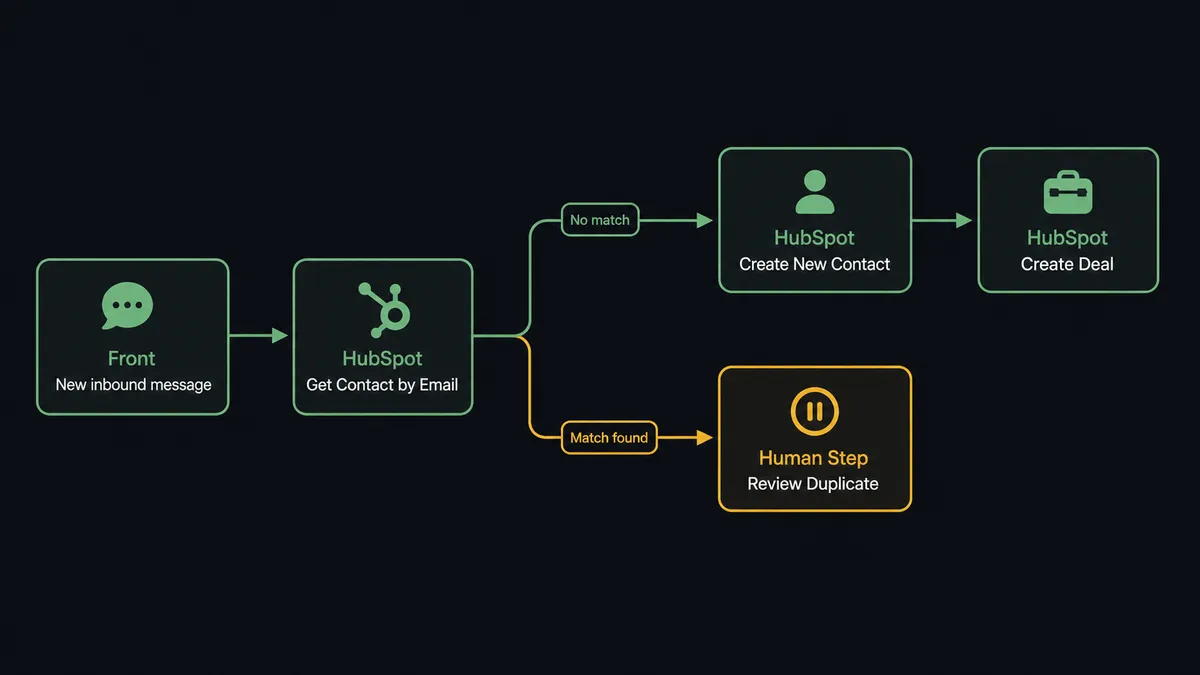
The flow starts on Front’s On New Inbound Message trigger, which fires the moment a new customer message arrives in a watched inbox. The agent reads the sender’s email address and calls Get Contact by Email in HubSpot to check for an existing record before doing anything else.
If no match exists, the agent calls Create Contact to add the person to HubSpot, then Associate Objects to link the new contact to its company record. If the conversation reads like a real opportunity rather than a support question, the agent also calls Create Deal to open it in the right pipeline with the lifecycle stage set. The agent then writes the new contact and deal context back onto the original Front conversation using Add Comment, so whoever is assigned to that conversation sees the customer’s CRM standing without leaving Front.
If a match already exists, the agent skips creation and instead calls Update Contact to refresh anything that changed, and Update Deal if the conversation touches an open opportunity, keeping the pipeline stage accurate without a rep opening HubSpot. Either way, Update Conversation in Front routes the message to the right inbox and assignee, so the person who ends up handling it already has the CRM side settled before they start typing a reply.
Can an AI agent run it? (and why a human stays in the loop)
Yes, and this is where it stops being a plain sync and becomes something closer to a coordinated decision. The agent doesn’t just check “does a contact exist, yes or no.” It reads the lookup result the way a CRM admin would: no match is easy, one clean match is easy, but two contacts with the same email domain and different company associations, or a contact whose name doesn’t match the sender’s display name, is ambiguous. That’s a judgment call, and the agent treats it as one.
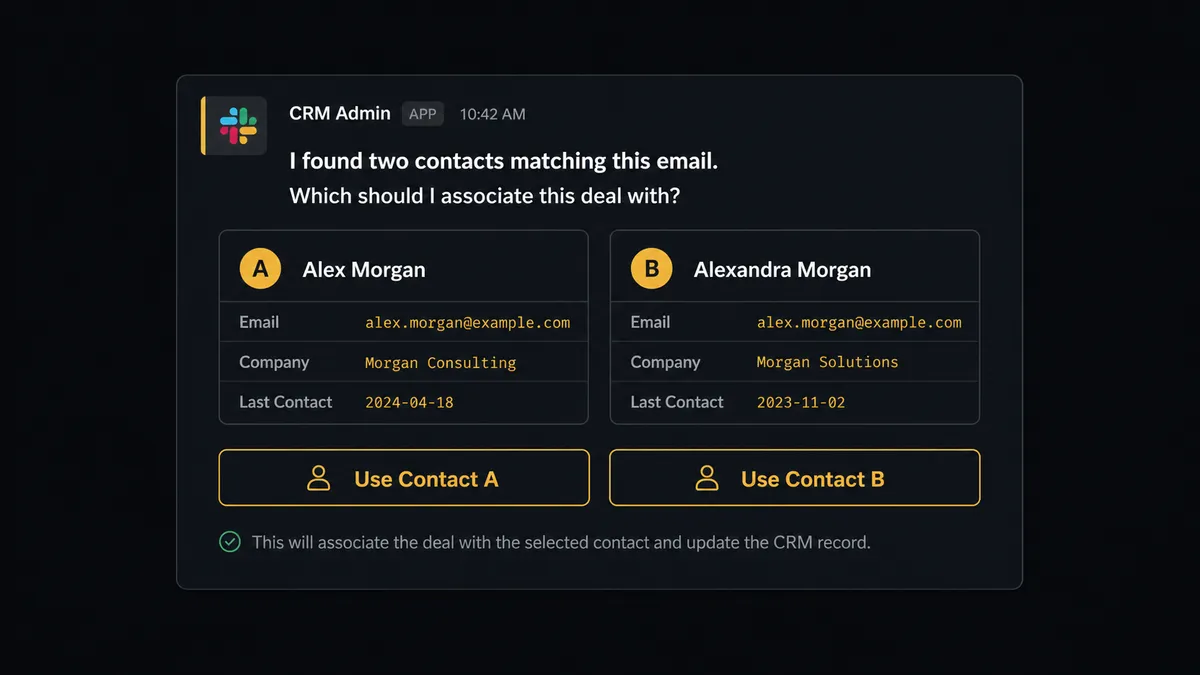
When the agent hits that ambiguity, it invokes a human-in-loop flow as a callable tool, the same way it calls Create Contact or Get Contact by Email. It pauses the flow and sends a CRM admin a Slack message: “I found two contacts matching this email. Which should I associate this deal with?” The message carries both contact records, the company each is linked to, and the new conversation that triggered the check. The admin picks one with a click. The agent associates the deal to that contact, logs the decision and the admin’s identity in the audit trail, and continues. Nothing gets silently merged or silently duplicated.
The same discipline shows up on the Front side. The agent can draft a reply to the customer, but it never sends one. It posts the draft as an internal comment on the conversation and routes it to the assigned teammate: “Drafted a reply for [customer]‘s question about [topic]. Review and send, edit, or take it over?” The person decides what actually reaches the customer in the company’s name. This is not a sync tool quietly moving records between two systems. The agent knows when to stop and ask, and it asks the right person at the right moment with the context they need to decide fast.
FlowRunner vs Zapier
Zapier is the tool most ops and support teams already know for connecting Front and HubSpot, and it earns that position: it’s fast to set up, has native triggers for both apps, and a non-technical team can build a basic “new message creates a contact” zap in minutes.
Where it runs out of road is the judgment calls. Zapier can check whether a contact exists and branch on the result, but it can’t reason about which of two conflicting contacts is the right one, and it has no built-in way to pause a zap, route the ambiguity to a person, and resume with their answer as an input. That logic has to be built by hand outside the tool, if it gets built at all.
| Capability | Zapier | FlowRunner |
|---|---|---|
| Human-in-loop on ambiguous matches | Not native; requires manual workarounds | Built in: the agent pauses and routes to a person, then resumes with the decision |
| Duplicate reasoning | Simple field match, no judgment on conflicting records | Agent evaluates conflicting contacts and escalates only when genuinely ambiguous |
| Users included | Priced per user on most plans | Unlimited users on every tier |
| AI provider model | Zapier-managed AI credits | BYOK: connect your own Claude, OpenAI, or provider account |
| Pricing model | Per-task/zap pricing, easy to outgrow | Transparent workflow-based execution tiers |
| Audit trail on decisions | Not a native feature | Every human decision logged with identity and timestamp |
Before and after
| Metric | Before | After |
|---|---|---|
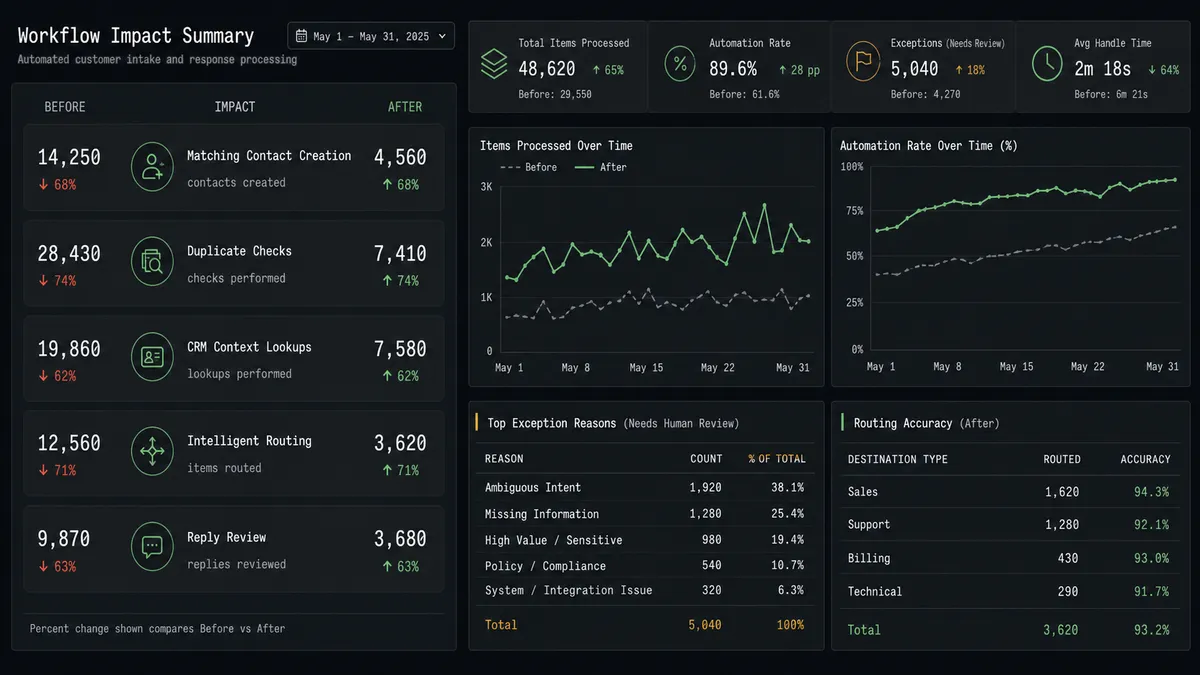
| Contact creation | Rep manually creates the HubSpot contact after reading the Front message | Contact created, associated, and deal opened automatically on arrival |
| Duplicate check | No systematic check before creating a new contact | Agent checks by email every time and escalates real conflicts |
| CRM context on the conversation | Rep switches to another tab to find the customer’s HubSpot history | Contact and deal context posted directly on the Front conversation |
| Conversation routing | Whoever opens the inbox decides who owns the conversation | Conversation routed and tagged the moment it lands |
| Outbound reply control | No consistent review step before a reply goes out | Draft posted as an internal comment; a teammate reviews and sends |
What you can build
Inbound-to-deal on first contact. Every new conversation from an unrecognized email becomes a HubSpot contact, company association, and inbound-pipeline deal, with the sales rep notified through Front’s internal comment instead of a separate CRM alert.
Duplicate-safe support handoffs. Support conversations check HubSpot before anyone opens a case, so a customer with three past support threads and an open deal shows up as one contact, not four.
Deal-aware reply drafting. When a conversation touches an open deal, the agent pulls the deal stage and amount into its internal comment draft, so the teammate reviewing the reply already knows what’s at stake before they hit send.
CRM-driven welcome sequences. A new HubSpot contact created from another source (a form, an ERP event) triggers Front’s Create Contact and Send Message, so the customer’s first email is consistent and immediate no matter which system originated the lead.
Weekly directory reconciliation. On a schedule, the agent lists Front accounts and HubSpot companies, flags mismatches, and routes anything ambiguous to a CRM admin instead of overwriting records automatically.
Common questions
Is it free to connect Front and HubSpot on FlowRunner? FlowRunner has a free plan with 100 executions a month, every integration included, and no credit card required, and new accounts get 14 days of Professional on top.
Do I need a developer to set up the Front to HubSpot connection? No. FlowRunner’s builder is visual and no-code, so an operations or support lead can connect Front and HubSpot, choose the trigger, and map the actions without writing anything.
Does the AI agent need my own OpenAI key? FlowRunner runs on a bring-your-own-key model, so you connect the AI provider account you already use (Claude, OpenAI, or another supported provider) and the agent runs on your keys.
What happens when the agent isn’t sure whether a HubSpot contact already exists? It does not guess. The agent pauses the flow, sends a CRM admin the conflicting contact records through Slack, and waits for a decision before associating anything.
Can the agent send replies to customers on its own? It can draft them, but Front’s human-in-loop step keeps outbound replies on a person: the agent posts the draft as an internal comment and a teammate reviews, edits, or sends it.
Getting started
FlowRunner has a free plan with 100 executions a month, every integration included, and no credit card required, and new accounts get 14 days of Professional on top. Build the trigger, map the create and associate actions, and add the human-in-loop step for duplicate resolution and reply review before you turn it on.
Start at flowrunner.ai or book a walkthrough at calendly.com/flowrunner/intro.
Frequently asked questions
Is it free to connect Front and HubSpot on FlowRunner?
FlowRunner has a free plan with 100 executions a month, every integration included, and no credit card required, and new accounts get 14 days of Professional on top.
Do I need a developer to set up the Front to HubSpot connection?
No. FlowRunner's builder is visual and no-code, so an operations or support lead can connect Front and HubSpot, choose the trigger, and map the actions without writing anything.
Does the AI agent need my own OpenAI key?
FlowRunner runs on a bring-your-own-key model, so you connect the AI provider account you already use (Claude, OpenAI, or another supported provider) and the agent runs on your keys.
What happens when the agent isn't sure whether a HubSpot contact already exists?
It does not guess. The agent pauses the flow, sends a CRM admin the conflicting contact records through Slack, and waits for a decision before associating anything.
Can the agent send replies to customers on its own?
It can draft them, but Front's human-in-loop step keeps outbound replies on a person: the agent posts the draft as an internal comment and a teammate reviews, edits, or sends it.