Connect HubSpot to Notion: Deals Documented Automatically
Connect HubSpot and Notion so every deal gets a documentation page automatically, with an AI agent that pauses for human review before anything goes external.
How do you connect HubSpot to Notion?
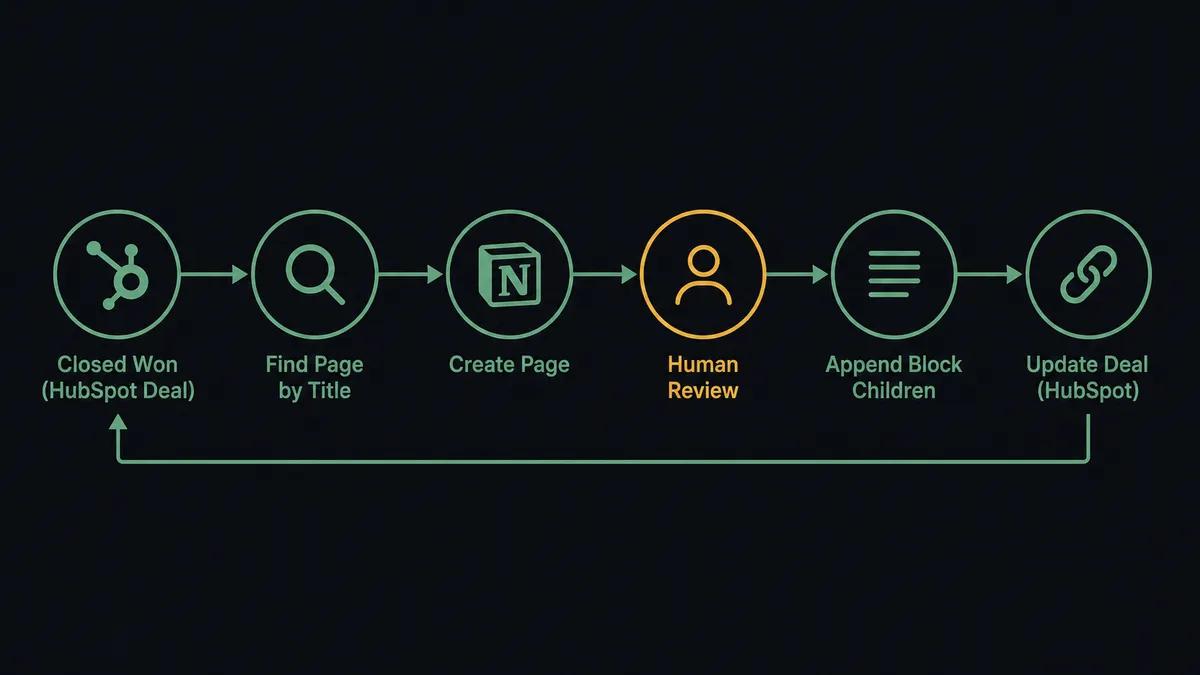
A HubSpot deal event, such as a deal moving to Closed Won, triggers a workflow that checks Notion for an existing deal page (Find Page by Title), then creates or updates one (Create Page, Append Block Children) with the deal name, amount, and next steps. FlowRunner is a visual AI-agent orchestration platform where automations run autonomously and pause for human judgment on the steps that carry real consequence. The same connection can run as a straight sync, or you can upgrade it to an AI agent that reasons about the deal and pauses for a human before a documentation page goes outside the workspace.
Why does deal documentation fall through the cracks?
A deal closes in HubSpot and the paper trail stops there. The account executive knows the terms, the discount that got approved, the implementation date that was promised on the call, but none of it makes it into a shared workspace. Six weeks later, customer success asks what was agreed to, and the answer lives in someone’s memory or a Slack thread nobody can find. Sales ops ends up rebuilding deal history from email threads because nobody had time to write it down when it happened.
The manual version of this is a spreadsheet, or worse, a Notion page someone remembers to create when they have a spare ten minutes. It gets skipped under deadline pressure, which means the deals that most need documentation, the complex ones with custom terms, are the ones most likely to have none. Ops leads want time back from chasing down deal history. Deal owners want the paperwork done without having to do it themselves.
How it works: the connection
The trigger sits on the HubSpot side: a deal reaching Closed Won, or a deal that’s gone stale in Negotiation for 14 days with no update. From there, the workflow calls Get Deal by ID to pull the full record, amount, stage, owner, and associated contact.
Before writing anything to Notion, the workflow calls Find Page by Title to check whether a documentation page already exists for that deal. If it does, it uses Update Page Properties to refresh the status and amount instead of creating a duplicate. If it doesn’t, it calls Create Page in the Notion Deals database with the deal name, close date, and amount as page properties, then Append Block Children to add the structured content: deal summary, key terms, and next steps.
For teams already using Notion to log meetings, the same pattern extends naturally. A sales call ending fires the transcription workflow, the agent creates a page in the Deals database with the call date and attendees, then appends the summary and action items as block content. The page is live before the rep checks their phone.
Can an AI agent run it, and why does a human stay in the loop?
Wiring the trigger straight to the action gets you a sync. Handing it to an agent gets you something that reasons about the deal before it acts. The agent reads the deal record, the amount, the stage, whether the account is new or an expansion, and decides how to document it, not just whether to. A small renewal at list price gets a page and moves on. A deal with a custom contract clause or a discount outside the normal range gets flagged for the AE to review the summary before it’s finalized.
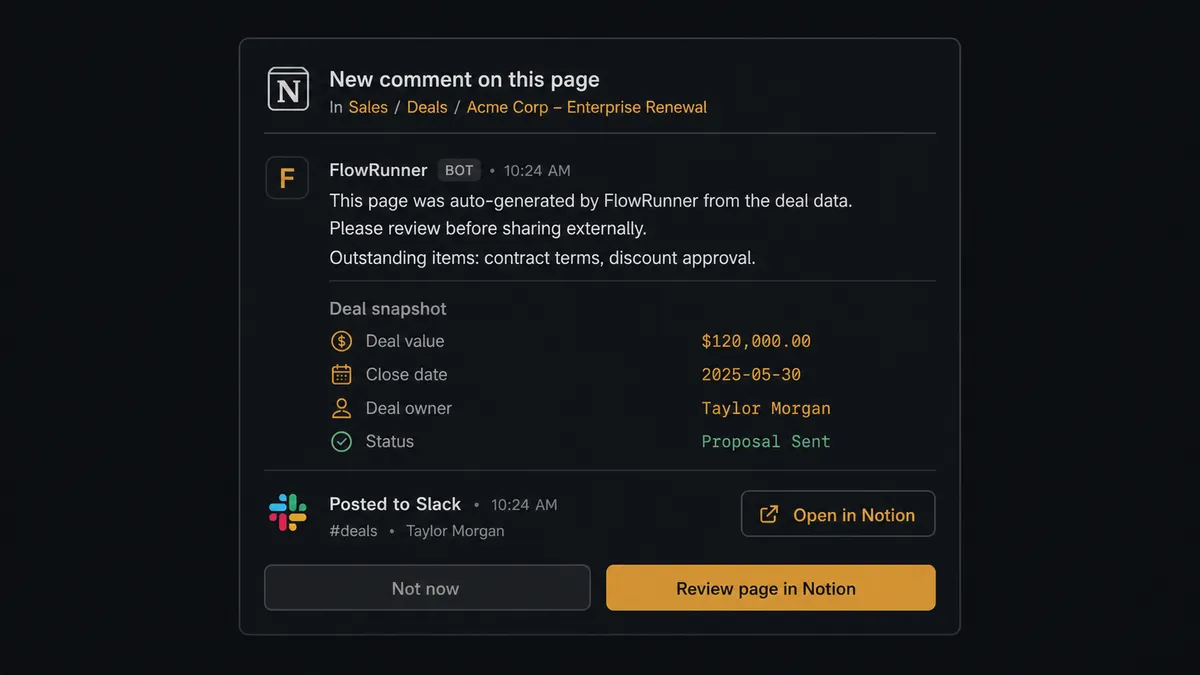
The consequential step isn’t creating the page. It’s what happens when that page needs to leave the workspace. If a summary is headed to a client, to finance, or to legal, the agent does not publish it and move on. It invokes a human-in-loop flow as a callable tool: it adds a comment directly on the Notion page, “This page was auto-generated by FlowRunner from the deal data. Please review before sharing externally. Outstanding items: contract terms, discount approval,” and sends the deal owner a Slack notification with a link. The owner reviews, edits if needed, and approves. Only then does the page go out.
This is not a sync tool guessing at a threshold. It’s an agent that packages full context, escalation reason and outstanding items included, and waits for a person to make the call. The same pattern applies on the HubSpot side: if the agent finds two contacts matching the same email while associating a deal, it pauses and asks a CRM admin which record is correct rather than picking one silently. That’s the digital andon cord: the agent stops the line the moment it hits something a human should decide.
FlowRunner vs Zapier: what’s different for HubSpot and Notion?
Zapier connects HubSpot and Notion well for simple cases: a new deal creates a new page, field for field. It’s fast to set up and familiar to non-technical teams, and that’s a real strength for straightforward syncs. Where it runs out of road is judgment. Zapier can’t decide that a $200K deal with custom terms needs a human’s eyes before the summary goes to legal. It can’t reason about which deals are stale versus which are simply slow. It executes the same path every time, regardless of what the deal actually looks like.
| Capability | Zapier | FlowRunner |
|---|---|---|
| Human review before external sharing | Not native; requires a separate manual step | Built in: agent invokes human-in-loop as a callable tool |
| Deal-level reasoning | Same path every run | Agent evaluates deal size, stage, and history before acting |
| Users included | Priced per user on most tiers | Unlimited users on every tier |
| AI model choice | Limited, tied to Zapier’s AI features | BYOK: bring your own key from your preferred provider |
| Self-hosting | Not available | Available on Enterprise |
| Pricing model | Per-task pricing that scales unpredictably | Transparent workflow-based tiers with clear execution limits |
Before and after
| Metric | Before | After |
|---|---|---|
| Deal documentation | Sales calls end with notes scattered in personal apps or not taken at all | Call summary and action items live in Notion before the rep checks their phone |
| Deal history at close | Rebuilt from memory or email threads weeks later | Notion page created automatically when the deal moves to Closed Won |
| Duplicate pages | No systematic check before creating a page | Agent checks Find Page by Title before creating any new page |
| External sharing | Whoever remembers reviews it, whoever forgets doesn’t | Agent flags pages for review and waits for approval before sharing |
| Decision audit trail | Escalation decisions made over Slack leave no searchable record | Every human decision logged as a Notion database item with context |
What can you build with HubSpot and Notion together?
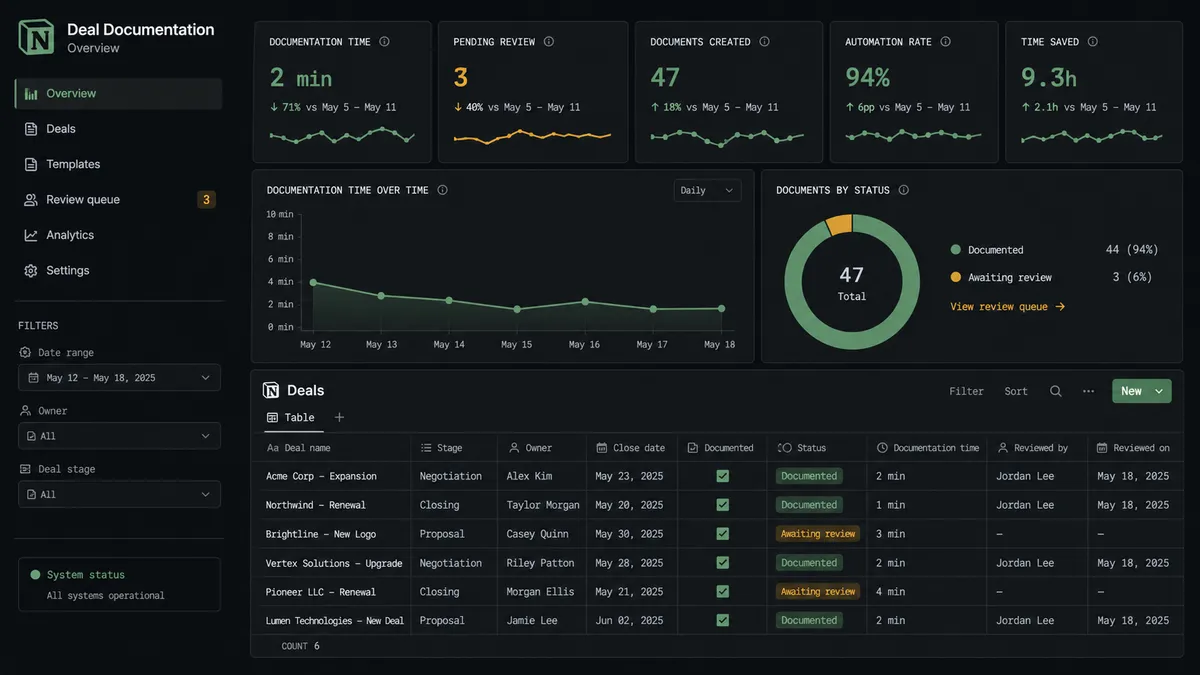
Automatic deal documentation. Every deal that hits Closed Won gets a Notion page with terms, amount, and next steps, created by the agent from the HubSpot deal record with no rep involvement.
Stalled deal escalation with a written record. When a deal sits in Negotiation for 14 days untouched, the agent messages the owner in Slack and logs the escalation as a Notion database item, so the follow-up has a searchable trail.
Due diligence tracking tied to a deal. As an M&A or enterprise deal moves through document review, the agent creates a Notion database item for each finding, document type, risk level, summary, linked back to the HubSpot deal ID.
Meeting-to-CRM loop. A sales call ends, the agent documents it in Notion, then calls Update Deal in HubSpot to attach the Notion page link directly to the deal record, so the next person to open the deal finds the notes without searching.
Common questions about connecting HubSpot and Notion
Is it free to connect HubSpot and Notion on FlowRunner? Yes. FlowRunner has a free plan with 100 executions a month, every integration included, and no credit card required, and new accounts get 14 days of Professional on top.
Do I need to write any code to connect HubSpot and Notion? No. Both connections are built visually: pick the HubSpot trigger, pick the Notion action, and map the fields. No API keys to wire up by hand and no scripts to maintain.
Does the AI agent need my own OpenAI key? FlowRunner runs on a BYOK model, so you bring your own key from your preferred AI provider. This keeps you in control of model choice and cost.
What happens when the agent isn’t sure whether to share a Notion page externally? It doesn’t guess. It adds a comment to the page explaining what’s outstanding, sends the deal owner a Slack notification, and pauses the workflow until a human approves.
Can I self-host this HubSpot to Notion workflow? Yes. FlowRunner’s Enterprise tier supports self-hosted deployment for teams that need the workflow running on their own infrastructure.
Can this run without an AI agent, just as a straight sync? Yes. You can wire the HubSpot trigger directly to the Notion action with no agent involved. The agent layer is an upgrade you add when you want reasoning and human escalation on top of the sync.
Getting started
FlowRunner has a free plan with 100 executions a month, every integration included, and no credit card required, and new accounts get 14 days of Professional on top. Connect your HubSpot account and your Notion workspace, pick the trigger that fits how your team closes deals, and add the human-in-loop step before anything goes external.
Start building at flowrunner.ai, or book time with the team at calendly.com/flowrunner/intro to walk through the setup live.
Frequently asked questions
Is it free to connect HubSpot and Notion on FlowRunner?
Yes. FlowRunner has a free plan with 100 executions a month, every integration included, and no credit card required, and new accounts get 14 days of Professional on top.
Do I need to write any code to connect HubSpot and Notion?
No. Both connections are built visually: pick the HubSpot trigger, pick the Notion action, and map the fields. No API keys to wire up by hand and no scripts to maintain.
Does the AI agent need my own OpenAI key?
FlowRunner runs on a BYOK model, so you bring your own key from your preferred AI provider. This keeps you in control of model choice and cost.
What happens when the agent isn't sure whether to share a Notion page externally?
It doesn't guess. It adds a comment to the page explaining what's outstanding, sends the deal owner a Slack notification, and pauses the workflow until a human approves.
Can I self-host this HubSpot to Notion workflow?
Yes. FlowRunner's Enterprise tier supports self-hosted deployment for teams that need the workflow running on their own infrastructure.
Can this run without an AI agent, just as a straight sync?
Yes. You can wire the HubSpot trigger directly to the Notion action with no agent involved. The agent layer is an upgrade you add when you want reasoning and human escalation on top of the sync.