Connect Bland AI to HubSpot: Every Call Becomes a CRM Field
Connect Bland AI to HubSpot so qualification calls write their own contact and deal fields, run as an AI agent that pauses for a person before any number dials.
How do you connect Bland AI to HubSpot?
You connect Bland AI to HubSpot by dispatching a Bland AI qualification call the moment a new lead lands in HubSpot, then writing Analyze Call’s typed answers back into the HubSpot contact and deal record with Update Contact, Update Deal, and Associate Objects. FlowRunner is a visual AI-agent orchestration platform where automations run autonomously and pause for human judgment on the steps that carry real consequence. The same connection can run as an AI agent that qualifies the lead by phone, updates HubSpot on its own, and stops to ask a person before it dials a number that hasn’t been approved.
The problem it solves
A new lead fills out a form and lands in HubSpot. Somewhere in a sales team’s day, an SDR is supposed to notice it, pick up the phone, ask the qualifying questions, and get back to a manager with an answer. In practice the list backs up. Leads sit for a day, then two, and the ones that get called are whatever’s on top when someone has ten free minutes. What the prospect actually said on the call survives as a note in a rep’s head or nothing at all, because nobody writes a transcript by hand between calls.
Meanwhile the CRM side has its own version of the same problem. HubSpot only knows what a rep remembered to type in. Deal stages stall because updating them isn’t the first thing on anyone’s mind after a call. Duplicate contacts pile up because nobody checks for an existing record before creating a new one. A CRM admin ends up doing cleanup work every quarter that a five-second lookup would have prevented. The spreadsheet version of this problem is the same complaint in a different tool: manual work that scales linearly with lead volume, and exceptions that fall through the cracks because nobody’s watching every record.
How it works: the connection
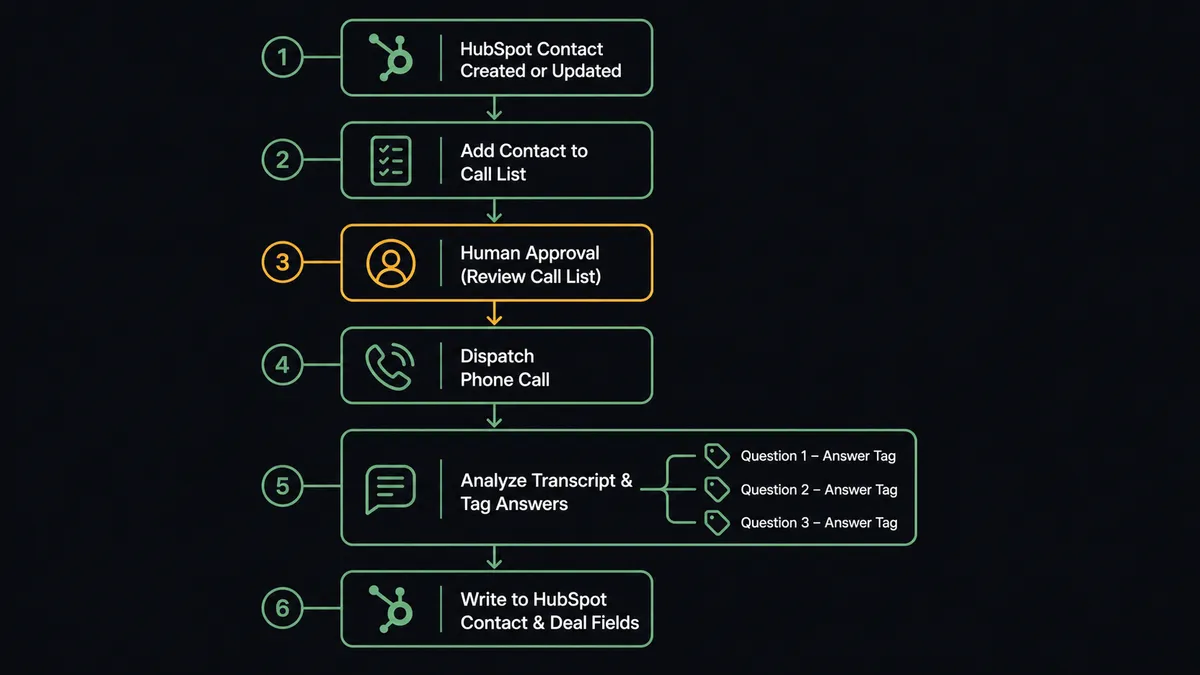
The workflow starts when a new lead lands in HubSpot. Before anything dials, the agent runs Get Contact by Email to confirm this is a genuinely new contact and not a duplicate of one already in the system. It filters the day’s leads for consent and for permitted calling hours in the lead’s time zone, then assembles a batch against a named Bland AI pathway.
Once that list is approved, Send Call dispatches the pathway to each contact, with the lead’s name and any known context injected as variables. Bland AI holds the actual conversation: greeting detection, a branching script instead of an improvised prompt, and a transfer to a human if the prospect asks for one. Get Call Details pulls the completed record, transcript, recording, and duration. Analyze Call then runs against that transcript and returns typed answers to the questions that matter for qualification: company size, budget authority, timeline, and whether the lead wants a callback.
Those answers don’t stay in Bland AI. The agent writes them straight into HubSpot. Update Contact sets lifecycle stage and lead score from what the call actually revealed. Create Deal or Update Deal opens or advances the opportunity in the right pipeline stage. Associate Objects links the deal to the contact and the company, so the relationship graph is correct without anyone dragging a card between columns. A qualified lead shows up in a rep’s queue with a transcript, a recording link, and CRM fields already filled in, not a task to go find out what happened.
Can an AI agent run it? (and why a human stays in the loop)
The agent doesn’t just execute a fixed sequence. It reads the day’s new HubSpot leads, reasons about which ones are actually eligible to call, and picks the right tools: Get Contact by Email to check for duplicates, Send Call to dispatch the pathway, Analyze Call to interpret the result, Update Contact and Update Deal to record it. It decides the order and adapts when a call comes back as voicemail instead of a completed conversation.
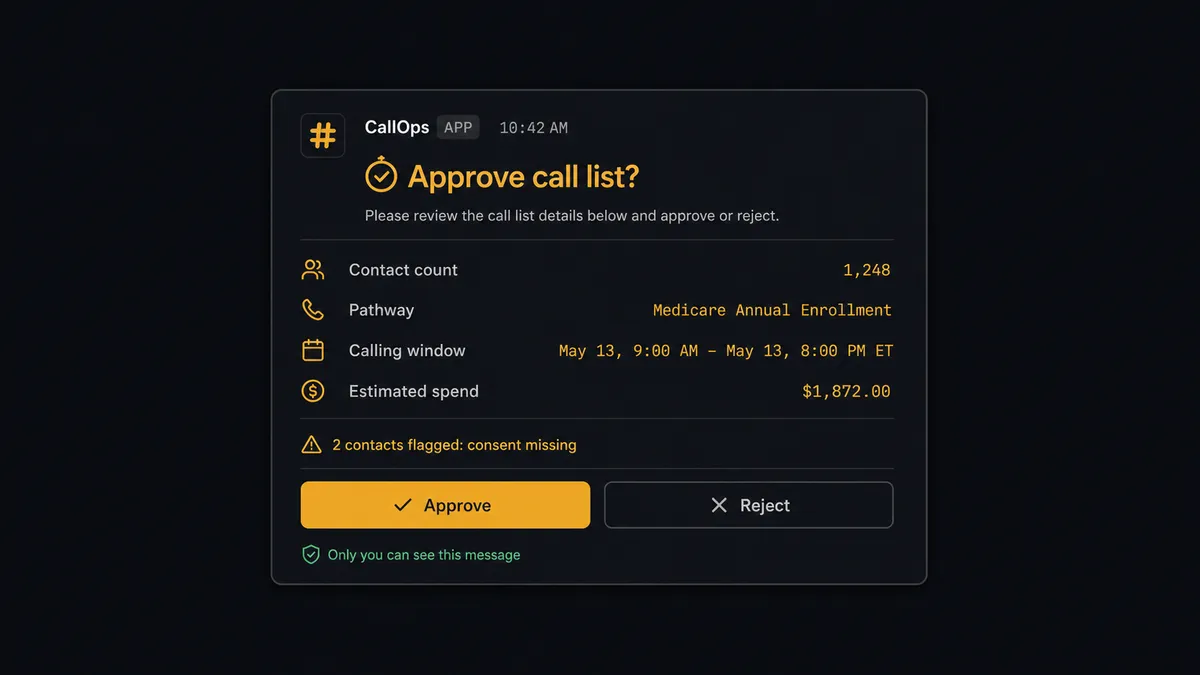
But a Bland AI call is not a draft. The moment Send Call fires, a real phone rings on the public network, per-minute billing starts, and whatever the agent says lands in a prospect’s ear under your company’s name. That is exactly the kind of step FlowRunner’s human-in-loop is built for, and it is not a hardcoded “call if X” rule. The agent assembles the batch, checks consent flags and calling windows, names the pathway it’s about to use, and estimates the spend. Then it invokes a human-in-loop tool that sends that context to the sales ops lead in Slack, not a bare notification but the actual list, pathway, and window, with an approve or reject button attached. Only after approval does a single number dial.
The same pattern shows up on the HubSpot side. If Analyze Call comes back and the agent finds two HubSpot contacts matching the same email, it doesn’t silently pick one and risk attaching a deal to the wrong record. It pauses, packages what it found (“two contacts match this email, here’s each one’s history”), and routes the decision to a CRM admin. The admin picks the correct record in one message; the agent associates the deal and logs who decided and when. This is not a sync tool quietly overwriting fields. The agent knows when to stop and ask, and both stops are wired as callable tools inside its own logic, not bolted-on conditionals.
FlowRunner vs Zapier for this workflow?
Zapier is a reasonable starting point for non-technical teams connecting Bland AI to HubSpot, and its trigger-and-action model is genuinely easy to set up for a single-step sync. Where it runs out of road is anywhere this workflow needs judgment: approving a call list before real money and real minutes get spent, or deciding which of two duplicate contacts should own a new deal. Zapier has no native concept of pausing mid-workflow for a person to weigh in with context; that logic has to be built and maintained separately, if it’s built at all.
| FlowRunner | Zapier | |
|---|---|---|
| Human-in-loop before a call dials | Native: the agent invokes an approval step as a callable tool, with context attached | Not built in; requires a separate manual check outside the Zap |
| Duplicate contact resolution | Agent detects the conflict and routes it to a CRM admin automatically | No native conflict detection; duplicates are usually caught later, if at all |
| Pricing model | Transparent workflow-based tiers with a clear execution ceiling | Per-task pricing that scales with every step in the Zap, including retries |
| Users included | Unlimited users on every tier | Team seats are metered and billed per user on most plans |
| BYOK for AI | Bring your own AI provider key | AI features run through Zapier’s own usage-based add-ons |
Before and after
| Metric | Before | After |
|---|---|---|
| Call outcomes | Confirmation and qualification calls eat the SDR’s morning, and the calls that matter most get whatever time is left | An approved pathway dials every eligible lead and handles voicemail the same way every time |
| Call records | What the prospect said survives as a scribbled note, or not at all | Transcript, recording, summary, and typed answers land directly in the systems that need them |
| Phone spend | Per-minute costs accumulate invisibly until the invoice reconstructs the month | Each call record carries its price in USD, so spend travels next to the outcome |
| CRM entry | Reps create contacts, companies, and deals by hand from call notes and form notifications | A qualified lead is in HubSpot, associated, and in the right pipeline stage in under 30 seconds |
| Duplicate records | No systematic check before creating a new contact | The agent checks by email before creating anything, and flags true conflicts for a person |
What you can build
Inbound lead qualification, start to finish. A new HubSpot lead triggers a Bland AI qualification call within the approved window; Analyze Call’s answers set lifecycle stage and open a deal, so a rep’s first touch is a warm, already-qualified conversation.
Stalled deal check-ins by phone instead of by message. When a deal sits in Negotiation past 14 days, the agent dispatches a check-in call through the approved pathway instead of a Slack ping the owner might miss, and logs the outcome straight to the deal.
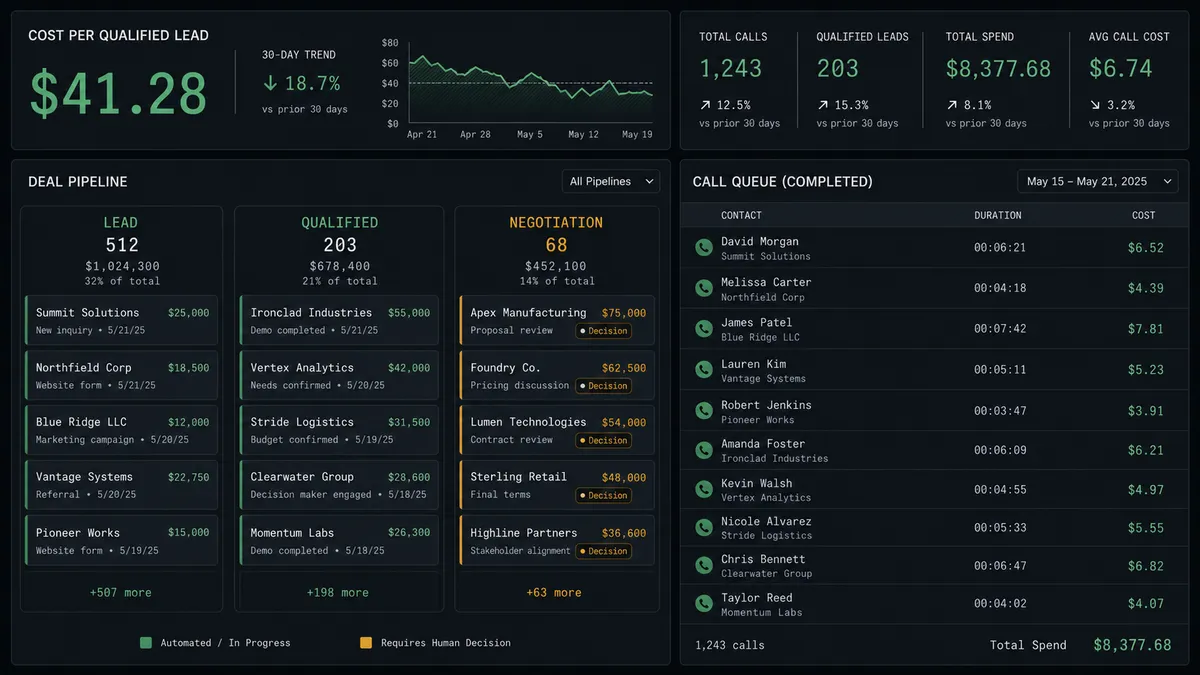
QA and cost review synced to the pipeline. A nightly run pulls Get Call Details and Get Call Recording for the day’s calls, and the agent writes cost-per-qualified-lead by campaign into a HubSpot custom field, so the number that decides whether a program expands lives where the sales team already looks.
Voicemail and callback follow-up that doesn’t get lost. Calls that end in voicemail or a reschedule request get flagged for a person, with the transcript attached, so the human callback starts with context instead of a cold redial.
Getting started
FlowRunner has a free plan with 100 executions a month, every integration included, and no credit card required, and new accounts get 14 days of Professional on top. That’s enough to connect Bland AI and HubSpot, build the qualification workflow above, and see real call and CRM data before paying anything.
Start with the Bland AI integration and the HubSpot integration to see the full list of actions available. When you’re ready to build, sign up at flowrunner.ai or book time with the team at calendly.com/flowrunner/intro.
Frequently asked questions
Is it free to connect Bland AI and HubSpot on FlowRunner?
Yes. FlowRunner has a free plan with 100 executions a month, every integration included, and no credit card required, and new accounts get 14 days of Professional on top.
Can I self-host this integration?
Bland AI and HubSpot both run on FlowRunner's cloud tiers starting at Growth ($45/mo), and the Enterprise tier adds a self-hosted deployment option with unlimited audit retention for teams that need the workflow on their own infrastructure.
Does the agent need my own OpenAI key?
Yes. FlowRunner uses a bring-your-own-key (BYOK) model, so you connect your own AI provider key and Bland AI and HubSpot run as tools the agent calls, rather than FlowRunner reselling AI usage back to you.
What happens when the agent isn't sure?
The agent stops and asks. If it can't match a call outcome to a single HubSpot contact, or a lead hasn't been approved for the calling list, it pauses the workflow and routes the decision to a person with full context, instead of guessing.
Does this replace my SDR team?
No. It removes the dialing and data entry so reps spend their time on qualified conversations, not chasing down every new lead or updating deal stages by hand. The team decides who gets called and who owns the resulting deal; the agent handles the rest.
How does Bland AI's per-minute cost show up in FlowRunner?
Every call record carries its price in USD, so cost travels with the outcome. A weekly report can show cost per qualified lead by campaign, which is the number that actually decides whether a calling program is worth expanding.