Connect WooCommerce to Google Sheets: Approved Storewide Pricing
Connect WooCommerce and Google Sheets so a finance-owned price sheet updates the storefront catalog automatically, with a person approving the batch before it goes live storewide.
How do you connect WooCommerce to Google Sheets?
Connect a row event in Google Sheets, On New Row or On New or Updated Row, to a WooCommerce action like Batch Products or Create Order Note, or connect a WooCommerce event like On Order Created to Add Row in Google Sheets so every sale logs itself. FlowRunner is a visual AI-agent orchestration platform where automations run autonomously and pause for human judgment on the steps that carry real consequence. The same connection can run as a plain trigger-to-action sync, or it can run as an AI agent that reads the row or order, decides what to do with it, and calls a human-in-loop flow as a tool before a storewide change goes live.
Why does WooCommerce pricing still live in a spreadsheet?
Finance builds the price sheet. Someone on the ops team turns it into WooCommerce changes. In most stores that means opening each product one at a time, editing the price field, saving, and moving to the next row, or running a script nobody reviews before it commits against the live catalog. Either way the spreadsheet and the storefront drift apart the moment finance edits a number, and nobody notices until a customer flags the wrong price or a margin report comes back wrong.
The same gap runs the other direction. Orders come into WooCommerce all day, and the only record anyone keeps outside the admin dashboard is whatever gets exported and pasted into a sheet, usually once a week, usually by hand. An order manager wants to know today’s revenue without opening WooCommerce. A finance lead wants a clean sales log without asking someone to re-key it. Both end up waiting on a manual export, and both are one missed export away from a number that’s simply wrong.
How does the connection actually work?
The core connection runs on real triggers and actions from both systems, not a generic sync.
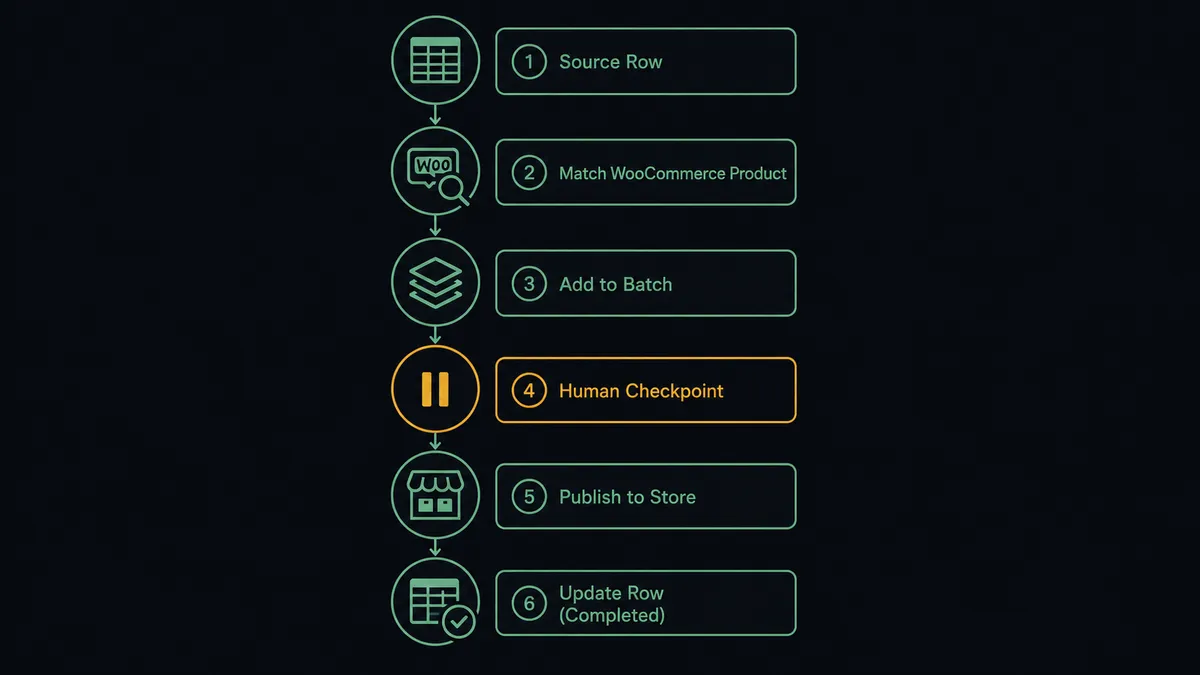
On the pricing side: Google Sheets fires On New or Updated Row when finance edits the price sheet. The flow loads the header row so it can address the SKU and price columns by name, then calls List Products or Get Product to match each row to its WooCommerce record. Instead of editing products one at a time, the matched rows go into a single Batch Products request, which creates, updates, or deletes up to 100 products in one call. Once the batch runs, an Update Row call writes the applied status back onto the sheet, so the sheet always shows what actually shipped to the storefront.
On the order side: WooCommerce fires On Order Created the moment a customer checks out. The flow reads the line items and totals and calls Add Row in Google Sheets to log the sale, giving the team a live sales record with no export step. Create Order Note can add a fulfillment note back on the WooCommerce order at the same time, so the order history and the sheet stay in sync from both ends.
Neither half needs a developer to set up. The trigger, the match, and the action are configured once, and every future row or order runs the same path.
Can an AI agent run it, and why does a human stay in the loop?
An agent does more than move data between the two systems. It reads the row, reasons about what changed, and decides what to do with the WooCommerce actions and the human-in-loop flow it has available as tools, rather than following a fixed if-this-then-that path.
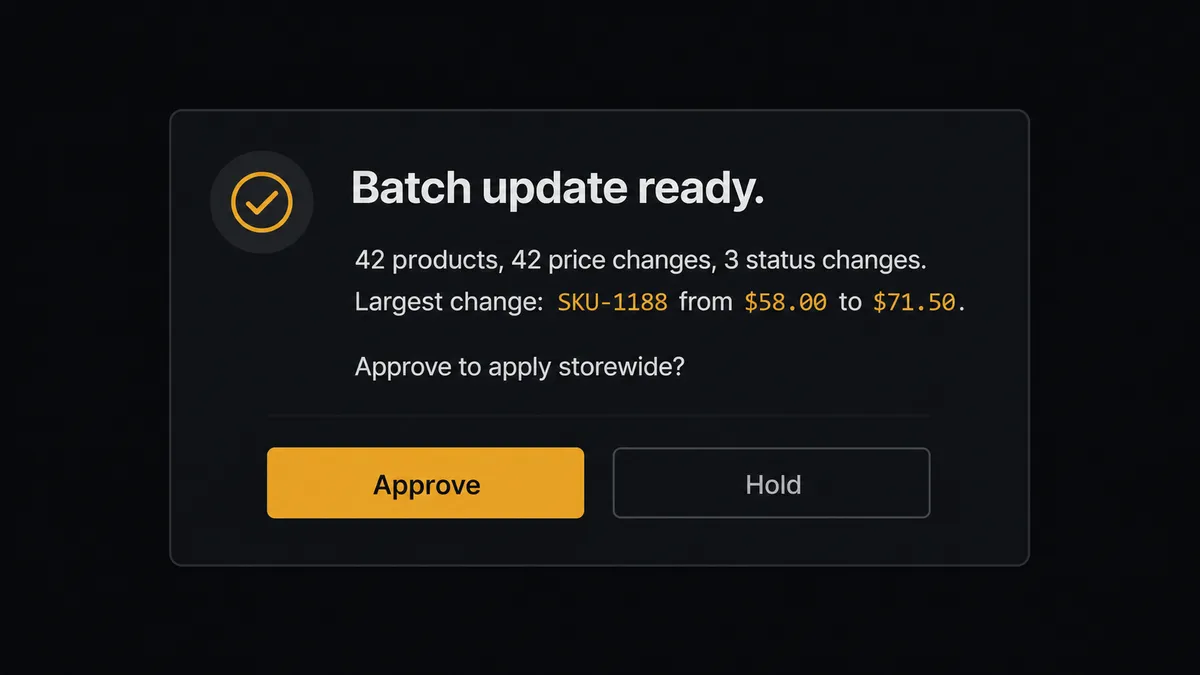
Here’s the decision moment. Finance edits the price sheet, and the agent starts matching rows to products. A single row that raises one product by a few cents does not need a person; the agent could, in principle, wave it through. But this is a batch: dozens of rows, spanning the whole catalog, about to go live storewide in one Batch Products call. The agent recognizes the scope of the change, not a fixed row count or dollar threshold, and stages it instead of running it. It packages the context: how many products are changing, how many are price changes versus status changes, and which single change moves the price the most. It posts that summary to the operations channel through Slack: “Batch update ready: [count] products, [count] price changes, [count] status changes. Largest change: [SKU] from $[old] to $[new]. Approve to apply storewide?” The named approver reviews the shape of the change and decides. Only after they approve does the agent run Batch Products.
This is not a sync tool waiting on a hardcoded rule. It’s what prospects describe as a digital andon cord: the agent knows the difference between a routine write and a storewide change, and it stops the line itself when the second kind comes up. The approver’s decision, their identity, and the timestamp are captured in the audit trail, so there’s a record of who signed off on every price that went live.
FlowRunner vs Zapier for WooCommerce and Google Sheets
Zapier is a reasonable starting point for this connection. It’s fast to set up, the WooCommerce and Google Sheets integrations are mature, and a non-technical ops person can wire a basic row-to-order sync in an afternoon without help. That’s a genuine strength, and plenty of small stores stop there.
Where it runs out of road is the moment the connection needs judgment instead of a fixed path, and the moment the team needs to see who approved a change and when.
| Zapier | FlowRunner | |
|---|---|---|
| Human-in-the-loop | Approval steps are separate add-ons bolted onto a Zap; no native reasoning about when to pause | Native. The agent decides when a change is routine versus consequential and invokes a human-in-loop flow as a tool |
| Bulk catalog changes | Each product typically processes as its own task, adding to the task count | Batch Products stages up to 100 products in one call, reviewed as a single change |
| Pricing model | Per-task pricing; a large batch or a busy order day can spike the task count fast | Workflow-based tiers with a stated execution limit per tier, no per-task surprise |
| Audit trail | Limited history on lower tiers | Every human-in-loop decision, the decider, and the timestamp are captured |
| Self-hosting | Not offered | Self-hosted Enterprise option available |
| Users included | Paid seats scale with plan | Unlimited users and workflows on every tier |
Before and after connecting WooCommerce and Google Sheets
| Before | After | |
|---|---|---|
| Price updates | Editing products one at a time in WooCommerce, or running an unreviewed script against the live catalog | A batch update is staged from the price sheet and a named approver signs off before it goes live storewide |
| Order visibility | Someone exports orders from WooCommerce and pastes them into a sheet, usually once a week | Every order writes to the sheet automatically the moment it’s created in WooCommerce |
| Spreadsheet role | The price sheet is a static file finance emails around and someone else re-keys | The price sheet is the record of truth; an edited row starts the pricing check itself |
| Reconciliation | Sheet and storefront drift apart between manual updates, and nobody notices until a customer flags it | Sheet and storefront stay matched, with the sheet showing which rows actually applied |
| Approval record | No record of who approved a price change or when | Every approval, the approver’s identity, and the timestamp land in the audit trail |
What can you build with WooCommerce and Google Sheets?
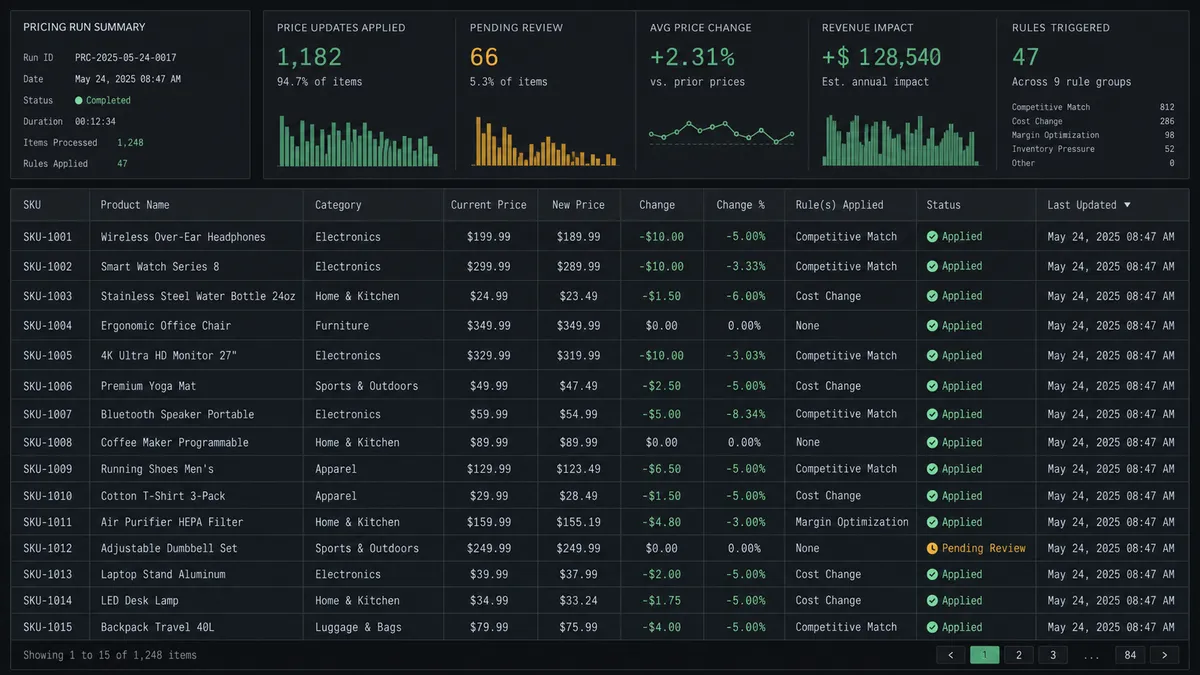
Approved bulk repricing. Finance edits the price sheet, the agent matches rows to products and stages a Batch Products request, and a named approver signs off before the new prices go live storewide.
Live sales log. Every order fires On Order Created and lands in a Google Sheets row through Add Row, so the team has a current sales record without opening WooCommerce or exporting anything.
Scheduled revenue report. On a schedule, Export Sheet turns the order log into an Excel file and the flow emails it out, so leadership gets a daily report without anyone downloading a file by hand.
Refund reconciliation. A Create Order Refund event on the WooCommerce side writes a row back to a refunds tracking sheet with Add Row, so finance has a running total without checking the WooCommerce admin.
Catalog audit. Get Rows pulls the current price sheet on a schedule and List Products pulls the live catalog, and the agent flags any product where the two disagree before it becomes a customer complaint.
Common questions
Is it free to connect WooCommerce and Google Sheets on FlowRunner? Yes to start. FlowRunner has a free plan with 100 executions a month, every integration included, and no credit card required, and new accounts get 14 days of Professional on top.
Can I self-host the WooCommerce and Google Sheets connection? Yes. A self-hosted Enterprise option is available for teams that need the flow running on their own infrastructure.
Does the agent need my own OpenAI key? FlowRunner runs on a bring-your-own-key model, so you connect the AI provider and model you already use.
What happens when the agent isn’t sure about a price change? It stops. The agent stages the batch, posts the summary to the approver’s channel, and waits for a decision instead of pushing an uncertain storewide change live.
Does this replace my WooCommerce admin or require a developer? No. The admin and the spreadsheet stay exactly as they are; FlowRunner watches for the row or order event and runs the connected actions, no code required.
Can I run this without an AI agent at all? Yes. The plain trigger-to-action connection, a row updates a price or an order writes to a sheet, works as a straightforward automation with no agent reasoning involved, if that’s all you need.
Getting started
FlowRunner has a free plan with 100 executions a month, every integration included, and no credit card required, and new accounts get 14 days of Professional on top. Set up the price sheet connection, the order log, or both, and add a human approval step wherever a change is big enough to matter. Start at flowrunner.ai or book a walkthrough at calendly.com/flowrunner/intro.
Frequently asked questions
Is it free to connect WooCommerce and Google Sheets on FlowRunner?
Yes to start. FlowRunner has a free plan with 100 executions a month, every integration included, and no credit card required, and new accounts get 14 days of Professional on top.
Can I self-host the WooCommerce and Google Sheets connection?
Yes. FlowRunner offers a self-hosted Enterprise option for teams that need the flow running on their own infrastructure, alongside the standard cloud tiers.
Does the agent need my own OpenAI key?
FlowRunner runs on a bring-your-own-key model for AI providers, so you connect the provider and model you already use rather than being locked to one vendor.
What happens when the agent isn't sure about a price change?
It stops. The agent stages the batch, posts the summary to the approver's channel, and waits. It does not push an uncertain storewide change live on its own.
Does this replace my WooCommerce admin or require a developer?
No. The WooCommerce admin and the spreadsheet both stay exactly as they are; FlowRunner just watches for the row or order event and runs the connected actions, no code required to set it up.
Can I run this without an AI agent at all?
Yes. The trigger-to-action connection (a row updates a price, an order writes to a sheet) works as a straightforward automation with no agent reasoning involved, if that's all you need.