Connect Klaviyo to WooCommerce: Orders Fuel the Next Campaign
Connect Klaviyo and WooCommerce so every order updates the buyer's profile and revenue attribution in minutes, with a human confirming the audience before any campaign sends.
How do you connect Klaviyo to WooCommerce?
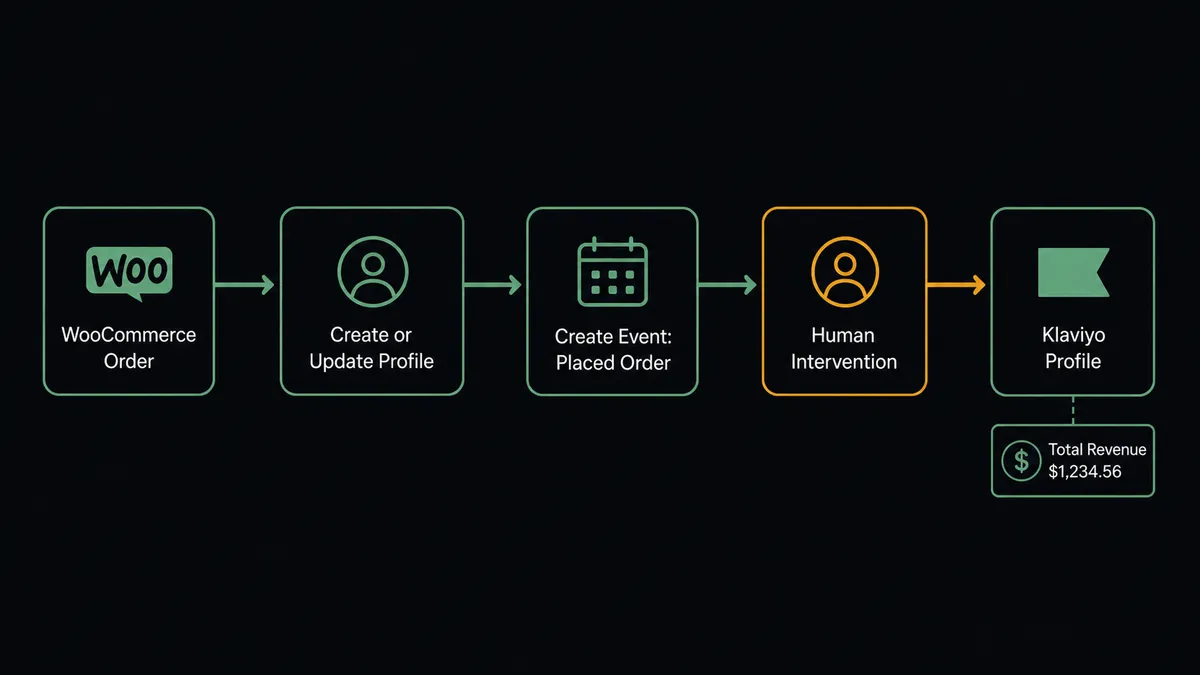
WooCommerce’s On Order Created trigger fires Klaviyo’s Create or Update Profile action for the buyer, followed by Create Event for Placed Order with the order value and line items, so every checkout updates the customer record and the revenue data behind it within minutes. FlowRunner is a visual AI-agent orchestration platform where automations run autonomously and pause for human judgment on the steps that carry real consequence. The same connection can run as an AI agent that reads each order, keeps profiles and segments current, and pauses for a person before it releases a campaign send to the audience that data built.
The problem it solves
A lifecycle marketer at a growing WooCommerce store depends on Klaviyo for winback and abandoned-cart flows, but the profile data those flows fire on is often a day or two stale. Orders get exported on a schedule, or someone remembers to run the sync script before the Monday campaign. New customers who registered Saturday do not show up in Klaviyo’s segments until Tuesday, so the flow that should have caught them fires late or not at all. Consent lives in the same gap. Whether a buyer double opted in, unsubscribed, or was manually added to a list often lives in someone’s memory rather than in Klaviyo’s records, which is a problem the moment a regulator or a platform review asks for proof.
Revenue attribution has the same manual seam. Someone has to open Klaviyo, pull the numbers behind a campaign or flow, and copy them into a report before the Monday meeting can start from real data. None of this is a big failure on its own. It is a dozen small manual touches a week that add up to stale segments, unreported revenue, and a marketer who spends Monday morning reconstructing what already happened instead of deciding what happens next.
How it works: the connection
The connection starts at checkout. WooCommerce’s On Order Created trigger fires the instant a customer completes an order, carrying the line items, billing details, and order total. FlowRunner passes that payload to Klaviyo’s Create or Update Profile action, which upserts the buyer by email so the record exists whether this is their first order or their fifth. Immediately after, Create Event logs a Placed Order event with the order value and items, which is the event Klaviyo’s flows and segments key off and the data Query Metric Aggregates later reports on.
The same pattern covers new customers: WooCommerce’s On Customer Created trigger can drive Klaviyo’s Subscribe Profiles action, recording explicit SUBSCRIBED consent and honoring double opt-in where a list requires it, rather than a bare list add that skips the consent record entirely. On the reporting side, a scheduled flow runs Query Metric Aggregates against the Placed Order metric, groups revenue by day and by campaign or flow, and writes the series into a report, so the numbers behind Monday’s meeting are pulled that morning instead of copied by hand the night before.
Can an AI agent run it? (and why a human stays in the loop)
The connection above is a sync. The upgrade is an agent that reasons about what the order data means before it acts, and that is the part n8n and Zapier do not offer. An AI Agent node holds Create or Update Profile, Create Event, Get Segment Profiles, and Send Campaign as tools, and it decides which ones to use and in what order based on what it finds, not a fixed sequence someone wired once and forgot.
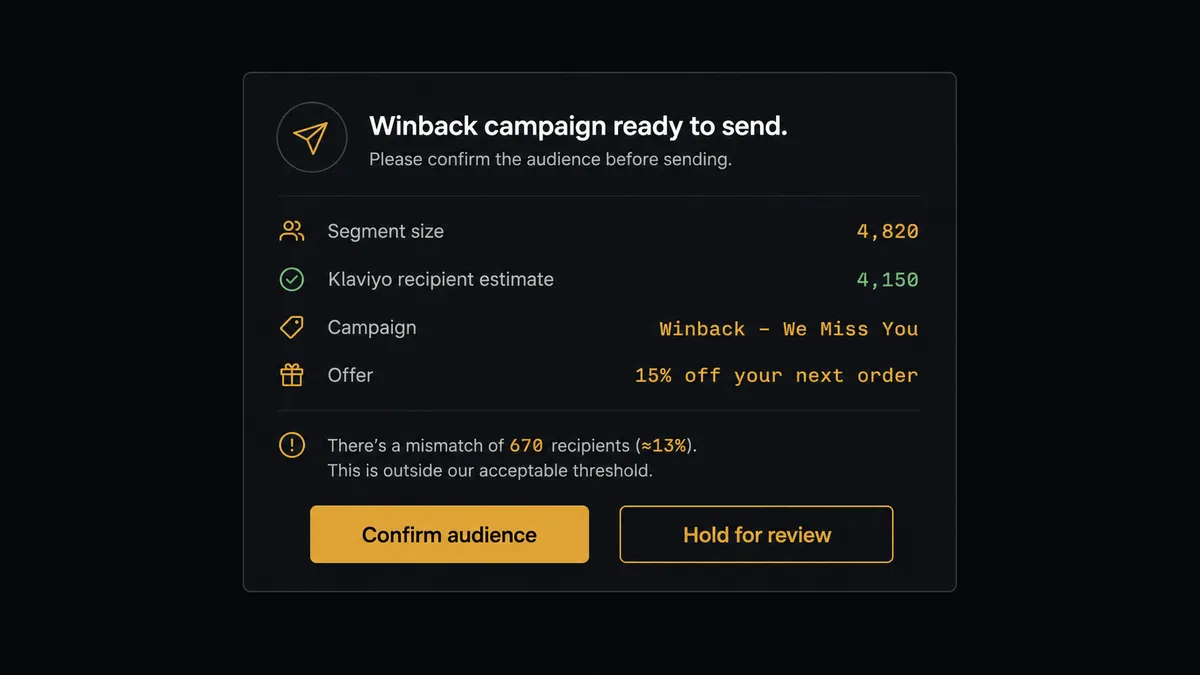
Here is the moment that matters. Klaviyo’s own workflow for a scheduled winback push runs Get Segment Profiles to pull the lapsed-customer audience, then Get Campaign Recipient Estimation to see the send size Klaviyo actually computed. The agent compares the two. Most weeks they match and the agent has nothing to escalate. But a filter typo in the segment definition, or a WooCommerce order sync that silently reactivated a batch of “lapsed” customers with fresh orders, can send an audience thousands of names off from what the marketer expects. When the agent finds that gap, it does not guess and it does not send. It invokes a human-in-loop flow as a tool, the same way it invokes Send Campaign, and posts to the marketing Slack channel: the segment count, the estimate Klaviyo returned, the campaign draft and offer, and a confirm-or-hold choice. The lifecycle marketer reviews it, confirms or fixes the segment, and the agent resumes and calls Send Campaign only after that response.
This is not a hardcoded threshold like “pause if audience size changes by more than 10%.” The agent is weighing the segment definition, the campaign’s stated audience, and the estimate together, the way a careful marketer would glance at a send and think “that’s not right” before hitting go. Prospects call this a digital andon cord: like Toyota’s quality control pull cord, the agent stops the line the instant something looks off instead of shipping the defect. This is not a sync tool. The agent knows when to stop and ask.
FlowRunner vs Zapier
Zapier is a real option here and it is fast to set up. A non-technical marketer can build a WooCommerce-to-Klaviyo Zap in an afternoon, and for a simple order-to-profile sync, that is often enough. Where it runs out of road is the moment a workflow needs judgment: Zapier’s Paths give you branching logic, but there is no agent reading the segment and the estimate together and deciding whether the numbers are close enough to trust. A human step in Zapier means someone remembers to check Klaviyo before hitting send, not a workflow that pauses itself and routes the decision automatically.
| Capability | Zapier | FlowRunner |
|---|---|---|
| Human-in-the-loop | Manual check outside the Zap, no built-in pause-and-resume | Native: the agent invokes a human approval flow as a tool and resumes on response |
| Pricing model | Per-task pricing that scales with every order and event synced | Transparent workflow-based tiers with a fixed execution allowance |
| Users included | Paid per-user on most plans | Unlimited users and unlimited workflows on every tier |
| AI provider | Built-in AI steps run on Zapier’s models | BYOK: bring your own OpenAI or Anthropic key, data stays in your account |
| Self-hosting | Not available | Free Community Edition for self-hosted deployments |
Before and after
| Category | Before | After |
|---|---|---|
| Profile freshness | Customer data reaches Klaviyo through periodic CSV imports, so flows fire on stale state | Orders upsert profiles and fire events within minutes of checkout, no import step |
| Consent records | Who is subscribed, unsubscribed, or suppressed lives in tribal memory | Subscribes and unsubscribes are explicit operations with an audit trail in the flow |
| Order-to-CRM handoff | New WooCommerce customers get copied into marketing lists by hand, so records drift | New registrations flow into Klaviyo with recorded consent, no re-keying |
| Revenue reporting | Attribution numbers leave Klaviyo only when someone remembers to copy them | Query Metric Aggregates writes the revenue series into the report automatically |
| Campaign sends | A marketer eyeballs the audience count before hitting send | The agent checks segment size against Klaviyo’s own estimate and escalates a mismatch before anyone sends |
What you can build
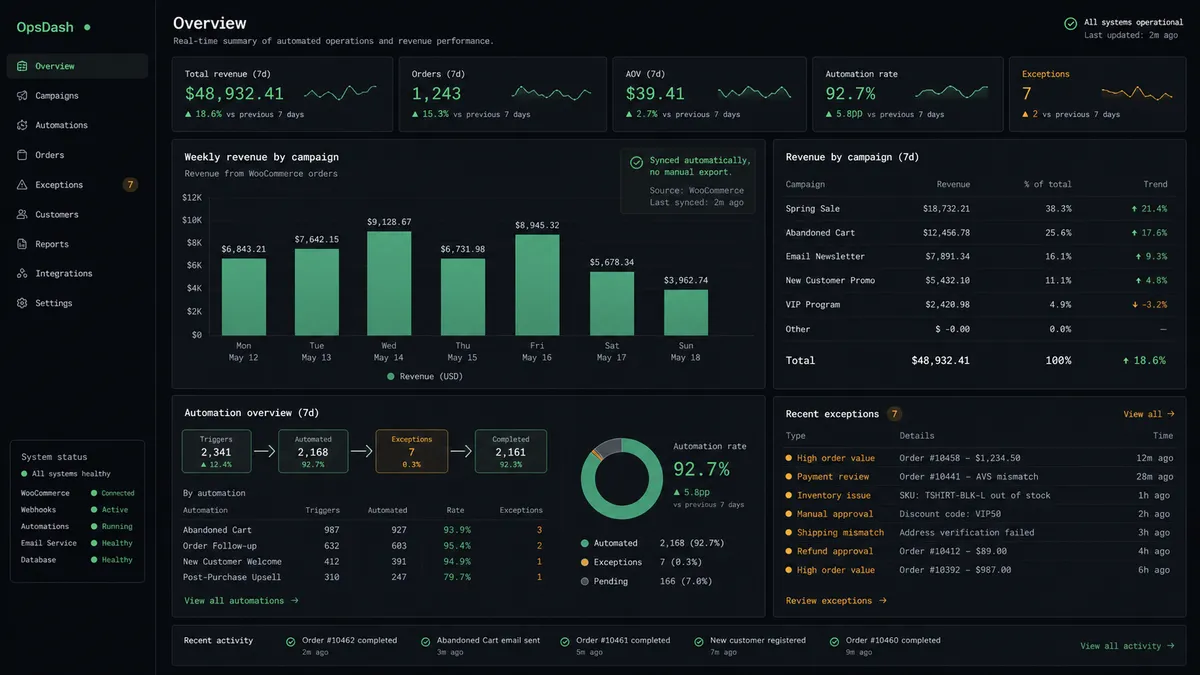
Order-to-profile sync with revenue attribution. Every WooCommerce order runs Create or Update Profile and Create Event for Placed Order, so Klaviyo’s flows and segments always reflect the latest purchase, and Query Metric Aggregates reports real revenue by campaign without a manual pull.
Winback campaigns with an audience check. A scheduled flow pulls the lapsed-customer segment with Get Segment Profiles, compares it against Get Campaign Recipient Estimation, and only calls Send Campaign after a person confirms the numbers line up.
Consent-safe customer onboarding. WooCommerce’s On Customer Created trigger drives Subscribe Profiles in Klaviyo, recording explicit consent instead of a bare list add, so new buyers enter marketing flows with a defensible opt-in record.
Suppression that tracks storefront signals. Repeated refunds or chargebacks on a WooCommerce order can trigger Suppress Profiles in Klaviyo, stopping email to a problem account without touching their underlying consent history.
Flow launches with a review step. Before an agent flips an automation flow live with Update Flow Status, it renders the templates involved with Render Template and asks the lifecycle marketer to confirm the copy and discount code, since a live flow messages every profile that enters it until someone turns it off.
Getting started
Connecting Klaviyo and WooCommerce takes a few minutes: authenticate both accounts, choose On Order Created as your trigger, and map the profile and event actions. FlowRunner has a free plan with 100 executions a month, every integration included, and no credit card required, and new accounts get 14 days of Professional on top. Review the full capability lists on the Klaviyo integration page and the WooCommerce integration page, then build the connection at flowrunner.ai or book time to walk through it at calendly.com/flowrunner/intro.
Frequently asked questions
Is it free to connect Klaviyo and WooCommerce on FlowRunner?
FlowRunner has a free plan with 100 executions a month, every integration included, and no credit card required, and new accounts get 14 days of Professional on top. Beyond the free plan, Growth is $45 per month with 12,000 executions included.
Can I self-host FlowRunner for this integration?
Yes. FlowRunner offers a free Community Edition for self-hosted, single-instance deployments. Enterprise self-hosted adds multi-instance clustering and the full compliance suite.
Does the agent need my own OpenAI or Anthropic key?
FlowRunner uses a bring-your-own-key model. You supply the API key for whichever AI provider you choose, and your data stays inside your account rather than passing through a shared model layer.
What happens when the agent is not sure about a campaign send?
The agent pauses the workflow and routes the audience and offer to a person through Slack, email, or WhatsApp, with the segment size, the campaign draft, and the estimate it is checking against. The workflow resumes the moment the person responds.
Does this replace WooCommerce's built-in email or a Klaviyo-WooCommerce plugin?
No. FlowRunner reads and writes through the Klaviyo and WooCommerce REST APIs directly, the same systems a plugin would touch, but it adds agent reasoning and a human approval step that a plugin's fixed sync rules do not have.
How many users can access the Klaviyo and WooCommerce integration?
All FlowRunner tiers include unlimited users and unlimited workflows, so marketing, ops, and support can share the same connection without per-seat cost.