WooCommerce Zoho Books Integration: Invoiced Fast, Refunds Held
Connect WooCommerce and Zoho Books so every order becomes an invoice on arrival, and run it as an AI agent that pauses for a human before a refund clears.
How do you connect WooCommerce to Zoho Books?
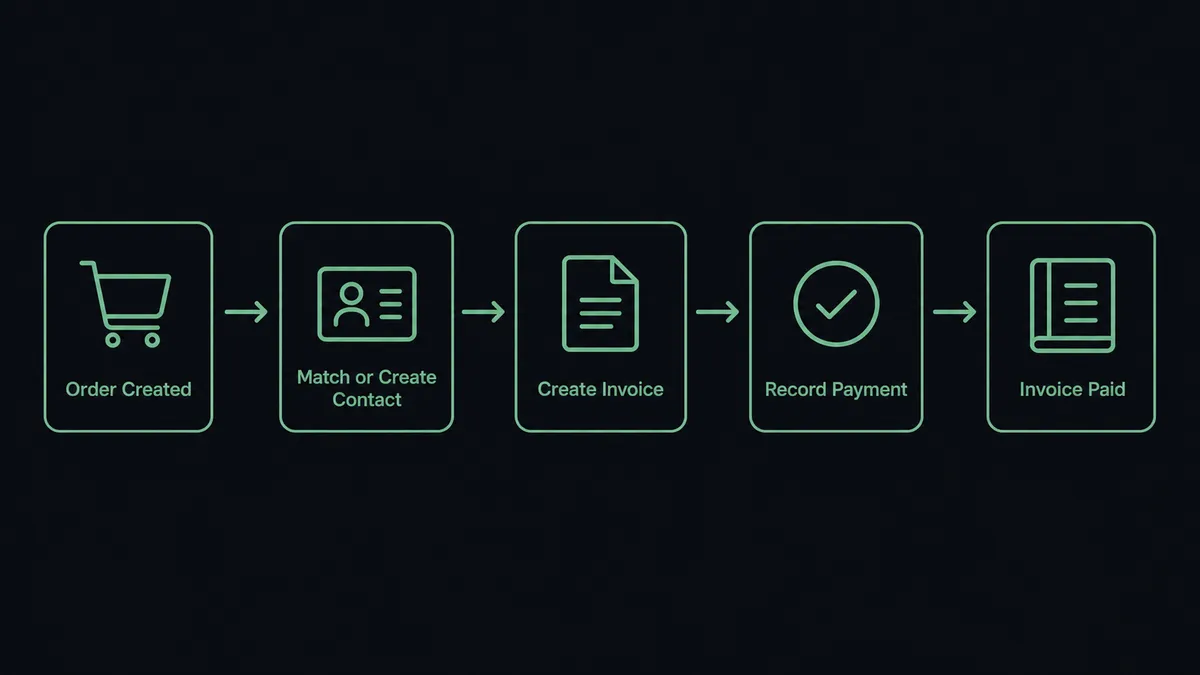
Connect WooCommerce to Zoho Books by having WooCommerce’s On Order Created trigger start an agent that matches or creates the customer in Zoho Books, posts a Create Invoice with the order’s line items, and records the payment with Record Customer Payment so the invoice lands already paid. FlowRunner is a visual AI-agent orchestration platform where automations run autonomously and pause for human judgment on the steps that carry real consequence. The same connection runs as a plain sync, or as an AI agent that handles routine orders on its own and pauses for a billing manager the moment a refund needs a second set of eyes.
The problem it solves
A billing manager at a growing WooCommerce store spends part of every morning re-keying orders into Zoho Books. Line items, customer details, tax, shipping. Each order is copied by hand from the WooCommerce admin into a new invoice, and the busier the store gets, the more this becomes the job instead of a part of it. When a customer’s information changes between orders, or an order needs a partial refund, someone has to notice, cross-reference two systems, and fix it before month-end close.
Refunds are worse. A refund issued in WooCommerce doesn’t show up in Zoho Books until someone remembers to record it, so the books drift from the store’s actual state. Multiply this across a few hundred orders a month and the AP clerk or ops lead is the one absorbing the exceptions, not the software. Spreadsheets fill the gap between the two systems, and anything that isn’t manually reconciled falls through the cracks until an auditor or a customer finds it first.
How it works: the connection
WooCommerce’s On Order Created trigger fires the moment a customer finishes checkout, carrying the line items, billing details, shipping address, and order total. The agent reads that payload and calls List Contacts in Zoho Books to check whether the customer already exists; if not, it calls Create Contact so the invoice has somewhere to attach.
With the contact resolved, the agent calls Create Invoice, mapping each WooCommerce line item, including specific product variations, to a Zoho Books invoice line, and carrying over the due date and order total. Because the order already cleared through the store’s payment gateway, the agent immediately calls Record Customer Payment to apply that payment against the new invoice, so it posts paid instead of sitting in receivables waiting for someone to close it out.
When WooCommerce’s On Order Updated trigger fires later, for example on a cancellation or a partial refund, the same flow reads the new status and decides what happens next. That’s where the connection stops being a plain sync and starts making a judgment call.
Can an AI agent run it? (and why a human stays in the loop)
A plain sync tool moves data on a rule: order created, invoice created, no judgment involved. An AI agent reads the order the way a person would. It checks the refund or cancellation against the customer’s order history, the amount involved, and a dollar threshold the billing manager sets, and it decides whether this is routine or worth a second look.
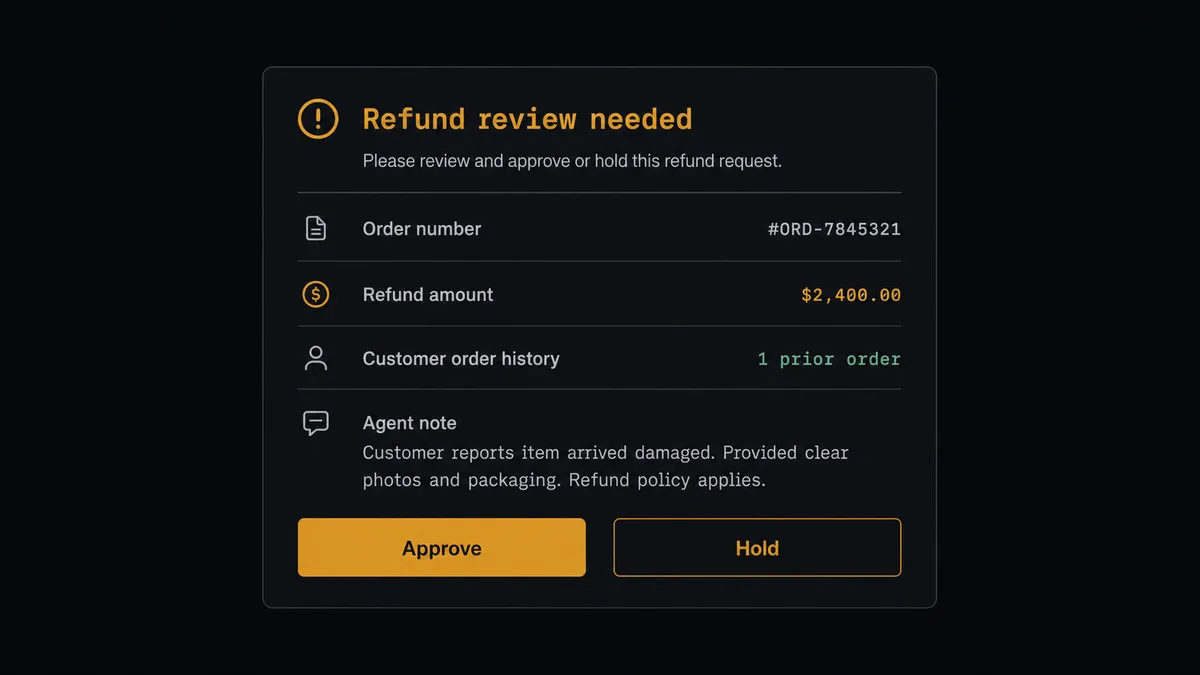
Here’s a real decision moment. A $180 refund on a first-time customer’s order is routine; the agent calls Create Order Refund in WooCommerce and Create Credit Note in Zoho Books and moves on. A $2,400 refund request on an order the agent flagged days earlier as high-value is not routine, so the agent stops. It packages the order number, the original amount, the refund amount, the customer’s order history, and its own reason for flagging it, and posts that to the billing manager’s Slack channel: approve, and the agent runs the refund in both systems in seconds; hold, and nothing moves until someone responds.
This is not a sync tool. The agent knows when to stop and ask. Prospects who’ve seen this pattern before call it a digital andon cord, the same idea as Toyota’s line-stop cord: the agent pulls it the moment it hits a decision that carries real money, rather than plowing ahead on autopilot.
FlowRunner vs Zapier
Zapier is a reasonable place to start this connection. It’s fast to set up, has native WooCommerce and Zoho Books triggers, and a non-technical billing manager can build the basic order-to-invoice zap without help. That’s a real strength, and for a store that only needs orders copied into invoices with no exceptions handling, it’s often enough.
Where it runs out of road is the refund, the duplicate customer, the order that doesn’t fit the rule. Zapier can branch on a condition, but it can’t reason about an order the way a person would, and it has nothing built in to pause a flow, route a decision to a human with context, and resume automatically once someone responds.
| Capability | Zapier | FlowRunner |
|---|---|---|
| Human-in-the-loop | Bolt-on: manual review steps or none | Native: agent invokes a human-approval flow as a callable tool |
| Refund/exception judgment | Rule-based branching only | Agent reads context and decides what needs a person |
| Users included | Priced per seat on most plans | Unlimited users on every tier |
| AI provider | Fixed to Zapier’s built-in AI | Bring your own key (BYOK) for the AI provider you choose |
| Self-hosting | Not available | Community Edition free; Enterprise self-hosted with full compliance |
| Pricing model | Per-task pricing that scales with volume | Transparent workflow-based tiers, unlimited workflows on every tier |
Before and after
| Metric | Before | After |
|---|---|---|
| Invoice creation | Billing manager re-keys each order into Zoho Books by hand | Invoice posts within seconds of On Order Created firing |
| Payment status | Orders sit as open receivables until someone reconciles them | Record Customer Payment marks the invoice paid on arrival |
| Refund visibility | Refunds in WooCommerce go unrecorded in Zoho Books until noticed | Every refund and cancellation is evaluated the moment the order updates |
| Refund approval | No consistent review before a refund posts | Refunds above the threshold pause for a named approver, on the record |
| Customer records | Duplicate or mismatched contacts drift between systems | Agent matches the existing contact or creates one, avoiding duplicates |
What you can build
Order-to-invoice on arrival. Every WooCommerce order becomes a Zoho Books invoice with a matched or newly created contact and a recorded payment, no manual entry required.
Refund review gate. Cancellations and refunds above a set dollar amount pause for a billing manager’s approval before Create Order Refund and Create Credit Note run, while small refunds process automatically.
Variable-product invoicing. Orders containing specific product variations, sizes, colors, bundles, invoice with the correct line-item detail instead of collapsing to a generic product line.
Estimate-to-order handoff. A Zoho Books estimate marked accepted can trigger a draft WooCommerce order for a custom or made-to-order item, keeping sales and fulfillment on the same page.
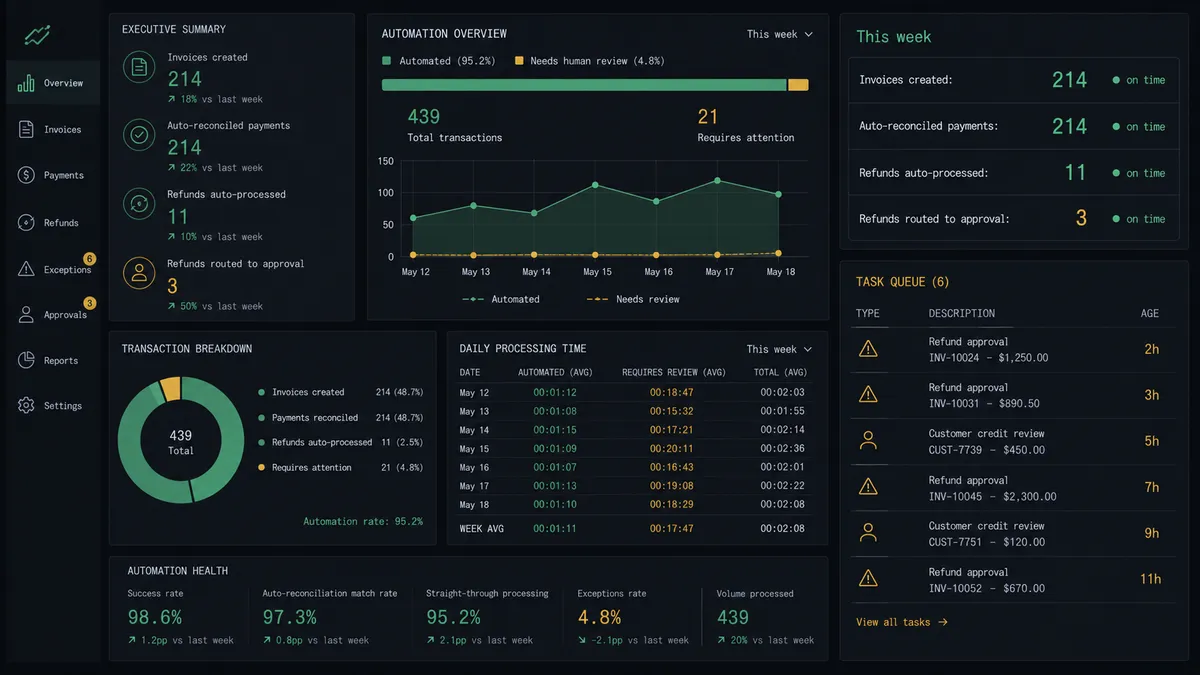
Monthly reconciliation summary. The agent compiles the week’s invoices, payments, and pending approvals into a summary posted to the finance channel, so nothing waits for someone to remember to check.
Getting started
FlowRunner has a free plan with 100 executions a month, every integration included, and no credit card required, and new accounts get 14 days of Professional on top. Set your refund threshold, pick the approval channel your billing manager already uses, and turn the flow on.
Start at flowrunner.ai, or book a walkthrough at calendly.com/flowrunner/intro to see the refund approval step running against your own order data.
Frequently asked questions
Is it free to connect WooCommerce and Zoho Books on FlowRunner?
Yes to start. FlowRunner has a free plan with 100 executions a month, every integration included, and no credit card required, and new accounts get 14 days of Professional on top.
Can I self-host the WooCommerce to Zoho Books connection?
Yes. FlowRunner's Community Edition is a free self-hosted option, and the self-hosted Enterprise tier adds the full compliance suite for teams that need audit retention and SSO on-premises.
Does the agent need my own OpenAI key?
FlowRunner uses a bring-your-own-key model for AI providers, so you connect your own Claude, OpenAI, or other provider key. Your WooCommerce and Zoho Books credentials are separate OAuth and API connections, not shared with the AI provider.
What happens when the agent isn't sure whether to approve a refund?
It doesn't guess. The agent pauses the flow, posts the order, the refund amount, and its reasoning to the channel a controller already watches, and waits for a decision before it touches money in either system.
Does this work for both simple and variable products?
Yes. WooCommerce line items, including specific product variations, map directly to Zoho Books invoice line items, so a size or color variant invoices the same way a simple product does.
Can the same flow also record customer payments and credit notes?
Yes. Record Customer Payment marks the Zoho Books invoice paid the moment the order clears, and approved refunds post a Credit Note in Zoho Books alongside the Order Refund in WooCommerce.