How to Connect Typeform with Google Sheets (With or Without an AI Agent)
Connect Typeform to Google Sheets so every new form submission lands as a row automatically, optionally with an AI agent that validates the data and pauses for a human before pushing incomplete or sensitive entries downstream.

How do you connect Typeform to Google Sheets?
You use a FlowRunner workflow to watch your Typeform form with the Get Form Responses action and append each new submission as a row in Google Sheets with the Add Row action. FlowRunner is a visual AI-agent orchestration platform where automations run autonomously and pause for human judgment on the steps that carry real consequence. The same connection can run as an AI agent that validates each submission before writing it to the sheet, and invokes a human reviewer when it finds sensitive data or a missing required field.
The problem it solves
Right now, Typeform responses sit in Typeform until someone exports them. That someone is usually an ops coordinator or an office manager who downloads a CSV, opens the sheet, pastes the data in the right columns, and then manually creates whatever downstream record the submission should trigger. When the form collects client intake information, that becomes a CRM contact created by hand. When it collects event registrations, that becomes a list paste followed by a confirmation email sent one by one. The work is predictable and repetitive. It is also the exact kind of work that falls through the cracks when the team is busy or someone is out.
The sheet itself compounds the problem. It is kept current only when a person remembers to update it. A new registrant sits in Typeform for hours before they appear in the sheet. A submission with a missing field gets pasted in alongside clean rows with no flag, no hold, and no review. By the time the gap is discovered, the downstream record is already wrong or missing.
How it works: the connection
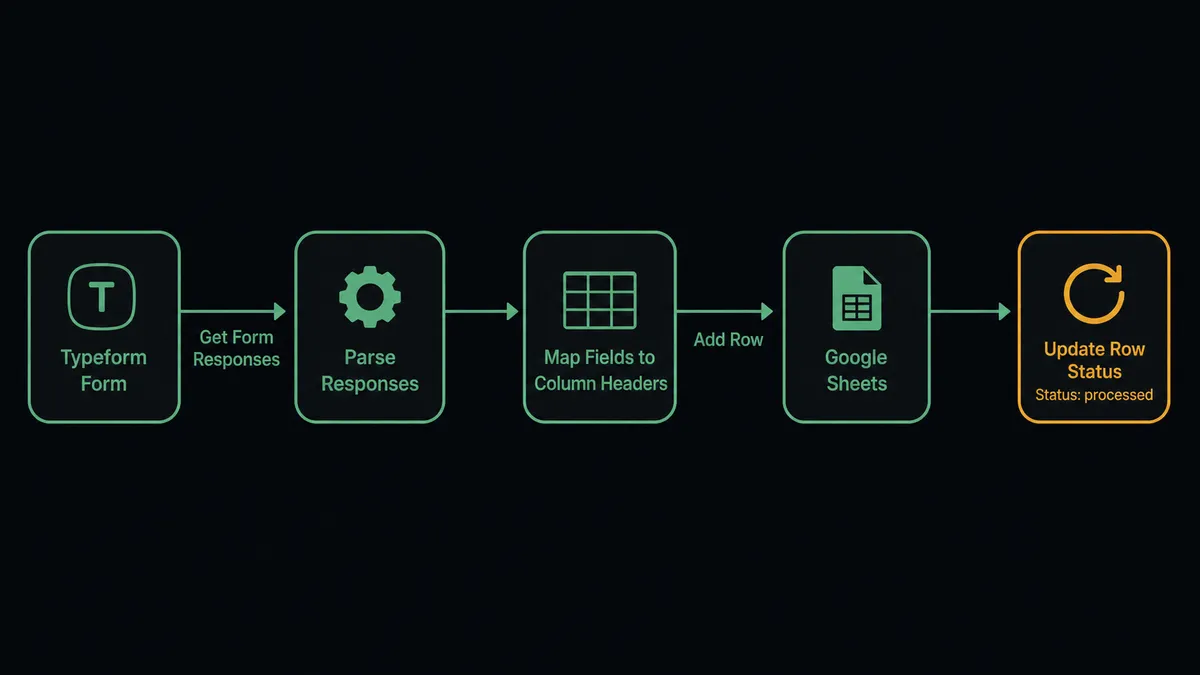
FlowRunner polls Typeform on a configurable interval using Get Form Responses. When a new submission arrives, the flow fires. The agent reads the submission data, including every field and answer, and maps it to the column structure of your Google Sheet using the Load Header Row action to confirm the mapping. It then calls Add Row to append the submission as a new row. The row lands in the sheet in real time, structured exactly as your headers expect.
After the row is written, the agent can call Update Row to write a processing status back to the same row, so the sheet shows whether the submission was processed, held for review, or forwarded to a downstream system. The sheet stops being a manual export artifact and becomes a live record of every submission as it arrives.
The integration supports the full range of form structures. If you run multiple Typeform forms (a client intake form, a feedback survey, and an event registration form), each can be its own workflow trigger, routing to the same sheet or to separate sheets within the same document. You can also use Copy Existing Form to create project-specific variants of a standard template, with each variant feeding the same downstream sheet.
Can an AI agent run it? (and why a human stays in the loop)
A standard Zapier or Make connection moves every submission to the sheet without reading it. The agent version reads the submission before it writes anything.
After Get Form Responses returns a new submission, the FlowRunner AI agent evaluates the data against the rules you give it: are all required fields present, does the submitted value look like a valid entry, and does any part of the submission indicate it should be reviewed before processing? If a client intake form submission includes a field flagged as containing healthcare or financial data, the agent does not push that row downstream automatically. It holds the row and invokes the human-in-loop subflow as a callable tool.
This is not a hardcoded threshold. The agent reads the submission and makes a judgment call. A registration form submission missing only a phone number might be processed normally and flagged as incomplete in a notes field. A healthcare intake submission with a field containing diagnosis codes gets escalated every time, because the agent’s instructions tell it those require review before the record is created in the clinical system.
When the agent escalates, it packages the full submission, the specific field that triggered the review, and a plain-language description of why it paused. The reviewer receives a Slack message: “New Typeform submission from [Name] contains information that may require compliance review before the record is created. View the full response here: [link]. Approve to proceed or reject to hold.” The reviewer responds. The agent resumes with the decision logged in the audit trail.
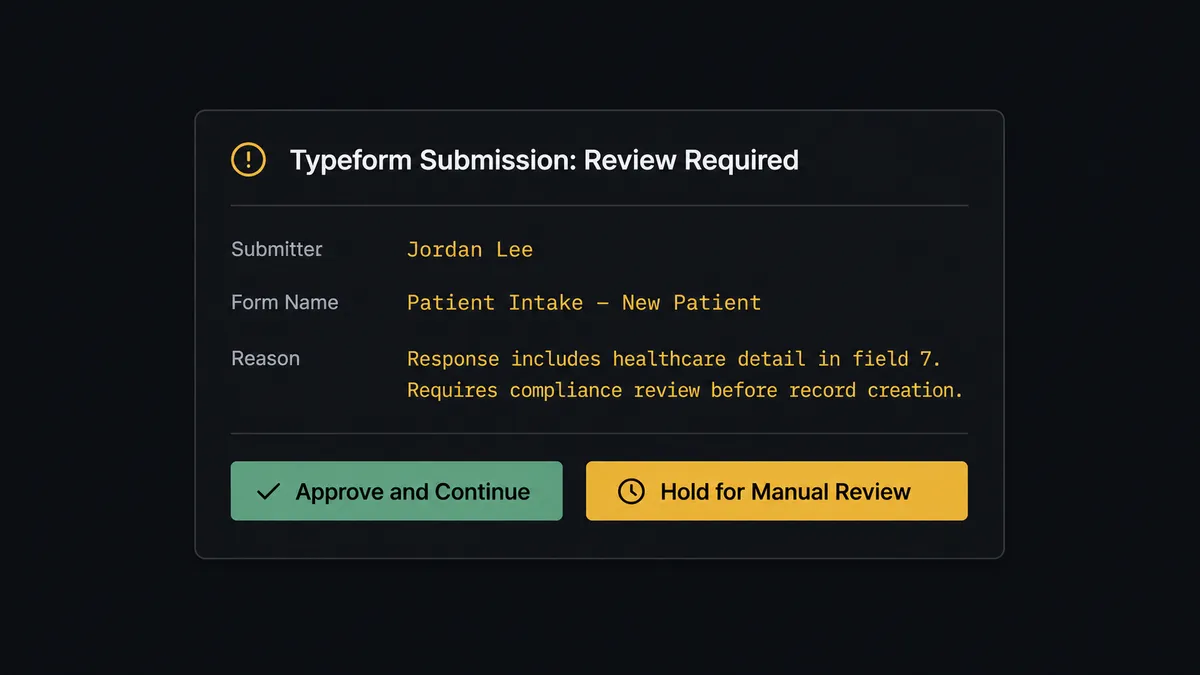
This is not a sync tool. The agent knows when to stop and ask. The reviewer never has to monitor Typeform manually to catch exceptions. The exceptions find the reviewer.
FlowRunner vs Zapier
Zapier is the tool most non-technical teams reach for first when they want to connect Typeform and Google Sheets. It works well for this connection. The Typeform trigger is reliable, the Google Sheets action is straightforward, and the setup takes under ten minutes without any technical knowledge. For a simple append-every-submission workflow, Zapier is a legitimate choice.
The differences show up when the workflow needs to do more than append.
| Capability | Zapier | FlowRunner |
|---|---|---|
| Append Typeform responses to Google Sheets | Yes | Yes |
| AI agent reads submission before writing | No (rule-based filters only) | Yes |
| Human-in-loop on sensitive or incomplete submissions | Not native; requires workarounds | Native callable tool; agent decides when to invoke |
| Write processing status back to the sheet row | Yes (multi-step Zap) | Yes |
| Unlimited users on every paid tier | No (user limits vary by plan) | Yes |
| BYOK for the AI model | No | Yes |
| Self-hosted deployment | No | Yes (Community Edition and Enterprise) |
| Audit trail for human decisions | No | Yes; decision, decider, and timestamp logged |
For a team that needs the simple connection and nothing else, Zapier’s free tier covers it. For teams that process intake forms with sensitive data, run compliance-sensitive workflows, or want the AI agent layer without building a custom integration, FlowRunner is the difference.
Before and after
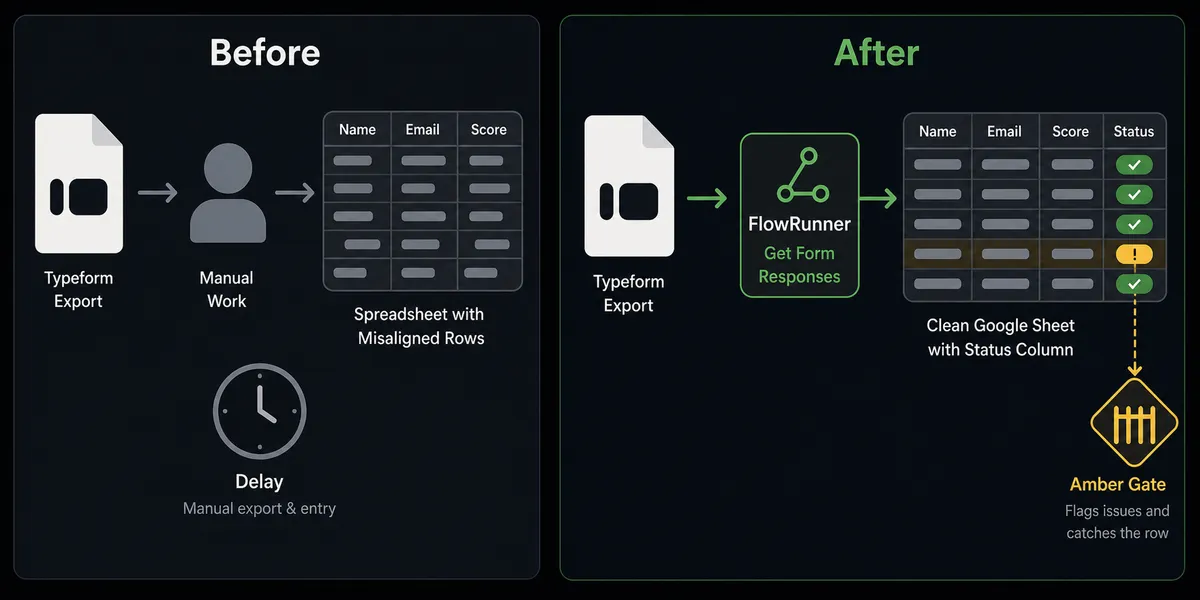
| Category | Before | After |
|---|---|---|
| Response capture | Manual CSV export; submitted responses sit in Typeform until someone downloads them | Every submission lands as a row in Google Sheets within one polling cycle |
| Data quality | Submissions with missing or sensitive fields paste in alongside clean rows with no flag | Agent validates each submission; incomplete or flagged rows are held for review before writing |
| Downstream records | Staff manually create CRM contacts, project records, or confirmation emails from the sheet | Agent creates downstream records from clean submissions automatically |
| Human review | Reviewers catch exceptions only if they notice them during the next manual export | Flagged submissions route to the reviewer via Slack with full context; clean submissions never interrupt anyone |
| Status tracking | No record in the sheet of what happened after the submission arrived | Processing status written back to the row so the sheet reflects the outcome |
| Audit trail | No log of who reviewed what or when | Every human decision captured with reviewer identity and timestamp |
What you can build
Client intake to CRM and project management. When a new client intake form is submitted, the agent calls Get Form Responses, writes the submission to the tracking sheet with Add Row, creates a contact in the CRM, and sends the kickoff invite. If the submission includes a field the agent flags for compliance review, it holds the record and routes it to the account owner before creating anything downstream.
Event registration to tracking sheet and confirmation. A webinar registration form feeds a Google Sheet that tracks all registrants. The agent appends each new submission with Add Row, updates the confirmation status with Update Row after sending the email, and routes any duplicate or suspicious entry to the ops lead for a quick check before the confirmation goes out.
Survey response processing with per-region routing. A multi-language customer survey uses Auto-Translate Form to serve Spanish and German variants. All responses route through the same FlowRunner workflow: Get Form Responses retrieves submissions from each variant, Add Row writes them to the regional sheet tab, and the agent uses Find Sheet to confirm the right tab before writing.
Scheduled export to report distribution. At the end of each week, a scheduled FlowRunner flow calls Export Sheet on the submissions tracker to generate an Excel file and emails the download URL to the team lead. No one needs to open the sheet or download a file by hand.
Row validation with human fix loop. An On New Row trigger fires when a submission is written to the sheet by another system. The agent reads the row, checks required fields, and calls Update Cell to write a validation status. Rows that fail, a missing amount, an unrecognized category, route to the data owner via Slack with the specific field that needs correction. The agent reprocesses the row once the owner confirms the fix.
Common questions
Is it free to connect Typeform and Google Sheets on FlowRunner? FlowRunner has a free plan with 100 executions a month, every integration included, and no credit card required, and new accounts get 14 days of Professional on top. Beyond the free plan, Growth is $45 per month.
Can I self-host FlowRunner? Yes. FlowRunner offers a free Community Edition for self-hosted single instances and an Enterprise tier for multi-instance deployments with full compliance features.
Does the AI agent need my own API key for the AI model? Yes. FlowRunner uses a Bring Your Own Key model, so you connect your preferred AI provider (OpenAI, Anthropic, or another) and the agent uses your key. FlowRunner never has access to your AI credits.
What happens when the agent is not sure how to handle a submission? The agent invokes a human-in-loop flow as a callable tool. It pauses execution, packages the submission data and the reason for escalation, and contacts the designated reviewer via Slack or email. The workflow resumes only after the reviewer responds.
Can I connect more than one Typeform form to the same sheet? Yes. Each form can be its own trigger in FlowRunner. You can route multiple forms to the same sheet, to different sheets in the same document, or to different sheets entirely, depending on how you structure the workflow.
Does it work if my Google Sheet already has existing data? Yes. FlowRunner’s Add Row action appends to the sheet without touching existing rows. The On New Row trigger also only fires on rows added after the trigger is activated, so historical data is not reprocessed.
Getting started
FlowRunner starts free. FlowRunner has a free plan with 100 executions a month, every integration included, and no credit card required, and new accounts get 14 days of Professional on top. Connect your Typeform account at /integrations/typeform and your Google Sheets account at /integrations/google-sheets, then build your first flow in the visual editor.
To see the AI agent and human-in-loop layer in action, book a 30-minute walkthrough at calendly.com/flowrunner/intro. Or start building now at flowrunner.ai.
Frequently asked questions
Is it free to connect Typeform and Google Sheets on FlowRunner?
FlowRunner has a free plan with 100 executions a month, every integration included, and no credit card required, and new accounts get 14 days of Professional on top. Beyond the free plan, Growth is $45 per month.
Can I self-host FlowRunner?
Yes. FlowRunner offers a free Community Edition for self-hosted single instances and an Enterprise tier for multi-instance deployments with full compliance features.
Does the AI agent need my own API key for the AI model?
Yes. FlowRunner uses a Bring Your Own Key model, so you connect your preferred AI provider (OpenAI, Anthropic, or another) and the agent uses your key. FlowRunner never has access to your AI credits.
What happens when the agent is not sure how to handle a submission?
The agent invokes a human-in-loop flow as a callable tool. It pauses execution, packages the submission data and the reason for escalation, and contacts the designated reviewer via Slack or email. The workflow resumes only after the reviewer responds.
Can I connect more than one Typeform form to the same sheet?
Yes. Each form can be its own trigger in FlowRunner. You can route multiple forms to the same sheet, to different sheets in the same document, or to different sheets entirely, depending on how you structure the workflow.
Does it work if my Google Sheet already has existing data?
Yes. FlowRunner's Add Row action appends to the sheet without touching existing rows. The On New Row trigger also only fires on rows added after the trigger is activated, so historical data is not reprocessed.