Can an AI Agent Route Zendesk Tickets Into Google Sheets?
Connect Zendesk and Google Sheets so every ticket logs itself, with an AI agent that pauses for a lead before it applies a bulk reassignment.
How do you connect Zendesk to Google Sheets?
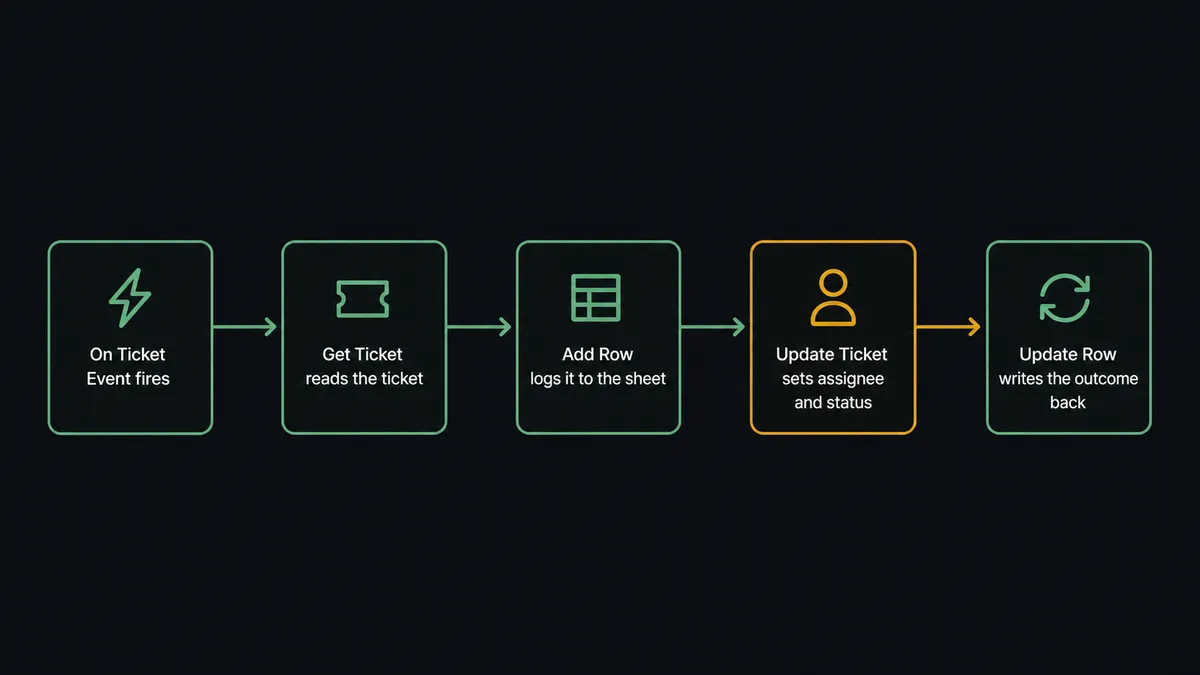
Zendesk’s On Ticket Event trigger fires the moment a ticket is created or updated, and the connected flow calls Get Ticket to read it, then Add Row in Google Sheets to log it into a tracking sheet, with Update Row writing status changes back as the ticket moves. FlowRunner is a visual AI-agent orchestration platform where automations run autonomously and pause for human judgment on the steps that carry real consequence. The same connection can run as an AI agent that reads each ticket, decides how to route it, and pulls in a support lead only when it’s about to reassign a whole batch of tickets at once, rather than asking a person to review every single update.
The problem it solves
A helpdesk manager or support ops lead usually finds out how the queue is trending by opening Zendesk, scrolling through tickets, and copying numbers into a spreadsheet by hand, or waiting for someone on the team to do it once a week. By the time that export happens, the data is already stale, and any pattern worth acting on, a spike in urgent tickets from one account, a group falling behind on response time, has had days to compound. Individual tickets get triaged as agents notice them, which means priority and assignment depend on who happens to open the queue first, not on the rules the team actually wants applied.
The bigger risk shows up at scale. When a lead needs to move a batch of tickets, say a Tier 1 group is drowning and thirty open tickets need to shift to Tier 2, that reassignment usually happens as one bulk action with no second set of eyes on it. A single fat-fingered filter can move the wrong tickets, orphan a conversation mid-thread, or bury an escalation that was already in progress. The team wants tickets triaged the moment they land and a spreadsheet that reflects reality without anyone exporting it, but they also want a batch move reviewed before it goes out, not undone after the fact.
How it works: the connection
The flow starts with Zendesk’s On Ticket Event trigger, which fires in real time on ticket creation and updates through a webhook and business-rule trigger that the extension provisions and removes automatically. When it fires, the flow calls Get Ticket to pull the subject, requester, priority, status, and custom fields, and List Ticket Comments when the full conversation matters for the decision. That data flows straight into Google Sheets: Add Row appends the ticket to a tracking sheet the moment it arrives, using Load Header Row first so the flow addresses columns like Ticket ID, Priority, Assignee, and Status by name instead of guessing at coordinates.
As tickets move through their lifecycle, the flow calls Update Ticket in Zendesk to set assignee, group, priority, or tags, and mirrors that outcome back into the sheet with Update Row, so the tracking sheet stays a live view of the queue instead of a snapshot from last week’s export. For teams that want a periodic digest on top of the live log, Export Sheet turns the current data into an Excel or PDF file and returns a URL, which a scheduled step can drop straight into an email to leadership without anyone opening the spreadsheet.
Can an AI agent run it? (and why a human stays in the loop)
A plain sync tool would apply the same rule to a single ticket update and a thirty-ticket bulk reassignment. An AI agent doesn’t. It reads each ticket as On Ticket Event fires, checks priority and tags against the routing rules, and calls Update Ticket on its own when the change affects one ticket at a time, because that’s low stakes and reversible. The agent also watches for a pattern across the tracking sheet, using Find Rows to spot when a group is accumulating enough open, aging tickets that a batch move looks like the right call.
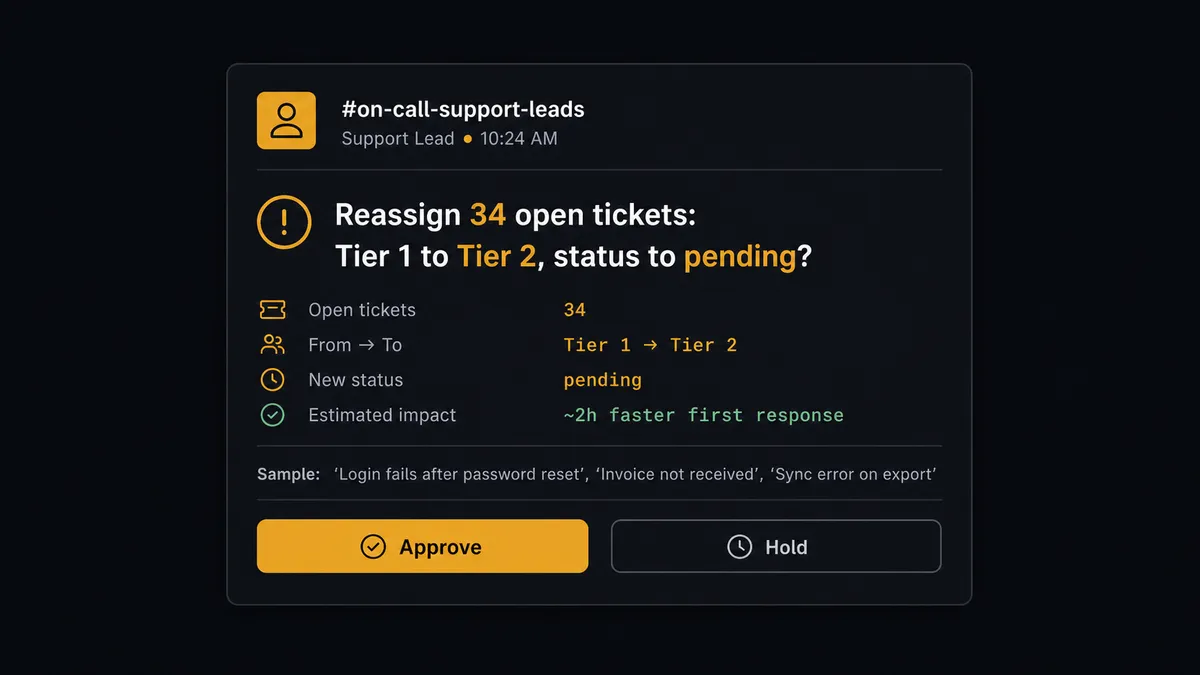
That’s the moment the agent stops. Moving dozens of tickets to a new owner or status at once can miss an SLA, orphan a conversation, or bury an escalation, so the agent invokes a human-in-loop flow as a callable tool instead of applying the change itself. It sends a support lead a message with the ticket count, the current and target group, the status change, and a sample of the affected subjects: “Reassign these 34 open tickets from the Tier 1 group to Tier 2 and set them to pending, or hold?” The lead approves or holds from that one message. On approval, the agent applies each change with Update Ticket and logs the result back to the sheet with Update Row. On hold, nothing moves and no ticket is touched. This is not a sync tool. The agent knows when to stop and ask.
FlowRunner vs Zapier
Zapier is the tool most non-technical support and ops teams already reach for when they want Zendesk and Google Sheets talking to each other, and it’s a fair starting point. It’s genuinely fast to set up a basic zap, has deep pre-built triggers for both apps, and doesn’t require anyone to think about servers or infrastructure. Where it runs out of room is the moment the workflow needs judgment instead of a fixed path: Zapier can move a ticket into a row, but it can’t read the ticket, decide whether a batch move is safe, and only ask a person when the change is big enough to matter.
| Zapier | FlowRunner | |
|---|---|---|
| Human oversight | A conditional branch, if configured, follows a fixed rule every time | An AI agent decides case by case when a change is significant enough to escalate |
| Users included | Paid per-user on most plans | Unlimited users on every tier |
| AI provider | Built-in AI limited to Zapier’s own credits and models | BYOK: connect the AI provider you already use |
| Self-hosting | Cloud only | Free self-hosted Community Edition, plus self-hosted Enterprise |
| Pricing model | Priced per task, which gets confusing as ticket volume grows | Transparent workflow-based tiers with a clear execution limit |
Before and after
| Category | Before | After |
|---|---|---|
| Ticket logging | Someone exports Zendesk data into a sheet by hand each week | Add Row logs every ticket into the tracking sheet the moment On Ticket Event fires |
| Triage | Tickets sit until an agent opens the queue and sets priority | Get Ticket and Update Ticket route each ticket the instant it lands |
| Bulk reassignment | A mass reassignment happens with no second set of eyes | A support lead approves the batch before Update Ticket applies it |
| Reporting | Reports are produced by opening the sheet and downloading a file | Export Sheet delivers the current data as a file on schedule, no one opens the spreadsheet |
What you can build
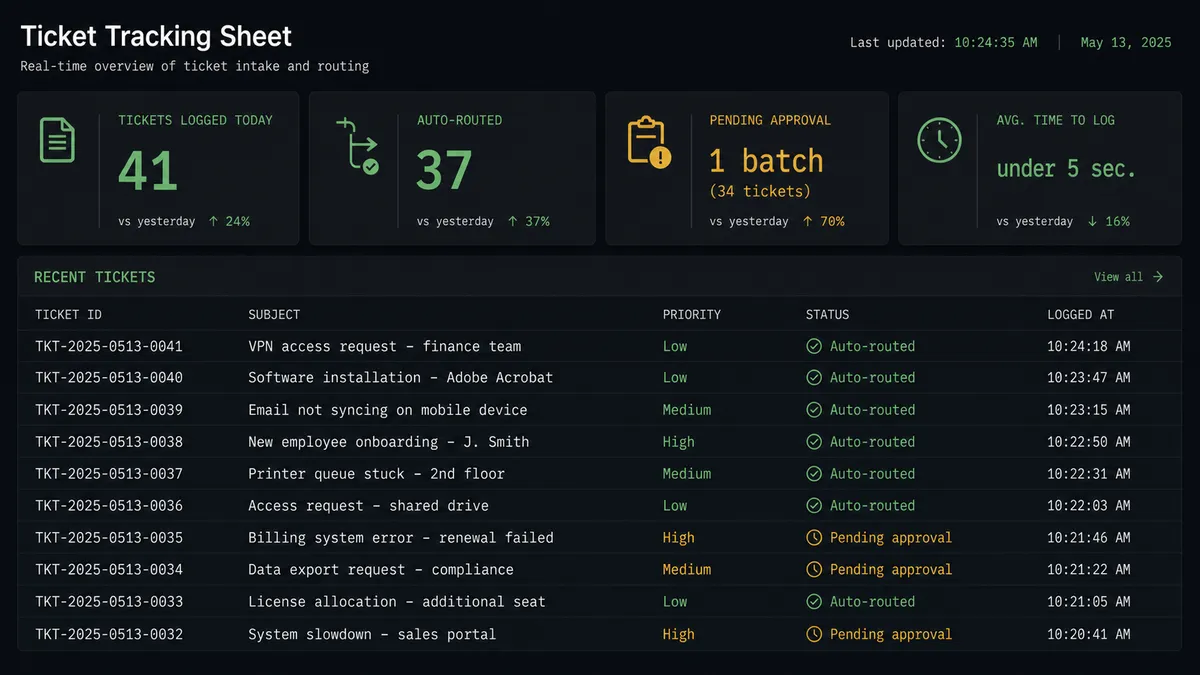
Live ticket reporting pipeline. On Ticket Event triggers Get Ticket and Add Row so every ticket lands in a tracking sheet the moment it’s created or changed, giving leadership a current view without anyone running an export.
Urgent escalation with a parallel log. For tickets that come in at urgent priority, the agent posts to the on-call channel and logs the same ticket into the reporting sheet in parallel, so the escalation and the trend data land at the same time.
Bulk reassignment with lead approval. The agent uses Find Rows to spot a group accumulating aging tickets, proposes a batch move, and waits for a support lead to approve or hold before Update Ticket touches a single record.
Weekly digest for leadership. On a schedule, Export Sheet generates the week’s ticket log as an Excel or PDF file and the flow emails it directly, so the report shows up without anyone opening Zendesk or Sheets.
Row-driven ticket creation. A new row in an intake sheet, caught by On New Row, triggers Search Users to find the requester and Create Ticket to open a support request with the right fields already set, so a form or import becomes a ticket without manual re-entry.
Common questions
Is it free to connect Zendesk and Google Sheets on FlowRunner? FlowRunner has a free plan with 100 executions a month, every integration included, and no credit card required, and new accounts get 14 days of Professional on top.
Can I self-host this workflow? Yes. The Community Edition is free for a single self-hosted instance, and self-hosted Enterprise adds multi-instance clustering and the full compliance suite.
Does the agent need my own OpenAI key? FlowRunner uses a bring-your-own-keys model, so you connect the AI provider you already use.
What happens when the agent isn’t sure whether to reassign a batch of tickets? It stops, packages the ticket count, target group, and a sample of affected subjects, and sends that to a support lead before anything moves.
Can the flow run in both directions, Zendesk to Sheets and Sheets to Zendesk? Yes, using On Ticket Event for the Zendesk-to-Sheets direction and On New Row for the Sheets-to-Zendesk direction.
How is this different from a Zapier zap between Zendesk and Google Sheets? A zap follows a fixed path every time. A FlowRunner agent reads the ticket, decides what the data means, and only pulls in a human when a change carries real weight.
Getting started
FlowRunner has a free plan with 100 executions a month, every integration included, and no credit card required, and new accounts get 14 days of Professional on top. Build the ticket logging flow first, then add the AI agent and the bulk-reassignment approval step when you’re ready to hand routing decisions to it. Start at flowrunner.ai or book time at calendly.com/flowrunner/intro to walk through your queue with someone from the team.
Frequently asked questions
Is it free to connect Zendesk and Google Sheets on FlowRunner?
FlowRunner has a free plan with 100 executions a month, every integration included, and no credit card required, and new accounts get 14 days of Professional on top. You can build and test the full Zendesk to Google Sheets flow, including the human-in-loop approval step, before paying anything.
Can I self-host this workflow?
Yes. The Community Edition is free for a single self-hosted instance, and the self-hosted Enterprise tier adds multi-instance clustering with the full compliance suite for larger support operations.
Does the agent need my own OpenAI key?
FlowRunner uses a bring-your-own-keys model, so you connect the AI provider you already have a relationship with. There is no markup on model usage baked into the FlowRunner price.
What happens when the agent isn't sure whether to reassign a batch of tickets?
The agent does not guess. It stops, packages the ticket count, the current and target group, and a sample of affected subjects, and sends that context to a support lead. Nothing moves until the lead approves or holds.
Can the flow run in both directions, Zendesk to Sheets and Sheets to Zendesk?
Yes. The same agent can log ticket events into a tracking sheet and, separately, watch a sheet for new rows and open a Zendesk ticket from them, using the trigger that fits each direction.
How is this different from a Zapier zap between Zendesk and Google Sheets?
A zap moves data on a fixed if-this-then-that path. A FlowRunner agent reads the ticket, decides what the data means, and only pulls in a human when a change carries real weight, like a bulk reassignment, rather than on every single update.