Connect Zendesk to Notion: Every Escalation Logged for Review
Connect Zendesk and Notion so every urgent ticket and bulk reassignment lands in a Notion decision log, and run it as an AI agent that pauses for a support lead before the batch moves.
How do you connect Zendesk to Notion?
Connect Zendesk to Notion by using Zendesk’s On Ticket Event trigger, which fires the moment a ticket is created or updated, to drive Notion’s Create Database Item action, which writes a record of the ticket or the decision made about it into a Notion database. FlowRunner is a visual AI-agent orchestration platform where automations run autonomously and pause for human judgment on the steps that carry real consequence. Run this same connection as a standing sync, or upgrade it to an AI agent that reads each ticket, decides whether it needs a human’s sign-off, and only then writes the outcome to Notion.
Why urgent Zendesk tickets need a Notion paper trail
A support lead’s day starts with a queue, not a plan. Tickets land, get triaged one by one, and urgent ones sit next to routine ones until someone opens each one to check. When something needs to move fast, like an outage ticket or a reassignment across a dozen open cases, the decision to act usually happens in a Slack thread or a hallway conversation. Nobody writes it down. Three weeks later, when a customer asks why their ticket sat for two days, there is no record of who decided what and why.
The spreadsheet version of this problem is a manual log someone updates at the end of the day, if they remember. It is always incomplete, because the person closest to the decision is also the person too busy to document it. Escalations fall through the cracks not because the team is careless, but because the tool that handles the ticket and the tool that should record the decision have never talked to each other. Zendesk knows the ticket. Notion, if anyone updates it, knows the decision. Connecting them closes that gap without adding a step to anyone’s day.
How the connection works
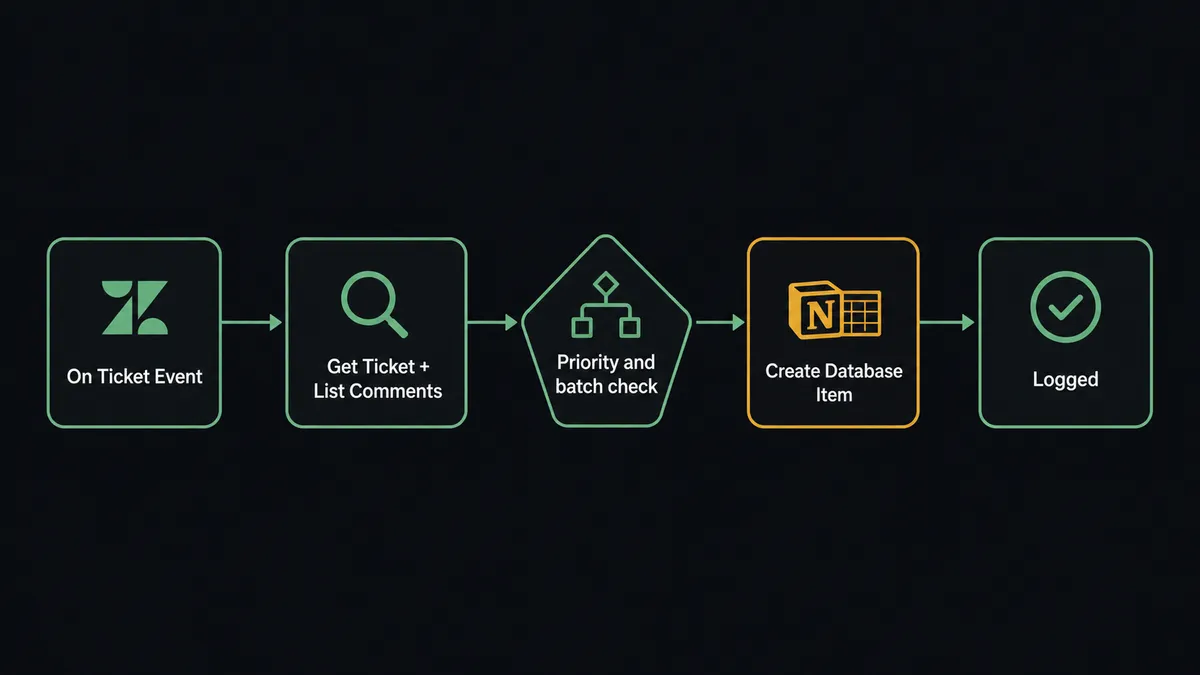
The flow starts with Zendesk’s On Ticket Event trigger, delivered through a webhook and business-rule trigger that FlowRunner provisions and removes automatically. It fires in real time whenever a ticket is created or updated, so nothing waits for a scheduled poll.
From there, the flow calls Get Ticket and List Ticket Comments to pull the subject, priority, requester, assignee, tags, and the full comment history. That gives the flow everything it needs to evaluate the ticket the way a person would, not just the metadata. For routine tickets, the flow applies routing directly with Update Ticket, setting the assignee and group so the ticket lands with the right team already prioritized.
For urgent tickets and for any change that would move more than a handful of tickets at once, such as a bulk reassignment across a triaged batch, the flow writes the decision to Notion with Create Database Item, recording the ticket count, the current and target assignee, the status change, and a sample of affected subjects into a decision log database your team already has open. If the output needs to live as a document rather than a row, the flow uses Create Page and Append Block Children to write a formatted summary instead. Either way, the record lands in Notion before anyone has to ask what happened.
Can an AI agent run this, and why does a human still approve the escalation?
A sync tool can move a ticket field or write a database row on a schedule. It cannot tell the difference between a routine reassignment and one that puts an SLA at risk. That distinction is exactly what an AI agent adds. The agent reads the ticket data with Get Ticket and List Ticket Comments, reasons about the priority, the group, and the size of the batch it is about to touch, and picks its next action from the same set of Zendesk and Notion tools a person would use.
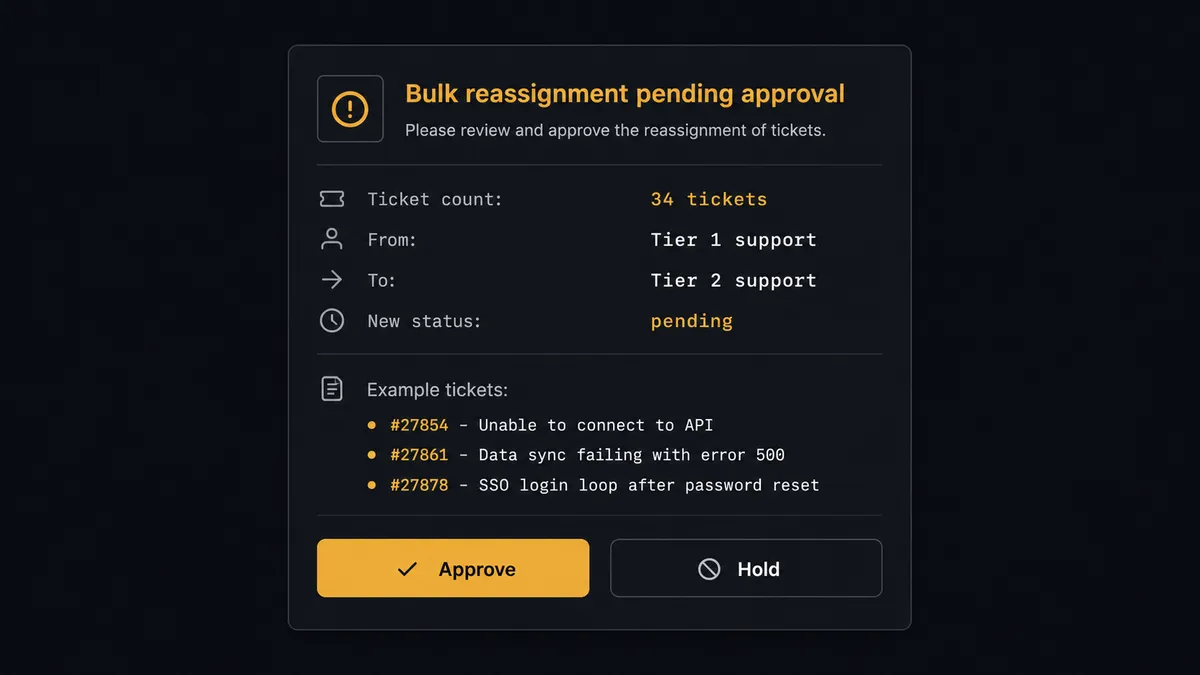
Here is a real decision moment. A flow proposes reassigning 34 open tickets from the Tier 1 group to Tier 2 and setting them to pending. The agent does not apply this automatically, even though it has the permissions to do so. Moving that many tickets at once can miss an SLA, orphan a conversation, or bury an escalation that was already in progress, so the agent invokes a human-in-loop flow as a callable tool. It posts to the on-call lead: “Reassign these 34 open tickets from Tier 1 to Tier 2 and set them to pending, or hold?”, along with the ticket count, the current and target assignee, and a sample of the affected subjects. The workflow pauses. The lead approves or holds. If approved, the agent applies each change with Update Ticket and then writes the full record, what it found, what it proposed, what the human decided, and when, to the Notion decision log with Create Database Item. If held, nothing moves, and the hold itself is logged.
This is not a sync tool. The agent knows when to stop and ask, and it treats the escalation and the approval as one event worth remembering, not two separate systems that happen to run near each other. Prospects who have seen this pattern call it a digital andon cord: the automation runs on its own until it hits a decision with real consequence, then it pulls the cord and waits for a person.
FlowRunner vs Zapier for Zendesk and Notion
Zapier is a reasonable starting point for a non-technical team that wants a basic Zendesk-to-Notion sync, and its Zendesk and Notion integrations are mature and well documented. Where it runs out of room is anything that needs judgment: Zapier’s filters and paths can check a field value, but they cannot read a ticket’s full comment history, weigh the size of a batch change, and decide on their own whether a person needs to sign off.
| Capability | FlowRunner | Zapier |
|---|---|---|
| Human-in-the-loop | Native: the agent invokes a human approval flow as a callable tool, mid-run, based on its own judgment | Not native: conditional paths follow fixed rules, no reasoning step |
| AI agent that chooses its own tools | Yes: the agent picks from Zendesk and Notion actions based on ticket context | No: each Zap follows a fixed trigger-to-action path |
| Users included | Unlimited on every tier | Priced per user on higher tiers |
| Self-hosting | Free Community Edition, plus a self-hosted Enterprise option | Cloud only |
| Pricing model | Transparent workflow-based tiers with a fixed execution limit | Per-task pricing that scales with volume, which can surprise teams at busy periods |
Before and after
| Category | Before | After |
|---|---|---|
| Ticket triage | Tickets triaged one by one as agents open each one manually | On Ticket Event routes each ticket the moment it lands |
| Urgent escalations | Urgent tickets sit in the queue before anyone routes them | The agent alerts the on-call channel as soon as an urgent ticket appears |
| Bulk reassignments | A mass reassignment happens with no second set of eyes | A lead approves any batch reassignment before it applies |
| Decision records | Escalation decisions made in Slack leave no searchable record | Every escalation decision is logged to Notion with full context |
| Documentation lag | Nobody updates the decision log until someone remembers | The decision log updates the moment the human responds |
What you can build with Zendesk and Notion
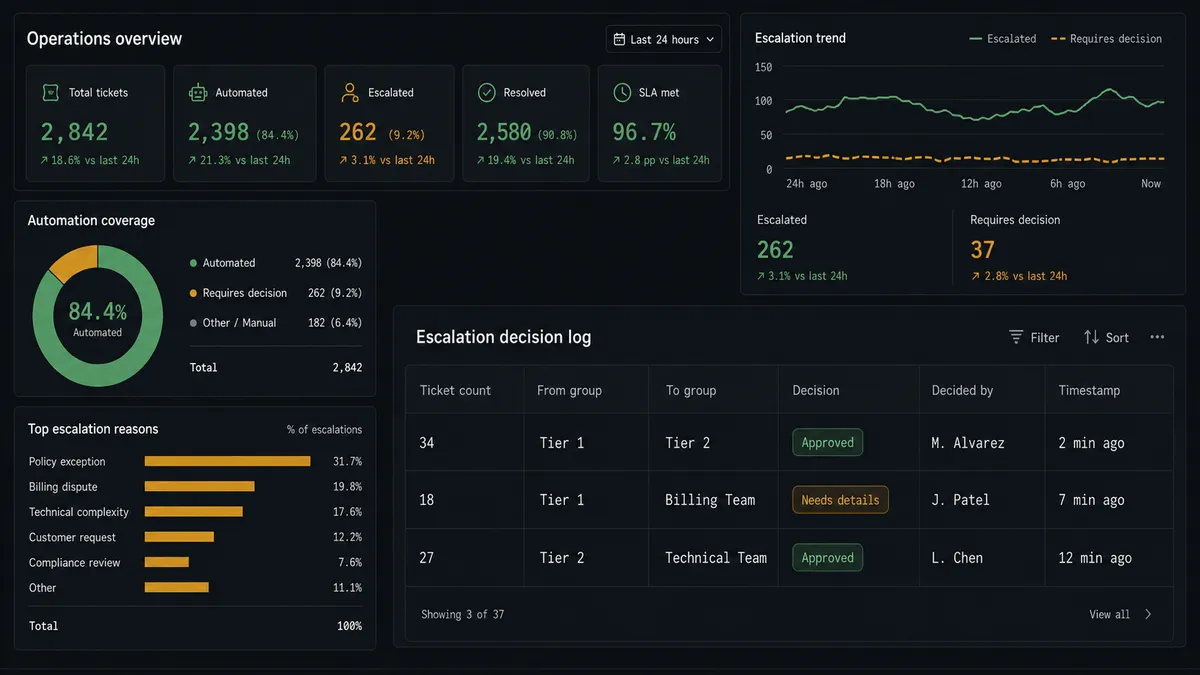
Escalation decision log. Every time the agent proposes an urgent reassignment or bulk change, it logs the proposal and the human’s decision to a Notion database with Create Database Item, giving support leadership a searchable audit trail without a separate tool.
Customer issue knowledge base. As tickets resolve, the agent uses Search Tickets to pull recurring issues and writes structured summaries into a Notion database with Create Database Item, building a knowledge base of known problems and their resolutions over time.
New-ticket-to-Notion-page bridge. When Create Ticket opens a support request from another system, the agent mirrors the key details onto a Notion page with Create Page and Append Block Children, so a project or account team without Zendesk access can still see what was reported.
Weekly triage summary. On a schedule, the agent calls List Tickets and Search Tickets to pull the week’s escalations and reassignments, then writes a formatted recap to a standing Notion page with Add Content to Page for the team’s weekly review.
Common questions
Is it free to connect Zendesk and Notion on FlowRunner? FlowRunner has a free plan with 100 executions a month, every integration included, and no credit card required, and new accounts get 14 days of Professional on top. A Zendesk-to-Notion logging flow with a human approval step fits comfortably inside that trial.
Can I self-host the Zendesk to Notion workflow? Yes. FlowRunner offers a free self-hosted Community Edition for single-instance deployments, and a self-hosted Enterprise tier with multi-instance clustering and full audit retention for larger teams.
Does the agent need my own OpenAI key? FlowRunner runs on a bring-your-own-key model for AI providers, so you connect your own Claude, OpenAI, or other provider key and control which model reasons over your ticket data.
What happens when the agent isn’t sure whether to escalate? The agent errs toward asking. If a change would touch more tickets than a routine update, or a Notion page is headed to an external audience, the agent routes it to a human with full context instead of guessing.
Does this replace my existing Zendesk triage rules? No. The agent works alongside your priority and routing rules, reading the same ticket data your team already relies on, and adds a decision log and an approval step for the moves that carry risk.
Can the agent create Notion pages, not just database items? Yes. The agent can create a new page with Create Page, append formatted content with Append Block Children, or add a database row with Create Database Item, depending on whether the output is a document or a tracked record.
Getting started
Start on the free plan: 100 executions a month, every integration included, no credit card required, plus 14 days of Professional for new accounts. Connect your Zendesk account and your Notion account, pick On Ticket Event as your trigger, and add the human-in-loop step for the escalations and bulk changes that need a second look. Visit flowrunner.ai to get started, or book time at calendly.com/flowrunner/intro to see the agent handle a real escalation end to end.
Frequently asked questions
Is it free to connect Zendesk and Notion on FlowRunner?
FlowRunner has a free plan with 100 executions a month, every integration included, and no credit card required, and new accounts get 14 days of Professional on top. A Zendesk-to-Notion logging flow with a human approval step fits comfortably inside that trial.
Can I self-host the Zendesk to Notion workflow?
Yes. FlowRunner offers a free self-hosted Community Edition for single-instance deployments, and a self-hosted Enterprise tier with multi-instance clustering and full audit retention for larger teams.
Does the agent need my own OpenAI key?
FlowRunner runs on a bring-your-own-key model for AI providers, so you connect your own Claude, OpenAI, or other provider key and control which model reasons over your ticket data.
What happens when the agent isn't sure whether to escalate?
The agent errs toward asking. If a change would touch more tickets than a routine update, or a Notion page is headed to an external audience, the agent routes it to a human with full context instead of guessing.
Does this replace my existing Zendesk triage rules?
No. The agent works alongside your priority and routing rules, reading the same ticket data your team already relies on, and adds a decision log and an approval step for the moves that carry risk.
Can the agent create Notion pages, not just database items?
Yes. The agent can create a new page with Create Page, append formatted content with Append Block Children, or add a database row with Create Database Item, depending on whether the output is a document or a tracked record.