Turn Google Sheets Rows into Trello Cards Automatically
Connect Trello and Google Sheets so new sheet rows become Trello cards automatically, with an AI agent that pauses for a human when a row is missing required data.
How do you connect Trello to Google Sheets?
You connect Trello and Google Sheets by having a Google Sheets trigger, On New Row, drive Trello actions like Find or Create Card, Add Member to Card, and Add Checklist Item, then writing the result back to the sheet with Update Row. FlowRunner is a visual AI-agent orchestration platform where automations run autonomously and pause for human judgment on the steps that carry real consequence. On FlowRunner, the same connection can run as an AI agent that reads each row, decides how to build the card, and pauses for a human when a row is missing what it needs to act safely.
The problem it solves
Ops teams keep task lists, intake forms, and client trackers in Google Sheets because a spreadsheet is the fastest thing to set up and everyone already knows how to use it. The problem shows up downstream. Someone, usually an ops coordinator or a project lead, has to notice the new row, open Trello, and manually create a card: type the task name, set the due date, assign a teammate, break the task into a checklist. Do that fifteen times a day and rows start to sit. A request logged Monday doesn’t get a card until Wednesday because the person responsible for moving data between the sheet and the board is busy running the rest of the operation.
The board and the sheet drift apart the same way. A card gets created but the sheet is never updated to show it, so two people end up tracking the same task in two places, and neither one is fully trusted. Exceptions make it worse: a row with no assignee or a due date that doesn’t parse either gets skipped entirely or turns into a half-built card someone has to fix later. None of this is a technology failure. It’s a spreadsheet doing the coordination job it was never built for, and a team’s time going to data entry instead of the decisions that actually need a person.
How it works: the connection
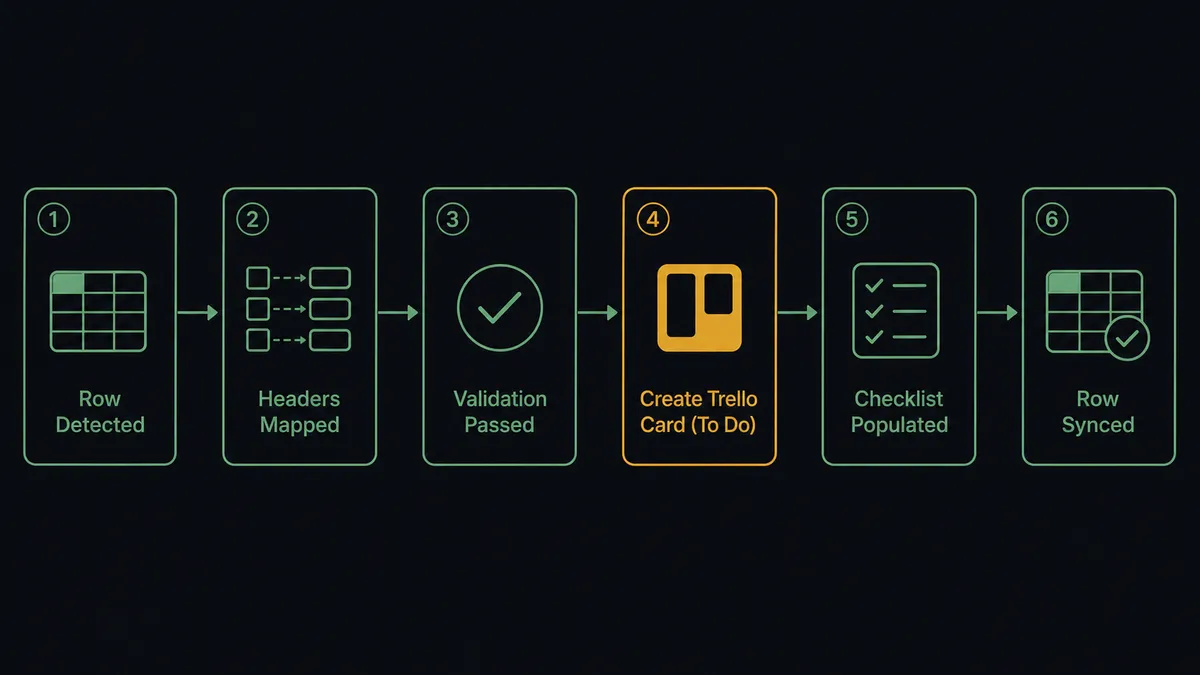
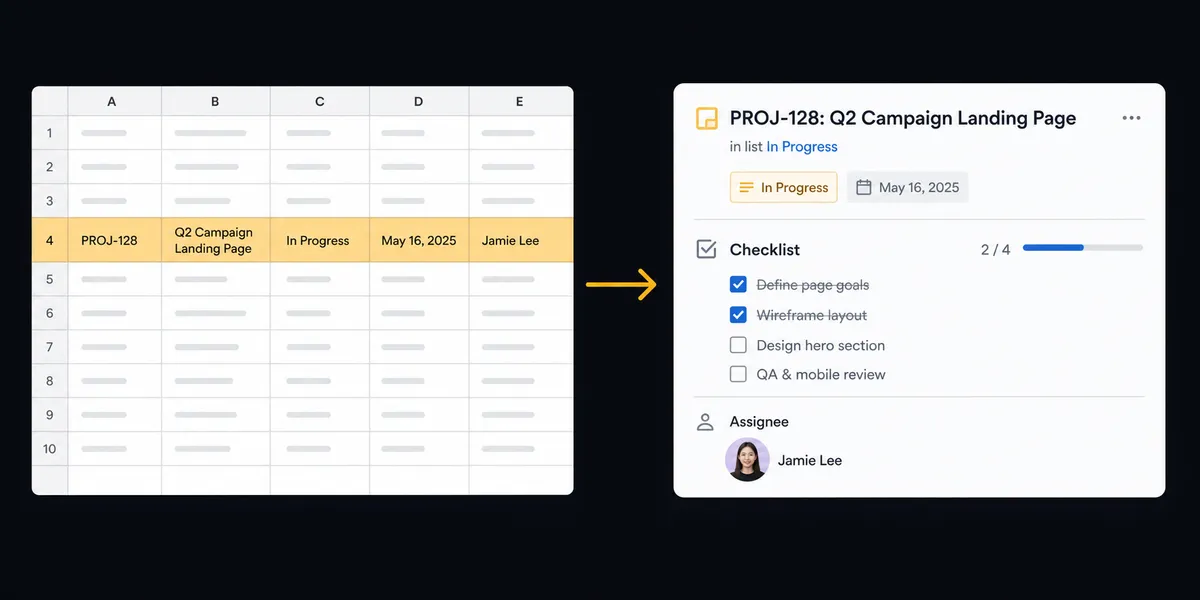
The flow starts on the Google Sheets side because that’s where the data enters. On New Row fires when a task, request, or deliverable lands in the tracked sheet. From there:
- The agent calls Load Header Row so it knows which column holds the task name, assignee, due date, and target Trello list, then reads the new row’s values against that map.
- The agent checks the row for the fields it needs to build a real card. A row with everything present moves forward immediately.
- The agent calls Find or Create Card to place the card on the right Trello list, matching Trello’s own pattern of creating a card in a Qualified or Pending list when a new record shows up.
- Add Member to Card assigns the card to the person named in the row, and the due date from the sheet sets the card’s due date.
- If the row includes a task breakdown, the agent calls Add Checklist to Card and then Add Checklist Item for each step, so the card arrives with real substance instead of just a title.
- The agent calls Update Row to write the new card’s status and link back into the originating row, so the sheet and the board tell the same story.
Trello has no triggers in FlowRunner today, only 66 actions, which is why the connection is built with Sheets as the starting point and Trello as the system the agent acts on. That is not a limitation you have to work around quietly; it’s the actual shape of this integration, and it’s the honest answer to “can Trello start the flow” (it can’t, yet, in this connector).
Can an AI agent run it? (and why a human stays in the loop)
Yes, and this is where it stops being a sync tool. A plain automation would create a card from every row, blank fields and all, because it can only follow the sequence it was given. An AI agent reads the row first. It has Find or Create Card, Add Member to Card, and Add Checklist Item available as tools, along with a human-in-loop flow, and it decides which ones to use based on what the row actually contains.
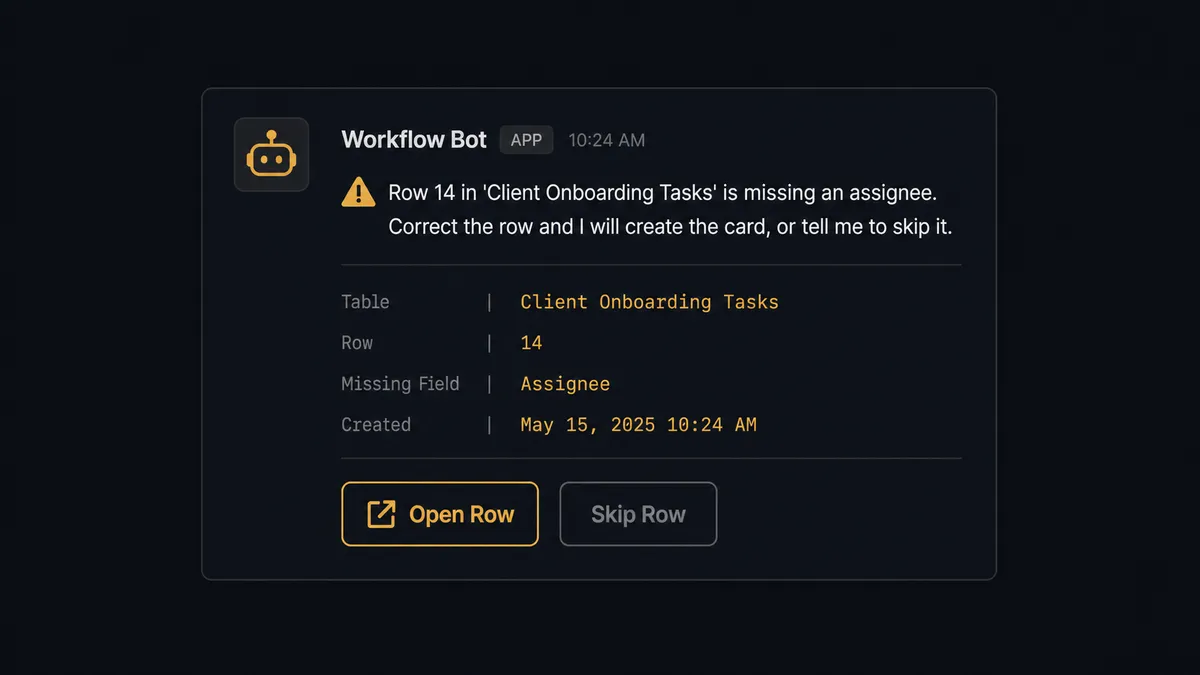
Picture a row that comes in with a task name and a due date but no assignee, on a sheet where every prior row this week had one. The agent doesn’t guess at an owner or create an unassigned card and move on. It recognizes the row is incomplete relative to the pattern it’s seeing, holds it, and invokes the human-in-loop flow as a tool: a Slack message to the sheet owner that reads something like “Row 14 in ‘Client Onboarding Tasks’ is missing an assignee. Correct the row and I will create the card, or tell me to skip it.” The message carries the row number, the sheet name, and exactly what’s missing, so the owner can act without opening the sheet to investigate. The owner responds, the agent reprocesses only that row, and the resolution is captured for the audit trail.
This is the digital andon cord: the agent doesn’t stop the whole flow, and it doesn’t push bad data through either. It stops the one row that needs a person and keeps everything else moving. This is not a hardcoded rule like “if assignee is blank, notify.” It’s the agent weighing what a usable card requires and choosing, row by row, whether it has enough to act.
FlowRunner vs Zapier
Zapier is a reasonable place to start this exact connection. Its Trello and Google Sheets apps are mature, the trigger-to-action setup is quick, and for a single-step “new row creates a card” zap it works fine. The gap opens once the flow needs judgment: deciding whether a row is complete enough to act on, not just whether a row exists.
| FlowRunner | Zapier | |
|---|---|---|
| Human-in-the-loop | An agent decides, per row, whether to pause and invoke a human step as a tool | A pause step you configure in advance for a specific path, not a decision the automation makes about the data |
| Users included | Unlimited users and workflows on every tier | Seats and collaboration features gated by plan |
| AI provider access | Bring your own key (BYOK) for whichever provider you already use | AI steps run on Zapier’s own model access |
| Self-hosting | Enterprise tier includes a self-hosted option | Cloud-only, no self-hosted deployment |
| Pricing model | Workflow-based tiers with a clear execution cap per tier | Per-task pricing that scales with volume and can surprise teams as usage grows |
Before and after
| Category | Before | After |
|---|---|---|
| Card creation | Someone opens Trello and manually builds a card for each new sheet row | New rows create the Trello card automatically, mapped from the row’s data |
| Sheet and board agreement | The sheet doesn’t reflect Trello card state; someone checks the board separately | The sheet shows the card’s status and link as soon as the card exists |
| Board accuracy | The board reflects last week’s state because cards are created and moved by hand | Cards stay in sync with the sheet without manual moves |
| Incomplete rows | A row missing an assignee or due date creates a broken card or gets skipped | Incomplete rows are held and routed to the sheet owner before a card is created |
| Reporting | Each report is produced by opening the sheet and downloading a file by hand | Sheets export on schedule and the report is delivered without anyone opening the file |
What you can build
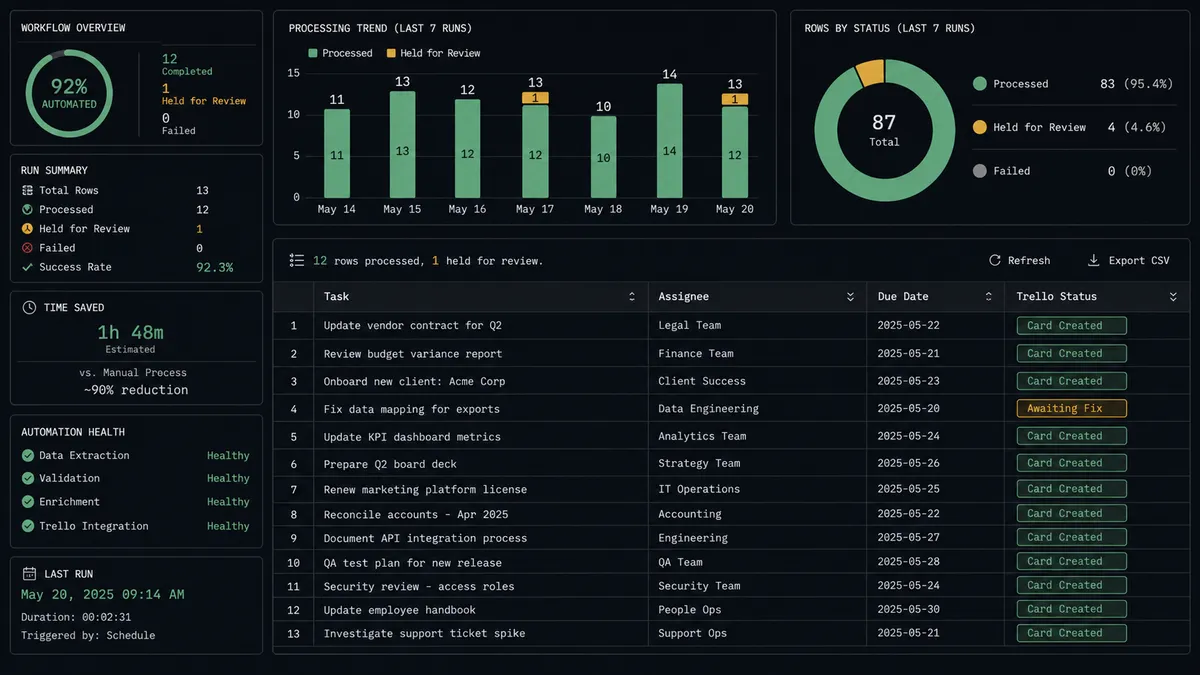
Task sheet to Trello board. A new row in a task intake sheet creates a Trello card with a checklist, an assignee, and a due date, and the card’s link writes back to the row so the sheet becomes a live index of every card.
Client deliverable tracker. A new row logging a deliverable milestone moves the matching Trello card to the next list, adds a comment with the update details, and writes the current stage back to the sheet for the client-facing team to see.
Weekly ops report. On a schedule, Export Sheet produces an Excel file of the current task sheet and the report goes out without anyone opening Trello or the spreadsheet to compile it by hand.
Exception board. Rows the agent holds during validation get their own card in a dedicated “Needs Fix” list, with a checklist of exactly what’s missing, so incomplete records have a visible home instead of disappearing into the sheet.
Common questions
Is it free to connect Trello and Google Sheets on FlowRunner? Every FlowRunner cloud tier includes both connectors with unlimited users and workflows. FlowRunner has a free plan with 100 executions a month, every integration included, and no credit card required, and new accounts get 14 days of Professional on top.
Can I self-host this Trello and Google Sheets workflow? Yes. FlowRunner’s Enterprise plan includes a self-hosted option with multi-instance clustering, so this connection can run entirely on your own infrastructure if that is a requirement.
Does the agent need my own OpenAI key to run this flow? FlowRunner uses a bring-your-own-key model, so the agent runs on whichever AI provider key you connect. There is no bundled model access to manage or pay FlowRunner for separately.
What happens when the agent isn’t sure a row is ready to become a Trello card? The agent holds the row instead of creating a card from incomplete data, flags it in the sheet, and messages the sheet owner in Slack with what is missing. The card is created only after the owner corrects the row or tells the agent to skip it.
Does Trello need a trigger to start this flow? No. Trello has no triggers in FlowRunner today, so it participates in this connection entirely through its 66 actions. Google Sheets, which has five triggers including On New Row, is what starts the flow.
Can the agent update the sheet after the Trello card changes? Yes. The agent can write the card’s status and link back to the originating row with Update Row or Update Cell, so the sheet stays a live reflection of what happened in Trello.
Getting started
Connect Trello and Google Sheets on FlowRunner and this flow can be running in an afternoon. FlowRunner has a free plan with 100 executions a month, every integration included, and no credit card required, and new accounts get 14 days of Professional on top. Start at flowrunner.ai or book time to see it built for your sheet at calendly.com/flowrunner/intro.
Frequently asked questions
Is it free to connect Trello and Google Sheets on FlowRunner?
Every FlowRunner cloud tier includes both connectors with unlimited users and workflows. FlowRunner has a free plan with 100 executions a month, every integration included, and no credit card required, and new accounts get 14 days of Professional on top.
Can I self-host this Trello and Google Sheets workflow?
Yes. FlowRunner's Enterprise plan includes a self-hosted option with multi-instance clustering, so this connection can run entirely on your own infrastructure if that is a requirement.
Does the agent need my own OpenAI key to run this flow?
FlowRunner uses a bring-your-own-key model, so the agent runs on whichever AI provider key you connect. There is no bundled model access to manage or pay FlowRunner for separately.
What happens when the agent isn't sure a row is ready to become a Trello card?
The agent holds the row instead of creating a card from incomplete data, flags it in the sheet, and messages the sheet owner in Slack with what is missing. The card is created only after the owner corrects the row or tells the agent to skip it.
Does Trello need a trigger to start this flow?
No. Trello has no triggers in FlowRunner today, so it participates in this connection entirely through its 66 actions. Google Sheets, which has five triggers including On New Row, is what starts the flow.
Can the agent update the sheet after the Trello card changes?
Yes. The agent can write the card's status and link back to the originating row with Update Row or Update Cell, so the sheet stays a live reflection of what happened in Trello.