Asana + Google Sheets: Every Flagged Row Becomes a Tracked Task
Connect Asana and Google Sheets so a new spreadsheet row becomes an assigned Asana task automatically, with an AI agent that pauses for a human on the rows that carry real risk.
How do you connect Asana to Google Sheets?
Connect Asana to Google Sheets by triggering on Google Sheets’ On New Row action and having the agent call Asana’s Create Task, so every row that lands in a tracking or intake sheet becomes an assigned, due-dated Asana task instead of a line item nobody owns. FlowRunner is a visual AI-agent orchestration platform where automations run autonomously and pause for human judgment on the steps that carry real consequence. The same connection that turns a spreadsheet row into a task can also run as an AI agent that reads the row, decides how urgent it is, and pauses to loop in a person before anything risky happens.
The problem it solves
An operations lead runs a spreadsheet that catches everything: intake requests, AP exceptions, onboarding items, client escalations. It works until it doesn’t. A new row sits there until someone opens the sheet and notices it. Nothing pings anyone. There is no owner, no due date, no history of who was supposed to act. The team’s actual work management tool, Asana, lives in a completely different tab, so the sheet and the task list drift apart within a week.
Managers end up chasing status by asking people directly, because the sheet cannot tell them what’s outstanding. AP analysts scroll through Slack threads looking for the exception someone mentioned three days ago. Client onboarding items fall through the cracks between the form that captured them and the project that was supposed to track them. The spreadsheet was supposed to be the single source of truth. Instead it’s a waiting room that nobody checks on a schedule, and the team spends time back-filling context that should have been captured the moment the row appeared.
How it works: the connection
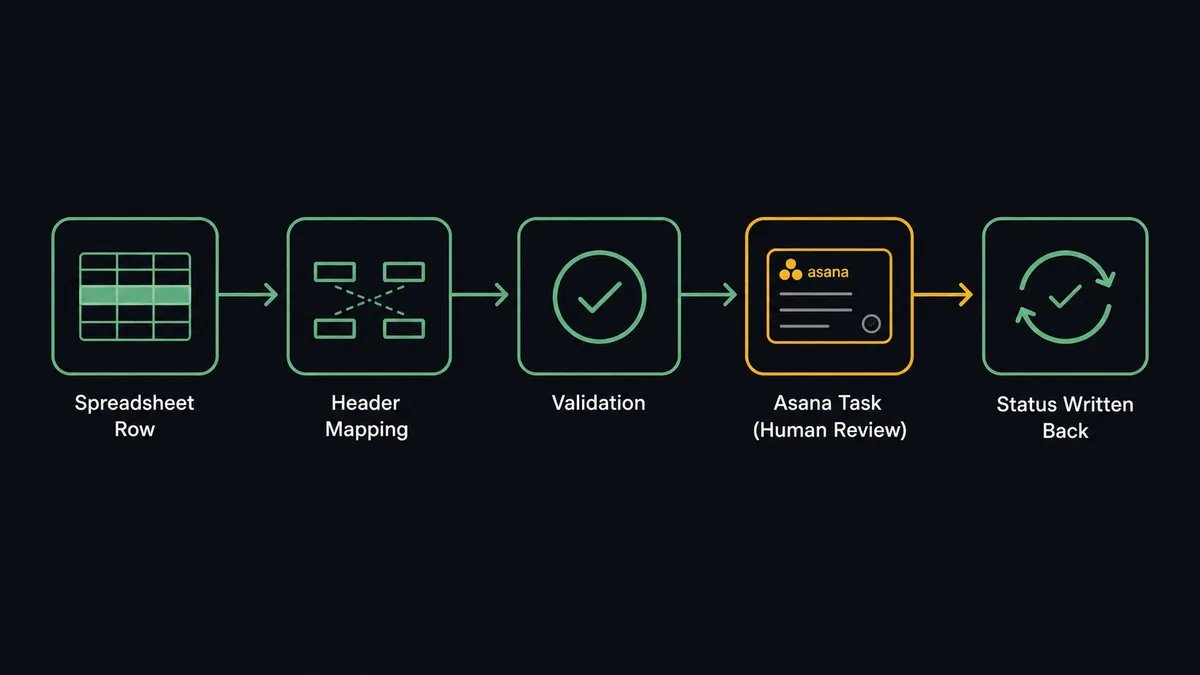
The flow starts with Google Sheets’ On New Row trigger, watching the intake or exception-tracking sheet. When a row lands, the agent calls Load Header Row so it can address every column by name instead of by position, then reads the new row’s values with Get Rows.
From there, the agent checks the row against required fields, the same validation Google Sheets is built to support. A row with a missing amount or an unrecognized status does not get pushed forward; the agent flags it in the sheet and routes it back to the owner instead of creating a broken task.
For a row that passes validation, the agent calls Create Task in Asana, naming the task from the row’s identifying fields (vendor, client, or request name), writing the discrepancy or request details into the description, and assigning it to whoever’s on rotation with a due date pulled from the row’s urgency. If the work fits a repeatable pattern, like a standard onboarding checklist, the agent can call Create Task from Template instead, and Add Task to Section to route it into the right stage of the project. Add Comment logs the originating row and sheet name directly on the task, and Attach File carries over any supporting document referenced in the row, so the assignee never has to go looking for context in a second tab.
When the assignee marks the Asana task complete, the agent calls Get Task by ID to detect the status change and writes the outcome back to the sheet with Update Row, so the tracking sheet reflects the real state of the work instead of freezing at the moment the row was created.
Can an AI agent run it? (and why a human stays in the loop)
Yes, and this is where it stops being a sync tool and starts being an orchestration layer. A plain integration would create a task for every row the same way, every time. The agent reads each row and decides how it should be handled, because not every exception carries the same weight.
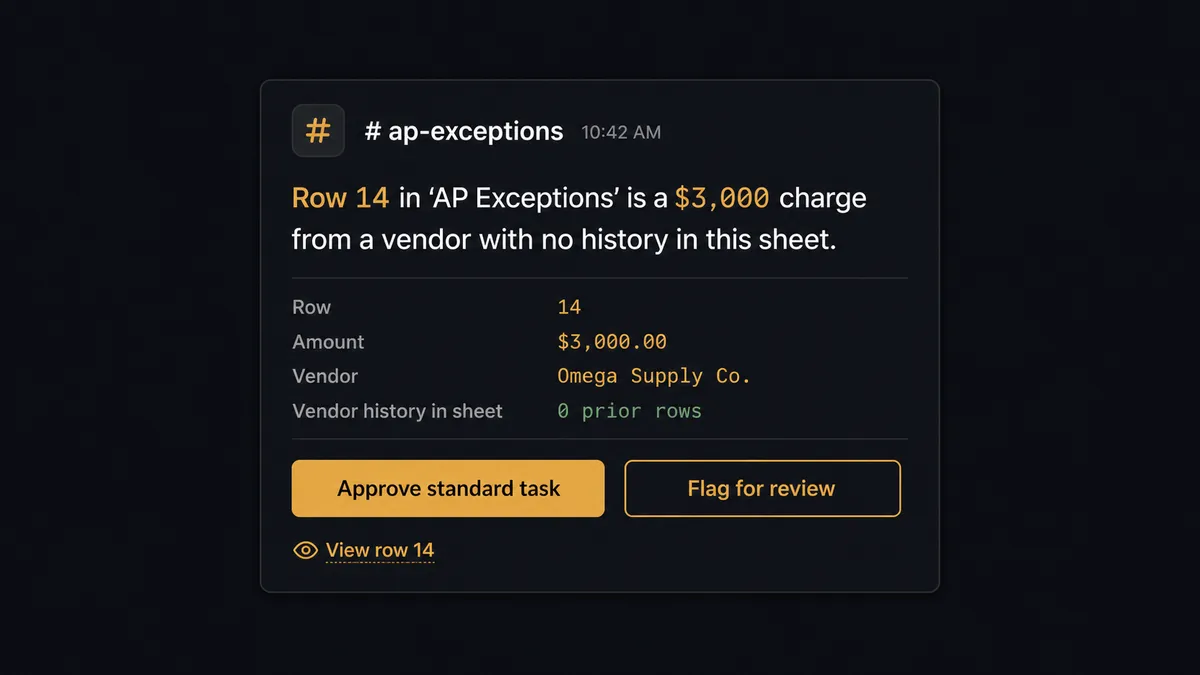
Say two rows land in the same AP exception sheet within the hour. One is a $400 discrepancy from a vendor with three years of clean invoices. The other is a $3,000 charge from a vendor that has never appeared in the sheet before. A rule-based system would treat both the same way: create a task, move on. The agent does not. It reads the vendor history available to it, recognizes that the second row has no track record behind it, and decides that one warrants a person’s eyes before a task even gets created, while the first one can flow straight into the analyst’s normal queue.
For the flagged row, the agent invokes a human-in-loop flow as a tool, the same way it invokes Create Task or Get Rows. That flow sends a Slack message to the AP lead: “Row 14 in ‘AP Exceptions’ is a $3,000 charge from a vendor with no history in this sheet. Approve to create a standard task, or flag for immediate review.” The workflow pauses. The AP lead reads the context, and the full row data, and decides. The agent resumes with that decision as input: either a standard task with a same-day due date, or a priority task plus an immediate Slack ping to the assignee with the direct task link, so it does not sit unnoticed in a project list.
The decision, the decider’s identity, and the timestamp are all captured in the audit trail. This is not a sync tool. The agent knows when to stop and ask, and it does that based on what’s actually in the row, not a hardcoded dollar threshold someone configured once and forgot about.
FlowRunner vs Zapier
Zapier is a genuinely fast way to wire Google Sheets to Asana for a simple, single-path flow, and its Google Sheets and Asana triggers are mature and reliable. For a team that just needs “new row creates a task,” Zapier gets that running in minutes.
Where it stops is the decision layer. Zapier does not read a row, weigh vendor history, and decide whether a person needs to see it first. Every row gets the same path unless someone hand-builds a maze of filters and paths to approximate judgment, and that maze still can’t reason about context the way an agent can.
| Capability | FlowRunner | Zapier |
|---|---|---|
| Human-in-loop | Native: the agent invokes a human decision as a callable tool, mid-flow, based on its own judgment | Not native: requires manually chained filter and approval steps for each scenario |
| Users included | Unlimited on every tier | Paid per user on higher plans |
| AI provider | BYOK: bring your own OpenAI, Anthropic, or other key | Zapier’s own AI credits, metered separately |
| Self-hosting | Available (Community Edition free, Enterprise for compliance) | Not available |
| Pricing model | Transparent workflow-based tiers with a stated execution ceiling | Per-task pricing that scales quickly as row volume grows |
Before and after
| Metric | Before | After |
|---|---|---|
| Row visibility | A new row sits until someone opens the sheet and notices it | On New Row triggers task creation the moment the row lands |
| Ownership | Exceptions live in chat threads with no assignee or due date | Every exception is an Asana task with an owner and a due date |
| Escalation | Managers chase status by asking team members directly | High-risk rows reach the right person over Slack automatically |
| Data quality | Incomplete rows get processed anyway or ignored entirely | Rows missing required fields are held and routed for a fix |
| Status sync | The sheet freezes at creation; task progress lives elsewhere | Task completion writes the outcome back to the row automatically |
What you can build
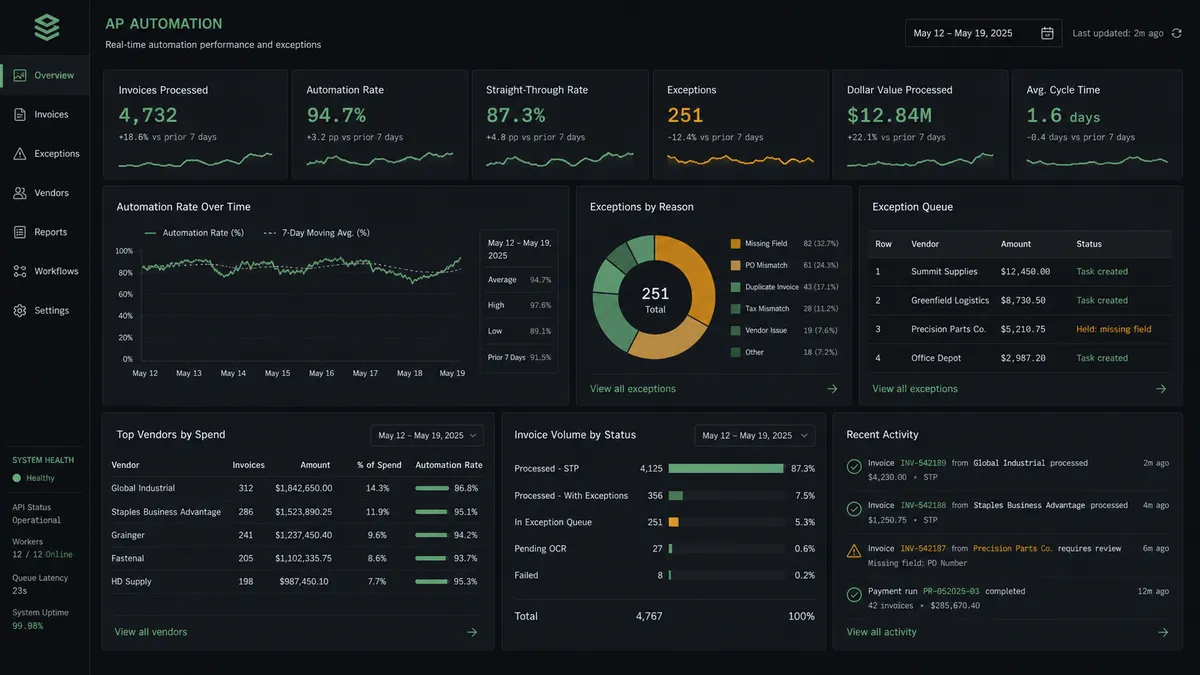
AP exception queue. A new row in the AP exceptions sheet becomes an Asana task with the vendor, invoice number, and discrepancy attached, and the agent writes the resolution back to the sheet the moment the analyst closes the task.
Client onboarding tracker. A signed contract logged to a tracking sheet triggers Create Project from Template in Asana, so the onboarding team gets a fully sectioned project (Kickoff, Implementation, Training, Go-Live) before the welcome email goes out.
Weekly exception report. On a schedule, the agent calls Export Sheet to generate the week’s resolved and open exceptions as a file, and attaches it to a summary email so leadership sees the queue without opening Asana or Sheets.
Vendor risk escalation. New vendors flagged in an intake row get routed through a human-in-loop Slack decision before a task is created, while returning, clean-history vendors flow straight into the standard queue.
Delivery follow-up tracker. A logged delivery-confirmation row creates a “Post-delivery check-in” task assigned to the account manager, due in three days, with the order details already in the description.
Common questions
Is it free to connect Asana and Google Sheets on FlowRunner? Yes. FlowRunner has a free plan with 100 executions a month, every integration included, and no credit card required, and new accounts get 14 days of Professional on top.
Does the agent need my own OpenAI key to run this flow? Yes. FlowRunner uses a bring-your-own-key model for AI providers, so the agent runs on the OpenAI, Anthropic, or other provider key you connect, and you control that spend directly.
What happens when the agent isn’t sure whether a row is an exception? The agent does not guess. It holds the row, marks it in the sheet, and routes it to the data owner through Slack with the specific field that failed, then waits for a human decision before creating or updating anything downstream.
Can I self-host this Asana and Google Sheets connection? FlowRunner offers a self-hosted Community Edition and a self-hosted Enterprise tier with full compliance features, so teams that need the workflow to run on their own infrastructure can do that instead of the cloud-hosted option.
Does this replace the person who currently manages the tracking sheet? No. The agent handles the row-to-task mechanics; the person who owns the sheet still makes the calls that matter, like which exceptions get escalated and which vendors get flagged, because those decisions stay with a human in the loop.
What’s the difference between On New Row and On New or Updated Row for this flow? On New Row fires only when a row is appended, which fits an intake sheet where every entry is a fresh request; On New or Updated Row also fires on edits, which fits a queue where someone might correct a row after the fact.
Getting started
FlowRunner has a free plan with 100 executions a month, every integration included, and no credit card required, and new accounts get 14 days of Professional on top. Connect Asana and Google Sheets, pick your trigger, and add the human-in-loop step where it matters for your exception rows.
Start at flowrunner.ai or book time to walk through your specific sheet structure at calendly.com/flowrunner/intro.
Frequently asked questions
Is it free to connect Asana and Google Sheets on FlowRunner?
Yes. FlowRunner has a free plan with 100 executions a month, every integration included, and no credit card required, and new accounts get 14 days of Professional on top.
Does the agent need my own OpenAI key to run this flow?
Yes. FlowRunner uses a bring-your-own-key model for AI providers, so the agent runs on the OpenAI, Anthropic, or other provider key you connect, and you control that spend directly.
What happens when the agent isn't sure whether a row is an exception?
The agent does not guess. It holds the row, marks it in the sheet, and routes it to the data owner through Slack with the specific field that failed, then waits for a human decision before creating or updating anything downstream.
Can I self-host this Asana and Google Sheets connection?
FlowRunner offers a self-hosted Community Edition and a self-hosted Enterprise tier with full compliance features, so teams that need the workflow to run on their own infrastructure can do that instead of the cloud-hosted option.
Does this replace the person who currently manages the tracking sheet?
No. The agent handles the row-to-task mechanics; the person who owns the sheet still makes the calls that matter, like which exceptions get escalated and which vendors get flagged, because those decisions stay with a human in the loop.
What's the difference between On New Row and On New or Updated Row for this flow?
On New Row fires only when a row is appended, which fits an intake sheet where every entry is a fresh request; On New or Updated Row also fires on edits, which fits a queue where someone might correct a row after the fact.