Can an AI Agent Route Failed Shippo Deliveries to Slack?
Connect Shippo and Slack so failed or returned shipments post straight to your team, and let an AI agent decide when a human needs to approve the reship or refund.
How do you connect Shippo to Slack?
Connect Shippo to Slack by wiring Shippo’s On Tracking Status Updated trigger to Slack’s Send Message to Channel action, so a failed or returned delivery posts directly to your fulfillment channel instead of getting caught by a customer follow-up. FlowRunner is a visual AI-agent orchestration platform where automations run autonomously and pause for human judgment on the steps that carry real consequence. The same connection can run as a straight notification, or as an AI agent that reads the shipment context, decides whether a case is routine or worth a person’s attention, and invokes a human-in-loop Slack step only when the decision matters.
The problem it solves
Right now, a failed or returned shipment usually surfaces the hard way. A customer emails asking where their order is, an ops lead pulls up the Shippo dashboard, and by the time anyone notices the tracking status flipped to RETURNED, the case is already a day or two old. Multiply that across dozens of shipments a week and the team is spending time hunting for exceptions instead of resolving them. The good ones, the packages that deliver fine, never need a human. The problem is that today they all look the same until someone goes looking.
The manual fallback is a spreadsheet, or a shared inbox someone checks once a day, or a Slack channel where a team member has to manually paste in the tracking number and order details every time something goes wrong. Reship decisions get made without knowing the order’s history. High-value orders and low-value ones get the same five minutes of attention, or the same neglect. Nothing routes itself, so everything falls through the cracks until a customer complains.
How it works: the connection
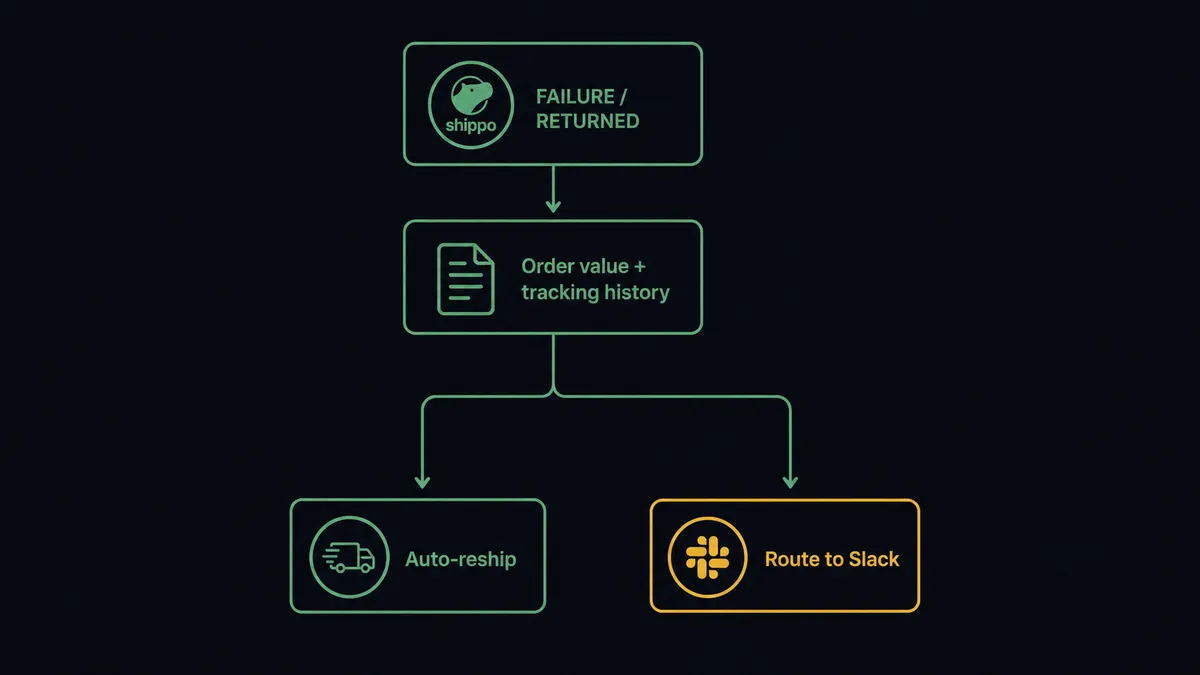
Shippo’s On Tracking Status Updated trigger fires whenever a shipment’s tracking status changes, whether it’s delivered, in transit, failed, or returned. For a straightforward connection, filter that trigger to FAILURE and RETURNED events and map it to Slack’s Send Message to Channel action, posting the tracking number, the order, and the status into a fulfillment-exceptions channel the moment it happens.
Before that, the flow can pull additional context. Get Shipment Rates and Validate Address run at label-creation time to make sure the shipment was clean to begin with, and Get Order retrieves the order value and customer so the Slack message isn’t just a tracking number, it’s a full case. On the delivered path, the same trigger can route to a customer notification instead, closing the loop without a human touching it. The connection is simple: one Shippo event, one Slack message, real data in both directions.
Can an AI agent run it? (and why a human stays in the loop)
An AI agent can run this connection, and the upgrade over a plain trigger-to-message sync is what happens between the tracking event and the Slack post. Instead of forwarding every failure the same way, the agent reads the order value, the shipment history, and the tracking events, and decides whether the case is routine or worth a person’s judgment. That decision is not a hardcoded dollar threshold buried in a filter. It’s the agent evaluating the specific case in front of it.
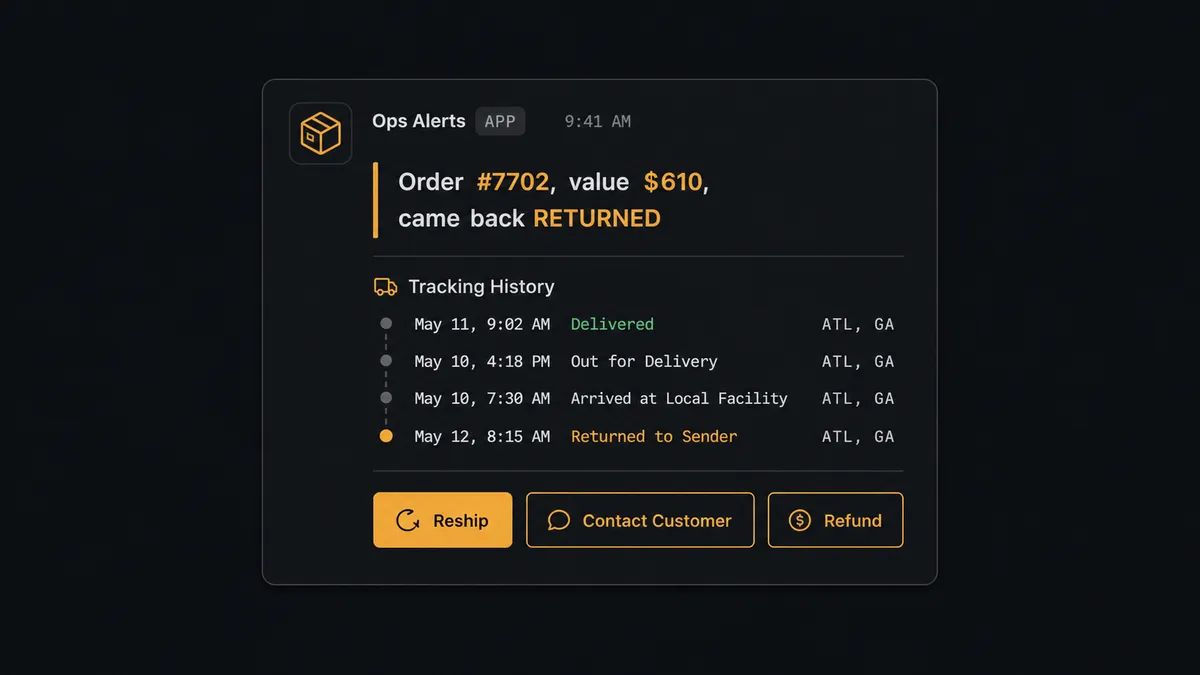
Picture a $610 order that comes back RETURNED. The agent assembles the tracking history, the order value, and the customer, then posts to ops in Slack: “Order #7702, value $610, came back RETURNED. Reship to the same address, contact the customer for a new one, or refund? History attached.” That message uses Slack’s Block Kit buttons, and the decision comes back through the On Block Action trigger. Ops picks a path from their phone. The agent resumes, executes Create Transaction (Buy Label) for a reship or Create Refund for a refund, and records who decided and when in the audit trail.
A $40 order that returns the same day might auto-reship without asking anyone, because the agent’s instructions don’t require a human for a routine case. This is not a sync tool with an if/then rule. It’s a digital andon cord: the agent keeps working the queue on its own, and it stops the line only when a specific case carries enough weight that a human should look at it first.
FlowRunner vs Zapier for Shippo and Slack
Zapier connects Shippo’s tracking events to Slack messages well, and for teams that just need a notification when a shipment fails, that’s genuinely enough. Where the two diverge is what happens after the notification lands: Zapier posts the alert and stops, leaving a person to open Shippo, check the order value, and decide what to do next by hand.
| Capability | Zapier | FlowRunner |
|---|---|---|
| Human-in-loop decision routing | Not native; requires a separate approval app or manual step | Built into the agent as a callable tool, with the decision captured in the workflow |
| Context in the Slack message | Whatever fields you manually map | Agent assembles tracking history, order value, and customer before posting |
| Users on the plan | Priced per user on most tiers | Unlimited users on every tier |
| AI model access | Zapier-hosted AI credits | BYOK, connect your own provider key |
| Audit trail of who decided | Not tracked by the integration itself | Approver identity and timestamp captured automatically |
| Pricing model | Per-task pricing across zaps | Transparent workflow-based execution tiers |
Before and after
| Metric | Before | After |
|---|---|---|
| Carrier selection | Chosen by habit, no rate comparison | Get Shipment Rates compares carriers and the agent buys the best fit |
| Bad addresses | Labels bought against unvalidated addresses, bounce back as returns | Validate Address runs before Create Transaction (Buy Label), so bad destinations stop early |
| Failure detection | Discovered when the customer follows up | On Tracking Status Updated fires immediately and routes the case |
| Exception resolution | Ad hoc, someone checks the dashboard when they remember | Case posts to Slack with full context the moment it fails |
| Decision record | Verbal or buried in email | Approver identity and timestamp captured in the audit trail automatically |
What you can build
Rate-shopped labels with exception routing. The agent runs Get Shipment Rates on every new order, buys the cheapest qualifying rate with Create Transaction (Buy Label), and only involves Slack when the resulting shipment later fails or returns.
International shipments with a customs desk in Slack. For cross-border orders, the agent builds the customs paperwork with Create Customs Declaration and Create Customs Item, then posts a Slack summary so the ops team can review anything unusual before the label buys.
Delivered-order confirmations without a person watching the tracker. On a DELIVERED status, the agent skips Slack entirely and notifies the customer directly, keeping the exceptions channel reserved for cases that actually need eyes.
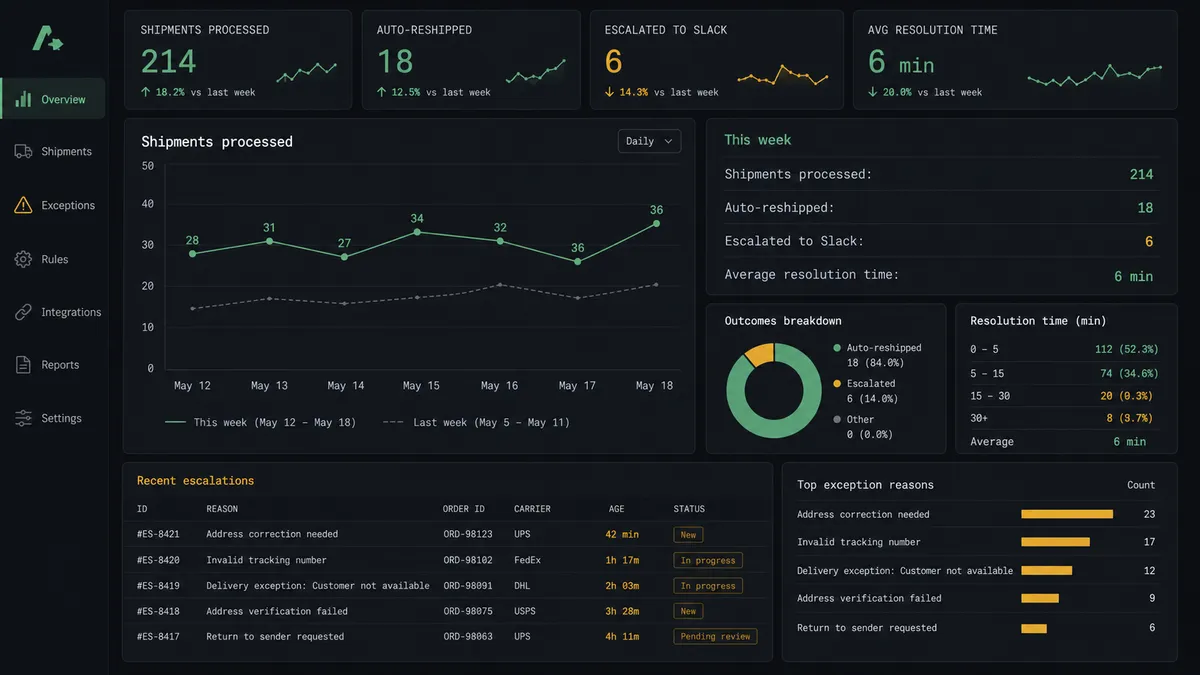
Weekly fulfillment digest. Alongside the real-time exception routing, a scheduled agent compiles the week’s failed, returned, and reshipped counts and posts a Block Kit summary to #operations every Monday.
Refund approval trail. When the agent decides a case should be refunded rather than reshipped, Create Refund runs only after the Slack decision comes back, and the reason and approver are stored with the transaction.
Common questions
Is it free to connect Shippo and Slack on FlowRunner? Yes. FlowRunner has a free plan with 100 executions a month, every integration included, and no credit card required, and new accounts get 14 days of Professional on top.
Does the agent need my own OpenAI key to run this? Yes. FlowRunner uses a bring-your-own-key model for AI agents, so you connect your own provider key and the agent runs against it rather than a shared FlowRunner model.
What happens when the agent isn’t sure whether to reship or refund? It doesn’t guess. The agent posts the tracking history, order value, and customer details to Slack, asks a specific person to choose reship, contact the customer, or refund, and waits for that decision before it acts.
Can I self-host this Shippo-Slack connection? Yes. FlowRunner offers a self-hosted Community Edition and a self-hosted Enterprise tier with full compliance features, so the workflow can run entirely inside your own infrastructure.
Do I still need Zapier or n8n if I’m using FlowRunner for this? No. FlowRunner connects the trigger, the agent’s reasoning, and the human-in-loop Slack step in one workflow, so there’s no separate tool needed to bridge Shippo events into Slack.
Which Slack channel receives the exception messages? Whichever channel you configure in the flow, such as a dedicated fulfillment-exceptions channel, and the agent can also route a specific case to a direct message if the decision needs one person’s attention.
Getting started
FlowRunner has a free plan with 100 executions a month, every integration included, and no credit card required, and new accounts get 14 days of Professional on top. Build the trigger-to-message connection in minutes, or add the AI agent layer so exceptions route themselves and only the cases that matter land in front of your team. Start at flowrunner.ai or book a walkthrough at calendly.com/flowrunner/intro.
Frequently asked questions
Is it free to connect Shippo and Slack on FlowRunner?
Yes. FlowRunner has a free plan with 100 executions a month, every integration included, and no credit card required, and new accounts get 14 days of Professional on top.
Does the agent need my own OpenAI key to run this?
Yes. FlowRunner uses a bring-your-own-key model for AI agents, so you connect your own provider key and the agent runs against it rather than a shared FlowRunner model.
What happens when the agent isn't sure whether to reship or refund?
It doesn't guess. The agent posts the tracking history, order value, and customer details to Slack, asks a specific person to choose reship, contact the customer, or refund, and waits for that decision before it acts.
Can I self-host this Shippo-Slack connection?
Yes. FlowRunner offers a self-hosted Community Edition and a self-hosted Enterprise tier with full compliance features, so the workflow can run entirely inside your own infrastructure.
Do I still need Zapier or n8n if I'm using FlowRunner for this?
No. FlowRunner connects the trigger, the agent's reasoning, and the human-in-loop Slack step in one workflow, so there's no separate tool needed to bridge Shippo events into Slack.
Which Slack channel receives the exception messages?
Whichever channel you configure in the flow, such as a dedicated fulfillment-exceptions channel, and the agent can also route a specific case to a direct message if the decision needs one person's attention.