Send ShipBob Shipment Exceptions to Slack Automatically
Connect ShipBob and Slack so shipment exceptions post to your ops channel automatically, with an AI agent that pauses for a human on high-value carrier issues.
How do you connect ShipBob to Slack?
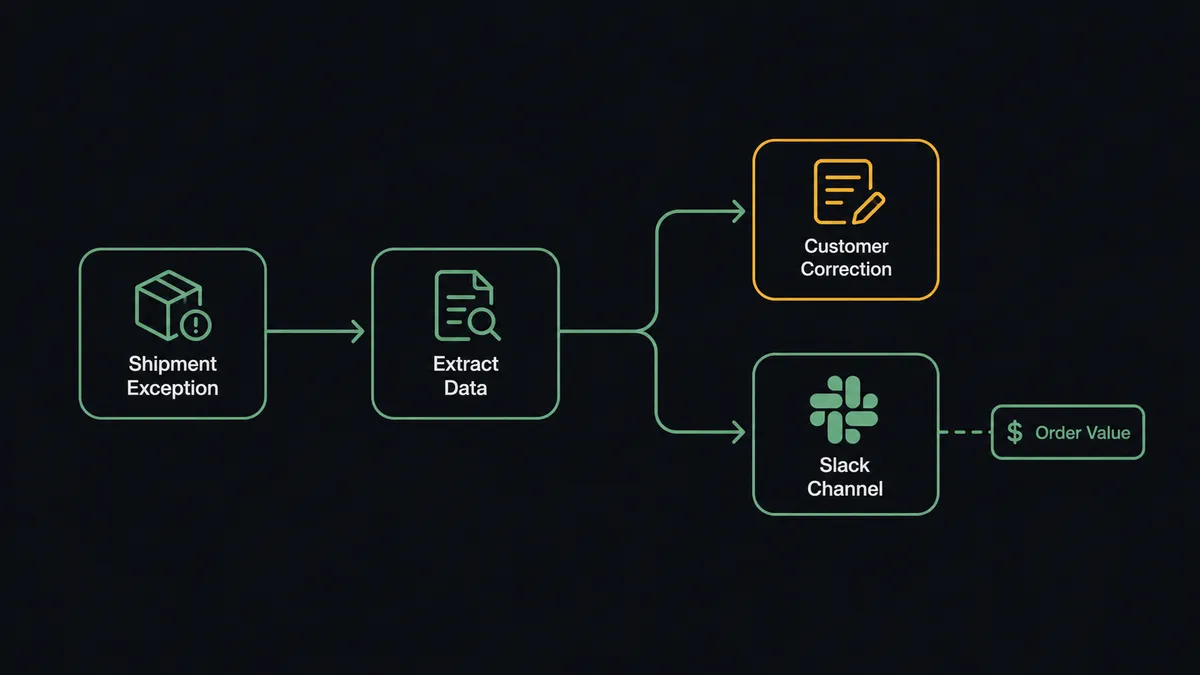
On Shipment Exception fires in ShipBob, the agent pulls the order details and exception type, and Send Message to Channel posts the exception to your Slack ops channel with the order value and resolution options attached. FlowRunner is a visual AI-agent orchestration platform where automations run autonomously and pause for human judgment on the steps that carry real consequence. The same connection can run as a plain trigger-to-message sync, or as an AI agent that reads each exception, decides whether a correction form is enough, and only interrupts your team when the order is worth stopping for.
The problem it solves
Right now, when a ShipBob shipment hits a delivery exception, someone on the ops team has to notice. That usually means watching the ShipBob dashboard throughout the day for exception flags, or waiting for a customer email to surface the problem first. Every exception, whether it is a mistyped address or a carrier that lost the package, gets the same generic automated response, because nobody has time to triage by exception type at scale. Meanwhile the actual decisions that matter, like whether to eat the cost of a lost high-value shipment or fight the carrier claim, sit in someone’s inbox until they get to it.
Returns are the same story. Staff have to check the condition of the returned item, decide whether it qualifies for a refund or needs a damage claim, and update inventory by hand. None of this is hard work. It is just manual, repetitive, and easy to let fall through the cracks when volume spikes around a sale or a holiday. The ops lead does not need more dashboards to watch. They need the exceptions that matter to land in front of them, and the ones that do not to resolve themselves.
How it works: the connection
The connection starts with ShipBob’s On Shipment Exception trigger, which fires the moment a shipment hits a delivery failure, address issue, or carrier problem. When it fires, the agent retrieves the order details, the customer’s contact information, and the exception type directly from ShipBob using Get Order and Get Shipment.
From there the data maps into a Slack message built with Send Message to Channel: the shipment ID, the order value, the exception type, and a short summary of what happened, formatted for a channel like #fulfillment-ops. For address issues, the flow can resolve on its own by sending the customer an automated correction form and skipping Slack entirely. For carrier issues, the agent posts to Slack instead, and Approve or Escalate buttons let the ops team resolve it from their phone using the On Block Action trigger to capture the click and resume the flow. On Return Completed works the same way on the other end of the fulfillment cycle, routing damaged returns to Slack while resalable returns process straight through.
Can an AI agent run it? (and why a human stays in the loop)
Yes, and this is where it stops being a sync tool. A basic integration would send every exception to Slack, or worse, send every exception the same automated response regardless of what is actually wrong. The agent does neither. It reads the exception type and the order value, reasons about what actually needs a person, and only invokes the human-in-loop step when the situation calls for it.
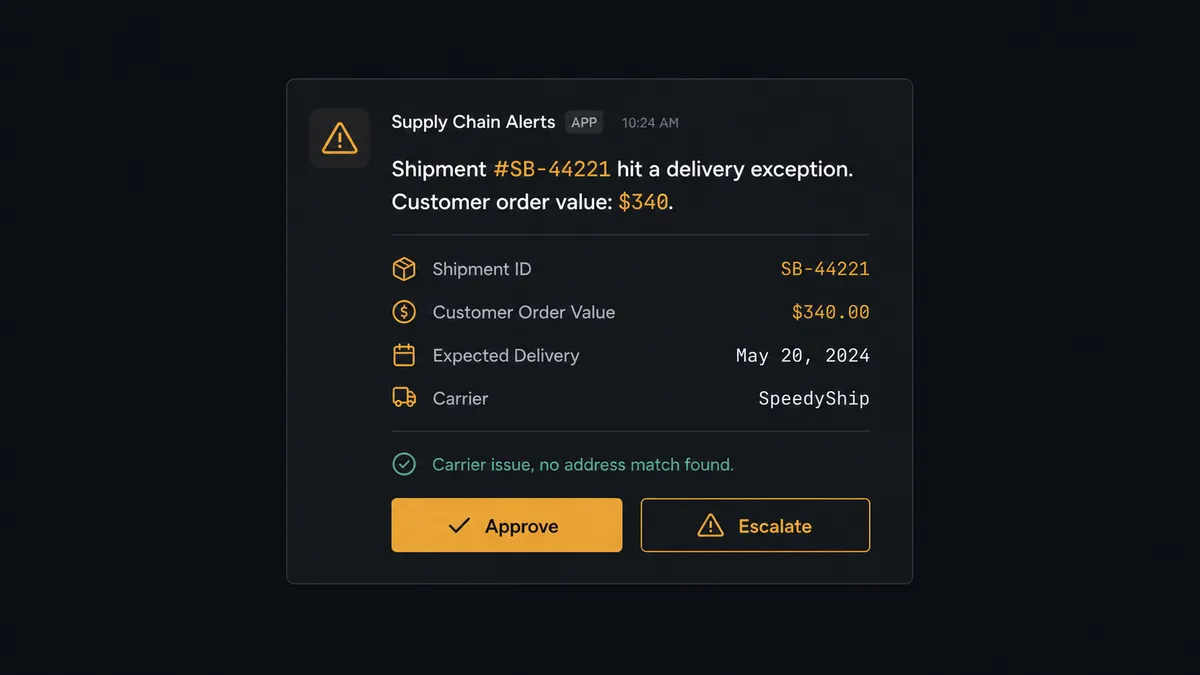
Picture a shipment exception on a $340 order where the carrier reports a delivery failure with no clear cause. A correction form will not fix a carrier problem, and the order value is high enough that guessing wrong costs real money. The agent invokes its human-in-loop tool: it posts to #fulfillment-ops with the full picture, “Shipment #SB-44221 hit a delivery exception. Customer order value: $340. Recommended resolution options attached,” and Approve or Escalate buttons underneath. The ops manager reads it, picks a path from their phone, and the agent executes it and confirms in the same thread. The decision, the decider’s identity, and the timestamp land in the audit trail automatically. A low-value order with a simple address typo never reaches Slack at all; the agent handles it end to end.
This is not a sync tool. The agent knows when to stop and ask, which is FlowRunner’s “digital andon cord”: the line keeps moving until something needs a human eye, and then it stops right there instead of guessing.
FlowRunner vs Zapier
Zapier is a reasonable first stop for a ShipBob-to-Slack notification. It is fast to set up, has mature triggers for both apps, and plenty of ops teams already run their alerting through it. Where it runs out of road is the decision itself: Zapier can post the exception to Slack, but it cannot read the order value, weigh it against the exception type, and decide on its own whether the situation needs a human at all.
| Capability | FlowRunner | Zapier |
|---|---|---|
| Human-in-loop | Native: the agent invokes a human-review step as a tool and resumes with the decision | Add-on: you build the branching logic and approval UI yourself with extra steps |
| Decision routing | Agent judges exception type and order value, escalates selectively | Every match fires the same Zap; routing logic is manual |
| Users included | Unlimited on every tier | Priced per user on higher tiers |
| AI provider | BYOK, connect the provider you already use | Requires Zapier’s own AI credits or a separate integration |
| Audit trail | Approver identity and timestamp captured automatically | Not built in; requires a separate logging step |
| Pricing model | Workflow-based tiers with a clear execution ceiling | Per-task pricing that scales with every Zap run |
Before and after
| What changes | Before | After |
|---|---|---|
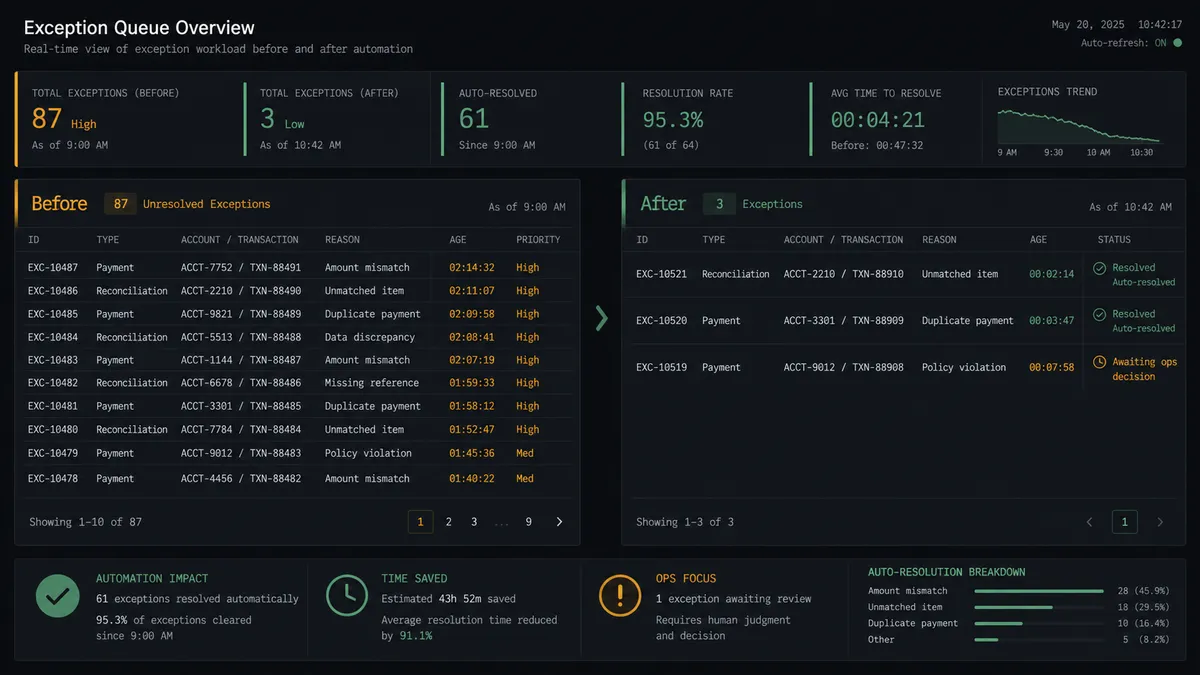
| Exception triage | Ops team watches the ShipBob dashboard throughout the day for exception flags | Exception lands in Slack within minutes of the ShipBob event, with order value attached |
| Customer response | Every exception gets the same generic automated message regardless of type | Address issues get a correction form automatically; carrier issues get human review |
| Returns handling | Staff check condition, decide on refund, and update inventory by hand | Resalable returns trigger the refund workflow automatically; damaged items route to a manager decision |
| Decision record | Approvals happen over email or a hallway conversation, with no single record | Every approve or escalate decision captured with approver identity and timestamp in Slack |
What you can build
Shipment exception escalation. On Shipment Exception triggers the agent to pull order and customer data, resolve address issues with an automated correction form, and route carrier issues above a value threshold to Slack with Approve and Escalate buttons.
Damaged return review. On Return Completed feeds the agent the SKU, condition, and reason code. Resalable items trigger the refund workflow automatically; damaged items get a Send Direct Message to the ops manager asking for a refund-or-claim decision.
Shipment hold investigation. On Shipment On Hold fires, the agent checks the hold reason, and if it cannot resolve it automatically, posts to Slack so the ops team can decide whether to release or cancel.
Low-inventory alerting. The agent runs Get Inventory on a schedule and posts a Send Message to Channel alert to the inventory manager when stock at a fulfillment center drops below a set threshold, ahead of the next WRO cycle.
Weekly fulfillment digest. The agent compiles shipment, exception, and WRO status and posts a Monday summary to #operations using Block Kit, giving leadership visibility without anyone pulling a report by hand.
Common questions
Is it free to connect ShipBob and Slack on FlowRunner? Yes. FlowRunner has a free plan with 100 executions a month, every integration included, and no credit card required, and new accounts get 14 days of Professional on top.
Can I run this without an AI agent, just a straight sync? Yes. Wire On Shipment Exception directly to Send Message to Channel with no agent involved, and layer the agent in later without rebuilding the connection.
Does the agent need my own OpenAI key? FlowRunner uses a bring-your-own-key model, so you connect the AI provider you already use rather than routing through a shared key.
What happens when the agent isn’t sure how to handle an exception? It does not guess. It packages the order value, customer history, and exception type into a Slack message and pauses until your ops team picks a resolution, then resumes automatically.
Can I self-host this connection? Yes, on the Enterprise tier, with a single instance or multi-instance clustering and the same ShipBob and Slack connectors plus full audit retention.
Which Slack channel does an escalated exception land in? Whichever channel you map during setup, and the agent can route to a specific person with Send Direct Message when an exception needs one clear owner.
Getting started
Connect ShipBob and Slack in FlowRunner and get your first exception routing to Slack in minutes. FlowRunner has a free plan with 100 executions a month, every integration included, and no credit card required, and new accounts get 14 days of Professional on top. Start at flowrunner.ai, or book time with the team to see the agent handle a live exception scenario.
Frequently asked questions
Is it free to connect ShipBob and Slack on FlowRunner?
Yes. FlowRunner has a free plan with 100 executions a month, every integration included, and no credit card required, and new accounts get 14 days of Professional on top.
Can I run this without an AI agent, just a straight sync?
Yes. You can wire On Shipment Exception directly to Send Message to Channel as a plain trigger-to-action flow with no agent involved, and add the agent layer later without rebuilding the connection.
Does the agent need my own OpenAI key?
FlowRunner uses a bring-your-own-key model, so you connect the AI provider you already use rather than routing through a shared FlowRunner-owned key.
What happens when the agent isn't sure how to handle an exception?
It does not guess. It packages the order value, customer history, and exception type into a Slack message and pauses the workflow until your ops team picks a resolution, then resumes automatically with that decision.
Can I self-host this connection?
Yes, on the Enterprise tier. Self-hosting gives you a single instance or multi-instance clustering with the same ShipBob and Slack connectors, plus full audit retention.
Which Slack channel does an escalated exception land in?
Whichever channel you map during setup, typically an operations or fulfillment channel, and the agent can also route to a specific person with Send Direct Message when an exception needs one owner rather than a group.