Shippo Shopify Integration: Rate-Shopped Labels, Every Order
Connect Shopify orders to Shippo so every label gets bought against the best carrier rate automatically, and run it as an AI agent that pauses for ops on a failed or returned high-value shipment.
How do you connect Shippo to Shopify?
Shopify’s On New Order trigger fires the moment a customer checks out, and FlowRunner maps that order into Shippo with Validate Address, Get Shipment Rates, and Create Transaction (Buy Label), so a label gets bought against the cheapest qualifying carrier rate instead of whatever carrier the store defaulted to months ago. FlowRunner is a visual AI-agent orchestration platform where automations run autonomously and pause for human judgment on the steps that carry real consequence. The same connection can run as a straightforward label-buying sync, or it can run as an AI agent that also watches tracking events and pauses for ops before a failed or returned high-value shipment gets reshipped or refunded.
The problem it solves
A fulfillment lead running Shopify and Shippo side by side usually inherits two separate habits instead of one process. Someone picks a carrier once, sets it as the default, and every order ships through that carrier whether or not it is actually the cheapest or fastest option for that destination that day. Addresses go unvalidated because checking each one by hand does not scale past a handful of orders, so a share of labels get bought against destinations that were never going to deliver, and the return comes back as a surprise instead of a flagged risk.
The other half of the problem shows up when something goes wrong. A parcel that fails delivery or comes back RETURNED sits in Shippo’s tracking data with nobody watching it in real time. The team usually finds out when the customer emails asking where their order is, days after the carrier already reported the failure. By then a $600 order that needed a same-day reship-or-refund call has cooled into an angry support ticket instead of a decision someone made on purpose.
How it works: the connection
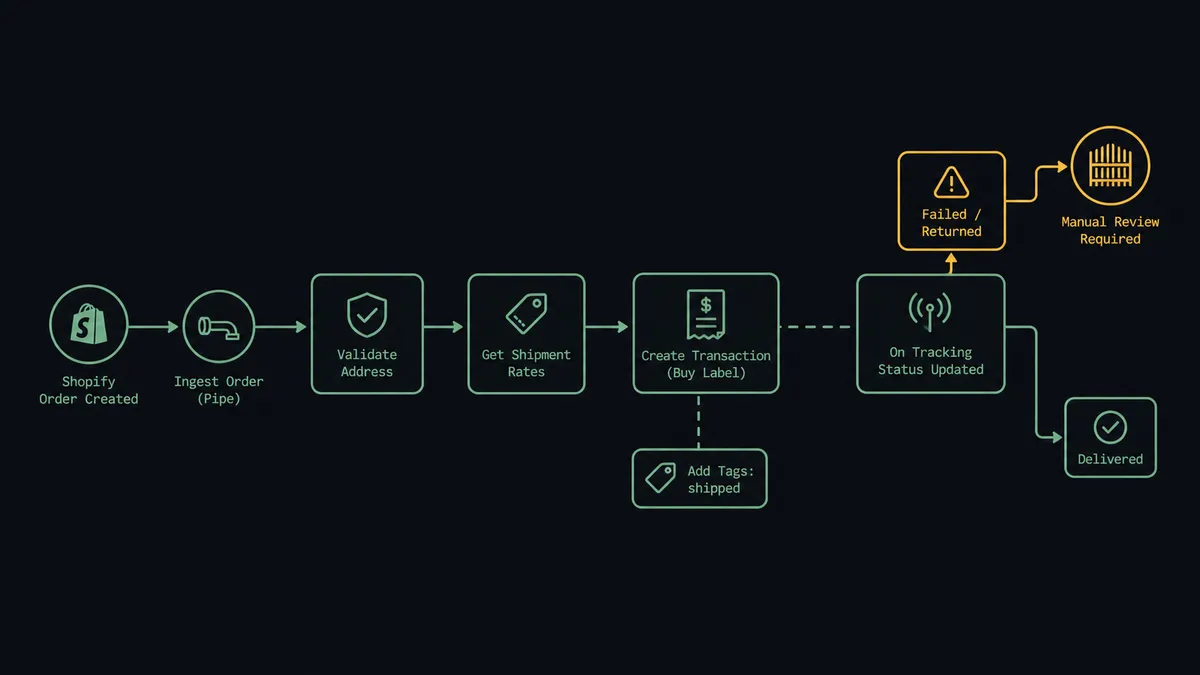
The flow starts on Shopify’s On New Order trigger. When a customer checks out, the agent reads the line items, the ship-to address, and the order value, then calls Validate Address in Shippo to confirm the destination is real before anything gets bought. With the address confirmed, the agent calls Get Shipment Rates to compare live options across carriers and calls Create Transaction (Buy Label) against the rate that best fits cost and speed for that shipment. The label and tracking number exist in Shippo, and the agent calls Add Tags on the Shopify order to mark it shipped, so anyone looking at the order in Shopify sees the fulfillment status without opening a second system.
That covers every order that ships clean. Shippo’s On Tracking Status Updated trigger fires again later when the carrier reports a status change. A DELIVERED status closes the loop and notifies the customer. A FAILURE or RETURNED status is where the flow gets more careful, because that is the event that used to sit unnoticed until a customer complained.
Can an AI agent run it? (and why a human stays in the loop)
Yes, and this is where it stops being a shipping script. A scheduled or webhook-triggered sync buys a label and watches a tracking webhook without weighing what any of it means. An AI agent reads the order value, the destination, and the tracking history, and decides on its own whether a failure is routine enough to reship automatically or serious enough that a person should choose the outcome first.
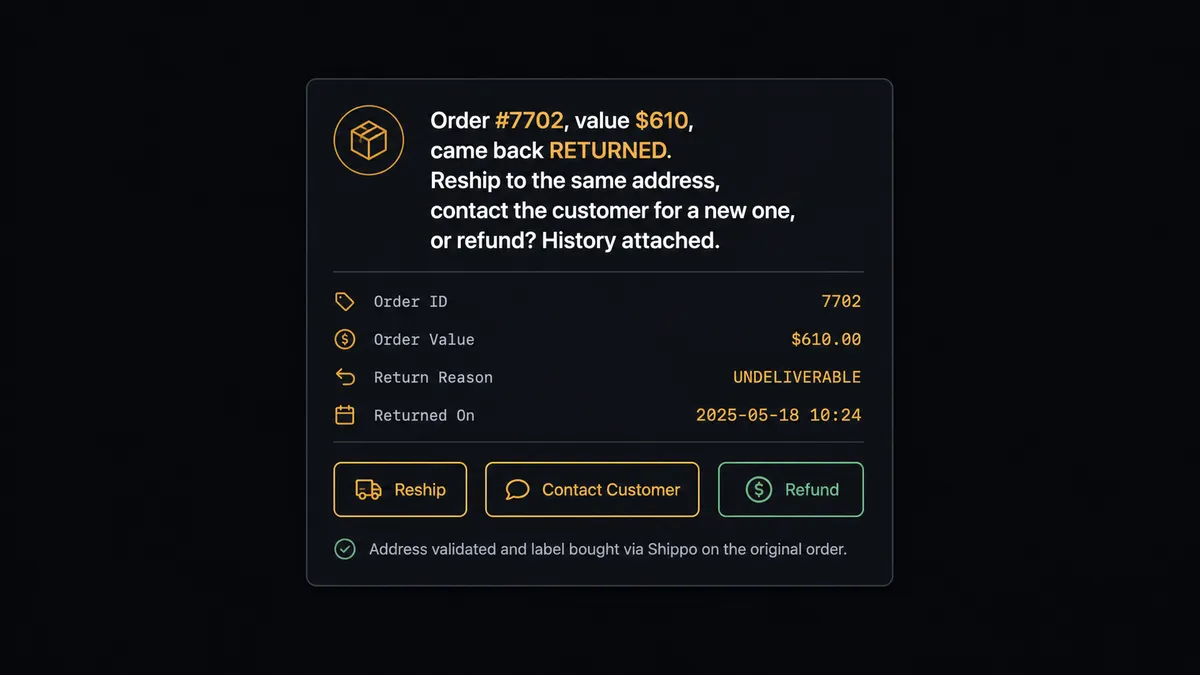
Here is the actual decision moment. Order #7702 comes back with a RETURNED status, and the order was worth $610, well above the account’s usual ticket. The agent has already validated the address and bought the original label, the same as it would for any order. But before it touches the outcome, it treats the decision as a human-in-the-loop moment: it pulls the tracking history and the order context, then posts to the fulfillment channel: “Order #7702, value $610, came back RETURNED. Reship to the same address, contact the customer for a new one, or refund? History attached.” Ops sees the tracking events and the order value in one message, no digging through Shippo’s dashboard required. They choose reship, and the agent calls Create Transaction (Buy Label) against a fresh rate immediately. They choose refund, and the agent calls Create Refund in Shopify instead, and records who decided either way. A $40 order that fails the same way never reaches this gate; it reships automatically because the value does not warrant a person’s time.
This is not a sync tool. The agent knows when a tracking event is routine and when it is not, and it does the surrounding work, pulling the history, drafting the summary, so ops only spends time on the judgment call the business actually needs a person for. Prospects who have seen this pattern before call it a digital andon cord: the line keeps shipping, and it stops the instant a return needs a human eye.
FlowRunner vs Zapier
Zapier is a reasonable starting point for this exact connection. It has both a Shopify and a Shippo app, the trigger-to-label mapping is genuinely fast to set up, and for a straight order-to-label sync with a single default carrier and no branching logic, plenty of teams get it running in an afternoon. That part is fair to credit.
Where it runs out of room is the return decision. Zapier can trigger on a tracking status change and call a Shippo or Shopify action, but it cannot look at a failed shipment’s order value and tracking history, weigh it against what is routine for that account, and decide on its own to stop and ask a specific person before reshipping or refunding. That logic gets built as a rigid if-status-then-notify step at best, or the team just finds out about the return when the customer writes in.
| Capability | FlowRunner | Zapier |
|---|---|---|
| Human-in-the-loop on the reship/refund decision | Native: the agent reasons about order value and tracking history, then invokes an ops decision as a callable tool | Not native: conditional branches can route to a notification, not a judgment call |
| Rate comparison before buying | Get Shipment Rates and Create Transaction (Buy Label) sit in one agent flow that reasons about the choice | Requires a fixed rate lookup step wired ahead of a separate buy step, with no reasoning between them |
| Pricing model | Transparent workflow-based tiers with a stated execution ceiling per tier | Per-task pricing that scales with volume and gets harder to predict at growth |
| Users included | Unlimited users on every tier | Seat-based pricing on higher tiers |
| Self-hosting | Available on Enterprise | Not offered |
Before and after
| Metric | Before | After |
|---|---|---|
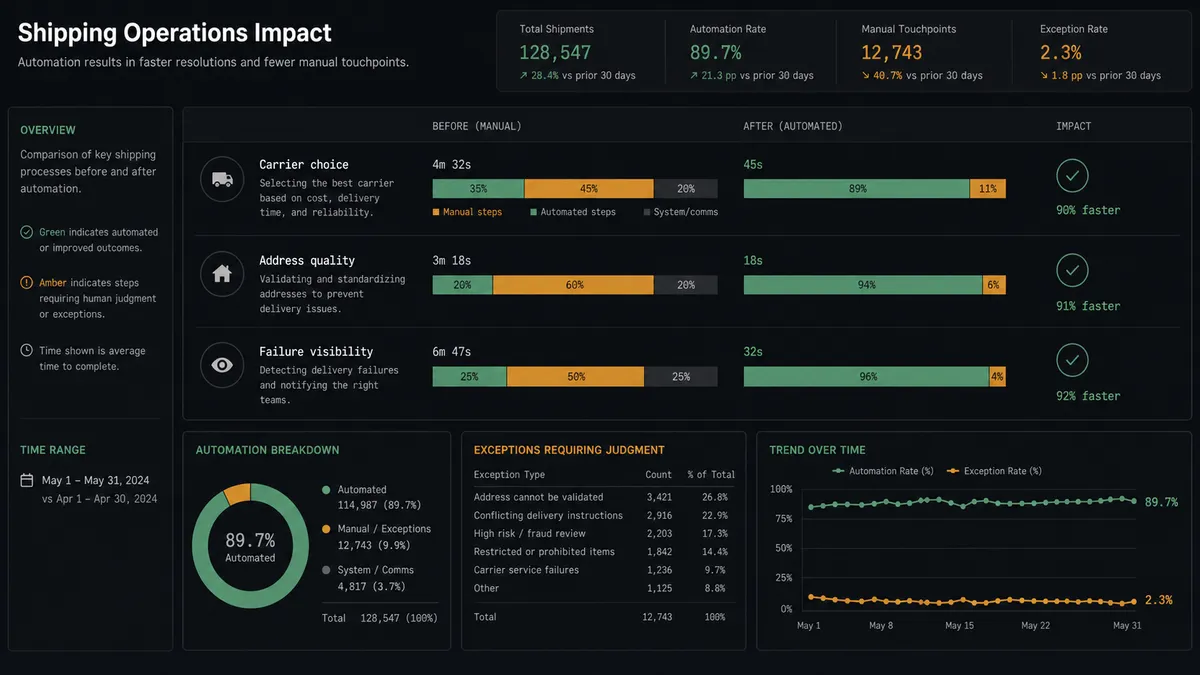
| Carrier choice | Orders default to one carrier without checking whether another is cheaper or faster | Get Shipment Rates compares live options and the agent buys the best fit |
| Address quality | Labels are bought against unvalidated addresses and bounce back as returns | Validate Address runs before Create Transaction (Buy Label) so bad destinations stop early |
| Failure visibility | A returned or failed delivery is discovered when the customer follows up | On Tracking Status Updated fires on failure or return and routes the case immediately |
| Fulfillment status in Shopify | Order status has to be checked in Shippo separately | Add Tags marks the Shopify order shipped the moment the label is bought |
| Reship/refund decision | Made in DMs after a customer complains, with no consistent record | Ops decides from a single message with tracking history attached, and the choice is on record |
What you can build
Rate-shopped label on every order. Shopify’s On New Order trigger feeds the agent an order, which calls Validate Address, Get Shipment Rates, and Create Transaction (Buy Label), so every parcel ships on the carrier that fits cost and speed for that specific destination.
International orders with customs handled inline. For cross-border checkouts, the agent calls Create Customs Declaration and Create Customs Item alongside Create Shipment before buying the label, so customs paperwork is built inside the flow instead of assembled by hand at ship time.
Failed and returned shipments routed to a decision, not a guess. On Tracking Status Updated fires with a FAILURE or RETURNED status, and the agent packages the order value and tracking history for ops to choose reship, contact the customer, or refund, instead of letting the case sit until someone follows up.
Shipped status visible without leaving Shopify. The moment Create Transaction (Buy Label) succeeds, the agent calls Add Tags on the Shopify order, so anyone checking order status in Shopify sees it is shipped without opening Shippo.
Batch pickups for high-volume ship days. The agent calls Add Shipments to Batch and Purchase Batch to group same-day orders into one pickup, then Create Pickup to schedule the carrier, so a high-volume day does not mean buying labels one at a time.
Common questions
Is it free to connect Shippo and Shopify on FlowRunner? Yes. FlowRunner has a free plan with 100 executions a month, every integration included, and no credit card required, and new accounts get 14 days of Professional on top.
Can I self-host the Shopify to Shippo flow? Yes. FlowRunner offers a self-hosted Enterprise option alongside the cloud tiers, so the same label-buying and return-review workflow can run on infrastructure you control.
Does the agent need my own OpenAI key? The AI agent step runs on a bring-your-own-key model, so you connect the AI provider you already use rather than routing usage through a vendor-owned key.
What happens when the agent isn’t sure whether to reship or refund? The agent does not guess. It packages the order value, the tracking history, and the customer, posts that to the channel your fulfillment team already watches, and waits for ops to choose reship or refund before either one runs.
Does this replace Shopify’s built-in shipping labels? No. FlowRunner sits above the connection as an orchestration layer, so the same label purchase can also compare live rates across carriers and carry a return-review gate that a single-carrier storefront label does not reason about.
Can the same flow catch a bad address before a label gets bought? Yes. Validate Address runs against the ship-to address before Create Transaction (Buy Label) ever fires, so a bad destination stops before money is spent on a label that would just bounce back.
Getting started
FlowRunner has a free plan with 100 executions a month, every integration included, and no credit card required, and new accounts get 14 days of Professional on top. Start with the rate-shopped label sync, then add the reship-or-refund decision gate when your fulfillment team is ready for it. Get started at flowrunner.ai or book a walkthrough at calendly.com/flowrunner/intro.
Frequently asked questions
Is it free to connect Shippo and Shopify on FlowRunner?
Yes. FlowRunner has a free plan with 100 executions a month, every integration included, and no credit card required, and new accounts get 14 days of Professional on top.
Can I self-host the Shopify to Shippo flow?
Yes. FlowRunner offers a self-hosted Enterprise option alongside the cloud tiers, so the same label-buying and return-review workflow can run on infrastructure you control.
Does the agent need my own OpenAI key?
The AI agent step runs on a bring-your-own-key model, so you connect the AI provider you already use rather than routing usage through a vendor-owned key.
What happens when the agent isn't sure whether to reship or refund?
The agent does not guess. It packages the order value, the tracking history, and the customer, posts that to the channel your fulfillment team already watches, and waits for ops to choose reship or refund before either one runs.
Does this replace Shopify's built-in shipping labels?
No. FlowRunner sits above the connection as an orchestration layer, so the same label purchase can also compare live rates across carriers and carry a return-review gate that a single-carrier storefront label does not reason about.
Can the same flow catch a bad address before a label gets bought?
Yes. Validate Address runs against the ship-to address before Create Transaction (Buy Label) ever fires, so a bad destination stops before money is spent on a label that would just bounce back.