Route Ramp Reimbursements to Slack for Approval
Connect Ramp and Slack so reimbursements and bills route to the right approver automatically, with an AI agent that pauses for a human before any money moves.
How do you connect Ramp to Slack?
Connect Ramp’s On New Reimbursement (or On New Bill, or On New Transaction) trigger to Slack’s Send Message to Channel action, and route the decision back through Slack’s On Block Action trigger into Ramp’s Approve Reimbursement action. FlowRunner is a visual AI-agent orchestration platform where automations run autonomously and pause for human judgment on the steps that carry real consequence. On this pair, that means the same connection can run as a simple sync (post every new bill to a channel) or as an AI agent that reads each reimbursement, decides whether it is routine or exceptional, and only pulls in a human when the amount or the vendor calls for one.
The problem it solves
Right now, spend visibility lives in two disconnected places. An AP clerk or billing manager watches Ramp for new transactions, reimbursements, and bills, then manually decides who needs to know and who needs to approve. Reimbursements get approved over scattered email threads with no consistent record. New vendors from Ramp get re-typed into the ERP by hand, and drift between the two systems is only caught during reconciliation, weeks after the fact. None of this fails loudly. It just falls through the cracks: a duplicate bill gets paid twice, an over-threshold reimbursement clears without the right eyes on it, and finance finds out at month-end instead of the moment it happened.
Slack is where the team already lives, but today it is disconnected from Ramp. Someone has to notice the exception in Ramp, then manually start a Slack thread or an email chain to get a decision, then go back into Ramp to act on it. Every extra hop is a place where the item sits, waits, or gets forgotten. The fix is not more email. It is wiring the trigger in Ramp directly to the approval surface in Slack, so the exception and the decision live in the same place, automatically.
How it works: the connection
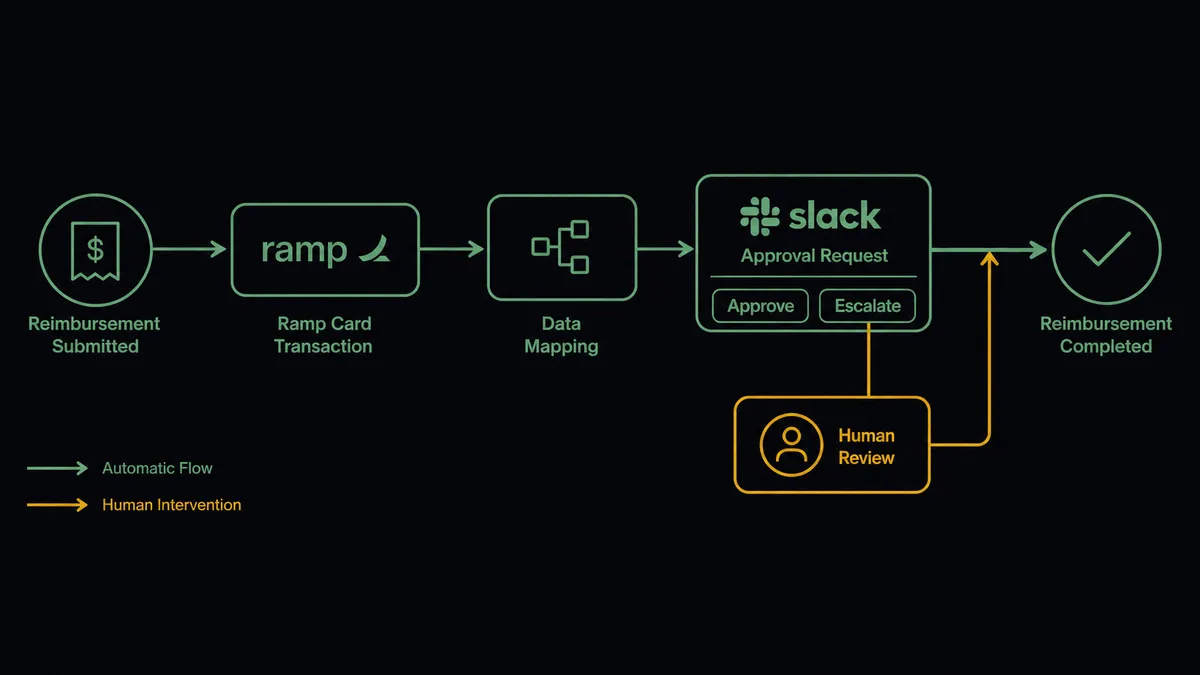
The connection runs on three real Ramp triggers: On New Transaction, On New Reimbursement, and On New Bill. Each one starts a different flow into Slack.
For reimbursements, On New Reimbursement fires the moment an employee submits an expense. The workflow reads the amount, submitter, department, and attached receipt from Ramp, then calls Send Message to Channel or Send Direct Message in Slack to notify the approver with the full detail attached. Once a decision comes back, Slack’s On Block Action trigger fires and the workflow calls Approve Reimbursement in Ramp to advance the item for payment.
For bills, On New Bill fires when a new AP bill lands in Ramp. The workflow calls Get Bill and List Bills to check whether a bill for the same reference already exists, and if the vendor is new, calls Create Vendor to mirror it into Ramp before the bill proceeds. A duplicate gets caught before it becomes a duplicate payment, and the vendor record stays in sync without anyone re-typing it.
For transactions, On New Transaction fires in real time as card spend posts. The workflow reads the merchant, amount, and cardholder, then calls Send Message to Channel to post an alert to a finance channel and appends the transaction to a running spend tracker. Finance sees spend as it happens instead of discovering it during statement reconciliation.
Can an AI agent run it? (and why a human stays in the loop)
A plain sync tool can move a Ramp event into a Slack channel. It cannot decide which events are worth a human’s attention. That decision is what the FlowRunner agent adds.
The agent reads each reimbursement or bill as it arrives: the amount, the category, the submitter, the vendor’s history. It checks that data against the approval policy, not a single hardcoded number. A routine reimbursement from a known category, in policy, moves through without anyone touching it. An out-of-policy category, or an amount above the configured limit, is where the agent invokes the human-in-loop flow as a tool, exactly the way it would call any Ramp action.
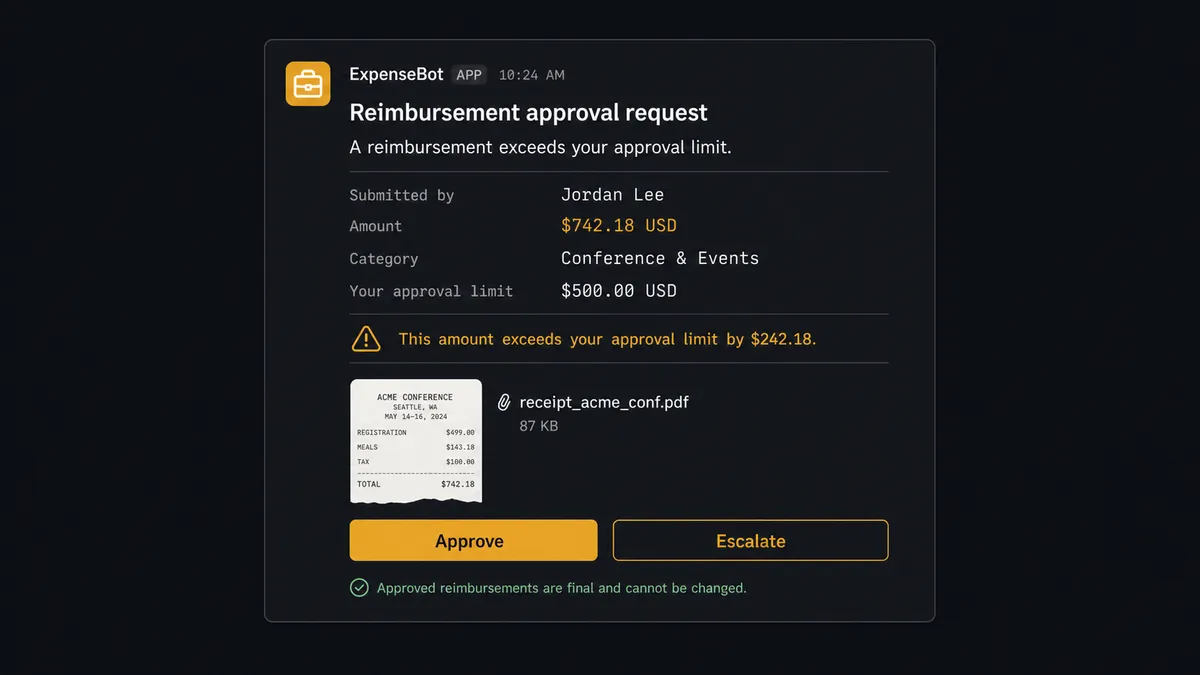
When it escalates, the agent packages the context the approver actually needs: the amount, the category, the policy it triggered, and the attached receipt. It posts that as a Slack Block Kit message with Approve and Escalate buttons. Slack’s On Block Action trigger captures the click. If approved, the agent calls Approve Reimbursement in Ramp to advance the payment. If escalated, it routes to the next approver with the same context attached. Either way, the approver’s identity and the timestamp are captured in the audit trail. This is not a sync tool. The agent knows when to stop and ask, and it never calls Approve Reimbursement on its own judgment. That approval only happens after a person decides.
This is the same pattern Slack’s own exception-routing workflows show at scale: an agent processing purchase orders overnight posted a summary of 44 of 47 items handled automatically, with the remaining 3 resolved in a single 6-minute Slack session from a manager’s phone. Reimbursement and bill approval through Ramp works the same way. Routine spend clears itself. Exceptions land in front of a person with everything they need to decide in seconds, not a meeting.
FlowRunner vs Zapier
Zapier is a reasonable starting point for connecting Ramp to Slack, and it earns that reputation honestly: the trigger-action setup is fast, the interface is approachable for a non-technical finance team, and a simple “new reimbursement posts to Slack” zap takes minutes to build. Where it runs out of road is the moment the workflow needs judgment instead of a straight pass-through. Zapier can post every reimbursement to Slack. It cannot read the amount, weigh it against a policy, and decide on its own whether this one needs a human or that one can clear automatically.
| Dimension | Zapier | FlowRunner |
|---|---|---|
| Human-in-loop | Manual Slack step you build and maintain yourself | Native: the agent invokes an approval flow as a callable tool and waits for the decision |
| Decision logic | If/then filters on fixed fields | Agent reasons over amount, category, and vendor history before deciding to escalate |
| Users included | Priced per user on most plans | Unlimited users and workflows on every tier |
| AI provider | Built-in AI add-on, provider fixed by Zapier | BYOK: connect your own model provider |
| Self-hosting | Not available | Free Community Edition and self-hosted Enterprise |
| Pricing model | Per-task pricing that scales with every Slack message and Ramp read | Transparent workflow-based tiers with a fixed execution limit |
Before and after
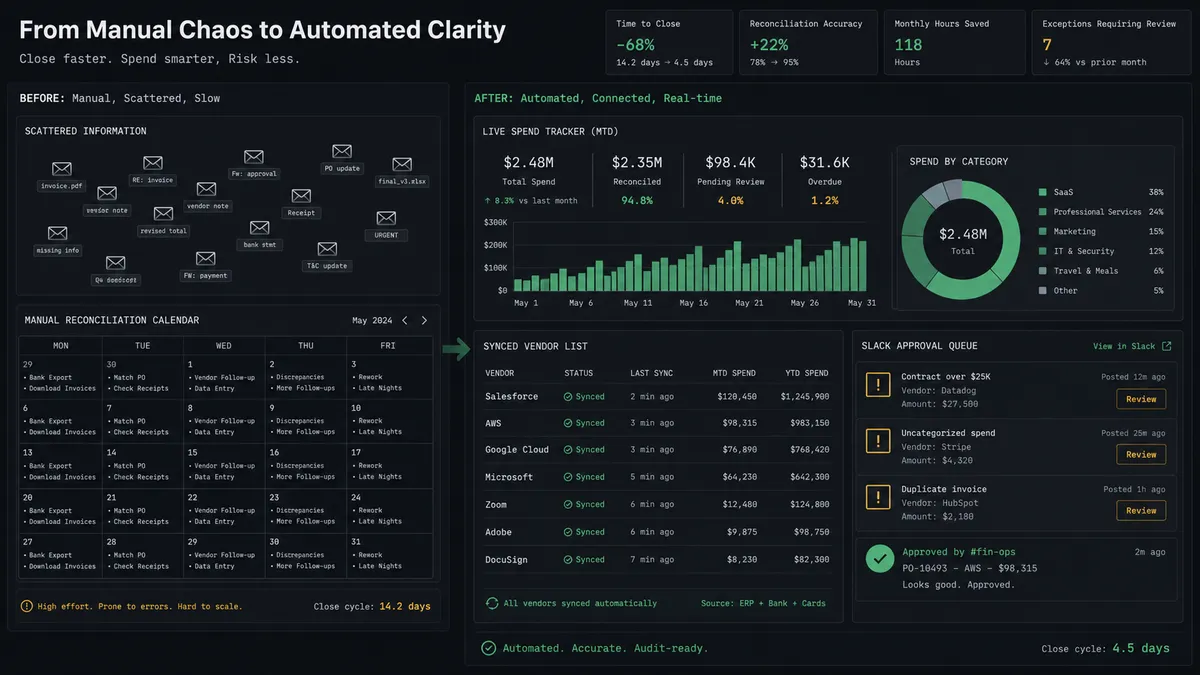
| What changes | Before | After |
|---|---|---|
| Spend visibility | Transactions are reviewed when the statement is reconciled, not when they happen | New transactions trigger alerts and policy checks the moment they post |
| Vendor records | New vendors are re-entered into the ERP by hand, with drift between systems | New Ramp vendors are mirrored into the accounting system automatically |
| Approval routing | Reimbursements are approved in scattered email threads with no consistent record | Reimbursements go to the right approver in Slack with receipt and policy context attached |
| Exception resolution | Exceptions require a meeting or email chain before resolution | Exceptions get approved or escalated from Slack, often from a phone, in minutes |
| Audit trail | Approval history is scattered across inboxes | Every approval is captured with approver identity and timestamp automatically |
What you can build
Real-time spend alerts. On New Transaction fires as a card charge posts. The agent reads the merchant and amount and calls Send Message to Channel to post it into a live finance-ops feed, so out-of-policy spend surfaces immediately instead of at reconciliation.
Reimbursement approval routing. On New Reimbursement fires when an employee submits an expense. The agent checks it against policy, sends an approval card to Slack when it needs a human, and calls Approve Reimbursement once the decision comes back.
Bill and vendor sync with duplicate checks. On New Bill fires when a bill lands in Ramp. The agent calls Get Bill and List Bills to check for duplicates and Create Vendor to keep new suppliers in sync, then posts a summary to Slack so AP has visibility without opening Ramp.
Card issue escalation. When List Transactions or a scheduled review flags unusual card activity, the agent posts to Slack with the option to Freeze Card directly from the message, giving finance a one-click way to halt spend on a suspected issue.
Weekly spend digest. On a schedule, the agent pulls List Transactions and List Reimbursements, compiles a summary using Block Kit, and posts it to a leadership channel so operational visibility does not depend on someone pulling a report.
Getting started
FlowRunner has a free plan with 100 executions a month, every integration included, and no credit card required, and new accounts get 14 days of Professional on top. Connect your Ramp account and your Slack workspace, pick the trigger that matches your workflow, and add the human-in-loop step so an approver, not the agent, decides on anything that moves real money.
Start building at flowrunner.ai, or book time with the team at calendly.com/flowrunner/intro to walk through the Ramp and Slack setup for your finance team.
Frequently asked questions
Is it free to connect Ramp and Slack on FlowRunner?
FlowRunner has a free plan with 100 executions a month, every integration included, and no credit card required, and new accounts get 14 days of Professional on top. Growth includes AI agents, BYOK, all integrations including Ramp and Slack, and human-in-loop orchestration.
Can I self-host the Ramp and Slack connection?
Yes. FlowRunner's Community Edition is a free, self-hosted single instance, and the Enterprise tier adds multi-instance clustering with the full compliance suite for teams that need Ramp and Slack workflows to run entirely on their own infrastructure.
Does the agent need my own OpenAI key?
FlowRunner uses a bring-your-own-key model for AI providers, so you connect your own key and control which model reasons over your Ramp and Slack data. FlowRunner does not resell model access.
What happens when the agent isn't sure about a reimbursement or bill?
The agent stops and asks. It posts the reimbursement or bill to Slack with the amount, category, and policy context, and waits for an approver to click Approve or Escalate before it calls Approve Reimbursement or moves the item forward.
Which Ramp events can trigger a Slack message?
Three Ramp triggers are available: On New Transaction, On New Reimbursement, and On New Bill. Each can route into a different Slack channel or approver depending on how the workflow is built.
Can approvers respond from their phone?
Yes. Slack's On Block Action trigger captures a tap on Approve or Escalate from the Slack mobile app, and the agent resumes the Ramp workflow the moment the decision comes back.