Ramp + QuickBooks Online: Vendor Bills Synced, Duplicates Caught
Connect Ramp bills to QuickBooks Online automatically, with an AI agent that catches duplicates and pauses for an accounting manager before posting a large or unfamiliar bill.
How do you connect Ramp to QuickBooks Online?
Use the On New Bill trigger in Ramp to fire when a vendor bill is submitted, then call Get Vendor and Create Bill in QuickBooks Online to check the supplier and record the entry automatically. FlowRunner is a visual AI-agent orchestration platform where automations run autonomously and pause for human judgment on the steps that carry real consequence. The same connection that syncs a routine vendor bill in seconds can run as an AI agent that checks for duplicates on its own and pauses for your accounting manager before posting a large or unfamiliar bill.
The problem it solves
An AP clerk opens Ramp, sees a new vendor bill, and starts the manual bridge: confirm the vendor exists in QuickBooks, check whether this invoice number has already been entered, key in the amount and due date, and file the reference. On a normal week that is a dozen small interruptions. During month-end it becomes the whole job. Vendor records drift because someone typed the name differently in one system than the other. A bill gets entered twice because nobody checked before keying it in, and the duplicate isn’t caught until the vendor calls asking why they got paid twice.
Ramp and QuickBooks were never built to talk to each other directly. Someone has to be the bridge every time a bill lands in Ramp and needs to show up in the books. That someone is usually a bookkeeper or AP coordinator who spends the morning reconciling instead of reviewing exceptions. Finance never has a same-day view of what’s outstanding, and reconciliation turns into a search party for entries that fell through the cracks.
How it works: the connection
The On New Bill trigger fires the moment a vendor bill is submitted in Ramp. The payload carries the vendor name, invoice reference, amount, due date, and line items, everything the accounting step needs.
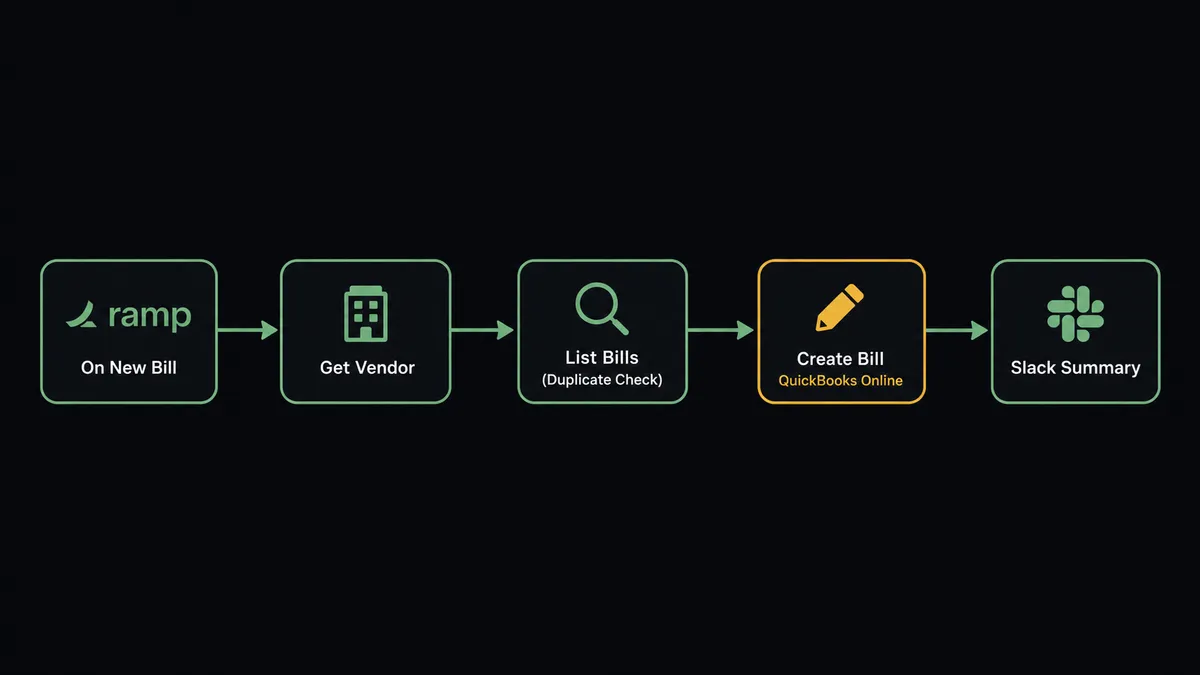
The flow runs like this:
- On New Bill fires in Ramp for a newly submitted vendor bill
- The agent calls Get Vendor in QuickBooks to find the existing supplier record, or Create Vendor if this is a new vendor
- The agent calls List Bills in QuickBooks, filtering by vendor and invoice reference, to check whether this bill already exists
- If no duplicate is found and the amount is within the review threshold, the agent calls Create Bill in QuickBooks with the vendor, amount, due date, and line items from the Ramp payload
- A summary posts to the finance Slack channel: “Bill created for [Vendor]. Amount: $[X]. QBO Bill ID: [Y].”
The same pattern runs in reverse for reimbursements. When On New Reimbursement fires in Ramp and the approver decides, the agent can call Get Bill in QuickBooks to confirm the corresponding expense line hasn’t already been recorded before logging it. Both flows run without a bookkeeper opening either app.
Can an AI agent run it? (and why a human stays in the loop)
A basic trigger-action connection records every bill the moment it appears in Ramp. That works fine for a $600 recurring software bill from a vendor with two years of clean payment history. It does not work for a $14,000 bill from a vendor Ramp has never seen before, or a bill that looks like it might already be sitting in QuickBooks under a slightly different reference number.
An AI agent on this flow does not apply one hardcoded rule to every bill. It reads the data and reasons about what it finds.
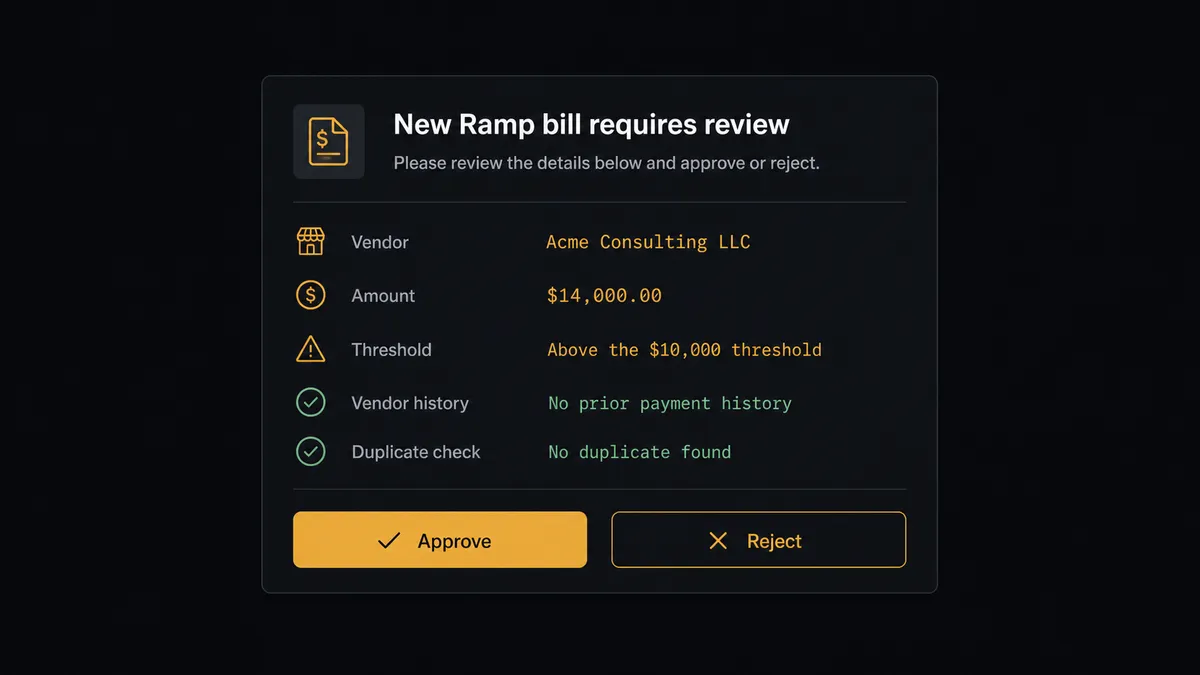
Here is how that plays out. On New Bill fires for a new vendor bill in Ramp. The agent calls Get Vendor in QuickBooks and finds the vendor was created two weeks ago with no prior bills. It calls List Bills and finds nothing with a matching reference, so this isn’t a duplicate. But the amount is $14,000, which crosses QuickBooks Online’s $10,000 review threshold. The agent does not create the bill.
Instead, it invokes the human-in-loop sub-flow. The accounting manager receives a Slack message:
“New Ramp bill for [Vendor] requires review. Amount: $14,000, above the $10,000 threshold. Vendor added two weeks ago, no prior payment history. No duplicate found in QuickBooks. Approve to create the bill, or reject to hold.”
The manager checks the attached invoice, confirms it matches a signed contract, and approves. The agent calls Create Bill in QuickBooks and records the entry. The approval decision, the manager’s identity, and the timestamp are written to the audit trail.
A $600 bill from a vendor with a two-year track record and no duplicate flag moves through automatically. The agent doesn’t need to ask. This is the “digital andon cord” idea: the line stops when there’s genuine uncertainty and keeps moving when the situation is clear. This is not a sync tool. The agent knows when to stop and ask.
FlowRunner vs Zapier
Zapier is a solid choice for a simple, rule-based connection between Ramp and QuickBooks. If you want every Ramp bill to create a QuickBooks bill with no conditions, Zapier can wire that up quickly, and its app catalog and setup speed are genuine advantages for a straightforward two-step automation.
The differences show up once your AP process needs more than a fixed rule:
| Capability | Zapier | FlowRunner |
|---|---|---|
| Trigger-action connection for Ramp to QBO | Yes | Yes |
| AI agent that reads the bill and decides | No | Yes |
| Duplicate and vendor-history check before posting | Manual condition only | Agent evaluates automatically |
| Human-in-loop as a callable agent tool | No | Yes, on any step |
| Audit trail with approver and timestamp | No | Yes, every approval |
| Unlimited users on every paid tier | No (seat-based) | Yes |
| Self-hosted option | No | Yes (Community and Enterprise) |
The honest version: if every Ramp bill you process is routine and low volume, Zapier covers it. If you have new vendors entering the system regularly, an AP review threshold, or a compliance need for a recorded approval trail, FlowRunner is the better fit.
Before and after
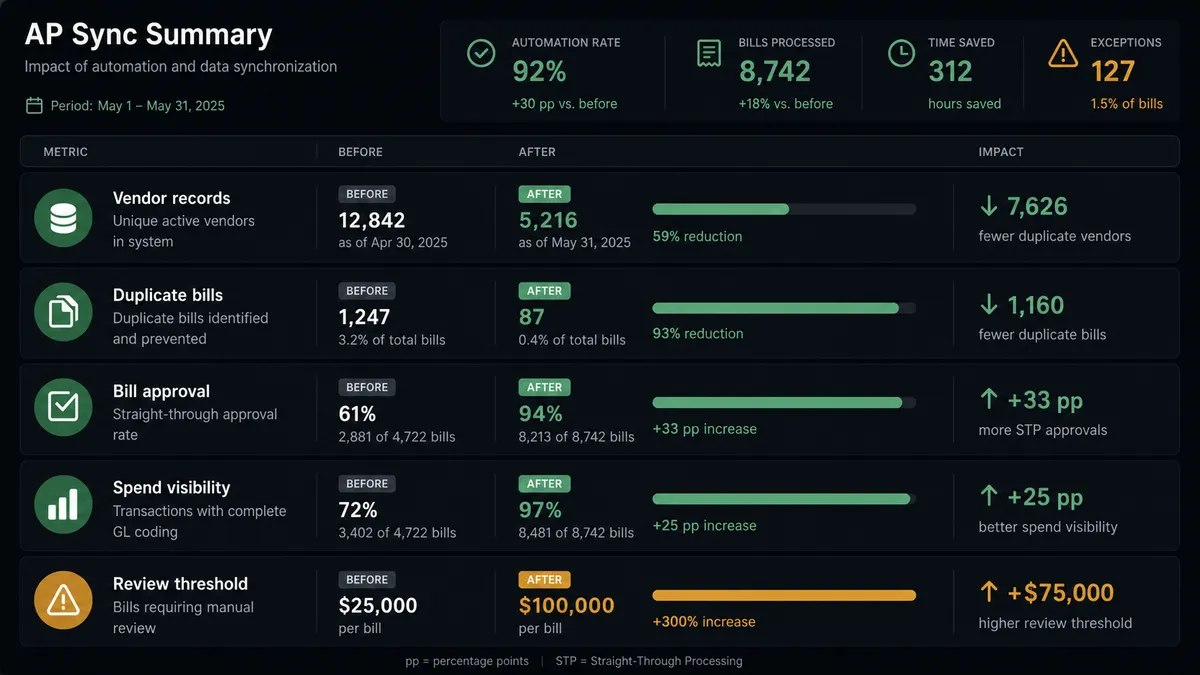
| Category | Before | After |
|---|---|---|
| Vendor records | New Ramp vendors re-entered into QuickBooks by hand, with drift between systems | New Ramp vendors mirrored into QuickBooks automatically via Create Vendor |
| Duplicate bills | Duplicate vendor invoices surface only during manual reconciliation | Agent runs List Bills in QuickBooks before every bill is created |
| Bill approval | Reimbursements and bills approved in scattered email threads with no consistent record | Bills route to the accounting manager with vendor, amount, and duplicate-check result attached |
| Spend visibility | Spend seen after the fact, when the statement is reconciled | New Ramp bills trigger a vendor and duplicate check the moment they’re submitted |
| Review threshold | No consistent rule for what needs sign-off before posting | Bills over $10,000 pause for accounting manager approval automatically |
What you can build
Vendor bill sync with duplicate protection. When On New Bill fires in Ramp, the agent calls Get Vendor and List Bills in QuickBooks to confirm the supplier exists and the invoice reference is new, then calls Create Bill to record it. Bills flagged as possible duplicates route to the accounting manager instead of posting.
Reimbursement decision mirrored to the books. When On New Reimbursement fires and the human approver decides, the agent calls Approve Reimbursement in Ramp for approved items, then checks Get Bill in QuickBooks to confirm the corresponding expense hasn’t already been logged before recording it as a bill.
New vendor onboarding across both systems. When a new supplier is validated from document intake, the agent calls Create Vendor in QuickBooks and mirrors the same record into Ramp with Create Vendor, so the vendor is ready for both card spend and bill pay without being entered twice.
Weekly AP reconciliation digest. Every Monday, the agent calls List Bills in Ramp and List Bills in QuickBooks, cross-references the two lists, and posts a summary to the finance Slack channel showing any bill pending approval and any reference that appears in one system but not the other.
Common questions
Is it free to connect Ramp and QuickBooks Online on FlowRunner? FlowRunner has a free plan with 100 executions a month, every integration included, and no credit card required, and new accounts get 14 days of Professional on top. No credit card is required to start. Beyond the free plan, Growth is $45 per month.
Can I self-host FlowRunner to keep spend data on my own infrastructure? Yes. FlowRunner offers a self-hosted Community Edition at no cost and an Enterprise self-hosted tier for multi-instance deployments with full compliance features. Both run on your own infrastructure.
Does the AI agent need my own OpenAI key? FlowRunner uses a BYOK (Bring Your Own Keys) model. You connect whichever AI provider you prefer. No key is required from FlowRunner itself.
What happens when the agent is not sure whether to record a bill? The agent pauses the workflow and routes the bill to your accounting manager via Slack with the vendor, amount, and duplicate-check result attached. The manager approves or rejects, and the agent records the decision, the approver’s identity, and the timestamp in the audit trail.
Does connecting Ramp to QuickBooks Online require a developer? No. Both connectors authenticate via OAuth2 through the FlowRunner visual builder. You map fields, set conditions, and activate the flow without writing code.
What Ramp events can trigger a QuickBooks action? On New Bill fires when a vendor bill is submitted in Ramp, and On New Reimbursement fires when an employee submits an expense. Either trigger can drive a QuickBooks Online action such as Create Bill or Create Payment.
Getting started
Start on the free plan: 100 executions a month, every integration included, no credit card required, plus 14 days of Professional for new accounts. Any real email address works; disposable domains are not accepted.
Both connectors authenticate with OAuth2 through the visual builder. You do not need a developer to get started.
Explore the integration pages for more on what each connector can do: Ramp and QuickBooks Online.
When you’re ready to try it, start at flowrunner.ai. If you want to walk through the setup with the team, book a session at calendly.com/flowrunner/intro.
Frequently asked questions
Is it free to connect Ramp and QuickBooks Online on FlowRunner?
FlowRunner has a free plan with 100 executions a month, every integration included, and no credit card required, and new accounts get 14 days of Professional on top. No credit card is required to start. Beyond the free plan, Growth is $45 per month.
Can I self-host FlowRunner to keep spend data on my own infrastructure?
Yes. FlowRunner offers a self-hosted Community Edition at no cost and an Enterprise self-hosted tier for multi-instance deployments with full compliance features. Both run on your own infrastructure.
Does the AI agent need my own OpenAI key?
FlowRunner uses a BYOK (Bring Your Own Keys) model. You connect whichever AI provider you prefer. No key is required from FlowRunner itself.
What happens when the agent is not sure whether to record a bill?
The agent pauses the workflow and routes the bill to your accounting manager via Slack with the vendor, amount, and duplicate-check result attached. The manager approves or rejects, and the agent records the decision, the approver's identity, and the timestamp in the audit trail.
Does connecting Ramp to QuickBooks Online require a developer?
No. Both connectors authenticate via OAuth2 through the FlowRunner visual builder. You map fields, set conditions, and activate the flow without writing code.
What Ramp events can trigger a QuickBooks action?
On New Bill fires when a vendor bill is submitted in Ramp, and On New Reimbursement fires when an employee submits an expense. Either trigger can drive a QuickBooks Online action such as Create Bill or Create Payment.