Expensify QuickBooks Online Integration: Reports Become Bills
Connect Expensify's approved expense reports to QuickBooks Online bills so reimbursements post themselves, optionally as an AI agent that verifies the vendor and pauses for a human before any bill over $10,000 goes out.
How do you connect Expensify to QuickBooks Online?
You connect Expensify to QuickBooks Online by running Expensify’s Get Report Data action on a schedule to pull approved, unexported reports, then having the workflow match each report’s employee against a QuickBooks Online vendor with Get Vendor and create the reimbursement as a bill with Create Bill, so approved spending lands in your books without anyone touching a CSV. FlowRunner is a visual AI-agent orchestration platform where automations run autonomously and pause for human judgment on the steps that carry real consequence. The same connection can run as an AI agent that verifies the vendor and totals the report on its own and pauses for a human before any bill over $10,000 posts.
The problem it solves
Expensify holds the spending story: who spent what, under which policy, approved by whom. QuickBooks Online holds the books. Between the two sits a gap that an AP clerk or billing manager fills by hand, every month, on a deadline. Someone opens Expensify, exports approved report CSVs, massages the columns to match QuickBooks’ import format, and creates a bill for each employee’s reimbursement one at a time. If a report has fifteen line items, the person retypes fifteen line items, or trusts a bulk import that mangles amounts because Expensify stores everything in cents and QuickBooks expects dollars.
The exceptions are where it actually breaks. A report gets exported twice and the reimbursement posts twice. An employee’s vendor record in QuickBooks does not exist yet, so the bill either fails silently or gets created against the wrong vendor. A reimbursement for an unusual amount, three times what that employee normally files, goes through with the same rubber stamp as a routine $40 lunch. None of this shows up until the books do not reconcile and someone has to trace it back through two systems by hand. Time back for the finance team means the routine reports post themselves and a human only looks at the reports that deserve a second look.
How it works: the connection
The connection reads from Expensify on a schedule and writes to QuickBooks Online. Here is the plain version, grounded in the real connector actions.
- Trigger: A scheduled run opens, nightly or at month-end close. Expensify’s Integration Server has no event triggers, so the schedule stands in for one.
- Resolve scope: The workflow calls Get Policy List to resolve the policy IDs for every workspace in scope.
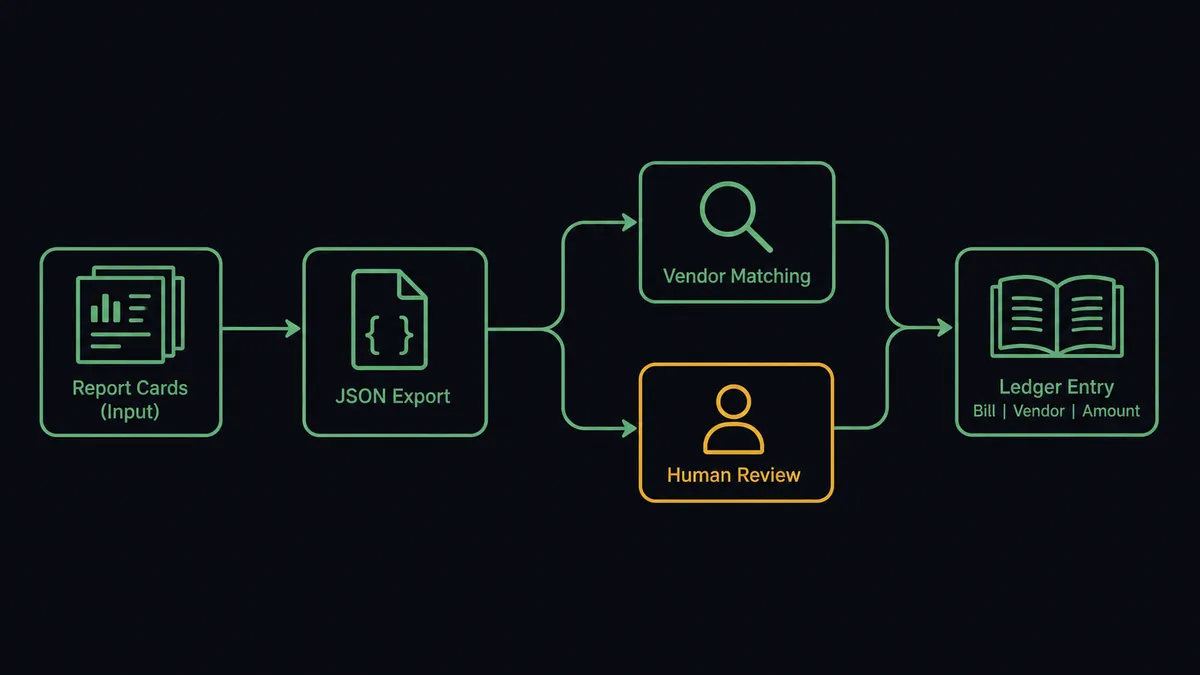
- Pull the data: It calls Get Report Data filtered to approved, unexported reports, returning reports and their transactions as parsed JSON for the period.
- Match the vendor: For each report, it calls Get Vendor in QuickBooks Online to find the record tied to that employee.
- Write the bill: It calls Create Bill with the report total, converted from cents to dollars, the line items, and the due date.
- Close the loop: A summary posts to the finance Slack channel with the report reference, the matched vendor, and the bill amount, so the team sees what moved without opening either system.
That is the “just connect them” answer. Approved spending in Expensify becomes a recorded bill in QuickBooks Online on a schedule, and nobody downloads a report to make it happen.
Can an AI agent run it? (and why a human stays in the loop)
Yes, and the agent is what turns a brittle export-and-import routine into something you can leave running. It holds the actions as tools: Get Policy List, Get Report Data, Create Expenses, and Update Employees on the Expensify side; Get Vendor, Create Vendor, Create Bill, and List Bills on the QuickBooks Online side. A plain sync would post every report the same way. The agent reasons first: it checks whether the employee already has a vendor record, matches the report total against what that employee has historically filed, and decides whether this reimbursement is routine or worth a second look.
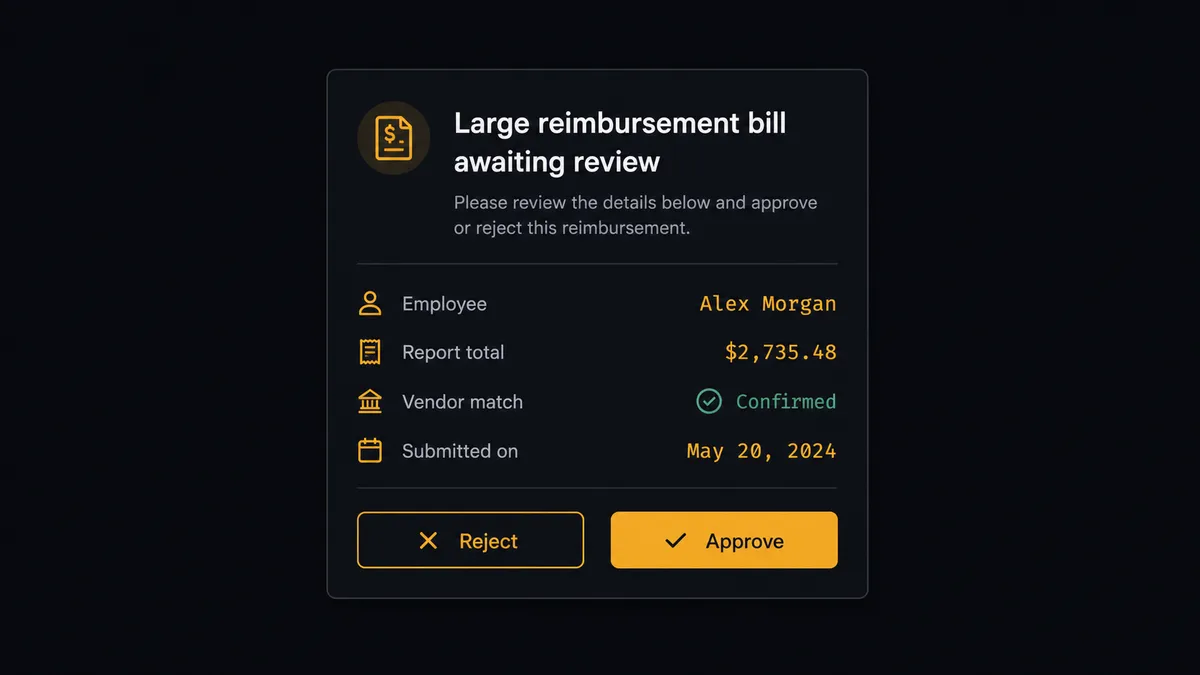
The consequential step is Create Bill on a large amount. QuickBooks Online’s own human-in-loop threshold gates any bill over $10,000 before it records, and Expensify’s report totals feed directly into that check. So when a report totals more than $10,000, the agent does not post it and hope. It packages the report data, the matched vendor, and the line items, then invokes a human-in-loop flow it holds as a callable tool. The workflow pauses and posts to the accounting manager: “Reimbursement report for [employee] totals $12,400, more than double their typical monthly total. Vendor match: [vendor]. Approve the bill, or hold for review?” Only after a named approval does Create Bill run, and the decision, approver, and timestamp land in the audit trail.
Prospects call this a digital andon cord: like Toyota’s production line pull cord, the workflow stops the line the moment a bill is large enough to matter. Routine reimbursements post at machine speed. Large ones wait for a person.
FlowRunner vs Zapier
Zapier is the default answer for a lot of Expensify and QuickBooks teams, and honestly so: it connects both sides of this pair, its QuickBooks Online support is mature, and pre-built templates exist for report-to-bill syncing. If you need every approved report to become a bill and nothing else, a Zap gets you there.
The differences surface at the judgment calls and on the invoice.
| What matters for this pair | FlowRunner | Zapier |
|---|---|---|
| Human-in-the-loop before large bills | Native. The agent invokes an approval flow as a callable tool and pauses mid-run on reports over $10,000 | Available via added approval steps, not a decision informed by the employee’s spending history |
| Who runs the flow | An AI agent matches vendors, totals reports, and picks actions as tools per report | A fixed field mapping applied to every report the same way |
| Users included | Unlimited users on every tier | Priced by task volume; seat limits vary by plan |
| Bring your own AI keys | Yes, BYOK | AI features tied to Zapier’s own AI offering |
| Self-hosted option | Yes, cloud-hosted or self-hosted | Cloud only |
| Pricing model | Transparent workflow-based tiers | Per-task pricing; a busy month-end burns tasks on every report and line item |
If your report volume is low and every reimbursement looks the same, Zapier will keep up. If your team processes enough volume that a $12,000 reimbursement can slip through unnoticed among the routine ones, the agent-with-a-gate version on FlowRunner is the better fit.
Before and after
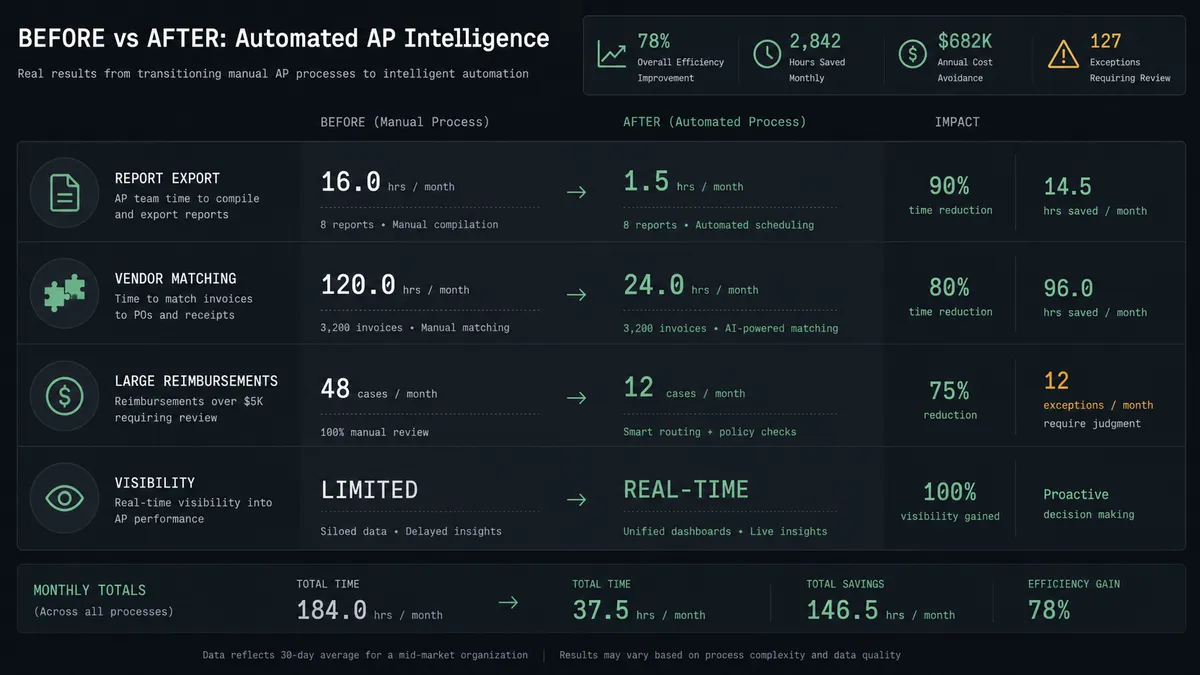
| Category | Before | After |
|---|---|---|
| Report export | Someone downloads report CSVs, massages columns, and enters bills by hand | Get Report Data pulls approved reports and lands them in the bill-creation flow without a download |
| Vendor matching | Employee-to-vendor mapping is checked manually or skipped | Get Vendor confirms the match before every bill is created |
| Large reimbursements | Every report gets the same rubber stamp regardless of amount | Reports over $10,000 pause for the accounting manager with full context |
| Duplicate risk | A report exported twice can post twice | Only approved, unexported reports are pulled each run |
| Visibility | Finance finds out what posted by checking QuickBooks after the fact | A Slack summary lands with every report, vendor, and bill amount as it happens |
What you can build
Report-to-bill reimbursement. A scheduled run calls Get Report Data, matches vendors with Get Vendor, and creates the reimbursement with Create Bill, so approved spending posts to the books without a manual export.
Guarded large-reimbursement approval. Reports over $10,000 route through a human-in-loop step before Create Bill runs, with the report, vendor match, and line items attached for the accounting manager.
Receipt-to-books pipeline. Receipts parsed upstream become Expensify transactions via Create Expenses, roll up into an approved report, and flow through this same connection into a QuickBooks Online bill without a second data entry step.
Approval-chain accuracy check. Before a batch run, the agent calls Get Policy List and cross-checks Expensify’s approval managers against QuickBooks Online vendor records, flagging mismatches for a finance admin instead of posting against a stale mapping.
Monthly reconciliation digest. After the bill-creation run completes, the agent calls List Bills in QuickBooks Online and compares the total against the Expensify report total for the period, posting any variance to the finance Slack channel for review.
Common questions
Is it free to connect Expensify and QuickBooks Online on FlowRunner? You can build and run the connection on FlowRunner’s free plan, which includes 100 executions a month and every integration with no credit card required, and new accounts also get 14 days of Professional. Both connectors are available on every FlowRunner tier, and every tier includes unlimited users and unlimited workflows.
Can I self-host the Expensify to QuickBooks Online workflow? Yes. FlowRunner offers a cloud-hosted option and a self-hosted option, so the connection can run inside your own environment.
Does the AI agent need my own OpenAI or Claude key? FlowRunner uses a bring-your-own-keys model, so you connect the AI provider key you already have. You are not locked to one model.
What stops the workflow from double-paying a reimbursement? The agent checks the vendor record in QuickBooks Online with Get Vendor before it creates a bill, and Expensify’s own Get Report Data call only pulls reports that are approved and not yet exported, so the same report cannot post twice.
Why does Expensify use a scheduled pull instead of a trigger? Expensify’s Integration Server does not expose event triggers, so the workflow runs Get Report Data on a schedule, for example nightly or at month-end close, and treats every approved, unexported report as new work for that run.
What happens when a reimbursement total is unusually large? The agent compares the report total against QuickBooks Online’s own bill-approval threshold. A bill over $10,000 pauses and routes to the accounting manager with the report, the vendor match, and the line items attached, instead of posting automatically.
Getting started
Start on the free plan: 100 executions a month, every integration included, no credit card required, plus 14 days of Professional for new accounts. Both connectors are available on every tier, and every tier includes unlimited users and unlimited workflows, so everyone touching expense reports and everyone closing the books is covered without seat math.
Explore the integration details:
- Expensify integration (7 actions covering policies, reports, expenses, and employees)
- QuickBooks Online integration (56 actions covering customers, vendors, invoices, bills, payments, and reports)
Start building free at flowrunner.ai or book a demo to see a live Expensify to QuickBooks Online workflow, large-bill approval and all.
Frequently asked questions
Is it free to connect Expensify and QuickBooks Online on FlowRunner?
You can build and run the connection on FlowRunner's free plan, which includes 100 executions a month and every integration with no credit card required, and new accounts also get 14 days of Professional. Both connectors are available on every FlowRunner tier, and every tier includes unlimited users and unlimited workflows.
Can I self-host the Expensify to QuickBooks Online workflow?
Yes. FlowRunner offers a cloud-hosted option and a self-hosted option, so the connection can run inside your own environment.
Does the AI agent need my own OpenAI or Claude key?
FlowRunner uses a bring-your-own-keys model, so you connect the AI provider key you already have. You are not locked to one model.
What stops the workflow from double-paying a reimbursement?
The agent checks the vendor record in QuickBooks Online with Get Vendor before it creates a bill, and Expensify's own Get Report Data call only pulls reports that are approved and not yet exported, so the same report cannot post twice.
Why does Expensify use a scheduled pull instead of a trigger?
Expensify's Integration Server does not expose event triggers, so the workflow runs Get Report Data on a schedule, for example nightly or at month-end close, and treats every approved, unexported report as new work for that run.
What happens when a reimbursement total is unusually large?
The agent compares the report total against QuickBooks Online's own bill-approval threshold. A bill over $10,000 pauses and routes to the accounting manager with the report, the vendor match, and the line items attached, instead of posting automatically.