How to Connect Brex to QuickBooks Online: Cards Reconciled Daily
Connect Brex settled card and cash transactions to QuickBooks Online bills so reconciliation runs nightly instead of monthly, optionally as an AI agent that verifies the vendor and pauses for a finance lead before a large bill posts or a new virtual card gets issued.
How do you connect Brex to QuickBooks Online?
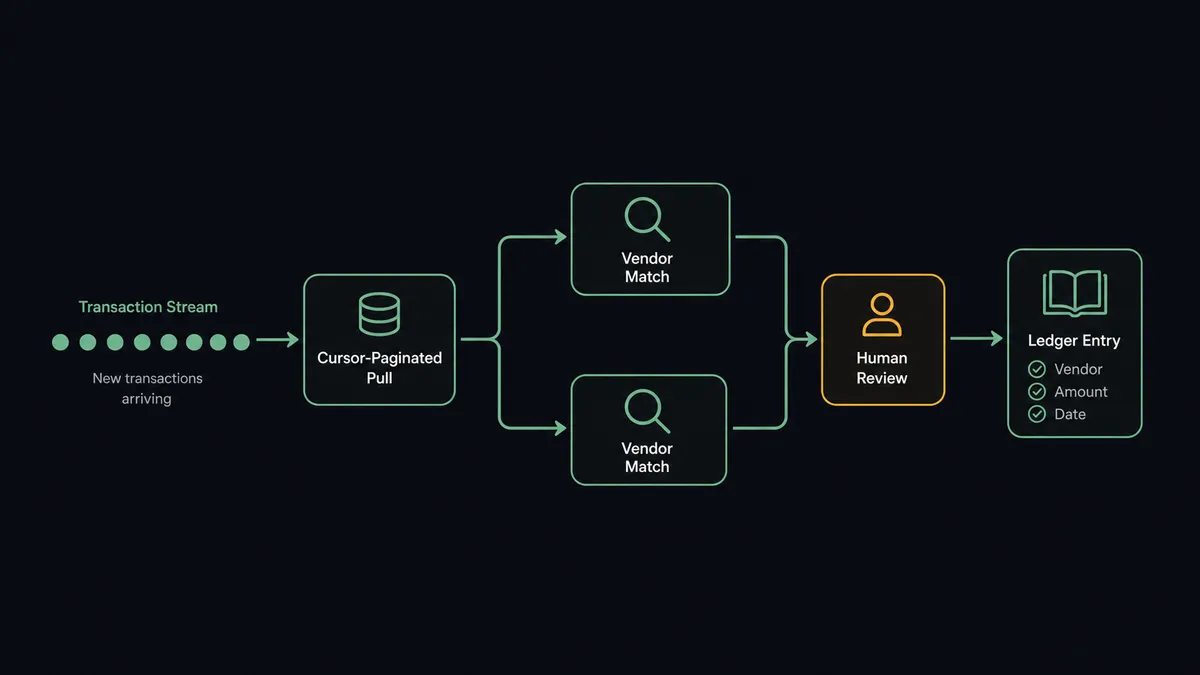
You connect Brex to QuickBooks Online by pulling settled transactions from Brex’s List Card Transactions and List Cash Transactions on a schedule, matching each merchant to a QuickBooks Online vendor with Get Vendor (creating one with Create Vendor when no match exists), and recording the spend as a bill with Create Bill, so card activity lands in your books without anyone exporting a statement. FlowRunner is a visual AI-agent orchestration platform where automations run autonomously and pause for human judgment on the steps that carry real consequence. The same connection can run as an AI agent that also handles the other half of Brex spend, issuing a new virtual card, and pauses for a finance approver before Create Virtual Card runs or before any bill over $10,000 posts.
The problem it solves
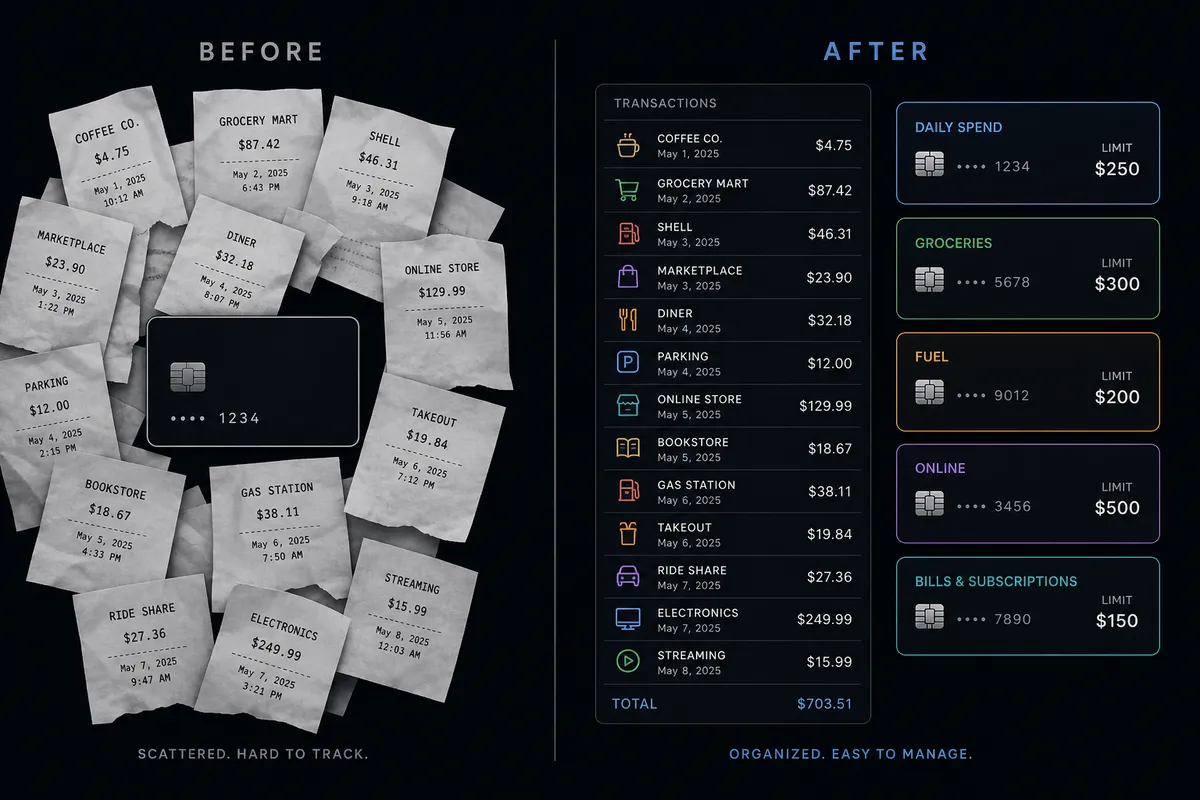
Ask a finance team how they reconcile corporate card spend and you’ll hear some version of archaeology. One Brex card number circulates across a dozen SaaS subscriptions because provisioning a new one felt like more trouble than it was worth, and when a fraud alert hits, nobody can say which vendor leaked it. At month end, the AP clerk or billing manager rebuilds the picture from statement lines, forwarded receipts, and memory, then keys each transaction into QuickBooks Online by hand. Meanwhile the available credit line is whatever the Brex dashboard shows when someone remembers to check it, which is usually after a payment has already declined.
The exceptions are where the process actually costs money. A new vendor needs a card issued fast, and rather than wait for someone to scope a limit and duration, the team reuses the shared card and hopes for the best. A settled transaction meant for one vendor’s bill falls through the cracks and gets keyed into QuickBooks twice because two people worked the same statement. A vendor bill crosses a threshold that should trigger a second look and instead gets the same rubber stamp as a $40 subscription line. None of it surfaces until the books don’t reconcile and someone has to trace it back through two systems by hand. Time back for finance means routine spend posts itself and a person only looks at the transactions and card requests that actually deserve a decision.
How it works: the connection
The connection reads settled spend from Brex and writes it into QuickBooks Online as bills, matched to a vendor record. Here is the plain version, grounded in the real connector actions.
- Trigger: A scheduled run opens, for example nightly. Brex exposes no event triggers, so the schedule stands in for one, and each run reads from a stored cursor.
- Pull the data: The workflow calls List Card Transactions and List Cash Transactions, cursor-paginated so nothing is missed or counted twice.
- Match the vendor: For each settled transaction, it calls Get Vendor in QuickBooks Online to find the record tied to that merchant, or List Vendors to search by name.
- Fill the gap: If no match exists, Create Vendor adds a record before the spend is recorded against it.
- Write the bill: Create Bill records the transaction against the matched vendor, carrying over the amount, the posted date, and the merchant detail.
- Close the loop: The reconciliation sheet updates and a summary posts to the finance Slack channel, so the only line items anyone opens either system for are the ones that need a look.
That is the “just connect them” answer: settled Brex spend becomes a recorded bill in QuickBooks Online on a schedule, with the vendor matched automatically.
Can an AI agent run it? (and why a human stays in the loop)
Yes, and the agent is what turns two brittle manual routines, statement reconciliation and card issuance, into something a finance team can leave running. It holds the read actions as tools on the Brex side: List Card Transactions, List Cash Transactions, List Card Accounts, and List Users. On the QuickBooks Online side it holds Get Vendor, Create Vendor, Create Bill, and List Bills. A plain sync would post every transaction and issue every card request the same way. The agent reasons first: it checks whether the vendor already exists, whether the resulting bill total crosses QuickBooks Online’s own $10,000 approval threshold, and whether a card request looks like routine provisioning or something that deserves a second look.
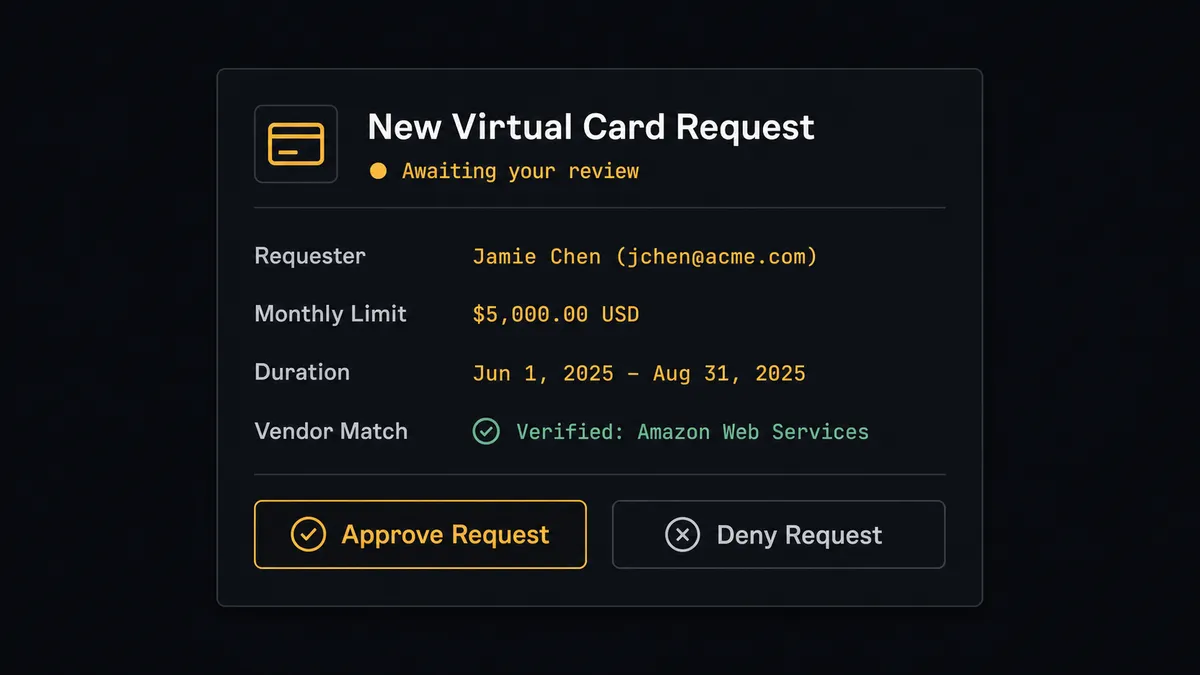
The consequential step isn’t the reconciliation feed. It’s Create Virtual Card. A virtual card is live the moment it’s issued, usable immediately up to its limit, and the limit is typed in cents, so a unit slip or a spoofed request can hand real spending power to the wrong owner before anyone notices. So issuance never runs on agent judgment alone. When marketing requests a new analytics subscription, the agent resolves the requester’s identity with List Users, verifies the vendor and monthly price against the QuickBooks Online record with Get Vendor, and confirms available credit with List Card Accounts. Then it invokes a human-in-loop flow it holds as a callable tool: “New card request: $150 monthly limit, twelve-month duration, owner [name], vendor [vendor] verified against QuickBooks. Approve or adjust?” Only after the finance lead answers does Create Virtual Card run. On the ledger side, a bill over $10,000 gets the same treatment before it posts.
Prospects call this a digital andon cord: like Toyota’s production line pull cord, the workflow stops the moment a decision carries real money risk. Routine reconciliation posts at machine speed. Card issuance and large bills wait for a person.
FlowRunner vs Zapier
Zapier is the practical default for a lot of Brex and QuickBooks Online teams, and it earns that spot honestly: both connectors are mature on Zapier, and a transaction-to-bill Zap is a known, well-documented pattern. If every settled transaction should become a bill the same way, a Zap gets you there.
The differences show up at the judgment calls, the moment a card needs issuing or a bill crosses a threshold that deserves review.
| What matters for this pair | FlowRunner | Zapier |
|---|---|---|
| Human-in-the-loop before card issuance | Native. The agent invokes an approval flow as a callable tool before Create Virtual Card runs | Available via added steps, not a decision informed by vendor history or available credit |
| Bill approval on large amounts | Agent checks the $10,000 threshold and packages vendor and amount context automatically | Requires a separate filter step configured per threshold |
| Users included | Unlimited users on every tier | Priced by task volume; seat limits vary by plan |
| Bring your own AI keys | Yes, BYOK | AI features tied to Zapier’s own AI offering |
| Self-hosted option | Yes, cloud-hosted or self-hosted | Cloud only |
| Pricing model | Transparent workflow-based tiers | Per-task pricing; a busy reconciliation night burns tasks per transaction |
If your card volume is low and every request looks the same, Zapier will keep up. FlowRunner has a free plan with 100 executions a month, every integration included, and no credit card required, and new accounts get 14 days of Professional on top.
Before and after
| Category | Before | After |
|---|---|---|
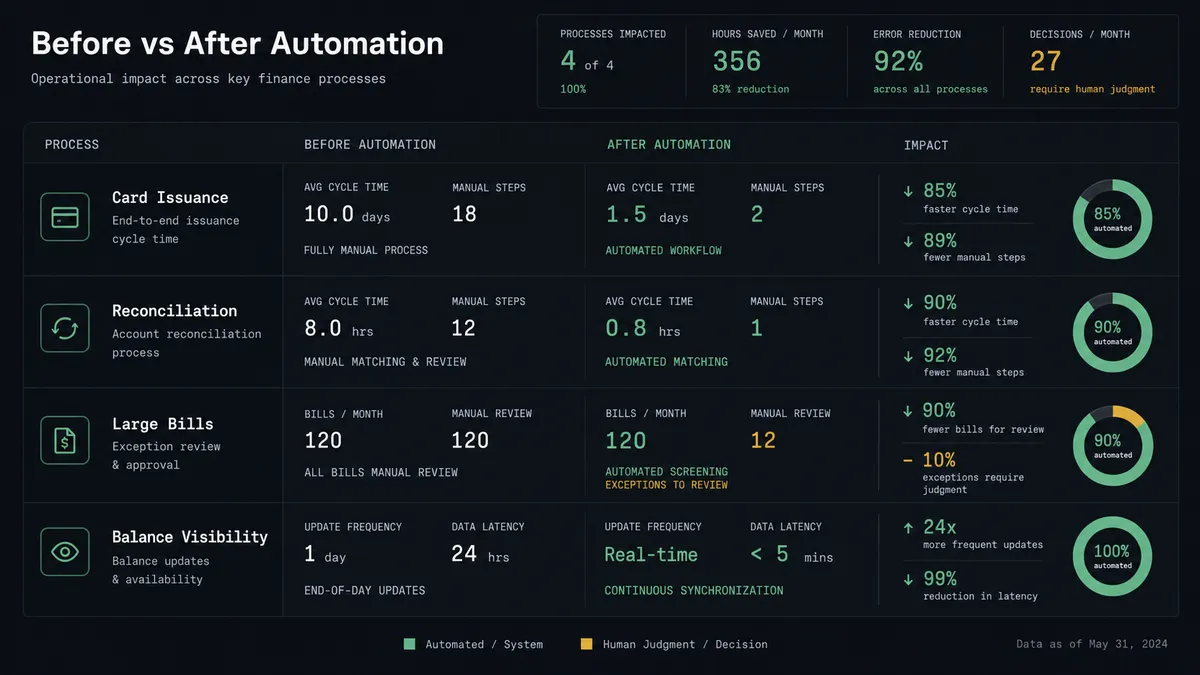
| Card issuance | One shared card number circulates across vendors; nobody can trace which one leaked when fraud hits | Virtual cards are issued per vendor with a limit and duration, and every issuance traces to a named approver |
| Reconciliation | An AP clerk rebuilds the month from statement lines, forwarded receipts, and memory | List Card Transactions and List Cash Transactions feed the ledger on a schedule, cursor-paginated so nothing is missed or doubled |
| Vendor matching | Employee-to-vendor mapping is checked manually or skipped | Get Vendor confirms the match before every bill is created, with Create Vendor filling gaps automatically |
| Large bills | Every bill gets the same rubber stamp regardless of amount | Bills over $10,000 pause for the accounting manager with vendor and amount attached |
| Balance visibility | Available credit is whatever the dashboard shows when someone checks | Agents monitor List Card Accounts continuously and alert finance before a threshold is crossed |
What you can build
Nightly card-to-bill reconciliation. List Card Transactions and List Cash Transactions feed the agent on a schedule; it matches vendors with Get Vendor and posts each settled charge with Create Bill, so the ledger stays current without a manual export.
Guarded virtual card issuance. A vendor purchase request routes through List Users and List Card Accounts for identity and capacity checks, then pauses for the finance lead before Create Virtual Card issues the card with its limit and duration.
Credit line early warning. Every morning, the agent reads List Card Accounts and List Cash Accounts. When available credit drops below the threshold finance set, it posts the number, the trend, and the largest recent transactions from List Expenses to the CFO’s channel.
Large-bill approval gate. Bills over $10,000 built from Brex transaction data route through a human-in-loop step before Create Bill runs, with vendor, amount, and card owner attached for the accounting manager.
Expense-to-books visibility. List Expenses pulls card and reimbursement activity into a reporting workflow that cross-references against QuickBooks Online’s Get Profit and Loss, so finance sees spend and books side by side for the week.
Common questions
Is it free to connect Brex and QuickBooks Online on FlowRunner? You can build and run the connection on FlowRunner’s free plan, which includes 100 executions a month and every integration with no credit card required, and new accounts also get 14 days of Professional. Both connectors are available on every FlowRunner tier, and every tier includes unlimited users and unlimited workflows.
Can I self-host the Brex to QuickBooks Online workflow? Yes. FlowRunner offers a cloud-hosted option and a self-hosted option, so the connection can run inside your own environment.
Does the AI agent need my own OpenAI or Claude key? FlowRunner uses a bring-your-own-keys model, so you connect the AI provider key you already have. You are not locked to one model.
Why does Brex use a scheduled pull instead of a trigger? Brex’s API exposes no event triggers, so the workflow runs List Card Transactions and List Cash Transactions on a schedule and uses stored cursors to treat only new activity as work for that run.
What happens when the agent isn’t sure about a card request or a bill? The agent packages what it found, the vendor match, the amount, the available credit, and invokes a human-in-loop flow as a callable tool. The workflow pauses, a named approver decides in Slack, and the decision, approver, and timestamp land in the audit trail.
Getting started
Start on the free plan: 100 executions a month, every integration included, no credit card required, plus 14 days of Professional for new accounts. Both connectors are available on every tier, and every tier includes unlimited users and unlimited workflows, so everyone touching card spend and everyone closing the books is covered without seat math.
Explore the integration details:
- Brex integration (10 actions covering transactions, cards, accounts, users, and expenses)
- QuickBooks Online integration (56 actions covering customers, vendors, invoices, bills, payments, and reports)
Start building free at flowrunner.ai or book a demo to see a live Brex to QuickBooks Online workflow, card issuance approval and all.
Frequently asked questions
Is it free to connect Brex and QuickBooks Online on FlowRunner?
You can build and run the connection on FlowRunner's free plan, which includes 100 executions a month and every integration with no credit card required, and new accounts also get 14 days of Professional. Both connectors are available on every FlowRunner tier, and every tier includes unlimited users and unlimited workflows.
Can I self-host the Brex to QuickBooks Online workflow?
Yes. FlowRunner offers a cloud-hosted option and a self-hosted option, so the connection can run inside your own environment.
Does the AI agent need my own OpenAI or Claude key?
FlowRunner uses a bring-your-own-keys model, so you connect the AI provider key you already have. You are not locked to one model.
Why does Brex use a scheduled pull instead of a trigger?
Brex's API exposes no event triggers, so the workflow runs List Card Transactions and List Cash Transactions on a schedule and uses stored cursors to treat only new activity as work for that run.
What happens when the agent isn't sure about a card request or a bill?
The agent packages what it found, the vendor match, the amount, the available credit, and invokes a human-in-loop flow as a callable tool. The workflow pauses, a named approver decides in Slack, and the decision, approver, and timestamp land in the audit trail.