Log Instantly Email Replies in Google Sheets Automatically
Connect Instantly and Google Sheets so every campaign reply is classified and logged automatically, with an AI agent that pauses for a sales manager on ambiguous replies.
How do you connect Instantly to Google Sheets?
Connect Instantly’s On Email Replied trigger to Google Sheets’ Add Row action, and every campaign reply gets classified and logged the moment it arrives. FlowRunner is a visual AI-agent orchestration platform where automations run autonomously and pause for human judgment on the steps that carry real consequence. The same connection can run as a standard sync, or you can upgrade it to an AI agent that reads each reply, decides how to route it, and pauses for a sales manager only on the replies that are genuinely ambiguous.
The problem it solves
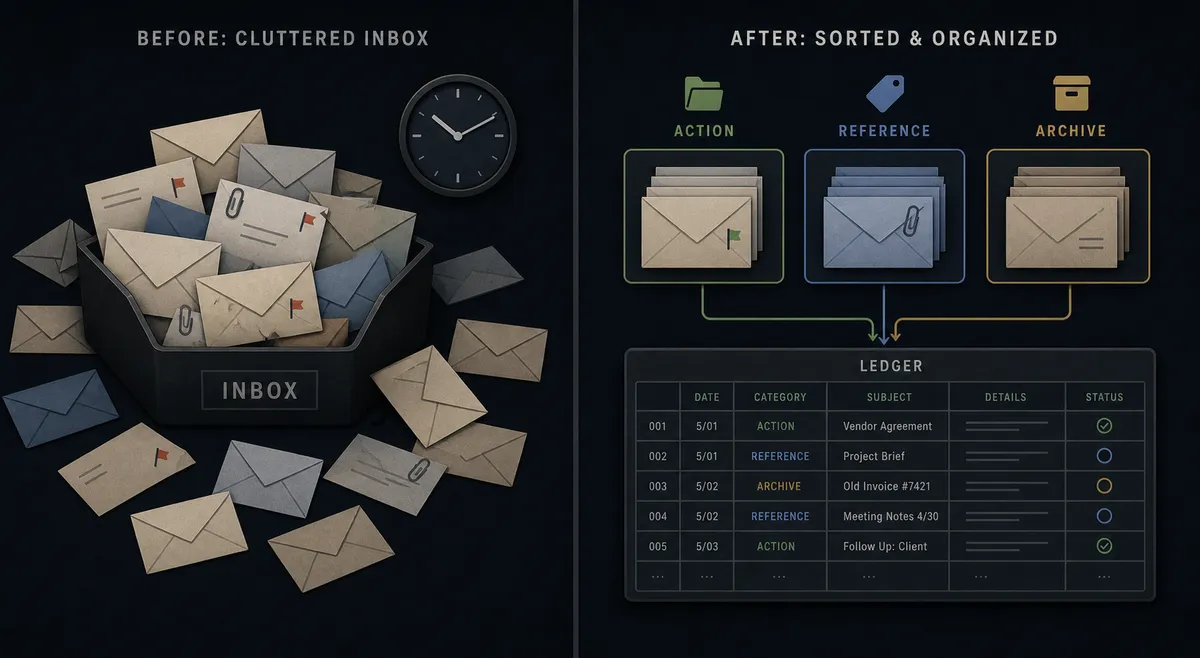
Sales reps and SDR managers do not lack replies. They lack a system that separates the replies worth a phone call from the ones that are noise. Right now, someone is checking the Instantly campaign dashboard throughout the day, reading each reply, and manually deciding what happens next. Interested leads sit for hours before a rep creates a CRM deal and sends a follow-up. Bounced addresses stay enrolled in sequences and keep burning send volume. None of it lives anywhere a sales manager can see at a glance without opening the tool.
The spreadsheet is supposed to be the fix, but it usually isn’t. Someone exports campaign data once a week and pastes it into a tracking sheet that is stale before lunch. A new row does not trigger anything; it just sits until a person notices it. Meanwhile, exceptions like an ambiguous “maybe, circle back next quarter” reply fall through the cracks entirely, because nobody built a process for the replies that don’t fit a clean yes or no.
How it works: the connection
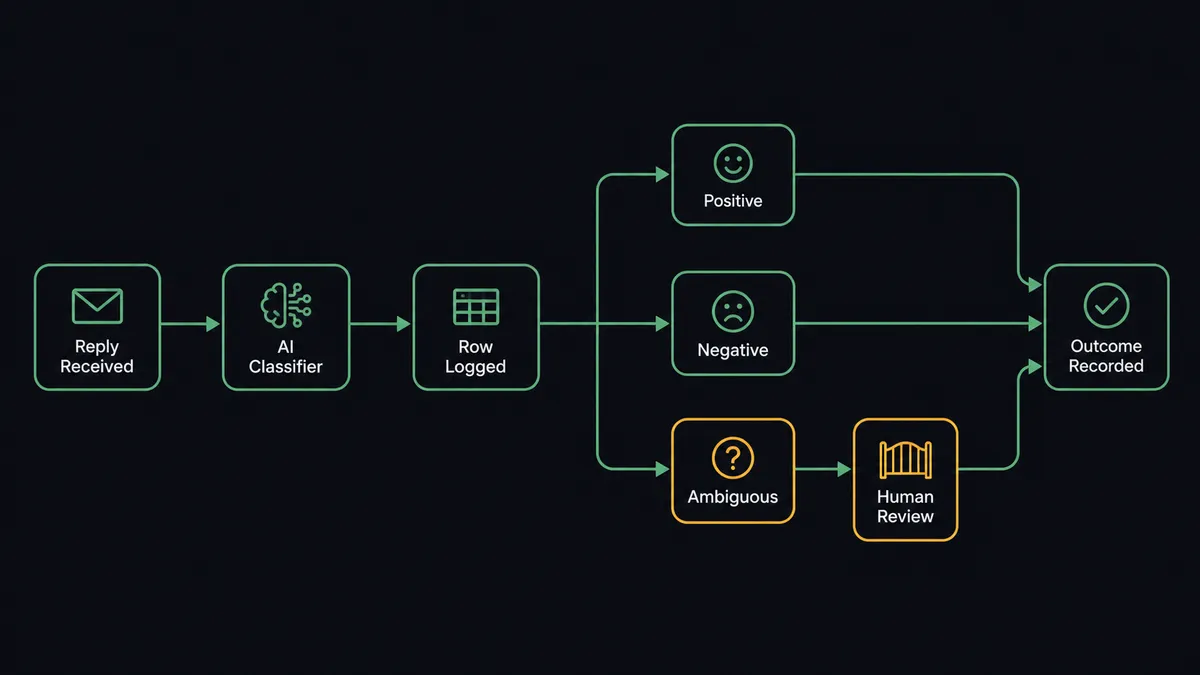
The flow starts when Instantly’s On Email Replied trigger fires. Instead of hard-coding a keyword match, an AI agent reads the actual reply content and classifies it: positive interest, negative, a question that needs a personal answer, or genuinely ambiguous. Every classified reply gets written to Google Sheets with Add Row, so the sheet becomes a live, timestamped log of every response instead of a weekly export.
From there, the actions branch based on what the agent found. Clear positive replies trigger a HubSpot deal creation and a lead-status update inside Instantly, plus a Slack notification to the rep with the reply text and a Calendly booking link, so the CRM record exists before the rep even opens their inbox. Clear negative replies update the lead’s status and pull them out of active sequences with Modify Lead Status. Bounced addresses get searched in Apollo for a valid alternative and either re-enrolled or flagged, using the same event-driven pattern.
The Google Sheets side of the connection also runs in reverse. A tracking sheet an SDR maintains by hand can drive Instantly directly: On New Row fires when a lead is added, the agent validates the row against required fields using Load Header Row and Get Rows, and clean rows flow into Bulk Import Leads or Add Leads to Campaign. Rows missing a required value never make it into a live campaign; they get flagged and routed back to the owner instead.
Can an AI agent run it? (and why a human stays in the loop)
Yes, and this is the part a simple sync cannot do. The agent does not apply a fixed rule like “if the reply contains ‘interested,’ mark it positive.” It reads the full reply, weighs tone and context, and picks from its available tools: log to Google Sheets, create a HubSpot deal, update lead status in Instantly, or invoke a human-in-loop flow. The decision to involve a person is itself something the agent decides, not a threshold someone configured once and forgot about.
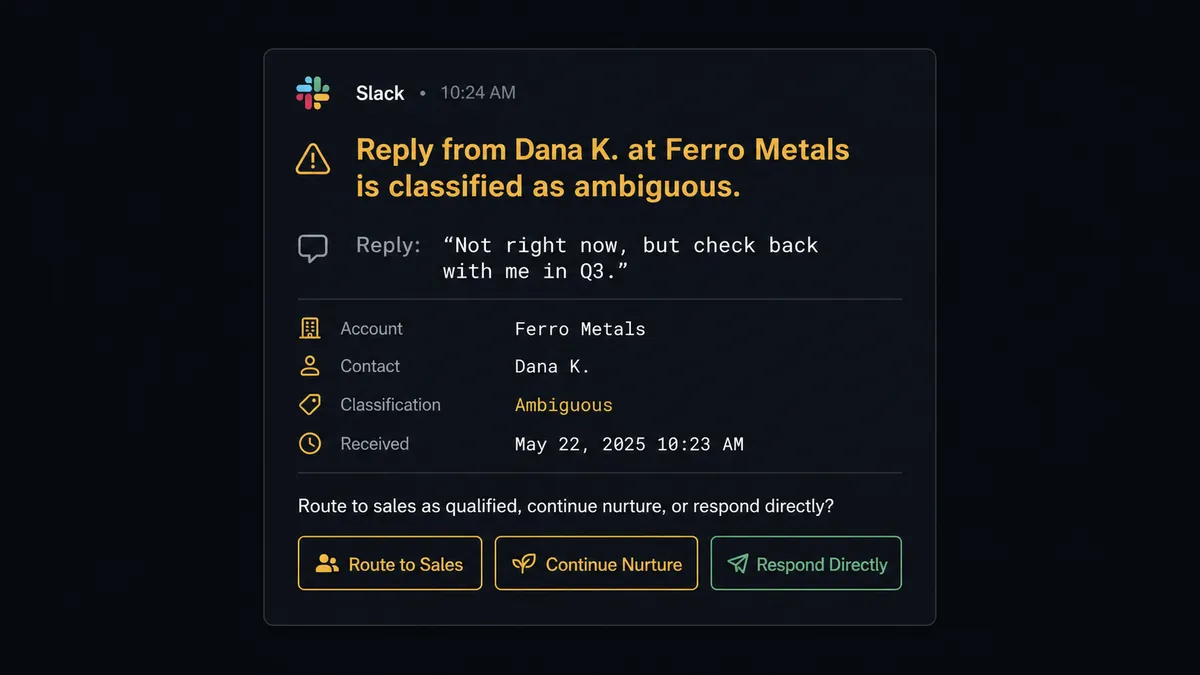
Here is what that looks like in practice. A reply comes in that reads: “Not right now, but check back with me in Q3.” That is not a clean positive and not a clean negative. Instead of guessing, the agent invokes its human-in-loop tool and sends the sales manager a Slack message: “Reply from [Lead Name] at [Company] is classified as ambiguous. Here is the reply: [text]. Route to sales as qualified, continue nurture, or respond directly?” The manager reads the actual reply, taps a response, and the flow resumes: the decision, the manager’s identity, and the timestamp all land in the audit trail alongside the row in Google Sheets.
This is not a sync tool moving data from one place to another. It is an agent that knows the difference between a reply it can handle and a reply that needs a person, and it stops the line on the second kind. Prospects call this a digital andon cord: like Toyota’s quality control pull cord, the agent stops and asks instead of guessing wrong at scale.
FlowRunner vs Zapier
Zapier is a reasonable starting point for connecting Instantly and Google Sheets, and it is genuinely easy for a non-technical SDR manager to set up a zap that appends a row on a new reply. That part works fine. Where it stops is judgment: a zap logs the row and the process ends there. Someone still has to open the sheet, read the reply, and decide what happens next.
| What matters for this pair | Zapier | FlowRunner |
|---|---|---|
| Reply classification | Keyword or field-match filters only | AI agent reads the actual reply and classifies intent |
| Human-in-the-loop | No native concept; you build a manual review step outside the tool | Native tool the agent invokes with full context, on its own judgment |
| Users included | Priced per user on most plans | Unlimited users on every tier |
| AI provider | No BYOK model | BYOK; connect the AI provider you already use |
| Audit trail of decisions | Not built in | Decision, decider, and timestamp captured automatically |
| Pricing model | Per-task pricing across connected apps | Transparent workflow-based execution tiers |
Before and after
| Metric | Before | After |
|---|---|---|
| Reply visibility | SDRs check the campaign dashboard throughout the day | Every reply is classified and logged within seconds of arrival |
| Lead handoff speed | Interested replies sit until a rep manually builds the CRM deal | CRM deal created and Calendly link sent before the rep opens their inbox |
| Bounce handling | Bounced addresses stay enrolled and keep wasting send volume | Bounces are searched in Apollo and re-enrolled or flagged automatically |
| Ambiguous replies | Buried in a dashboard until someone happens to reread them | Routed to the sales manager in Slack with the reply text attached |
| Lead-list intake | Spreadsheet rows pasted in weekly, then manually uploaded to Instantly | New rows validate and flow into a live campaign automatically |
What you can build
Reply log and CRM handoff. On Email Replied classifies every response, logs it to Google Sheets with Add Row, and creates a HubSpot deal for clear positives while flagging ambiguous replies for the sales manager.
Bounce recovery tracker. On Email Bounced marks the address invalid, searches Apollo for a replacement, and writes the outcome to a Google Sheets recovery log so the team can see bounce trends without opening Instantly.
Sheet-driven campaign intake. On New Row fires when an SDR adds a lead to a tracking sheet; the agent validates the row and calls Add Leads to Campaign, routing incomplete rows back to the owner instead of silently skipping them.
Weekly campaign report. On a schedule, Get Campaign Analytics pulls performance data from Instantly and the agent writes it into Google Sheets with Update Rows, then calls Export Sheet to deliver a formatted report by email.
Common questions
Is it free to connect Instantly and Google Sheets on FlowRunner? Yes. FlowRunner has a free plan with 100 executions a month, every integration included, and no credit card required, and new accounts get 14 days of Professional on top.
Can I self-host this Instantly and Google Sheets connection? FlowRunner offers a free self-hosted Community Edition for a single instance, and a self-hosted Enterprise option with clustering and full compliance features for teams that need the flow on their own infrastructure.
Does the AI agent need my own OpenAI key? FlowRunner uses a BYOK model, so you connect the AI provider you already use for classification, and no keys are stored in plaintext anywhere in the flow.
What happens when the agent isn’t sure how to classify a reply? It pauses the flow, marks the row in Google Sheets, and sends the sales manager the actual reply text in Slack with a request to route it as qualified, nurture, or a direct response.
Can FlowRunner also push Google Sheets rows into an Instantly campaign? Yes. A new row on a lead-list sheet can trigger Bulk Import Leads or Add Leads to Campaign in Instantly, with the agent validating required fields before any row reaches a live campaign.
How is this different from a Zapier zap between Instantly and Google Sheets? A Zapier zap logs the reply and stops there. FlowRunner’s agent reads the reply, decides whether it is a clear win, a clear loss, or genuinely unclear, and only involves a human on the replies that actually need judgment.
Getting started
FlowRunner has a free plan with 100 executions a month, every integration included, and no credit card required, and new accounts get 14 days of Professional on top. Start at flowrunner.ai or book a walkthrough at calendly.com/flowrunner/intro to see the reply-classification agent built against your own campaigns.
Frequently asked questions
Is it free to connect Instantly and Google Sheets on FlowRunner?
Yes. FlowRunner has a free plan with 100 executions a month, every integration included, and no credit card required, and new accounts get 14 days of Professional on top.
Can I self-host this Instantly and Google Sheets connection?
FlowRunner offers a free self-hosted Community Edition for a single instance, and a self-hosted Enterprise option with clustering and full compliance features for teams that need the flow to run on their own infrastructure.
Does the AI agent need my own OpenAI key?
FlowRunner uses a BYOK (Bring Your Own Keys) model, so you connect the AI provider you already use for classification, and no keys are stored in plaintext anywhere in the flow.
What happens when the agent isn't sure how to classify a reply?
The agent does not guess. It pauses the flow, marks the row in Google Sheets, and sends the sales manager the actual reply text in Slack with a request to route it as qualified, nurture, or a direct response.
Can FlowRunner also push Google Sheets rows into an Instantly campaign?
Yes. A new row on a lead-list sheet can trigger Bulk Import Leads or Add Leads to Campaign in Instantly, with the agent validating required fields before any row reaches the campaign.
How is this different from a Zapier zap between Instantly and Google Sheets?
A Zapier zap logs the reply and stops there. FlowRunner's agent reads the reply, decides whether it is a clear win, a clear loss, or genuinely unclear, and only involves a human on the replies that actually need judgment.