How to Connect NetSuite with Google Sheets (With or Without an AI Agent)
Connect NetSuite and Google Sheets so financial records, sales orders, and payment data flow automatically between your ERP and your spreadsheets, optionally as an AI agent that pauses for human approval on consequential writes.
How do you connect NetSuite to Google Sheets?
Use FlowRunner’s On New Row trigger in Google Sheets to fire a flow that calls Create Sales Order, Create Invoice, or Create Customer in NetSuite, then writes the resulting record ID and status back to the originating row using Update Row. FlowRunner is a visual AI-agent orchestration platform where automations run autonomously and pause for human judgment on the steps that carry real consequence. The same connection that routes plain rows into NetSuite can run as an AI agent that evaluates each row, reasons about whether it needs approval, and invokes a human-in-loop flow before any consequential ERP write goes through.
The problem finance and operations teams live with every day
The spreadsheet is not going away. Google Sheets is where form submissions land, where field teams log orders, where AP clerks track invoices before they get entered into NetSuite. The problem is that someone has to move the data. A row sits in a sheet until a billing manager opens NetSuite, creates the record manually, and marks the row done. That gap is where exceptions fall through the cracks. A duplicate customer gets created. An invoice goes in with the wrong terms. An order above a threshold gets entered without the approver’s sign-off because the approver was not in the loop.
The volume compounds the problem. A small finance team processing dozens of orders per day cannot manually reconcile every row with the ERP and still have time to manage what actually requires a human judgment call. The work that should take seconds, matching a row to an existing customer and creating a sales order, takes minutes per record. The work that actually requires attention, a new vendor, a mismatched amount, an order from a customer with an open dispute, gets the same manual treatment as a routine row, or it gets skipped.
How it works: the connection between Google Sheets and NetSuite
The core connection starts with the On New Row trigger in Google Sheets. Every time a row is added to a watched sheet, FlowRunner fires the flow. The agent loads the header row using Load Header Row to map column names to values, then reads the row data.
From there, the agent calls the appropriate NetSuite action based on the row type:
- If the row represents a new order, the agent calls Get Customer to check whether the customer already exists. If not, it calls Create Customer, then Create Sales Order from the row’s line item data.
- If the row represents an invoice, the agent calls Create Invoice and maps the amount, due date, and terms from the corresponding sheet columns.
- If the row represents a payment confirmation, the agent calls Create Payment to record the application against the open invoice in NetSuite.
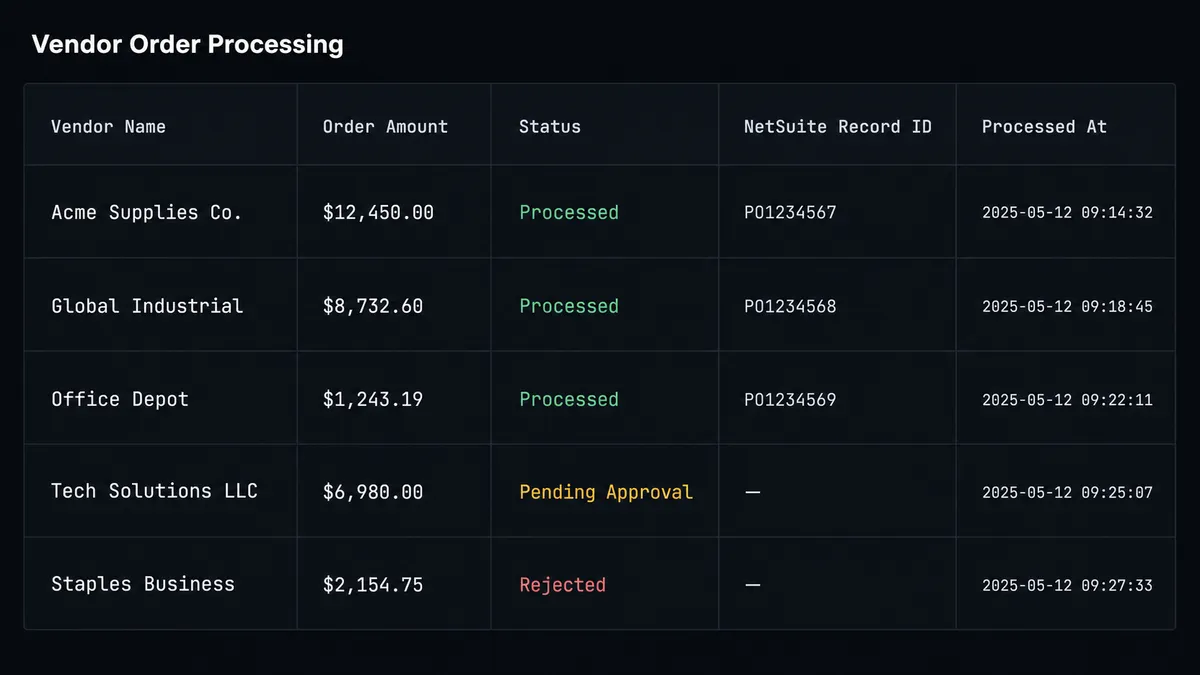
- After each successful NetSuite write, the agent calls Update Row in Google Sheets to write the NetSuite record ID, the processing status, and a timestamp back to the originating row.
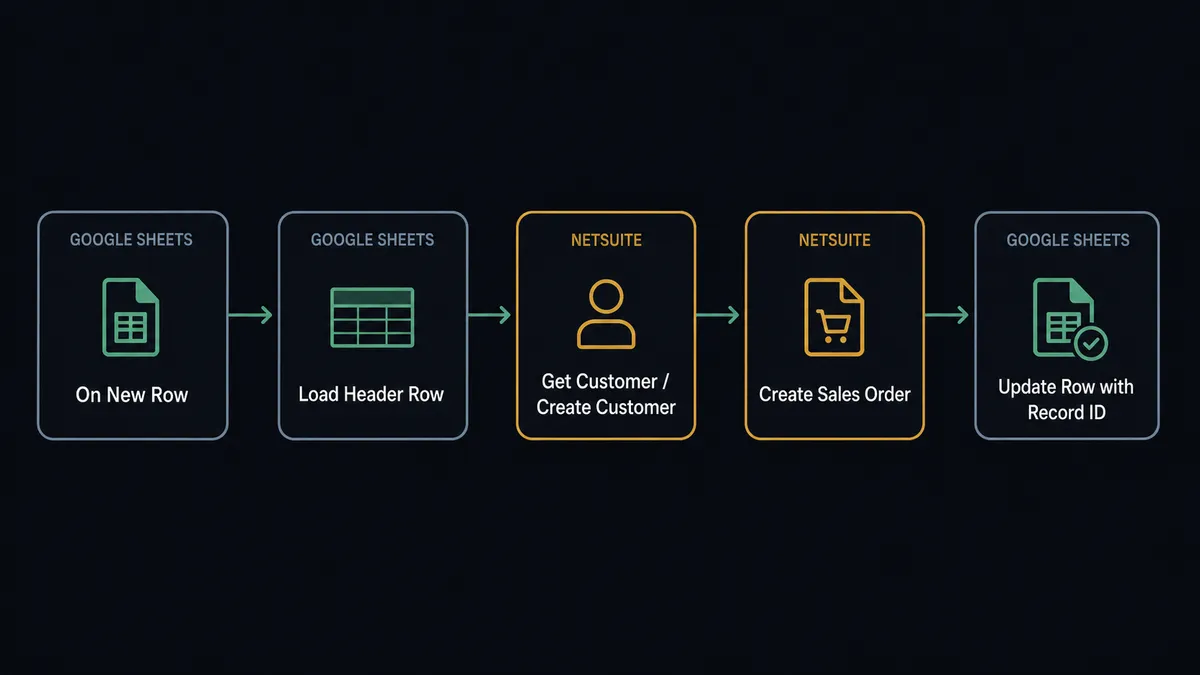
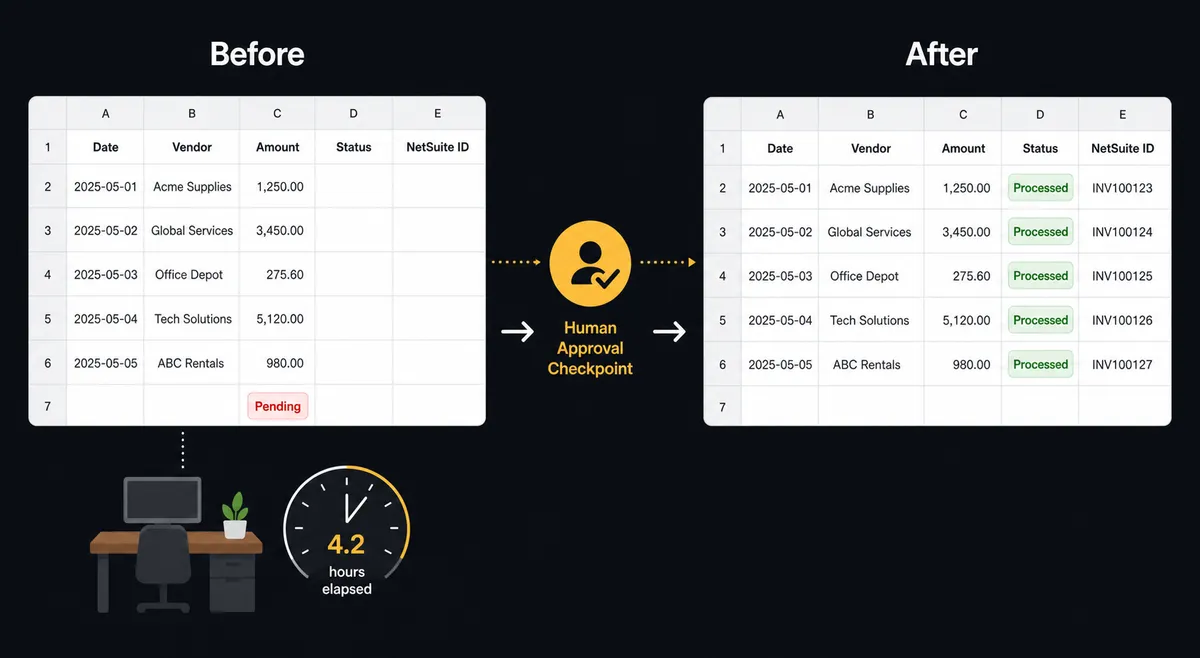
The sheet becomes a live status tracker. Every processed row shows the NetSuite record ID and a “Processed” status. Rows that have not yet been handled are visually distinct. The finance team can see the state of every submission without logging into NetSuite.
Can an AI agent run it? (And why a human stays in the loop)
A trigger-action connection handles the routine rows. An AI agent handles what happens when a row is not routine.
The agent reads the row data and reasons about it before deciding which NetSuite action to call. If an order row shows a total 3x the vendor’s usual amount, the agent does not create the sales order. If a row references a customer name the agent cannot match to an existing NetSuite record and the amount is above a threshold the agent considers material, the agent does not guess. If a required field is missing, the agent does not push an incomplete record into the ERP.
In each case, the agent invokes the human-in-loop flow as a callable tool. This is not a hardcoded rule. The agent evaluates the context, decides that this particular row warrants a person’s judgment, and acts accordingly.
Here is what that moment looks like in practice: an order row arrives for a new vendor showing a $73,000 purchase. The agent calls Get Vendor and finds no matching record in NetSuite. It packages the full row, the vendor name, the line items, the amount, and the fact that no prior history exists, and routes to the AP manager via Slack: “New vendor purchase order: [Vendor Name], $73,000. No existing NetSuite vendor record found. Review and approve to create the vendor and sales order, or reject.” The manager clicks Approve. The agent calls Create Vendor, then Create Sales Order, then writes the record IDs back to the Google Sheets row. The entire decision, the approver’s identity, and the timestamp are captured in the audit trail.
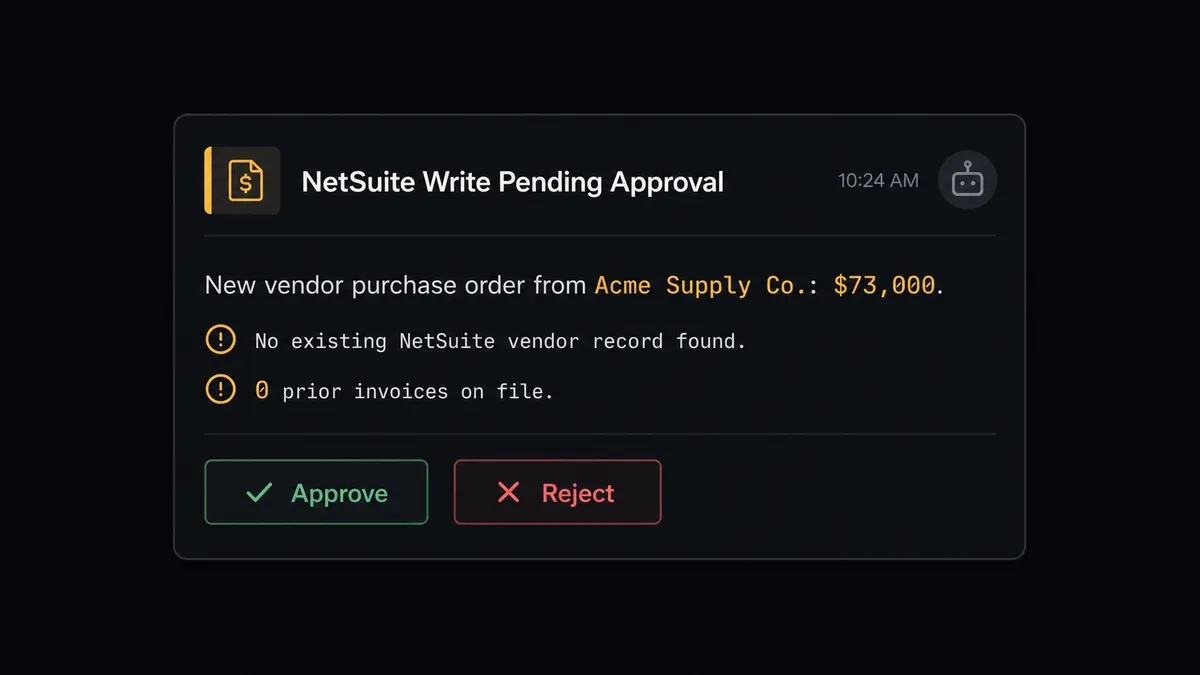
Prospects describe this as a digital andon cord. The line keeps moving on routine rows. When the agent hits uncertainty, it stops and asks. This is not a sync tool. The agent knows when to stop and ask.
FlowRunner vs the tool you are probably comparing
Most teams connecting NetSuite to Google Sheets use Zapier for non-technical setups or n8n for teams with developer resources. Both are solid for trigger-action connections. Here is where the comparison actually lands.
Zapier does the trigger-action connection reliably and has a large template library. Its pricing scales per task, which works until volume grows and the monthly bill becomes hard to predict.
n8n is more flexible for technical teams, supports self-hosting, and covers complex branching logic. Its AI agent capabilities exist but are implemented as LangChain nodes, meaning the intelligence is a tool you bolt on rather than a first-class orchestration layer.
| Feature | Zapier | n8n | FlowRunner |
|---|---|---|---|
| Native AI agent with reasoning | No | LangChain bolt-on | Yes, native |
| Human-in-loop as agent tool | No | No | Yes |
| Pricing model | Per task | Per workflow execution | Per workflow execution |
| Unlimited users on every tier | No | No | Yes |
| BYOK for AI providers | No | Partial | Yes |
| Self-hosted option | No | Yes | Yes |
| Audit trail with approver identity | No | No | Yes, native |
The honest framing: if you need a simple connection and predictable low volume, Zapier gets the job done. If your team has a developer and wants self-hosted flexibility, n8n is a reasonable choice. If you need the agent to reason about rows before writing to your ERP, and you need a paper trail that shows who approved what and when, FlowRunner is the option built for that.
Before and after
| Category | Before | After |
|---|---|---|
| Order entry time | AP clerk manually creates NetSuite customer, SO, and invoice from each sheet row | Agent creates the full record chain automatically on row arrival |
| Exception handling | Oversize or incomplete orders processed the same as routine rows, or skipped | Agent flags exceptions and routes to a person before the ERP write goes through |
| Sheet accuracy | Row status is blank until someone updates it manually | NetSuite record ID and “Processed” status written back to each row automatically |
| Audit trail | No record of who approved what or when | Every approval logged with approver identity and timestamp in FlowRunner’s audit trail |
| AP reconciliation | Finance team runs manual reports to find open bills | Agent runs SuiteQL queries and posts reconciliation reports to the AP channel on schedule |
What you can build
Sales order intake from a field team sheet. Field reps log orders in a shared Google Sheet. On New Row fires, the agent calls Get Customer to match the customer, Create Sales Order from the line items, and Update Row to write the SO number back. Sales ops sees confirmed SO numbers in the sheet without touching NetSuite.
Invoice creation from a billing tracker. A billing manager marks rows as “Ready to Invoice” by updating a status cell. On New or Updated Row fires, the agent reads the row, calls Create Invoice in NetSuite with the correct terms and amount, and writes the invoice number back to the sheet. The billing tracker becomes a confirmed invoice log.
Scheduled AP reconciliation report. On a weekly schedule, the agent calls Run SuiteQL Query to find open vendor bills where the purchase order is marked received but no payment is scheduled, formats the results with Add Rows into a dedicated reconciliation sheet, and calls Export Sheet to deliver the file to the AP channel. The AP manager receives the report without pulling it manually.
New vendor onboarding from a procurement sheet. Procurement logs approved vendors in a Google Sheet. The agent calls Create Vendor in NetSuite using the row data and writes the NetSuite vendor ID back to the sheet. Oversize initial orders are held for human review before the vendor record is created.
Payment confirmation sync. Confirmed payments logged in a Google Sheet trigger the agent to call Create Payment in NetSuite against the open invoice. The sheet row is updated with the NetSuite payment ID and a “Reconciled” status. AR stays current without manual entry.
Common questions
Is it free to connect NetSuite and Google Sheets on FlowRunner? FlowRunner has a free plan with 100 executions a month, every integration included, and no credit card required, and new accounts get 14 days of Professional on top. Any real email address works; disposable domains are not accepted.
Can I self-host FlowRunner for this connection? Yes. FlowRunner offers a self-hosted Community Edition at no cost for single-instance deployments. A self-hosted Enterprise tier is available for multi-instance clustering and full compliance features.
Does the AI agent need my own OpenAI or LLM key? FlowRunner uses a Bring Your Own Keys model. You connect your preferred AI provider, whether that is Anthropic, OpenAI, or another supported model. FlowRunner orchestrates the agent; the model cost goes on your account directly.
What happens when the agent is not sure about a NetSuite write? The agent invokes a human-in-loop flow as a callable tool. It pauses execution, packages the full context, and routes to a person via Slack, email, or WhatsApp. The workflow resumes only after the person responds. The decision, the decider’s identity, and the timestamp are captured in the audit trail.
Does this work for multi-subsidiary NetSuite environments? Yes. The NetSuite connector is built for multi-subsidiary and multi-currency environments. The Run SuiteQL Query action lets agents reach across subsidiaries in a single query, and the standard CRUD actions work against any subsidiary the OAuth2 credentials have access to.
Can FlowRunner write data back to Google Sheets after a NetSuite action completes? Yes. After the agent creates a NetSuite record, a subsequent step calls Update Row or Update Cell to write the NetSuite record ID, status, or timestamp back to the originating row in Google Sheets. The sheet becomes a live status tracker, not just an input.
Getting started
FlowRunner’s Growth tier starts at $45/month with 12,000 workflow executions and covers unlimited users and workflows. FlowRunner has a free plan with 100 executions a month, every integration included, and no credit card required, and new accounts get 14 days of Professional on top. Any real email address works; disposable domains are not accepted.
To start building:
- Browse the NetSuite integration to see the full action library including Create Sales Order, Create Invoice, List Payments, and Run SuiteQL Query.
- Browse the Google Sheets integration to see the trigger and action options including On New Row, Update Row, Export Sheet, and Find Row.
- Start your free trial at flowrunner.ai.
- Book a 30-minute walkthrough at calendly.com/flowrunner/intro if you want a guided look at how the NetSuite agent handles exceptions before you build it.
Frequently asked questions
Is it free to connect NetSuite and Google Sheets on FlowRunner?
FlowRunner has a free plan with 100 executions a month, every integration included, and no credit card required, and new accounts get 14 days of Professional on top. Any real email address works; disposable domains are not accepted.
Can I self-host FlowRunner for this connection?
Yes. FlowRunner offers a self-hosted Community Edition at no cost for single-instance deployments. A self-hosted Enterprise tier is available for multi-instance clustering and full compliance features.
Does the AI agent need my own OpenAI or LLM key?
FlowRunner uses a Bring Your Own Keys model. You connect your preferred AI provider, whether that is Anthropic, OpenAI, or another supported model. FlowRunner orchestrates the agent; the model cost goes on your account directly.
What happens when the agent is not sure about a NetSuite write?
The agent invokes a human-in-loop flow as a callable tool. It pauses execution, packages the full context, and routes to a person via Slack, email, or WhatsApp. The workflow resumes only after the person responds. The decision, the decider's identity, and the timestamp are captured in the audit trail.
Does this work for multi-subsidiary NetSuite environments?
Yes. The NetSuite connector is built for multi-subsidiary and multi-currency environments. The Run SuiteQL Query action lets agents reach across subsidiaries in a single query, and the standard CRUD actions work against any subsidiary the OAuth2 credentials have access to.
Can FlowRunner write data back to Google Sheets after a NetSuite action completes?
Yes. After the agent creates a NetSuite record, a subsequent step calls Update Row or Update Cell to write the NetSuite record ID, status, or timestamp back to the originating row in Google Sheets. The sheet becomes a live status tracker, not just an input.