FreshBooks + Slack: Invoices Posted, Credit Notes Approved First
Connect FreshBooks and Slack so invoices and payments post to your finance channel automatically, with an AI agent that pauses for a controller before a credit note or void goes through.
How do you connect FreshBooks to Slack?
FreshBooks’ Record Created or Changed trigger fires when an invoice is created, sent, or paid, and the connection maps that event to Slack’s Send Message to Channel action, posting the client, amount, and invoice number to your finance-ops channel the moment it happens. FlowRunner is a visual AI-agent orchestration platform where automations run autonomously and pause for human judgment on the steps that carry real consequence. The same connection can run as an AI agent that reads the FreshBooks record, decides whether it’s routine or requires sign-off, and invokes a Slack approval message with interactive buttons before a credit note, void, or write-off goes through. Either way, what happens in your books shows up where your team already works.
The problem it solves
A billing manager or controller runs FreshBooks and Slack as two disconnected systems. Invoices get created, sent, and paid inside FreshBooks, but nobody outside accounting sees any of it unless someone opens the app and checks. When a client disputes a charge or asks for a credit, the request usually arrives by email or a hallway conversation, gets typed into a note, and sits until someone remembers to act on it. The controller finds out about a write-off after it’s already posted, not before.
The exceptions are where the real cost lives. A discount that should have gone through review gets applied directly. A credit note gets issued against the wrong invoice because the person entering it was working from a screenshot instead of the live record. None of this shows up as a single dramatic failure. It shows up as a controller who spends Friday afternoons reconciling what happened during the week instead of deciding what should happen next. The team wants time back, not another spreadsheet to check.
How it works: the connection
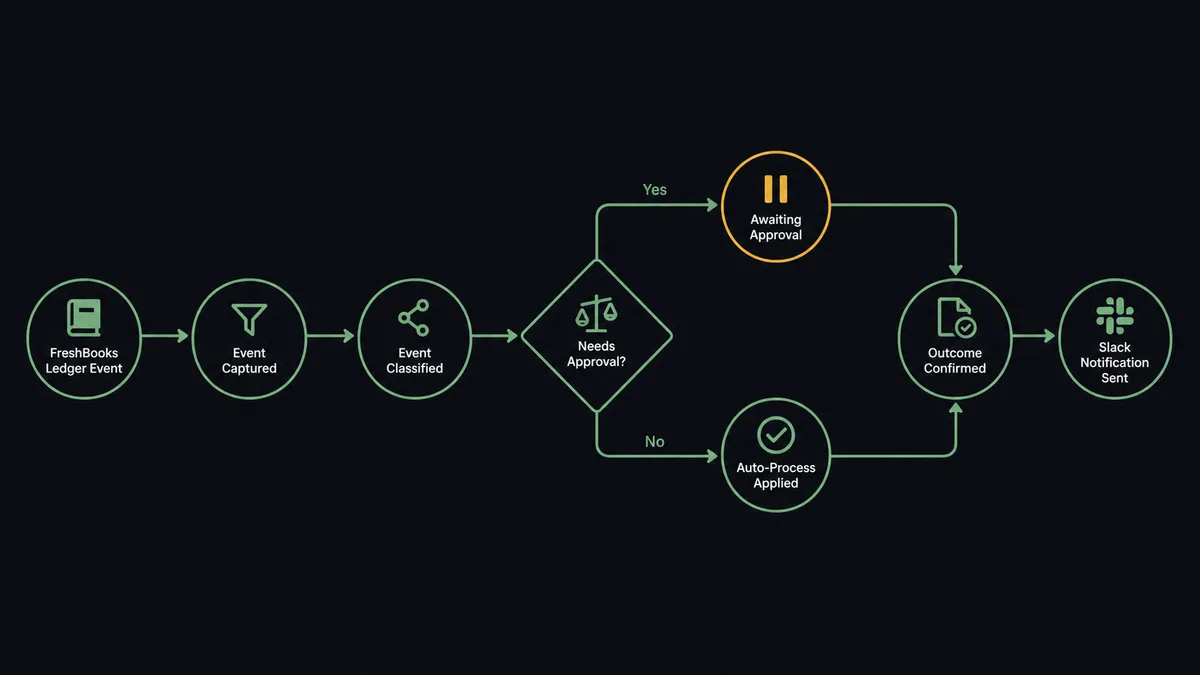
FlowRunner bridges FreshBooks and Slack at the trigger level. FreshBooks’ single Record Created or Changed trigger fires on client, invoice, estimate, payment, and expense events, and the flow routes on the record type. When an invoice is created, the agent calls Get Invoice to pull the client, line items, and total, then calls Send Message to Channel to post a summary to #finance-ops: client name, invoice number, and amount. When a payment lands, the same pattern applies using Get Payment and Record Payment context, so the team sees reconciliation happen in real time instead of finding out at month-end.
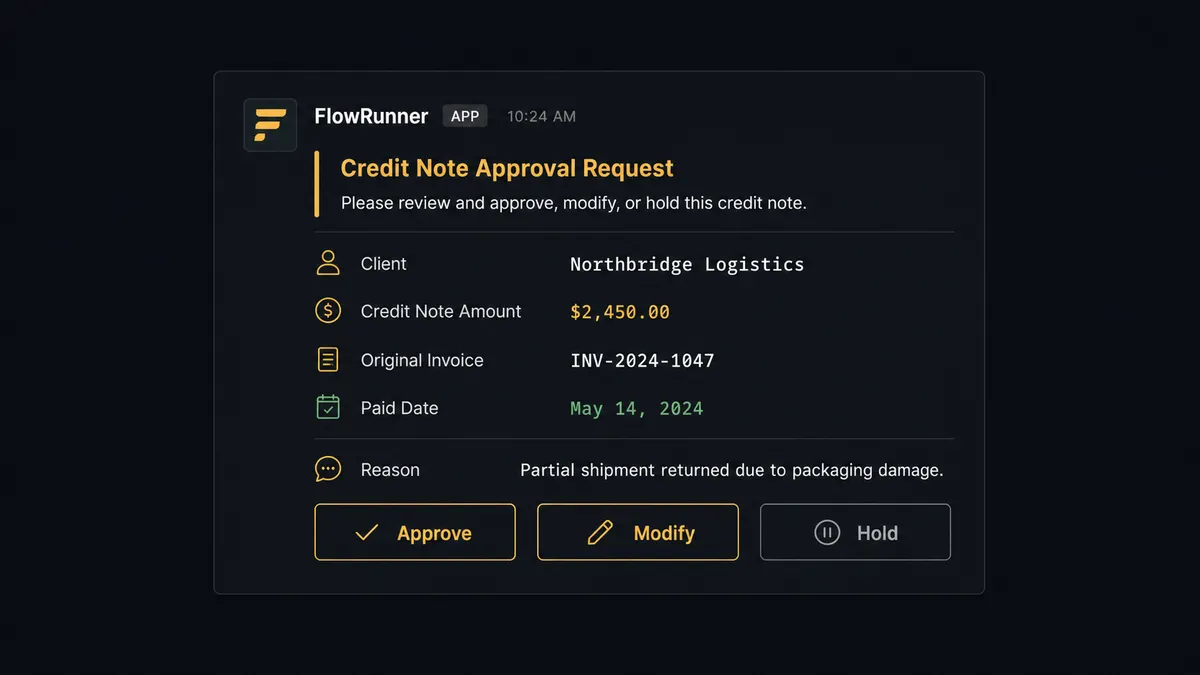
For the deeper connection, the agent watches for record changes that carry weight: a credit note request, a void, or a write-off. Rather than creating the credit note directly, the agent assembles the change request, the amount, the affected invoice number, and the reason, and routes it to the controller through Slack using the same Send Message to Channel action, this time with Block Kit buttons attached. The controller’s decision fires Slack’s On Block Action trigger, which resumes the paused FreshBooks flow. On approval, the agent calls Create Credit Note or Void Invoice. The original Slack message updates to show the outcome, so anyone scrolling the channel later sees the full arc: request, decision, result.
Can an AI agent run it? (and why a human stays in the loop)
A plain trigger-action sync would post every FreshBooks event to Slack the same way, whether it’s a routine invoice or a credit note that reverses $4,000 already on the books. An AI agent running this workflow reasons about which is which before it acts.
Here is a real decision moment. A client requests a credit note for a disputed line item on invoice INV-2214, $2,850. The agent reads the request, calls Get Invoice to check the original amount and payment status, and finds the invoice was paid in full two weeks ago. The agent’s reasoning: this isn’t a routine adjustment on an open invoice, it’s a reversal against money already collected. That crosses the configured threshold for a controller decision, regardless of how small the amount looks on its own.
The agent invokes the human-in-loop flow as a tool. It posts to the controller in Slack: “Credit note requested for [client] of $2,850 against invoice INV-2214, which was paid in full on [date]. Reason given: disputed line item. Approve, modify the amount, or hold for more information?” The controller reviews from their phone and taps a response. Slack’s On Block Action trigger fires, and the agent resumes: on approval, it calls Create Credit Note with the confirmed amount; on hold, it logs the pause and notifies the client-facing team to gather more detail. The approver’s identity and the timestamp are captured in the audit trail either way.
This is not a sync tool. The agent knows when to stop and ask, the same way a digital andon cord stops the line the moment something looks off, rather than letting it run to the end of the belt.
FlowRunner vs Zapier (the tool you are probably comparing)
If your team is non-technical, Zapier is a reasonable first stop. It connects FreshBooks and Slack quickly, has a large template library, and “when an invoice is created, post to Slack” is exactly the kind of Zap it was built for. That part of the job, Zapier does well.
The gap opens once the connection needs to reason about a record instead of just relaying it, or once someone needs to prove who approved a reversal and when.
| Capability | Zapier | FlowRunner |
|---|---|---|
| Simple trigger-action connection | Yes, fast setup | Yes, comparable setup |
| AI agent that reasons about routine vs. reversal | No (rule-based Zaps only) | Yes, native agent with tool use |
| Human-in-loop with interactive Slack buttons | Not native; requires a Zapier Interfaces workaround | Native: agent invokes it as a callable tool |
| Audit trail with approver identity and timestamp | No | Yes, on every human decision |
| Unlimited users on every tier | No (seat-based pricing on higher plans) | Yes, all tiers |
| Bring Your Own AI Key | No | Yes |
| Self-hosted option | No | Yes (Community Edition free; Enterprise custom) |
Zapier is the right call if the connection is “notify Slack when something happens” and stays that simple. FlowRunner is the right call once the workflow needs to tell the difference between a routine invoice and a $2,850 reversal against a paid invoice, and needs a record of who signed off.
Before and after
| Category | Before | After |
|---|---|---|
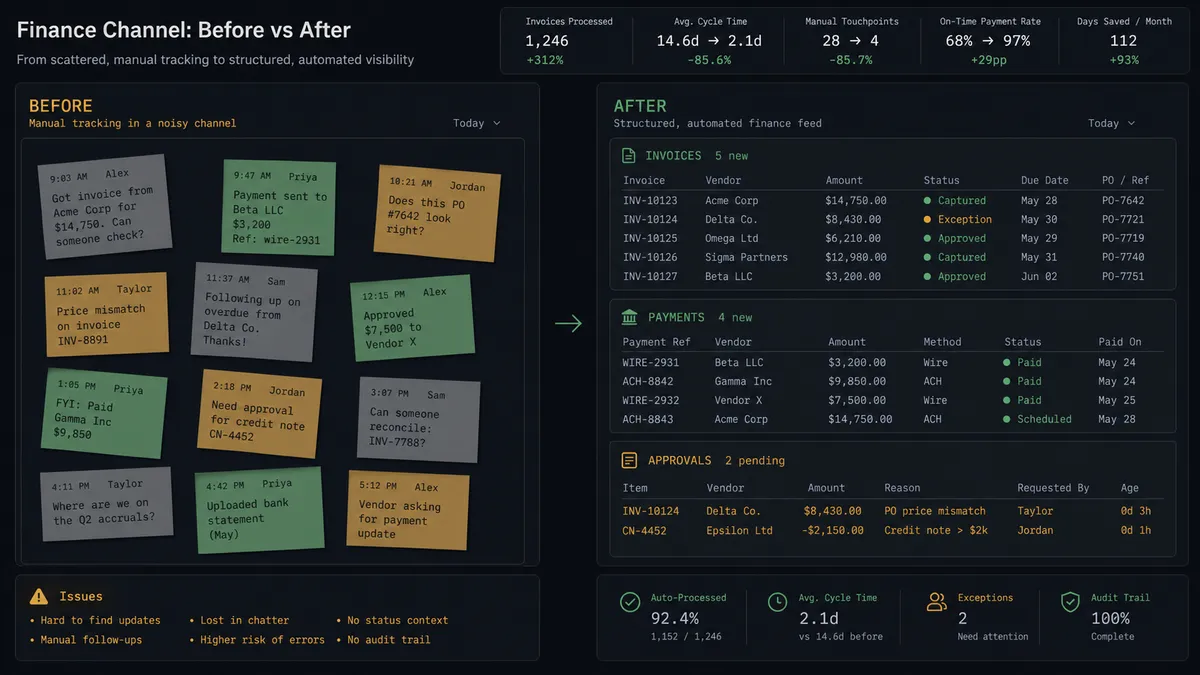
| Invoice visibility | Team checks FreshBooks manually to see what’s been billed | Every invoice and payment posts to #finance-ops the moment it’s created or paid |
| Credit note requests | Arrive by email or hallway conversation, tracked in a note | Routed to the controller in Slack with the invoice, amount, and reason attached |
| Approval turnaround | Sits until the controller opens FreshBooks and reviews manually | Approve, modify, or hold from a phone in one Slack session |
| Audit trail | Approval captured in email if at all | Every decision logged with approver identity and timestamp |
| Payment reconciliation | Matched against the bank feed at month-end | Recorded against the invoice as the payment event lands |
| Reporting | Profit-and-loss and aging reports pulled by request | Reports run on a schedule and land where the team already works |
What you can build
Invoice and payment feed to Slack. Every time FreshBooks creates an invoice or records a payment, the agent posts a structured summary to #finance-ops. The team sees billing activity as it happens instead of pulling a report at the end of the week.
Credit note approval with interactive buttons. When a credit note or void is requested, the agent packages the original invoice, the amount, and the reason, and sends it to the controller with Approve, Modify, and Hold buttons. FreshBooks only executes the reversal after a person signs off.
Overdue invoice escalation. The agent calls Find Invoices on a schedule to check for invoices past due, then posts a digest to #billing with the client, amount, and days overdue, so the billing manager can follow up without exporting an aging report first.
Scheduled financial report distribution. On the first of the month, the agent calls Get Financial Report for profit-and-loss, tax summary, and aging, attaches the FreshBooks PDF link, and posts the headline figures to #finance-leadership. No one runs the export by hand.
New client onboarding notification. When Create Client fires from an order or deal-close event, the agent posts a welcome note to #sales-ops confirming the client record now exists in FreshBooks, so sales and billing stay in sync on who’s an active customer.
Common questions
Is it free to connect FreshBooks and Slack on FlowRunner? Yes to start. FlowRunner has a free plan with 100 executions a month, every integration included, and no credit card required, and new accounts get 14 days of Professional on top. Both integrations are available on every paid tier.
Do I need to know how to code to set this up? No. The trigger, the invoice mapping, and the human-in-loop approval step are all configured visually in FlowRunner. No API scripts to write or maintain.
Can I self-host the FreshBooks to Slack flow? Yes. FlowRunner offers a free self-hosted Community Edition for a single instance, and a self-hosted Enterprise tier with clustering and full compliance features.
Does the agent need my own OpenAI key? FlowRunner runs on a bring-your-own-key model, so you connect the AI provider you already use, such as Claude or OpenAI, rather than paying a markup on inference.
What happens when the agent isn’t sure whether to issue a credit note? It doesn’t guess. The agent packages the invoice, the amount, and its reasoning, sends it to the controller in Slack with Approve, Modify, and Hold options, and waits for a decision before touching the FreshBooks record.
Can this run as a plain sync without an AI agent? Yes. The invoice-to-Slack notification runs as a standard trigger-and-action flow. The AI agent layer is an upgrade you add when you want the agent reasoning about which changes need a controller and which don’t.
Getting started
FlowRunner has a free plan with 100 executions a month, every integration included, and no credit card required, and new accounts get 14 days of Professional on top. Any real email address works; disposable domains are not accepted.
Connect both integrations from the FlowRunner library: FreshBooks and Slack. The invoice-to-Slack notification can be live in under an hour; the credit note approval flow adds one more afternoon.
Start your free trial at flowrunner.ai or book a 30-minute walkthrough at calendly.com/flowrunner/intro. Bring your FreshBooks account and your Slack workspace. We will build the first workflow together.
Frequently asked questions
Is it free to connect FreshBooks and Slack on FlowRunner?
Yes to start. FlowRunner has a free plan with 100 executions a month, every integration included, and no credit card required, and new accounts get 14 days of Professional on top. Both integrations are available on every paid tier.
Do I need to know how to code to set this up?
No. The trigger, the invoice mapping, and the human-in-loop approval step are all configured visually in FlowRunner. No API scripts to write or maintain.
Can I self-host the FreshBooks to Slack flow?
Yes. FlowRunner offers a free self-hosted Community Edition for a single instance, and a self-hosted Enterprise tier with clustering and full compliance features.
Does the agent need my own OpenAI key?
FlowRunner runs on a bring-your-own-key model, so you connect the AI provider you already use, such as Claude or OpenAI, rather than paying a markup on inference.
What happens when the agent isn't sure whether to issue a credit note?
It doesn't guess. The agent packages the invoice, the amount, and its reasoning, sends it to the controller in Slack with Approve, Modify, and Hold options, and waits for a decision before touching the FreshBooks record.
Can this run as a plain sync without an AI agent?
Yes. The invoice-to-Slack notification runs as a standard trigger-and-action flow. The AI agent layer is an upgrade you add when you want the agent reasoning about which changes need a controller and which don't.