Record Stripe Payments in FreshBooks Automatically
Connect Stripe and FreshBooks so every successful charge is matched to its invoice and recorded automatically, with a human called in only when the amounts don't line up.
How do you connect Stripe to FreshBooks?
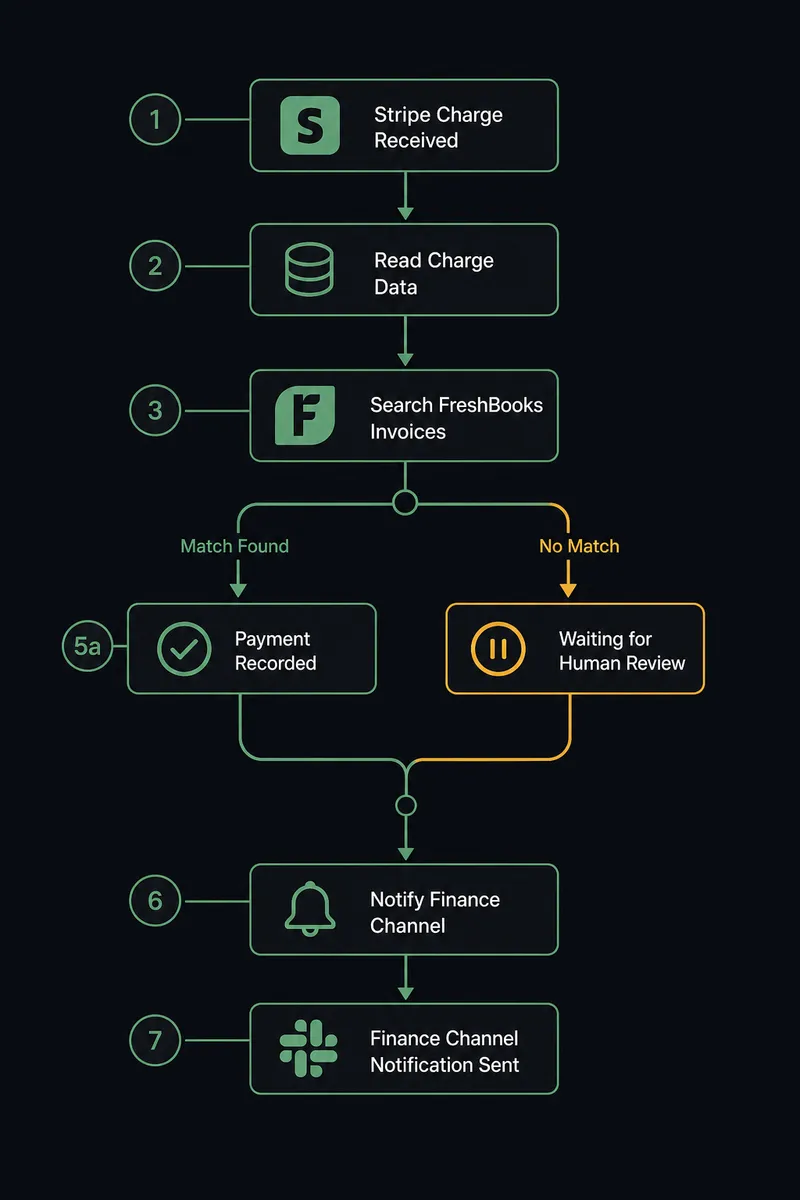
Stripe’s Parse Webhook Event trigger fires when a charge succeeds, and FlowRunner uses that event to call Find Invoices and Record Payment in FreshBooks, matching the charge to its open invoice and posting the payment automatically. FlowRunner is a visual AI-agent orchestration platform where automations run autonomously and pause for human judgment on the steps that carry real consequence. The same connection can run as a script that always does the same three steps, or as an AI agent that reads the charge, reasons about whether it actually matches an open invoice, and calls a human-in-loop flow as a tool the moment the amounts don’t line up.
The problem it solves
Right now, most of this reconciliation happens on a Friday afternoon. A billing manager or AP clerk opens the Stripe dashboard, opens FreshBooks in a second tab, and manually matches each charge to the invoice it’s supposed to close. When the customer name in Stripe doesn’t exactly match the client record in FreshBooks, or a partial payment comes through, the match gets set aside for “later,” and later often means the invoice sits open for weeks while the cash has already landed.
The spreadsheet version of this problem is worse. Some teams export both systems and VLOOKUP their way to a match. Every manual match is an opportunity for an exception to fall through the cracks: a payment that never gets recorded, an invoice that stays open after it’s been paid, a double-entry that throws off the aging report. None of this is a skill problem. It’s a volume problem. The team doesn’t need to work harder at matching payments; they need the routine matches handled so their time goes to the handful of charges that actually need a decision.
How it works: the connection
The trigger is Stripe’s Parse Webhook Event, filtered to the payment-succeeded event. When a charge clears, the agent reads the charge amount, the customer, and the processor reference directly off the event payload.
From there it calls Find Invoices in FreshBooks, searching for an open invoice tied to that customer. If the invoice total matches the charge amount, the agent calls Record Payment with the amount, the payment date, and the Stripe reference attached, so the invoice closes with a clean audit trail back to the original charge. No one opens FreshBooks by hand. No one exports a report to check whether the payment landed.
This is the same connection FreshBooks describes in its own reconciliation scenario: “A Stripe charge succeeds for a previously-invoiced customer. The agent reads the charge, finds the matching FreshBooks invoice with Find Invoices, and calls Record Payment with the amount, date, and payment-processor reference.” Reconciliation runs the moment the payment lands instead of catching up at month-end.
Can an AI agent run it? (and why a human stays in the loop)
A sync tool moves data. An agent decides what the data means. When the charge amount and the invoice total match exactly, there’s nothing to decide, the agent records the payment and moves on. The judgment call happens when they don’t match: a charge for $1,240 against an invoice for $1,450, or a charge with no invoice at all under that customer name.
This is where the agent invokes human-in-loop as a tool, not as a hardcoded “if amount doesn’t equal invoice total” rule. The agent has already checked whether the customer name is a near-match (a typo, a shortened company name, a different contact at the same account) before deciding whether this is worth a person’s attention. If it can resolve the mismatch with high confidence, it does. If it can’t, it stops.
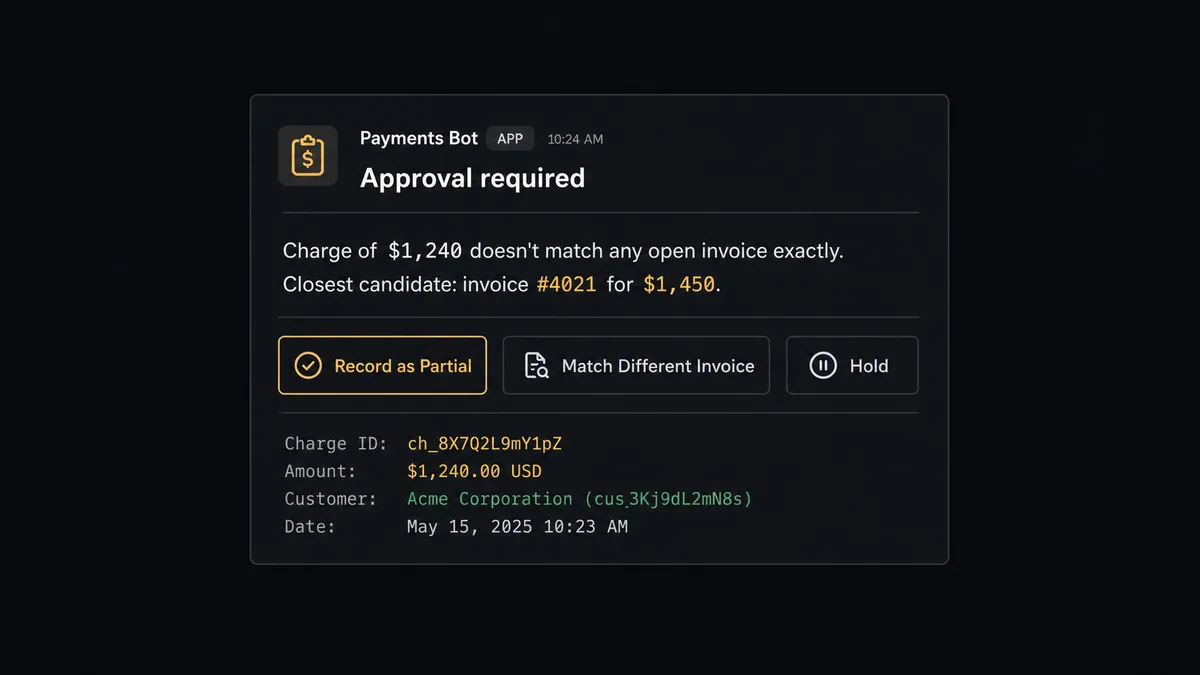
When it stops, it packages the Stripe charge details, the closest FreshBooks invoice candidates it found, and the reason it isn’t confident, then sends that to the controller over Slack: “Charge of $1,240 from [customer] doesn’t match any open invoice exactly. Closest candidate is invoice #4021 for $1,450. Record as partial payment, match to a different invoice, or hold?” The controller picks an option. The agent records the payment exactly as directed and logs the decision, the decider’s identity, and the timestamp in the audit trail.
This is the digital andon cord: the agent stops the line the moment it hits genuine uncertainty, instead of guessing or silently recording something wrong. Routine matches never touch a human. Real exceptions always do.
FlowRunner vs Zapier for Stripe and FreshBooks
Zapier is a reasonable choice for a small team that just needs Stripe and FreshBooks to talk, and its Stripe and FreshBooks integrations are mature and well documented. Where it stops is judgment: a Zap follows the same steps every time, so a mismatched amount either gets forced through with a rule you wrote in advance or fails silently, and there’s no way for the automation to reason about a specific charge and decide on its own that this one needs a person.
| FlowRunner | Zapier | |
|---|---|---|
| Handling a mismatch | Agent reasons about the specific charge and invoice, escalates only when it’s genuinely unsure | Rule-based branching only; no judgment on ambiguous cases |
| Human-in-loop | Native tool the agent calls mid-workflow, with full context and an audit trail | Not built in; requires a separate manual review step outside the automation |
| Users included | Unlimited users and workflows on every tier | Per-user and per-task pricing scales cost with team size |
| AI model | BYOK; you choose and pay for the model the agent runs on | Built-in AI steps are limited and metered separately |
| Self-hosting | Available on Enterprise for teams that need it on their own infrastructure | Cloud-only, no self-hosted option |
| Pricing clarity | Fixed workflow-based tiers with a hard execution cap | Per-task pricing that scales unpredictably with volume |
Before and after
| Category | Before | After |
|---|---|---|
| Invoice matching | A team member opens Stripe and FreshBooks side by side and matches charges to invoices by hand | Each successful charge is matched to its open invoice the moment it clears |
| Payment recording | Incoming payments are matched to invoices by reading the bank feed, often days later | Payment events from Stripe record into FreshBooks with reference and method attached |
| Mismatch handling | Ambiguous or partial payments sit unresolved until someone notices during month-end close | The agent surfaces mismatches to the controller with the charge and closest invoice candidates the same day |
| Audit trail | Manual matches leave no record of who decided what | Every human decision on a mismatch is logged with the approver’s identity and timestamp |
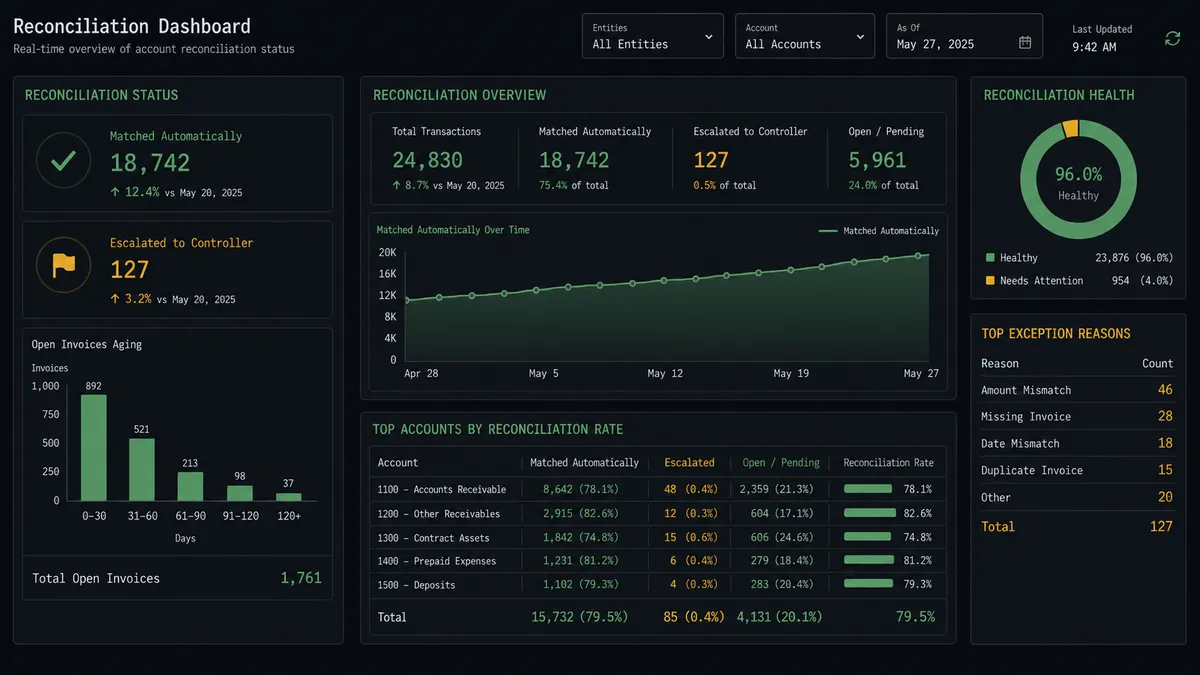
| Reporting | Profit-and-loss and aging reports are exported when someone asks for them | Get Financial Report runs on a schedule and lands where the team already looks |
What you can build
Order-to-invoice with automatic payment close. An order ships, the agent calls Create Client (or finds the existing one), Create Invoice with the line items, and Send Invoice. When the matching Stripe charge clears, the same agent calls Record Payment to close the loop without anyone touching either system.
Dunning that only escalates real risk. When a Stripe subscription payment fails, the agent checks whether it’s an expired card or insufficient funds, sends the appropriate recovery step, and only pulls in the billing team via Slack after a second failed attempt.
Refund-to-credit-note handoff. When a Stripe refund is issued above a configured threshold, the agent proposes the matching FreshBooks credit note to the controller before creating it, so the books never show a refund that hasn’t been approved.
Scheduled financial reporting. On a monthly schedule, the agent pulls Get Financial Report for profit-and-loss and tax summary, attaches the FreshBooks PDF, and posts the headline figures to the finance channel automatically.
Common questions
Is it free to connect Stripe and FreshBooks on FlowRunner? Yes. FlowRunner has a free plan with 100 executions a month, every integration included, and no credit card required, and new accounts get 14 days of Professional on top.
Can I self-host the Stripe to FreshBooks connection? Yes on Enterprise. Cloud tiers (Growth, Professional, Business) run hosted; Enterprise adds a self-hosted option for teams that need the workflow behind their own infrastructure.
Does the agent need my own OpenAI key to run this workflow? FlowRunner uses a BYOK model, so you bring the key for whichever AI provider you prefer. The agent reasoning that matches payments to invoices runs on the model you connect.
What happens when the agent isn’t sure which invoice a payment matches? It stops. The agent packages the Stripe charge details and the closest FreshBooks invoice candidates, sends them to the controller through Slack or email, and waits for a decision before recording anything.
Do I need to know how to code to set this up? No. Connecting Stripe and FreshBooks, choosing the trigger, and adding the human-in-loop step are all done visually in FlowRunner’s builder.
Can the agent create the FreshBooks invoice too, not just record the payment? Yes. The same agent can call Create Invoice and Send Invoice when an order ships, then later call Record Payment when the matching Stripe charge succeeds, so the whole cycle runs from one workflow.
Getting started
FlowRunner has a free plan with 100 executions a month, every integration included, and no credit card required, and new accounts get 14 days of Professional on top. Build the reconciliation workflow above in the visual builder, or start from a template and adjust the matching logic to your invoicing patterns.
Ready to see it running on your own data? Start free at flowrunner.ai or book a walkthrough and we’ll build the Stripe-to-FreshBooks flow with you live.
Frequently asked questions
Is it free to connect Stripe and FreshBooks on FlowRunner?
Yes. FlowRunner has a free plan with 100 executions a month, every integration included, and no credit card required, and new accounts get 14 days of Professional on top.
Can I self-host the Stripe to FreshBooks connection?
Yes on Enterprise. Cloud tiers (Growth, Professional, Business) run hosted; Enterprise adds a self-hosted option for teams that need the workflow behind their own infrastructure.
Does the agent need my own OpenAI key to run this workflow?
FlowRunner uses a BYOK model, so you bring the key for whichever AI provider you prefer. The agent reasoning that matches payments to invoices runs on the model you connect.
What happens when the agent isn't sure which invoice a payment matches?
It stops. The agent packages the Stripe charge details and the closest FreshBooks invoice candidates, sends them to the controller through Slack or email, and waits for a decision before recording anything.
Do I need to know how to code to set this up?
No. Connecting Stripe and FreshBooks, choosing the trigger, and adding the human-in-loop step are all done visually in FlowRunner's builder.
Can the agent create the FreshBooks invoice too, not just record the payment?
Yes. The same agent can call Create Invoice and Send Invoice when an order ships, then later call Record Payment when the matching Stripe charge succeeds, so the whole cycle runs from one workflow.