Send Zoho Books Bill Approvals to Slack Automatically
Connect Zoho Books and Slack so a vendor bill posts for approval automatically, and let an AI agent run the connection with a controller in the loop on the bills that are actually risky.
How do you connect Zoho Books to Slack?
Zoho Books’ On Bill Created (Realtime) trigger fires the moment a vendor bill is recorded, and FlowRunner’s Send Message to Channel action posts that bill into a Slack channel like #finance-ops so your team sees it without opening Zoho Books. FlowRunner is a visual AI-agent orchestration platform where automations run autonomously and pause for human judgment on the steps that carry real consequence. The same connection can also run as an AI agent: instead of posting every bill, the agent reads each one, decides which are routine, and invokes a human-in-loop step in Slack only for the bills that carry real weight, such as an unusually large payable from a new vendor.
The problem it solves
Right now, a bill that needs approval either sits in Zoho Books until someone happens to log in, or it gets forwarded by email and tracked in a separate thread. An AP clerk keys the vendor invoice into the books by hand, then pings a controller or forwards a screenshot to get a sign-off. If the controller is traveling or in back-to-back meetings, the bill waits. Nobody notices a stalled payable until a vendor calls asking where their payment is, and by then it has fallen through the cracks along with the context of why it was flagged in the first place.
The same gap shows up on the receivables side. A payment lands in the bank, but reconciling it against the right invoice happens in a batch at the end of the week, not the moment the money clears. Finance teams end up spending time keying transactions and chasing status updates instead of resolving the handful of exceptions that actually need a decision. The systems exist to solve this. They just aren’t talking to each other in real time.
How the connection works
Zoho Books’ On Bill Created (Realtime) trigger fires the moment a vendor bill is recorded, whether it came in through Create Bill or was entered directly. That trigger hands off to Slack’s Send Message to Channel action, which posts the vendor name, amount, and line items into a channel your team already watches. The same pattern works for the trigger you actually want to react to: On Invoice Created (Realtime) can announce a new sale to a revenue channel, On Payment Created (Realtime) can confirm a receivable was reconciled, and On Estimate Accepted (Realtime) can hand a won deal to the team that turns it into an invoice with Convert Estimate To Invoice.
The connection runs in both directions when you need it to. A message in Slack can start a Zoho Books action, not just report one: On Block Action fires when someone clicks a button in a Block Kit message, which is how a Slack decision resumes a Zoho Books flow, such as calling Mark Bill Open after a controller approves a payable. Slack’s Find Member and Find Channel actions resolve who should receive the message before it sends, so the right person gets the right context instead of a broadcast to the whole team.
Can an AI agent run it? (and why a human stays in the loop)
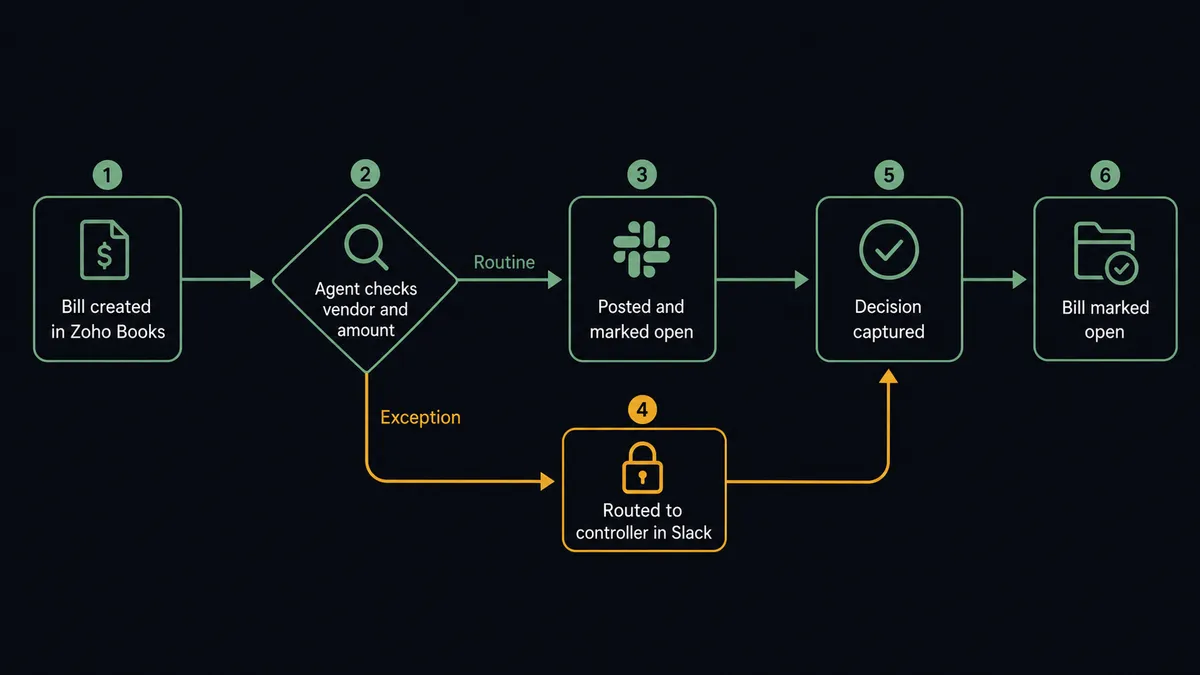
An agent version of this flow does more than fire a message on every bill. It treats Create Bill, Get Bill, and Mark Bill Open as tools it can call, reads the vendor, amount, and line items on each new bill, and decides for itself whether the bill is routine or needs a person. This is not a sync tool. The agent knows when to stop and ask.
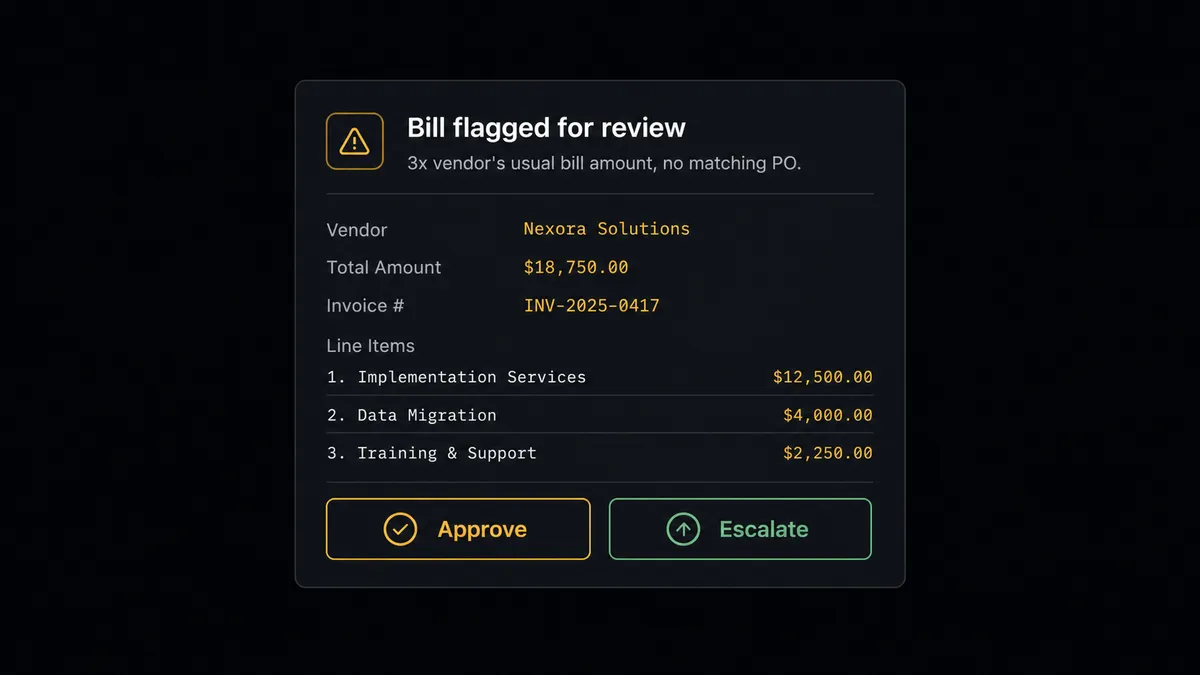
Say a bill comes in from a vendor the company has paid a dozen times, always for roughly the same amount. The agent checks the history, sees this bill matches the pattern, calls Create Bill, and moves it toward Mark Bill Open without involving anyone. Now say a bill arrives from that same vendor for three times its usual amount, with no matching purchase order on file. The agent recognizes the mismatch and invokes a human-in-loop flow as a callable tool instead of guessing. It packages the vendor name, the amount, the line items, and the fact that this bill is three times the vendor’s typical size, then posts it to #finance-ops as an interactive Slack message with Approve and Escalate buttons. A controller sees exactly why the agent flagged it, not just a raw bill. When the controller clicks Approve, On Block Action fires, the agent resumes, and calls Mark Bill Open. If they click Escalate, the bill holds and the finance director gets the full context next. Either way, the decision, the decider, and the timestamp land in the audit trail automatically.
FlowRunner vs Zapier
Zapier is a genuinely easy way to wire Zoho Books to Slack for teams that just need a message to fire when a bill or invoice is created. It has a mature, well-documented Zoho Books integration and a simple trigger-action builder that non-technical teams pick up in minutes. Where it runs out of road is judgment: Zapier can send every bill to Slack, but it cannot read the bill, decide which ones are routine, and only interrupt a human for the ones that matter.
| Capability | FlowRunner | Zapier |
|---|---|---|
| Human-in-the-loop | Native: agent decides when to invoke a person as a tool call, with full context | Not native: requires a manual filter step or a separate approval app |
| Decision logic | AI agent reads the bill and reasons about it before acting | Fixed if/then rules on a Zap; no reasoning over the data |
| Users included | Unlimited on every tier | Priced per user on paid plans |
| AI provider | BYOK: bring your own OpenAI, Anthropic, or other key | No native AI agent layer for this kind of decision |
| Pricing model | Transparent workflow-based tiers with a clear execution cap | Per-task pricing that scales with every trigger firing |
| Self-hosting | Enterprise self-hosted option available | Cloud-only |
Before and after
| Metric | Before | After |
|---|---|---|
| Payables entry | Someone reads each vendor invoice and types it into the books | The agent records the bill the moment a parsed invoice arrives |
| Approval routing | AP exceptions sent via email and tracked in separate threads | Flagged bills post to Slack with Approve and Escalate buttons |
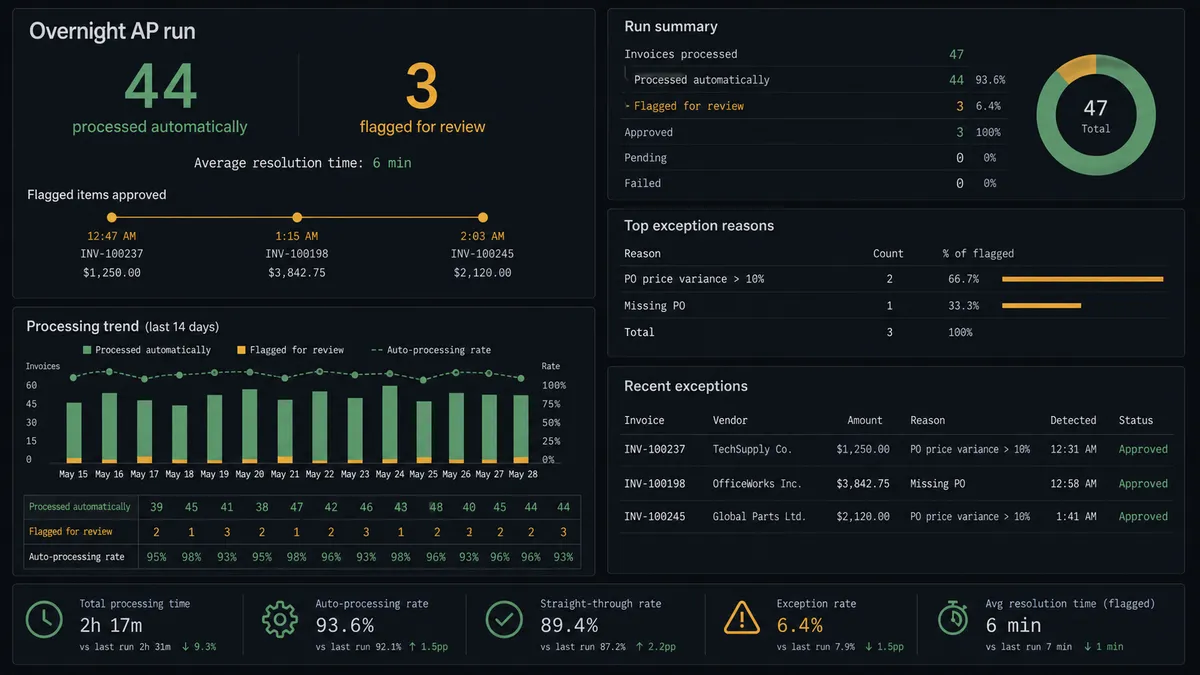
| Exception resolution | Requires a meeting or email chain before resolution | Three exceptions approved and escalated in one Slack session from a phone in 6 minutes |
| Overnight processing | Bills wait until someone opens Zoho Books | 44 of 47 routine items post and move without anyone touching them |
| Decision record | Approvals tracked informally, if at all | Every approval captured with approver identity and timestamp automatically |
What you can build
Vendor bill approval routing. On Bill Created (Realtime) hands off to an agent that checks the vendor and amount, calls Create Bill for routine payables, and routes anything unusual to Slack with Approve and Escalate buttons before calling Mark Bill Open.
New invoice announcements. On Invoice Created (Realtime) triggers Send Message to Channel so sales and finance see every new invoice land in real time, instead of waiting for the next status meeting.
Estimate-to-invoice handoff. On Estimate Accepted (Realtime) posts a win to Slack and calls Convert Estimate To Invoice, so an accepted quote becomes a billable invoice the same minute it’s won.
Payment reconciliation confirmations. On Payment Created (Realtime) calls Record Customer Payment and then posts a confirmation to #finance-ops, so receivables are visibly reconciled the moment the money clears, not at the next batch review.
Weekly payable digest. Every Monday, an agent pulls the week’s activity with List Expenses and posts a formatted Block Kit report to #operations, giving leadership visibility without anyone pulling a manual report.
Common questions
Is it free to connect Zoho Books and Slack on FlowRunner? FlowRunner has a free plan with 100 executions a month, every integration included, and no credit card required, and new accounts get 14 days of Professional on top. Both Zoho Books and Slack connections are included at every tier, so there is no extra charge to connect the two systems.
Does the agent need my own OpenAI key? Yes. FlowRunner uses a bring-your-own-key (BYOK) model, so you connect your own AI provider account and control which model runs your Zoho Books and Slack agents.
What happens when the agent isn’t sure? The agent pauses the flow and invokes a human-in-loop step as a callable tool, posting the vendor, amount, and line items to Slack with Approve and Escalate buttons instead of guessing or auto-approving.
Can I self-host this connection? Yes. FlowRunner offers a self-hosted Enterprise option in addition to the cloud tiers, so the Zoho Books and Slack connection can run on your own infrastructure if that is a requirement.
Do I need to write code to set this up? No. Both the trigger-to-action connection and the AI agent version are built visually in FlowRunner, using the same Zoho Books and Slack actions described on this page.
Does every bill require a human to approve it in Slack? No. Only bills that cross a threshold you set, or that the agent flags as unusual for that vendor, route to a controller in Slack. Routine bills post and move forward on their own.
Getting started
Start on the free plan: 100 executions a month, every integration included, no credit card required, plus 14 days of Professional for new accounts. Connect your Zoho Books account and your Slack workspace, pick the trigger that matches the flow you want, and add the human-in-loop step when you’re ready to let an agent make the routing decision instead of you.
Get started at flowrunner.ai, or book time with the team at calendly.com/flowrunner/intro to walk through your specific approval thresholds.
Frequently asked questions
Is it free to connect Zoho Books and Slack on FlowRunner?
FlowRunner has a free plan with 100 executions a month, every integration included, and no credit card required, and new accounts get 14 days of Professional on top. Both Zoho Books and Slack connections are included at every tier, so there is no extra charge to connect the two systems.
Does the agent need my own OpenAI key?
Yes. FlowRunner uses a bring-your-own-key (BYOK) model, so you connect your own AI provider account and control which model runs your Zoho Books and Slack agents.
What happens when the agent isn't sure?
The agent pauses the flow and invokes a human-in-loop step as a callable tool, posting the vendor, amount, and line items to Slack with Approve and Escalate buttons instead of guessing or auto-approving.
Can I self-host this connection?
Yes. FlowRunner offers a self-hosted Enterprise option in addition to the cloud tiers, so the Zoho Books and Slack connection can run on your own infrastructure if that is a requirement.
Do I need to write code to set this up?
No. Both the trigger-to-action connection and the AI agent version are built visually in FlowRunner, using the same Zoho Books and Slack actions described on this page.
Does every bill require a human to approve it in Slack?
No. Only bills that cross a threshold you set, or that the agent flags as unusual for that vendor, route to a controller in Slack. Routine bills post and move forward on their own.