Send Anthropic Claude Contract Reviews to Google Sheets
Connect Anthropic Claude and Google Sheets so a new contract row triggers Claude to extract and cite key terms, with a person reviewing anything non-standard before it's logged.
How do you connect Anthropic Claude to Google Sheets?
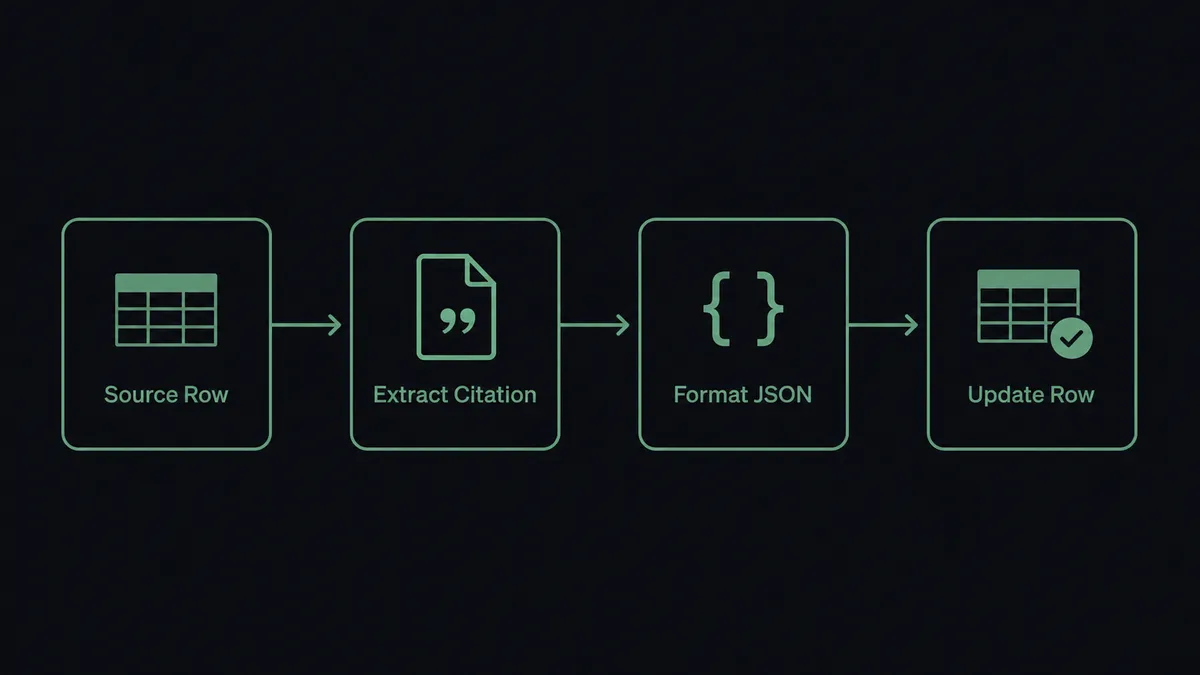
A new row in a Google Sheets tracker fires the On New Row trigger, which hands a contract link to Claude’s Analyze Document action; Claude reads the file, extracts the key terms with citations, and the flow writes the result back to the same row with Update Row. FlowRunner is a visual AI-agent orchestration platform where automations run autonomously and pause for human judgment on the steps that carry real consequence. The same connection can also run as an AI agent that reads each contract, decides what’s standard and what isn’t, and invokes a human-in-loop step only for the clauses that need a person’s judgment.
The problem it solves
An ops lead or contracts manager tracks incoming vendor agreements in a Google Sheet: a row per contract, a column for status, a link to the PDF. Someone still has to open every attachment and read it line by line to find the payment terms, the termination clause, and anything unusual buried on page nine. New rows sit untouched until a person happens to notice them. The sheet is the system of record, but it’s a passive one. Nothing in it triggers anything.
The result is a queue that only moves as fast as the slowest reviewer’s calendar. Standard contracts, the ones that match the template every time, get the same manual read as the ones with a real problem hiding in a change-of-control clause. Reading time doesn’t scale with contract volume, and exceptions fall through the cracks because they look identical to routine paperwork until someone actually reads them.
How it works: the connection
The flow starts with Google Sheets’ On New Row trigger watching a contract tracker document. Each new row carries a link to the contract PDF and a few metadata fields (vendor name, contract type, date received).
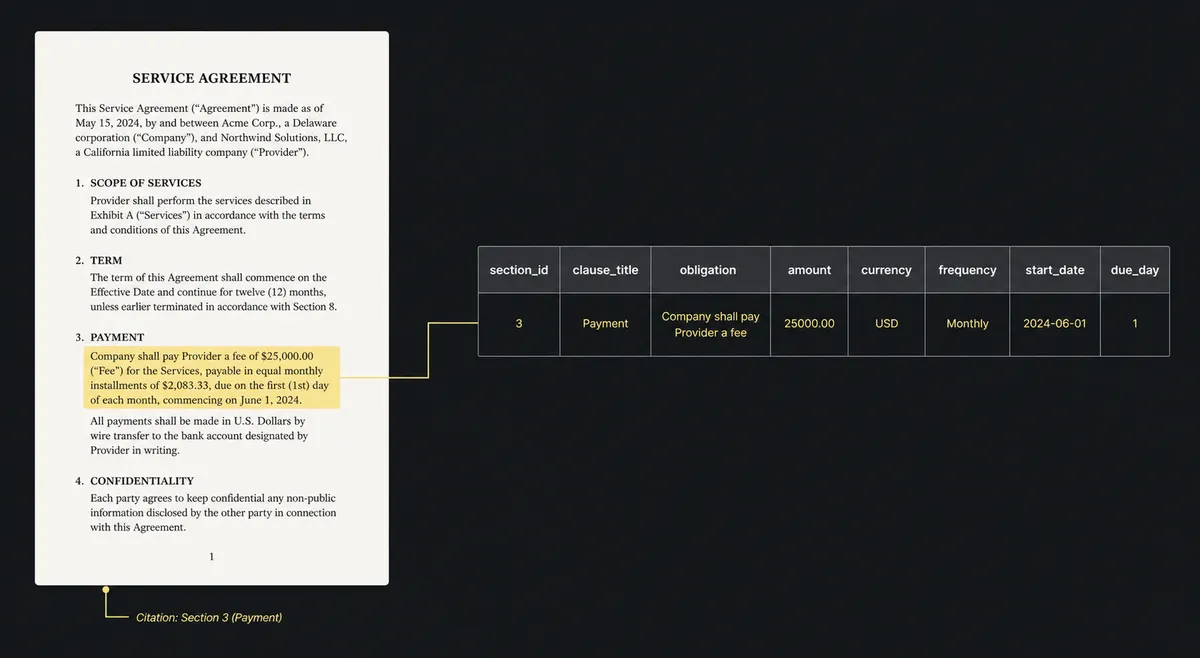
When the row lands, the flow calls Claude’s Analyze Document action with citations enabled, pointed at the PDF. Claude reads the full document, including any tables or scanned pages, and returns the payment terms, termination clause, and change-of-control provisions, each one linked back to the exact passage it came from. Because the output needs to be reliable, the flow uses Send Messages with a JSON schema so the response comes back as structured fields instead of a paragraph of prose. Those fields, plus the citation references, get written back to the row with Update Row, so the sheet itself becomes the readable summary. No one has to open the original PDF unless they want to check the source.
Can an AI agent run it? (and why a human stays in the loop)
This is where it stops being a sync tool. Instead of a flow that always runs the same three steps, an AI agent owns this process end to end: it reads the extracted terms, compares them against the company’s approved contract template, and decides for itself whether what it found is routine or worth a second look. Not a hardcoded rule like “flag any contract over $50,000.” The agent reasons about the actual content: a termination clause with an unusual notice period, a change-of-control provision that doesn’t match the template’s standard language, a payment term that’s structured differently than every other vendor agreement in the sheet.
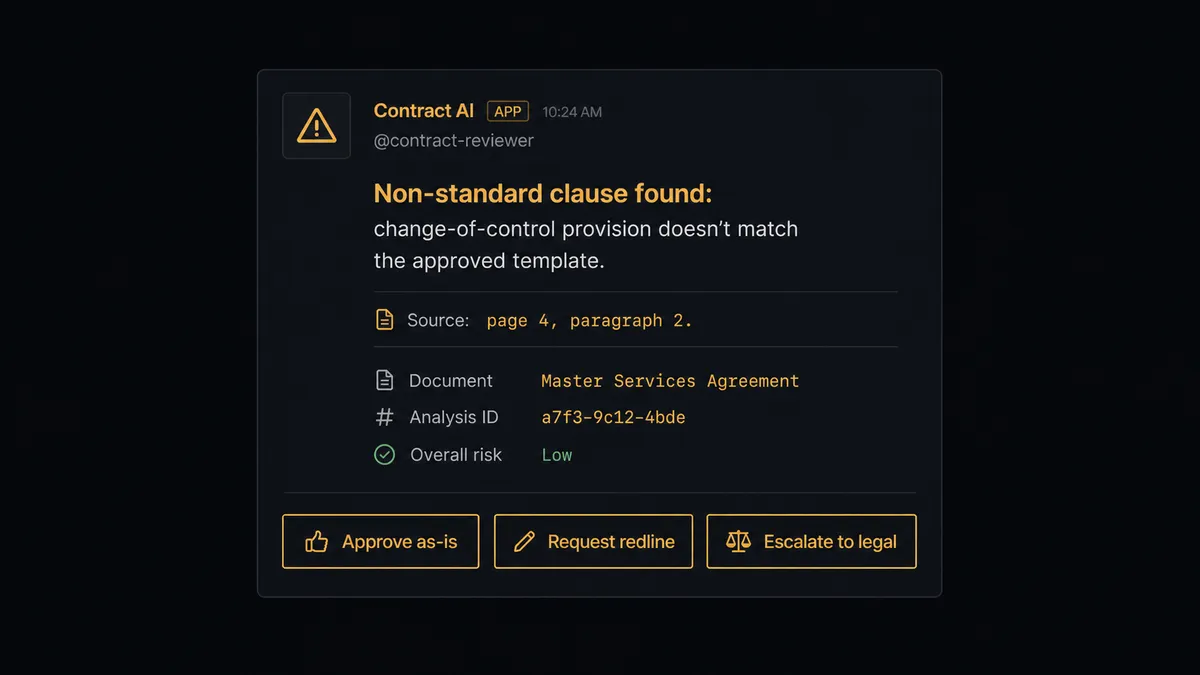
When the agent finds something that doesn’t match, it invokes a human-in-loop flow as a callable tool, the same way it calls Analyze Document or Update Row. That flow sends a Slack message to the assigned reviewer with the flagged clause, the citation pointing to the exact page and passage, and the two or three ways it could be handled: approve as-is, request a redline, or escalate to legal. The row stays marked “pending review” until the person responds. Once they do, the agent resumes, writes the decision and the reviewer’s name into the row, and moves on to the next contract.
This is the same pattern Claude’s own Managed Agents use natively: a long-running research or extraction task works autonomously in its sandbox, and when it hits a step configured to require approval, the session goes idle and waits. FlowRunner treats that pause as the human-in-the-loop step, whether the agent is mid-document-review or mid-research-brief. Prospects call this a digital andon cord. The agent doesn’t ask about everything, and it doesn’t guess about anything that matters. It knows when to stop and ask.
FlowRunner vs Zapier
Zapier is a fast, familiar way to wire Google Sheets to an AI step for teams that don’t want to think about infrastructure. Its row triggers are reliable and its AI actions can call Claude directly for a straightforward “summarize this row” or “classify this text” step, and for a single linear zap it gets set up in minutes.
Where the two diverge is what happens when the answer isn’t clean. Zapier doesn’t have a native way for an AI step to decide, mid-run, that a specific case needs a person’s judgment and route it there with full context; that has to be built as a separate manual branch, if it exists at all. Here’s what actually differs for this pair:
| Capability | FlowRunner | Zapier |
|---|---|---|
| Human-in-the-loop | Native: the agent invokes a human-in-loop flow as a callable tool, mid-run, based on its own reasoning | Not native: approval-style logic has to be built as separate conditional paths, without the agent deciding when to escalate |
| BYOK for AI | Yes, your own Anthropic key, billed directly by Anthropic | Requires Zapier’s AI credits or a connected key depending on plan |
| Self-hosting | Free Community Edition, plus an Enterprise self-hosted tier | Cloud only |
| Pricing model | Transparent workflow-based tiers with a clear execution ceiling per tier | Task-based pricing that can be hard to predict as AI steps multiply tasks per zap |
| Users included | Unlimited users on every tier | Per-plan user limits on lower tiers |
Before and after
| What Changes | Before | After |
|---|---|---|
| Contract reading | Someone reads every page to find the clauses that actually matter | Claude reads the full document and surfaces only what needs a decision |
| Row activity | A new row sits until a person notices it and acts | A new or updated row triggers the right downstream automation |
| Term extraction | Summaries have no link back to the source passage they came from | Citations point to the exact passage each answer is based on |
| Reporting | Each report is produced by opening the sheet and downloading a file | Sheets export to a file and deliver on schedule without anyone opening them |
| Long research tasks | Multi-step research and document work waits on a person to run it | Managed Agents run the long task and stop to ask when they hit a gate |
What you can build
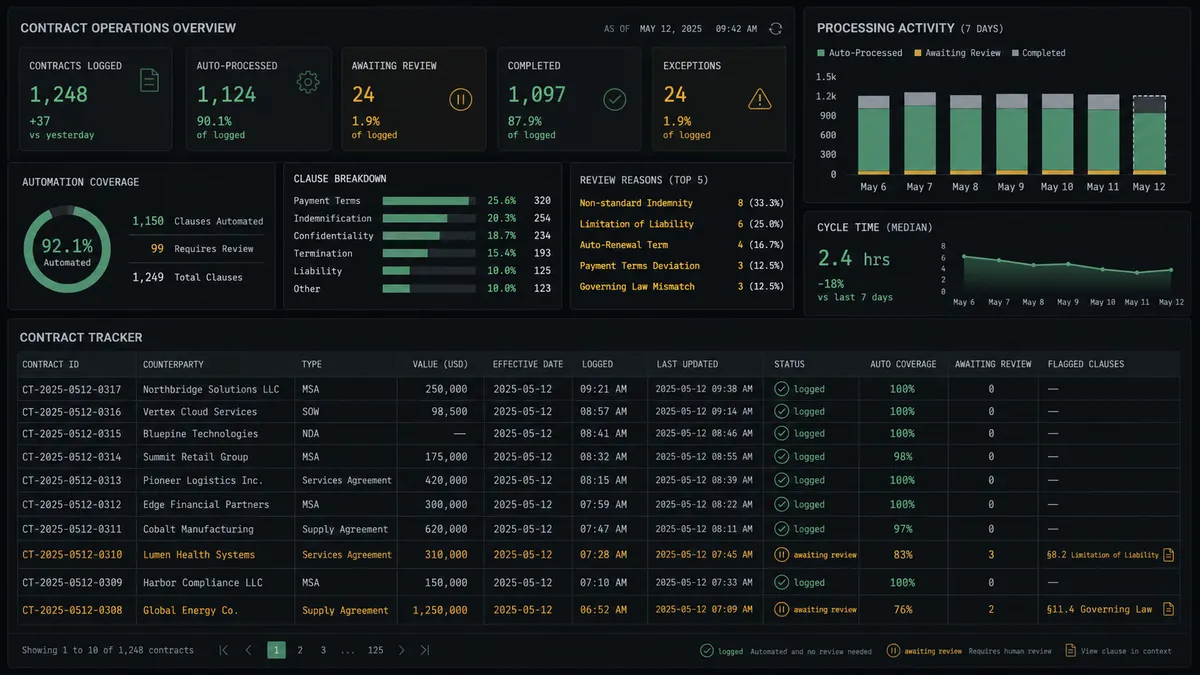
Contract intake and review tracker. On New Row fires when a contract link lands in the tracker. The agent calls Analyze Document with citations, extracts terms into schema-enforced JSON, and writes them back with Update Row, pausing for a reviewer only on non-standard clauses.
Bulk ticket classification at volume. Get Rows pulls a batch of unclassified support rows, Create Message Batch submits them all to Claude in one request at reduced token cost, and Update Rows writes each classification back once Get Message Batch Results matches answers to rows by custom ID.
Scheduled research digest. A Managed Agents session works a research brief against a Define Outcome rubric. Once On Session Idle fires, the agent writes findings to a fresh sheet with Add Rows and calls Export Sheet to deliver a PDF the team never has to assemble by hand.
Row validation with an escalation. On New or Updated Row fires, the agent asks Claude to check the row against required fields and expected values, and routes anything it isn’t confident about to the row owner over Slack before Update Cell marks the row processed.
Getting started
FlowRunner has a free plan with 100 executions a month, every integration included, and no credit card required, and new accounts get 14 days of Professional on top. Set up the contract tracker flow above in minutes, or start from scratch with your own sheet and your own clause list.
Ready to see it running on your own contracts? Start at flowrunner.ai or book a walkthrough at calendly.com/flowrunner/intro.
Frequently asked questions
Is it free to connect Anthropic Claude and Google Sheets on FlowRunner?
FlowRunner has a free plan with 100 executions a month, every integration included, and no credit card required, and new accounts get 14 days of Professional on top. Google Sheets and Anthropic Claude are both included; you supply your own Anthropic API key under FlowRunner's BYOK model.
Can I self-host this workflow?
Yes. FlowRunner offers a free Community Edition for self-hosting, and an Enterprise self-hosted tier with multi-instance clustering and the full compliance suite for teams that need audit trails and SSO on their own infrastructure.
Does the agent need my own Anthropic API key?
Yes. FlowRunner uses a bring-your-own-key model for AI providers, so your Analyze Document and Send Messages calls run on your own Anthropic account and are billed directly by Anthropic, not marked up by FlowRunner.
What happens when the agent isn't sure about a contract clause?
The agent does not guess. It compares the extracted terms against your approved template, and when a clause doesn't match, it pauses the flow and routes the specific passage to a reviewer over Slack with the citation attached, then resumes once a person responds.
Can FlowRunner classify a large batch of sheet rows at once?
Yes. The agent can build a Claude Message Batch from a set of unprocessed rows, submit it for asynchronous processing at reduced token cost, then match each result back to its row by custom ID and write the outcome with Update Rows.
Do I need to know how to code to set this up?
No. Connecting Anthropic Claude and Google Sheets, mapping the trigger and actions, and adding the human-in-loop step are all done visually in FlowRunner. No API code or webhook configuration is required.