How to Connect Anthropic Claude to Slack for Agent Approvals
Connect Anthropic Claude and Slack so a Managed Agents session posts its work and pauses for a human, in Slack, on the step that carries real consequence.
How do you connect Anthropic Claude to Slack?
Claude’s On Session Idle trigger fires when a Managed Agents session pauses, either because the work finished or because it hit a tool with an always-ask policy; FlowRunner reads that pause with Get Session Result and calls Slack’s Send Message to Channel to post the context with Approve and Escalate buttons. FlowRunner is a visual AI-agent orchestration platform where automations run autonomously and pause for human judgment on the steps that carry real consequence. The same connection can run as a fully autonomous AI agent that only stops for a person when the tool it’s about to use is configured to require one, with Slack’s On Block Action trigger and Claude’s Send Tool Confirmation action closing the loop.
The problem it solves
An ops lead or deal reviewer hands a long task to Claude, a hundred-page contract, a competitive research brief, a batch of support tickets, and then has no visibility into it until it’s done. If the task needs a decision partway through (does this clause require legal review, is this classification confident enough to act on), the agent either guesses or the whole thing stalls waiting for someone to notice it’s stuck. Nobody is watching a session status page. The result lands in an inbox nobody checks until Monday, or the analyst has to manually copy the agent’s output into Slack and explain what it means, turning a five-minute review into a twenty-minute one.
The alternative teams fall back on is worse: running the agent, then manually re-reading its output start to finish because they don’t trust the parts they didn’t personally check. That defeats the purpose of delegating the task in the first place. Extraction without provenance means summaries with no link back to the source passage they came from, so a reviewer either trusts a black box or reads the original anyway. Either way, the time back the team was promised never shows up.
How it works: the connection
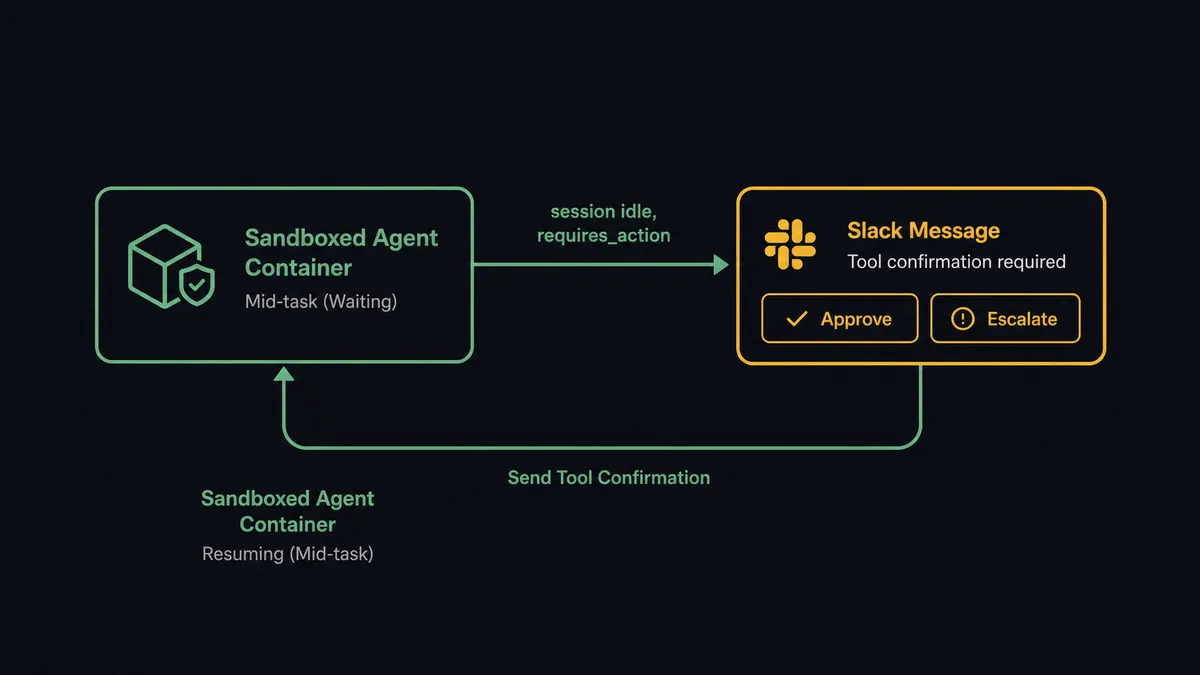
The flow starts on Claude’s side. A Managed Agents session works a task, contract review, research, or triage, inside a sandboxed container. When the session reaches a step configured with an always-ask permission policy, it emits a tool-use event and goes idle with a stop reason of requires_action. FlowRunner’s On Session Idle trigger catches that transition without polling.
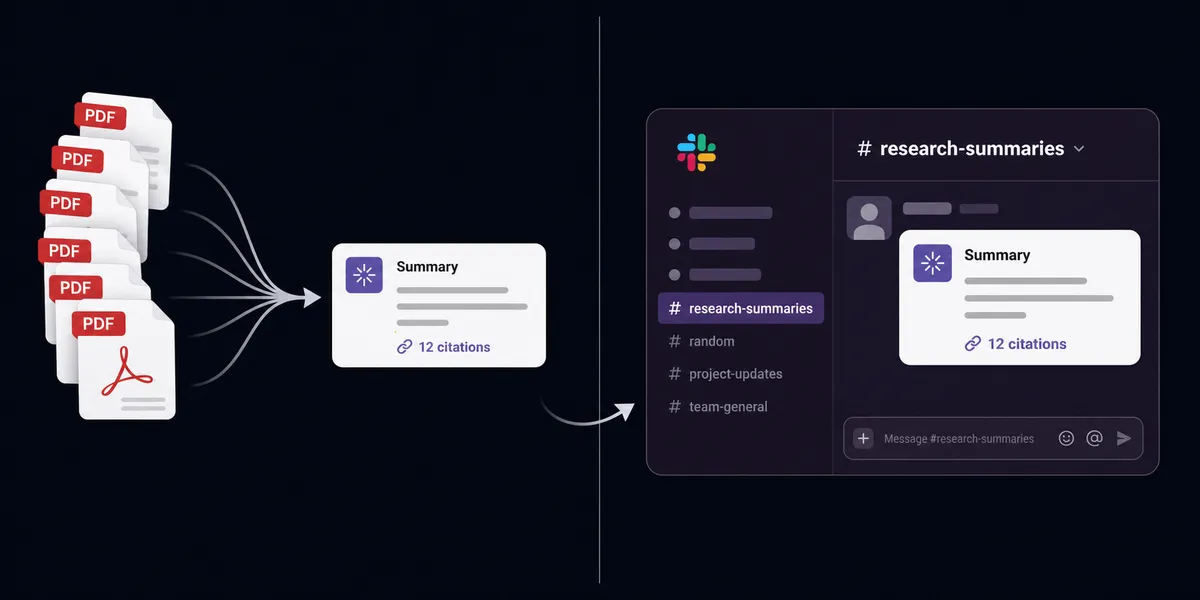
From there, the flow calls Get Session Result to read what the agent produced so far and Get Session Events if it needs the fuller trail of what the agent tried. It packages that into a Slack message using Send Message to Channel, built with Block Kit so the context is readable and the Approve and Escalate buttons are attached directly to the message. If the underlying document supports it, Analyze Document’s citation output is included, so the reviewer can see the exact passage the agent’s summary is based on, not just the agent’s paraphrase of it.
When someone clicks a button, Slack’s On Block Action trigger fires. The flow reads which button was clicked and by whom, then calls Claude’s Send Tool Confirmation action, approving or denying the pending tool call and optionally attaching a reason. The session resumes exactly where it paused. If the task is still running, Update Message in Channel edits the original Slack post from “pending review” to “approved” so the thread stays accurate without a second message.
Can an AI agent run it? (and why a human stays in the loop)
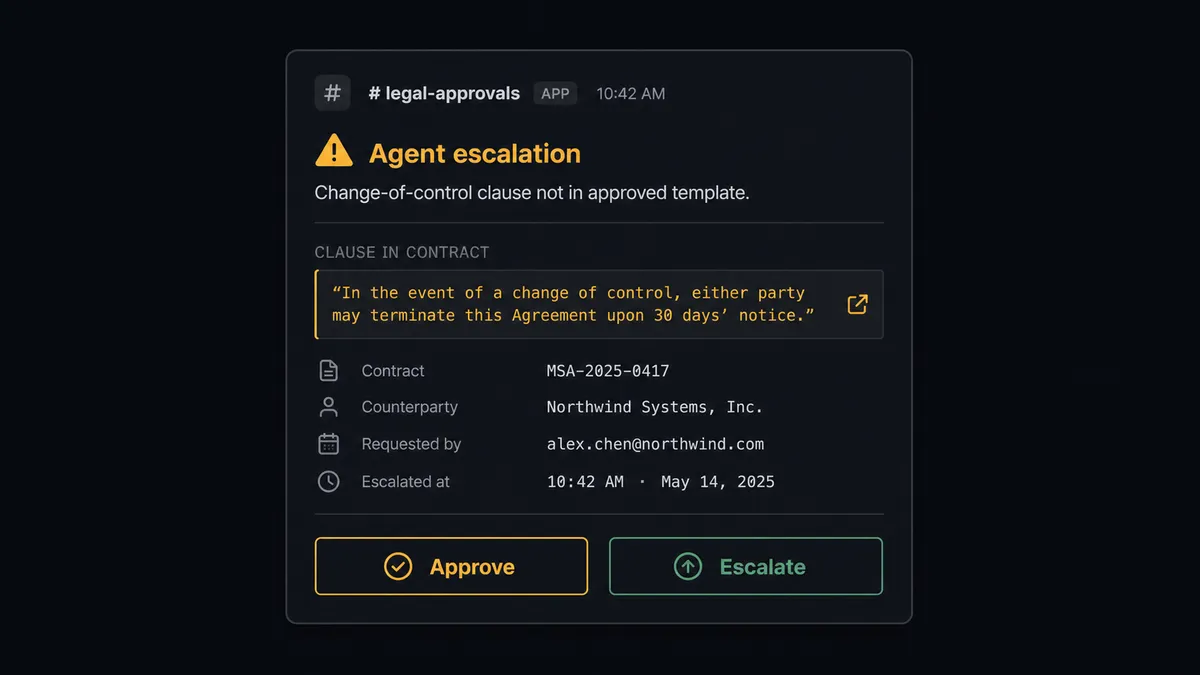
The agent doesn’t check a dollar amount against a fixed threshold and branch. It reads the contract, reasons about what it found, and decides for itself whether the clause it just extracted matches the approved template or deviates from it. A standard payment-terms clause gets filed and summarized without anyone touching it. A change-of-control provision that doesn’t match anything in the template gets escalated, because the agent’s own instructions tell it that’s outside what it’s authorized to resolve alone. The decision to involve a human is itself an output of the agent’s reasoning, not a rule someone hardcoded into the flow.
When it escalates, the agent packages real context: which clause triggered the stop, the cited source passage from Analyze Document, and what it already checked and ruled out. That lands in Slack as a single message with Approve and Escalate buttons, not a vague “action needed” ping. The reviewer sees exactly what the agent saw. Approve, and Send Tool Confirmation releases the agent to continue. Escalate with a reason, and the agent adjusts its next step using that reason as input, rather than failing silently or looping.
This is not a sync tool moving data from one system to another on a schedule. It’s an agent that knows when to stop and ask. Every pause, every response, and the identity of who answered are captured automatically in FlowRunner’s audit trail, which is what turns “the AI decided” into something a compliance reviewer can actually sign off on. Prospects who’ve seen this in production call it a digital andon cord: like Toyota’s quality control pull cord, the agent stops the line itself the moment it hits something it shouldn’t decide alone.
FlowRunner vs n8n
n8n is a strong choice for teams with engineers willing to build this by hand. Its LangChain-based AI nodes can call Claude, and its Slack node can post interactive messages, so a technical team can wire up a version of this flow themselves. That flexibility is real, and teams already invested in n8n’s workflow library shouldn’t discount it.
Where the two diverge is what happens after the agent pauses. In n8n, “wait for approval” is typically a webhook node and a manually built polling or resume pattern that a developer maintains. In FlowRunner, the pause is native to how the Claude and Slack actions are built to work together, and the audit trail (who approved, when, and what the agent said before it asked) is captured automatically rather than something the team has to design and store itself.
| Dimension | FlowRunner | n8n |
|---|---|---|
| Human-in-loop on agent gates | Native: On Session Idle and Send Tool Confirmation are built for this pause/resume pattern | Bolt-on: built with generic webhook and wait nodes a developer assembles |
| Decision audit trail | Captured automatically: approver identity and timestamp on every response | Not built in; requires custom logging to a database or sheet |
| Setup for non-technical ops staff | Visual builder, no code | Requires comfort with nodes, expressions, and JSON |
| Users included | Unlimited on every tier | Priced per seat above the free tier |
| AI provider billing | BYOK, you pay Anthropic directly | BYOK also supported via credentials |
| Pricing model | Transparent workflow-based execution tiers | Execution-based pricing that scales with node runs, which can be hard to predict on agent workloads with variable tool calls |
Before and after
| Contract review | Someone reads every page to find the clauses that matter | Claude reads the full document and surfaces only what needs a decision | | Traceability | Summaries have no link back to the source passage they came from | Citations point to the exact passage each answer is based on | | Exception resolution | Exceptions require a meeting or an email chain before anyone decides | A decision resolved in one Slack session, often in minutes, from a phone | | Long research tasks | Multi-step research and document work waits on a person to run it | The Managed Agent works the task autonomously and stops only at the approval gate | | Status tracking | Managers ask team members directly to get a status update | Every approval is captured with approver identity and timestamp automatically |
What you can build
Contract review digests. Analyze Document extracts payment terms, termination clauses, and change-of-control provisions with citations, then Send Message to Channel posts a summary to the deal team so reading narrows to what actually needs a decision.
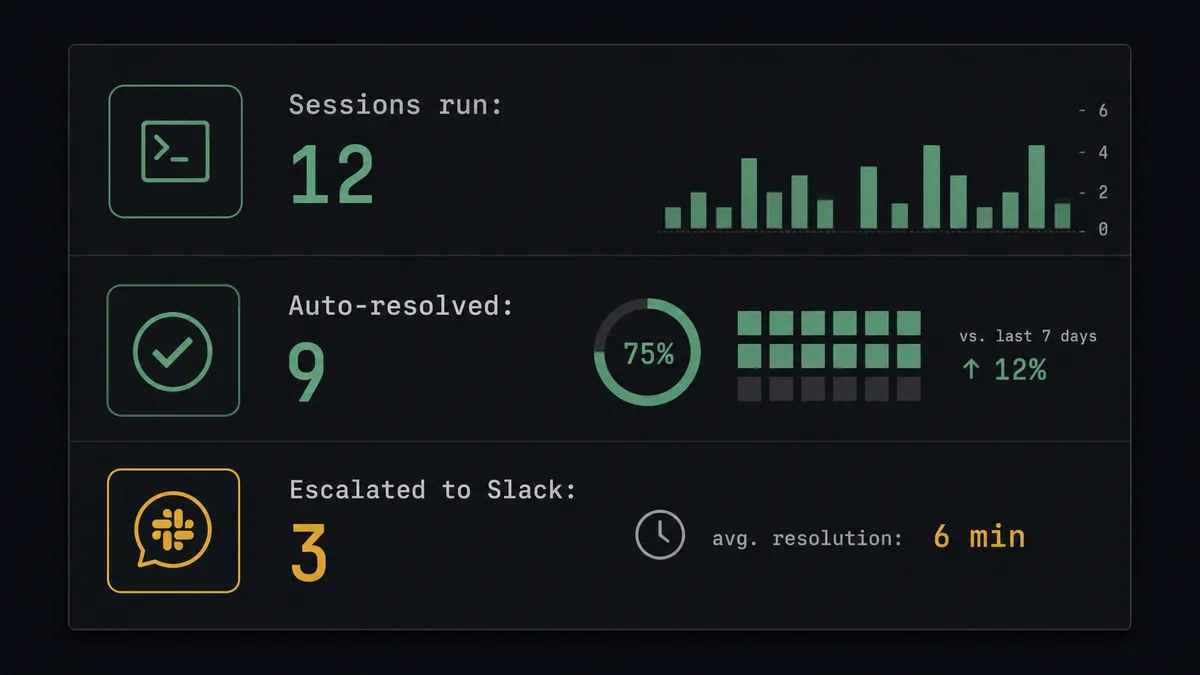
Approval gates for Managed Agents. On Session Idle catches any session that pauses on requires_action, posts the pending action to Slack with Approve and Escalate buttons, and Send Tool Confirmation resumes the agent once someone answers.
Support triage at volume. Create Message Batch classifies a spike of inbound tickets at reduced cost, and once Get Message Batch Results comes back, Send Message to Channel posts a routing summary so the team sees what got auto-routed and what needs a look.
Research agent progress updates. Define Outcome starts a rubric-graded research task, and Update Message in Channel keeps a single Slack message current as the agent iterates, instead of flooding the channel with new posts.
Inbound document processing from Slack. On File Shared fires when a vendor drops a PDF into a channel, Analyze Document reads it, and the agent posts a structured summary back in the thread, or escalates with Send Direct Message if something doesn’t match.
Common questions
Is it free to connect Anthropic Claude and Slack on FlowRunner? FlowRunner has a free plan with 100 executions a month, every integration included, and no credit card required, and new accounts get 14 days of Professional on top. Beyond the free plan, Growth runs $45/mo for 12,000 executions with unlimited users and workflows.
Can I self-host the Claude and Slack workflow? Yes. FlowRunner’s Enterprise tier includes a self-hosted deployment option with unlimited audit retention, which matters if a Managed Agents session is handling contract or financial data your team can’t send through a third-party cloud.
Does the agent need my own Anthropic API key? Yes, FlowRunner uses a bring-your-own-key model for Claude, so you connect your own Anthropic account and pay Anthropic directly for model usage. FlowRunner’s execution pricing covers the orchestration, not the model calls.
What happens when the agent isn’t sure? The Managed Agents session hits a tool configured with an always-ask policy, goes idle with a stop reason of requires_action, and stops. FlowRunner’s On Session Idle trigger catches that pause, packages the context, and posts it to Slack for a person to decide.
Which Slack trigger actually resumes the paused Claude agent? On Block Action. When someone clicks Approve or Escalate on the Slack message FlowRunner sent, that trigger fires and the flow calls Send Tool Confirmation, which releases or blocks the agent’s next move in the same session.
Can a non-technical ops team set this up without a developer? Yes. Connecting the trigger and action, adding the Slack approval step, and mapping the fields is done in FlowRunner’s visual builder; no code is required to wire On Session Idle to Send Message to Channel or On Block Action to Send Tool Confirmation.
Getting started
Start on the free plan: 100 executions a month, every integration included, no credit card required, plus 14 days of Professional for new accounts. Connect Anthropic Claude and Slack, build the On Session Idle to Send Message to Channel flow above, and add Send Tool Confirmation as the resume step.
Ready to see it running on your own contracts or tickets? Sign up at flowrunner.ai or book a walkthrough at calendly.com/flowrunner/intro.
Frequently asked questions
Is it free to connect Anthropic Claude and Slack on FlowRunner?
FlowRunner has a free plan with 100 executions a month, every integration included, and no credit card required, and new accounts get 14 days of Professional on top. Beyond the free plan, Growth runs $45/mo for 12,000 executions with unlimited users and workflows.
Can I self-host the Claude and Slack workflow?
Yes. FlowRunner's Enterprise tier includes a self-hosted deployment option with unlimited audit retention, which matters if a Managed Agents session is handling contract or financial data your team can't send through a third-party cloud.
Does the agent need my own Anthropic API key?
Yes, FlowRunner uses a bring-your-own-key model for Claude, so you connect your own Anthropic account and pay Anthropic directly for model usage. FlowRunner's execution pricing covers the orchestration, not the model calls.
What happens when the agent isn't sure?
The Managed Agents session hits a tool configured with an always-ask policy, goes idle with a stop reason of requires_action, and stops. FlowRunner's On Session Idle trigger catches that pause, packages the context, and posts it to Slack for a person to decide.
Which Slack trigger actually resumes the paused Claude agent?
On Block Action. When someone clicks Approve or Escalate on the Slack message FlowRunner sent, that trigger fires and the flow calls Send Tool Confirmation, which releases or blocks the agent's next move in the same session.
Can a non-technical ops team set this up without a developer?
Yes. Connecting the trigger and action, adding the Slack approval step, and mapping the fields is done in FlowRunner's visual builder; no code is required to wire On Session Idle to Send Message to Channel or On Block Action to Send Tool Confirmation.