Can Mistral AI Flag Contract Clauses for Slack Review?
Connect Mistral AI and Slack so an agent reads and summarizes contracts, then pauses in Slack for a human when it finds a clause that isn't standard.
How do you connect Mistral AI to Slack?
Connect Mistral AI to Slack by using Slack’s On File Shared trigger to start the flow when a contract lands in a channel, then having Mistral AI’s OCR Document action read it and Ask AI summarize it, with the result posted back to Slack through Send Message to Channel. FlowRunner is a visual AI-agent orchestration platform where automations run autonomously and pause for human judgment on the steps that carry real consequence. The same connection can run as an AI agent that reads the contract, decides which clauses are standard, and invokes a human-in-loop step in Slack only when something needs a person’s judgment.
The problem it solves
Contracts still arrive as PDFs dropped into a Slack channel, forwarded from an inbox, or scanned from a fax. An ops lead or paralegal opens each one, reads it end to end, and tries to remember what a standard indemnification clause or payment term looks like across dozens of vendor templates. Scanned documents make this worse: an image-based PDF cannot be searched, copied, or run through a text tool, so the reader has to work from the image itself. Multiply this by a stack of contracts in a week and review becomes a queue that never empties.
The cost isn’t just time. A non-standard clause buried on page eleven falls through the cracks when a tired reader skims to the signature block. Legal gets pulled in on every contract regardless of risk, because there’s no reliable way to separate the ten that are boilerplate from the one that actually needs their attention. Teams end up either reviewing everything manually, which doesn’t scale, or reviewing selectively, which is how the wrong clause gets missed.
How it works: the connection
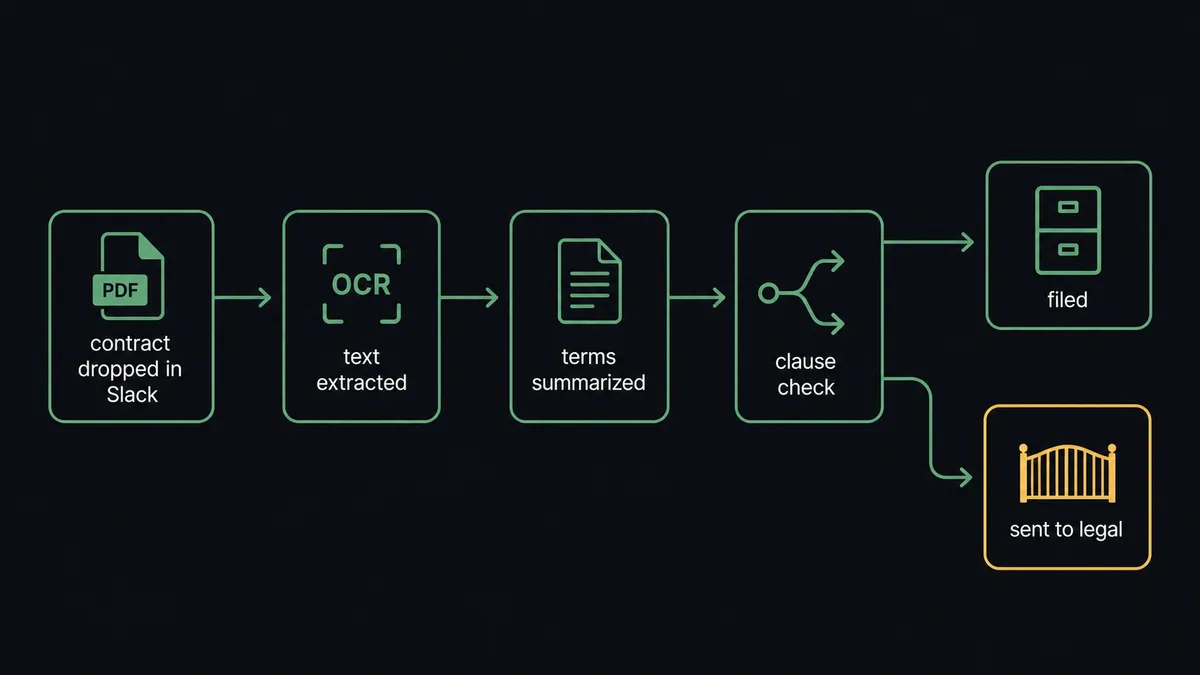
The flow starts on Slack’s On File Shared trigger, which fires the moment a contract PDF is uploaded to a monitored channel like #vendor-docs. From there, Mistral AI’s OCR Document action extracts the text and structure from the file, including scanned image-based PDFs that would otherwise be unusable. The extracted text goes to Ask AI, which summarizes the terms against a defined structured format and flags any clause that doesn’t match the standard set.
Once the summary is ready, Send Message to Channel posts it back into the same Slack thread, so the person who dropped the file sees the summary without leaving the conversation. If the contract is clean, the structured summary is filed against the contract record and the flow closes. Every field in the summary, from parties to payment terms to flagged clauses, maps directly from what Document AI and the chat model extracted; nothing is retyped by hand.
Can an AI agent run it? (and why a human stays in the loop)
Yes, and this is where FlowRunner differs from a plain sync tool. The agent doesn’t just call OCR Document then Ask AI in a fixed sequence. It reads the extracted summary, reasons about whether each clause matches the standard template the company uses, and decides on its own whether the contract can be filed automatically or needs a person. That decision isn’t a hardcoded rule like “always escalate indemnification clauses.” It’s the agent evaluating the actual language against context, the same way a reviewer would.
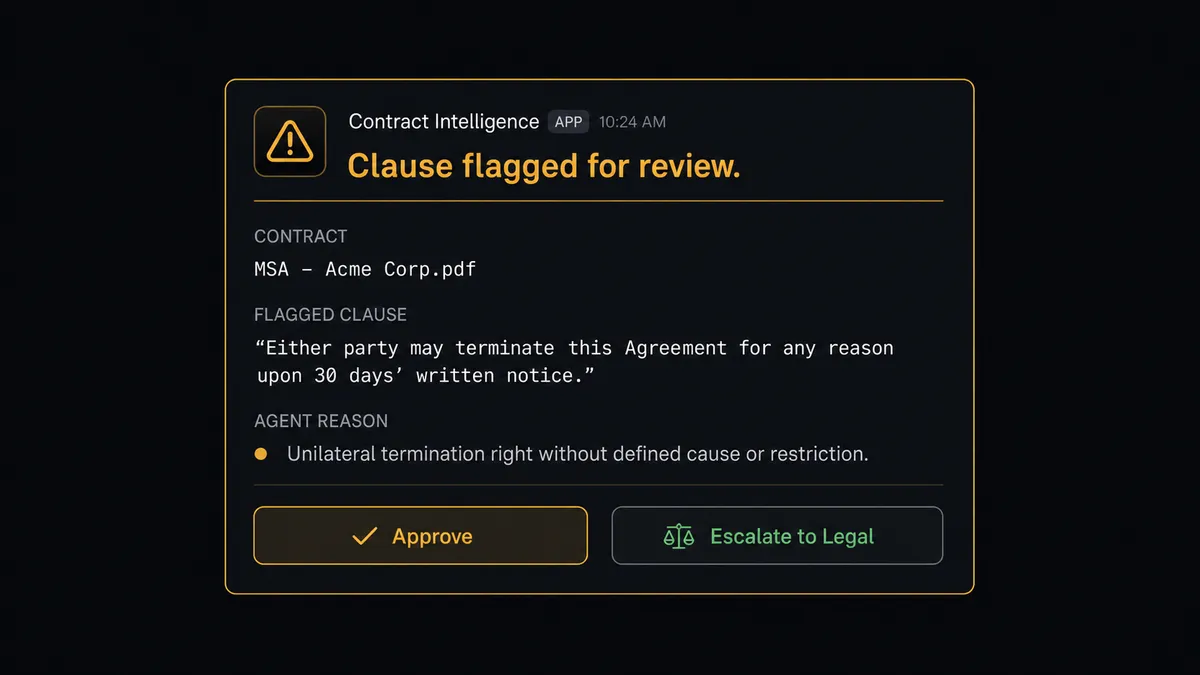
When the agent finds a clause it judges non-standard, it invokes a human-in-loop flow built on Slack’s On Block Action trigger as a callable tool. It posts the flagged clause, the contract it came from, and its own reasoning for the flag into the channel with Approve and Escalate buttons. A legal reviewer sees exactly what the agent found and why, decides in the thread, and the workflow resumes with that decision as input. The clause, the decider’s identity, and the timestamp are captured in the audit trail automatically.
This is not a sync tool. The agent knows when to stop and ask. A boilerplate NDA with standard terms gets summarized and filed without anyone touching it. A vendor contract with an unusual liability cap gets the same OCR and summarization treatment, then stops, because the agent judged the clause worth a person’s attention. That’s the “digital andon cord”: the line keeps moving on routine work and stops the moment something needs a human call.
FlowRunner vs Zapier
Zapier is genuinely good at what it does: fast setup, a huge library of pre-built app connections, and a low barrier to entry for non-technical teams wiring up simple triggers and actions. For a straightforward “when a file lands, run OCR” step, Zapier can get that connection running in minutes.
Where it stops is judgment. Zapier moves data from one system to the other; it doesn’t reason about what’s inside a contract or decide which clause needs a person. FlowRunner’s agent reads the summary, evaluates it against context, and only pauses for a human when the situation calls for it.
| Capability | FlowRunner | Zapier |
|---|---|---|
| Human-in-the-loop | Native, agent-decided escalation via Slack buttons | Not built in; requires custom logic bolted on |
| Contract reasoning | Agent evaluates clauses against context, not fixed rules | Rule-based paths only, no judgment |
| Users included | Unlimited on every tier | Priced per user on paid plans |
| AI provider | Bring your own key (Mistral or others) | Limited native AI steps, provider-locked |
| Self-hosting | Available on Enterprise | Not offered |
| Pricing model | Transparent workflow-based tiers | Per-task pricing that scales with volume |
Before and after
| Metric | Before | After |
|---|---|---|
| AI toolkit | Multiple vendors stitched together for OCR, chat, and moderation | One Mistral AI connector covers OCR, chat, and flagging |
| Contract review depth | Someone reads every page to find clauses that matter | Reading narrows to the clauses the agent flags |
| Scanned contracts | Image-based PDFs unusable downstream | Document AI reads scans into structured text automatically |
| Exception routing | Exceptions sent by email and tracked in separate threads | Flagged clauses posted straight into the Slack thread with buttons |
| Decision speed | Requires a meeting or email chain before resolution | Approve or Escalate decided in the same Slack thread in minutes |
| Audit trail | Managers ask team members directly for status | Every decision captured with approver identity and timestamp automatically |
What you can build
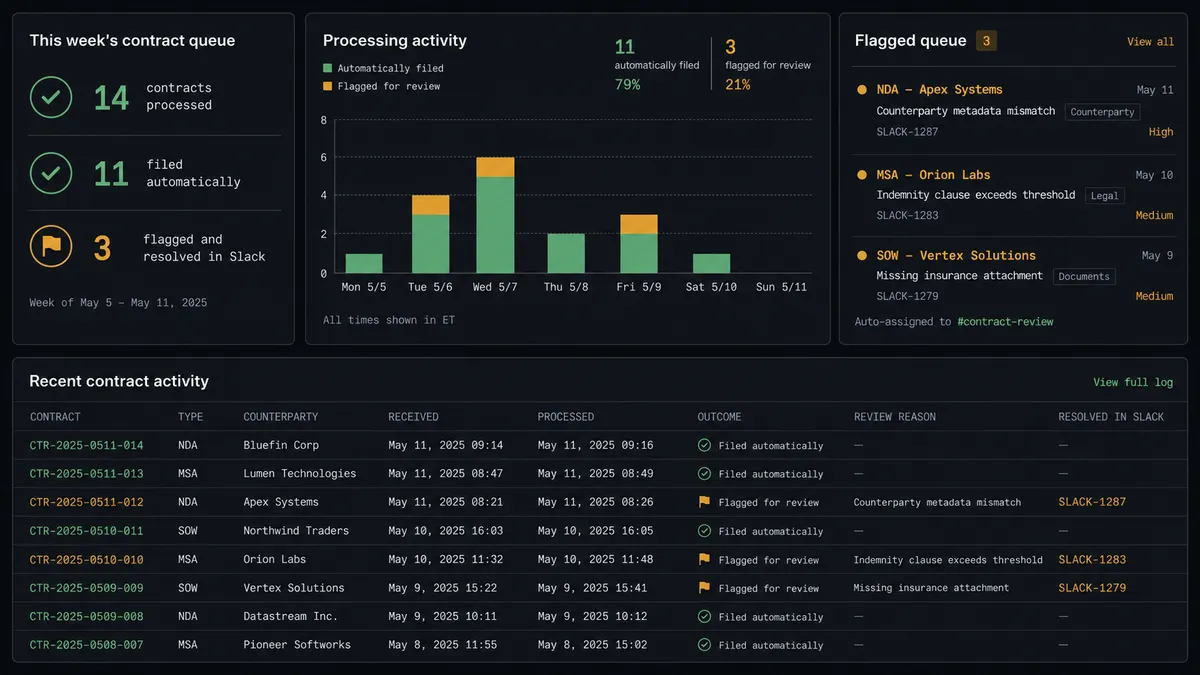
Contract intake with automatic filing. Every PDF dropped into #vendor-docs gets OCR’d, summarized, and filed against the contract record, with only non-standard clauses stopping for legal.
Scanned document triage. Old scanned agreements get run through OCR Document and Ask AI to surface which ones contain outdated terms, without anyone re-typing a single page.
Moderated intake with Slack review. User-submitted content runs through Moderate Text, and anything the model flags gets routed to a moderator in Slack with the model’s read attached for a fast human call.
Weekly contract digest. Every Monday, an agent compiles what was filed automatically versus escalated that week and posts a Block Kit summary to #operations, so legal has visibility without pulling a report by hand.
Code change review. FIM Completion drafts a small script change on a schedule, and the diff gets posted to a Slack channel with Approve and Escalate buttons before it merges.
Common questions
Is it free to connect Mistral AI and Slack on FlowRunner? Yes. FlowRunner has a free plan with 100 executions a month, every integration included, and no credit card required, and new accounts get 14 days of Professional on top.
Can I self-host the Mistral AI and Slack connection? Yes, on the Enterprise tier. Cloud tiers (Growth, Professional, Business) run hosted, and self-hosting is available for teams that need Mistral AI and Slack running on their own infrastructure.
Does the agent need my own Mistral API key? FlowRunner uses a bring-your-own-key model for AI providers, so you connect the Mistral account and model you already use rather than being locked into one vendor.
What happens when the agent isn’t sure whether a clause is standard? It treats uncertainty the same way it treats a confirmed flag: it pauses, posts the clause and its reasoning to Slack, and waits for a person to decide rather than guessing and filing the contract forward.
Do I still need Zapier or n8n if I already have FlowRunner? No. FlowRunner connects Mistral AI and Slack directly, and adds the AI agent and human-in-loop layer that Zapier and n8n do not offer natively.
Can the agent handle scanned PDFs, not just typed contracts? Yes. Mistral AI’s Document AI OCR reads image-based PDFs into structured text first, so the agent can summarize a scan the same way it summarizes a native PDF.
Getting started
FlowRunner has a free plan with 100 executions a month, every integration included, and no credit card required, and new accounts get 14 days of Professional on top. Connect Mistral AI and Slack, build the flow above, and add the human-in-loop step where your team needs it. Start at flowrunner.ai or book a walkthrough at calendly.com/flowrunner/intro.
Frequently asked questions
Is it free to connect Mistral AI and Slack on FlowRunner?
Yes. FlowRunner has a free plan with 100 executions a month, every integration included, and no credit card required, and new accounts get 14 days of Professional on top.
Can I self-host the Mistral AI and Slack connection?
Yes, on the Enterprise tier. Cloud tiers (Growth, Professional, Business) run hosted, and self-hosting is available for teams that need Mistral AI and Slack running on their own infrastructure.
Does the agent need my own Mistral API key?
FlowRunner uses a bring-your-own-key model for AI providers, so you connect the Mistral account and model you already use rather than being locked into one vendor.
What happens when the agent isn't sure whether a clause is standard?
It treats uncertainty the same way it treats a confirmed flag: it pauses, posts the clause and its reasoning to Slack, and waits for a person to decide rather than guessing and filing the contract forward.
Do I still need Zapier or n8n if I already have FlowRunner?
No. FlowRunner connects Mistral AI and Slack directly, and adds the AI agent and human-in-loop layer that Zapier and n8n do not offer natively.
Can the agent handle scanned PDFs, not just typed contracts?
Yes. Mistral AI's Document AI OCR reads image-based PDFs into structured text first, so the agent can summarize a scan the same way it summarizes a native PDF.