Anthropic Claude + Notion: Every Session Finding Filed for Review
Connect Anthropic Claude to Notion so Managed Agents sessions log their findings automatically, with a human review gate before anything non-standard reaches Notion.
How do you connect Anthropic Claude to Notion?
You connect Anthropic Claude to Notion by triggering on Claude’s On Session Idle event and writing the result into Notion with Create Database Item and Append Block Children: when a Managed Agents session finishes analyzing a contract or document stack, FlowRunner reads the answer with Get Session Result and logs it, citations included, as a new Notion page or database row. FlowRunner is a visual AI-agent orchestration platform where automations run autonomously and pause for human judgment on the steps that carry real consequence. The same connection can run as an AI agent: Claude reasons about what it found, decides whether a finding needs sign-off, and invokes a human-in-loop step before anything non-standard reaches Notion.
The problem it solves
A deal team working through a document stack, contracts, diligence files, research sources, reads every page by hand looking for the clauses and numbers that actually matter. The associate assigned to the review has no reliable way to separate a boilerplate governing-law clause from a change-of-control provision that changes the deal’s risk profile without reading both in full. Findings get typed into a shared spreadsheet, one row per document, updated whenever someone remembers to update it. Exceptions, the finding that actually needs a partner’s attention, sit in the same spreadsheet as everything else, with nothing to flag them.
Once a finding is real, documenting it is its own manual step. A decision made over a Slack thread, “approved, this clause is fine because we’ve seen it before,” has no searchable record six months later. Meeting notes and call summaries scatter across personal notebooks and forgotten drafts. The team spends time back not on judgment calls but on re-finding what was already decided, and anything not written down the same day tends to fall through the cracks entirely.
How it works: the connection
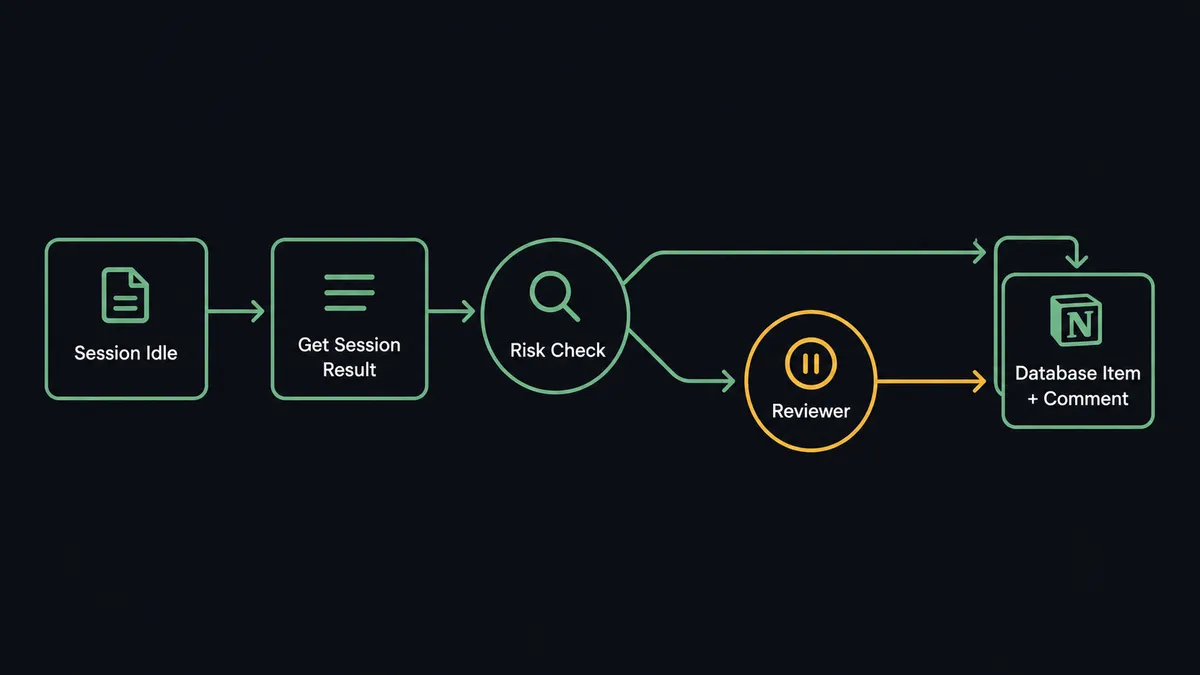
The flow starts on Claude’s side because Notion currently has no triggers of its own. A Managed Agents session, created with Create Agent and started with Create Session, works a document review or research task inside its sandboxed container. When the agent finishes its current turn or hits a gate, the session transitions to idle and FlowRunner’s On Session Idle trigger fires, filtered by title so one flow only watches its own sessions.
From there, Get Session Result reads the agent’s answer: the concatenated response, stop reason, and token usage since the last message. If the task involved a PDF, the agent had already called Analyze Document with citations enabled, so every extracted term links back to the exact passage it came from rather than arriving as an unsourced summary. The flow then maps that answer into Notion. Create Database Item adds a new row to the due diligence or deals database with document type, risk level, and summary as properties. Append Block Children writes the fuller narrative, the cited passages, and next steps into the page body as formatted content blocks. If the session produced output files, List Session Output Files followed by Download File pulls those into Notion or FlowRunner storage alongside the entry.
Can an AI agent run it? (and why a human stays in the loop)
This is not a sync tool moving a summary from one app to another on a schedule. The agent reads what it found, reasons about whether it is routine, and decides on its own whether to pause. Say the agent is working through a document stack and most contracts carry the standard governing-law and payment-term language it has seen a hundred times before. Those write straight to Notion as Create Database Item entries with no interruption. Then it hits a change-of-control clause that does not match the approved contract template.
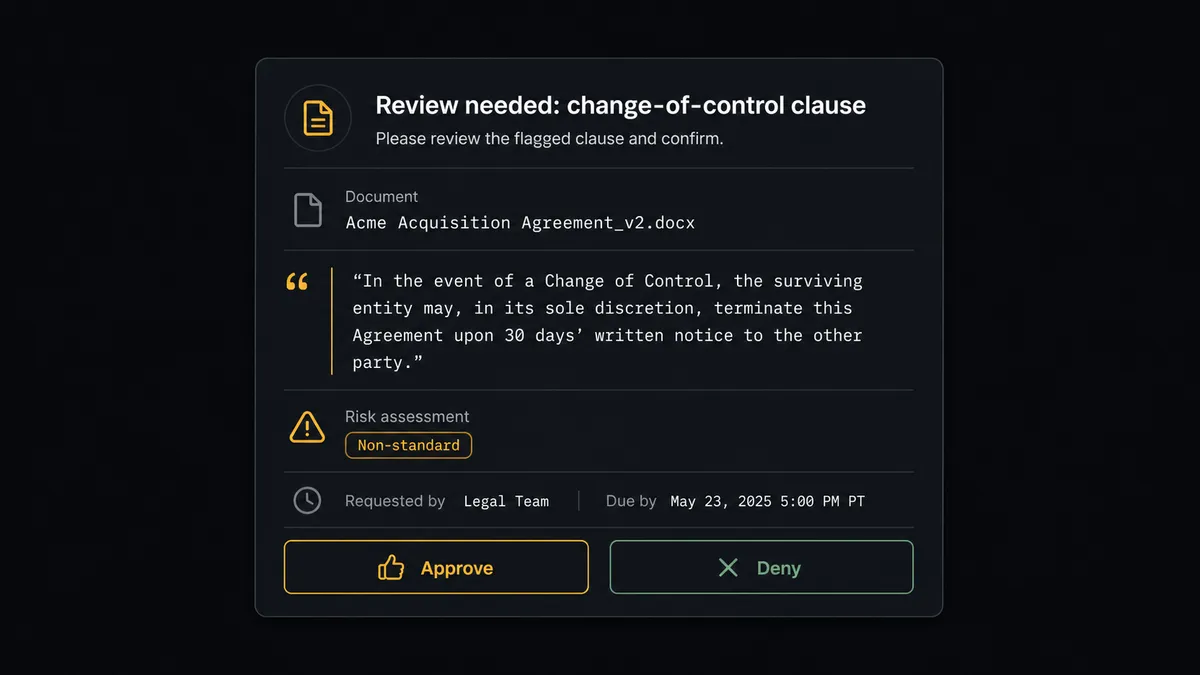
Because the tool that writes findings to Notion carries an always-ask permission policy, the session emits a tool-use event and goes idle with a stop reason of requires_action instead of writing anything. On Session Idle fires on that pause too. FlowRunner assembles the pending action, the clause text, its citation back to the source page, and the risk level Claude assigned, and routes it to the deal lead over Slack. The reviewer sees exactly what the agent found and why it stopped, not just a generic “approval needed” ping. They approve or deny, optionally with a reason. FlowRunner calls Send Tool Confirmation to resume the session with that answer, the agent finishes writing the Notion entry marked as reviewed, and Create Comment logs the reviewer’s decision directly on the page. This is a digital andon cord: the agent keeps working the routine ninety percent of the document stack and stops the line only for the finding that needed a person.
FlowRunner vs Zapier
Zapier connects Notion to hundreds of other apps through a large library of pre-built templates, and a non-technical user can wire up a basic “new item, post to Notion” automation in minutes. For a straight data hand-off, that ease of setup is real and worth acknowledging. Where the two diverge is what happens once a finding is not routine.
| Capability | FlowRunner | Zapier |
|---|---|---|
| Human-in-the-loop on the write step | Native: the agent pauses the session itself and routes the pending action with full context | Not built in: a Zap either runs or fails, with no reasoning step before it writes |
| AI agent reasoning before the write | Claude evaluates risk and citations before deciding to write or escalate | Zaps follow fixed if/then paths, not model judgment |
| BYOK for the AI provider | Connect your own Anthropic key, pay Anthropic directly | AI steps run through Zapier’s own model access and pricing |
| Users included | Unlimited users and workflows on every tier | Per-user seat costs scale with team size |
| Pricing model | Transparent workflow-based execution tiers | Per-task pricing that gets harder to predict as volume grows |
Before and after
| Category | Before | After |
|---|---|---|
| Document review | Someone reads every page to find the clauses that actually matter | Claude reads the full document and surfaces only what needs a decision |
| Provenance | Summaries with no link back to the source passage they came from | Citations point to the exact passage each finding is based on |
| Diligence tracking | Deal teams track findings in spreadsheets updated by hand during review | A live Notion database fills in as the agent works through the document stack |
| Decision audit trail | Escalation decisions made over Slack leave no searchable, organized record | Every reviewer decision is logged as a Notion comment with full context |
| Turnaround | Findings sit until someone manually writes them up | A reviewed finding lands in Notion within minutes of the session going idle |
What you can build
Contract Review Digest: Claude’s Analyze Document with citations enabled extracts payment terms, termination clauses, and change-of-control provisions from an inbound contract, and Create Page writes the structured summary into the Deals database with the source passages one click away.
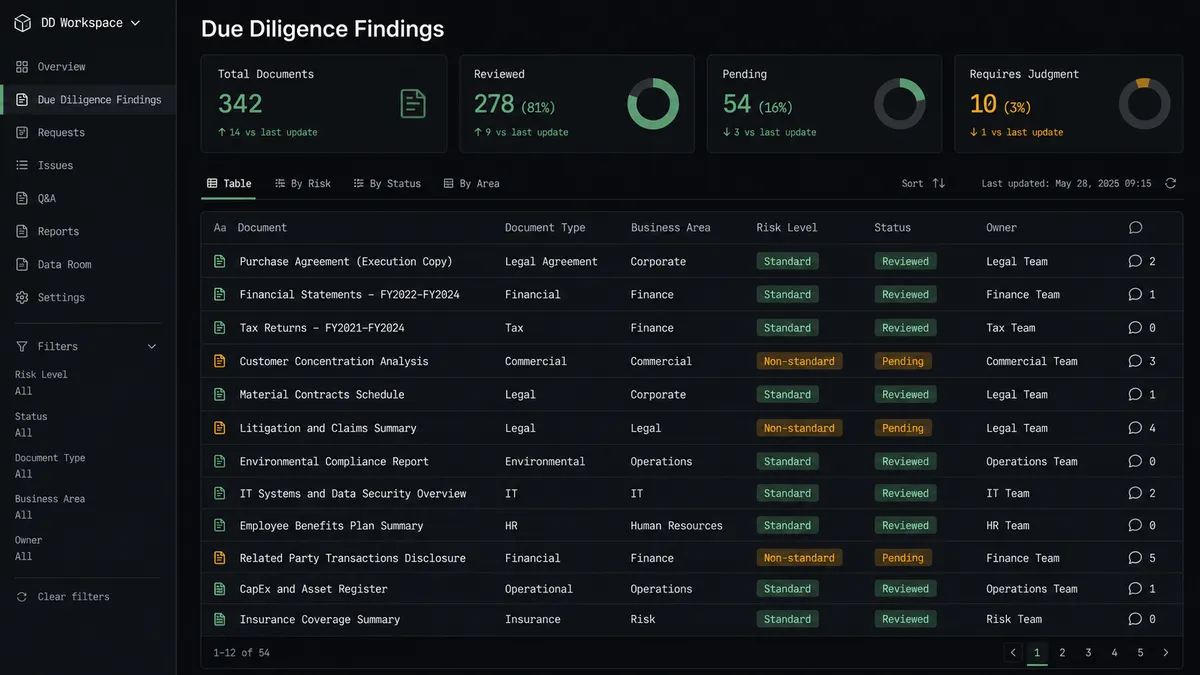
Due Diligence Knowledge Base: As a Managed Agents session works through a stack of diligence documents, each finding lands as a Create Database Item entry with document type, risk level, and summary, giving the deal team a database that fills in as the agent reads rather than after the fact.
Research Brief Handoff: A Define Outcome rubric-graded research session runs autonomously, and once On Session Idle fires, Get Session Result plus List Session Output Files feed a finished Notion page with the brief and any supporting files attached.
Escalation Decision Log: Every time Send Tool Confirmation releases or blocks a pending action, Create Comment writes the reviewer’s decision and reasoning onto the relevant Notion page, building a searchable record the team already knows how to search.

Getting started
FlowRunner has a free plan with 100 executions a month, every integration included, and no credit card required, and new accounts get 14 days of Professional on top. Connect your Anthropic Claude account with your own API key, connect your Notion workspace, and build the flow above without writing code. When you are ready to see it built out for your own document stack, book time at calendly.com/flowrunner/intro or start free at flowrunner.ai.
Frequently asked questions
Is it free to connect Anthropic Claude and Notion on FlowRunner?
FlowRunner has a free plan with 100 executions a month, every integration included, and no credit card required, and new accounts get 14 days of Professional on top. After the trial, Growth runs $45/mo for 12,000 executions, with unlimited users and workflows on every tier.
Does the agent need my own Anthropic API key?
Yes. FlowRunner uses a bring-your-own-key model for Claude, so you connect your own Anthropic API key and pay Anthropic directly for model usage. FlowRunner does not mark up or resell tokens.
Can I self-host this flow?
Self-hosting is available on FlowRunner's Enterprise tier, which also adds unlimited audit retention and multi-instance clustering. Cloud-hosted tiers cover most Claude-plus-Notion use cases without that overhead.
What happens when the agent isn't sure?
The Managed Agents session pauses. When a tool carries an always-ask policy, the session goes idle with a stop reason of requires_action and waits until a human responds through Send Tool Confirmation, so nothing questionable reaches Notion unreviewed.
Do I need to code anything to connect Claude Managed Agents to Notion?
No. Both integrations are configured visually in FlowRunner's flow builder: pick the trigger, map the Notion action, and add the human-in-loop step without writing a script.
Can a change in Notion trigger the flow instead?
Not yet. Notion currently ships 23 actions on FlowRunner but no triggers, so this connection always starts on the Claude side, most commonly Claude's On Session Idle event, and writes into Notion.