Zoho Recruit Gmail Integration: Offers Wait for Approval
Connect Zoho Recruit and Gmail so interview details send the moment a slot is booked, with an AI agent that drafts offer emails and pauses for a hiring manager before any offer goes out.
How do you connect Zoho Recruit to Gmail?
Zoho Recruit’s On Interview Created trigger fires the moment an interview is scheduled, and an AI agent calls Get Interview to pull the candidate, interviewer, and time, then calls Gmail’s Send Message to notify both sides with the details. FlowRunner is a visual AI-agent orchestration platform where automations run autonomously and pause for human judgment on the steps that carry real consequence. The same connection can run as a straightforward notification sync, or as an AI agent that also watches for a candidate reaching the offer stage, drafts the offer email in Gmail, and pauses for a hiring manager to approve it before it sends. Either way, interview logistics stop depending on a recruiter sending three separate messages by hand.
The problem it solves
A recruiter schedules an interview in Zoho Recruit, and then the actual coordination starts: a separate calendar invite, a confirmation email to the candidate, a heads-up to the interviewer, and often a reminder the day before, all typed out by hand for every slot on the calendar. Multiply that across a busy hiring season and a recruiter is spending as much time composing routine emails as they are talking to candidates. Interviews get double-booked, confirmations go out late, and candidates are left guessing whether the process is moving.
The higher-stakes version of the same problem shows up at the offer stage. An application moves to “Offer Made” in Zoho Recruit, and somewhere a recruiter or hiring manager is supposed to draft the offer, get sign-off, and send it, usually across a thread of Slack messages and a manually written email that lives outside the system of record. When that step is manual, it either moves too slowly (a strong candidate waits days for an offer a competitor sends in hours) or too fast (an offer goes out before the right person actually confirmed the terms). Either way, it falls through the cracks of a process that has no clear checkpoint. What hiring teams want back isn’t just time, it’s a guarantee that the one step with real consequence never skips the person who’s accountable for it.
How it works: the connection
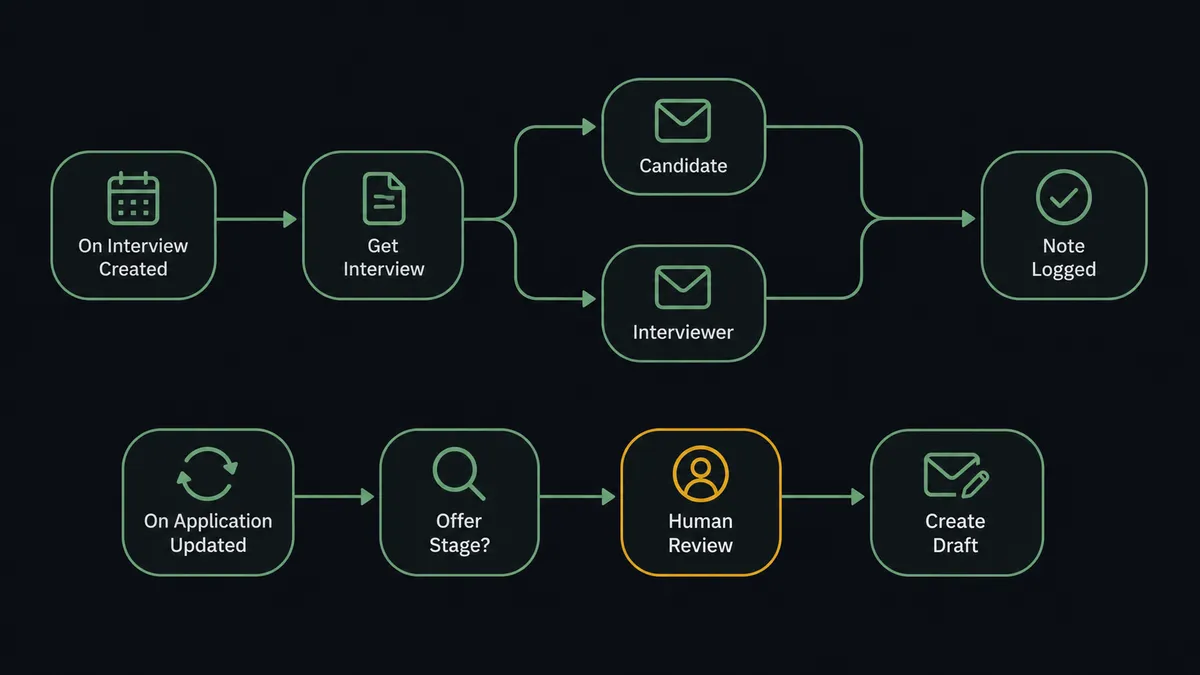
Zoho Recruit’s On Interview Created (Realtime) trigger fires as soon as an interview record is created, whether that came from a recruiter’s own scheduling or an earlier automation. From there:
- Get Interview retrieves the candidate, interviewer, scheduled time, venue or video link, and interview type.
- Gmail’s Send Message sends the candidate a confirmation with the time and location, and sends the interviewer a separate notification with the same details plus the candidate’s background.
- Add Note To Record logs on the Zoho Recruit interview record that both notifications went out, so anyone reviewing the file later can see it happened.
That covers scheduling. The second half of the connection watches the pipeline itself. Zoho Recruit’s On Application Updated (Realtime) trigger fires whenever an application’s status changes, including the move into the offer stage. When that happens, the flow reads the candidate and application details with Get Candidate and Get Application, and Gmail’s Create Draft prepares the offer email without sending it. Change Application Status is the action that actually advances the pipeline once the offer is approved and out.
That’s the direct answer to “how do I connect Zoho Recruit to Gmail”: one trigger drives confirmation emails automatically, and a second trigger drives an offer draft that waits on approval before it becomes a sent message and a status change. It runs the same way whether it’s a simple notification sync or an AI agent making the calls.
Can an AI agent run it? (and why a human stays in the loop)
An AI agent doesn’t just relay Zoho Recruit’s trigger into Gmail’s send action. It reads the application data, reasons about what stage it represents, and picks which of its tools to use, Get Interview, Get Candidate, Get Application, Send Message, Create Draft, Send Draft, Change Application Status, in whatever order the situation calls for. An interview confirmation is routine: the agent sends it the moment the trigger fires, no review needed. An offer is not, and the agent treats it differently on its own, not because someone hardcoded a rule that says “offer stage requires approval.”
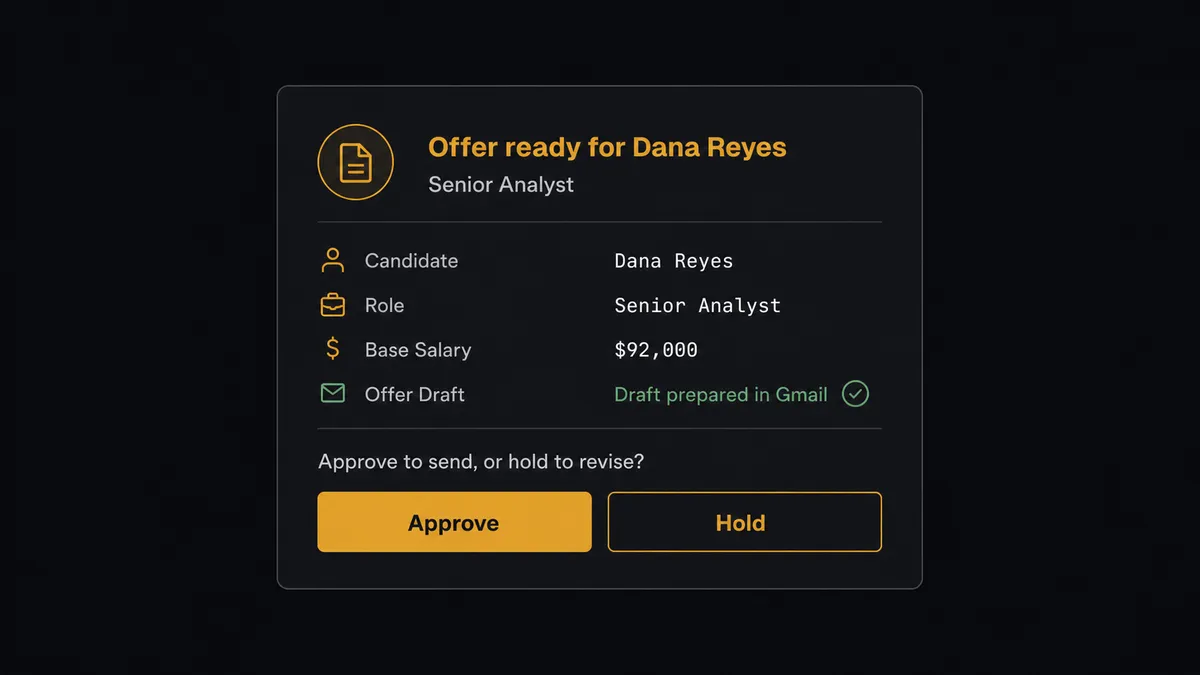
Here’s a real decision moment. An application moves to “Offer Made.” The agent calls Get Candidate and Get Application to see the full picture, salary band, role, interview history, any notes recruiters left along the way, and instead of calling Change Application Status right away, it calls Create Draft to prepare the offer email and invokes a human-in-loop flow as a tool. It posts to the hiring manager: “Offer ready for [candidate name], [role], base [salary from the application record]. Draft prepared in Gmail. Approve to send, or hold to revise?” The hiring manager sees the actual candidate and application history, not just a notification that something needs a click. They approve, and the agent calls Send Draft to release the email and Change Application Status to move the candidate forward. They hold, and the draft sits untouched until someone acts on it.
This is not a sync tool. A sync tool would either send the offer automatically the instant the status flips, or require someone to babysit the pipeline stage by stage to catch it manually. The agent knows the difference between a confirmation email and an offer email because it reads what the record actually says, and it treats the one with legal and financial weight as a step that needs a person. Prospects call this a digital andon cord: the agent pulls the cord itself on the step that matters, and the line only moves again once a human says so.
FlowRunner vs Zapier
Zapier is genuinely fast to set up for a one-step “new interview creates a calendar reminder” Zap, and for a small hiring team wiring up their first automation, that speed is real. Where it runs out of road is the offer step. Zapier has no native concept of an agent that drafts an email, holds it, and waits for a specific person to approve specific terms before it sends; the closest most teams get is a separate approval app bolted onto the Zap, configured and maintained on the side.
| Zapier | FlowRunner | |
|---|---|---|
| Human-in-loop on the offer step | Not native; requires a separate approval app | Built in: the agent drafts the offer and invokes a human-in-loop flow as a callable tool |
| Users per plan | Priced per user on most tiers | Unlimited users on every tier |
| AI model access | Zapier-hosted AI, limited model choice | BYOK: bring your own key, choose your own model |
| Pricing model | Per-task pricing, tasks add up fast across a busy interview season | Transparent workflow-based execution tiers |
| Self-hosting | Not available | Self-hosted Community Edition (free) or Enterprise |
Before and after
| What changes | Before | After |
|---|---|---|
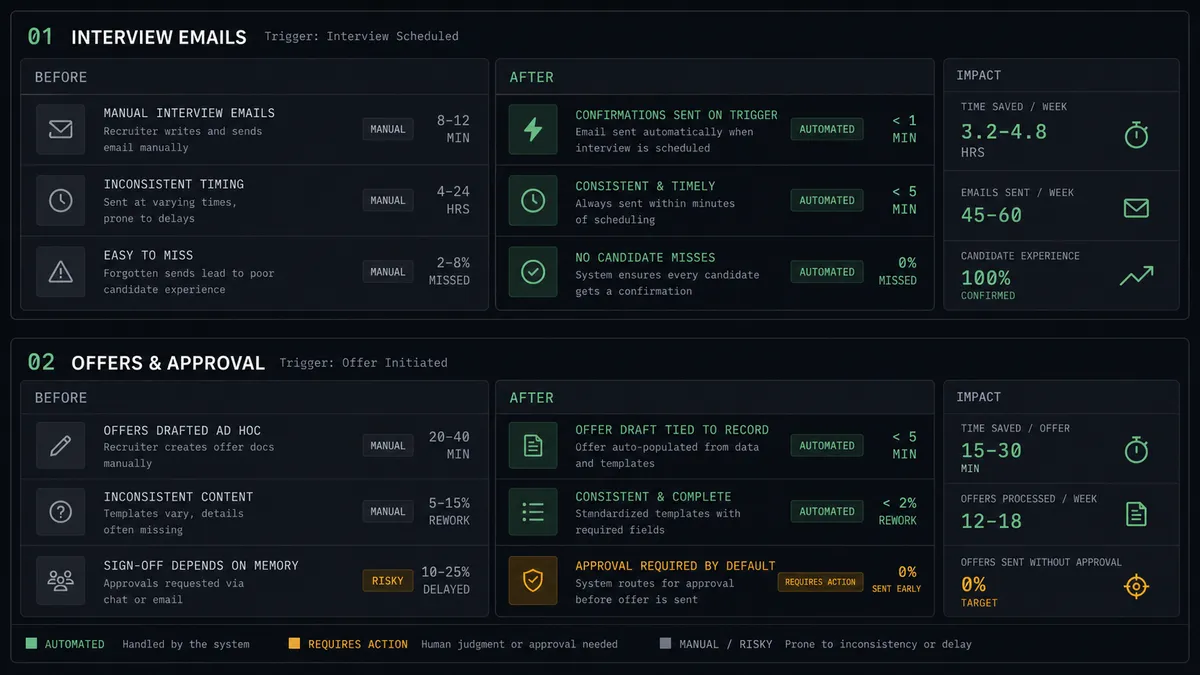
| Interview confirmations | Interviews mean back-and-forth email and separate calendar invites sent by hand | Candidate and interviewer both get details the moment On Interview Created fires |
| Offer emails | Drafted, reviewed, and sent across scattered threads outside the system of record | Create Draft prepares the offer in Gmail, tied to the actual application data |
| Offer sign-off | Depends on someone remembering to loop in the hiring manager before hitting send | The agent pauses on every offer stage change and waits for approval by default |
| Pipeline visibility | Stage changes are noticed when someone happens to check the ATS | On Application Updated starts the flow the moment status changes |
| Recruiter time | Spent composing routine confirmation emails one at a time | Spent on the interviews and offers themselves, not the paperwork around them |
What you can build
Interview day confirmations. On Interview Created fires the moment a slot is booked. The agent calls Get Interview and sends the candidate a confirmation with time and location, and the interviewer a separate heads-up with the candidate’s background attached.
Offer approval with a paper trail. When an application reaches the offer stage, the agent drafts the email with Create Draft, routes it to the hiring manager, and only calls Send Draft and Change Application Status once approved, leaving a record of who signed off and when.
Rejection notices logged on the record. When an application moves to a closed stage, the agent sends a templated Gmail message and calls Add Note To Record so the outcome and the notification both live on the same file.
Interview reschedule alerts. When an existing interview is updated, the agent compares the new time against the old one and sends both parties an updated Gmail confirmation instead of leaving them with the original invite.
Hiring manager digest. On a schedule, the agent lists interviews and applications changed in the last day and emails the hiring manager a summary through Gmail’s Send Message, so a manager tracking three roles doesn’t have to open Zoho Recruit to stay current.
Common questions
Is it free to connect Zoho Recruit and Gmail on FlowRunner? Yes. FlowRunner has a free plan with 100 executions a month, every integration included, and no credit card required, and new accounts get 14 days of Professional on top.
Does the agent need my own OpenAI key? Yes, FlowRunner runs on a bring-your-own-key model for AI providers, so you connect your own key and control which model powers the agent.
Can I self-host this connection? Yes. FlowRunner offers a self-hosted Community Edition for a single instance, and a self-hosted Enterprise tier with multi-instance clustering and the full compliance suite.
What happens when an application reaches the offer stage? The agent does not send the offer or change the status on its own. It drafts the offer email in Gmail and routes the candidate, the role, and the application history to the hiring manager, who approves or holds before anything goes out.
Do I need a developer to set this up? No. Connecting Zoho Recruit and Gmail, choosing the trigger, and adding the human-in-loop step are all done in FlowRunner’s visual builder, no code required.
Will interview emails still go out correctly if the interviewer changes at the last minute? Yes. The agent reads the current interview record at the moment the trigger fires, so an Update Interview change made before the notification step runs is reflected in who gets emailed.
Getting started
FlowRunner has a free plan with 100 executions a month, every integration included, and no credit card required, and new accounts get 14 days of Professional on top. Start at flowrunner.ai, or book time on Calendly to walk through the offer-approval step with someone on the team.
Frequently asked questions
Is it free to connect Zoho Recruit and Gmail on FlowRunner?
Yes. FlowRunner has a free plan with 100 executions a month, every integration included, and no credit card required, and new accounts get 14 days of Professional on top.
Does the agent need my own OpenAI key?
Yes, FlowRunner runs on a bring-your-own-key model for AI providers, so you connect your own key and control which model powers the agent.
Can I self-host this connection?
Yes. FlowRunner offers a self-hosted Community Edition for a single instance, and a self-hosted Enterprise tier with multi-instance clustering and the full compliance suite.
What happens when an application reaches the offer stage?
The agent does not send the offer or change the status on its own. It drafts the offer email in Gmail and routes the candidate, the role, and the application history to the hiring manager, who approves or holds before anything goes out.
Do I need a developer to set this up?
No. Connecting Zoho Recruit and Gmail, choosing the trigger, and adding the human-in-loop step are all done in FlowRunner's visual builder, no code required.
Will interview emails still go out correctly if the interviewer changes at the last minute?
Yes. The agent reads the current interview record at the moment the trigger fires, so an Update Interview change made before the notification step runs is reflected in who gets emailed.