Attio Gmail Integration: Every Reply Becomes a Clean CRM Record
Connect Attio and Gmail so every inbound email upserts the right Person and Company in Attio, with an AI agent that pauses for a human when a match is ambiguous.
How do you connect Attio to Gmail?
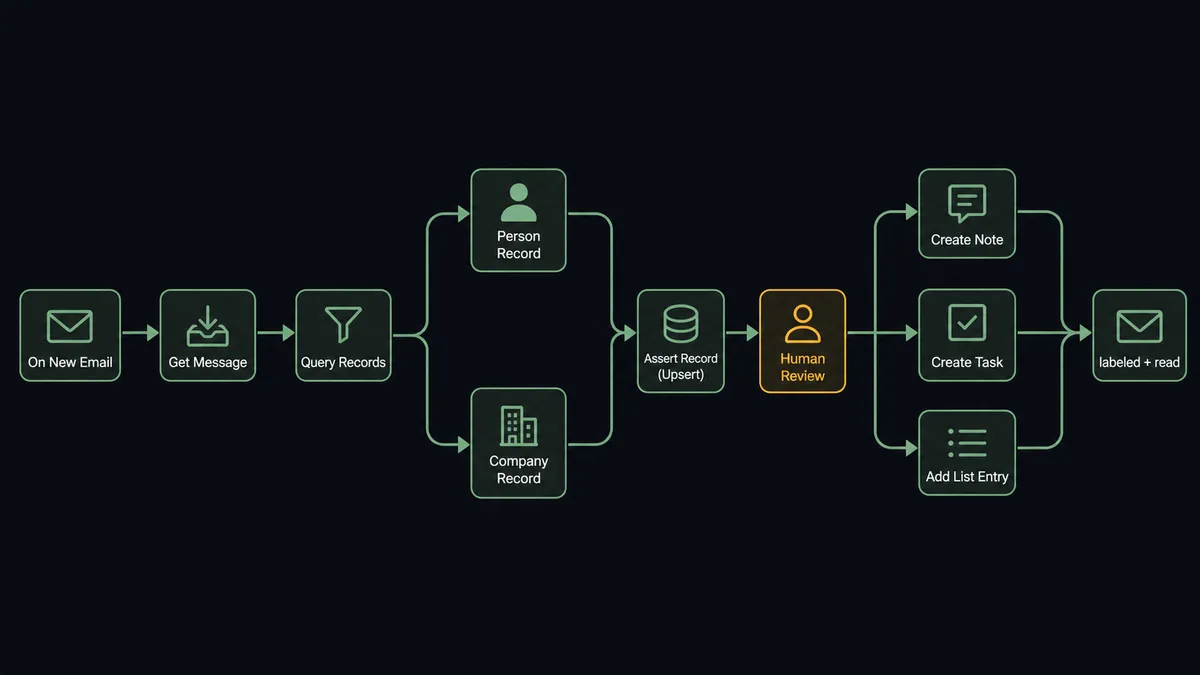
Gmail’s On New Email trigger starts the flow, and an AI agent calls Get Message to read it, Query Records to check Attio for a match, and Assert Record (Upsert) to create or refresh the Person and Company. FlowRunner is a visual AI-agent orchestration platform where automations run autonomously and pause for human judgment on the steps that carry real consequence. The same connection can run as a simple sync, or as an AI agent that reads each email, decides how to route it, and calls a human-in-loop flow as a tool whenever a match is too ambiguous to write automatically. Either way, the record in Attio stays current without anyone copying an email into the CRM by hand.
The problem it solves
An inbound email from a prospect, a reply from an existing customer, a note forwarded from a teammate: all of it is supposed to end up in the CRM, and almost none of it does on time. A sales rep or ops lead reads the email, means to log it, gets pulled into the next thing, and the record goes stale. Multiply that across a team and the CRM becomes a lagging indicator instead of a source of truth. Spreadsheets and sticky notes fill the gap between what happened and what’s recorded.
The harder problem is duplication. Someone new emails from a company that’s already a Company record, under a name that’s a near-match but not an exact one, and now there’s a decision to make: new Person, or the same person with a typo? Get it wrong at scale and the CRM fills with near-duplicate Company records under three spellings, and every report built on top of it quietly disagrees with the one before it. This is the work that falls through the cracks, not because it’s hard, but because it’s tedious and interruptive, and nobody has time back to do it by hand every day.
How it works: the connection
Gmail’s On New Email trigger fires whenever a message lands, matching whatever criteria the flow is scoped to (a label, a sender pattern, or every message in the inbox). From there:
- Get Message retrieves the email body, sender, and subject.
- Query Records in Attio checks for an existing Person matched on email, and a Company matched on domain.
- Assert Record (Upsert) writes the Person and Company records, creating them if they’re new and refreshing them if they already exist, keyed on a single unique attribute so the same email address never produces two Person records.
- Add List Entry places a new contact on the sales pipeline list, if the workflow is scoped to lead intake.
- Create Note logs the email’s content on the record, so the next person who opens it sees the actual conversation, not just a timestamp.
- Create Task schedules the follow-up, so the reply doesn’t require someone to remember to act on it.
- Add Label To Message and Mark Message as Read close the loop on the Gmail side, so the inbox reflects what’s already been handled.
That’s the direct answer to “how do I connect Attio to Gmail”: a trigger on one side, an upsert on the other, and everything in between is data mapping. It runs the same way whether it’s a straightforward sync or an AI agent making the calls.
Can an AI agent run it? (and why a human stays in the loop)
An AI agent doesn’t just move data from Gmail’s trigger to Attio’s upsert action. It reads the email, reasons about what it’s looking at, and picks which of its tools to use, Query Records, Get Record, Assert Record (Upsert), Create Note, Create Task, Add List Entry, in whatever order the situation calls for. A clean match to an existing Person gets a fast, quiet update. A message that raises a question does not.
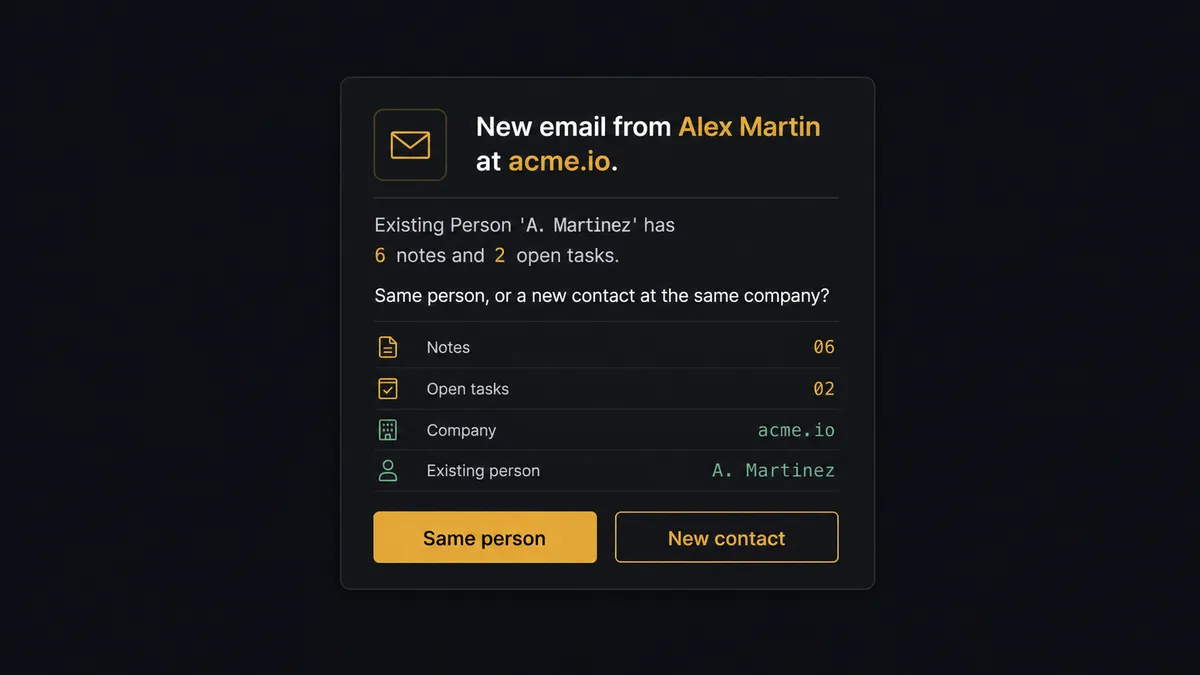
Here’s a real decision moment. An email arrives from someone at acme.io. Query Records finds a Company already on file under “Acme Inc,” and a Person named “A. Martinez,” but the sender’s name in the email is “Alex Martin.” Is this a typo the agent should reconcile, or a different person at the same company who happens to share a first name? The agent does not guess. It calls Get Record on the existing Person to pull the full context (notes, tasks, list entries attached to it), and invokes a human-in-loop flow as a tool: it posts to the record owner in Slack, “New email from Alex Martin at acme.io. Existing Person ‘A. Martinez’ has 6 notes and 2 open tasks. Same person, or a new contact at the same company?” The owner has two buttons and the actual evidence, not just a name collision. Whatever they pick, the agent resumes: either it upserts onto the existing record, or it creates a new Person and links both to the same Company.
This is not a sync tool. A sync tool would either overwrite the wrong record or spin up a duplicate and let someone find it three months later during a report that doesn’t add up. The agent knows when to stop and ask, which is exactly the moment Attio’s own Delete Record and merge operations are designed to be gated behind a person. Prospects call this a digital andon cord: the agent pulls the cord itself, the line stops, and it starts again only after a human makes the call.
FlowRunner vs Zapier
Zapier is genuinely easy to start with, and for a one-step “new email creates a contact” Zap, it does the job in minutes. That’s a real strength for a non-technical team wiring up a first automation. Where it runs out of road is exactly the moment above: Zapier has no native concept of an agent pausing mid-workflow to ask a specific person a specific question with specific evidence attached. A Zap either runs the step or it doesn’t; there’s no built-in mechanism for “hold this one and ask.”
| Zapier | FlowRunner | |
|---|---|---|
| Human-in-loop on ambiguous matches | Not native; requires a separate approval app bolted on | Built in: the agent invokes a human-in-loop flow as a callable tool |
| Users per plan | Priced per user on most tiers | Unlimited users on every tier |
| AI model access | Zapier-hosted AI, limited model choice | BYOK: bring your own key, choose your own model |
| Pricing model | Per-task pricing, tasks add up fast on high email volume | Transparent workflow-based execution tiers |
| Self-hosting | Not available | Self-hosted Community Edition (free) or Enterprise |
Before and after
| What changes | Before | After |
|---|---|---|
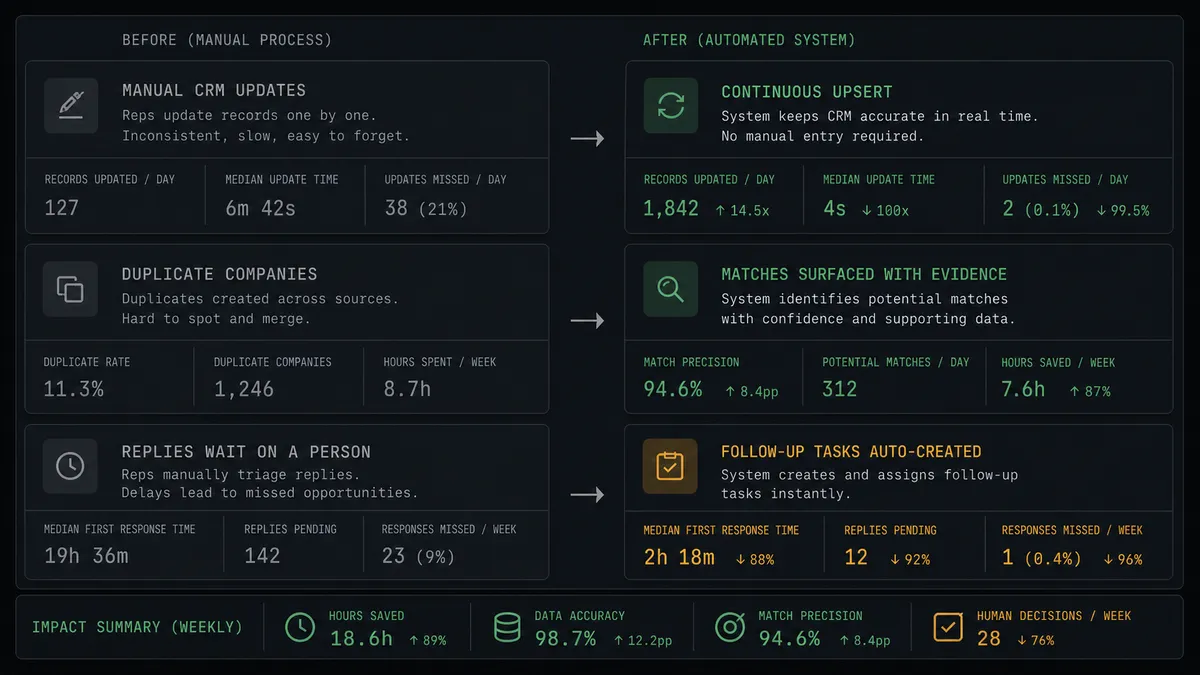
| CRM hygiene | A recurring manual task that always loses to revenue work | Agents upsert and reconcile records continuously, as each email arrives |
| Duplicate contacts | The same company exists under three spellings and reports quietly disagree | Ambiguous matches are surfaced with evidence before anything gets written |
| Email context | Conversations live in the inbox, disconnected from the CRM record | Every relevant email becomes a note on the record automatically |
| Follow-up tracking | Replies wait on someone to remember to act on them | Create Task turns a reply into an assigned follow-up the moment it arrives |
| Inbox triage | Incoming mail is read and routed by hand before any CRM work can start | On New Email starts the flow; the inbox is just the trigger, not the workspace |
What you can build
Lead capture from cold inbound. On New Email fires when someone new emails a shared sales inbox. The agent runs Query Records, finds no match, calls Assert Record (Upsert) to create the Person and Company, and Add List Entry puts them straight on the pipeline list.
Support thread to CRM timeline. A customer replies to an open thread. Get Message pulls the content, Assert Record (Upsert) refreshes the existing Person, and Create Note appends the exchange so support history lives on the same record as sales history.
Weekly reply digest to the account owner. On a schedule, the agent queries recent Attio activity generated from email intake and posts a summary to the owner, so nobody has to open the CRM to know what happened this week.
Dedup sweep triggered by a new domain match. When an email introduces a Company domain that closely matches an existing one, the agent runs the same near-match comparison it uses for People, and routes the merge decision to RevOps instead of guessing.
Meeting-adjacent thread logging. When an email thread references a scheduled call, Create Task schedules the prep, and Create Note captures the thread so the account owner walks in with full context instead of scrolling their inbox first.
Common questions
Is it free to connect Attio and Gmail on FlowRunner? Yes. FlowRunner has a free plan with 100 executions a month, every integration included, and no credit card required, and new accounts get 14 days of Professional on top.
Does the agent need my own OpenAI key? Yes, FlowRunner runs on a bring-your-own-key model for AI providers, so you connect your own key and control which model powers the agent.
Can I self-host this connection? Yes. FlowRunner offers a self-hosted Community Edition for a single instance, and a self-hosted Enterprise tier with multi-instance clustering and the full compliance suite.
What happens when the agent isn’t sure whether a sender already exists in Attio? The agent does not guess. It posts the matching candidates and its reasoning to the record owner and waits for a decision before it writes anything.
Do I need a developer to set this up? No. Connecting Attio and Gmail, choosing the trigger, and adding the human-in-loop step are all done in FlowRunner’s visual builder, no code required.
Will this create duplicate records in Attio? No. The agent writes with Assert Record (Upsert) keyed on email and domain, which updates an existing match instead of creating a new one, and escalates anything ambiguous to a person first.
Getting started
FlowRunner has a free plan with 100 executions a month, every integration included, and no credit card required, and new accounts get 14 days of Professional on top. Start at flowrunner.ai, or book time on Calendly to walk through the human-in-loop step with someone on the team.
Frequently asked questions
Is it free to connect Attio and Gmail on FlowRunner?
Yes. FlowRunner has a free plan with 100 executions a month, every integration included, and no credit card required, and new accounts get 14 days of Professional on top.
Does the agent need my own OpenAI key?
Yes, FlowRunner runs on a bring-your-own-key model for AI providers, so you connect your own key and control which model powers the agent.
Can I self-host this connection?
Yes. FlowRunner offers a self-hosted Community Edition for a single instance, and a self-hosted Enterprise tier with multi-instance clustering and the full compliance suite.
What happens when the agent isn't sure whether a sender already exists in Attio?
The agent does not guess. It posts the matching candidates and its reasoning to the record owner and waits for a decision before it writes anything.
Do I need a developer to set this up?
No. Connecting Attio and Gmail, choosing the trigger, and adding the human-in-loop step are all done in FlowRunner's visual builder, no code required.
Will this create duplicate records in Attio?
No. The agent writes with Assert Record (Upsert) keyed on email and domain, which updates an existing match instead of creating a new one, and escalates anything ambiguous to a person first.