Zoho Inventory Shopify Integration: Reorders Get Human Approval
Connect Zoho Inventory and Shopify so every checkout creates a sales order and syncs stock across both systems, with a human approving any reorder above a spend threshold before the purchase order goes out.
How do you connect Zoho Inventory to Shopify?
You connect Zoho Inventory to Shopify by triggering a FlowRunner workflow on Shopify’s On New Order event, which fires Zoho Inventory’s Create Sales Order action and then writes the resulting stock count back to Shopify with Set Inventory Quantities. FlowRunner is a visual AI-agent orchestration platform where automations run autonomously and pause for human judgment on the steps that carry real consequence. The same connection can run as an AI agent that reads each order, checks live stock, and invokes a human-in-loop flow when a reorder crosses a spend threshold, instead of a plain sync tool that moves data both ways with no judgment in between.
What breaks when Zoho Inventory and Shopify are not connected?
An ops lead or warehouse manager checks the Shopify admin queue by hand, opens Zoho Inventory in a second tab, and manually keys each new order into a sales order before anyone in the warehouse can pick and pack it. Stock counts live in two places that never agree: a bestseller sells out on the storefront hours before anyone in Zoho Inventory notices, and by the time someone spots the gap, the order has already been promised to a customer who now waits on a backorder email. Meanwhile, the reorder decision falls to whoever happens to glance at the low-stock report that week; some vendors get reordered twice, others get missed entirely, and money sits tied up in stock nobody tracked.
The spreadsheet workaround does not fix this. Someone exports Shopify orders, cross-references them against a Zoho Inventory item list, and flags the SKUs that need a purchase order. It works until the exporter is out sick, or the sheet falls a day behind and an item stocks out mid-week. None of this is a skills problem. It is a systems problem: two platforms that both think they own the truth about what is on the shelf, with nothing to keep them lined up, and no consistent record of who approved which reorder.
How it works: the connection
Shopify fires On New Order the moment a customer completes checkout. The agent reads the line items, the customer record, and the shipping address, then calls Create Sales Order in Zoho Inventory to record the sale against the matching customer contact. Zoho Inventory now has the order the warehouse needs to fulfill it, without anyone retyping SKUs or quantities.
Before the sale settles, the agent calls Get Item in Zoho Inventory to check the current stock-on-hand and available-stock per location for each line item, confirming the order is actually covered. Once confirmed, the agent calls Set Inventory Quantities on the Shopify side so the storefront count reflects the post-sale reality immediately, not at the next scheduled sync. This is the direction most teams miss: it is not enough to push Shopify orders into Zoho Inventory, the stock picture also has to flow back out so the next shopper does not buy something that is already gone.
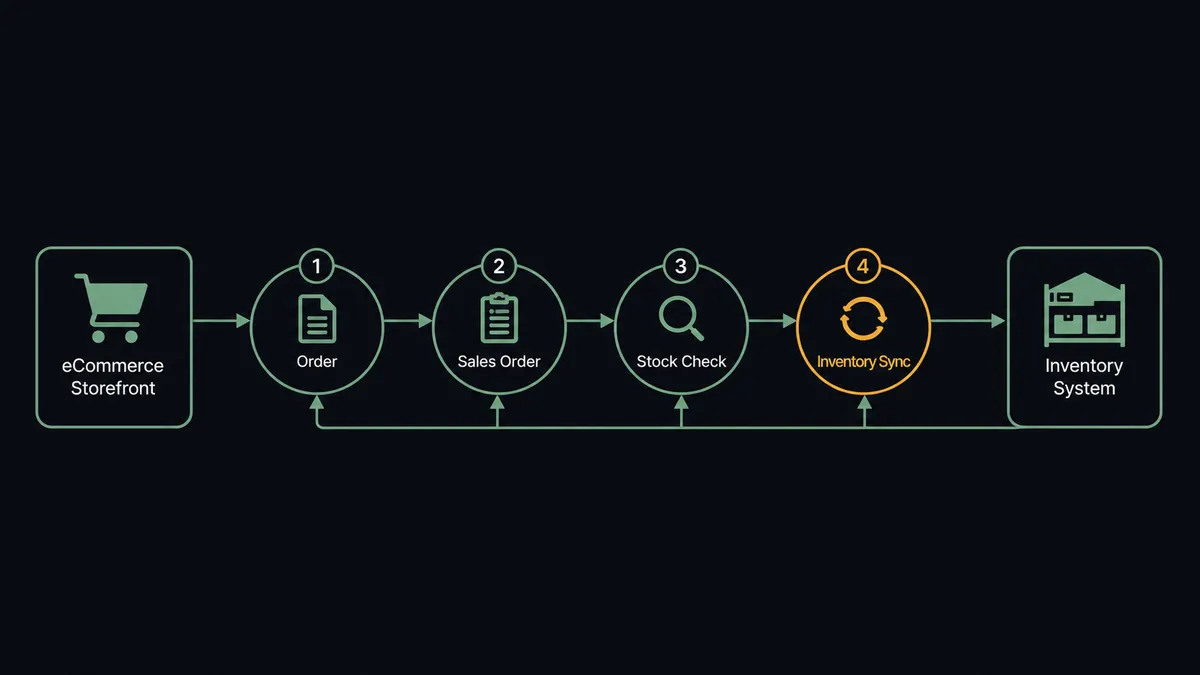
Zoho Inventory’s own polling triggers pick up from there. On Low Stock Item fires when a sale (or several) drops an item below its reorder level, whether that item came from Shopify or any other channel Zoho Inventory tracks. The agent reads the item, its current stock, and its preferred vendor, then checks whether a purchase order already covers it before drafting a new one with Create Purchase Order. This is the same connection working in reverse, warehouse reality driving a procurement decision, not just a storefront event driving a warehouse record.
Can an AI agent run it? (and why a human stays in the loop)
Yes, and this is where FlowRunner differs from a plain data-sync tool. The agent does not just move the order record from Shopify to Zoho Inventory and stop. It evaluates the stock level, decides whether a reorder is warranted, and calls Create Purchase Order as one of the tools available to it, the same way it calls Get Item or Set Inventory Quantities. It is reasoning about the situation, not executing a fixed script.
The moment that matters is the reorder itself. A purchase order commits real spend, and an agent that reorders on autopilot can tie up cash in stock nobody needs. So the agent treats issuing a purchase order above a threshold you set as a human-in-loop step: it pauses, and instead of calling Mark PO Issued, it invokes a separate flow built specifically to reach purchasing. That flow posts the item, the quantity, the vendor, and the total spend to the purchasing channel in Slack, framed as a decision, not a notification. Purchasing approves, and the agent resumes and issues the order. Purchasing holds, and the draft purchase order waits exactly where it is.
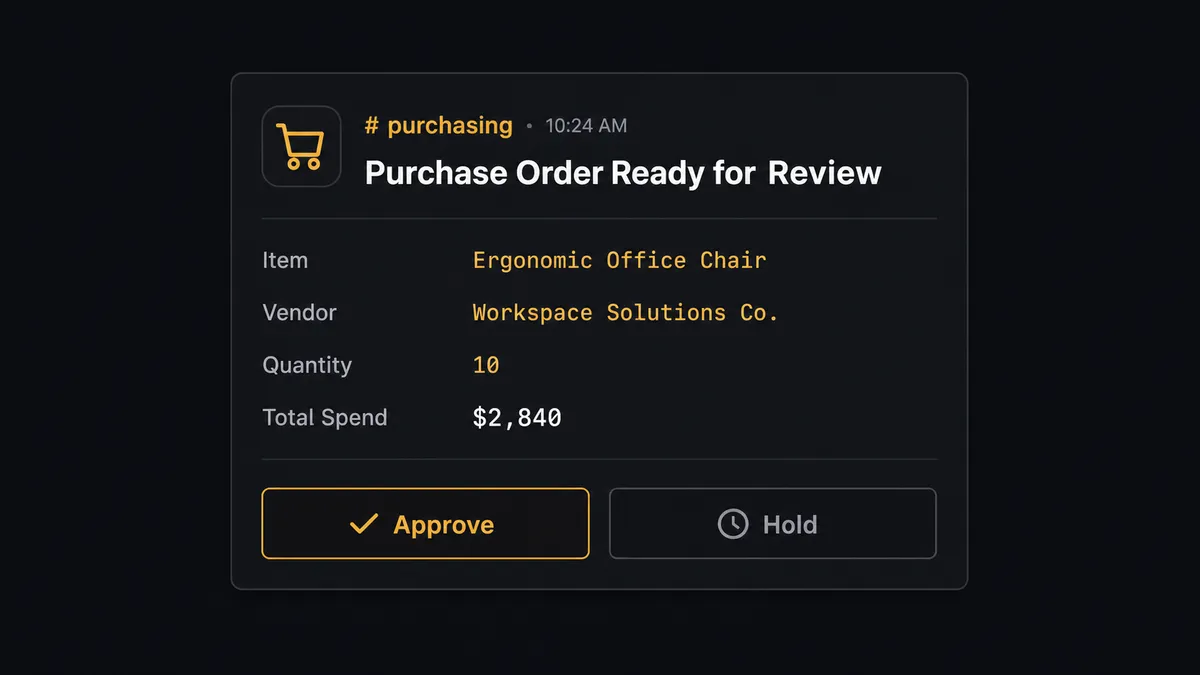
This is not a threshold hardcoded once and forgotten. The agent applies the spend rule you gave it in plain instructions to every low-stock event it sees, so a $180 reorder from a vendor with years of clean history clears automatically while a $2,840 reorder from the same event gets a person before the order goes out. This is the digital andon cord: the agent does not stop the line on every event, it stops the line on the ones that move real money, and it hands the person everything they need to decide in seconds instead of digging through Zoho Inventory to reconstruct the context themselves.
FlowRunner vs Celigo
Celigo is a real option here, and it earns its place: it is a purpose-built iPaaS with prebuilt ecommerce-to-ERP integration templates, including flows that already know how Shopify orders map to inventory and accounting systems. Teams that need a narrow, well-trodden sync path without touching AI at all often start there.
Where FlowRunner differs is what happens at the decision point. Celigo’s flows move data on rules you configure once; they do not reason about context or pause for a person unless you build that logic yourself with custom scripting. FlowRunner’s agent reads the situation on every run and decides when a step needs a human, with the approval built into the platform rather than bolted on afterward.
| Capability | FlowRunner | Celigo |
|---|---|---|
| Human-in-loop on reorders | Native, agent decides per event | Requires custom scripting to add |
| AI agent reasoning over stock data | Built into the flow, no separate AI tooling | Not built in |
| BYOK for the AI model | Yes, connect your own provider | Not applicable |
| Self-hosting option | Community Edition free, Enterprise available | Cloud-only |
| Unlimited users per tier | Yes, every tier | Priced per connector/flow volume |
| Pricing model | Transparent workflow-based tiers | Custom, connector and volume based |
Before and after
| Metric | Before | After |
|---|---|---|
| Stockout detection | Low stock is noticed when an order cannot be filled | On Low Stock Item starts the reorder before an order is at risk |
| Order-to-sales-order entry | Purchasing or ops keys each order into Zoho Inventory by hand | Create Sales Order fires the moment Shopify’s On New Order event lands |
| Reorder decisions | Purchasing builds each purchase order manually after checking levels | The agent raises the purchase order from the item and vendor data automatically |
| Inventory accuracy | Stock counts fall out of sync between the storefront and the warehouse feed | Set Inventory Quantities keeps the Shopify count aligned with Zoho Inventory after every sale |
| Reorder approval trail | Approvals happen in DMs with no consistent record | Every reorder above the threshold is approved by a named person, logged in the audit trail |
What you can build
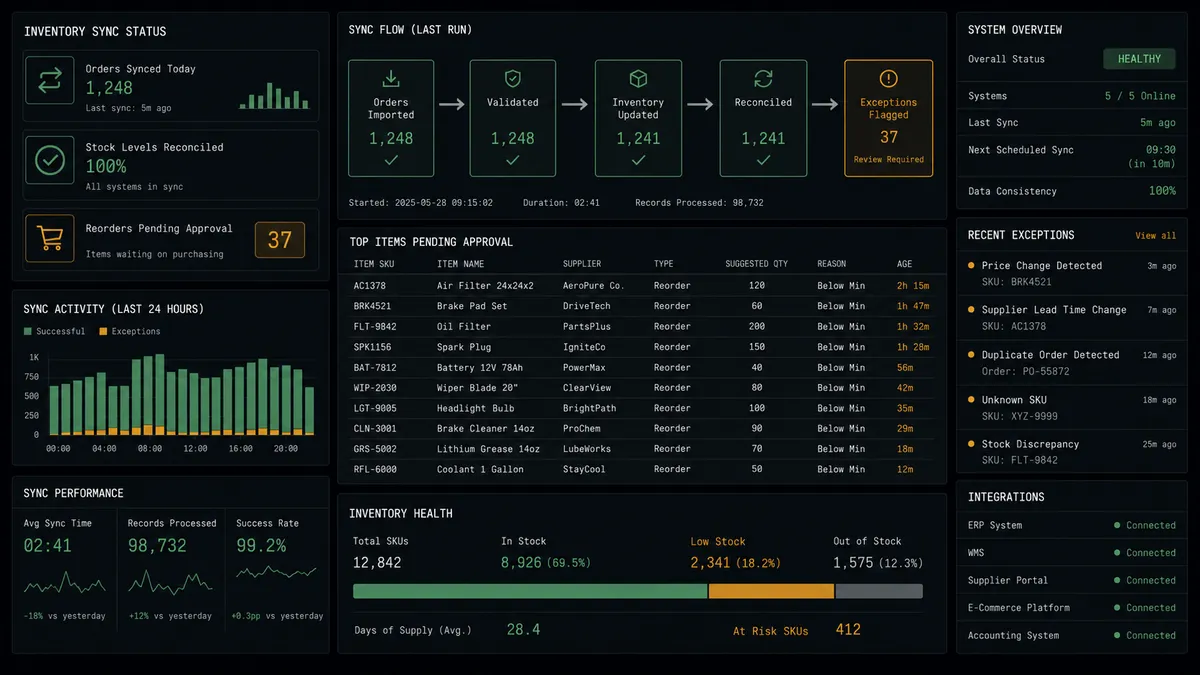
Checkout to fulfillment-ready sales order. Shopify’s On New Order triggers Create Sales Order in Zoho Inventory, and the agent calls Create Invoice and Email Invoice so the customer has a record and the books reflect the sale the same day it happened.
Low stock to approved reorder. On Low Stock Item alerts purchasing through Slack, the agent drafts Create Purchase Order, and anything above your spend threshold waits for a named approver before Mark PO Issued runs.
New product catalog sync. Shopify’s On New Product trigger hands the SKU, description, and pricing to Zoho Inventory’s Create Item, so a product listed on the storefront is tracked in inventory from day one instead of showing up in a warehouse spreadsheet later.
Multi-location stock accuracy. Zoho Inventory’s Create Transfer Order and Update Item track stock as it moves between warehouses, and the agent calls Set Inventory Quantities so each Shopify location reflects what is actually on that shelf, not a stale count from the last manual sync.
Returns reconciled on both sides. When a Shopify refund is approved through its own human-in-loop step, the agent records the corresponding Create Sales Return in Zoho Inventory so the books and the shelf count both reflect the return, not just the storefront.
Getting started
FlowRunner has a free plan with 100 executions a month, every integration included, and no credit card required, and new accounts get 14 days of Professional on top. Connect Zoho Inventory and Shopify, pick Shopify’s On New Order trigger, and build the sales order and stock sync flow above in minutes.
Ready to see it running against your own store and warehouse? Start free at flowrunner.ai or book a walkthrough at calendly.com/flowrunner/intro.
Frequently asked questions
Is it free to connect Zoho Inventory and Shopify on FlowRunner?
FlowRunner has a free plan with 100 executions a month, every integration included, and no credit card required, and new accounts get 14 days of Professional on top. Beyond the free plan, Growth is $45 per month for 12,000 executions.
Can I self-host the Zoho Inventory and Shopify connection?
Yes. FlowRunner's Community Edition is free for a single self-hosted instance, and the Enterprise self-hosted tier adds clustering and the full compliance suite. Most teams start on the cloud-hosted Growth tier and move to self-hosting only if their infrastructure policy requires it.
Does the agent need my own AI provider key?
FlowRunner runs on a bring-your-own-key model. You connect your own OpenAI, Anthropic, or other provider credentials, and FlowRunner orchestrates the agent using them. You control which model runs and what it costs.
What happens when the agent is not sure about a reorder?
The agent invokes a human-in-loop flow as a callable tool instead of guessing. It packages the item, quantity, vendor, and total spend, routes the decision to purchasing over Slack or email, and waits. The workflow resumes the moment a person approves or holds it.
Which Shopify events can start a Zoho Inventory workflow?
Shopify provides six triggers: On New Order, On Order Updated, On New Customer, On Customer Updated, On New Product, and On New Dispute. On New Order is the one most teams use to start the Zoho Inventory sales order and stock sync flow.
Does this replace a platform like Celigo?
Not exactly. Celigo is a purpose-built iPaaS with prebuilt ecommerce-to-ERP templates. FlowRunner covers the same trigger-to-action connection and adds an AI agent layer with native human-in-loop approval, which Celigo's flows do not include without custom scripting.