Can an AI Agent Sync Shopify to Klaviyo and Hold Refunds?
Connect Shopify orders to Klaviyo profiles and events automatically, and run it as an AI agent that pauses for a human before issuing a refund.
How do you connect Klaviyo to Shopify?
Shopify’s On New Order trigger fires the moment a customer checks out, and FlowRunner maps that order into Klaviyo with Create or Update Profile and Create Event for Placed Order, so the customer record and the order value land in Klaviyo within minutes instead of the next CSV import. FlowRunner is a visual AI-agent orchestration platform where automations run autonomously and pause for human judgment on the steps that carry real consequence. The same connection can run as a scripted sync, or it can run as an AI agent that also watches for refunds on those orders and pauses for a person before Create Refund moves any money.
The problem it solves
A marketing ops manager running Klaviyo off Shopify data usually inherits a lag. Orders happen in Shopify all day, but profiles in Klaviyo update on whatever schedule the CSV import or the native app sync runs, so a flow meant to fire off a fresh purchase fires against yesterday’s data, and revenue attribution gets rebuilt from screenshots someone remembered to take before the numbers rolled off a dashboard. Nobody planned it this way. It is what happens when two systems that should talk in real time are actually bridged by a person’s memory.
The other half of the problem shows up downstream. When a customer gets a refund, nothing tells Klaviyo to stop sending them the post-purchase upsell sequence that assumes they kept the order. That refund decision itself often gets made in a Slack DM with no consistent record of who approved what, and the marketing suppression that should follow it, if it happens at all, happens manually, days later, after the customer has already replied “why am I still getting these emails” to a campaign that assumed a completed sale.
How it works: the connection
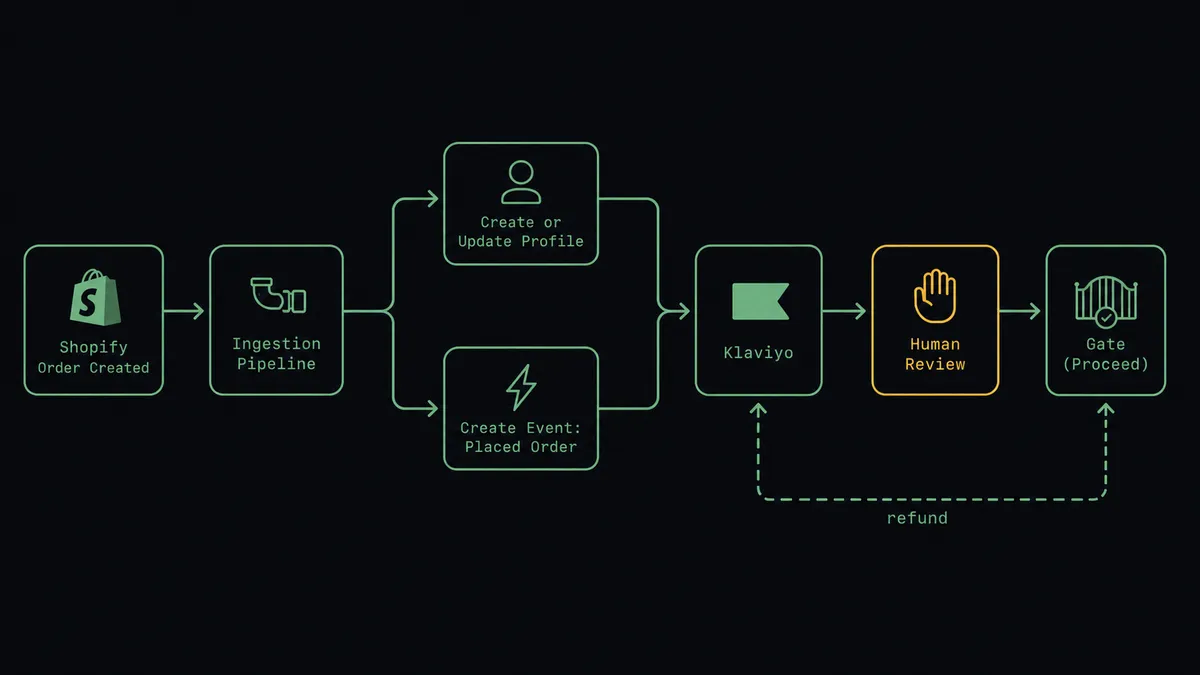
The core sync runs on Shopify’s On New Order trigger. When a customer checks out, the agent reads the line items, the customer identifiers, and the order total, then calls Create or Update Profile in Klaviyo so the customer record exists or updates with current data, and calls Create Event for Placed Order with the order value and items attached. That event is what Klaviyo flows and segments actually run on, so post-purchase automations, win-back segments, and revenue reporting all inherit live data instead of a batch that ran overnight.
From there the connection can extend into the parts of the relationship that come after checkout. A return or dispute against that same order reaches a refund decision, and the agent gathers the order, the customer, the amount, and the reason before Create Refund is ever called. Once a refund is approved and issued, the agent calls Suppress Profiles or Add Tags in Klaviyo, so a customer who just got their money back does not keep receiving the flow built for someone who kept the purchase. The same order that started the sync into Klaviyo is the order that eventually tells Klaviyo to stand down.
Can an AI agent run it? (and why a human stays in the loop)
Yes, and this is where it stops being a sync tool. A scripted integration moves data on a schedule or a webhook and does not reason about what it is looking at. An AI agent reads the refund request, evaluates the amount against the order’s history, and decides on its own whether the situation needs a person, the same way it would auto-process a routine reorder but stop on an order that does not match the customer’s usual pattern.
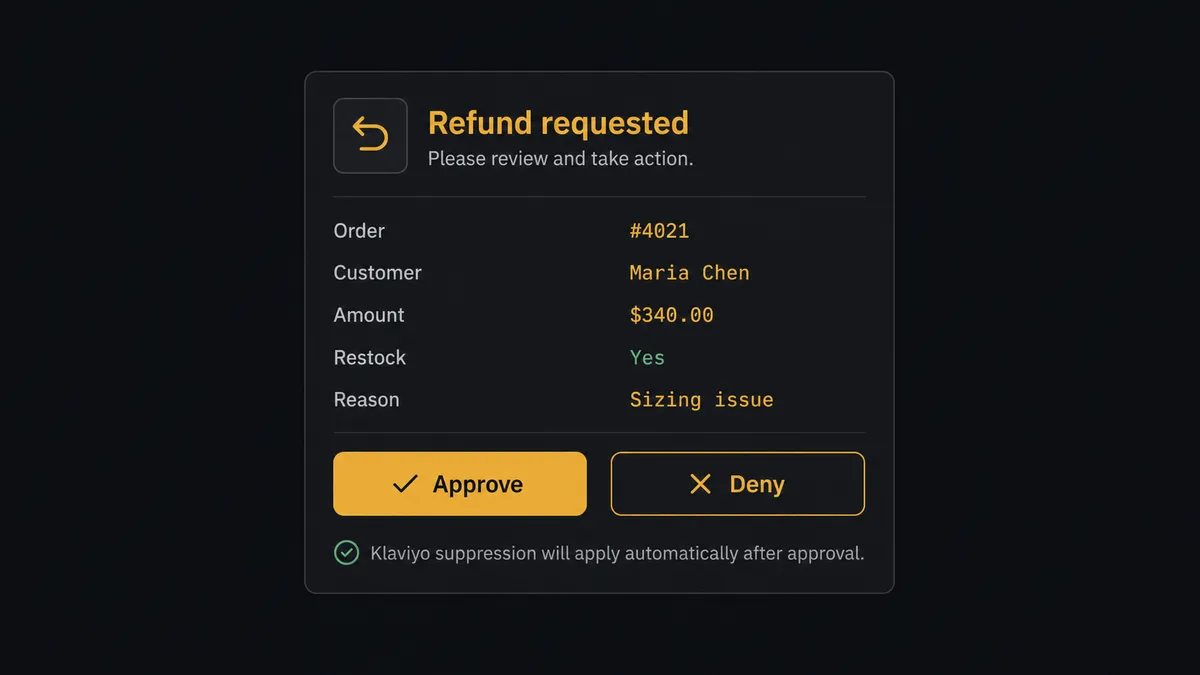
Here is the actual decision moment. A return comes in against a $340 order from a repeat customer. The agent checks the amount against the order total, checks whether the customer has an unusual refund history, and if nothing is out of the ordinary, it still does not move the money on its own, because Create Refund is the kind of write that gets a human by default in this flow. It posts to the operations Slack channel: “Refund requested for order #4021, customer Maria Chen, amount $340.00, restock yes. Reason: sizing issue. Approve to issue?” The approver has full context in one message, no digging through the Shopify admin required. They approve, and the agent calls Create Refund immediately, then calls Suppress Profiles in Klaviyo so the post-purchase flow stops targeting that customer.
This is not a sync tool. The agent knows when to stop and ask, and it does the surrounding work, gathering context, drafting the summary, updating Klaviyo after the fact, so the human’s only job is the fifteen-second judgment call the business actually needs a person for. Prospects who have seen this pattern before call it a digital andon cord: the line keeps running, and it stops the instant something needs a human eye.
FlowRunner vs Zapier
Zapier is a reasonable starting point for this exact connection. It has both a Shopify and a Klaviyo app, the setup is genuinely fast, and for a straight order-to-profile sync with no branching logic, a lot of teams get it running in an afternoon. That part is fair to credit.
Where it runs out of room is the refund branch. Zapier can trigger on a Shopify event and call a Klaviyo action, but it cannot look at a refund amount, reason about whether it is routine, and decide on its own to stop and ask a specific person before the money moves. That logic gets built as a rigid if-amount-then-notify step at best, or it does not get built at all and the suppression step happens manually.
| Capability | FlowRunner | Zapier |
|---|---|---|
| Human-in-the-loop on the refund step | Native: the agent reasons about the refund and invokes a human approval as a callable tool | Not native: conditional branches can route to a notification, not a judgment call |
| Pricing model | Transparent workflow-based tiers with a stated execution ceiling per tier | Per-task pricing that scales with volume and gets harder to predict at growth |
| Users included | Unlimited users on every tier | Seat-based pricing on higher tiers |
| Self-hosting | Available on Enterprise | Not offered |
| AI provider access | Bring your own key for the AI agent step | AI features tied to Zapier’s own model access |
Before and after
| Metric | Before | After |
|---|---|---|
| Profile freshness | Customer data reaches Klaviyo through periodic CSVs, so flows fire on stale state | Orders upsert profiles and fire events within minutes of checkout, no import step |
| Revenue attribution | Attribution numbers leave Klaviyo when someone remembers to copy them into a report | Time-bucketed aggregates flow into weekly reports automatically |
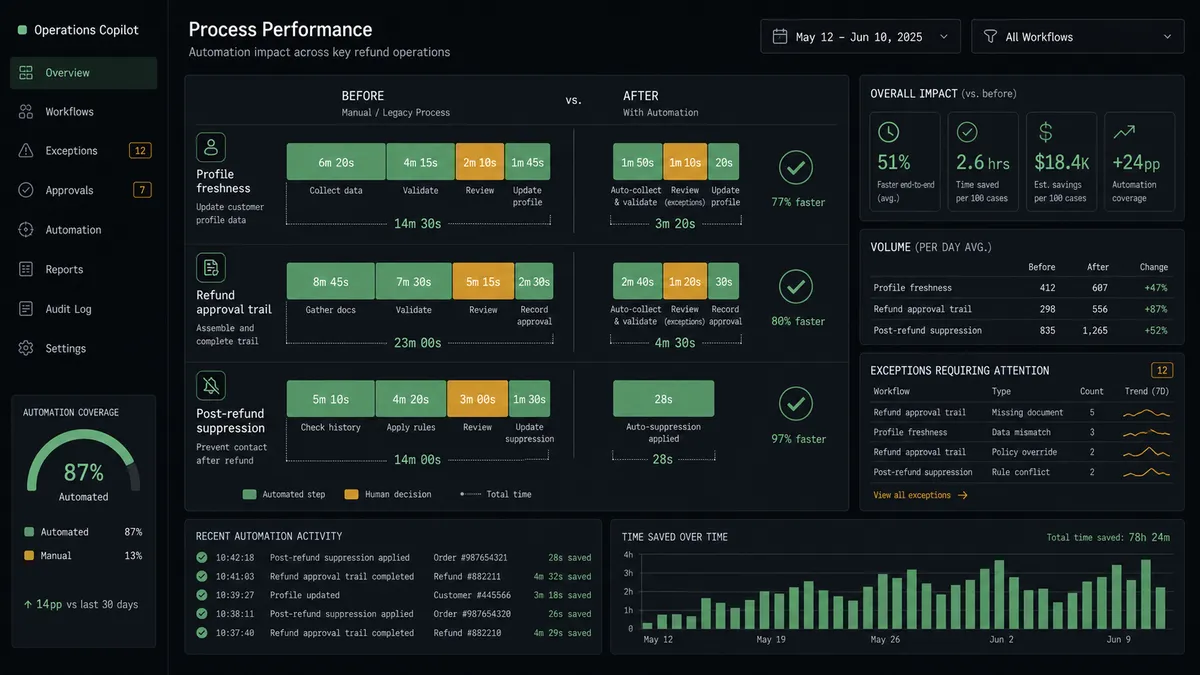
| Refund approval trail | Refund decisions get made in DMs, then keyed into Shopify with no consistent record of who approved what | Every refund is quoted with full context and issued only after a named approver signs off |
| Post-refund suppression | Refunded customers keep receiving the post-purchase flow until someone notices and manually unsubscribes them | Suppression runs automatically the moment a refund is approved and issued |
| Consent record | Who is suppressed, unsubscribed, or double opted in lives in tribal memory | Subscribes, unsubscribes, and suppressions are explicit operations with an audit trail |
What you can build
Order-to-profile sync with live revenue attribution. Every Shopify order calls Create or Update Profile and Create Event for Placed Order in Klaviyo, and a weekly flow runs Query Metric Aggregates so revenue by campaign and flow shows up as data instead of a screenshot someone has to remember to take.
Refund approval with automatic suppression. A return or dispute against an order routes through a human-in-loop approval before Create Refund runs, and once issued, the agent calls Suppress Profiles so the customer stops receiving the post-purchase sequence built for a kept order.
Fraud-flagged order hold with marketing pause. Shopify’s On New Order trigger flags a high-value or unusual order for ops review, and while the order is on hold, the agent skips the Placed Order event so Klaviyo does not fire a confirmation flow for an order that has not actually shipped.
Product launch sync into segmentation. Shopify’s On New Product trigger feeds the new SKU into a Klaviyo segment update, so a launch-day flow can target customers whose purchase history matches the new product’s category the moment it goes live.
Dispute response with a marketing freeze. Shopify’s On New Dispute trigger starts an evidence-gathering flow, and the agent calls Suppress Profiles on the disputing customer in Klaviyo so no promotional send lands in their inbox while the dispute is open.
Common questions
Is it free to connect Klaviyo and Shopify on FlowRunner? Yes. FlowRunner has a free plan with 100 executions a month, every integration included, and no credit card required, and new accounts get 14 days of Professional on top.
Can I self-host the Shopify to Klaviyo flow? Yes. FlowRunner offers a self-hosted Enterprise option alongside the cloud tiers, so the same Shopify order sync and Klaviyo consent workflow can run on infrastructure you control.
Does the agent need my own OpenAI key? The AI agent step runs on a bring-your-own-key model, so you connect the AI provider you already use rather than routing usage through a vendor-owned key.
What happens when the agent isn’t sure about a refund? The agent does not guess. It packages the order, the amount, and the reason, posts it to the channel your ops team already watches, and waits for a named person to approve or deny before Create Refund ever runs.
Does this replace Klaviyo’s native Shopify integration? No. FlowRunner sits above the connection as an orchestration layer, so the same profile and event sync can also carry a refund approval gate and a post-refund consent update that a native two-way sync does not reason about.
Can the same flow update Klaviyo consent after a refund? Yes. Once a refund is approved and issued in Shopify, the agent can call Klaviyo’s suppression or tagging operations so a refunded customer stops receiving the active post-purchase campaign.
Getting started
FlowRunner has a free plan with 100 executions a month, every integration included, and no credit card required, and new accounts get 14 days of Professional on top. Start with the order-to-profile sync, then add the refund approval gate when your team is ready for it. Get started at flowrunner.ai or book a walkthrough at calendly.com/flowrunner/intro.
Frequently asked questions
Is it free to connect Klaviyo and Shopify on FlowRunner?
Yes. FlowRunner has a free plan with 100 executions a month, every integration included, and no credit card required, and new accounts get 14 days of Professional on top.
Can I self-host the Shopify to Klaviyo flow?
Yes. FlowRunner offers a self-hosted Enterprise option alongside the cloud tiers, so the same Shopify order sync and Klaviyo consent workflow can run on infrastructure you control.
Does the agent need my own OpenAI key?
The AI agent step runs on a bring-your-own-key model, so you connect the AI provider you already use rather than routing usage through a vendor-owned key.
What happens when the agent isn't sure about a refund?
The agent does not guess. It packages the order, the amount, and the reason, posts it to the channel your ops team already watches, and waits for a named person to approve or deny before Create Refund ever runs.
Does this replace Klaviyo's native Shopify integration?
No. FlowRunner sits above the connection as an orchestration layer, so the same profile and event sync can also carry a refund approval gate and a post-refund consent update that a native two-way sync does not reason about.
Can the same flow update Klaviyo consent after a refund?
Yes. Once a refund is approved and issued in Shopify, the agent can call Klaviyo's suppression or tagging operations so a refunded customer stops receiving the active post-purchase campaign.