Can an AI Agent Route Zendesk Sell Exceptions to Slack?
Connect Zendesk Sell and Slack so deal exceptions post to Slack automatically, with an AI agent that pauses for a rep's approval before deleting or merging any deal.
How do you connect Zendesk Sell to Slack?
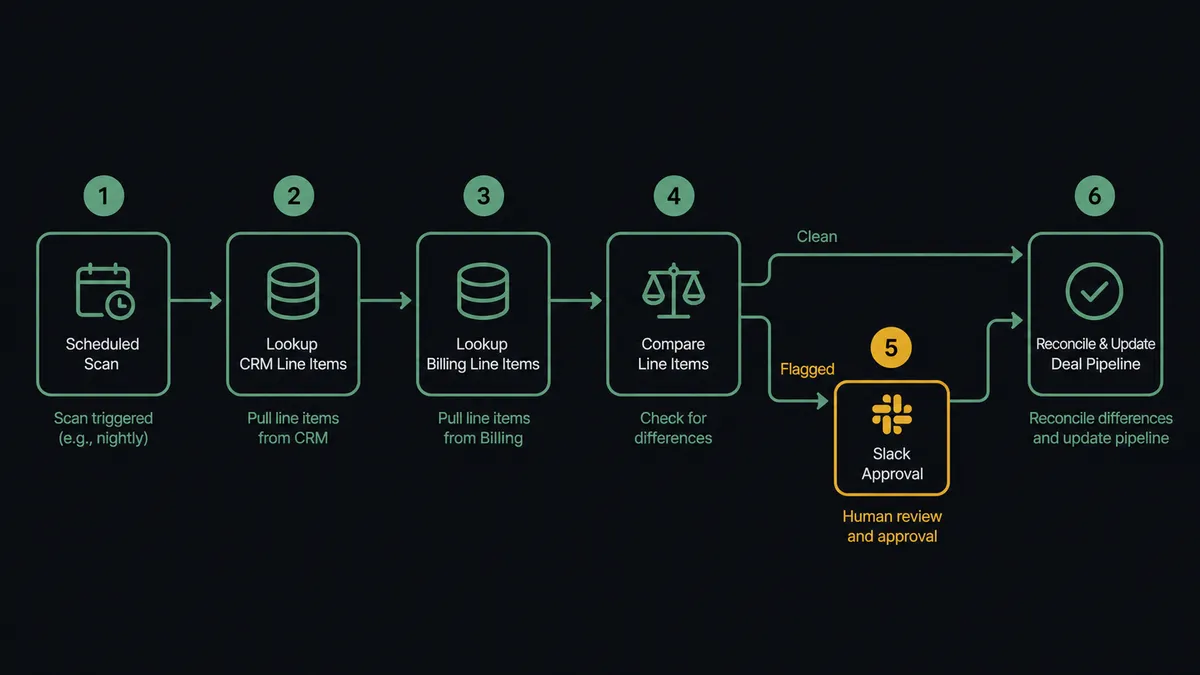
You connect Zendesk Sell to Slack by running a scheduled review of Zendesk Sell’s List Deals and List Deal Line Items to catch value mismatches and duplicate records, then handing anything that needs a decision to Slack’s Send Message to Channel action; when a rep clicks Approve or Delete, Slack’s On Block Action trigger fires and resumes the workflow with a Zendesk Sell action such as Update Deal, Add Deal Line Item, or Delete Deal. FlowRunner is a visual AI-agent orchestration platform where automations run autonomously and pause for human judgment on the steps that carry real consequence. On FlowRunner, this same connection runs as an AI agent: it reads the deal data, decides on its own whether something needs a person, and calls the human-in-loop flow as a tool only when the numbers actually disagree or a genuine duplicate turns up. Everything else, the deals that check out clean, closes without anyone touching Slack at all.
The problem it solves
Sales ops leads and CRM admins spend real hours cleaning up Zendesk Sell manually. A webhook fires twice, a rep re-enters a lead that already exists, or a deal closes at a round number someone typed instead of the number the catalog actually supports, and now two deals or two totals sit in the pipeline. Nobody notices until forecasting week, when the ops lead has to open each duplicate, compare notes and line items by hand, and guess which record has the real history.
Today that review happens in spreadsheets exported from Zendesk Sell, or in a Slack DM someone sends the account owner asking “is this the real one?” with no record of who answered or why. Deals with mismatched values sit in the won column looking closed while finance’s numbers and the CRM’s numbers quietly disagree. The exceptions fall through the cracks because catching them means somebody has to go looking, and looking does not scale past a handful of reps.
How it works: the connection
The workflow starts with a scheduled scan of Zendesk Sell using List Deals, filtered to deals that moved to won or review in the last day. For each one, Get Deal pulls the current value and stage, and List Deal Line Items pulls what products are actually attached. The agent adds up the line items and compares the total to the deal value Zendesk Sell has on record.
If they match, the workflow moves the deal along on its own: Add Deal Line Item fills in any product the catalog can resolve, Update Deal advances the stage, and Create Note logs what happened, all without a person touching it.
If they don’t match, or List Deals turns up a second open deal tied to the same contact for what looks like the same purchase, the workflow does not guess. It hands off to Slack’s Send Message to Channel action, posting both records side by side with their line items so a rep can see the discrepancy in one message instead of two open Zendesk Sell tabs. The rep’s click on an Approve, Merge, or Delete button fires Slack’s On Block Action trigger, and the workflow resumes with the matching Zendesk Sell action: Delete Deal Line Item to strip a bad entry, Delete Deal to remove a confirmed duplicate, or Update Deal to close the deal the rep confirmed is real.
Can an AI agent run it? (and why a human stays in the loop)
Yes, and this is where FlowRunner differs from a plain sync tool. Instead of a fixed rule like “if the deal has two matches, ask a human,” the agent reads the actual data on each pass: the line items, the value, the contact, the deal age, and decides for itself whether what it is looking at is routine cleanup or something that needs a person. A deal that is off by a rounding error because a discount did not reprice is not the same call as two full deals for the same $40,000 order, and the agent treats them differently because it evaluated the specifics, not because a threshold told it to.
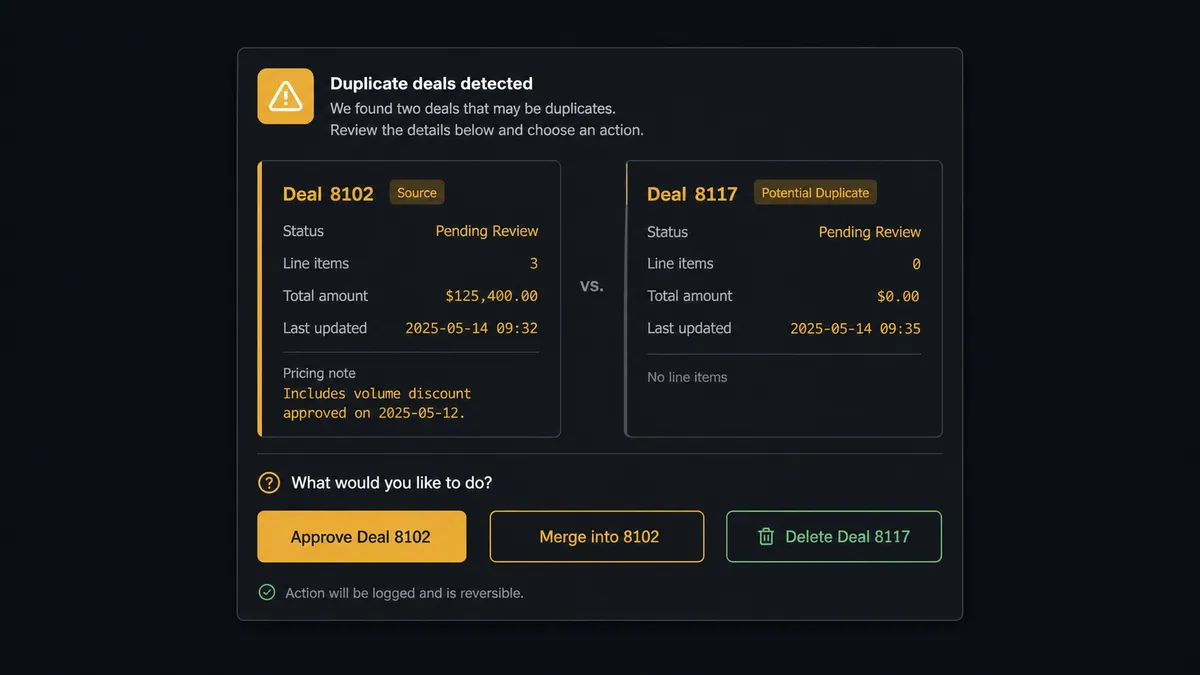
Here is a real decision moment. The agent finds Deal 8102 and Deal 8117 both tied to the Meridian account, both closed within an hour of each other, the fingerprint of a webhook that fired twice. It retrieves both with Get Deal, pulls their line items with List Deal Line Items, and sees that 8102 carries three line items and a pricing note while 8117 is empty. Rather than deleting the empty one on its own judgment, the agent packages the comparison, both deal IDs, the line-item counts, and its read of which one looks real, into a Slack message addressed to the deal owner: “Two deals exist for the Meridian order. Deal 8102 has three line items and the pricing note. Deal 8117 is empty. Delete 8117?” The rep taps Delete, Slack’s On Block Action trigger fires, and only then does Delete Deal run. The decision, the decider, and the timestamp land in the audit trail automatically.
This is not a sync tool guessing at rules. It is an agent that knows the difference between work it can finish on its own and a call that belongs to a person, a digital andon cord that stops the line the moment it hits a decision it should not make alone.
FlowRunner vs Zapier
Most sales ops teams who have automated part of their Zendesk Sell workflow before did it in Zapier, and Zapier earns that: its Zendesk Sell and Slack integrations are quick to wire up, and for a straight “new deal, post a Slack message” zap it works well.
Where it runs out of road is exactly the moment that matters here, a duplicate deal or a value mismatch that should not be deleted or closed automatically. Zapier can post the exception to Slack; it cannot have an agent read the line items, compare two records, reason about which one is real, and only ask a person when the comparison is genuinely ambiguous. That judgment step is either missing or has to be hand-built as a maze of Zapier paths and filters that breaks the first time the data looks different than expected.
| What matters for this pair | FlowRunner | Zapier |
|---|---|---|
| Human-in-the-loop on deletes | Native: the agent packages context and waits for a Slack click before Delete Deal runs | Not built in; you chain filters and hope the logic covers every case |
| Reasoning before escalating | Agent compares line items and value itself, only asks when they disagree | Rule-based triggers only; no judgment call on ambiguous cases |
| Users on your plan | Unlimited users and workflows on every tier | Per-user pricing on higher tiers |
| AI provider | BYOK, connect the provider you already use | Built-in AI credits billed through Zapier |
| Self-hosting | Available on the Enterprise tier | Not offered |
| Pricing model | Transparent workflow-based execution tiers | Per-task pricing that scales unpredictably with volume |
Before and after
| Category | Before | After |
|---|---|---|
| Deal values | Reps type a round number instead of building it from the catalog | Deal values assemble from catalog products, quantities, and prices |
| Duplicate cleanup | Ops leads compare deals by hand across open tabs during forecasting week | Duplicates surface automatically with line items compared side by side in Slack |
| Exception resolution | Exceptions require an email chain or a meeting before anyone decides | Exceptions approved or escalated from a phone in one Slack session, minutes instead of days |
| Stage accuracy | Payment clears but the pipeline still shows the deal open | Won status and line items update the same hour reconciliation completes |
| Decision record | Nobody can say later who deleted a deal or why | Every approval captured with approver identity and timestamp automatically |
What you can build
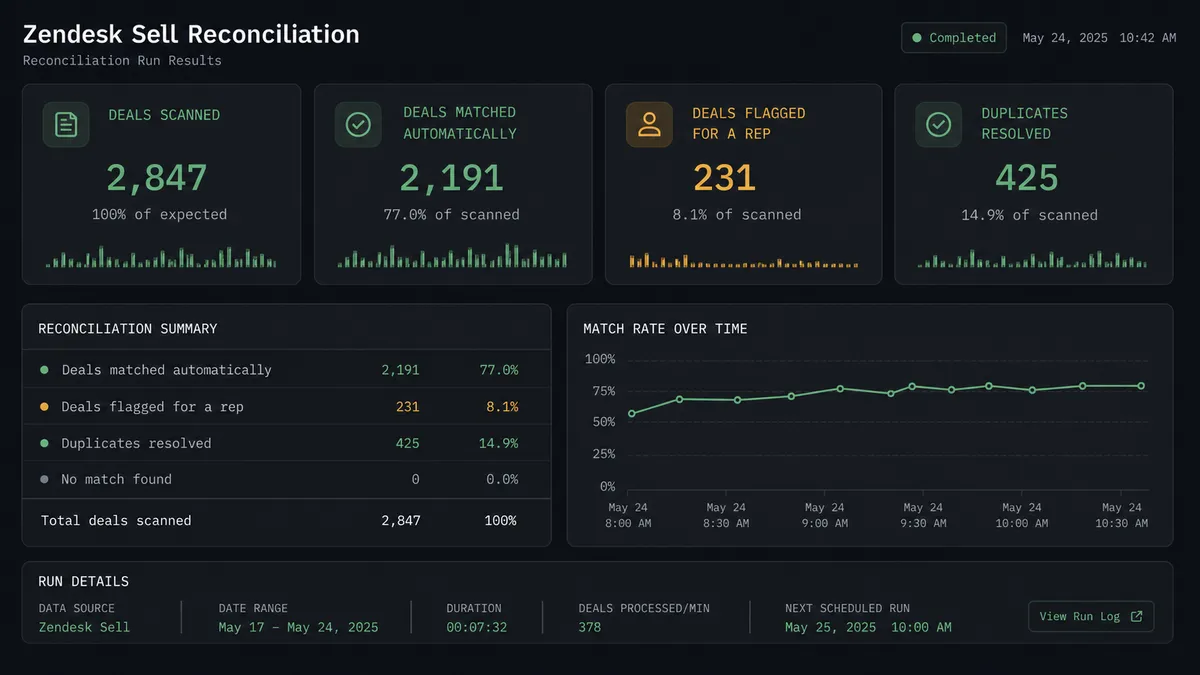
Duplicate deal sweep: A scheduled scan flags deals tied to the same contact closed within the same hour, and a rep resolves each pair from Slack before any cleanup runs.
Value reconciliation on close: Every deal moving to won gets its line-item total checked against the deal value automatically, with mismatches routed to the sales channel instead of sitting quiet in the pipeline.
Pipeline digest with one-click drill-in: A weekly summary of stage moves and flagged deals posts to the sales channel, so leadership catches issues without opening Zendesk Sell.
Follow-up nudges after a fix: When a deal’s line items change after a Slack-approved correction, Create Task opens a follow-up so the rep confirms the customer agrees with the revised total.
Common questions
Is it free to connect Zendesk Sell and Slack on FlowRunner? Yes. FlowRunner has a free plan with 100 executions a month, every integration included, and no credit card required, and new accounts get 14 days of Professional on top.
Does the agent need my own OpenAI key? FlowRunner uses a bring-your-own-key (BYOK) model, so you connect the AI provider you already use rather than paying a markup on someone else’s key.
What happens when the agent isn’t sure whether a deal is a duplicate? It stops and asks. The agent posts both deals side by side in Slack with their line items and lets a rep pick which one survives; nothing gets deleted without that answer.
Can I self-host this Zendesk Sell to Slack workflow? Yes. FlowRunner’s Enterprise tier supports self-hosted deployment for teams that need the workflow running on their own infrastructure.
Do I need to build the Slack approval buttons myself? No. FlowRunner’s human-in-loop flow includes the Block Kit message and the On Block Action trigger that reads the rep’s click, so a workflow builder adds approval without writing Slack app code.
Will this catch every duplicate deal automatically? It flags them; it does not delete them automatically. The agent compares line items and value, but a person always confirms which record is real before FlowRunner removes anything.
Getting started
FlowRunner has a free plan with 100 executions a month, every integration included, and no credit card required, and new accounts get 14 days of Professional on top. Add your Zendesk Sell and Slack connections, pick the scan that fits how your pipeline actually breaks, and let the agent decide the rest.
Start free at flowrunner.ai, or book time with the team at calendly.com/flowrunner/intro to walk through the Zendesk Sell workflow with your own deal data.
Frequently asked questions
Is it free to connect Zendesk Sell and Slack on FlowRunner?
Yes. FlowRunner has a free plan with 100 executions a month, every integration included, and no credit card required, and new accounts get 14 days of Professional on top.
Does the agent need my own OpenAI key?
FlowRunner uses a bring-your-own-key (BYOK) model, so you connect the AI provider you already use rather than paying a markup on someone else's key.
What happens when the agent isn't sure whether a deal is a duplicate?
It stops and asks. The agent posts both deals side by side in Slack with their line items and lets a rep pick which one survives; nothing gets deleted without that answer.
Can I self-host this Zendesk Sell to Slack workflow?
Yes. FlowRunner's Enterprise tier supports self-hosted deployment for teams that need the workflow running on their own infrastructure.
Do I need to build the Slack approval buttons myself?
No. FlowRunner's human-in-loop flow includes the Block Kit message and the On Block Action trigger that reads the rep's click, so a workflow builder adds approval without writing Slack app code.
Will this catch every duplicate deal automatically?
It flags them; it does not delete them automatically. The agent compares line items and value, but a person always confirms which record is real before FlowRunner removes anything.