How to Connect Slack with Attio (With or Without an AI Agent)
Turn Slack messages into Attio records with an emoji reaction, optionally as an AI agent that upserts people and companies automatically and pauses for a human before it overwrites existing CRM data.
How do you connect Slack to Attio?
You connect Slack to Attio by having Slack’s On Reaction Added trigger drive Attio actions: a teammate marks a message with an agreed emoji, the workflow calls Get Message to pull the full text and author, then writes the contact into Attio with Assert Record (Upsert) and attaches the conversation with Create Note, so a deal signal buried in a channel becomes a structured CRM record. FlowRunner is a visual AI-agent orchestration platform where automations run autonomously and pause for human judgment on the steps that carry real consequence. The same connection can run as an AI agent that reads each captured message, decides which object and attributes it belongs to, and pauses for a named human before it overwrites a value that Attio already holds or calls Delete Record on anything.
The problem it solves
Attio is where your pipeline lives, but the raw material for it lives in Slack. A founder drops an intro in the partnerships channel. A rep pastes a prospect’s reply into a thread. Someone mentions in passing that a target company just changed CFOs. Today the bridge between those two systems is a person who reads the thread, opens Attio, searches for the record, creates it if it is missing, and retypes the context into a note. Nobody does that reliably at five in the afternoon, so the CRM slowly drifts away from what the team actually knows.
The edges are worse than the happy path. The same company exists twice because one person keyed the domain and another keyed the name. A thread says the champion moved to a new role, but the Attio record still shows the old title, and the next outreach email lands wrong. When someone finally cleans up, they overwrite a field that was actually correct, and there is no record of who changed what or why. The cost is not the typing. It is the decisions your team makes on stale data.
How it works: the connection
The connection listens to Slack and writes to Attio. Here is the plain version, grounded in the real connector actions.
- Trigger: Slack fires On Reaction Added when a teammate marks a message with the capture emoji your team agreed on.
- Read: The workflow calls Get Message to pull the full message text, the author, and the thread it belongs to, adding Get Latest Thread Messages when the context spans a conversation.
- Match: It calls Query Records in Attio to look for an existing person by email_addresses or an existing company by domains.
- Write: It calls Assert Record (Upsert), which creates the record if none exists or updates it if the matching attribute already has a value, so duplicates never enter the workspace.
- Attach the context: It calls Create Note on the record with the message content, so the conversation travels with the contact instead of dying in the channel.
- Queue the follow-up: It calls Create Task linked to the record, assigned through List Workspace Members to the right owner, with a deadline.
- Confirm: It calls Send Message To Channel back in Slack so the team sees the record was captured, with a link.
That is the “just connect them” answer. A pinned message becomes a deduplicated Attio record with the conversation attached and a task on someone’s plate.
Can an AI agent run it? (and why a human stays in the loop)
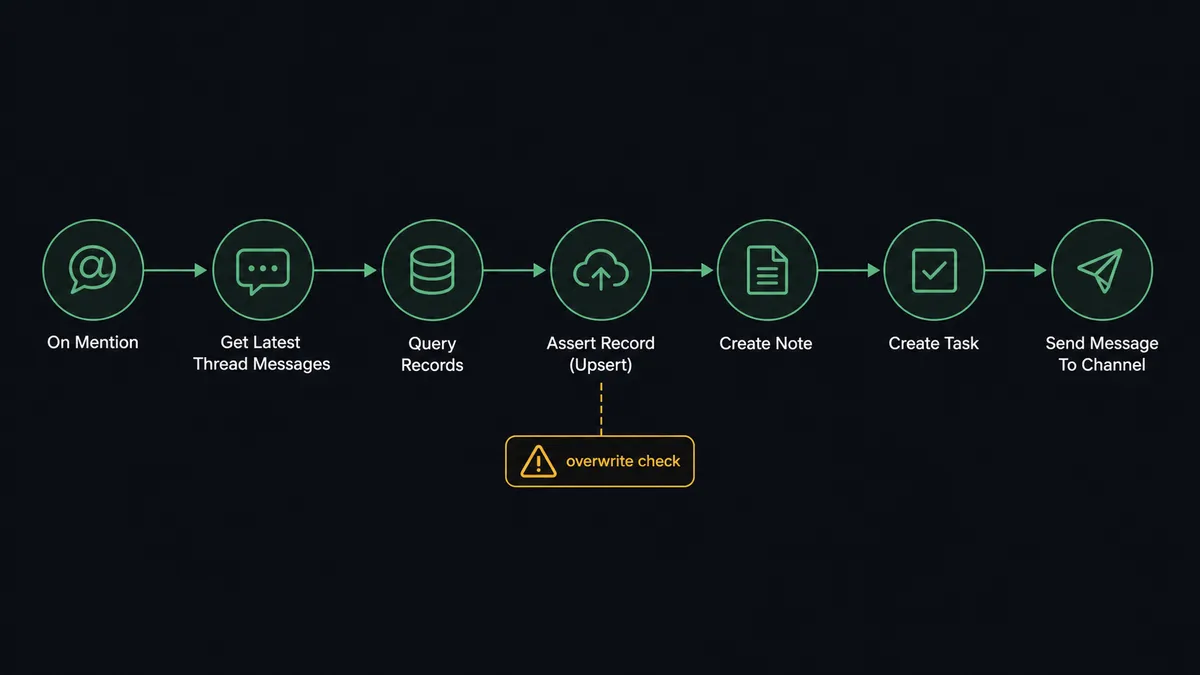
Yes, and this is where the connection stops being a capture macro and starts being a CRM operator. Instead of one fixed mapping, an AI agent reads the captured message and reasons about it: is this a person or a company signal, which Attio object does it belong to, which attributes does it fill, and does it belong on a list. It holds the Attio actions as tools: Query Records, Assert Record (Upsert), Create Note, Create Task, Add List Entry, Update Record. A message about a warm intro lands differently than a message about a churn risk, and the agent picks different tools for each.
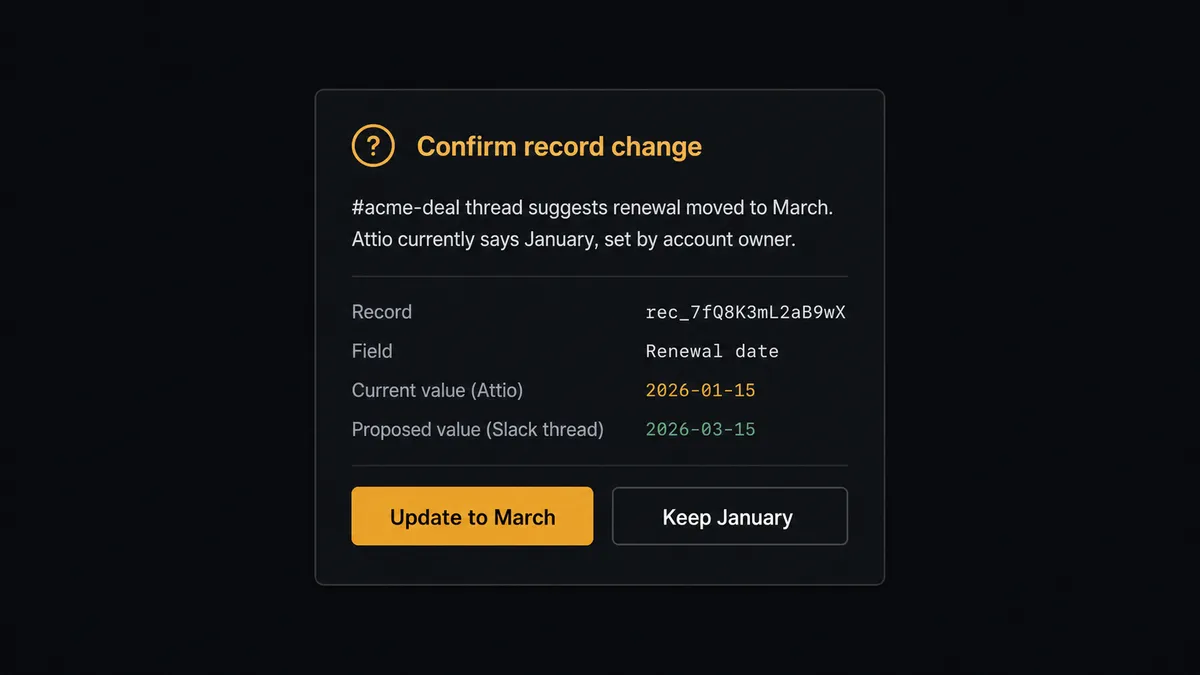
The consequential step is overwriting truth. Assert Record (Upsert) is safe when the field is empty, but when the Slack thread says the prospect is now VP of Finance and Attio says Director of Accounting, one of those is wrong and the agent does not get to guess. Before it calls Update Record on a conflicting value, it invokes a human-review flow it holds as a callable tool. The workflow pauses and posts to the channel where the capture happened: “Attio shows [existing value] for [record]. This thread says [new value]. Source message linked. Keep existing, or update?” One click resolves it. The same gate is absolute for Delete Record and Delete Note, both of which Attio cannot undo: the agent proposes, a named human disposes.
This is the digital andon cord, the phrase our prospects reached for before we did. Like Toyota’s production line cord, the workflow stops the line the moment it hits uncertainty, a teammate resolves it in seconds without leaving Slack, and the line moves again. The CRM stays current without an agent ever silently rewriting what your team believed to be true.
FlowRunner vs Zapier
Zapier is the tool most teams try first for Slack to CRM capture, and its strength here is real: a huge template gallery, thousands of connectors, and a setup experience a non-technical rep can finish in an afternoon. For a single fixed path where a new Slack message creates an Attio record, it is quick to stand up and it works.
The difference shows up when the record already exists and the data disagrees. FlowRunner is built around native human-in-the-loop and AI-agent orchestration, where the agent decides when a person needs to look, rather than a fixed step sequence. Here is the honest side-by-side.
| What matters for this pair | FlowRunner | Zapier |
|---|---|---|
| Human-in-the-loop on conflicting Update Record writes | Native. The agent invokes an approval flow as a callable tool and pauses before overwriting | Available via added approval steps, not a native agent decision |
| Who runs the flow | An AI agent reads the thread, reasons, picks Attio actions as tools | Predefined step sequence you configure per Zap |
| Users included | Unlimited users on every tier | Priced by task volume; seats vary by plan |
| Bring your own AI keys | Yes, BYOK | AI features tied to Zapier’s own AI offering |
| Self-hosted option | Yes, cloud-hosted or self-hosted | Cloud only |
| Pricing model | Transparent workflow-based tiers | Per-task pricing that grows with capture volume |
If you need a one-way “message in, record out” push and nothing else, Zapier will do it. If your CRM data is an asset you protect, where every overwrite is either safe or approved, this pairing is the better fit.
Before and after
| Category | Before | After |
|---|---|---|
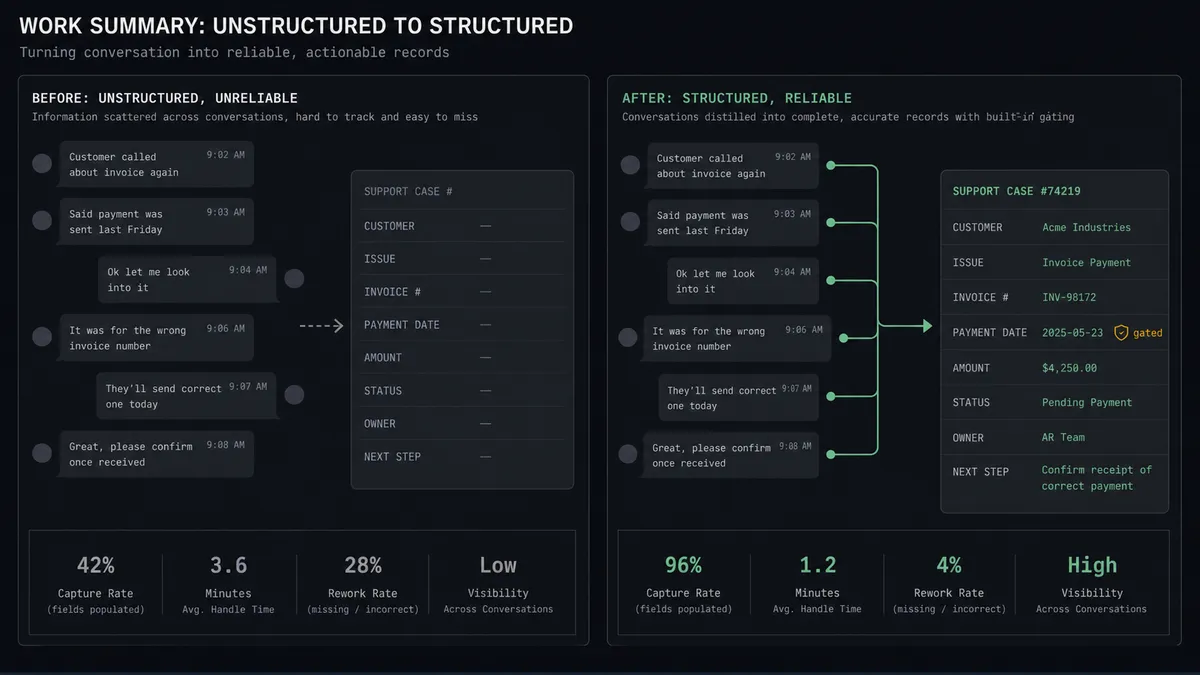
| Capturing signals | Deal intel lives in threads until someone retypes it into Attio, usually days later | An emoji reaction captures the message into Attio the moment it happens |
| Duplicates | The same company entered twice, once by name and once by domain, by different people | Assert Record (Upsert) matches on email_addresses and domains, so one record per entity |
| Conflicting data | Whoever edits last wins, silently | Conflicts pause for a named reviewer with both values and the source thread in front of them |
| Context on records | Records hold fields but not the conversation that explains them | Create Note attaches the thread to the record it belongs to |
| Follow-through | ”Someone should reach out” dies in the channel | Create Task puts a dated, assigned follow-up on the record automatically |
What you can build
Pin-to-CRM capture. On Reaction Added fires on the capture emoji. The agent calls Get Message, matches with Query Records, writes with Assert Record (Upsert), and attaches the thread with Create Note. Signals stop dying in channels.
Leads channel sweeper. On Channel Message watches the inbound-leads channel. The agent extracts the person and company from each post, upserts both, and calls Add List Entry to place the company on the pipeline list at the right stage.
Conflict-checked enrichment. When a thread reveals a title change or a new email, the agent pulls the current state with Get Record and compares. Clean additions apply on their own; conflicts pause for the reviewer before Update Record runs.
Task from a mention. On Mention lets anyone ask the agent directly: “log this and remind me Friday.” The agent creates the note, then Create Task with a deadline, assigned through List Workspace Members to the person who asked.
Record hygiene with a hard gate. On a schedule, the agent uses Query Records to find stale or orphaned records and proposes cleanup in a digest. Nothing is removed until a named human approves each Delete Record, because Attio deletions cannot be undone.
Common questions
Is it free to connect Slack and Attio on FlowRunner? You can build and run the connection on FlowRunner’s free plan, which includes 100 executions a month and every integration with no credit card required, and new accounts also get 14 days of Professional. Both connectors are available on every FlowRunner tier, and every tier includes unlimited users and unlimited workflows.
Can I self-host the Slack to Attio workflow? Yes. FlowRunner offers a cloud-hosted option and a self-hosted option, so the connection can run inside your own environment.
Does the AI agent need my own OpenAI or Claude key? FlowRunner uses a bring-your-own-keys model, so you connect the AI provider key you already have. You are not locked to one model.
What happens when the Slack message conflicts with what Attio already says? The agent does not overwrite. It pauses, posts both values side by side to the channel with the source message linked, and waits for a teammate to pick which value wins. Only after that decision does it call Update Record, and the approval is captured in the audit trail.
Which Slack triggers can start an Attio workflow? Slack offers eight triggers, including On Reaction Added, On Channel Message, On Mention, and On Message from Query. On Reaction Added is the natural fit here: your team marks a message with an agreed emoji and the workflow captures it into Attio.
Can the agent delete records in Attio? Delete Record in Attio is permanent and cannot be undone, so the workflow treats it as a hard gate. The agent never calls it on its own; it packages the record, the reason, and the linked activity, and a named human approves before deletion runs.
Getting started
Start on the free plan: 100 executions a month, every integration included, no credit card required, plus 14 days of Professional for new accounts. Both connectors are available on every tier, and every tier includes unlimited users and unlimited workflows.
Explore the integration details:
- Slack integration (8 triggers and 16 actions covering messages, reactions, files, and channel management)
- Attio integration (26 actions covering records, lists, notes, tasks, and comments)
Start building free at flowrunner.ai or book a demo to see a live Slack to Attio workflow, conflict approval and all.
Frequently asked questions
Is it free to connect Slack and Attio on FlowRunner?
You can build and run the connection on FlowRunner's free plan, which includes 100 executions a month and every integration with no credit card required, and new accounts also get 14 days of Professional. Both connectors are available on every FlowRunner tier, and every tier includes unlimited users and unlimited workflows.
Can I self-host the Slack to Attio workflow?
Yes. FlowRunner offers a cloud-hosted option and a self-hosted option, so the connection can run inside your own environment.
Does the AI agent need my own OpenAI or Claude key?
FlowRunner uses a bring-your-own-keys model, so you connect the AI provider key you already have. You are not locked to one model.
What happens when the Slack message conflicts with what Attio already says?
The agent does not overwrite. It pauses, posts both values side by side to the channel with the source message linked, and waits for a teammate to pick which value wins. Only after that decision does it call Update Record, and the approval is captured in the audit trail.
Which Slack triggers can start an Attio workflow?
Slack offers eight triggers, including On Reaction Added, On Channel Message, On Mention, and On Message from Query. On Reaction Added is the natural fit here: your team marks a message with an agreed emoji and the workflow captures it into Attio.
Can the agent delete records in Attio?
Delete Record in Attio is permanent and cannot be undone, so the workflow treats it as a hard gate. The agent never calls it on its own; it packages the record, the reason, and the linked activity, and a named human approves before deletion runs.