How to Connect Stripe to Wave: Payments Become Approved Invoices
Connect Stripe and Wave so every successful charge drafts a matching Wave invoice automatically, with a bookkeeper on the seam whenever the amount, customer, or business entity does not line up.
How do you connect Stripe to Wave?
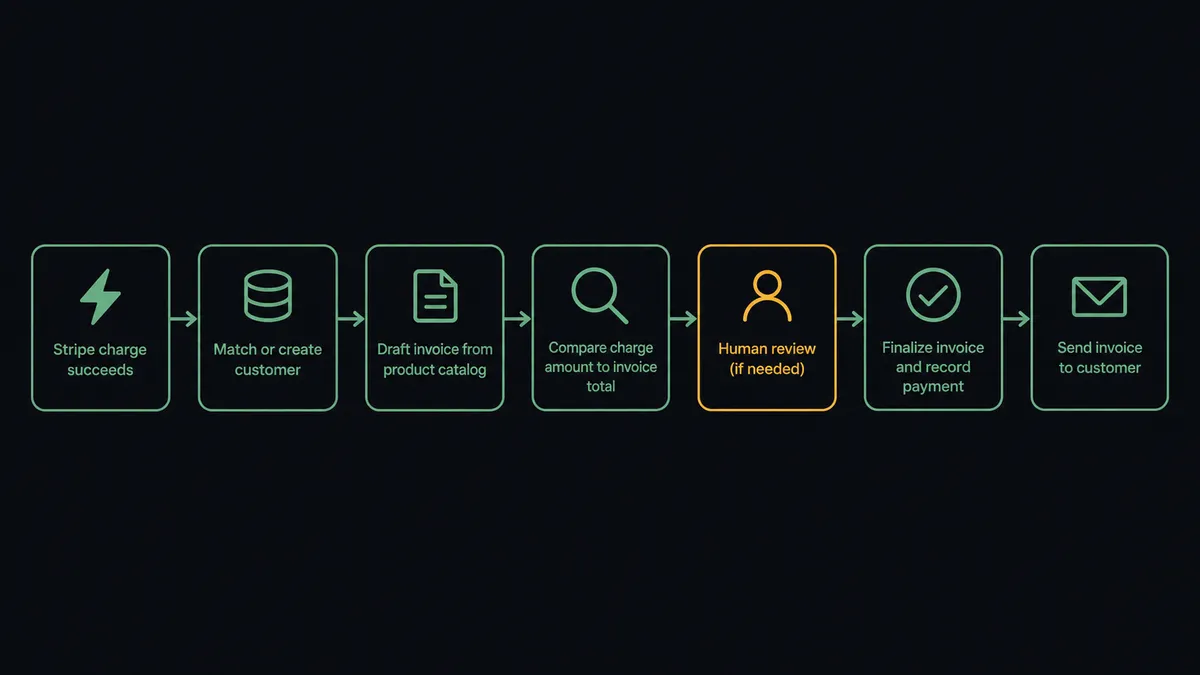
You connect them by setting a trigger in Stripe that drives a named action in Wave. Stripe’s Parse Webhook Event trigger fires when a charge succeeds, and FlowRunner’s agent calls List Customers and Create Invoice in Wave to draft a matching invoice, with Run GraphQL Query recording the payment against it once approved. FlowRunner is a visual AI-agent orchestration platform where automations run autonomously and pause for human judgment on the steps that carry real consequence. That same connection can run as an AI agent: it reasons about whether the charge amount matches the invoice it is about to create, and it invokes a Slack approval message when something does not line up.
The problem it solves
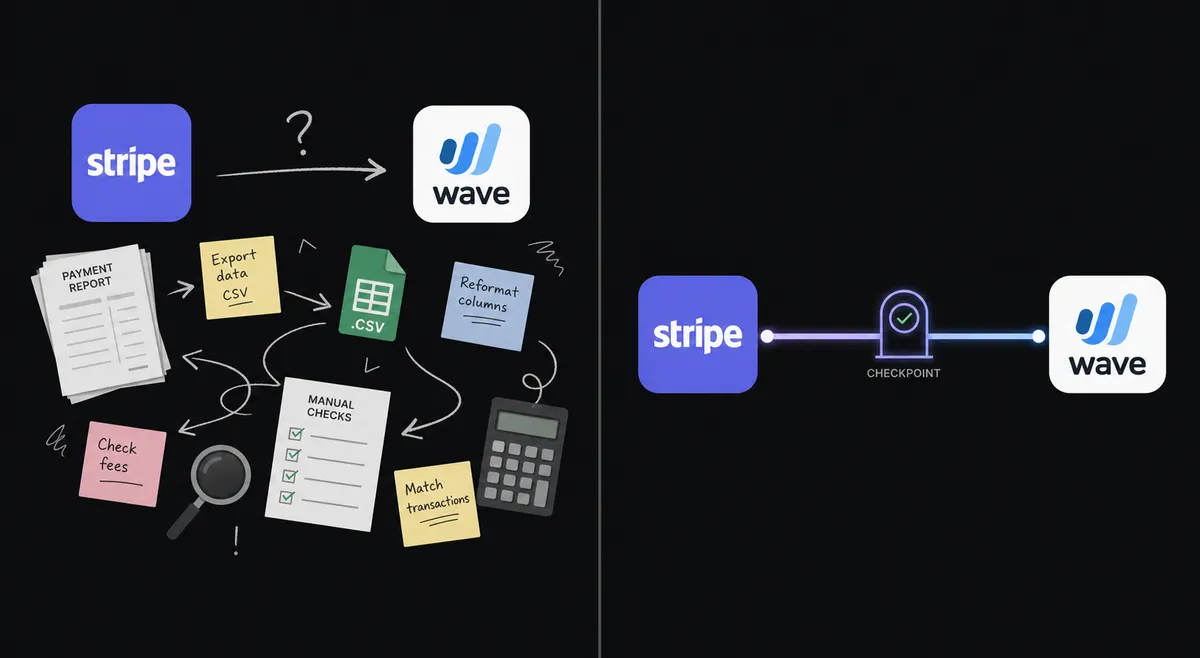
Stripe handles the money. Wave holds the books. Nothing connects them automatically, so someone has to. A bookkeeper or the founder opens the Stripe dashboard, finds the successful charge, flips to Wave, searches for the customer, builds the invoice line by line, and sends it, or more often, does not send it at all and just leaves the payment sitting as a Stripe record with no matching invoice in the ledger. Multiply that by every sale in a week and the gap becomes the whole afternoon.
The deeper cost shows up at reconciliation. Invoicing trails the sale by days because someone has to remember to retype it into Wave. Overdue follow-up depends on someone remembering to check. By the time the books get reviewed, often not until tax season, the accountant is untangling which Stripe charges have a matching Wave invoice and which do not. The money moved cleanly. The paper trail did not follow it.
How it works: the connection
FlowRunner bridges the two systems at the trigger level. Stripe’s Parse Webhook Event trigger fires on a payment event, a charge succeeding or a subscription invoice being paid, and the agent picks up the customer email, the amount, and the description from the event payload.
The agent calls List Customers in Wave to check whether that buyer already has a record. If the account has more than one business configured, it also calls List Businesses to confirm which entity the sale belongs to. When no matching customer exists, Create Customer adds them with the details from Stripe. The agent then calls List Products to price line items from the real catalog, not from string-matching the Stripe description, and calls Create Invoice to draft the invoice with those line items, the sale date, and the Stripe charge ID recorded as the memo so the two records can be traced back to each other later.
That invoice sits as a draft, exactly as Wave’s API design intends. It is not sent yet. The agent’s job past this point is deciding whether it is safe to move the draft forward on its own or whether a person needs to look at it first.
Can an AI agent run it? (and why a human stays in the loop)
A plain sync tool would draft the invoice and stop, or draft it and send it without a second look. The FlowRunner agent evaluates what it found before deciding what to do next.
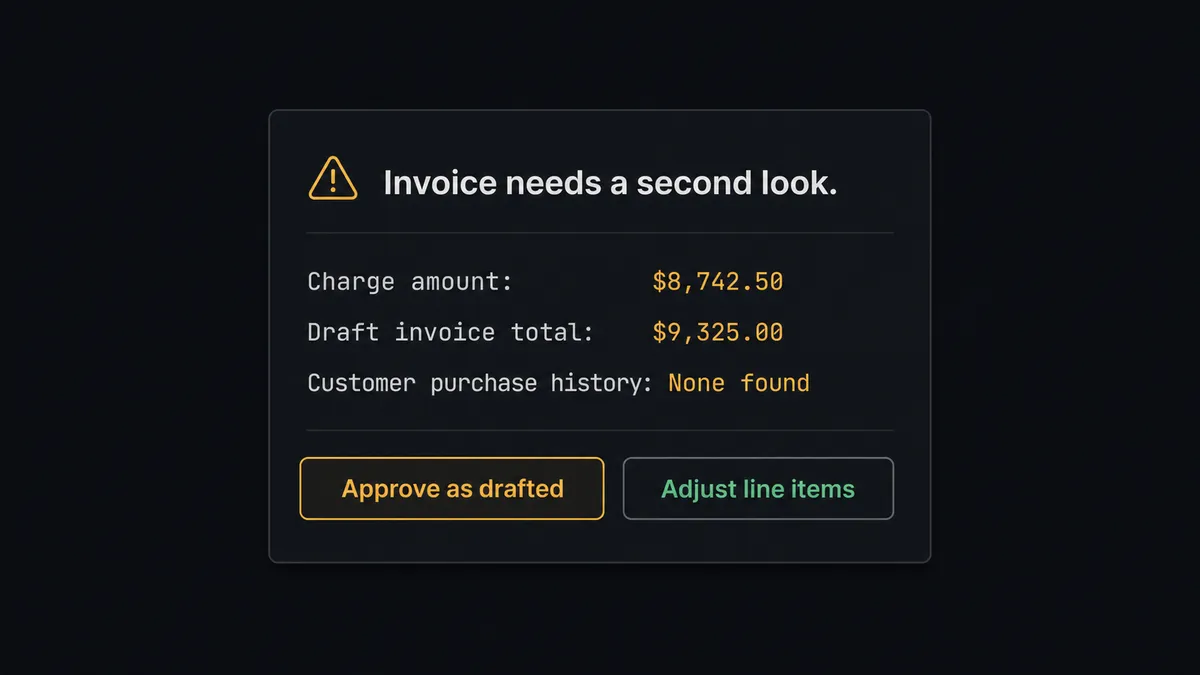
Here is a real decision moment. A Stripe charge comes in for $1,240. The agent drafts a Wave invoice from the product catalog, and the line items total $1,150. There is a $90 gap, likely a discount applied at checkout that never made it into the product price. The agent does not round the invoice up to match the charge, and it does not silently send an invoice for the wrong amount. It reasons: the charge and the invoice disagree, this customer has no purchase history to compare against, and the account has two businesses configured, so the wrong entity could be involved too. This is not a routine match. A person should look at it before it goes out.
The agent invokes the human-in-loop flow as a tool. That flow sends a Slack message to the bookkeeper: “Stripe charge for $1,240 does not match the draft Wave invoice total of $1,150. Customer: first purchase, no history on file. Business: Acme Retail (confirm this is correct). [Approve as drafted] [Adjust line items] [Escalate]”
The bookkeeper responds from their phone. The agent resumes with the decision: adjust the line items, approve as drafted, or hold for review. Either way, the decision, the decider’s identity, and the timestamp are captured in the audit trail. Only after the draft clears does the agent call Approve Invoice and Send Invoice, then record the payment against the invoice with Run GraphQL Query, referencing the original Stripe charge ID.
This is not a sync tool. The agent knows when to stop and ask. Prospects call this a digital andon cord, the line stops the moment something looks uncertain instead of shipping an invoice that erodes a customer’s trust in your books.
FlowRunner vs Zapier (the tool you’re probably comparing)
If you run Stripe and Wave, Zapier is probably the first tool you looked at. That is a reasonable instinct. Zapier has a large template library, a fast setup flow, and it handles “new Stripe charge creates a Wave invoice” competently as a straight-line Zap.
The gap shows up the moment the charge and the invoice do not agree, or the account has more than one business, or a customer’s first purchase needs a human eye before the invoice goes out.
| Capability | Zapier | FlowRunner |
|---|---|---|
| Simple charge-to-invoice connection | Yes, fast and easy | Yes, comparable setup |
| Agent reasons about amount mismatches before sending | No (rule-based Zaps only) | Yes, native agent with tool use |
| Human-in-loop with interactive Slack buttons | Not native; requires workarounds | Native: agent invokes it as a callable tool |
| Audit trail with approver identity and timestamp | No | Yes, on every human decision |
| Unlimited users on every tier | No (seat-based pricing on higher plans) | Yes, all tiers |
| Bring Your Own AI Key | No | Yes |
Zapier is the right tool if every charge maps cleanly to one invoice and stays that way. FlowRunner is the right tool once you have multiple businesses, discounts that break the price match, or a bookkeeper who wants to see what is about to go out before it does.
Before and after
| Category | Before | After |
|---|---|---|
| Invoice creation | Bookkeeper retypes each Stripe charge into Wave by hand | Agent drafts the Wave invoice from the charge within minutes, priced from the real product catalog |
| Amount accuracy | Mismatches between the charge and the invoice surface at reconciliation, if at all | Agent compares charge and invoice totals before the draft ever reaches a customer |
| Review time | A bookkeeper builds the invoice from scratch, 10 to 15 minutes each | A flagged draft takes a thirty-second read to approve or correct |
| Payment reconciliation | Stripe charges and Wave invoices are matched manually at month end | Payment is recorded against the invoice automatically, tagged with the Stripe charge ID |
| Multi-business risk | An invoice can be fired at the wrong business entity with no check | Agent confirms the entity via List Businesses before drafting |
| Overdue visibility | Unpaid invoices surface whenever someone remembers to check | Weekly sweep flags anything unpaid, with the Stripe payment history attached |
What you can build
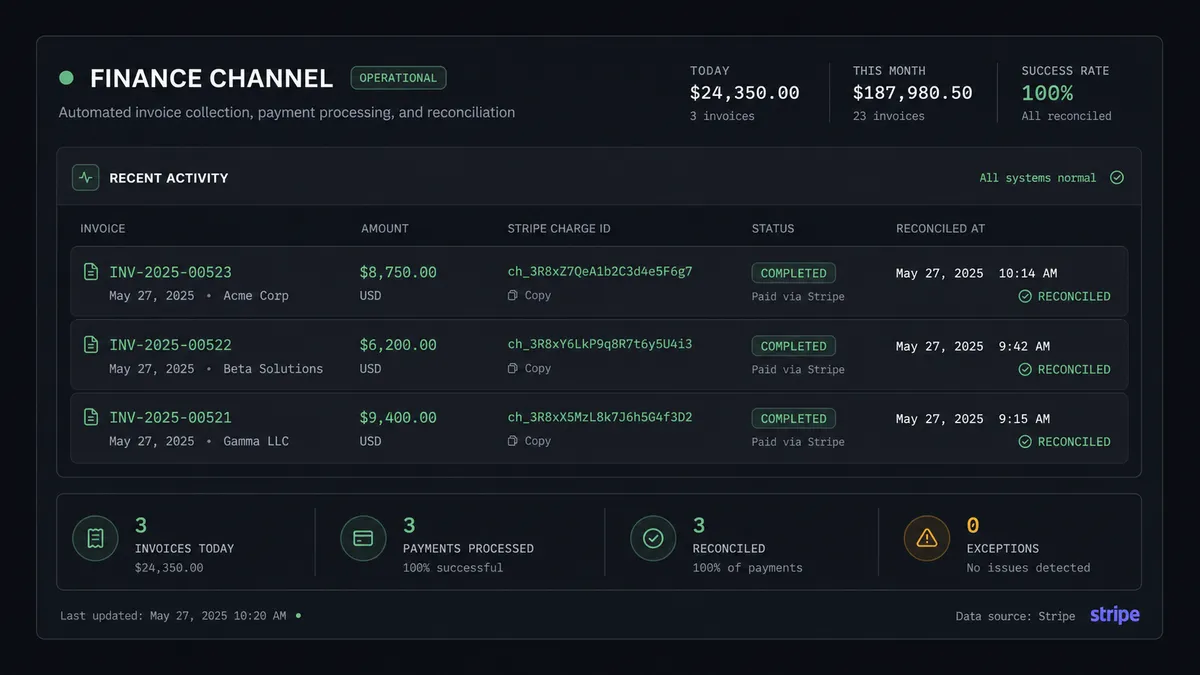
Charge-to-invoice drafting. A Stripe charge succeeds. The agent matches or creates the customer in Wave, drafts the invoice from the product catalog, and posts the draft link to the bookkeeper. Cleared drafts send themselves; anything that does not match gets a Slack card first.
Refund and invoice correction. Stripe issues a refund above the $500 human-in-loop threshold. The agent pulls the matching Wave invoice, drafts a correction, and routes it to the billing manager with the original charge, the refund reason, and the customer’s history before anything changes in the ledger.
Multi-business routing. An account runs two Wave businesses off one Stripe account. The agent calls List Businesses and routes each charge’s invoice to the correct entity automatically, flagging anything ambiguous instead of guessing.
Weekly reconciliation sweep. Every Friday, the agent runs List Transactions and List Invoices, matches Stripe charge IDs against recorded Wave payments, and posts anything unmatched to #finance-ops with the charge amount and date attached.
Common questions
Is it free to connect Stripe and Wave on FlowRunner? FlowRunner has a free plan with 100 executions a month, every integration included, and no credit card required, and new accounts get 14 days of Professional on top. Beyond the free plan, Growth starts at $45 per month.
Does the agent need my own OpenAI key? FlowRunner uses a bring-your-own-key model. You connect the AI provider of your choice, such as Anthropic Claude or OpenAI, and FlowRunner orchestrates your agents using that key. You are never locked into a specific model.
What happens when the agent isn’t sure what to do? The agent pauses and sends a Slack message with the Stripe charge details, the draft Wave invoice, and exactly what looks off. When the bookkeeper responds, the workflow resumes with the decision recorded in the audit trail.
Can the agent mark a Wave invoice as paid automatically after a Stripe charge succeeds? Yes. Once the invoice is approved and sent, the agent can record the payment against it using Wave’s Run GraphQL Query action, referencing the Stripe charge ID so the two records reconcile without manual entry.
Can I self-host FlowRunner? Yes. FlowRunner offers a free Community Edition for single-instance self-hosting, and an Enterprise self-hosted option with multi-instance clustering, full compliance features, and dedicated support.
Do unlimited users come with every plan? Yes. Every FlowRunner tier, from Growth at $45 per month to Enterprise, includes unlimited users and unlimited workflows. You pay for execution volume, not seat count.
Getting started
FlowRunner has a free plan with 100 executions a month, every integration included, and no credit card required, and new accounts get 14 days of Professional on top. Any real email address works; disposable domains are not accepted.
Connect both integrations from the FlowRunner integrations library: Stripe and Wave. The charge-to-invoice workflow described here can be live the same afternoon.
Start your free trial at flowrunner.ai or book a 30-minute walkthrough at calendly.com/flowrunner/intro. Bring your Stripe account and your Wave business, and we will build the first workflow together.
Frequently asked questions
Is it free to connect Stripe and Wave on FlowRunner?
FlowRunner has a free plan with 100 executions a month, every integration included, and no credit card required, and new accounts get 14 days of Professional on top. Beyond the free plan, Growth starts at $45 per month.
Does the agent need my own OpenAI key?
FlowRunner uses a bring-your-own-key model. You connect the AI provider of your choice, such as Anthropic Claude or OpenAI, and FlowRunner orchestrates your agents using that key. You are never locked into a specific model.
What happens when the agent isn't sure what to do?
The agent pauses and sends a Slack message with the Stripe charge details, the draft Wave invoice, and exactly what looks off. When the bookkeeper responds, the workflow resumes with the decision recorded in the audit trail.
Can the agent mark a Wave invoice as paid automatically after a Stripe charge succeeds?
Yes. Once the invoice is approved and sent, the agent can record the payment against it using Wave's Run GraphQL Query action, referencing the Stripe charge ID so the two records reconcile without manual entry.
Can I self-host FlowRunner?
Yes. FlowRunner offers a free Community Edition for single-instance self-hosting, and an Enterprise self-hosted option with multi-instance clustering, full compliance features, and dedicated support.
Do unlimited users come with every plan?
Yes. Every FlowRunner tier, from Growth at $45 per month to Enterprise, includes unlimited users and unlimited workflows. You pay for execution volume, not seat count.