Connect Stripe to Google Sheets: A Ledger That Flags Refunds
Connect Stripe and Google Sheets to log every payment automatically, or run it as an AI agent that pauses for a human before a refund over $500 or a dispute gets written into the books as final.

How do you connect Stripe to Google Sheets?
Stripe’s Parse Webhook Event trigger fires the moment a payment succeeds, a refund is created, or a dispute opens, and that event drives an Add Row action in Google Sheets that writes the transaction to a running ledger. FlowRunner is a visual AI-agent orchestration platform where automations run autonomously and pause for human judgment on the steps that carry real consequence. The same connection can run as an AI agent that reads each Stripe event, decides how to log it, and pauses to ask a billing manager before a large refund or an open dispute gets written into the books as final.
The problem it solves
Right now, the source of truth for payments lives in Stripe, and the source of truth everyone actually looks at lives in a spreadsheet. A billing manager or ops lead checks the Stripe dashboard, exports a CSV, and pastes it into a tracking sheet on some cadence, weekly if things are calm, daily if a launch is happening. Between exports, nothing in the sheet reflects what’s actually happening in Stripe. A refund goes out. A dispute opens. Nobody sees either one until the next manual pull.
That gap is where exceptions fall through the cracks. A refund that’s three times a customer’s normal order size gets buried in a list of routine ones, and nobody flags it until month-end reconciliation, if at all. Dispute evidence, when it’s needed, gets assembled by hand from Stripe, the order system, and email, a process that takes two to three hours per case. The spreadsheet was supposed to give the team visibility. Instead it gives them a stale copy of reality and no time back.
How it works: the connection
The connection runs on Stripe’s single trigger, Parse Webhook Event, which fires on any Stripe event type, including payment_intent.succeeded, charge.refunded, and charge.dispute.created. When it fires, the agent reads the payload for the amount, the customer, and the event type.
Before writing anything, the agent calls Find Row in Google Sheets to check whether that payment ID is already logged. Stripe webhooks can retry, and without this check a retried event would create a duplicate line in the ledger. If the row doesn’t exist yet, the agent calls Add Row to append it, mapped against a header row set up with Load Header Row so the flow addresses columns like date, customer, amount, event type, and status by name instead of by coordinate. Once the entry is settled, the agent calls Update Cell to write the final status back to that row, so the sheet always reflects where each transaction landed.
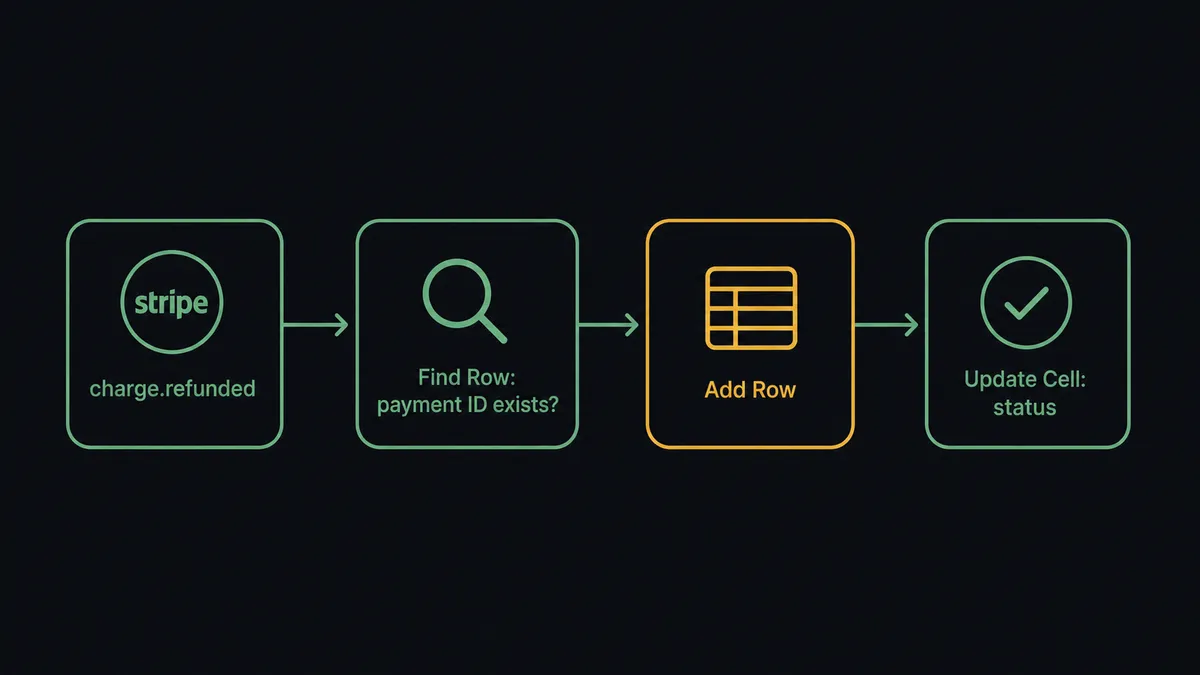
For high-volume accounts, the same pattern extends to disputes: when charge.dispute.created fires, the agent can route that event to its own tab using Add Sheet or Find Sheet, keeping refund history and dispute history separate but both current.
Can an AI agent run it? (and why a human stays in the loop)
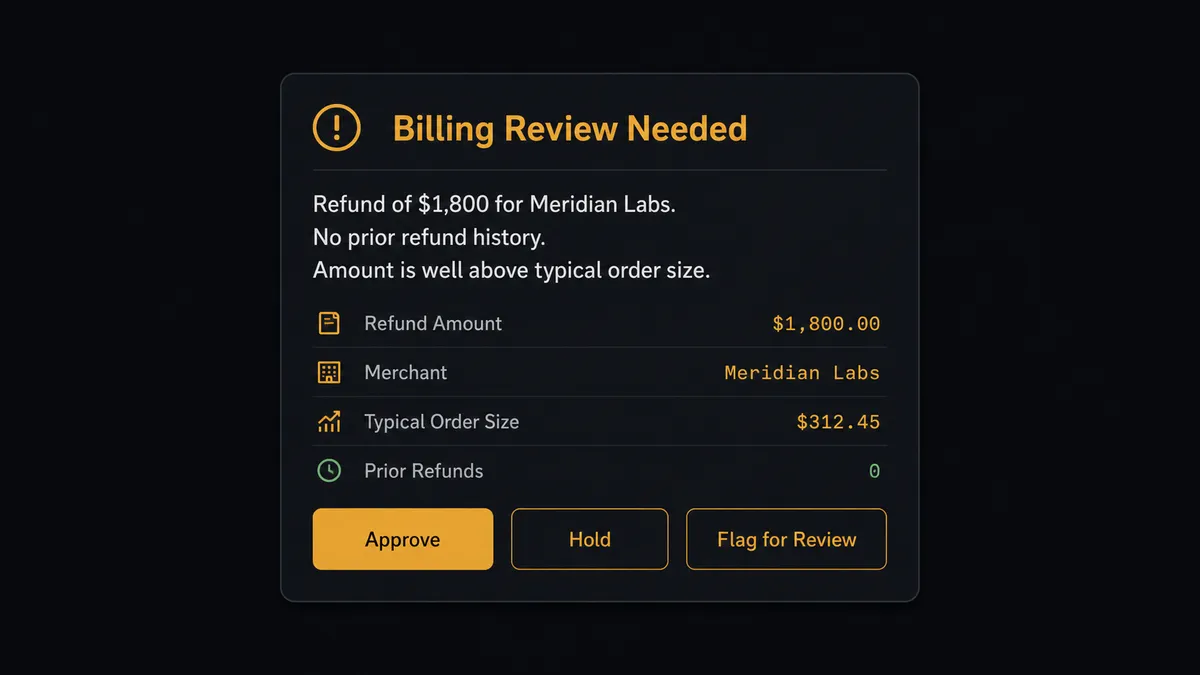
A sync tool moves data from A to B. An agent reads the data first. When the Stripe event is a refund, the agent doesn’t just log the amount, it checks the size of the refund against the customer’s history before deciding what to do next. A $40 refund on an account with a normal order pattern gets logged automatically. A $1,800 refund on an account that has never had one before does not.
This is the digital andon cord: the agent pulls the line and stops, the same way a factory worker pulls a cord to halt production when something looks wrong, rather than letting a bad part keep moving down the line. In this flow, that means the refund does not get written to the ledger as final until a person has seen it.
When the agent decides to escalate, it invokes a human-in-loop flow as a tool, the same way it would call any Stripe or Sheets action. It sends the billing manager a Slack message: “Refund of $1,800 for [customer] just came through Stripe. This account has no prior refund history and the amount is well above their typical order size. Approve, hold, or flag for review?” The manager responds with one click. The agent takes that decision, writes it to the row along with the approver’s identity and a timestamp, and only then marks the entry final. Disputes get the same treatment: they always route to a person, since a dispute is never a routine event.
FlowRunner vs Zapier
Zapier is a reasonable place to start this exact connection. It has mature Stripe and Google Sheets triggers, a huge library of pre-built Zaps, and a setup flow that a non-technical operator can finish in minutes. That’s a genuine strength, and most ops teams have used it for something like this before.
Where the two diverge is what happens at the moment that actually matters, the refund that’s too big or the dispute that just opened.
| Capability | Zapier | FlowRunner |
|---|---|---|
| Human review on refunds and disputes | Not built in; you’d chain a Slack step manually and hope someone checks it in time | Native: the agent decides when to pause and packages the context automatically |
| Users on the plan | Paid seats add up as more people need visibility | Unlimited users on every tier |
| AI provider | Runs on Zapier’s own AI credits and models | BYOK: bring your own OpenAI or Anthropic key |
| Pricing during a payment spike | Per-task pricing that’s easy to run through unexpectedly | Transparent workflow-based tiers with clear execution limits |
| Self-hosting | Not available | Enterprise self-hosted option |
Before and after
| Category | Before | After |
|---|---|---|
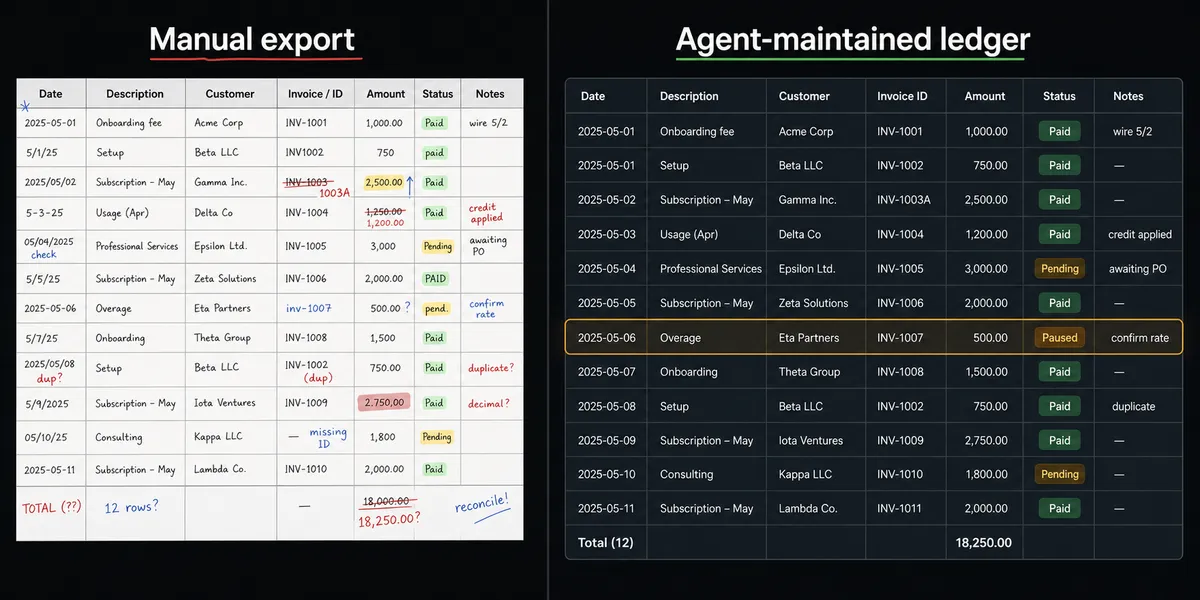
| Payment visibility | Billing staff check the Stripe dashboard daily and export data by hand | Every payment, refund, and dispute lands in the ledger automatically |
| Refund review | Large refunds sit in a transaction list until month-end reconciliation | Refunds over $500 pause for the billing manager before they’re logged as final |
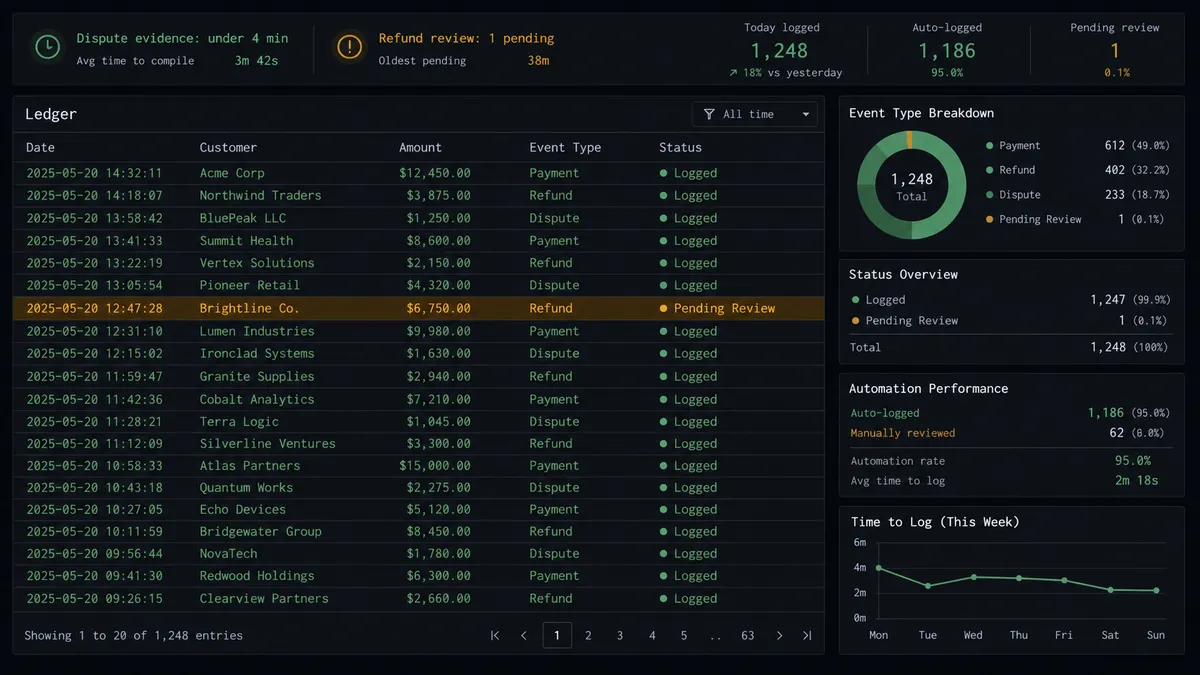
| Dispute evidence | Assembled manually in 2-3 hours by pulling records from multiple systems | Assembled and uploaded to the dispute in under 4 minutes |
| Ledger accuracy | The sheet goes stale between manual exports | The sheet reflects the live Stripe event stream |
| Data entry | Someone pastes an exported CSV into the sheet each week | Rows are written directly by the agent as events fire |
What you can build
A live revenue ledger with refund review. Every Stripe payment, refund, and dispute event writes a row to the sheet as it happens, and refunds over your threshold pause for approval before they’re marked final.
Dunning tracking in a shared sheet. Subscription payment failures get logged with the failure reason and the eventual outcome, so the billing team has a shared view of recovery attempts instead of digging through Slack history.
Weekly reconciliation reports. The agent runs Export Sheet on a schedule to generate the ledger as an Excel file and delivers it alongside the day’s Stripe balance, so treasury reporting shows up without anyone opening the spreadsheet.
A dedicated dispute log. When a dispute opens, the agent routes it to its own tab with Add Sheet, tracks its status with Update Row, and updates it again once evidence has been uploaded to Stripe.
Duplicate-safe logging at scale. With Find Row checking every payment ID before Add Row runs, the ledger stays clean even when Stripe retries a webhook during a traffic spike.
Common questions
Is it free to connect Stripe and Google Sheets on FlowRunner? Yes. FlowRunner has a free plan with 100 executions a month, every integration included, and no credit card required, and new accounts get 14 days of Professional on top.
Can I self-host this workflow? Yes. The Enterprise tier supports a self-hosted deployment, so the Stripe-to-Sheets flow and its data can run entirely inside your own infrastructure.
Does the agent need my own OpenAI key? Yes. FlowRunner uses a bring-your-own-key model, so the agent runs on the AI provider and account you already control rather than a shared black-box model.
What happens when the agent isn’t sure whether to log a refund? It pauses the flow, sends the billing manager a Slack message with the amount, the customer, and the reason it’s unsure, and waits for a decision before writing anything to the sheet as final.
Will retried Stripe webhooks create duplicate rows in my sheet? No. The agent runs Find Row against the payment ID before logging, so a webhook retry updates the existing row instead of adding a duplicate one.
Can I track disputes and refunds in separate tabs? Yes. The agent can use Add Sheet and Find Sheet to route different Stripe event types to their own tabs within one spreadsheet document.
Getting started
FlowRunner has a free plan with 100 executions a month, every integration included, and no credit card required, and new accounts get 14 days of Professional on top. Connect Stripe and Google Sheets, set the trigger to fire on the events you care about, and add the human-in-loop step before the agent touches a refund.
Start building at flowrunner.ai, or book time with the team at calendly.com/flowrunner/intro to walk through the flow together.
Frequently asked questions
Is it free to connect Stripe and Google Sheets on FlowRunner?
Yes. FlowRunner has a free plan with 100 executions a month, every integration included, and no credit card required, and new accounts get 14 days of Professional on top.
Can I self-host this workflow?
Yes. The Enterprise tier supports a self-hosted deployment, so the Stripe-to-Sheets flow and its data can run entirely inside your own infrastructure.
Does the agent need my own OpenAI key?
Yes. FlowRunner uses a bring-your-own-key model, so the agent runs on the AI provider and account you already control rather than a shared black-box model.
What happens when the agent isn't sure whether to log a refund?
It pauses the flow, sends the billing manager a Slack message with the amount, the customer, and the reason it's unsure, and waits for a decision before writing anything to the sheet as final.
Will retried Stripe webhooks create duplicate rows in my sheet?
No. The agent runs Find Row against the payment ID before logging, so a webhook retry updates the existing row instead of adding a duplicate one.
Can I track disputes and refunds in separate tabs?
Yes. The agent can use Add Sheet and Find Sheet to route different Stripe event types to their own tabs within one spreadsheet document.