How to Connect Stripe with NetSuite (With or Without an AI Agent)
Connect Stripe and NetSuite so payment events automatically record in your ERP, optionally as an AI agent that pauses for human judgment before posting disputed charges or large transactions.
How do you connect Stripe to NetSuite?
You connect Stripe to NetSuite by setting the Stripe Parse Webhook Event as your flow trigger and mapping it to NetSuite actions like Create Customer, Create Invoice, and Create Payment. FlowRunner is a visual AI-agent orchestration platform where automations run autonomously and pause for human judgment on the steps that carry real consequence. The same connection that syncs a payment record can run as an AI agent that evaluates context, decides which NetSuite records to create, and routes anomalies to your finance team before a disputed charge becomes a write-off.
The problem it solves
Right now, your AP clerk or billing manager logs into two systems every day. A Stripe payment lands, and someone has to open NetSuite, find the customer, locate the open invoice, and manually apply the payment. Sales orders come through and need a matching NetSuite record built by hand. Subscription failures pile up in a dashboard that nobody checks until accounts go dark. The work is repetitive, the errors compound quietly, and the exceptions fall through the cracks on busy days.
The real cost is not the time per transaction. It is what does not get done while your team is copying fields between systems. Month-end close takes longer because payment records are three days behind. Disputes sit unworked because the evidence package requires pulling records from three places. A team built for judgment is spending its time on data entry.
How it works: the connection
The Stripe Parse Webhook Event trigger is the entry point for the entire integration. Every event Stripe emits, from payment success to subscription canceled to dispute opened, passes through a single trigger that wakes the flow and hands the event data to the agent.
From there, the agent works through NetSuite in sequence. When a payment succeeds, it calls Get Customer to verify the NetSuite record exists, then calls Create Payment to record the application against the open invoice. When a new subscription is confirmed, it calls Create Customer if no record exists, then Create Sales Order from the subscription line items. When an invoice milestone is reached, it calls Create Invoice directly in NetSuite without anyone touching either system.
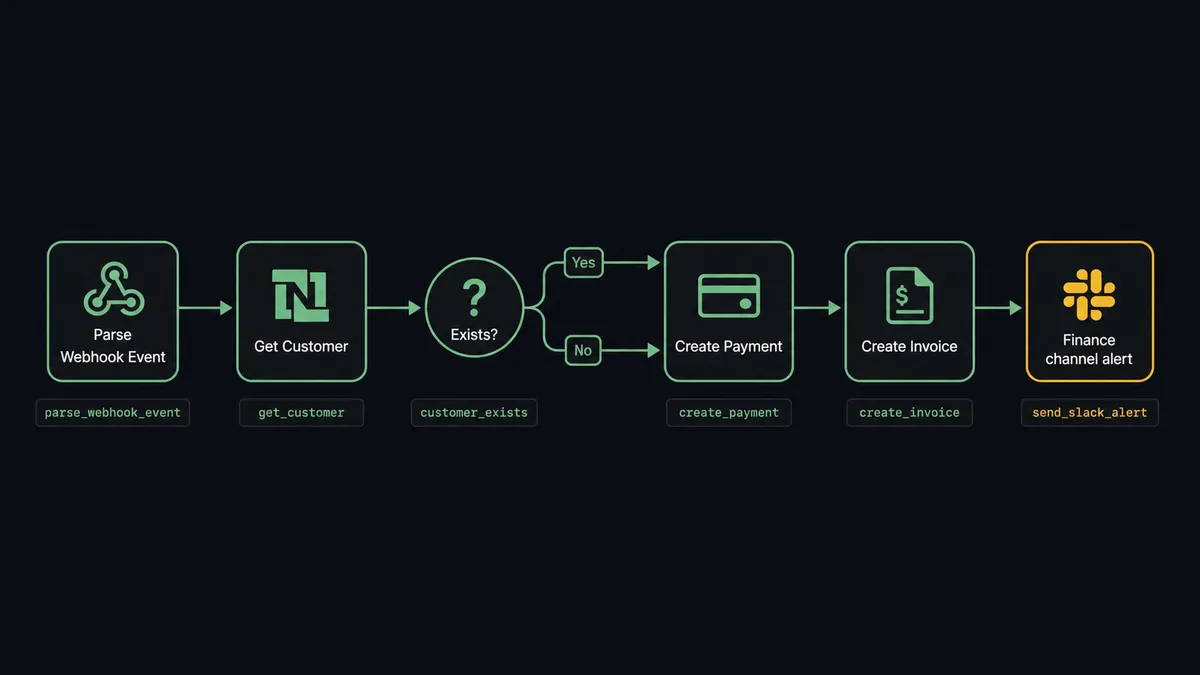
The data mapping is direct. Stripe’s customer ID links to the NetSuite customer record. The payment amount maps to the NetSuite payment amount. The invoice ID from the Stripe event identifies the open NetSuite invoice to apply the payment against. No spreadsheet intermediary, no manual lookup.
Can an AI agent run it? (and why a human stays in the loop)
The plain connection handles the routine case. An AI agent handles everything else, and that is where the real operational value sits.
The agent reads each Stripe event and reasons about what to do with it. A $400 payment from a customer with three years of clean history and a matching open invoice gets processed automatically. A $7,200 payment from a customer with two prior disputes and an amount that does not match any open NetSuite invoice gets flagged before anything is written to your ERP.
The decision to escalate is the agent’s call, not a hardcoded rule. The agent evaluates the payment amount, the customer’s history, the failure reason on a declined charge, and whether a matching invoice exists in NetSuite. It is not asking “is this over $500?” It is asking “does this transaction make sense given what I know about this customer?”
When the agent decides a human needs to weigh in, it invokes your human-in-loop flow as a callable tool. The workflow pauses. Your billing manager receives a Slack message:
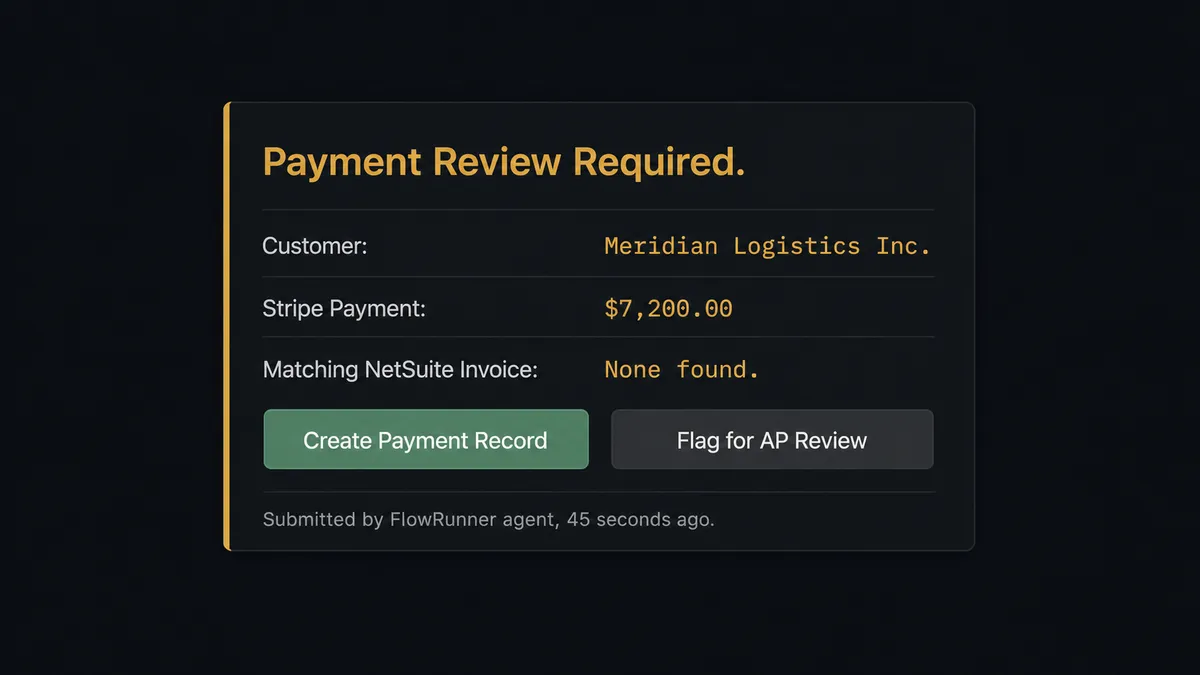
The manager reviews and clicks. The agent processes the exact action approved. The approver’s identity, the decision, and the timestamp are captured in the audit trail. You have a paper trail for every exception without building one manually.
This is the digital andon cord. The agent stops the line when it hits uncertainty. It does not guess and it does not skip. It asks.
FlowRunner vs the tool you’re probably comparing
Most teams connecting Stripe to NetSuite today are using Zapier for simpler setups or Celigo for ERP-specific integrations. Both are legitimate choices for certain needs. Here is an honest comparison for this use case.
Zapier is fast to set up and covers the basic trigger-action pattern well. It works for simple, predictable flows where every event maps to the same action every time. It does not have native AI agent reasoning, and there is no human-in-loop capability beyond a basic approval email. Celigo is built specifically for ERP integrations and has deep NetSuite expertise, but it requires technical configuration, licenses per connection, and does not have agent-based decision logic.
| Capability | Zapier | Celigo | FlowRunner |
|---|---|---|---|
| Stripe trigger to NetSuite action | Yes | Yes | Yes |
| AI agent decision logic per transaction | No | No | Yes |
| Human-in-loop as a callable agent tool | No | No | Yes |
| Audit trail with approver identity | No | Limited | Yes |
| Unlimited users on every plan | No (per-seat) | No (per-seat) | Yes |
| Bring your own AI provider keys | No | No | Yes |
| Self-hosted option | No | No | Yes (Community / Enterprise) |
The comparison is not about which tool connects two systems. It is about what happens when the connection meets an exception. Zapier and Celigo route the exception to a spreadsheet or a support ticket. FlowRunner routes it to the right person with full context, waits for a decision, and acts on it.
Before and after
| Category | Before | After |
|---|---|---|
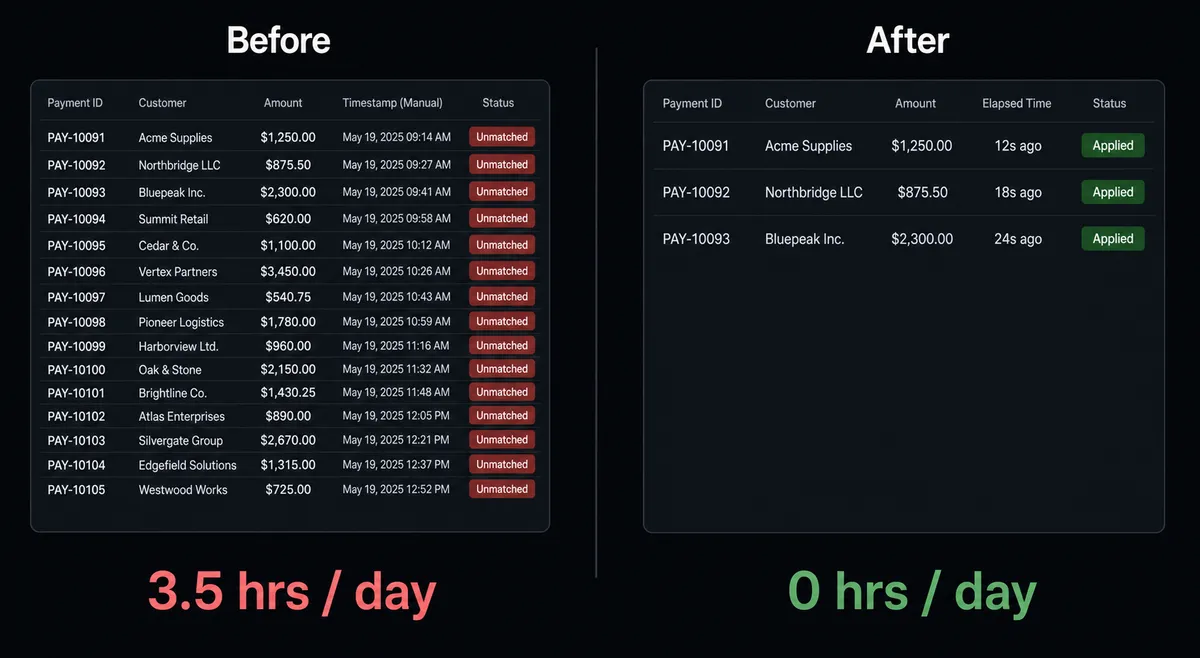
| Payment application | AP clerk manually matches Stripe payments to open NetSuite invoices daily | Agent applies payment to the correct NetSuite invoice automatically within seconds of the Stripe event |
| Dispute evidence | 2-3 hours assembling order records, emails, and shipping data across systems | Agent builds and submits the evidence package in under 4 minutes |
| Sales order creation | Staff create NetSuite customer and SO by hand after each deal closes | Agent creates customer and SO from Stripe subscription data with no manual entries |
| Exception handling | Anomalous payments processed with the same logic as routine ones | Agent evaluates context and routes exceptions to the billing team before money moves |
| Month-end reconciliation | Finance team exports and reconciles payment records manually at close | Agent runs SuiteQL reconciliation queries and posts the summary to the finance channel |
What you can build
Automated order-to-cash cycle. When a Stripe subscription is confirmed, the agent calls Create Customer in NetSuite (if needed), Create Sales Order from the subscription line items, Create Invoice when the order ships, and Create Payment when the charge succeeds. The full cycle runs without a single manual entry.
Subscription failure dunning with escalation. Parse Webhook Event fires on a failed payment. The agent checks the failure reason: expired card gets an automated payment update email; insufficient funds triggers a 3-day wait and retry. If the second attempt fails, the agent pauses and routes to the billing team via Slack with the customer’s full history. The team decides on a grace period or cancellation.
High-value sales order approval. Deals above $50,000 that would generate a NetSuite sales order pause before creation. The agent routes the proposed order to the VP of Sales via Slack with line item detail. The VP approves or modifies. The agent creates the SO with the approved values.
AP reconciliation from Stripe payouts. The agent runs a Run SuiteQL Query each week to identify open NetSuite invoices where the corresponding Stripe payment has succeeded but the payment has not been applied. It generates a reconciliation report and posts it to the AP channel with the unmatched records highlighted.
Dispute evidence automation. Parse Webhook Event fires on dispute opened. The agent calls Get Customer and Get Invoice in NetSuite, retrieves the original payment record and any related order data, compiles the package, and uploads it to the Stripe dispute. Disputes that cannot be confidently resolved automatically are surfaced to the billing manager with the available context.
Common questions
Is it free to connect Stripe and NetSuite on FlowRunner? FlowRunner has a free plan with 100 executions a month, every integration included, and no credit card required, and new accounts get 14 days of Professional on top. The Growth plan starts at $45 per month beyond the free plan.
Can I self-host FlowRunner? Yes. FlowRunner offers a free Community Edition for self-hosted, single-instance deployments. An Enterprise self-hosted option is available for organizations that need multi-instance clustering and the full compliance suite.
Does the AI agent need my own OpenAI key? FlowRunner uses a bring-your-own-keys model. You connect your own API key from any supported AI provider. FlowRunner orchestrates the agent; the AI calls run against your account.
What happens when the agent encounters a Stripe payment it cannot process automatically? The agent invokes a human-in-loop flow as a callable tool. It pauses the workflow, packages the context (payment amount, customer history, failure reason), and routes it to the appropriate person via Slack, email, or WhatsApp. The workflow resumes after the human decides. The decision, the approver’s identity, and the timestamp are all captured in the audit trail.
What if a NetSuite sales order exceeds our approval threshold? The agent evaluates the order value and context before writing to NetSuite. Orders above your threshold pause for VP-level approval via Slack. The agent presents the line items and waits. Once approved, it creates the sales order. No record is written without the approval.
Does FlowRunner have limits on the number of users or workflows? No. All FlowRunner plans include unlimited users and unlimited workflows. You pay for execution volume, not for seats.
Getting started
FlowRunner has a free plan with 100 executions a month, every integration included, and no credit card required, and new accounts get 14 days of Professional on top. Corporate email sign-up at flowrunner.ai.
The Stripe and NetSuite connectors are ready to use from day one. Start with the integration pages to see the full action libraries:
- Stripe integration: 1 trigger, 67 actions covering payments, subscriptions, invoices, refunds, disputes, and payouts.
- NetSuite integration: 27 actions covering customers, vendors, invoices, sales orders, payments, and SuiteQL.
To talk through your specific order-to-cash or payment reconciliation workflow, book a 30-minute call at calendly.com/flowrunner/intro. You will leave with a workflow design, not a sales pitch.
Frequently asked questions
Is it free to connect Stripe and NetSuite on FlowRunner?
FlowRunner has a free plan with 100 executions a month, every integration included, and no credit card required, and new accounts get 14 days of Professional on top. The Growth plan starts at $45 per month beyond the free plan.
Can I self-host FlowRunner?
Yes. FlowRunner offers a free Community Edition for self-hosted, single-instance deployments. An Enterprise self-hosted option is available for organizations that need multi-instance clustering and the full compliance suite.
Does the AI agent need my own OpenAI key?
FlowRunner uses a bring-your-own-keys model. You connect your own API key from any supported AI provider. FlowRunner orchestrates the agent; the AI calls run against your account.
What happens when the agent encounters a Stripe payment it cannot process automatically?
The agent invokes a human-in-loop flow as a callable tool. It pauses the workflow, packages the context (payment amount, customer history, failure reason), and routes it to the appropriate person via Slack, email, or WhatsApp. The workflow resumes after the human decides. The decision, the approver's identity, and the timestamp are all captured in the audit trail.
What if a NetSuite sales order exceeds our approval threshold?
The agent evaluates the order value and context before writing to NetSuite. Orders above your threshold pause for VP-level approval via Slack. The agent presents the line items and waits. Once approved, it creates the sales order. No record is written without the approval.
Does FlowRunner have limits on the number of users or workflows?
No. All FlowRunner plans include unlimited users and unlimited workflows. You pay for execution volume, not for seats.