Shopify Airtable Integration: Flagged Orders Tracked to Resolution
Connect Shopify and Airtable to log flagged orders and disputes as a tracked exception queue, or run it as an AI agent that pauses for a named approver before a refund goes out.
How do you connect Shopify to Airtable?
Shopify’s On New Order or On New Dispute trigger starts the flow, and Airtable’s Create Record action logs the order or dispute as a row in an Exceptions table with the amount, customer, and recommended action attached. When a manager updates that row’s status in Airtable, the On New or Updated Record trigger fires and the flow calls back into Shopify, using Create Refund, Add Tags, or a fulfillment release to apply the decision. FlowRunner is a visual AI-agent orchestration platform where automations run autonomously and pause for human judgment on the steps that carry real consequence. The same Shopify-to-Airtable connection can run as a plain sync, or as an AI agent that decides which orders need a person and calls a human-in-loop flow as a tool before it issues a refund.
The problem it solves
New orders land in the Shopify admin faster than anyone can look at them, and most of them are fine. The ones that aren’t, a high-value order from a first-time customer, a shipping address that doesn’t match the billing address, a chargeback that just opened, sit in the same queue as everything else until someone happens to open the dashboard. By then the fulfillment window is closing or the dispute evidence deadline is a day closer. The fulfillment manager ends up triaging by memory, and the record of who decided to hold or release an order lives in a Slack DM that nobody can search six weeks later.
Refunds carry the same gap. A support rep quotes a refund in a customer thread, someone approves it verbally, and the actual Create Refund call happens whenever someone remembers to key it into Shopify. There’s no structured queue of what’s open, no single place an AP-style ops lead can scan each morning, and no consistent record connecting the approval to the action. Exceptions fall through the cracks not because the team is careless, but because the tools they’re using, an inbox and a dashboard, were never built to hold a queue.
How it works: the connection
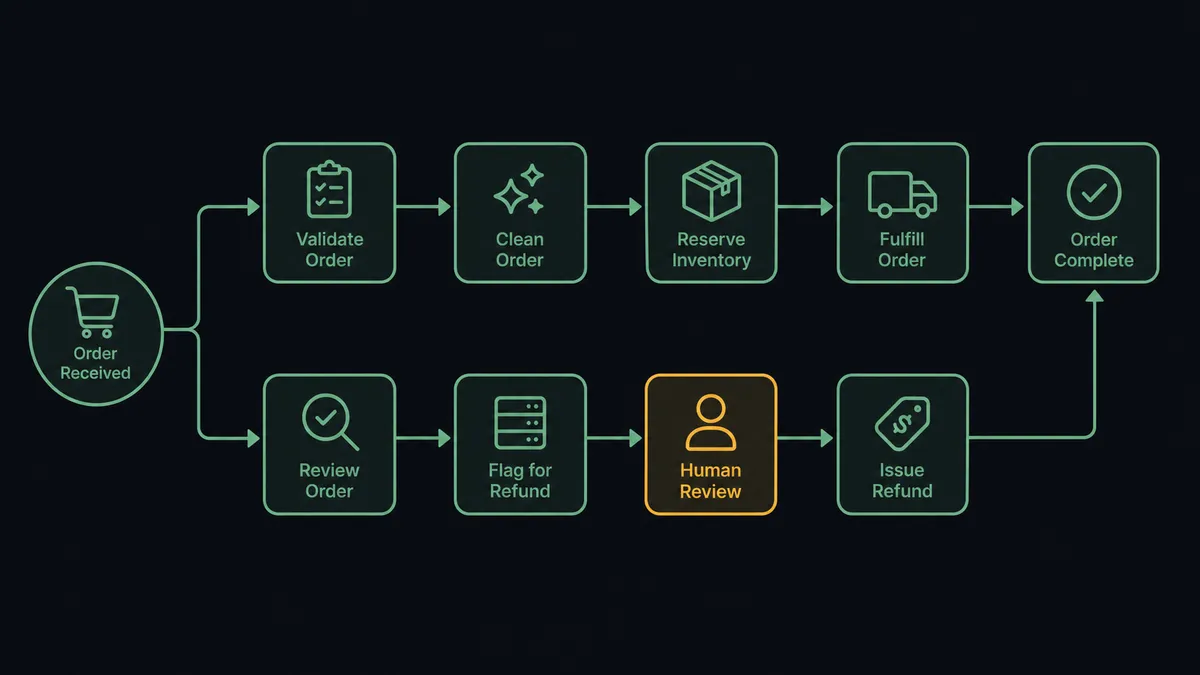
The flow starts when Shopify fires On New Order at checkout or On New Dispute when a cardholder challenges a charge. The agent pulls the full context: line items, shipping address, order total, or for a dispute, the amount, reason, and evidence deadline. It checks inventory availability per SKU and scores the order against fraud signals and a configurable high-value threshold using data already available through Get Order and Get List of Disputes.
For anything that trips a signal, the agent calls Airtable’s Create Record action to write a new row into the Exceptions table: issue type, order or dispute number, amount, and a recommended action. This is the same pattern Airtable already runs for purchase-order exceptions, applied to storefront orders instead of AP documents. The record becomes the single place the issue lives, searchable and permanent, instead of a message that scrolls out of view.
Clean orders skip all of this. They get tagged with Add Tags and handed straight to the fulfillment flow, with a confirmation email out to the customer. Only the orders and disputes that actually need a decision generate an Airtable record and a notification.
Can an AI agent run it? (and why a human stays in the loop)
This is not a sync tool moving rows from one app to another. The agent reads the order or dispute, reasons about what it’s looking at, and decides on its own whether the case needs a person, the same way it would decide which Shopify action to call next. It doesn’t stop at a hardcoded dollar figure. An order from a returning customer at 3x their usual order value, shipped to their normal address, might clear automatically. A first-time customer’s order at half that amount, shipped to an address that doesn’t match the billing zip, gets flagged, because the fraud signal matters more than the total.
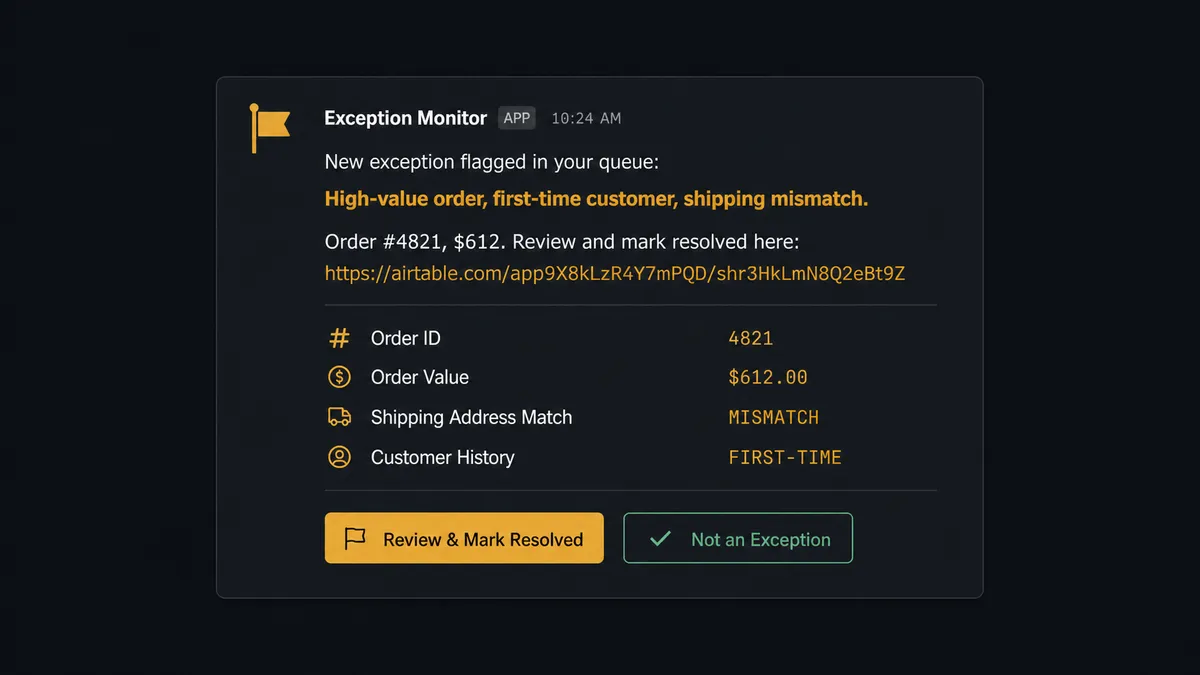
When the agent decides a case needs a person, it packages everything the approver needs before asking: the order number, the customer, the amount, whether inventory would need to be restocked on a refund, and the reason it’s flagging the case. It writes that into the Airtable Exceptions record, then posts to the operations Slack channel: “New exception flagged in your queue: [issue type] for [order/customer]. Review and mark resolved here: [Airtable link].” Nobody has to dig through a dashboard. The approver clicks through, sees the full context in one place, and makes the call.
The approver marks the record Resolved in Airtable, whether that means release the order, deny the refund, or approve it. Airtable’s On New or Updated Record trigger fires, the agent reads the decision, and only then does it call Create Refund or release the hold in Shopify. Prospects call this a digital andon cord: the agent stops the line the moment it hits uncertainty, and only a named person can restart it. This is not a basic conditional branch. It’s an agent that evaluates context every time and decides for itself when a human’s judgment is worth more than moving fast.
FlowRunner vs Zapier
Zapier’s Shopify and Airtable integrations are mature, well documented, and fast to wire up for straightforward field mapping. That ease is real, and for a flow where every new order should simply become a new row with no judgment involved, a zap does the job. Where it runs out of road is the moment a decision needs to happen in the middle: routing to a person, waiting for their input, and resuming with that input as context. Zapier can approximate this with Paths, Delay, and a separate notification app stitched together, but the reasoning about which orders need a person in the first place has to be hardcoded as rules, not judgment.
| Capability | FlowRunner | Zapier |
|---|---|---|
| Human-in-loop | Native: the agent invokes a human-review flow as a callable tool | Not native: requires Paths, Delay, and a separate app stitched together |
| Decision logic | Agent reasons about fraud signals and order context, not fixed rules | Filters and static conditions only |
| Users included | Unlimited users on every tier | Priced per user on higher tiers |
| AI provider access | BYOK: bring your own key for any provider | AI features tied to Zapier’s own AI credits |
| Self-hosting | Free Community Edition and self-hosted Enterprise available | Cloud only |
| Pricing model | Transparent workflow-based execution tiers | Per-task pricing that scales with every step in the zap |
Before and after
| Category | Before | After |
|---|---|---|
| Order and dispute triage | New orders and disputes wait in the admin queue until someone opens the dashboard | Orders are validated, scored, and routed the moment they’re placed |
| Exception visibility | Issues live in DMs and email threads, or get missed | Every flagged order or dispute becomes a structured record in Airtable |
| Refund approvals | Refunds get approved verbally, then keyed in whenever someone remembers | Every refund is quoted with full context and issued only after a named approver signs off in Airtable |
| Resolution speed | ERP or Shopify corrections happen days after the exception surfaced | Shopify is updated the moment the Airtable record is marked Resolved |
| Audit trail | No consistent record of who approved what | Every decision, the decider’s identity, and the timestamp are captured |
What you can build
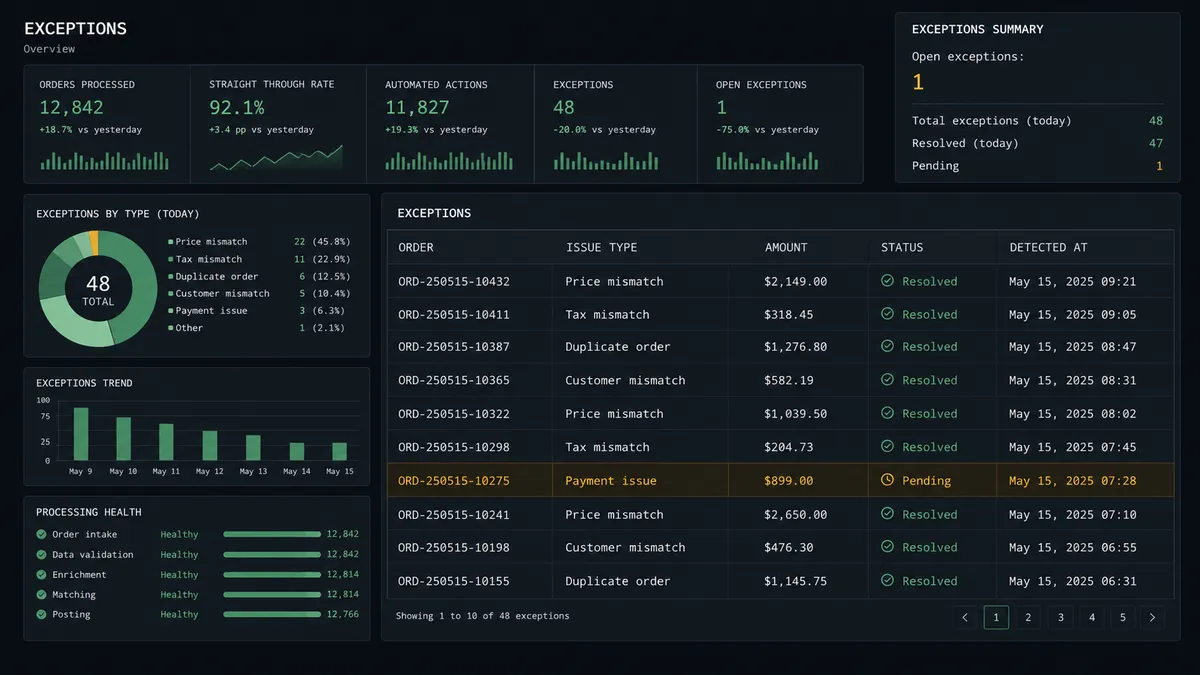
Fraud and high-value order triage. Shopify’s On New Order trigger feeds the agent’s fraud and threshold check, and flagged orders land in an Airtable queue with a Slack link so the fulfillment manager can hold or release before anything ships.
Dispute evidence tracker. On New Dispute starts a race against the evidence deadline. The agent creates an Airtable record with the deadline visible, assembles the order and payout context, and hands the finance reviewer a ready-to-submit case instead of a blank inbox.
Refund approval log. Every refund request becomes an Airtable row with the amount and reason before Create Refund ever runs, so the approval and the action live in the same auditable place.
Inventory reconciliation dashboard. A supplier feed synced into Airtable becomes the source of truth the agent reads before calling Set Inventory Quantities, so the storefront reflects what’s actually on the shelf across every location.
Product launch tracker. Shopify’s On New Product trigger creates a row in an Airtable launch calendar. When the team marks it Ready, the agent calls Add Products to Collection and the item goes live without a second manual step.
Common questions
Is it free to connect Shopify and Airtable on FlowRunner? FlowRunner has a free plan with 100 executions a month, every integration included, and no credit card required, and new accounts get 14 days of Professional on top. Beyond the free plan, Growth starts at $45/mo for 12,000 executions with unlimited users and workflows included.
Can I self-host the Shopify to Airtable flow? Yes. The free Community Edition runs a single self-hosted instance, and the self-hosted Enterprise tier adds multi-instance clustering plus full audit retention, RBAC, and SSO for teams that need to keep order and customer data on their own infrastructure.
Does the agent need my own OpenAI key? FlowRunner uses a BYOK model, so you bring your own API key for whichever AI provider you choose. FlowRunner does not resell model access or mark up token usage.
What happens when the agent isn’t sure whether to flag an order? The agent errs toward creating the Airtable exception record and routing it to a person rather than guessing. A named approver reviews the order or dispute in Airtable and marks it resolved, and only then does the agent act on Shopify.
How is this different from a Zapier zap between Shopify and Airtable? A Zapier zap can move a new order into an Airtable row, but the judgment call, human notification, wait, and resume logic has to be built separately across Paths and additional apps. In FlowRunner, an AI agent evaluates the order, decides whether it needs a person, and invokes the human-in-loop step as one native tool call.
Which Airtable trigger fires the resolution step? On New or Updated Record fires when the approver changes the exception row’s status in Airtable, and that event is what tells the agent to read the decision and apply it back in Shopify.
Getting started
FlowRunner has a free plan with 100 executions a month, every integration included, and no credit card required, and new accounts get 14 days of Professional on top. Connect your Shopify store and your Airtable base, pick the trigger that matches your exception, and turn on the flow.
Start building at flowrunner.ai, or book time with the team at calendly.com/flowrunner/intro to walk through the flow with your own order and dispute data.
Frequently asked questions
Is it free to connect Shopify and Airtable on FlowRunner?
FlowRunner has a free plan with 100 executions a month, every integration included, and no credit card required, and new accounts get 14 days of Professional on top. Beyond the free plan, Growth starts at $45/mo for 12,000 executions with unlimited users and workflows included.
Can I self-host the Shopify to Airtable flow?
Yes. The free Community Edition runs a single self-hosted instance, and the self-hosted Enterprise tier adds multi-instance clustering plus full audit retention, RBAC, and SSO for teams that need to keep order and customer data on their own infrastructure.
Does the agent need my own OpenAI key?
FlowRunner uses a BYOK model, so you bring your own API key for whichever AI provider you choose. FlowRunner does not resell model access or mark up token usage.
What happens when the agent isn't sure whether to flag an order?
The agent errs toward creating the Airtable exception record and routing it to a person rather than guessing. A named approver reviews the order or dispute in Airtable and marks it resolved, and only then does the agent act on Shopify.
How is this different from a Zapier zap between Shopify and Airtable?
A Zapier zap can move a new order into an Airtable row, but the judgment call, human notification, wait, and resume logic has to be built separately across Paths and additional apps. In FlowRunner, an AI agent evaluates the order, decides whether it needs a person, and invokes the human-in-loop step as one native tool call.
Which Airtable trigger fires the resolution step?
On New or Updated Record fires when the approver changes the exception row's status in Airtable, and that event is what tells the agent to read the decision and apply it back in Shopify.