Can an AI Agent Route Rossum Invoices Into QuickBooks Bills?
Connect Rossum and QuickBooks Online so extracted invoices post as matched bills automatically, with a human reviewing low-confidence fields and bills over $10,000.
How do you connect Rossum to QuickBooks Online?
Rossum’s Get Annotation Content action drives QuickBooks Online’s Create Bill action: the agent extracts the invoice, matches it to an open purchase order, and posts the bill once the numbers hold up. FlowRunner is a visual AI-agent orchestration platform where automations run autonomously and pause for human judgment on the steps that carry real consequence. The same connection can run as a simple field mapping, or it can run as an AI agent that reasons about each invoice and invokes a human-in-loop flow as a callable tool the moment something doesn’t match.
Neither Rossum nor QuickBooks Online exposes a native webhook trigger inside FlowRunner, so the flow starts wherever the PDF actually lands, an inbox or an upload folder, and the agent calls Upload Document to hand it to Rossum. Everything downstream, from extraction to the posted bill, runs without anyone re-keying a number.
The problem it solves
An AP clerk opens a vendor invoice PDF, reads the total, the invoice number, the line items, and types them into QuickBooks. It’s a job description built on retyping. Accuracy depends on whether it’s a Monday morning or a Friday afternoon, and every invoice gets the same amount of attention whether it’s a clean recurring charge from a vendor with a decade of history or a first-time bill for an amount nobody’s seen before.
The extracted data doesn’t help until someone moves it. Rossum can pull the vendor, total, and line items off the page with a confidence score on every field, but that extraction dies in a silo if a person still has to open QuickBooks and create the bill by hand. Meanwhile the exceptions, the invoice that doesn’t match its PO, the vendor bill that’s three times the usual amount, fall through the cracks the same way the clean ones do, because nothing distinguishes them until a human happens to notice.
How it works: the connection
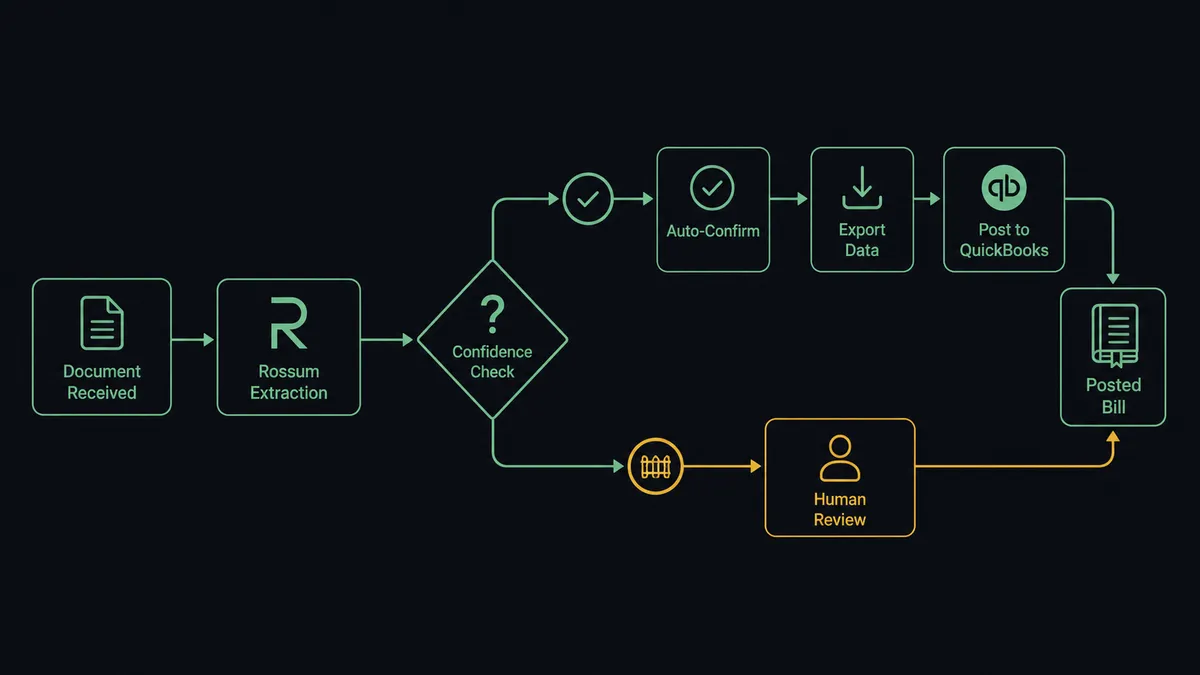
The flow starts when a vendor invoice PDF arrives in the AP mailbox. The agent calls Upload Document to send the file into Rossum’s invoices queue with source metadata attached, then Wait for Document Extraction polls until the AI Engine returns a reviewable annotation, typically within about 90 seconds.
Get Annotation Content reads the datapoint tree: vendor, invoice number, date, totals, and line items, each with a per-field confidence score. The agent checks that total and PO reference against the open purchase order. If every material field clears the confidence bar and the PO matches, Confirm Annotation validates the annotation and fires Rossum’s export hooks, the same action that turns an extracted number into a financial fact.
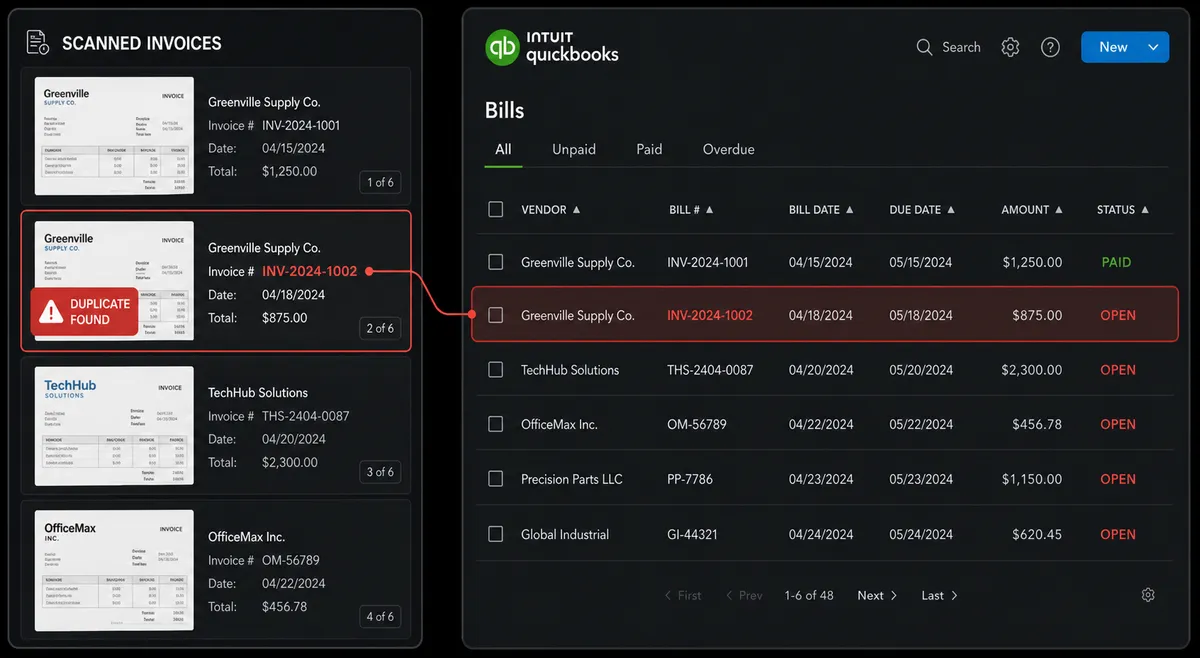
From there the agent moves into QuickBooks Online. If the vendor doesn’t already exist, Create Vendor adds the record; Create Bill posts the invoice with the matched PO reference, amount, and line items. List Bills lets the agent check for an existing bill from the same vendor and invoice number first, so a duplicate document doesn’t become a duplicate payment. The whole path, from PDF to posted bill, runs without a person touching either system, unless the data says otherwise.
Can an AI agent run it? (and why a human stays in the loop)
This isn’t a field-mapping sync. The agent reads the extracted data, reasons about what it’s looking at, and decides which of its tools to use next, Confirm Annotation, Create Vendor, Create Bill, or a human-in-loop flow, based on the specific invoice in front of it, not a fixed rule applied to every document the same way.
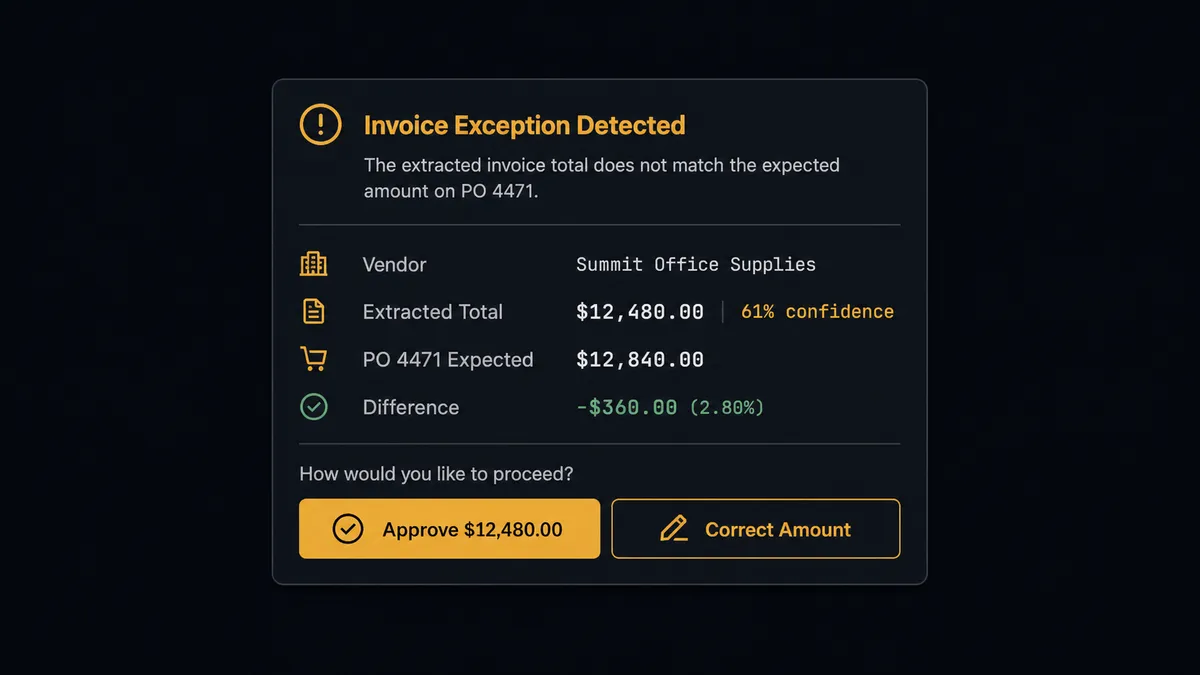
Say a $12,480 invoice comes in from a vendor the system has processed a dozen times before, and the total extracts at 61 percent confidence while the open PO expects $12,840. That gap plus the low confidence is enough for the agent to stop rather than guess. It packages the context, the extracted total, the confidence score, the PO number and its expected amount, the vendor’s history, and sends it to the AP specialist in Slack: “Total extracted as $12,480.00 at 61 percent confidence; PO 4471 expects $12,840.00.” The specialist corrects the figure or confirms it’s right, and the agent resumes from that answer. A separate check applies on the QuickBooks side: any bill the agent is about to create above $10,000, or any invoice void, routes to the accounting manager with the vendor, amount, line items, and matching PO before it posts. The approval, the approver’s identity, and the timestamp all land in the audit trail.
This is the digital andon cord: the agent doesn’t wait for a person by default, and it doesn’t proceed blind by default either. It reads the specific numbers in front of it and decides which invoices need a second set of eyes. A wrong payment recalled costs a week of cleanup. A 30-second Slack approval costs a minute.
FlowRunner vs Zapier
Zapier is genuinely easy to wire up, and a lot of AP teams already have a Zapier trigger firing off a Rossum webhook into a QuickBooks step. For a fixed, low-volume flow with no exceptions to speak of, that’s a reasonable starting point.
Where it runs out of road is judgment. Zapier moves data from A to B on a rule you write once; it doesn’t read the invoice, weigh a confidence score against a PO mismatch, and decide on its own that this particular bill needs a person. That decision, made per invoice instead of per rule, is the part FlowRunner adds.
| What matters for this pair | FlowRunner | Zapier |
|---|---|---|
| Human-in-loop | Native: the agent invokes a review or approval flow as a tool, based on its own reasoning about the invoice | Bolt-on at best: a fixed conditional branch you configure once, not a judgment call |
| Users included | Unlimited on every tier | Priced per user on most plans |
| AI provider | BYOK, connect the model provider you already use | No native agent reasoning layer |
| Self-hosting | Available on Enterprise | Not offered |
| Pricing model | Transparent workflow-based execution limits by tier | Per-task pricing that gets harder to predict at volume |
Before and after
| What changes | Before | After |
|---|---|---|
| Invoice data entry | AP clerk retypes vendor invoices into QuickBooks by hand | Rossum extracts fields in about 90 seconds and the agent creates the bill directly |
| Review effort | Every invoice gets the same manual reading time | Only low-confidence fields and failed PO matches reach a human reviewer |
| Large bill oversight | No formal checkpoint before a vendor bill posts | Bills over $10,000 and invoice voids pause in Slack for accounting manager approval |
| Reconciliation | Extracted data sits in Rossum until someone re-keys it into the ledger | Confirming the annotation fires the export hook straight into the QuickBooks bill |
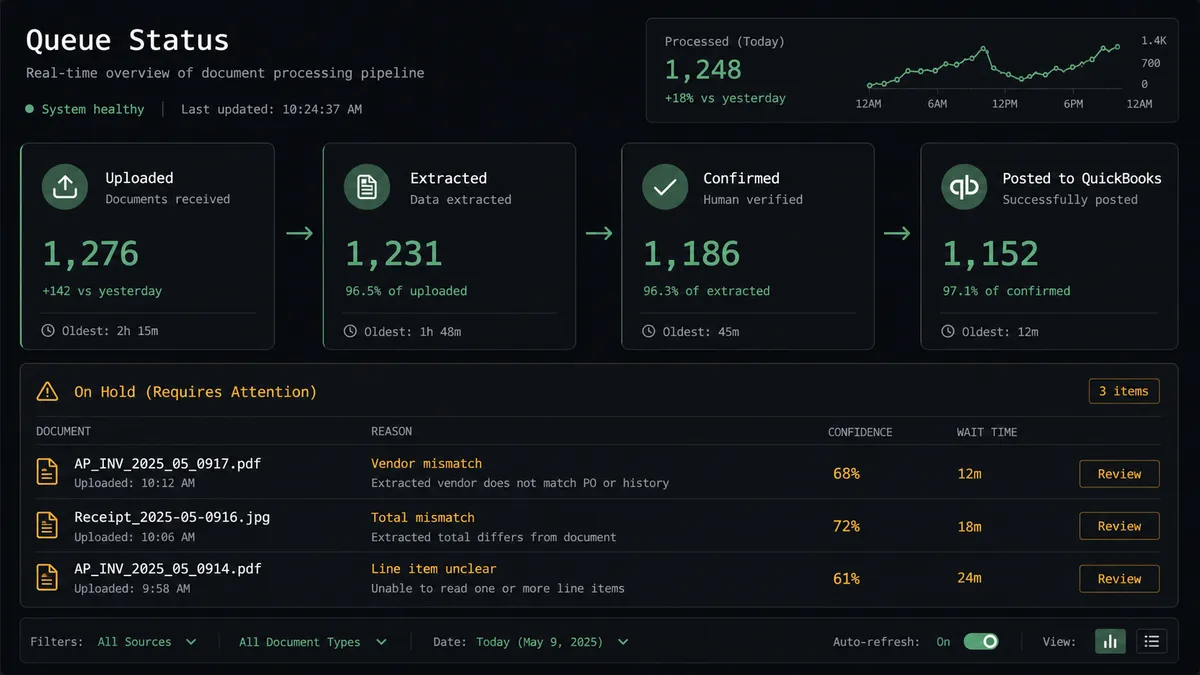
| Visibility | Nobody knows a document’s status without checking manually | Each document’s state, uploaded, extracted, confirmed, posted, is queryable at any moment |
What you can build
Vendor invoice to matched bill. Upload Document and Get Annotation Content extract the invoice; the agent checks it against the open PO and calls Create Bill in QuickBooks Online the moment it’s clean, no retyping step in between.
New vendor onboarding. When Rossum extracts a vendor QuickBooks doesn’t recognize yet, the agent calls Create Vendor before Create Bill, so the AP team never has to manually add a supplier record mid-invoice.
Duplicate invoice catch. Before posting, the agent runs List Bills to check whether a bill from that vendor and invoice number already exists, catching a resubmitted PDF before it becomes a duplicate payment.
Weekly AP position. Export Queue pulls the week’s confirmed Rossum annotations while List Bills pulls what actually posted in QuickBooks Online; the agent flags any gap between the two counts in the #accounting Slack digest.
Common questions
Is it free to connect Rossum and QuickBooks Online on FlowRunner? Yes. FlowRunner has a free plan with 100 executions a month, every integration included, and no credit card required, and new accounts get 14 days of Professional on top.
Does this replace my AP team? No. It removes the retyping. The agent extracts, matches, and posts clean invoices; your AP specialists spend their time on the fields the agent flagged, not on every invoice.
Can I self-host this Rossum to QuickBooks Online flow? Yes, on FlowRunner’s Enterprise tier, which includes a self-hosted option alongside unlimited audit retention and dedicated support.
Does the agent need my own OpenAI key? FlowRunner uses a bring-your-own-key model for AI providers, so you connect the model provider you already use rather than paying a markup on FlowRunner’s own key.
What happens when the agent isn’t sure about an extracted invoice? It doesn’t guess. Any field below the confidence threshold, a failed purchase order match, or a bill over $10,000 pauses in Slack with the specific numbers in question for a person to confirm.
What actually triggers the flow if Rossum has no native trigger? The flow starts when the invoice PDF lands in the AP mailbox or upload folder; the agent calls Rossum’s Upload Document action to start extraction from there.
Getting started
FlowRunner has a free plan with 100 executions a month, every integration included, and no credit card required, and new accounts get 14 days of Professional on top. Build the extraction-to-bill flow, set your confidence threshold and PO match logic, and add the Slack approval step for anything over $10,000 or under-confident.
Start at flowrunner.ai, or book time to walk through your specific invoice volume and exception rate at calendly.com/flowrunner/intro.
Frequently asked questions
Is it free to connect Rossum and QuickBooks Online on FlowRunner?
Yes. FlowRunner has a free plan with 100 executions a month, every integration included, and no credit card required, and new accounts get 14 days of Professional on top.
Does this replace my AP team?
No. It removes the retyping. The agent extracts, matches, and posts clean invoices; your AP specialists spend their time on the fields the agent flagged, not on every invoice.
Can I self-host this Rossum to QuickBooks Online flow?
Yes, on FlowRunner's Enterprise tier, which includes a self-hosted option alongside unlimited audit retention and dedicated support.
Does the agent need my own OpenAI key?
FlowRunner uses a bring-your-own-key model for AI providers, so you connect the model provider you already use rather than paying a markup on FlowRunner's own key.
What happens when the agent isn't sure about an extracted invoice?
It doesn't guess. Any field below the confidence threshold, a failed purchase order match, or a bill over $10,000 pauses in Slack with the specific numbers in question for a person to confirm.
What actually triggers the flow if Rossum has no native trigger?
The flow starts when the invoice PDF lands in the AP mailbox or upload folder; the agent calls Rossum's Upload Document action to start extraction from there.