Connect Square to QuickBooks Online: Payouts Reconciled Daily
Connect Square and QuickBooks Online so every payout reconciles into matching invoices automatically, with an AI agent that pauses for a person when an entry doesn't tie out or a void tops $10,000.
How do you connect Square to QuickBooks Online?
You connect Square to QuickBooks Online by running a daily check against Square’s List Payouts and List Payout Entries actions, then using QuickBooks Online’s Create Payment and Create Bill actions to close the matching invoices and record the processing fees behind each deposit. FlowRunner is a visual AI-agent orchestration platform where automations run autonomously and pause for human judgment on the steps that carry real consequence. The same connection can also run as an AI agent that reasons about which entries reconcile cleanly and invokes a human-in-loop flow as a callable tool the moment something doesn’t tie out or a void crosses $10,000.
The problem it solves
A bookkeeper’s morning usually starts with two browser tabs open side by side: Square’s payout report and the QuickBooks Online register. The bank deposit is one number. The day’s Square payments are a different number, because the deposit nets out refunds, disputed-charge fees, and processing costs that never show up as a single line anywhere. Tying the two together means opening each payout, expanding its entries by hand, and matching them against invoices one at a time. On a slow day that’s tedious. On a day with a refund or two, it’s the kind of exception that eats an afternoon and still sometimes falls through the cracks until a customer calls asking why their invoice still shows open.
The cost isn’t just time back, it’s confidence. When reconciliation is manual, the accounting manager finds out about a mismatched payout days later, if at all, and the P&L reflects invoices that are actually closed as still outstanding. Scaling the business with more locations or higher payment volume just multiplies the same spreadsheet work across more payouts, not less of it.
How it works: the connection
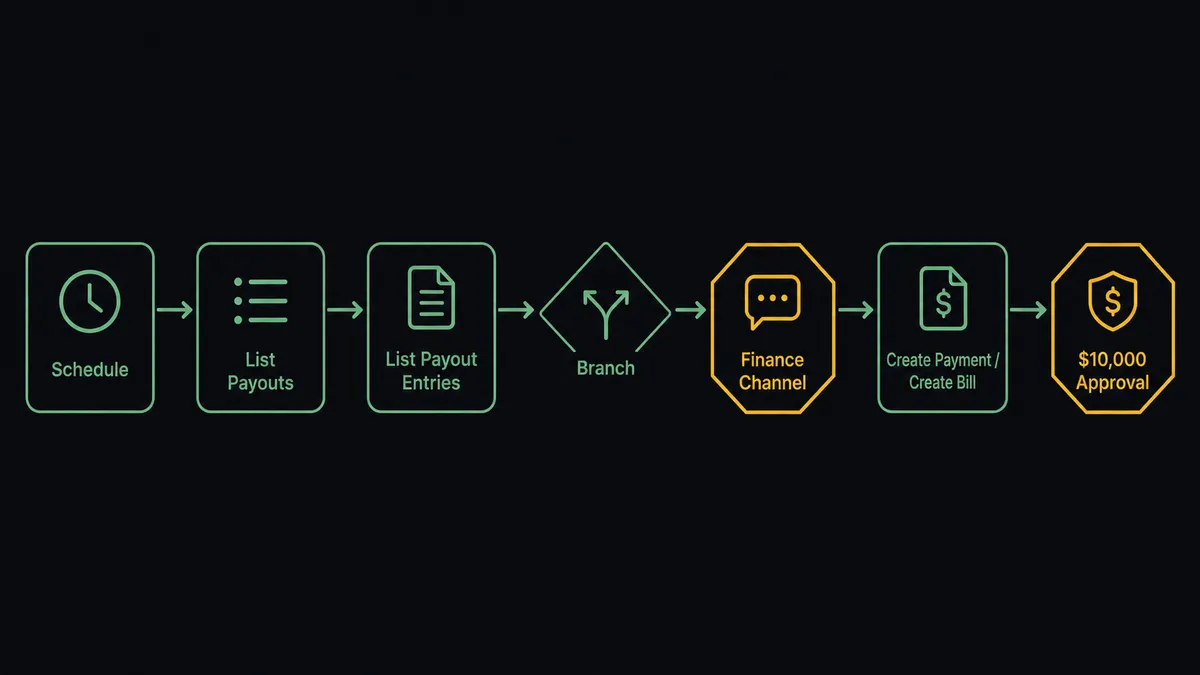
The flow starts on a schedule, since Square doesn’t expose a trigger that fires when a payout lands. Once a day, the agent calls List Payouts to find deposits that haven’t been reconciled yet, then calls List Payout Entries on each one to itemize it into its component charges, refunds, and fees, the raw material Square provides for exactly this reconciliation.
For entries that tie cleanly to a Square payment on an invoice, the agent calls Create Payment in QuickBooks Online to record the payment against the matching invoice and close it out. For the processing fees embedded in the payout, the agent calls Create Bill in QuickBooks Online so the fee shows up as its own line rather than disappearing into a deposit total nobody can trace back. The same connection point also covers the earlier half of the loop: when a signed order comes through Square, Create Order and Create Invoice draft it, and once a person approves, Publish Invoice sends it, so the invoice already exists in Square before the payout that eventually reconciles against it in QuickBooks.
Can an AI agent run it? (and why a human stays in the loop)
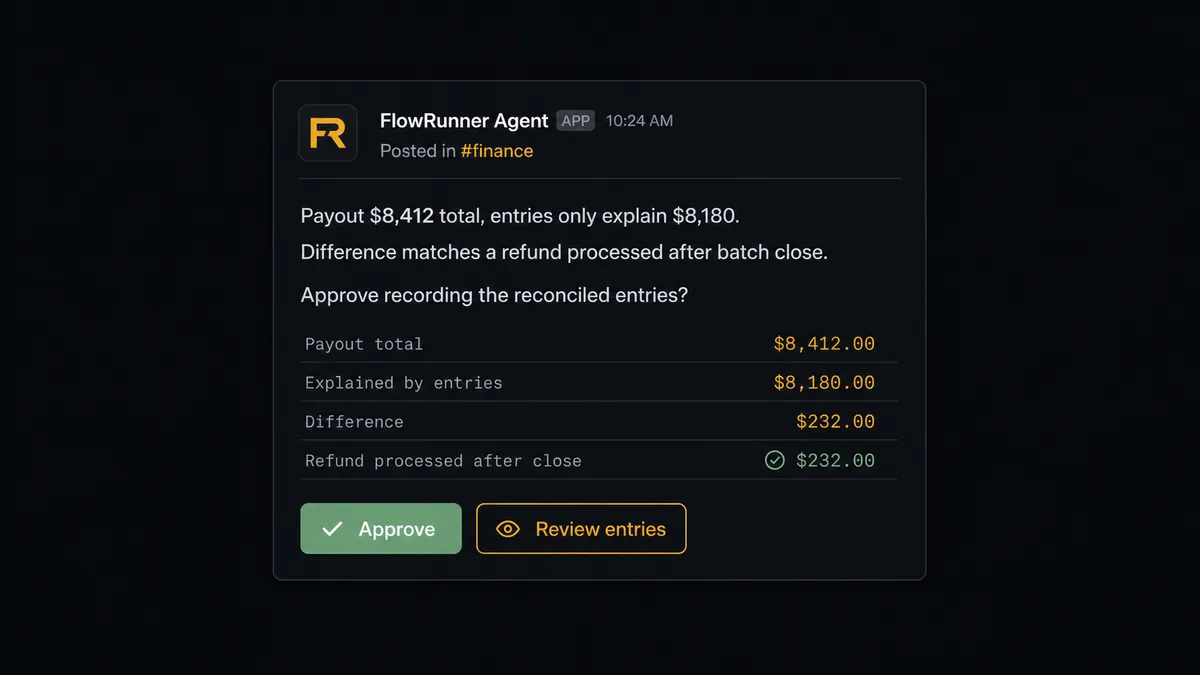
A sync tool would post whatever the numbers say and let the accounting manager find the mismatch later. FlowRunner’s agent reads the itemized payout before it writes anything, reasons about whether the entries actually explain the deposit, and picks Create Payment or Create Bill as tools only once it’s confident the match is right. When they don’t line up, it doesn’t guess and it doesn’t skip the entry silently. It invokes the human-in-loop flow as a callable tool, the same way it would call any other action.
Say a payout is short of what the day’s Square payments predicted. The itemized entries show a refund that processed after the batch closed, an entry the agent’s initial pass didn’t account for. Instead of forcing a match or leaving the payout unreconciled with no explanation, the agent posts the specific entries to the finance Slack channel: which charges it can explain, which refund is the difference, and what it’s proposing to book once confirmed. The accounting manager clears it with one click, and the agent resumes, recording the entry and logging the decision, the decider, and the timestamp in the audit trail.
The same gate applies to a second, separate decision: QuickBooks Online treats any bill or invoice void over $10,000 as one that requires the accounting manager’s sign-off, no matter how clean the agent’s reconciliation looks. This is not a hardcoded amount picked for this workflow; it’s the account’s own approval threshold, and the agent respects it as a rule it checks before writing, not a suggestion. This is not a sync tool. The agent knows when to stop and ask, and it packages exactly what the person needs to decide fast: the entries, the amount, and the invoice or bill in question.
FlowRunner vs Zapier
Zapier is a fair comparison here because a lot of finance teams already use it to move a Square payment into QuickBooks as a single-step zap, and it does that job quickly with a shallow learning curve. Where it runs out of road is reconciliation logic: a zap can create a QuickBooks payment when a Square payment happens, but it can’t itemize a payout, decide whether the entries actually explain the deposit, or hold a $10,000 void for a named approver. That’s judgment, not a trigger-action pair.
| Zapier | FlowRunner | |
|---|---|---|
| Human-in-the-loop on a mismatch | No native gate; a bad match posts and gets caught later | Agent pauses and routes the specific entries to a person before posting |
| Reasoning across multiple actions | Each zap is one trigger to one action | Agent chooses among List Payouts, List Payout Entries, Create Payment, and Create Bill based on what it finds |
| Users included | Paid per user on team plans | Unlimited users on every tier |
| AI provider | Zapier-hosted AI credits | BYOK, use your own provider and model |
| Pricing model | Per-task pricing that scales with volume | Workflow-based tiers with a transparent execution ceiling |
Before and after
| Before | After | |
|---|---|---|
| Payout mystery | The bank deposit and the register disagree, and nobody can say which fees explain the gap | Every deposit reconciled against its individual charges, refunds, and fees |
| Invoices keyed twice | The quote lives in one system and gets re-typed into Square, with discrepancies found by the customer | Line items, taxes, and totals flow from the order into a draft a person approves before it sends |
| Manual payment recording | Bookkeeper logs each payment in QuickBooks by hand | Every matched Square payment flows to QuickBooks without bookkeeper involvement |
| AR updated in batches | Invoice status stays open until someone runs the reconciliation process | Invoice marked paid in QuickBooks within seconds of a confirmed match |
| No weekly financial visibility | Leadership waits for the CFO to prepare a P&L report before seeing financials | Month-to-date vs. prior month variance posted to the finance channel before 8am |
What you can build
Order to invoice to closed books. Square’s Create Order and Create Invoice draft the bill against a signed order, a person approves with Publish Invoice, and once the payment lands, QuickBooks Online’s Create Payment closes the matching invoice automatically.
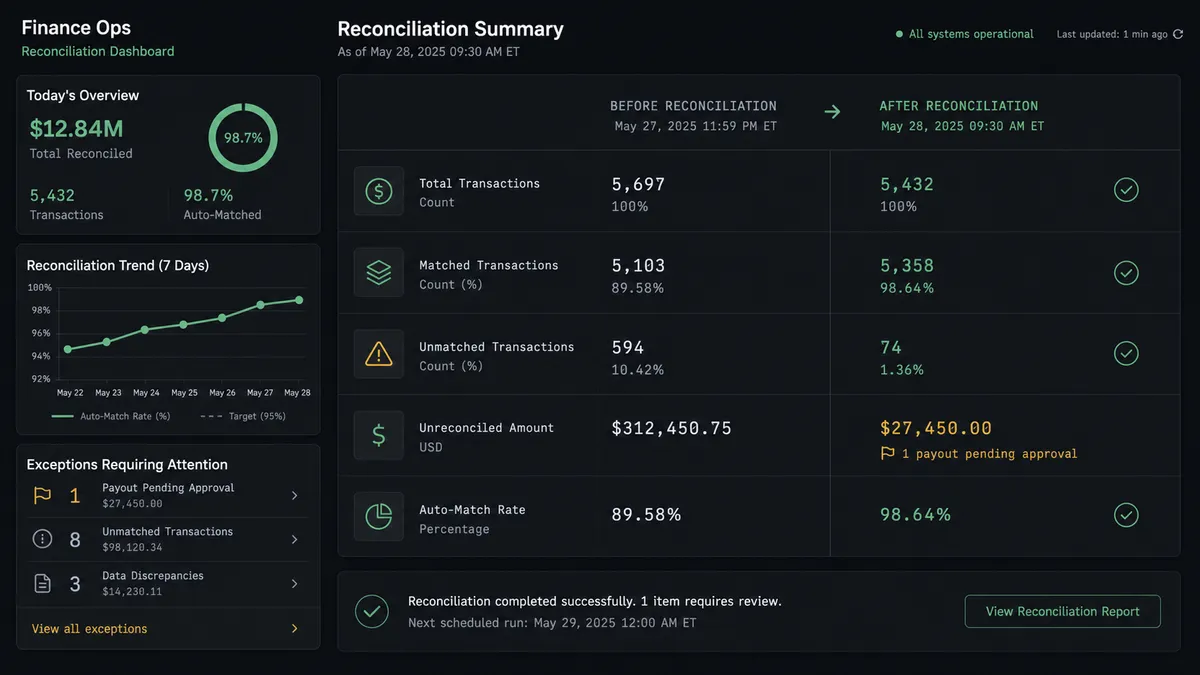
Daily payout reconciliation. List Payouts and List Payout Entries itemize each deposit every morning, Create Payment and Create Bill post the matched entries, and anything that doesn’t tie out goes to the finance channel first.
Fee tracking by vendor. Processing fees pulled from List Payout Entries post as bills against a dedicated fees vendor using QuickBooks Online’s Create Vendor and Create Bill, so fee trends show up in the P&L instead of hiding inside deposit totals.
Customer record parity. Search Customers in Square and Create Customer or Get Customer in QuickBooks Online keep the same customer profile in step across both systems as new customers sign up.
Weekly P&L cross-check. QuickBooks Online’s Get Profit and Loss combines with Square’s Search Orders so leadership sees the Monday digest with payment-channel context built in, not just the accounting-side number.
Common questions
Is it free to connect Square and QuickBooks Online on FlowRunner? FlowRunner has a free plan with 100 executions a month, every integration included, and no credit card required, and new accounts get 14 days of Professional on top. Beyond the free plan, Growth is $45/mo for 12,000 executions with unlimited users and workflows included.
Does Square have a native trigger for new payouts? No. Square exposes payout data through actions like List Payouts and List Payout Entries, not a payout-landed trigger, so the flow runs on a daily schedule that checks for deposits not yet reconciled.
Can I self-host this Square and QuickBooks Online flow? Yes, on the Enterprise tier, which adds a self-hosted deployment option alongside the cloud version.
Does the agent need my own OpenAI key? FlowRunner uses a bring-your-own-key model for AI providers, so you connect the provider and model you already use.
What happens when the agent isn’t sure a payout reconciles? It stops and asks. The agent posts the specific payout entries that don’t tie back to Square’s logged payments to your finance Slack channel, and nothing writes to QuickBooks Online until a person clears it.
Can the agent void a QuickBooks invoice on its own? No. Invoice voids and bills over $10,000 always pause for the accounting manager’s approval before QuickBooks Online reflects the change.
Getting started
FlowRunner has a free plan with 100 executions a month, every integration included, and no credit card required, and new accounts get 14 days of Professional on top. Start at flowrunner.ai or book a walkthrough at calendly.com/flowrunner/intro to see the payout reconciliation flow built against your own account.
Frequently asked questions
Is it free to connect Square and QuickBooks Online on FlowRunner?
FlowRunner has a free plan with 100 executions a month, every integration included, and no credit card required, and new accounts get 14 days of Professional on top. Beyond the free plan, Growth is $45/mo for 12,000 executions with unlimited users and workflows included.
Does Square have a native trigger for new payouts?
No. Square exposes payout data through actions like List Payouts and List Payout Entries, not a payout-landed trigger, so the flow runs on a daily schedule that checks for deposits not yet reconciled. The result reads the same to your team either way: reconciled entries land in QuickBooks Online without anyone opening either system.
Can I self-host this Square and QuickBooks Online flow?
Yes, on the Enterprise tier, which adds a self-hosted deployment option alongside the cloud version. Cloud tiers cover most finance teams; self-hosting is for organizations with a data residency or infrastructure requirement.
Does the agent need my own OpenAI key?
FlowRunner uses a bring-your-own-key model for AI providers, so you connect the provider and model you already use rather than paying a markup on FlowRunner's own key.
What happens when the agent isn't sure a payout reconciles?
It stops and asks. The agent posts the specific payout entries that don't tie back to Square's logged payments to your finance Slack channel, and nothing writes to QuickBooks Online until a person clears it or corrects it.
Can the agent void a QuickBooks invoice on its own?
No. Invoice voids and bills over $10,000 always pause for the accounting manager's approval before QuickBooks Online reflects the change, regardless of how confident the agent is in the match.