How to Connect QuickBooks Online with Stripe Using FlowRunner
Eliminate manual payment recording and AR reconciliation by connecting Stripe payment events directly to QuickBooks Online through FlowRunner.
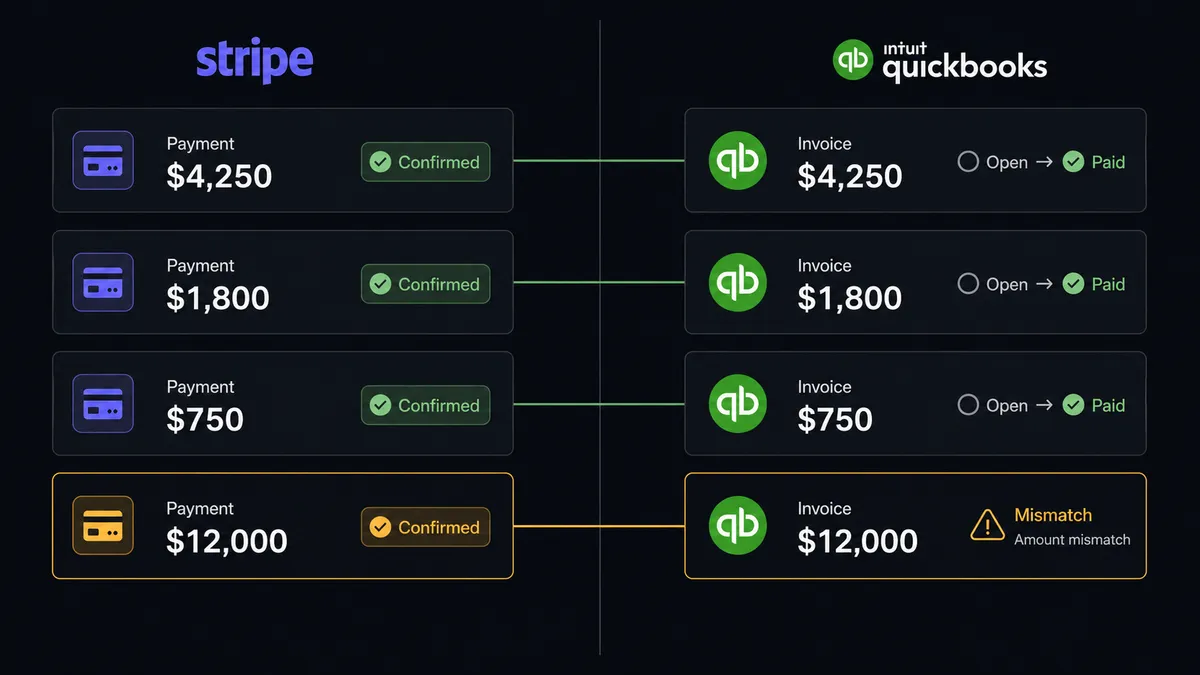
The Problem: Two Systems, One Spreadsheet in Between
Every company running Stripe and QuickBooks Online has the same gap. Payments succeed in Stripe. Someone has to log into QuickBooks, find the customer, find the invoice, record the payment, and mark it paid. Multiply that by dozens of transactions a day. Then do it again for refunds, failed payments, and subscription changes.
The bookkeeper spends half their week on data entry that adds zero judgment to the process. AR is always a few hours behind. Invoices sit in “open” status long after payment clears. Refunds get recorded in the wrong period. When something falls through the cracks, you find out at month-end close when the numbers do not reconcile.
And the exceptions are worse. A partial payment comes in and nobody knows how to apply it. A refund gets processed in Stripe but never reversed in QuickBooks. A subscription cancellation triggers a charge that should not have happened. These are not edge cases. They are Tuesday. Your team tracks them in spreadsheets, email threads, and sticky notes. Every reconciliation cycle is a scavenger hunt.
The Solution: One Coordination Layer, Both Systems in Sync
Connect Stripe and QuickBooks Online through FlowRunner and the gap disappears. The workflow listens for every Stripe event (payment success, payment failure, refund, dispute) and processes them against your QuickBooks data automatically. Routine transactions flow through without human involvement. Your AR is current within seconds of a charge confirming.
The end state looks like this: your bookkeeper stops doing data entry and starts reviewing a clean summary each morning. Invoices close themselves. Refunds reverse the correct records. Failed payments trigger the right recovery sequence based on the failure reason. Your team only touches what needs a human decision.
FlowRunner is the coordination layer between these two systems. The workflow handles the mechanics. Your team handles the judgment calls.
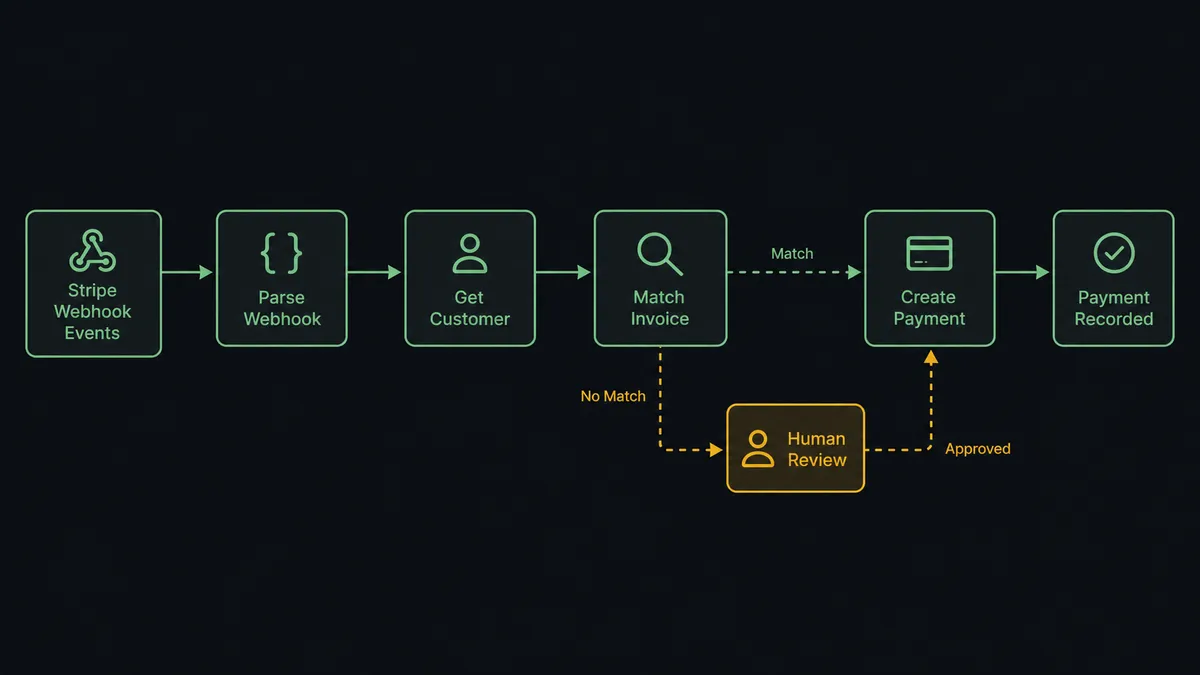
Why Human-in-Loop Matters Here
Without human oversight built into this integration, money moves on autopilot. Imagine a large refund processed without anyone knowing. A duplicate payment gets recorded because the matching logic picked the wrong invoice. An invoice gets voided when it should have been credited. These are not theoretical risks. They are the reason your team does manual reconciliation in the first place.
This is not a sync tool. The workflow knows when to stop and ask. When a refund exceeds the configured threshold, the flow pauses and routes it to the billing manager with the customer’s history, the refund reason, and the original invoice from QuickBooks. When a payment does not match any open invoice, the workflow does not guess. It surfaces the exception with full context and waits for a decision. Every approval is logged with the approver’s identity and timestamp in the decision history. Prospects call this a “digital andon cord”: like Toyota’s quality control pull cord, the workflow stops the line when it hits uncertainty. Your team pulls it back into motion.
How It Works
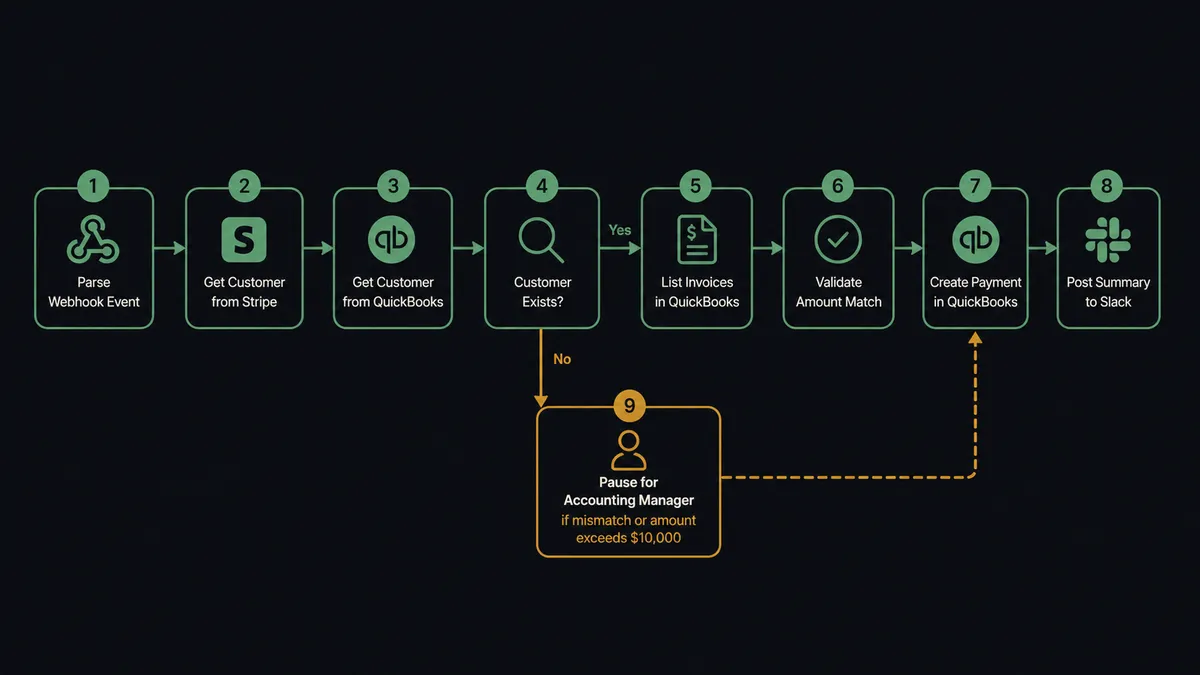
Workflow 1: Stripe Payment to QuickBooks Invoice Reconciliation
This is the core workflow. A customer pays through Stripe. The workflow picks it up and closes the loop in QuickBooks within seconds.
- Trigger: Stripe’s Parse Webhook Event fires on payment success
- Action: The flow calls Get Customer in Stripe to pull the payer’s email, name, and metadata
- Action: The flow calls Get Customer in QuickBooks Online to find the matching account by email or customer ID
- Check: If no matching QuickBooks customer exists, the flow pauses and flags the exception
- Action: The flow calls List Invoices in QuickBooks filtered by customer and amount to locate the open invoice
- Check: The flow validates the Stripe payment amount matches the QuickBooks invoice total
- Action: The flow calls Create Payment in QuickBooks, recording the payment against the matched invoice
- Notify: A summary posts to the #accounting Slack channel with the customer name, payment amount, and invoice closed.
- Human: If the payment amount does not match any open invoice, or if the amount exceeds the configured threshold, the flow pauses and routes the exception to the accounting manager with full context
No bookkeeper touches QuickBooks. The invoice is marked paid within seconds of the Stripe charge confirming. AR is current in real time.
Workflow 2: Failed Subscription Payment with Dunning and AR Hold
When a subscription payment fails in Stripe, the downstream accounting impact matters just as much as the customer recovery effort.
- Trigger: Parse Webhook Event fires on subscription payment failure
- Action: The flow calls Get Subscription in Stripe to retrieve the plan details and billing history
- Check: The flow retrieves the failure reason from Stripe: expired card vs. insufficient funds
- Action: For expired cards, the flow sends a payment update email to the customer with a link to update their card
- Action: For insufficient funds, the flow waits 3 days and retries the charge
- Action: The flow calls Get Invoice in QuickBooks to locate the associated invoice and flag it as at-risk in the internal notes using Update Invoice
- Notify: The billing team receives a Slack alert if the second attempt also fails, with the customer name, subscription plan, and amount.
- Human: Accounts that fail twice are routed to the billing team via Slack. They decide: extend grace period or begin cancellation. The flow calls Cancel Subscription in Stripe or updates the retry schedule based on the decision.
The billing team gets the judgment call. The workflow handles the mechanics on both sides.
Workflow 3: Refund Processing Across Both Systems
A refund approved in Stripe needs to reverse the corresponding payment in QuickBooks. Manual refund recording is one of the most common sources of reconciliation errors at month-end.
- Trigger: Parse Webhook Event fires when a refund is processed in Stripe
- Action: The flow calls Get Refund in Stripe for the full refund details: amount, reason, original charge ID
- Action: The flow calls Get Customer in QuickBooks Online to locate the account
- Action: The flow calls List Payments in QuickBooks to find the original payment record matching the Stripe charge
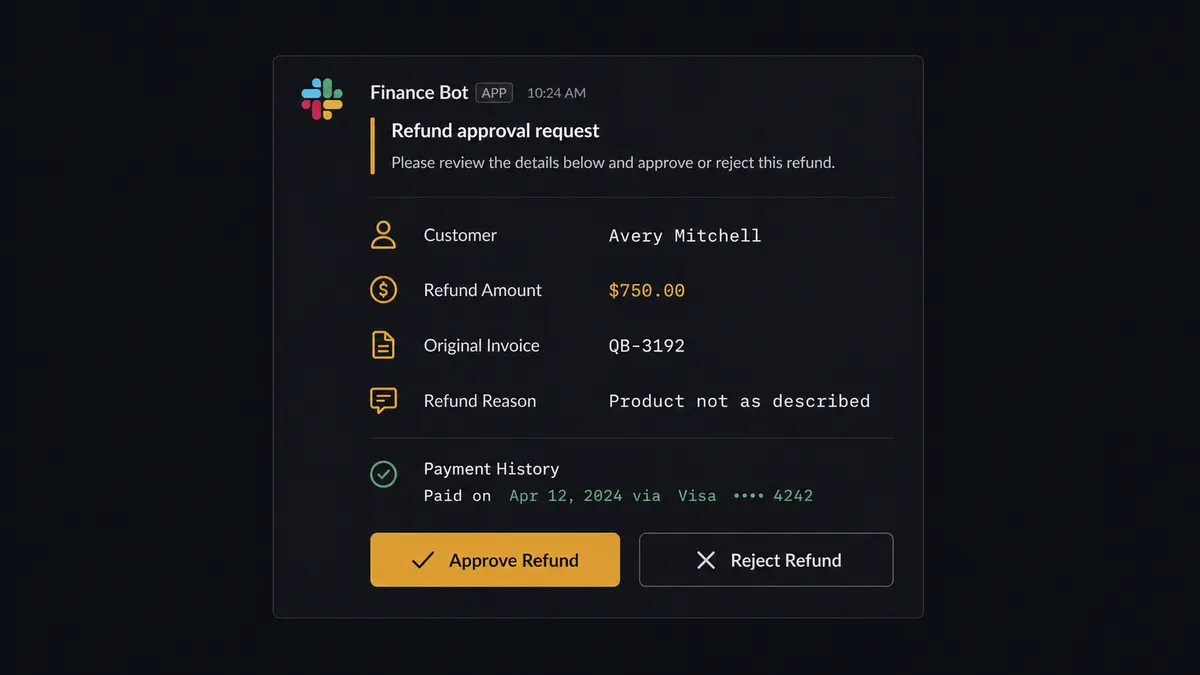
- Human: Refunds over the configured threshold pause here. The billing manager receives a Slack message with the refund reason, customer name, amount, original invoice reference, and the customer’s payment history. One click to approve, modify, or reject.
- Action: On approval, the flow calls Void Payment in QuickBooks (for full refunds) or records a credit memo (for partial refunds)
- Notify: The #accounting channel receives a refund summary with the customer name, refund amount, original invoice reference, and the named approver.
Every refund is traceable. Every approval is recorded. No reconciliation surprises at month-end.
Before and After
| Before | After | |
|---|---|---|
| Payment recording | Bookkeeper logs each Stripe payment in QuickBooks by hand | Every Stripe payment recorded in QuickBooks automatically. Invoice marked paid within seconds. |
| AR visibility | Invoice status stays open until someone runs the reconciliation process | AR updated in real time as payments confirm in Stripe |
| Financial reporting | Leadership waits for the CFO to prepare a P&L before seeing financials | Monday P&L digest via Get Profit and Loss: month-to-date vs. prior month variance posted to the finance channel before the team arrives |
| Failed payment handling | Billing staff check the Stripe dashboard daily for failed payments and handle each manually | Failure reason determines recovery path automatically. Expired cards and insufficient funds each get the right sequence. |
| Dispute response | Chargeback evidence assembled by hand from multiple systems | Evidence package compiled and uploaded to Stripe automatically |
| Refund accuracy | Manual refund entries are a top source of reconciliation errors at month-end | Refunds over the configured threshold require human approval. Below that, the workflow records and reconciles automatically. |
What You Can Build
These are specific workflow combinations using actions from both integrations:
Stripe charge to QuickBooks invoice close. Parse Webhook Event fires on payment success. The flow calls Get Customer, List Invoices, and Create Payment in QuickBooks. AR stays current without manual entry.
Subscription lifecycle sync. Create Subscription in Stripe triggers Create Invoice in QuickBooks. When Cancel Subscription fires, the flow calls Void Invoice in QuickBooks with human approval for active accounts.
Automated dunning with AR flagging. Failed payments in Stripe trigger retry logic based on the failure reason. The flow calls Update Invoice in QuickBooks to flag invoices as at-risk. Accounts that fail twice route to the billing team.
Weekly P&L with revenue reconciliation. Every Monday, the flow calls Get Profit and Loss from QuickBooks and List Payment Intents from Stripe. Revenue variances between the two systems surface to the finance team before the weekly meeting.
New customer onboarding pipeline. A deal closes in your CRM. The flow calls Create Customer in both Stripe and QuickBooks, Create Subscription in Stripe, and Create Invoice in QuickBooks. The customer is provisioned for billing across both systems without anyone touching either platform.
Getting Started
Both QuickBooks Online (45 actions) and Stripe (1 trigger, 63 actions) are available on every FlowRunner tier, starting at Growth ($45/mo). Every tier includes unlimited users and unlimited workflows.
Start on the free plan: 100 executions a month, every integration included, no credit card required, plus 14 days of Professional for new accounts.
For teams that need decision history on financial workflows, Professional at $299/mo adds longer log history. Role-based access is available on Professional and above. That is a fraction of what other platforms charge for compliance features.
Explore the integration details:
- QuickBooks Online integration (45 actions covering customers, vendors, invoices, bills, payments, and P&L reports)
- Stripe integration (63 actions and 1 webhook trigger covering payments, subscriptions, refunds, disputes, and invoicing)
Start building free at flowrunner.ai or book a demo to see a live Stripe-to-QuickBooks workflow in action.