How to Connect QuickBooks Online with Attio (With or Without an AI Agent)
Sync invoice balances and payment status from QuickBooks Online into Attio records, with an agent that flags overdue accounts and pauses for the account owner before a payment reminder reaches the customer.
How do you connect QuickBooks Online to Attio?
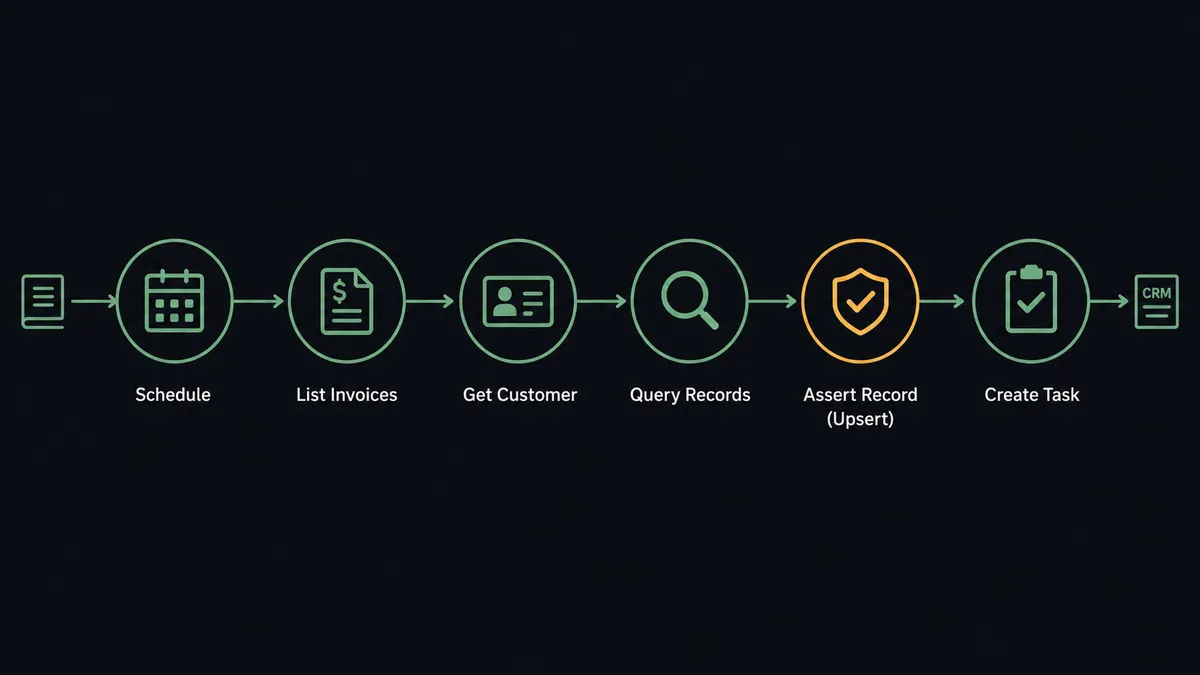
You connect QuickBooks Online to Attio with a scheduled FlowRunner workflow: List Invoices pulls the open and overdue invoices each morning, Get Customer fetches the billing details, Query Records finds the matching Attio company, and Assert Record (Upsert) writes the balance, due date, and days overdue onto the record your team already works from. Neither connector exposes a trigger, so the schedule is the starting point. FlowRunner is a visual AI-agent orchestration platform where automations run autonomously and pause for human judgment on the steps that carry real consequence. Run as an agent, the connection also acts on what it sees: it drafts the payment reminder and flags the account, then pauses for the account owner before Send Invoice puts anything in a customer’s inbox.
The problem it solves
Right now the CRM and the books disagree, and someone reconciles them by hand. Sales and success live in Attio; the truth about who has actually paid lives in QuickBooks Online. So an ops person exports invoice reports, cross-references company names, and pings account owners about balances, usually days after the invoice went overdue. Meanwhile a success manager plans an expansion conversation with an account that has two unpaid invoices, because nothing in Attio told them.
The edges are where trust erodes. A customer on negotiated net-60 terms gets a late notice from someone reading a report without context. A company renamed itself after an acquisition, so its balance lands on a stale record or on no record at all. A reminder goes out while the check is literally clearing, and the account owner spends the next call apologizing. Chasing revenue is necessary; chasing it bluntly is expensive. The gap is not data movement, it is judgment about which accounts to touch and how.
How it works: the connection
Here is the deterministic version, grounded in the real connector actions.
- Trigger: Every morning at 7 AM, the workflow calls List Invoices in QuickBooks Online, filtered to open and overdue.
- Read: For each invoice, it calls Get Customer to pull the customer’s name, email, and balance.
- Match: It calls Query Records in Attio to find the company by domain or email.
- Upsert: It calls Assert Record (Upsert) to write open balance, invoice number, due date, and days overdue onto the Attio record.
- Log: It calls Create Note so the record carries a dated billing snapshot the whole team can read.
- Assign: For newly overdue accounts, it calls Create Task in Attio, assigned to the account owner with the invoice details.
That is the plain answer. Billing status stops living in exported spreadsheets and shows up on the CRM record, refreshed every morning before the team logs in.
Can an AI agent run it? (and why a human stays in the loop)
Yes, and this is where the connection earns its keep. The agent holds the actions as tools: List Invoices, Get Invoice, Get Customer, and Send Invoice on the QuickBooks Online side; Query Records, Assert Record (Upsert), Create Note, Create Task, and Add List Entry on the Attio side. Instead of applying one rule to every account, it reads each overdue balance in context. An account that is fifteen days late but has paid promptly for two years reads differently from one that is fifteen days late for the third consecutive quarter. Negotiated terms, an open support escalation, an active renewal conversation: the agent weighs what the Attio record already says before deciding anything.
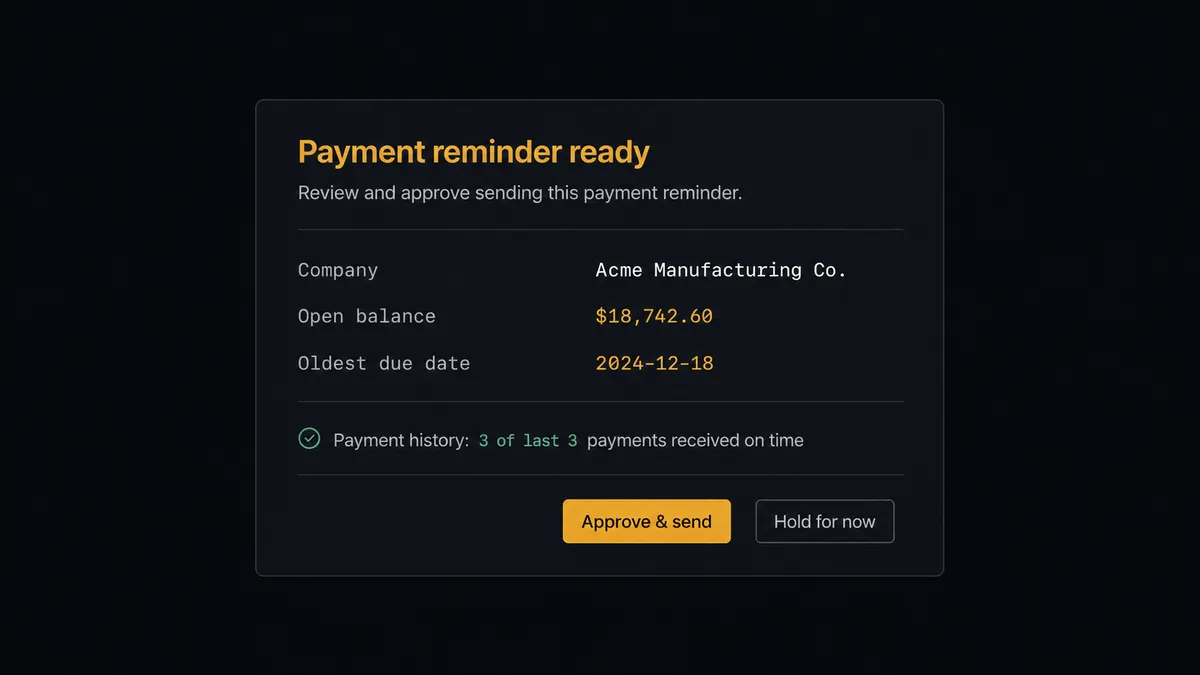
The consequential step is Send Invoice, because that action reaches the customer. A payment reminder is a relationship event dressed as an accounting event, and the wrong one at the wrong moment costs more than the invoice. So the agent never sends on its own. It invokes a human-review flow it holds as a callable tool, and the workflow pauses with everything the owner needs in one message: “Account [company]. Open balance [amount] across [invoice numbers], oldest due [date]. History: paid on time for the last four quarters. No open escalations. Send the reminder and add to the collections list?” One click approves. Send Invoice re-delivers the invoice from QuickBooks Online, Add List Entry places the account on the collections list in Attio, and the audit trail records who approved and when.
This is the digital andon cord applied to receivables: the workflow stops the line the moment an action would touch a customer relationship, and the person who owns that relationship pulls it back into motion.
FlowRunner vs Zapier
Most operations teams connecting QuickBooks Online to Attio look at Zapier first, and the appeal is legitimate. Zapier has one of the largest connector libraries anywhere, a polished setup experience, and ready-made templates for pushing invoice data into CRM fields. For a one-way “invoice paid, update the record” push, it is quick to stand up and dependable.
The difference appears at the step that touches the customer and at the judgment before it. Zapier moves the data; it does not weigh the account.
| What matters for this pair | FlowRunner | Zapier |
|---|---|---|
| Human-in-the-loop on Send Invoice | Native. The agent invokes an approval flow as a callable tool and pauses until the account owner decides | Available by inserting approval steps into a Zap, not a native agent decision |
| Who runs the flow | An AI agent reads balances in relationship context and picks actions as tools | A predefined step sequence you configure per Zap |
| Users included | Unlimited users on every tier | Priced by task volume; seats vary by plan |
| Bring your own AI keys | Yes, BYOK | AI features tied to Zapier’s own AI offering |
| Self-hosted option | Yes, cloud-hosted or self-hosted | Cloud only |
| Pricing model | Transparent workflow-based tiers | Per-task pricing that gets harder to predict as invoice volume grows |
If you only need invoice fields mirrored into Attio, Zapier will do it well. If you want the CRM to reflect billing reality and a named human on every reminder that reaches a customer, this pairing is the better fit.
Before and after
| Category | Before | After |
|---|---|---|
| Billing visibility | Account owners learn about unpaid invoices from a monthly export or an awkward call | Every Attio record shows balance, due date, and days overdue, refreshed each morning |
| Collections triage | One blanket days-overdue rule treats a loyal customer like a chronic late payer | The agent weighs history and context, and routes only genuine risk to the owner |
| Reminder sending | Late notices go out from a report, sometimes mid-negotiation or mid-escalation | Send Invoice runs only after the account owner approves with full context |
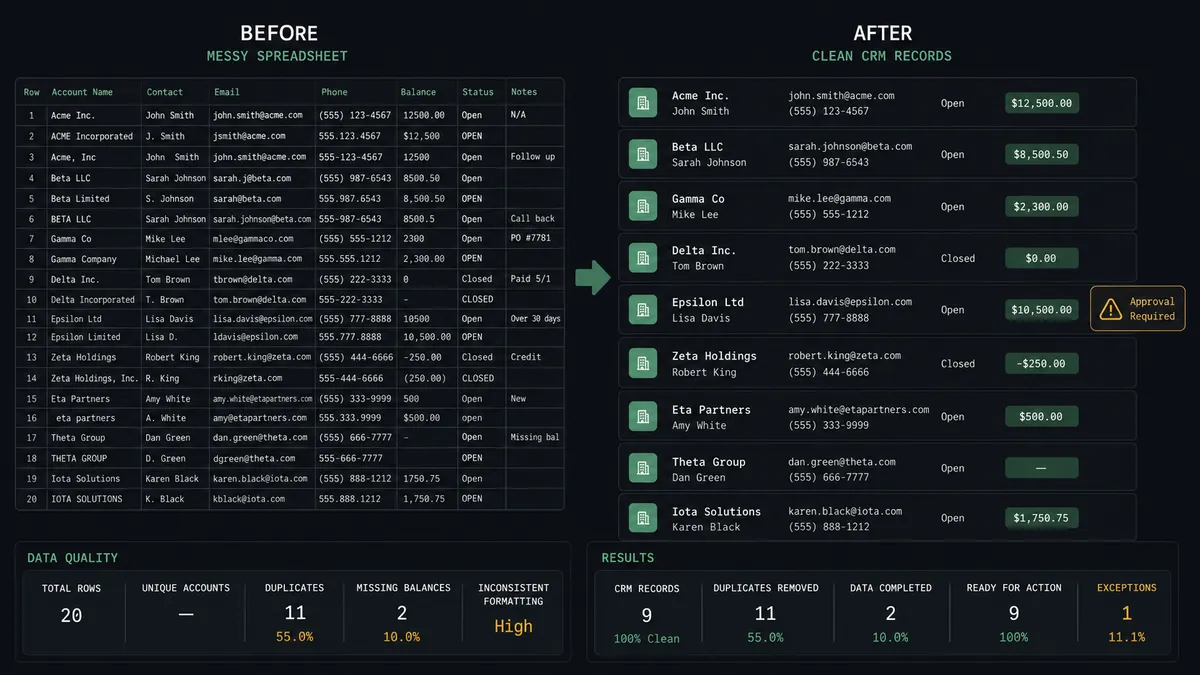
| Record matching | Renamed or duplicate companies collect balances on the wrong record | Query Records matches by domain and email, and the agent asks when it is unsure |
| Audit trail | Nobody can say who decided to chase which account | Every reminder and collections flag carries an approver and a timestamp |
What you can build
Morning billing sync. List Invoices and Get Customer pull the open picture at 7 AM, Query Records and Assert Record (Upsert) write it onto Attio records, and Create Note leaves a dated snapshot. The team starts every day seeing billing truth in the CRM.
Context-aware collections. The agent separates late payers from negotiated terms, drafts the reminder, and pauses for the owner. On approval, Send Invoice re-delivers the invoice and Add List Entry moves the account onto the collections list.
Pre-renewal payment check. Before a renewal conversation, the agent pulls the account’s invoices with List Invoices and Get Invoice, and posts a payment-history note to the record with Create Note so nobody walks into a renewal blind.
Onboarding to first invoice. When a closed-won company appears in an Attio list, the agent matches it with Get Customer or creates it with Create Customer in QuickBooks Online, then drafts the first invoice with Create Invoice and holds it for finance approval before Send Invoice delivers it.
Weekly receivables digest. The agent aggregates open balances from List Invoices, groups them by account owner via Attio’s Query List Entries, and posts a digest of which relationships carry open revenue, with tasks created for the stale ones.
Common questions
Is it free to connect QuickBooks Online and Attio on FlowRunner? You can build and run the connection on FlowRunner’s free plan, which includes 100 executions a month and every integration with no credit card required, and new accounts also get 14 days of Professional. Both connectors are available on every FlowRunner tier, and every tier includes unlimited users and unlimited workflows.
Can I self-host the QuickBooks Online to Attio workflow? Yes. FlowRunner offers a cloud-hosted option and a self-hosted option, so the connection can run inside your own environment.
Does the AI agent need my own OpenAI or Claude key? FlowRunner uses a bring-your-own-keys model, so you connect the AI provider key you already have. You are not locked to one model.
What happens when the agent cannot match a QuickBooks customer to an Attio record? It stops and asks. When Query Records returns no match or several plausible companies, the agent posts the customer name, email, and candidates to your team’s channel and waits for a person to choose or create the record, so billing data never lands on the wrong account.
Which triggers and actions does this pair use? Neither connector exposes a trigger, so the workflow runs on a schedule. It calls List Invoices, Get Customer, and Send Invoice in QuickBooks Online, and Query Records, Assert Record (Upsert), Create Note, Create Task, and Add List Entry in Attio.
Will a payment reminder ever reach a customer without approval? No. The agent drafts the reminder and flags the account, but Send Invoice only runs after the account owner approves. The approval, the owner’s name, and the timestamp are captured in the audit trail.
Getting started
Start on the free plan: 100 executions a month, every integration included, no credit card required, plus 14 days of Professional for new accounts. Both connectors are available on every tier, and every tier includes unlimited users and unlimited workflows.
Explore the integration details:
- QuickBooks Online integration (56 actions covering customers, invoices, payments, bills, and P&L reports)
- Attio integration (26 actions covering records, lists, notes, tasks, and comments)
Start building free at flowrunner.ai or book a demo to see a live QuickBooks Online to Attio workflow, reminder approval and all.
Frequently asked questions
Is it free to connect QuickBooks Online and Attio on FlowRunner?
You can build and run the connection on FlowRunner's free plan, which includes 100 executions a month and every integration with no credit card required, and new accounts also get 14 days of Professional. Both connectors are available on every FlowRunner tier, and every tier includes unlimited users and unlimited workflows.
Can I self-host the QuickBooks Online to Attio workflow?
Yes. FlowRunner offers a cloud-hosted option and a self-hosted option, so the connection can run inside your own environment.
Does the AI agent need my own OpenAI or Claude key?
FlowRunner uses a bring-your-own-keys model, so you connect the AI provider key you already have. You are not locked to one model.
What happens when the agent cannot match a QuickBooks customer to an Attio record?
It stops and asks. When Query Records returns no match or several plausible companies, the agent posts the customer name, email, and candidates to your team's channel and waits for a person to choose or create the record, so billing data never lands on the wrong account.
Which triggers and actions does this pair use?
Neither connector exposes a trigger, so the workflow runs on a schedule. It calls List Invoices, Get Customer, and Send Invoice in QuickBooks Online, and Query Records, Assert Record (Upsert), Create Note, Create Task, and Add List Entry in Attio.
Will a payment reminder ever reach a customer without approval?
No. The agent drafts the reminder and flags the account, but Send Invoice only runs after the account owner approves. The approval, the owner's name, and the timestamp are captured in the audit trail.