Connect PayPal to FreshBooks: Payments Recorded to the Right Invoice
Connect PayPal and FreshBooks so every captured payment is recorded against the right invoice automatically, with an AI agent that pauses for a controller before refunding or creating a credit note.
How do you connect PayPal to FreshBooks?
You connect PayPal to FreshBooks by pairing PayPal’s Capture Order action with FreshBooks’ Find Invoices and Record Payment actions: when a buyer approves a checkout order, the agent captures the payment in PayPal, matches it to the open invoice in FreshBooks, and records it there with the PayPal capture ID as the reference. FlowRunner is a visual AI-agent orchestration platform where automations run autonomously and pause for human judgment on the steps that carry real consequence. That same connection can run as an AI agent that decides which payments to reconcile on its own and which refunds or credit notes need a controller’s sign-off first.
The problem it solves
Small businesses and agencies that bill through FreshBooks and collect through PayPal end up with the same gap every week: the invoice lives in one system and the payment confirmation lives in another. A bookkeeper or billing manager checks the PayPal dashboard, finds the payment, opens FreshBooks, finds the matching invoice, and manually records the payment against it. On a slow week that is a minor annoyance. During a busy billing cycle, with dozens of invoices going out and payments landing out of order, it turns into a running spreadsheet of “paid but not recorded” that someone has to maintain by hand.
The exceptions cost more than the routine work. A partial payment that does not match the invoice total exactly. A refund issued in PayPal with no credit note ever created in FreshBooks, so the books show revenue that was actually returned. A client who pays twice because the first payment was never marked as received. None of this is exotic. It is the ordinary friction of running billing and collections in two systems that were never built to talk to each other, and it falls through the cracks precisely when the team is busiest.
How it works: the connection
The integration maps PayPal’s checkout and payment surface directly onto FreshBooks’ invoicing and reconciliation actions.
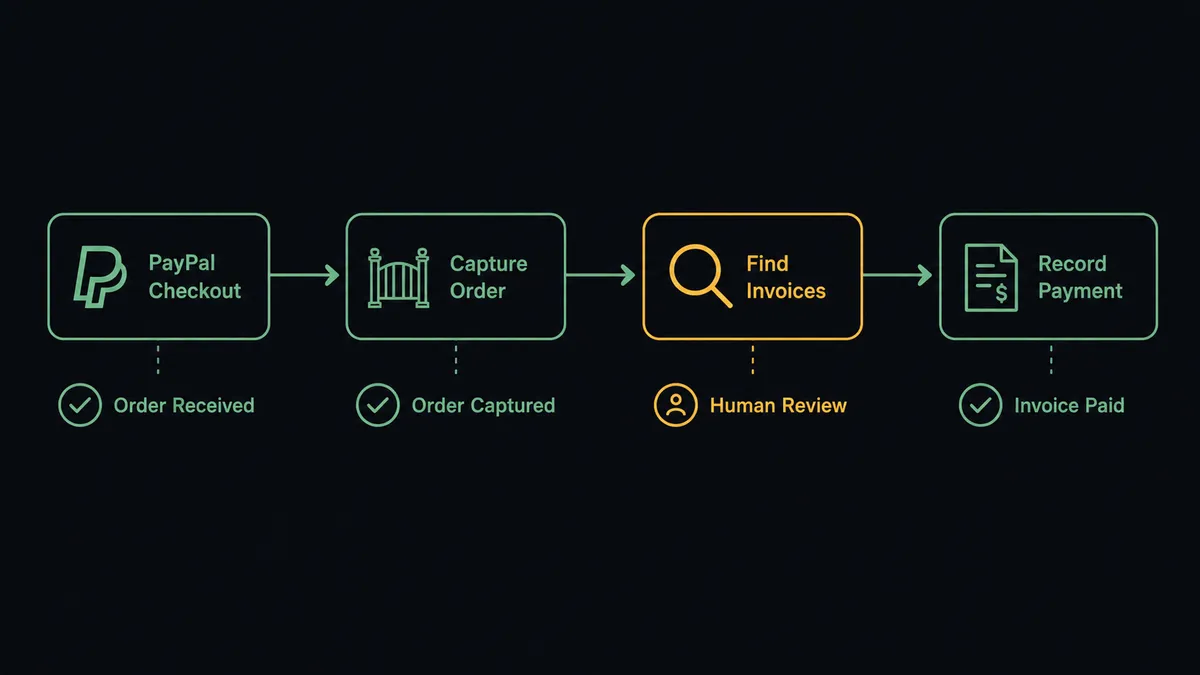
When a buyer approves a checkout order for an invoice that was sent from FreshBooks, the agent reads the order amount, currency, and buyer details, then calls Capture Order in PayPal to collect the funds. It follows up with Get Captured Payment to confirm the capture cleared. On the FreshBooks side, the agent calls Find Invoices to locate the matching open invoice by client and amount, then calls Record Payment to log the payment against that invoice, with the PayPal capture ID stored as the payment reference. The invoice moves from outstanding to paid, and the payment is traceable back to the exact PayPal transaction that funded it.
For new billing relationships, the flow runs the other direction first. The agent calls Find Clients in FreshBooks, or Create Client if none exists, builds the invoice with Create Invoice, and delivers it with Send Invoice. Once the client pays through PayPal, the reconciliation flow above closes the loop.
For corrections, the agent calls Refund Captured Payment in PayPal with the original capture ID and an optional note visible to the payer, then creates the matching adjustment in FreshBooks with Create Credit Note. Both records move together instead of drifting apart.
Can an AI agent run it? (and why a human stays in the loop)
A plain connection between PayPal and FreshBooks is a sync tool. An AI agent running the same connection reads each transaction, reasons about whether it is routine, and decides which action to call next. That distinction shows up the moment a payment does not match cleanly.
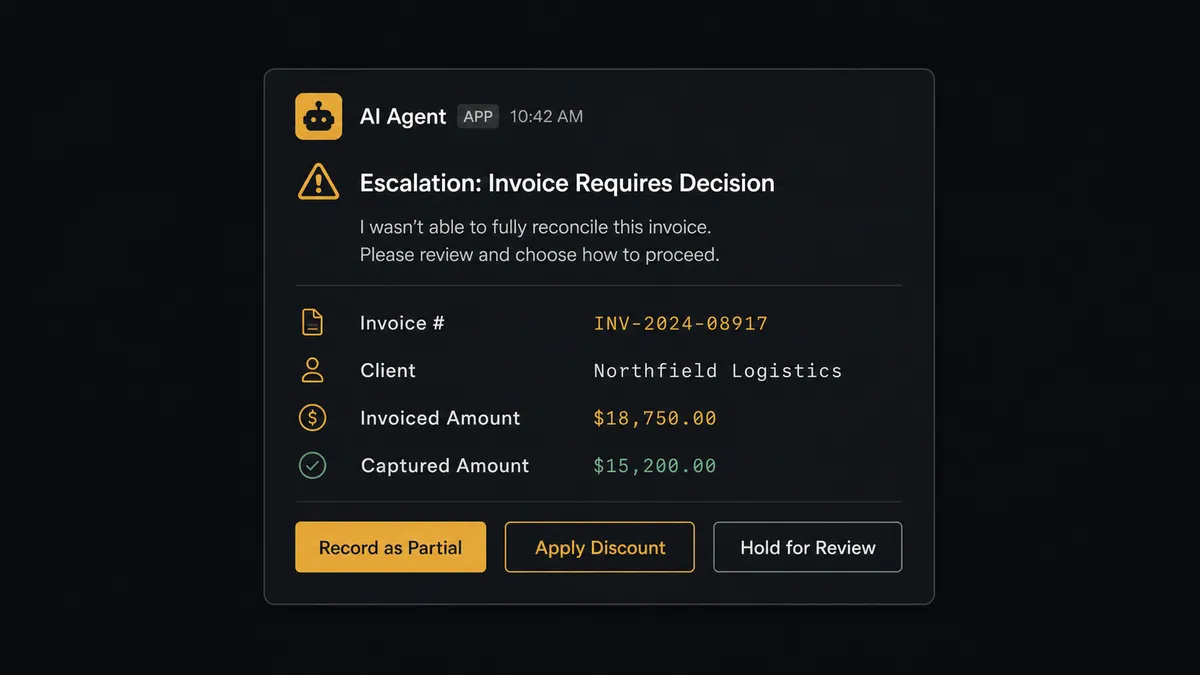
Say a PayPal capture comes in for $1,240, but the matching FreshBooks invoice is billed at $1,400. The agent does not apply a fixed tolerance rule and move on. It reads the discrepancy, checks whether a partial payment or a discount is already noted on the invoice, and decides this gap is not explained by anything in the record. It invokes its human-in-loop tool: a subflow that sends the billing manager a Slack message with the invoice number, the client name, the invoiced amount, the captured amount, and a direct question: “Invoice INV-2291 was billed at $1,400 but PayPal captured $1,240. Record as partial payment, apply a discount, or hold for review?”
The manager sees the same numbers the agent assembled. They choose “record as partial payment.” The agent calls Record Payment in FreshBooks with the $1,240 confirmed amount and a note referencing the manager’s decision. The invoice reflects a $160 balance instead of silently closing out as paid in full. The decision, the approver’s identity, and the timestamp are written to the audit trail.
The same pattern governs refunds and credit notes. Reversing a posted transaction is exactly where an agent should stop and ask rather than act. Before calling Refund Captured Payment or Create Credit Note, the agent packages the amount, the original invoice, and the stated reason, and waits for a controller’s approval.
This is not a sync tool. The agent knows when to stop and ask. That is the digital andon cord: it does not interrupt every transaction, only the ones where the cost of guessing wrong is too high.
FlowRunner vs the tool you are probably comparing
Most small businesses reaching for a PayPal-to-FreshBooks connection start with Zapier. Zapier is genuinely easy to set up, has a large library of pre-built templates for exactly this kind of “new payment, update invoice” flow, and it works well when the transaction always follows the same shape.
The differences that matter show up when a payment does not match, or when money needs to move back out.
| Feature | Zapier | FlowRunner |
|---|---|---|
| Human-in-loop before a refund or credit note | Not available natively; requires a manual branching workaround | Native tool the AI agent invokes on its own judgment |
| Agent reasoning about amount mismatches | Not available; Zaps run the same steps regardless of context | Agent compares captured amount to invoiced amount and decides whether to escalate |
| Audit trail with approver identity and timestamp | Not available | Built into every human-in-loop decision |
| Unlimited users on every plan | Per-user pricing on higher tiers | Unlimited users on every tier |
| Pricing model | Per-task execution pricing | Workflow-based tiers with clear execution limits |
The core difference is not a longer feature list. It is what happens when a payment lands $160 short of the invoice. Zapier records what it is told to record. FlowRunner’s agent notices the gap and asks before anyone’s books are wrong.
Before and after
| Category | Before | After |
|---|---|---|
| Invoice creation | A team member re-enters order details into FreshBooks by hand for each new bill | Each new order or approved estimate produces a FreshBooks invoice with the right client, items, and project |
| Payment matching | Billing manager checks the PayPal dashboard, then opens FreshBooks to record the payment manually | Agent matches the PayPal capture to the invoice with Find Invoices and records it with Record Payment automatically |
| Refunds and credit notes | Refund issued in PayPal with no corresponding credit note created in FreshBooks, so books and reality drift apart | Refund and credit note are created together in the same workflow run, with a controller’s approval on record |
| Financial reporting | Profit-and-loss and aging reports exported by hand when someone asks for them | Get Financial Report runs on a schedule and posts headline figures to the finance channel |
| Exception visibility | Mismatched or unmatched payments discovered during month-end close | Agent flags the mismatch the moment the capture lands and routes it for a same-day decision |
What you can build
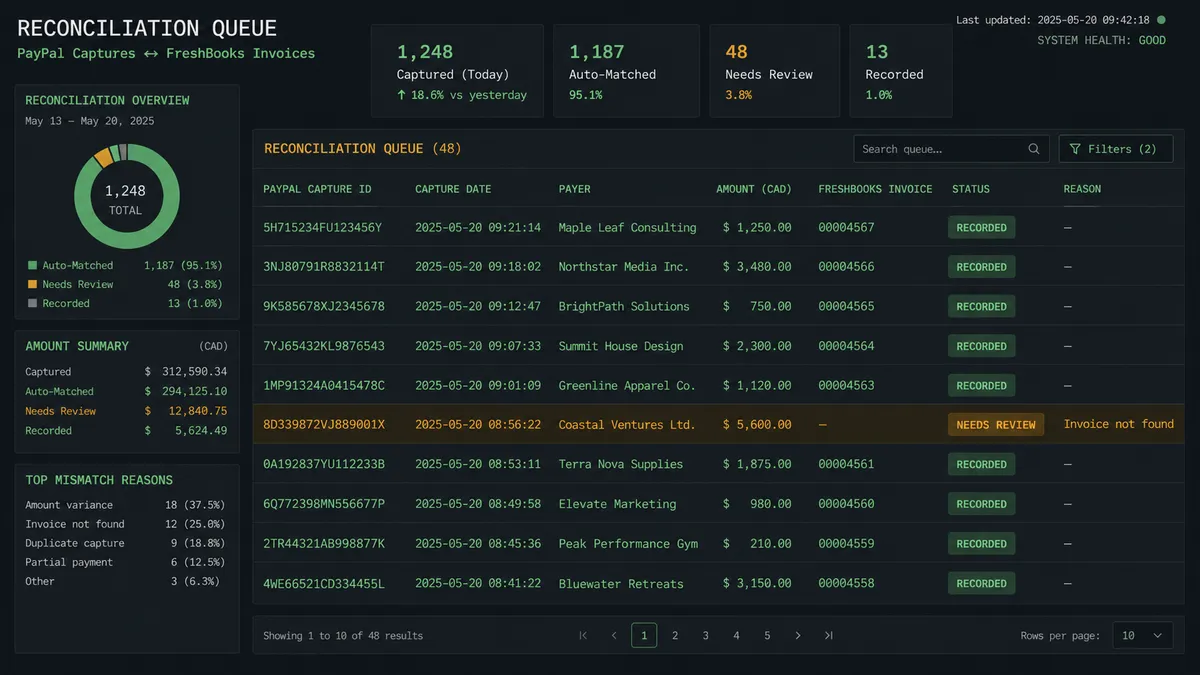
Order capture with invoice matching. A buyer approves a PayPal checkout order tied to a FreshBooks invoice. The agent captures the payment, matches it with Find Invoices, and records it with Record Payment, updating the invoice status without anyone opening either system.
New-client onboarding to first invoice. A new order comes in from a client FreshBooks has never seen. The agent calls Find Clients, creates the client with Create Client if none exists, builds the invoice with Create Invoice, and sends it with Send Invoice. When the client pays through PayPal, the reconciliation flow above closes the loop automatically.
Refund with a credit note gate. A customer requests a refund. The agent packages the invoice, the amount, and the reason, and pauses for the controller. On approval, it calls Refund Captured Payment in PayPal and Create Credit Note in FreshBooks in the same run, so the refund and the accounting adjustment never drift out of sync.
Recurring billing reconciliation. A FreshBooks recurring invoice generates on schedule and is sent to the client. When the client pays the linked PayPal invoice, the agent confirms the capture with Get Captured Payment and records it against the recurring invoice’s latest instance with Record Payment.
Scheduled financial reporting. On a monthly schedule, the agent calls Get Financial Report for profit-and-loss and aging, attaches the FreshBooks report link, and posts the headline figures to the finance channel, so no one has to remember to run the export.
Common questions
Is it free to connect PayPal and FreshBooks on FlowRunner? FlowRunner has a free plan with 100 executions a month, every integration included, and no credit card required, and new accounts get 14 days of Professional on top. Beyond the free plan, Growth starts at $45 per month, and every tier includes unlimited users and workflows.
Can I self-host the PayPal and FreshBooks integration? Yes. FlowRunner offers a self-hosted Community Edition at no cost and an Enterprise self-hosted tier for teams that need multi-instance clustering and a full compliance suite. The integration works the same way on both.
Does the AI agent need my own API keys for PayPal or FreshBooks? FlowRunner connects to PayPal and FreshBooks with your own OAuth2 credentials. For the AI agent’s reasoning layer, FlowRunner uses a bring-your-own-key model, so you connect whichever AI provider you already use.
What happens when the agent isn’t sure about a transaction? FlowRunner’s human-in-loop works as a callable tool the agent invokes on its own judgment. When a refund, credit note, or unmatched capture looks like it needs a second opinion, the agent pauses the workflow, packages the transaction detail, and routes it to the right person on Slack or by email. The workflow resumes the moment they respond.
Does FlowRunner support FreshBooks’ real-time trigger? Yes. FlowRunner listens for FreshBooks’ Record Created or Changed trigger and routes flows based on the record type, so an invoice change, a new client, or a logged expense can each start a different automation.
Can I use FlowRunner to record PayPal payments against existing FreshBooks invoices? Yes. The agent can capture a PayPal order, match it to the open FreshBooks invoice with Find Invoices, and call Record Payment with the amount, date, and PayPal capture ID as the reference. Reconciliation runs without anyone opening either system.
Getting started
FlowRunner has a free plan with 100 executions a month, every integration included, and no credit card required, and new accounts get 14 days of Professional on top. Any real email address works; disposable domains are not accepted.
Connect both integrations in your account: PayPal and FreshBooks. Build the trigger-action connection first, then add the AI agent and the human-in-loop subflow once payments are matching correctly. Most teams have a working reconciliation flow within an afternoon.
Start at flowrunner.ai or book a 30-minute walkthrough at calendly.com/flowrunner/intro to see the human-in-loop step in a live demo.
Frequently asked questions
Is it free to connect PayPal and FreshBooks on FlowRunner?
FlowRunner has a free plan with 100 executions a month, every integration included, and no credit card required, and new accounts get 14 days of Professional on top. Beyond the free plan, Growth starts at $45 per month, and every tier includes unlimited users and workflows.
Can I self-host the PayPal and FreshBooks integration?
Yes. FlowRunner offers a self-hosted Community Edition at no cost and an Enterprise self-hosted tier for teams that need multi-instance clustering and a full compliance suite. The integration works the same way on both.
Does the AI agent need my own API keys for PayPal or FreshBooks?
FlowRunner connects to PayPal and FreshBooks with your own OAuth2 credentials. For the AI agent's reasoning layer, FlowRunner uses a bring-your-own-key model, so you connect whichever AI provider you already use.
What happens when the agent isn't sure about a transaction?
FlowRunner's human-in-loop works as a callable tool the agent invokes on its own judgment. When a refund, credit note, or unmatched capture looks like it needs a second opinion, the agent pauses the workflow, packages the transaction detail, and routes it to the right person on Slack or by email. The workflow resumes the moment they respond.
Does FlowRunner support FreshBooks' real-time trigger?
Yes. FlowRunner listens for FreshBooks' Record Created or Changed trigger and routes flows based on the record type, so an invoice change, a new client, or a logged expense can each start a different automation.
Can I use FlowRunner to record PayPal payments against existing FreshBooks invoices?
Yes. The agent can capture a PayPal order, match it to the open FreshBooks invoice with Find Invoices, and call Record Payment with the amount, date, and PayPal capture ID as the reference. Reconciliation runs without anyone opening either system.