Connect Notion to Google Sheets: Every Row Becomes a Page
Connect Notion and Google Sheets so every tracked row becomes a reviewed Notion record, run as a plain sync or as an AI agent that pauses for a person before a page goes external.
How do you connect Notion to Google Sheets?
Connect Notion to Google Sheets by letting On New Row or On New or Updated Row in Google Sheets drive Find or Create Database Item and Append Block Children in Notion, so every tracked row becomes a structured Notion record without anyone copying data by hand. FlowRunner is a visual AI-agent orchestration platform where automations run autonomously and pause for human judgment on the steps that carry real consequence. The same connection can run as a plain sync, or as an AI agent that reads each row, decides whether it needs a person, and pauses for a human before a page goes to someone outside the team.
The problem it solves
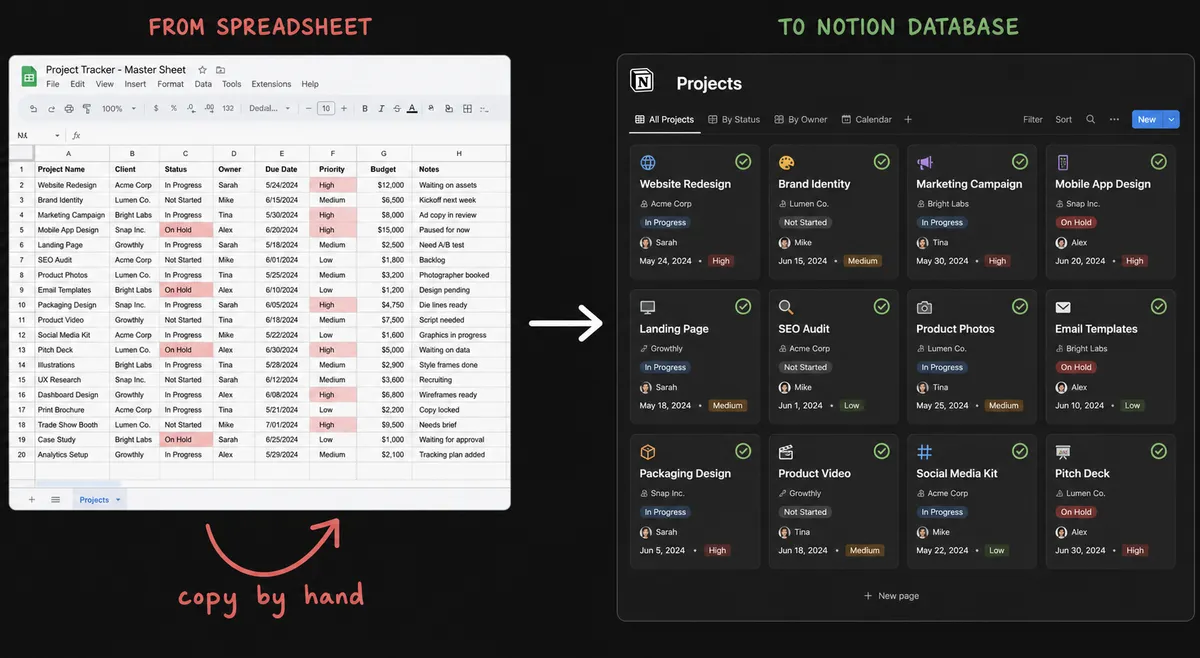
An ops lead or deal analyst usually keeps two systems that should agree and don’t. Intake requests, form responses, or due diligence findings land in a Google Sheet because that’s where the form dumps them or where the team has always tracked status. The actual documentation, the deal record, the project page, the knowledge base entry, lives in Notion because that’s where the rest of the company reads it. Someone has to bridge the two by hand: open the sheet, find the new rows, copy the fields into a new Notion page or database item, format it, and mark the row as done. On a busy week that copy step gets batched, delayed, or skipped.
The gap between the two systems is where things fall through the cracks. A row sits in the sheet with no Notion record because nobody got to it before the meeting. A duplicate page gets created because two people worked the same row. Escalation decisions get made in a Slack thread that nobody can search six weeks later. The spreadsheet becomes the de facto system of record even though it was only ever meant to be an intake log, and the team spends time reconciling two versions of the same information instead of getting time back for the work that actually needs a person.
How it works: the connection
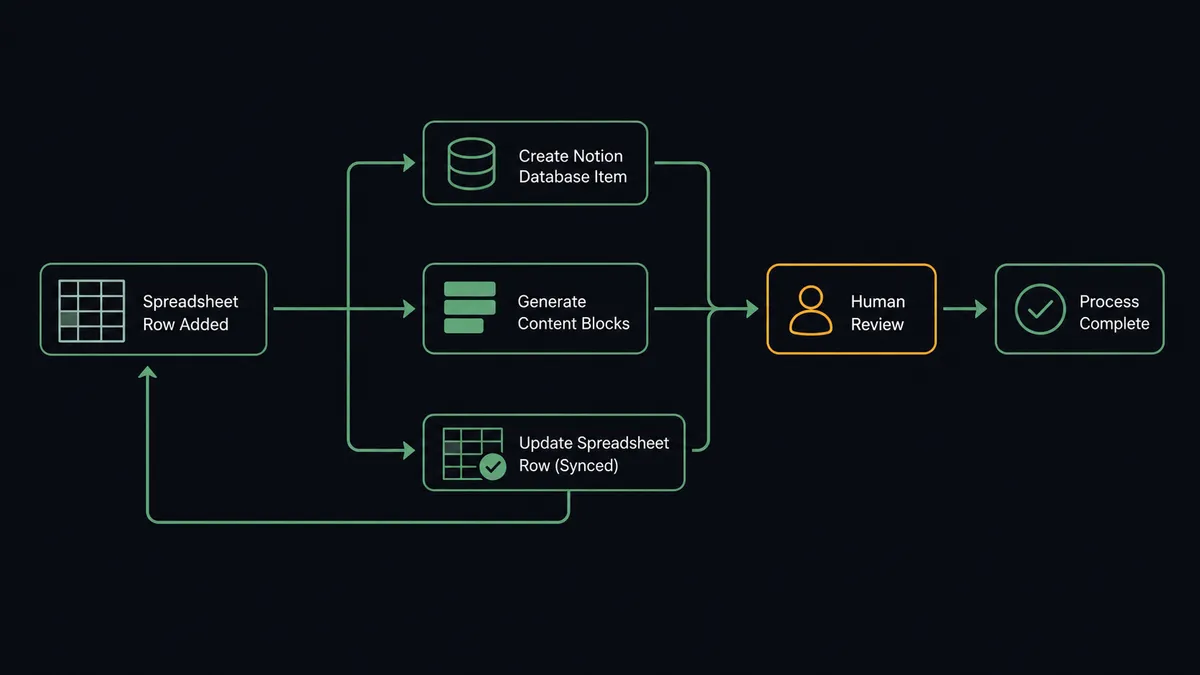
The flow starts when On New Row or On New or Updated Row fires in Google Sheets. On New Row suits an append-only log like form submissions; On New or Updated Row also catches edits to existing rows, which matters if people correct entries after the fact. Once the trigger fires, the agent uses Load Header Row and Get Rows to read the row’s values against the mapped header columns, so the flow can address “Deal Name” or “Risk Level” by name instead of by cell coordinate.
Before creating anything, the agent runs Find Database Item to check whether a matching record already exists in the Notion database, which prevents duplicate pages when a row gets edited more than once. If nothing matches, Find or Create Database Item creates a new Notion database item with the row’s fields set as page properties. Append Block Children then writes the row’s detail into the page body as formatted content blocks, a summary, a findings list, whatever the row contains beyond the property fields. Once the Notion side is written, Update Cell (or Update Row for multiple fields at once) writes a synced status and a link to the new Notion page back into the sheet, so anyone looking at the tracker can see exactly which rows have a documented record and click straight through to it.
Can an AI agent run it? (and why a human stays in the loop)
A plain sync stops at “row arrived, page created.” An agent goes further: it reads the row, reasons about whether the data is usable, and calls Notion and Google Sheets actions as tools in whatever order the situation calls for, not a fixed script. Two moments in this connection are where that judgment actually shows up.
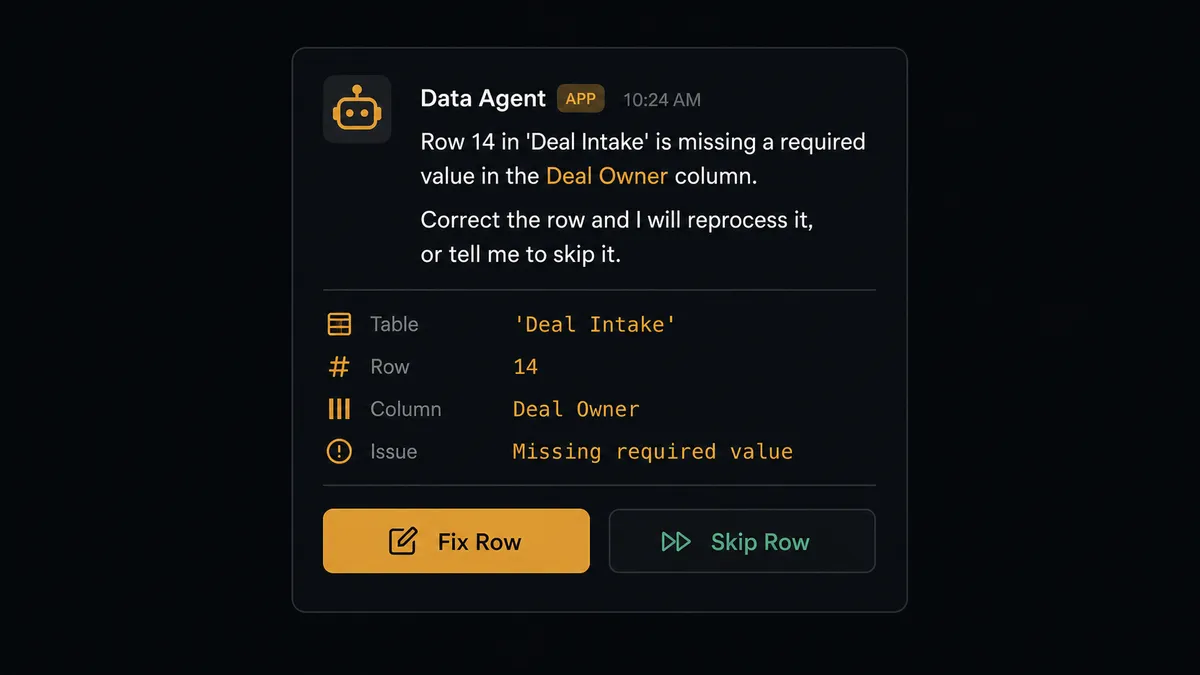
The first is bad data. If a row is missing a required field, the agent doesn’t push it into Notion anyway and let the gap surface later as a broken record. It holds the row, marks it in the sheet, and routes it to the data owner in Slack with a specific message: “Row 14 in ‘Deal Intake’ is missing a required value in the Deal Owner column. Correct the row and I will reprocess it, or tell me to skip it.” The owner fixes the cell or tells the agent to move on, and the agent reprocesses only what was approved. Clean rows keep flowing automatically; the malformed ones get a person before they ever touch Notion.
The second is external exposure. Some Notion pages the agent creates are meant to stay internal working documents; others end up shared with a client or a stakeholder outside the team. When a generated page falls into that second category, the agent doesn’t publish and move on. It adds a comment to the page itself, “This page was auto-generated by FlowRunner from the deal data. Please review before sharing externally. Outstanding items: [list],” and sends a Slack notification to the page owner. The owner reviews, edits if needed, and shares it themselves. The agent’s output is a draft, not an unsanctioned final version of something a client is about to read.
This is not a sync tool that fires and forgets. It’s closer to a digital andon cord: the agent keeps working the queue on its own until it hits a row or a page where a wrong move has real consequences, and at that exact point it stops and asks.
FlowRunner vs Zapier
Zapier is the tool most non-technical teams already reach for when they want to connect Google Sheets and Notion, and it earns that habit honestly: its Notion and Sheets triggers are mature, well-documented, and quick to wire up for a straightforward row-to-page sync. For a one-way copy job with no judgment involved, Zapier does the job it was built to do.
Where the two diverge is what happens when a row is wrong, or a page shouldn’t go out yet. Zapier runs the same steps every time regardless of what the data looks like; getting a validation check and an escalation to a person requires bolting on extra apps or Paths logic. FlowRunner’s agent evaluates the row and the situation as part of one native decision, not a separate integration.
| Capability | FlowRunner | Zapier |
|---|---|---|
| Human-in-loop on bad data or sensitive pages | Native: the agent decides when to pause and routes to Slack, email, or WhatsApp with context | Not built in; requires manual Paths logic and a separate approval app |
| AI model access | BYOK: connect the provider and model you already use | Requires Zapier’s AI credits or a connected AI app subscription |
| Pricing model | Transparent workflow-based tiers with a stated execution ceiling | Per-task pricing that scales with every step in every run |
| Users included | Unlimited users and workflows on every tier | Paid seats beyond the entry plan |
| Self-hosting | Free Community Edition, custom Enterprise for on-prem clustering | Cloud-only |
What did this look like before and after?
| What changed | Before | After |
|---|---|---|
| New rows | A new row sits in the sheet until a person notices it and manually starts documenting it | On New or Updated Row triggers Notion record creation the moment the row lands |
| Record creation | Someone copies each row into Notion by hand, usually batched at the end of the day | Find or Create Database Item builds the Notion record as the row arrives, with no duplicates |
| Escalation history | Decisions made in a Slack thread leave no searchable, organized record | Every human decision is logged back to Notion as a comment tied to the record it concerns |
| Sheet status | The sheet shows whether a row exists, not whether it has a documented Notion record | Update Cell writes the Notion page link and a synced status back to the row automatically |
| Bad data | Rows missing a field get copied into Notion anyway, creating an incomplete record | Rows missing a required field are held and routed to the owner before anything is created in Notion |
What you can build
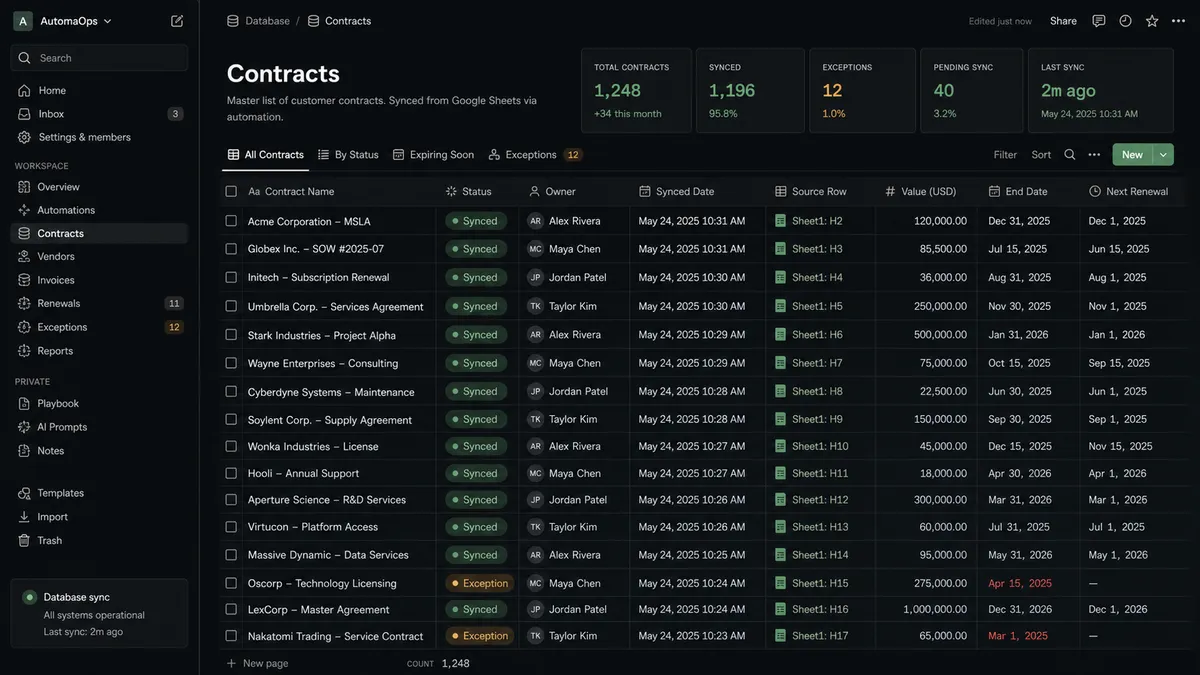
Intake tracker to documented record. A new row in an intake sheet, whether from a form or manual entry, becomes a fully documented Notion database item with formatted content blocks, no separate write-up step.
Due diligence findings database. As findings land in a tracking sheet row by row, the agent builds the corresponding Notion database item in real time, so the deal team has a current database instead of a static spreadsheet that’s out of date by the next standup.
Review-gated external pages. Pages the agent generates from sheet data that are meant for a client or stakeholder get a review comment and a Slack ping before anyone outside the team sees them.
Clean-data enforcement. Rows missing a required column never make it into Notion silently; the agent holds them, flags the sheet, and only pushes what a person has approved or corrected.
Searchable decision log. Every human-in-loop resolution from the validation workflow gets written back as a Notion comment or database item, giving the team an audit trail in the tool they already read every day.
Common questions
Is it free to connect Notion and Google Sheets on FlowRunner? FlowRunner has a free plan with 100 executions a month, every integration included, and no credit card required, and new accounts get 14 days of Professional on top. Beyond the free plan, Growth is $45 a month for 12,000 executions with unlimited users and workflows.
Can I self-host the Notion and Google Sheets connection? Yes. FlowRunner offers a free self-hosted Community Edition for single-instance use, and a custom-priced self-hosted Enterprise tier with multi-instance clustering and the full compliance suite for teams that need audit trails, RBAC, and SSO on their own infrastructure.
Does the agent need my own OpenAI key? FlowRunner runs on a bring-your-own-key model for AI providers, so you connect the model you already use rather than paying a markup on tokens routed through FlowRunner.
What happens when the agent isn’t sure? The agent pauses the flow and invokes a human-in-loop step as a tool, sending the person the exact row or page in question along with what it found and what it needs, then resumes once a person responds.
Do I need a Notion database and a Google Sheet already set up? You need at least a sheet with a header row and a Notion database or page to write into. FlowRunner can also create the Notion database from a template as part of setup if you are starting from scratch.
Should I use On New Row or On New or Updated Row as the trigger? Use On New Row if the sheet is an append-only log, like form submissions. Use On New or Updated Row if people edit existing rows and you need Notion to reflect those edits, not just new entries.
Getting started
Connecting Notion and Google Sheets takes a trigger, a header mapping, and two actions to wire up. FlowRunner has a free plan with 100 executions a month, every integration included, and no credit card required, and new accounts get 14 days of Professional on top.
See the full action list for each side on the Notion integration page and the Google Sheets integration page. Start building at flowrunner.ai, or book time to walk through your specific workflow at calendly.com/flowrunner/intro.
Frequently asked questions
Is it free to connect Notion and Google Sheets on FlowRunner?
FlowRunner has a free plan with 100 executions a month, every integration included, and no credit card required, and new accounts get 14 days of Professional on top. Beyond the free plan, Growth is $45 a month for 12,000 executions with unlimited users and workflows.
Can I self-host the Notion and Google Sheets connection?
Yes. FlowRunner offers a free self-hosted Community Edition for single-instance use, and a custom-priced self-hosted Enterprise tier with multi-instance clustering and the full compliance suite for teams that need audit trails, RBAC, and SSO on their own infrastructure.
Does the agent need my own OpenAI key?
FlowRunner runs on a bring-your-own-key model for AI providers, so you connect the model you already use rather than paying a markup on tokens routed through FlowRunner.
What happens when the agent isn't sure?
The agent pauses the flow and invokes a human-in-loop step as a tool, sending the person the exact row or page in question along with what it found and what it needs, then resumes once a person responds.
Do I need a Notion database and a Google Sheet already set up?
You need at least a sheet with a header row and a Notion database or page to write into. FlowRunner can also create the Notion database from a template as part of setup if you are starting from scratch.
Should I use On New Row or On New or Updated Row as the trigger?
Use On New Row if the sheet is an append-only log, like form submissions. Use On New or Updated Row if people edit existing rows and you need Notion to reflect those edits, not just new entries.