Airtable Notion Integration: Exceptions Logged, Decisions Kept
Connect Airtable and Notion in FlowRunner so exception records flagged in Airtable become a searchable decision log in Notion automatically, with a human confirming the call before it's written down.
How do you connect Airtable to Notion?
In FlowRunner, Airtable’s On New or Updated Record trigger fires when an exception record is flagged or its status changes, and Notion’s Create Database Item action writes that record into a Decision Log database, with Append Block Children adding the full context as formatted blocks. FlowRunner is a visual AI-agent orchestration platform where automations run autonomously and pause for human judgment on the steps that carry real consequence. That same connection runs as an AI agent that checks for precedent on its own and only pauses for a person when an exception has none.
The problem it solves
Exception tracking today usually lives in two disconnected places. The operational record sits in a spreadsheet or an Airtable base: a duplicate invoice here, a price mismatch there, a missing PO somewhere in the pile. The AP manager hunts through email threads and Slack messages to figure out what’s outstanding, and half the context that led to a decision never gets written down anywhere searchable. By the time someone asks “why did we approve that vendor’s invoice last month,” the answer lives in someone’s memory or an inbox nobody can search.
Even when a team is disciplined about logging exceptions in Airtable, the decision itself, what was found, what was considered, who approved it, and why, rarely makes it into a permanent record. Escalation decisions made over Slack leave no organized trail once the thread scrolls past. A new hire trying to understand why a vendor was flagged twice has no single place to look. The exceptions fall through the cracks, and so does the reasoning behind resolving them.
How it works: the connection
The connection listens to Airtable and writes to Notion. Here is the plain version, grounded in the real connector actions.
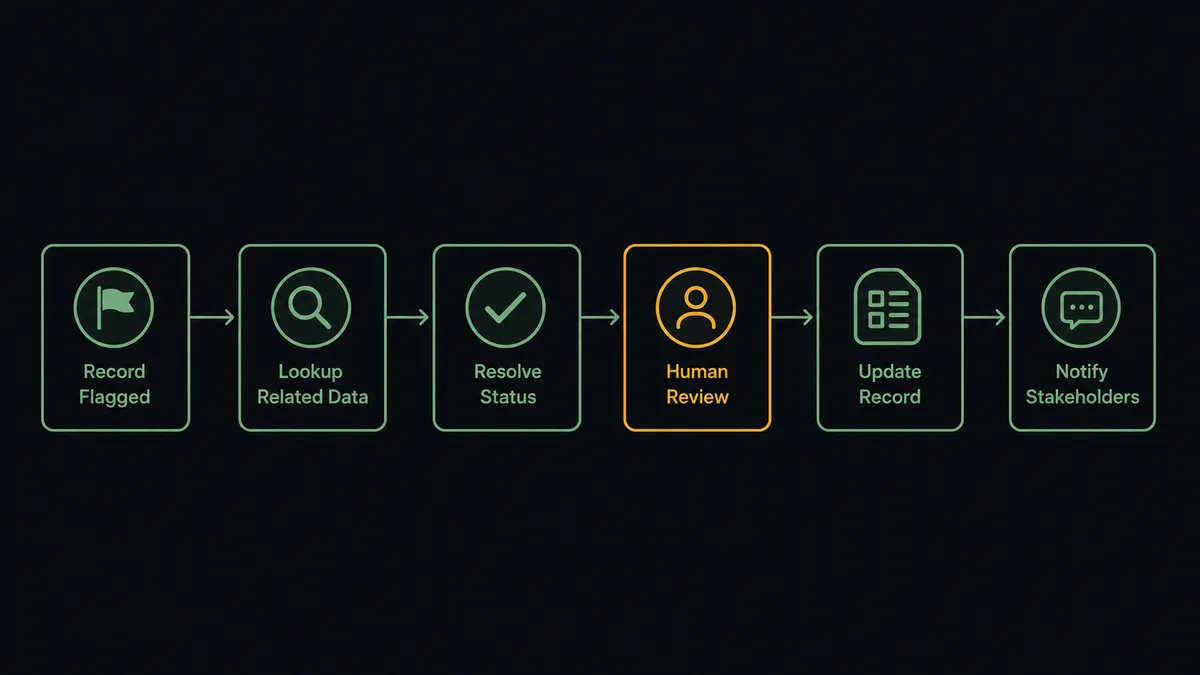
- Trigger: Airtable fires On New or Updated Record when a row is added to the Exceptions table, or when a field on an existing row changes.
- Look up: The workflow calls Find Many Records in Airtable to pull any prior exceptions matching the same vendor or issue type.
- Resolve: When the record’s status changes to Resolved, the trigger fires again and the workflow reads the resolution.
- Log: It calls Create Database Item in Notion’s Decision Log database with the issue type, the source record, and the resolution as structured properties.
- Document: It calls Append Block Children to write the full context, what was found, what was considered, and what was decided, into the page as formatted content blocks.
- Record ownership: It calls Create Comment on the Notion item to note who made the call and when.
That is the “just connect them” answer. Exceptions flagged in Airtable become a permanent, searchable decision record in Notion, and nothing that gets resolved has to be reconstructed from memory later.
Can an AI agent run it? (and why a human stays in the loop)
Yes, and the agent’s first job isn’t to log the exception. It’s to decide whether the exception needs a person at all. When a new record lands in the Exceptions table, the agent calls Find Many Records to check whether this vendor or issue type has come up before with a clear resolution pattern. If it has, the agent can apply the same resolution and move straight to logging it in Notion. Find Many Records, Create Database Item, Append Block Children, Create Comment: these are the agent’s tools, and it chooses which ones to use based on what it finds.
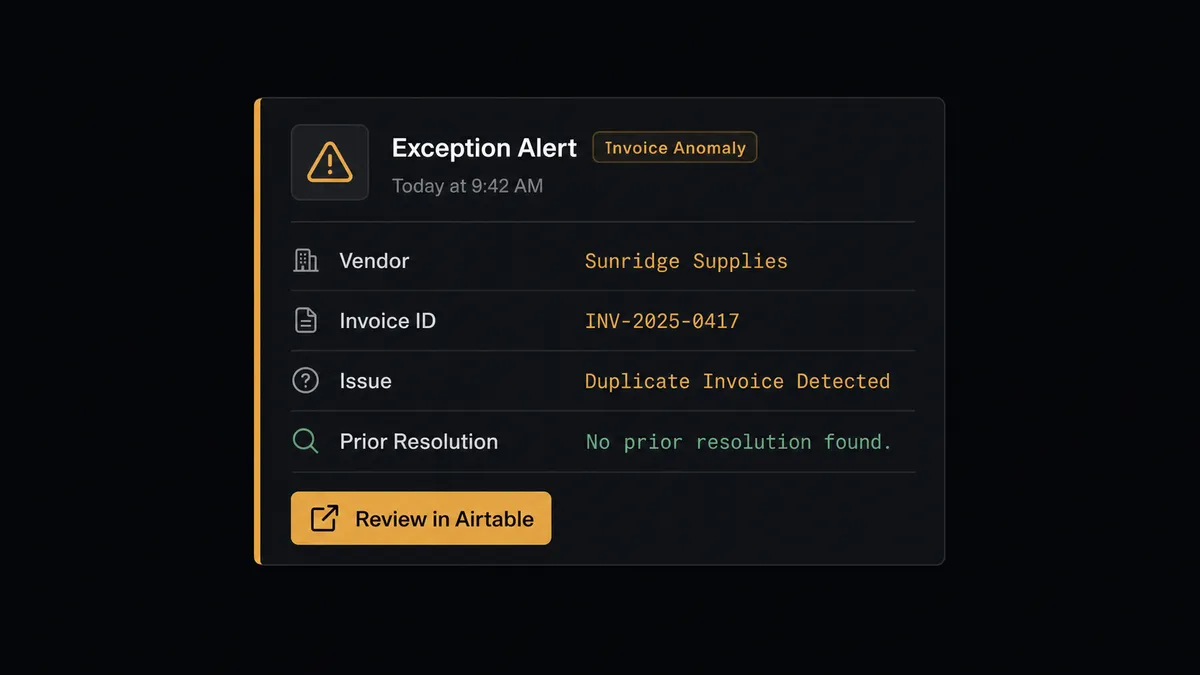
The consequential step is a decision with no precedent: a vendor the team has never flagged before, a price mismatch with no matching prior case, a duplicate invoice the agent can’t confidently rule on. Before resolving one of those on its own, the agent invokes a human-in-loop flow it holds as a callable tool. It posts to the responsible manager over Slack: “New exception flagged in your queue: [Issue Type] for [Vendor/Invoice]. No prior resolution found. Review and mark resolved here: [link to Airtable record].” The manager reviews the record, resolves it, and marks it Resolved in Airtable. That status change fires the trigger again, the agent reads the resolution, and only then does it write the decision into Notion’s Decision Log with the manager’s name and the timestamp attached.
Prospects call this pattern a digital andon cord: like Toyota’s quality control pull cord, the workflow stops the line the moment it hits a case it can’t confidently rule on, and your team pulls it back into motion. This is not a sync tool. The agent knows when to stop and ask, and it only writes a decision into the permanent record once a person has actually made one.
FlowRunner vs Zapier
Most teams connecting Airtable to Notion look at Zapier first, and fairly so. Zapier’s support for both apps is mature, its templates cover common “new row creates a page” patterns, and a simple sync between the two is quick to set up without help from IT. For straightforward record-to-page logging, it works.
The difference shows up at the decision itself. FlowRunner is built around native human-in-the-loop and AI-agent orchestration, where the agent decides whether an exception needs a person to weigh in rather than logging every record the same way every time.
| What matters for this pair | FlowRunner | Zapier |
|---|---|---|
| Human-in-the-loop before a decision gets logged | Native. The agent invokes an approval flow as a callable tool and waits for the manager’s call before writing to Notion | Available via manually inserted approval steps, not a native agent decision |
| Who decides which exceptions need a person | An AI agent checks for precedent and reasons about each case | A fixed rule you configure once and apply to every record the same way |
| Users included | Unlimited users on every tier | Priced by task volume; seats vary by plan |
| Bring your own AI keys | Yes, BYOK. Connect the AI provider key you already have | AI features tied to Zapier’s own AI offering |
| Self-hosted option | Yes, cloud-hosted or self-hosted, including a free Community Edition | Cloud only |
| Pricing model | Transparent workflow-based tiers with clear execution limits | Per-task pricing that gets harder to predict as exception volume grows |
If all you need is Airtable rows landing as Notion pages, Zapier will do it. If exceptions need someone’s judgment before they’re logged as resolved, and you want that decision captured with an owner’s name and a timestamp, that is where FlowRunner is the better fit.
Before and after
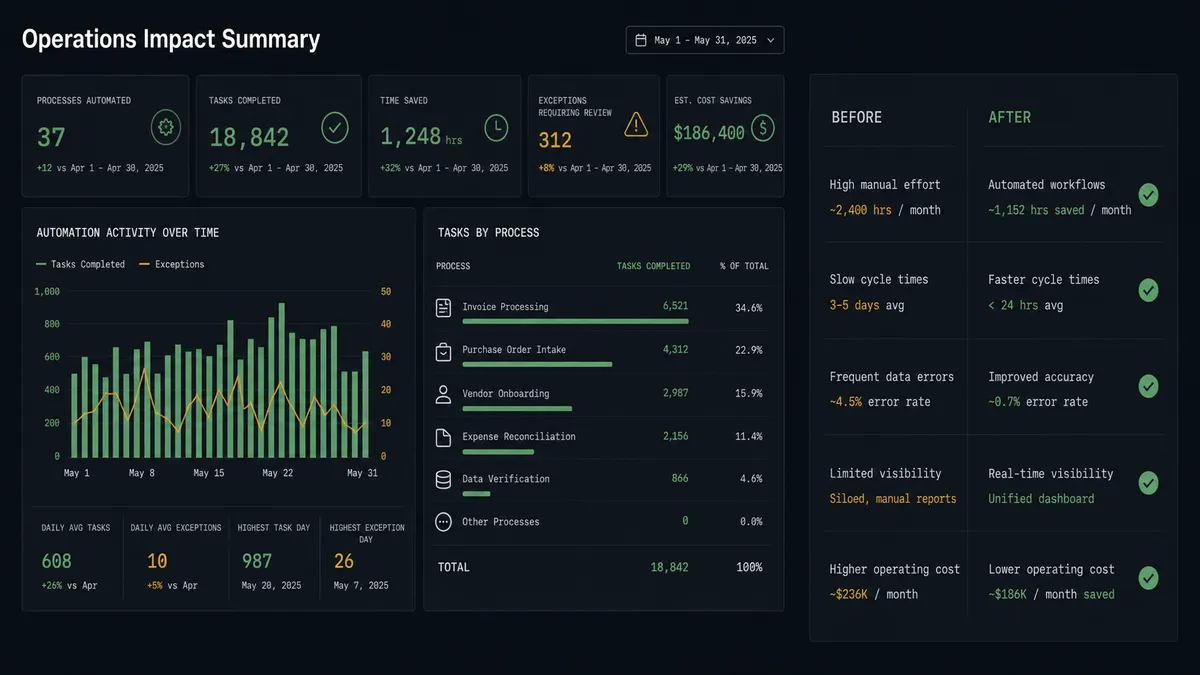
| Category | Before | After |
|---|---|---|
| Exception visibility | Exceptions logged in email threads or missed entirely | Every issue tracked with full context in Airtable’s Exceptions table |
| Finding what’s outstanding | AP manager hunts through inboxes to find open issues | A structured queue in Airtable shows exactly what needs a decision |
| Decision record | Escalation decisions made over Slack leave no searchable, organized record | Every decision lands in Notion’s Decision Log with what was found, what was decided, and when |
| Resolution speed | Corrections happen days after exceptions are first found | Logged the moment the Airtable record is marked resolved |
| Repeat cases | Each new exception is reviewed from scratch, precedent or not | Agent checks prior exceptions first and only escalates cases with no clear precedent |
What you can build
Exception queue to decision log. On New or Updated Record fires when an exception is flagged in Airtable. The agent checks for precedent with Find Many Records, escalates cases with none, and logs every resolution as a Create Database Item entry in Notion’s Decision Log once a manager marks it Resolved.
Repeat-vendor fast path. When a flagged vendor already has a clean resolution history in Airtable, the agent applies the same call without escalating, and still writes the outcome to Notion so the pattern is visible to anyone reviewing vendor history later.
Project kickoff documentation. On New Record fires when a new project row is created in Airtable. The agent calls Create Page in Notion to stand up the project’s documentation page, then Append Block Children to add the initial scope and team notes pulled from the record.
Audit-ready comment trail. Every time the agent logs a resolved exception in Notion, it calls Create Comment on the database item naming the manager who resolved it, so a compliance reviewer can search Notion directly instead of requesting the FlowRunner audit trail.
Content calendar cross-reference. When a marketing record in Airtable moves to Ready for Publishing, the agent creates a corresponding Notion database item logging the publish decision and timestamp, giving the team one searchable record of what went out and when, alongside the exception log.
Common questions
Is it free to connect Airtable and Notion on FlowRunner? You can build and run the connection on FlowRunner’s free plan, which includes 100 executions a month and every integration with no credit card required, and new accounts also get 14 days of Professional. Both connectors are available on every FlowRunner tier, and every tier includes unlimited users and unlimited workflows.
Can I self-host the Airtable to Notion workflow? Yes. FlowRunner offers a cloud-hosted option and a self-hosted option, including a free Community Edition, so the connection can run inside your own environment.
Does the AI agent need my own OpenAI or Claude key? FlowRunner uses a bring-your-own-keys model, so you connect the AI provider key you already have. You are not locked to one model.
What happens when the agent isn’t sure how to resolve an exception? The agent stops and invokes a human-in-loop flow. It posts the issue type, the source record, and its recommended action to the responsible person over Slack, then waits for a decision before it writes anything to Notion. The decision, the decider’s identity, and the timestamp are captured in the audit trail.
Which Airtable events can trigger a Notion action? Airtable offers two triggers: On New Record and On New or Updated Record. On New Record starts a workflow the moment a row is added; On New or Updated Record also fires when a status field changes, which is what drives the resolution step in this connection.
Does every exception need a human to look at it? No. The agent checks Airtable for prior matching exceptions first and resolves clear repeat cases on its own. It escalates only when there’s no clean precedent, such as a first-time vendor mismatch or a duplicate it can’t confidently rule on.
Getting started
Start on the free plan: 100 executions a month, every integration included, no credit card required, plus 14 days of Professional for new accounts. Both connectors are available on every tier, and every tier includes unlimited users and unlimited workflows.
Explore the integration details:
- Airtable integration (2 triggers and 17 actions covering full record CRUD, comments, and base schemas)
- Notion integration (23 actions covering pages, databases, blocks, comments, and users)
Start building free at flowrunner.ai or book a demo to see a live Airtable to Notion workflow, decision log and all.
Frequently asked questions
Is it free to connect Airtable and Notion on FlowRunner?
You can build and run the connection on FlowRunner's free plan, which includes 100 executions a month and every integration with no credit card required, and new accounts also get 14 days of Professional. Both connectors are available on every FlowRunner tier, and every tier includes unlimited users and unlimited workflows.
Can I self-host the Airtable to Notion workflow?
Yes. FlowRunner offers a cloud-hosted option and a self-hosted option, including a free Community Edition, so the connection can run inside your own environment.
Does the AI agent need my own OpenAI or Claude key?
FlowRunner uses a bring-your-own-keys model, so you connect the AI provider key you already have. You are not locked to one model.
What happens when the agent isn't sure how to resolve an exception?
The agent stops and invokes a human-in-loop flow. It posts the issue type, the source record, and its recommended action to the responsible person over Slack, then waits for a decision before it writes anything to Notion. The decision, the decider's identity, and the timestamp are captured in the audit trail.
Which Airtable events can trigger a Notion action?
Airtable offers two triggers: On New Record and On New or Updated Record. On New Record starts a workflow the moment a row is added; On New or Updated Record also fires when a status field changes, which is what drives the resolution step in this connection.
Does every exception need a human to look at it?
No. The agent checks Airtable for prior matching exceptions first and resolves clear repeat cases on its own. It escalates only when there's no clean precedent, such as a first-time vendor mismatch or a duplicate it can't confidently rule on.